
Why Certificate Expiry Outages Keep Happening (to Everyone)
Somewhere this morning a competent IT team is having a bad day. The website that worked at midnight now greets every visitor with a full-screen security warning. The mobile app cannot reach its own backend. Nothing was hacked, nothing crashed, and nobody changed anything. A certificate expired, on the exact schedule that was written inside it the day it was made.
Certificate expiry is the most preventable outage in IT. It happens to the one-person shop, the mid-size company with a real IT department, and the household-name service with a whole reliability team. That should strike you as odd. This is a failure whose date is known to the second, far in advance. If a hard drive announced the precise moment it would die, no admin would let it take production down. Expired certificates take production down constantly. I have had one of my own, and I would like to say it was early in my career. It was not.
This guide explains why. You will learn what a certificate actually is, in plain language with no math. You will learn why expiry is a hard, absolute failure rather than a gentle degradation. You will see how the classic expiry outage unfolds, step by step, and why the problem is getting harder rather than easier. By the end you will understand the three-part discipline — inventory, monitoring, automation — that the rest of this topic's guides build out. You will understand why teams that practice it treat expiry as a non-event.
In this guide
- A certificate is an ID card with an expiry date
- Why expiry is a hard failure, not a soft one
- The anatomy of the classic expiry outage
- Why it happens to giants too
- Validity periods keep getting shorter
- The discipline: inventory, monitoring, automation
- Where to go next
A certificate is an ID card with an expiry date
Strip away the acronyms and a TLS certificate is an identity document for a machine. TLS is Transport Layer Security, the protocol behind the padlock icon and the https:// at the front of a web address. Like a passport, the certificate states a name — mail.example.com, say. It carries an issue date and an expiry date. It is stamped by an authority whose whole job is to vouch for it. When your browser connects to a website, the server presents this document and says: this is who I am, and here is proof.
The proof rests on a pair of cryptographic keys. The certificate contains a public key, which anyone may see. The server holds the matching private key, which must stay secret. The two are mathematically linked: what one locks, only the other unlocks. During the connection, the server demonstrates that it holds the private key matching the certificate it just showed. That is what stops an impostor from simply copying the public document — the document is useless without its secret half. It also explains why "just reinstall the certificate" is not always trivial during an emergency. The certificate file and the private key file travel as a pair. Losing track of the key half causes real pain.
The stamp comes from a certificate authority, or CA. Its business is verifying that whoever requests a certificate for a name genuinely controls that name. It then signs the certificate to say so. Your operating system and your browser ship with a short built-in list of authorities they trust, called the trust store. And here is the elegant part: authorities vouch through a chain. A root certificate sits in your trust store. The root signs an intermediate certificate. The intermediate signs the leaf certificate your server actually presents. It works exactly like a passport at a border. The officer has never met you, but the officer trusts the passport office, and the passport office vouched for you. Every link in that chain carries its own expiry date. (Yes, the intermediate too. Especially the intermediate.)
Why expiry is a hard failure, not a soft one
Most things in IT fail gradually and negotiably. A disk at ninety percent full keeps working. Latency creeps up before users notice. You get a slope, and a slope gives you time. Certificate expiry gives you nothing, because the validity dates are part of the signed data inside the certificate itself. They cannot be edited, extended, or argued with. Change a single character of the document and the CA's signature no longer matches, which makes it invalid for a different reason. There is no mechanism anywhere in the system for asking for one more week.
The software doing the checking is deliberately strict about this. When a client validates a certificate, comparing the current time against the validity window is one of the checks it is required to perform. An expired certificate is treated the same as no certificate at all. That is a security feature, not pedantry. Expiry limits how long a stolen private key stays useful, and it forces the vouching to be re-verified on a schedule. An ID card that never expired would be a much weaker ID card.
The result is a cliff. One minute before midnight the service works for everyone; one minute after, it works for no one. Browsers throw a full-screen warning that users have been rightly trained not to click through. Machine-to-machine connections fail more quietly and more confusingly. API calls error out, scheduled jobs stop, and mobile apps show a vague "cannot connect." The error messages rarely say the word "certificate" anywhere near loudly enough. There is no degraded mode, no partial service, no grace period. The refusal is the security system working exactly as designed, which is why no amount of restarting the server fixes it. The certificate did precisely what it said it would, on the day it said it would, and it is not sorry.
The blast radius is usually wider than one doorway, too. A certificate rarely protects a single thing. The same certificate, or copies of it, often sits in front of the www site. It often also sits in front of the API the mobile app talks to and the webhook endpoints your partners call. A wildcard certificate — one issued to cover every name under a domain — fails everywhere at once when it expires. Users, apps, partners, and internal jobs all hit the wall in the same minute. That turns one missed renewal into several simultaneous incidents that look completely unrelated for the first confusing half hour.
At Northgate Retail the wildcard certificate lived on the load balancer. The load balancer sat in front of the web shop, the staff mail portal, and the API the delivery app talked to. The certificate expired at one minute past midnight on a Saturday. The web shop showed a warning, and the mail portal showed a warning. The delivery app showed nothing at all, which the drivers reported as "the app is being weird". For the first forty minutes three people were working three separate incidents. The on-call engineer found the cause by opening the shop on her phone and reading the error. The review recorded this as "effective use of available tooling".
One sharp edge deserves a special mention: the validity check compares the certificate's dates against the client's clock. A machine whose clock has drifted badly will reject certificates that are perfectly valid, or quietly accept ones that are not. If you ever see certificate errors on exactly one machine while every other client is happy, check its time before anything else. Accurate time across your fleet, kept honest by NTP (the Network Time Protocol), is quietly part of certificate hygiene. The guide on monitoring NTP covers how to keep those clocks trustworthy.
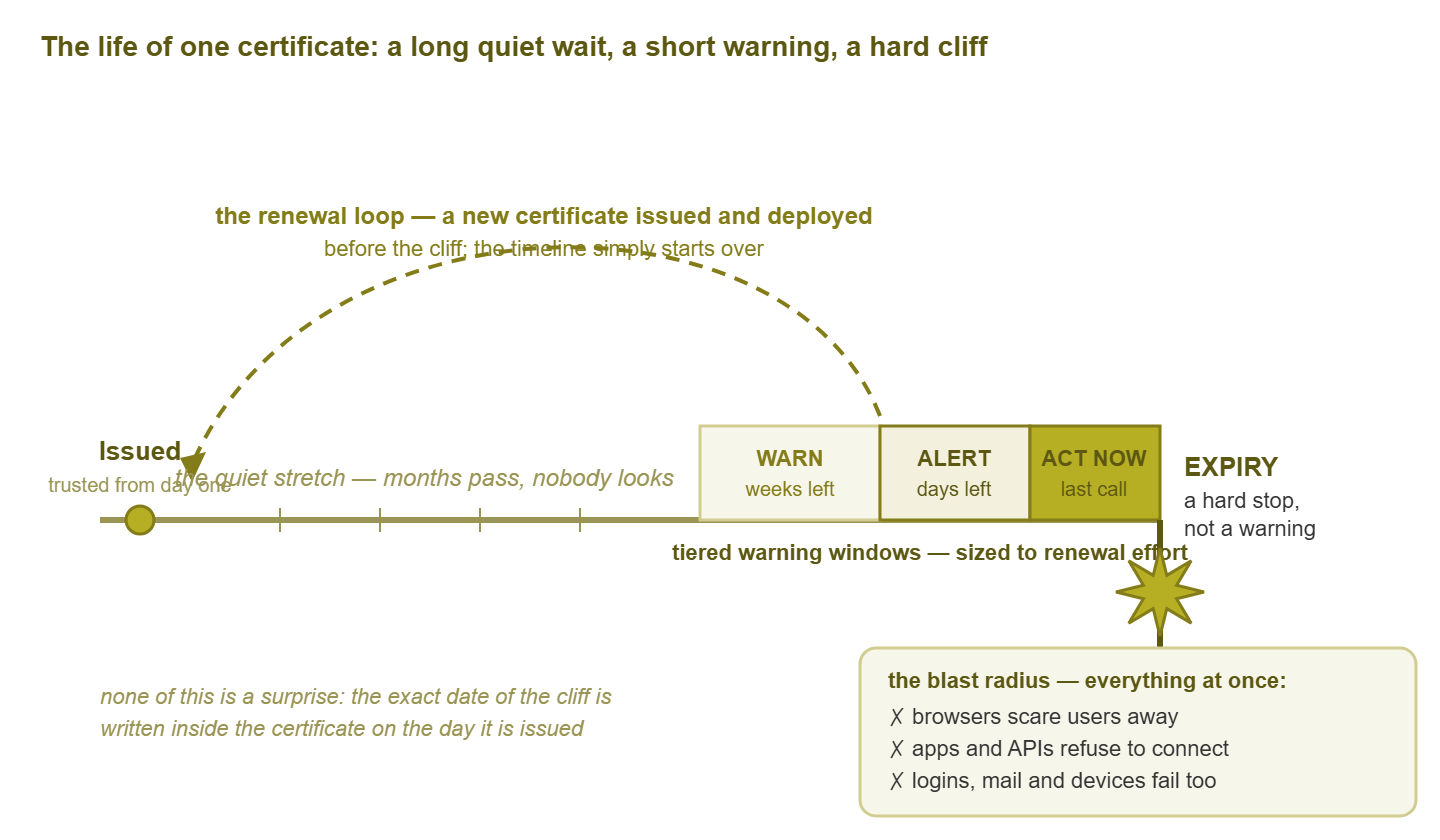
Figure 1: A certificate's whole life on one line. Everything about the cliff is knowable on day one. The renewal loop, run inside the warning windows, is what makes expiry a non-event.
The anatomy of the classic expiry outage
Ask admins who have lived through one, and the same story comes back with only the names changed. Walk through it slowly, because every step is ordinary, and that is exactly what makes the failure so reliable.
- 1. The certificate is bought. An admin — call her Maria — stands up the customer portal. She creates an account at a certificate vendor using her own work email, buys the certificate, installs it, tests it. Everything works. Total attention required: one afternoon.
- 2. It becomes invisible. A working certificate produces no tickets, no alerts, and no reasons to think about it. The vendor account, its password, and the renewal date now live in exactly one place: Maria's mailbox and Maria's memory.
- 3. Maria leaves. The handover covers servers, projects, and the passwords people remembered to ask about. Nobody asks about certificates, because nothing is wrong with them. Her mailbox is disabled a few weeks later, per standard policy.
- 4. The reminders fire perfectly — into the void. The vendor does its job and sends renewal reminders on a sensible schedule before expiry. Every one of them is delivered to a mailbox that no longer exists. No bounce message ever reaches a human.
- 5. Expiry lands at the worst time. In truth it lands whenever it lands; it merely feels like it is always a weekend or the first day of a holiday. The certificate expires silently, at midnight, in whatever time zone the CA stamped on it.
- 6. Monitoring stays green. Ping answers. The web server process is running. The port is open, CPU is low, disk is fine. Every dashboard shows green, because the server is perfectly healthy. It is the trust that died, and nobody was watching the trust.
- 7. Customers find it first. The first real signal is the support queue: screenshots of scary browser warnings, "is your site safe??", posts on social media. The team learns about the outage from the very people the certificate existed to protect.
- 8. The scramble. Who owns the vendor account? The password reset goes to the dead mailbox. Where is the private key? Which of the two load balancers actually serves this? What would have been a fifteen-minute routine task in the right week becomes hours of archaeology under pressure.
Notice what is missing from that story: negligence. Nobody was lazy, and nobody made a bad decision by the standards of their week. The renewal "process" was simply a chain built from the two most fragile materials in IT — a personal mailbox and human memory. It quietly rusted for a long time before the day it was needed. The most damning part is the usual postmortem action item, "set a calendar reminder." That rebuilds the same chain out of the same materials and hands it to the next person who will eventually leave.
Tip: pause and try to name, from memory, every certificate your organization presents to the world and to itself. Most people confidently name two or three. The gap between the certificates you can name and the certificates you actually have is precisely where the next one of these stories is waiting. Closing that gap is the whole point of building a certificate inventory.
Why it happens to giants too
It is tempting to file all this under small-shop problems. Surely organizations with dedicated security teams and change boards do not get caught by a date printed on a document they issued themselves. Yet large, sophisticated platforms have gone dark in exactly this way. When the write-ups appear they read like Maria's story with more zeros in the user count. The causes are structural, which is why size does not cure them.
Certificates hide everywhere. The public website is the certificate everyone remembers. But certificates also sit on mail servers, VPN portals, load balancers, and internal admin pages. They sit on wireless authentication servers, printers, API endpoints, and the encrypted connections between your own internal services. Every new system quietly adds a few more. The mental list is always shorter than the real list, and the outage comes from the difference between the two. Scale makes this worse, not better. A giant does not have one forgotten certificate. It has a small chance of forgetting each of thousands. Across thousands of chances, the forgetting becomes a certainty.
Renewal is rare enough to be nobody's habit. Humans are genuinely good at daily and weekly rituals. Checking backups every morning becomes muscle memory. A task that recurs once a year or two never does. Each time it comes around, it is effectively being done for the first time. Often a different person than last time is following a document that no longer matches the vendor's portal. Rare tasks rot, and certificate renewal has historically been one of the rarest recurring tasks in IT.
Ownership falls between chairs. Security bought the certificate, and the application team installed it. Infrastructure owns the server it lives on, and finance owns the credit card that paid for it. Each group reasonably assumes one of the others is watching the expiry date. Certificates are a shared responsibility, and shared responsibility without an explicit owner is how countdowns run to zero with four teams standing nearby.
Ordinary monitoring cannot see it coming. Most monitoring answers the question "is it broken right now?" A certificate thirty days from expiry is not broken right now. It is flawless right up until the instant it is catastrophic. Catching it requires a check that looks into the future and alarms on a date. That is a slightly unusual thing to ask of a monitoring system. It is unusual enough that many setups simply never do it. That check is the subject of monitoring certificate expiry.
Validity periods keep getting shorter
There is one more force at work, and it is pushing in a clear direction. The maximum lifetime that browsers and the certificate industry allow a publicly trusted certificate to have keeps being reduced. This guide deliberately will not quote the current limit, because by the time you read it the number may well have moved again. But the direction of travel has been one way for a long time: shorter, then shorter still. Certificates that once lasted years now last a fraction of that, and the industry openly expects lifetimes to keep shrinking.
The reasons are sound. A shorter life means a stolen private key is useful for less time. With a shorter life, stale ownership information gets re-verified sooner. The whole ecosystem can move off a weakened algorithm quickly because everything re-issues frequently anyway. Short lifetimes make the public web safer. Nobody shortened them to ruin your weekend specifically.
But for anyone tracking renewals by hand, the arithmetic is brutal. A handful of certificates renewed annually fits in a spreadsheet and a calendar, just barely, as long as nobody leaves. The same certificates on short lifetimes mean renewals every month, then every few weeks — each one another chance to repeat Maria's story. Manual tracking was already failing at the old pace. At the new pace it is not a plan at all. The honest response is not to grip the spreadsheet harder but to change methods. That is exactly the ladder described in automating renewals. There is a silver lining: teams that automated renewal barely notice lifetimes shrinking. A robot renewing every month is no more effort than a robot renewing every year. The trend punishes only the manual holdouts. (Certificates issued by your own internal authority are a partial exception. You choose those lifetimes. But as running an internal CA explains, using that freedom to mint decade-long certificates mostly creates bigger, better-hidden versions of the same trap.)
The discipline: inventory, monitoring, automation
Everything above sounds grim, so here is the good news: this problem is completely solvable, and the solution is not heroics or better memory. It is three unglamorous practices stacked on top of each other, each one catching what the previous one misses.
| Stage | The question it answers | The outage it prevents |
|---|---|---|
| 1. Inventory | What certificates do we have, where do they live, and who owns each one? | The certificate nobody knew existed |
| 2. Monitoring | Which ones are approaching expiry, and is a named person acting on that? | The renewal nobody started in time |
| 3. Automation | Can renewal and deployment happen without any human remembering anything? | The reminder nobody read |
The order matters. You cannot monitor certificates you have not found, so inventory comes first. Monitoring comes second and stays forever, because it is the safety net under manual renewals. Later, it is also the independent check that your automation is actually working. Automation comes last and removes the human from the loop wherever the technology allows, which on modern systems is most places. Teams that complete the ladder reach a genuinely boring end state. In that state, certificates renew themselves, an alert fires on the rare exception, and expiry stops being a word anyone associates with outages. Aim for boring. Not "resilient", not "robust". Boring.
Warning: do not skip the middle rung. Jumping straight to automation without independent expiry monitoring replaces "a human forgot" with "a script failed silently". That is the same outage with extra steps and a longer detection time. The automation renews; the monitoring proves it renewed. You want both, permanently.
Where to go next
None of this is fixable by trying harder, and all of it is fixable by process. Certificates fail hard by design. They hide in more places than anyone remembers. Renewal is too rare to become a habit. The industry keeps shortening lifetimes in ways that punish anyone tracking them by hand. Start with the certificate inventory guide this week, add expiry checks that fire in time, and work toward automated renewal. The rest of the Certificate & Expiry Monitoring guides walk each stage in detail. The date of your next expiry outage is already written down somewhere. The only question is whether you read it before your customers do.
Put this into practice with SysPeep Monitor
An expiry date is a deadline, and deadlines need a watcher that never forgets. SysPeep Monitor installs on a single Windows machine and auto-discovers the devices and services on your network. It lets you build alert rules with thresholds and email notifications. That turns a silent countdown into a loud, early warning that reaches the right person. The free trial takes minutes to set up.
Download Free TrialLearn About SysPeep - All Rights Reserved.