
ChatOps in Plain Language: Why Alerts Belong in Chat (Sometimes)
The monitoring system emails an alert at 10:12. Three people read it. Nobody replies, because replying-all to an alert feels silly. By 10:20 all three are quietly investigating the same switch, and none of them knows the other two are. The person who fixes it never says so; the alert just clears. On every one of those three screens the team chat is open all day. That is where the real conversation ("is anyone looking at this?") eventually happens anyway. I have been each of the three people in that scene.
So it is natural to point the monitoring system at the chat tool. Some teams do this and it changes how they work. Others do it and, within a month, have a channel that everyone has muted. (I muted mine on day nine.) The difference between the two outcomes is not the tool. It is a small set of habits that go by the name ChatOps. This guide explains what ChatOps means beyond "alerts in a channel." It explains why chat is good at some jobs and terrible at others, and which messages belong there. It also explains a channel layout that works for a team of three as well as a team of thirty. By the end you will be able to decide, honestly, whether your team should do this and how to start without building the muted channel.
A separate guide covers chat as a notification channel: how alerts get into it and the basic conventions for keeping it readable. This pillar is about the practice built on top of that: context, actions, noise discipline, and running incidents in threads. Where the two touch, we link rather than repeat.
In this guide
- Chat as shared context
- What ChatOps means beyond notifications
- What belongs in chat, and what does not
- The channel model
- A what-goes-where table
- The honest small-team version
- Where to go next
Chat as shared context
Chat does one thing no other channel does. When an alert lands in a channel, everyone in that channel sees the same message, at the same time, in the same place. They see each other's replies. That sounds trivial. It is not. Compare it to email, where the same alert becomes five private copies in five inboxes. Any discussion about it is invisible to everyone not on the reply. Email is a set of parallel monologues. Chat is one shared conversation.
The practical effects of that are large. First, duplicate effort disappears: one person reacts to the alert, and the other four know to stand down. Second, knowledge spreads for free. The junior admin who watches a senior colleague work through an alert in a thread learns more in ten minutes than from an hour of documentation. Third, the record writes itself. The alert, the questions, the thing that fixed it, and the "all clear" sit in one scrollback in the order they happened. That last point is why a well-run chat thread is half of a post-incident timeline before anyone sits down to write one. The timeline is the minute-by-minute account of what happened, written up afterwards.
The analogy that helps most is a radio channel versus a stack of letters. On the radio, everyone hears the same call, hears who answered it, and hears the "handled." With letters, each person opens their own copy and decides alone what to do. Monitoring alerts are radio-shaped traffic: short, time-sensitive, and interesting to more than one person. That is the honest case for chat. Email has never once wanted to be a conversation.
What ChatOps means beyond notifications
ChatOps is the practice of doing operational work — watching, deciding, and acting — in the team chat, in view of the team. "Alerts in a channel" is the first step, but on its own it is only a notification channel with extra steps. The practice has three more layers, and you can adopt them one at a time.
Layer 1: alerts arrive with context
The alert message is not a bare "DOWN: sw-03." It is a small card that says what is wrong, where, how bad, and since when. It has a link to the graph and a link to the runbook (the written procedure for handling that kind of problem). The person reading it can decide in five seconds whether to act, without opening anything else. The Alerts With Context guide is entirely about building that card.
Layer 2: acting from chat
A bot is a small program that sits in the chat tool as if it were a user. It can post messages, watch for replies, and react to commands. With a bot in the loop, a person can acknowledge an alert. That tells the monitoring system and the team "I've got it". They do this by adding a reaction to the message or typing a short command. They can snooze a known problem or escalate it to the next person. Or they can ask the bot a question — "what is alerting right now?" — and get an answer in the channel where everyone can see it. Unlike the rest of us, the bot remembers who said "mine." The Acknowledging and Acting from Chat guide covers which actions are safe to allow and in what order to introduce them.
Layer 3: incidents run in threads
A thread is a reply chain attached to one message, so the discussion about that message stays together instead of scattering through the channel. When an alert turns into a real incident, the thread becomes the incident's home. The bot posts each new alert and state change into it. Humans post what they are trying and what they found. A handoff summary goes there when someone takes over. The whole thing is later exported into the post-incident review. The Chat During Incidents guide walks through running one.
All three layers do the same thing: they make work visible. That is the whole idea. ChatOps is less a technology than a decision to do operations out loud.
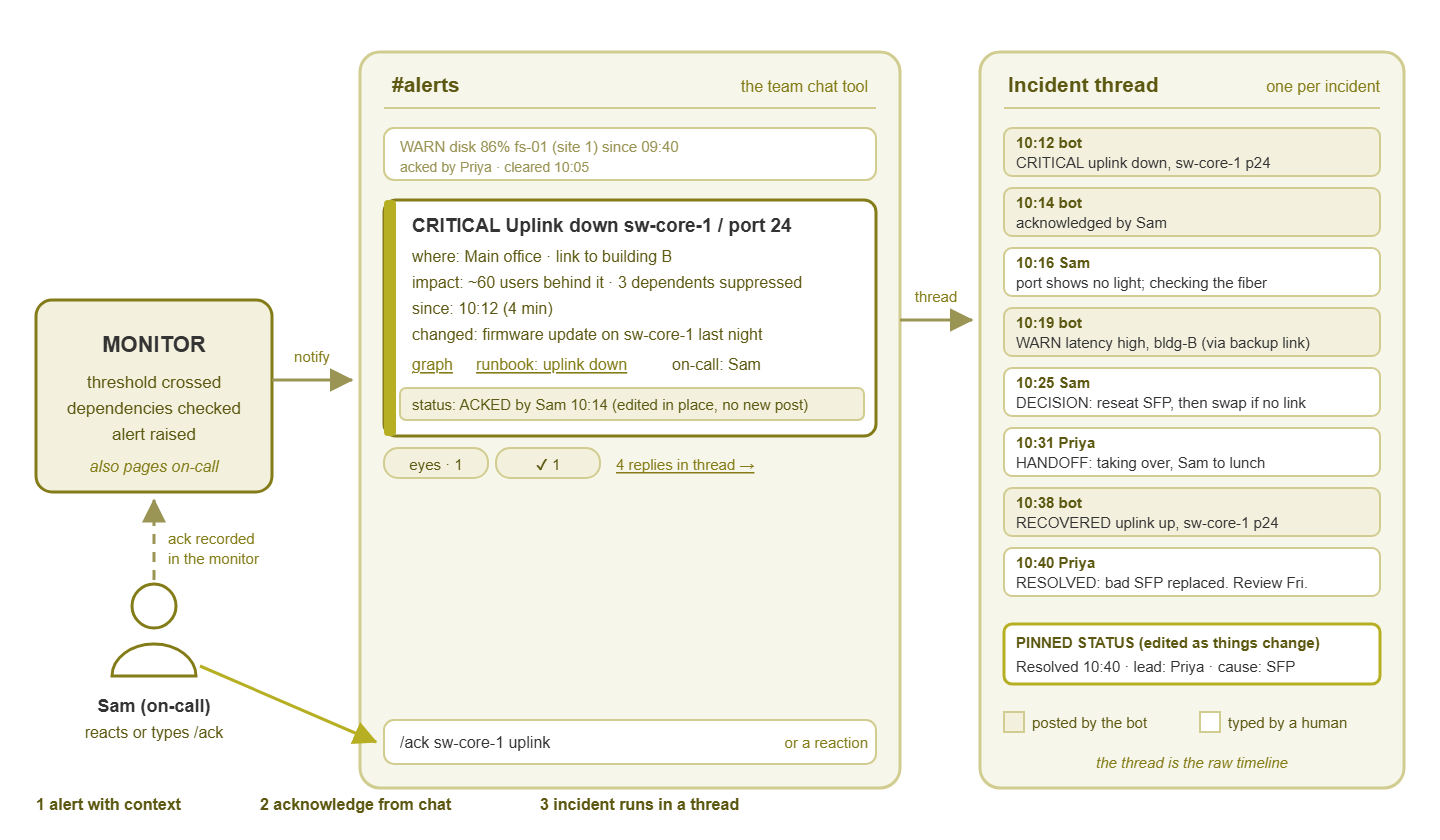
Figure 1: The three layers of ChatOps in one picture. An alert arrives as a card with context, a person acknowledges it from chat, and a thread carries the incident's timeline.
What belongs in chat
Chat is the right home for three kinds of traffic. The test for all three is the same: will more than one person want to see this, and might someone want to reply?
- Alerts people will discuss. A core switch losing an uplink, a server's disk crossing the warning line, a backup job failing. These are messages where the natural response is a question ("did the change last night do this?") or a claim ("mine, looking now"). Chat gives those replies somewhere to live.
- Incident coordination. Once something is really broken, several people need the same picture at the same time. They need to know what is affected, who is on it, what has been tried, and what is next. A thread does this better than any combination of email, phone, and shouting across the room.
- Status questions. "Is site three still down?" "Is anything alerting right now?" "Did the certificate renewal go through?" If a bot can answer these in the channel, the whole team learns the answer at once. In that case, the person who would have been interrupted with a direct message is not.
What does not belong in chat
Three things, and the first is the one that gets teams in trouble.
Paging
Paging means reaching a specific person, urgently, in a way that gets through no matter what. Examples are a phone call, an SMS, or a push notification that bypasses do-not-disturb. Chat is not that. Chat is muted at night, closed on weekends, silenced during meetings, and buried under forty other channels. A critical alert posted only to chat at 2 AM will be read at 8 AM by whoever arrives first. That is a very expensive way to discover that nobody was paged. The rule is simple: chat informs the team; the pager wakes a person. Anything that needs a human within minutes goes to the pager as well, never to chat instead. The guide on matching channels to urgency lays out exactly which alert deserves which channel. Here, the point is only that chat sits in the middle of that scale, not the top.
Sensitive data
Chat is searchable, retained for a long time, often accessible from phones, and sometimes shared with people outside the team. Passwords, private keys, personal data about users, and customer details do not belong in an alert message or a thread reply, ever. An alert can say "authentication failing on the VPN gateway"; it should not paste the failing credentials. A thread can say "found the cause in the payroll export log"; it should not paste the export. If the monitoring tool includes raw log lines in notifications, check what is in those lines before pointing them at a channel.
Everything
The third thing that does not belong in chat is all of it. It is very easy to route every notification the monitoring system can produce into one channel. And the result is a firehose that nobody reads. Every informational event, every recovery, every warning that clears itself in three minutes — each one trains the team a little more to scroll past. The Avoiding Channel Noise guide is devoted to this failure and its fixes. For now, hold onto the principle that a message earns its place in a channel only if someone would react to it.
Northgate Retail routed everything into one channel on a Friday afternoon: every alert, every recovery, every device rediscovered across forty stores. By nine on Monday the channel showed 1,400 unread messages. One of them, somewhere near the middle, was the till server at the flagship store going down on Saturday night. Nobody found it in chat; the store manager found it by phone. Every member of the team had muted the channel by Thursday, and the review recorded that the integration had been "enthusiastically adopted." They now run three channels, and the busy one is the one nobody is expected to read.
Tip: the quickest sanity check for any message you are about to route into chat is to imagine it arriving while the team is at lunch. If it can wait until they are back, chat is fine. If it cannot, it needs a pager too. If nobody would care when they got back either, it does not need a channel at all.
The channel model
A channel is a named room in the chat tool. The mistake is having one room for everything; the other mistake is having thirty. The model below uses three kinds of channel and scales by adding more of the first kind only when a team genuinely needs its own. The ChatOps alerting guide covers the mechanics of setting these channels up and naming them; here we care about what each one is for.
Alert channels, split by severity or team
This is where the monitoring system posts things that deserve a glance. Split it in two ways as you grow. By severity, create a critical channel that stays nearly silent, so a message there means "stop what you are doing." Add a general alerts channel for warnings and things worth knowing. By team: if the network people and the server people genuinely never act on each other's alerts, give each their own. Then neither group learns to ignore half of what they see. Resist splitting further until a channel is provably too busy for the people in it. That is because every extra channel is one more place a message can land unread.
The incidents channel: one thread per incident
A separate channel where a real incident gets one top-level message and everything about it goes into that message's thread. The top-level channel view becomes a list of incidents, newest first, each showing its current status. Nobody discusses an incident in the channel itself; they open the thread. This keeps two incidents on the same afternoon from tangling into one confusing conversation. And it means anyone can find the record of last Tuesday's outage by scrolling a short list rather than searching a busy room.
The noise channel: informational events nobody reads live
Some events are worth recording but not worth anyone's attention: a device rediscovered, a warning that cleared itself, a daily "backup succeeded" report. Give them a channel that nobody is expected to watch. It exists for searching later ("when did that interface last flap?") and for the occasional bored scroll. Its name should make its status obvious, and nobody should feel guilty for muting it; muting it is the intended use. It is the one channel that is doing its job when nobody reads it.
That is the whole model: alerts, incidents, noise. A message moves between them by its nature, not by its source. The same monitoring system feeds all three; the routing rules decide which severity goes where.
A what-goes-where table
When you sit down to configure routing, this is the table to have open. "Also page?" means the alert should additionally go to a channel that reaches a specific person no matter what. That could be a phone call, SMS, or push notification.
| Message | Goes to | Also page? | Why |
|---|---|---|---|
| Critical alert: core switch, firewall, main server down | Critical alerts channel | Yes, always | Team needs to see it; the on-call person needs to be woken |
| Warning: disk at 85%, port errors rising, certificate 14 days out | General alerts channel | No | Worth a glance and a reply; can wait for working hours |
| Alert acknowledged by someone | Same message, edited in place | No | Everyone sees who owns it without a new message |
| Recovery of a critical or warning alert | Same message, edited; short thread reply | No | Closes the loop without adding a second post |
| Real incident (multiple alerts, users affected) | Incidents channel, one thread | Yes, for the lead | Coordination needs one place; the timeline writes itself |
| Informational: device rediscovered, warning self-cleared, job succeeded | Noise channel | No | Searchable later; nobody is expected to read it live |
| Status question ("what is alerting?") | Wherever asked; bot answers in a thread | No | Answer is visible to the team; asker is not blocked |
| Anything containing credentials or personal data | Nowhere in chat | — | Chat is searchable, retained, and often on phones |
The "edited in place" row does more work than it looks. It means the bot (or the monitoring tool's integration) changes the original alert message rather than posting a new one. That edit happens when the alert is acknowledged or clears. That single habit removes about half the messages a naive setup would produce. And the "nowhere in chat" row is not optional; it is the one rule with consequences beyond annoyance. Annoyance gets a channel muted; a pasted password gets a meeting.
The honest small-team version
Everything above can sound like it needs a bot, a routing engine, and someone to maintain both. It does not. Here is the version that a team of two to five people can run this week, with no code, and grow out of when it starts to pinch.
- One alerts channel. Route warning-and-above alerts from the monitoring system into it, using whatever notification method the tool supports that the chat tool can receive. Many chat tools can accept email into a channel, and many monitoring tools can send email. Do not split by severity yet; the channel will tell you when it needs splitting.
- The pager stays separate. Critical alerts still go to whoever is on call by phone or SMS, exactly as before. Chat is an addition, not a replacement.
- A human convention for acknowledging. No bot. The rule is: if you are looking at an alert, add an agreed reaction to it (a pair of eyes is the common choice). Then reply in the thread with one line. The reaction is the "mine"; the thread reply is the record. Someone still acknowledges in the monitoring console so it stops re-notifying.
- One incidents channel, or none. With a very small team, the alert's own thread is usually enough to run the incident. Create a dedicated incidents channel only when threads on alert messages start getting long enough to be hard to follow.
- A pinned status line. The chat tool's pin feature keeps one message at the top of a channel. During an incident, pin the current status and edit it as things change. That is the entire "status page" for a small team, and it works.
This version gives you the biggest ChatOps benefit: shared context, no duplicate effort, a record that writes itself. This costs one channel and one habit. Layers two and three, acting from chat and bot-posted timelines, are upgrades you add when you feel the friction, not prerequisites.
A first-week plan
If you want the ordered version, this is the sequence that avoids the muted channel.
- Day 1: create the alerts channel. Route only critical and warning alerts into it. Confirm the pager still works independently.
- Day 2: agree the acknowledgement convention out loud, in the channel, and pin it. One reaction, one thread reply.
- Day 3: look at yesterday's messages. Any that nobody reacted to and nobody would have? Route them to a noise channel or turn them off at the source.
- Day 4: improve the message itself. Add the device, the site, the duration, and a link to the graph, using the monitoring tool's notification template. Even one extra field changes how fast people respond.
- Day 5: run the next real problem in a thread, start to finish, and read the thread back afterward. Notice what is missing. That list is your next week's work.
A week of this tells you more about whether ChatOps fits your team than any amount of planning. Some teams find that chat becomes the operations room and the console becomes a place you visit to change settings. Others find they prefer the console and keep chat for incidents only. Both are legitimate; the practice is a means, not a badge.
Where to go next
You now have the shape of ChatOps: chat as shared context, three layers of practice, and three kinds of channel. You also have a clear line between what belongs there and what does not. None of it needs a bot to start. All of it needs the line. The rest of Monitoring in the Team Chat (ChatOps) takes each layer in turn. It covers building an alert message that carries its own context and acting from chat safely. It covers keeping the channel from turning into wallpaper and running incidents in threads that become the timeline. Start with the message anatomy; it is the improvement your team will notice first. It is also the one that would have saved my channel on day nine.
Put this into practice with SysPeep Monitor
Chat is only as useful as the alerts that reach it, and the quiet channel starts at the source. SysPeep Monitor's thresholds, dependency rules, and alert rules are designed to keep noise down before a notification is ever sent. SysPeep Monitor delivers alerts by email and other notifications according to rules you control. So what arrives in the team's channel is worth a reply. Check the product documentation for its notification options, and try the free trial on any Windows machine.
Download Free TrialLearn About SysPeep - All Rights Reserved.