
Cloud Networking in Plain Language: VPCs, Subnets, and Gateways
The cloud account usually arrives in your lap sideways. A department signed up for something, and a developer spun up a few servers. Now you — the person who runs the actual network — are expected to keep it all healthy. You open the provider's console and find a wall of unfamiliar nouns: VPCs, security groups, internet gateways, route tables, NAT gateways. It looks like a foreign country.
Here is the secret nobody puts on the first page of the documentation: you already know almost all of this. Cloud networking is the networking you run today with the physical layer removed and most of the nouns renamed. A VPC is a private network. A subnet is a subnet. A route table is a route table. The genuinely new parts — and there are a few — are about who owns which layer and where your visibility comes from.
This guide translates the cloud's vocabulary into the on-prem concepts you already have. It tells you honestly which instincts carry over and which ones to retire. It shows you where monitoring attaches in a world with no switch ports to poll. By the end, the console should read like a network diagram instead of a puzzle.
In this guide
- The one idea underneath everything
- Subnets: dividing the floor into rooms
- Route tables: the steering wheel
- Security groups, network ACLs, and your firewall instincts
- The three doors: gateways
- What carries over, and what to unlearn
- Where monitoring hooks exist in this world
- Where to go next
The one idea underneath everything: a data center you rent
VPC is short for virtual private cloud, though your provider may use a slightly different name for the same idea. It is a private network you rent inside the provider's enormous shared infrastructure. Think of it as leasing one floor of a huge office tower. Thousands of other tenants lease other floors, but yours has its own locked door, its own layout, and its own address plan. The landlord owns the elevators, the concrete, the power, and the plumbing. You own everything on your floor.
When you create a VPC, you pick its address range — typically a private block like 10.0.0.0/16, the same RFC 1918 space you use on-prem. That range is yours alone within your account. Nothing outside can reach it, and nothing inside can reach out, until you deliberately add doors. A brand-new VPC is a sealed room: private by default, useless by default, and safe by default. Every connection it will ever have to the internet or to your building is something you (or a predecessor) explicitly built.
That default matters for how you think about problems later. On-prem, connectivity is often the natural state and isolation is something you configure. In a VPC it is exactly reversed: isolation is the natural state, and every path that exists was created on purpose. When something cannot connect in the cloud, the question is rarely "what broke?" and usually "what was never opened?"
Subnets: dividing the floor into rooms
Inside the VPC you carve the address range into subnets, exactly the way you would carve up address space on-prem. Take your 10.0.0.0/16 and slice off a 10.0.1.0/24 for web servers, a 10.0.2.0/24 for databases, and so on. The subnetting math is the math you already know. No new skill required.
Two things are new. First, each subnet lives in one availability zone. That is the provider's term for physically separate facilities with independent power and networking, close enough together to act as one region. Picture separate buildings on the same campus. Spreading subnets across zones is how cloud designs survive a facility having a bad day. So a typical VPC has pairs of subnets: two web subnets in two zones, two database subnets in two zones.
Second, address handout is no longer your chore. When an instance (the cloud word for a virtual server) starts in a subnet, the provider's fabric assigns it an address from that subnet automatically. There is no DHCP server for you to build, monitor, or exhaust. You will not miss it. There is also a small delight for anyone who has chased a rogue DHCP server across a building. In a VPC, there is nowhere for one to hide.
One habit to keep from on-prem: plan the address space anyway. Cloud address ranges are easy to create and painful to renumber. The day you connect the VPC back to your building, any overlap between cloud ranges and office ranges becomes a genuine mess. Pick cloud ranges that do not collide with anything your building uses. Write them down in the same document where you keep your on-prem subnets.
Route tables: the steering wheel
Every subnet is attached to a route table, and the route table decides where traffic leaving that subnet can go. The logic is identical to the routing you know: most-specific prefix wins, default route catches the rest. What is missing is the router itself. There is no box, no console cable, no blinking lights. The VPC's router is an invisible function of the fabric — the first router in your career you cannot ping when you are bored.
Here is the shape of two typical route tables, with the plain meaning of each line:
Route table: public-subnets
Destination       Target              Plain meaning
10.0.0.0/16       local               traffic for the VPC stays inside the VPC
0.0.0.0/0         internet-gateway    everything else goes out the front door

Route table: private-subnets
Destination       Target              Plain meaning
10.0.0.0/16       local               traffic for the VPC stays inside the VPC
192.168.0.0/16    vpn-gateway         office networks take the private road home
0.0.0.0/0         nat-gateway         everything else leaves via the outbound-only door
Notice what makes a subnet "public" or "private": nothing but its routes. A public subnet is simply one whose route table points the default route at an internet gateway. A private subnet is one that has no such route. There is no checkbox labeled public. This is worth internalizing. It means the route table is where you look first when something can or cannot reach the internet. It also means a single careless route edit can quietly change the security posture of everything in the subnet.
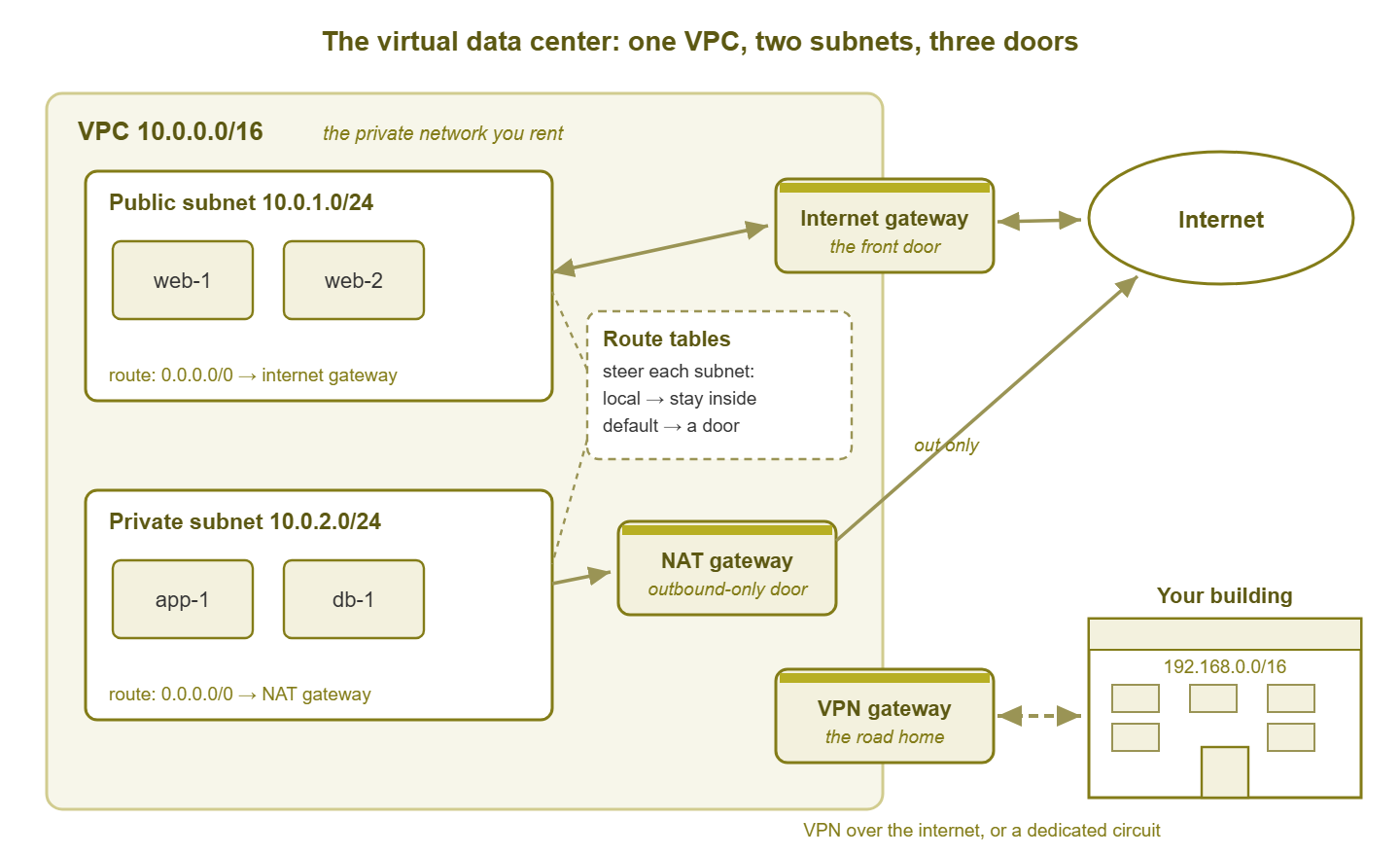
Figure 1: The virtual data center. One VPC, two subnets, a route table steering traffic, and three doors: the internet gateway, the NAT gateway, and the private road back to your building.
Security groups, network ACLs, and your firewall instincts
On-prem, your firewall instinct is a choke point: one stateful box at the edge where rules live, logs accumulate, and troubleshooting starts. The cloud takes that one box, shrinks it, and wraps a copy around every single server. That wrapper is the security group: a small stateful firewall attached to each instance's network interface.
Stateful means the firewall remembers conversations. If an outbound request is allowed, the reply is automatically allowed back in — you never write a rule for return traffic. Security group rules are allow-only: you list what may enter and what may leave, and everything else is dropped. A fresh security group typically permits all outbound and no inbound. That is why a brand-new instance can happily download updates while refusing every connection you try to make to it.
The network ACL (access control list) is the other layer, and it works more like an old router ACL. It sits at the subnet boundary. It is stateless (replies need their own explicit rule, ephemeral ports and all). And its rules are numbered and evaluated in order, with both allow and deny available. Most teams leave network ACLs wide open and do the real work in security groups, keeping the ACL as a coarse guardrail. One example is a hard deny of a protocol that should never appear in a subnet, no matter what any security group says.
| Question | Security group | Network ACL | Your old edge firewall |
|---|---|---|---|
| Where it sits | Around each instance's interface | At the subnet boundary | One box at the network edge |
| Stateful? | Yes — replies allowed automatically | No — replies need their own rule | Almost always stateful |
| Rule types | Allow only; all else dropped | Allow and deny, in number order | Allow and deny, top down |
| Default posture | Inbound closed, outbound open | Often open until tightened | Whatever you built |
| When a packet is refused | Dropped silently — no log by default | Dropped silently — no log by default | Usually logged loudly |
| Best used for | Per-role rules that follow the workload | Coarse subnet guardrails | The building's front line |
Look hard at the second-to-last row, because it is the biggest behavioral change in this entire article. Your on-prem firewall logged its denies; the log was where every "it cannot connect" investigation began. Security groups and network ACLs drop traffic silently. No counter increments where you can see it, no line appears in any log you own, and the connection just times out. The cloud's answer to this blindness is the flow log, which records both accepted and rejected traffic. It is important enough that the next guide in this pillar is entirely about it.
The three doors: gateways
A sealed private network needs doors, and the cloud gives you three kinds. Learning which door handles which traffic explains most of a VPC's behavior.
The internet gateway: the front door
The internet gateway connects the VPC to the internet in both directions. It is the front door of the building: visitors can come in, occupants can go out. For an instance to actually be reachable from the internet, four things must line up. The VPC has an internet gateway, and the subnet's route table points at it. The instance has a public address, and a security group allows the inbound port. Miss any one and the instance is invisible from outside. This is a wonderful property when it is intentional and a maddening one when you forget which of the four is missing.
The NAT gateway: the outbound-only door
The NAT gateway is a door that opens only from the inside — a fire exit with no outside handle. Instances in private subnets use it to reach out for updates, licensing checks, and external APIs, while remaining unreachable from the internet. It performs the same network address translation your office firewall does for user workstations, packaged as a managed service. There are two operational notes. The gateway is a per-zone resource (a zone outage can take its NAT with it unless you deployed one per zone). Its traffic is metered: the provider bills for the volume that flows through it. That pattern matters later when we talk about egress costs.
The private road home
The third door does not lead to the internet at all: it leads back to your building. A VPN gateway terminates an encrypted tunnel from your office firewall across the internet. A dedicated interconnect is a private circuit from your premises into the provider's edge. Either way, the result is the same mental model. The VPC becomes another site on your WAN, reachable by private addresses, no different in spirit from a branch office. Once this door exists, your route tables on both sides need to know about each other. The health of this path then becomes some of the most important monitoring you own — enough that it has its own guide.
What carries over — and what to unlearn
The good news first. These on-prem skills transfer completely: IP addressing and subnet math, routing logic, and DNS (still the cause of everything). So do the principle of least privilege in firewall rules and the discipline of writing down what you built. If you can design VLANs and firewall rules for a building, you can design subnets and security groups for a VPC. The thinking is the same; only the furniture moved.
Now the instincts to retire, because they will send you looking for things that do not exist:
- There are no switches to monitor. No port status, no error counters, no duplex mismatches, no spanning tree. The entire layer-two world you patrol on-prem is the provider's problem, handled invisibly. An entire category of your troubleshooting repertoire simply has no target here.
- There are no cables to wiggle. The oldest diagnostic move in networking — reseat the cable, swap the patch lead, check the link light — has no cloud equivalent. Physical-layer faults still happen inside the provider's facilities; you just never see them as physical faults. They surface, if at all, as brief errors or as notes on a status page.
- You cannot mirror a port. On-prem, when things get weird, you span a switch port and capture packets. In a VPC there is no switch to span. Some providers offer traffic mirroring as a paid feature, but the everyday substitute is the flow log — connection summaries rather than packets.
- The provider owns layers you used to own. Power, cabling, switching, the hypervisor, and the routing fabric all belong to the landlord. When the provider has a bad day, your console is a status page and your remediation is often "wait, fail over, or both." This is genuinely uncomfortable at first. It is also, on most days, a fair trade. Nobody calls you when a top-of-rack switch dies at the provider, because failing around it is their job.
- Capacity is not infinite, just invisible. Each instance size comes with a network performance ceiling, and small instances have low ones. A "network problem" in the cloud is sometimes an instance quietly hitting its own bandwidth cap. That is the cloud version of discovering a server was plugged into a fast-ethernet port someone forgot to upgrade.
Tip: when cloud troubleshooting stalls, remember that almost every problem is one of four things. It might be a route (the table does not send traffic where you think). It might be a rule (a security group or ACL silently drops it). It might be a door (the gateway you assume exists does not) or a cap (a resource hit its limit). There is no fifth category called "bad cable" anymore. Check the four in that order and you will resolve most tickets without leaving your chair. That is convenient, because the data center is now hundreds of miles away.
Where monitoring hooks exist in this world
If the switches are invisible and the firewall is a thousand tiny wrappers, where does a monitoring person actually attach? Three places, and the rest of this pillar walks through each in depth.
Flow logs are the record of what moved and what was refused. They are connection summaries for traffic crossing your instances' interfaces, including the silent security-group denies you cannot see anywhere else. They are the closest thing the cloud gives you to the traffic visibility of NetFlow plus firewall logs combined. And the flow logs guide covers reading them like a pro.
Provider metrics are the gauges the landlord publishes. They include bytes and packets per instance, load balancer health and latency, tunnel state on your VPN, and throughput on your gateways. They are measured from the provider's side of the fence, which makes them trustworthy about the fabric and blind about your users. The provider metrics guide covers what exists and how to pull it into one view instead of living in another console.
Your own agents and checks still work exactly as they always have. An instance is a server. It will run the same monitoring agent and answer the same SSH or WMI queries. It will report the same disk, CPU, and service checks as any machine in your rack. And synthetic checks from your building measure the one thing neither flow logs nor provider metrics can. That is what the path actually feels like from where your users sit. Examples are a ping, a TCP connect, and an HTTP request aimed at cloud resources.
A sensible first week of cloud visibility looks like this:
- 1. Enable flow logs on the VPC, so history exists before the first incident needs it.
- 2. Find the provider's metrics for your instances, gateways, and any VPN tunnel. And look at a week of each to learn the shape of normal.
- 3. Install your standard monitoring agent on the instances, exactly as you would for any new server.
- 4. Add a reachability and latency check from your building to one address in each cloud subnet, so the path itself has a baseline.
- 5. Write down the address plan, the route tables, and the doors. Future-you, standing in the smoke of an outage, will be grateful.
Where to go next
You now have the mental model. A VPC is a rented private network. Subnets divide it, and route tables steer it. Security groups guard each workload silently. Three kinds of doors connect it to the world and to your building. Everything strange about cloud networking is a variation on those five ideas. The rest of the Cloud Network Monitoring pillar builds on this foundation. It covers flow logs for traffic truth and provider metrics for the fabric's gauges. It also covers egress watching for the traffic that costs money, and hybrid path health for the road between here and there. Start with flow logs; they are the visibility you will miss first.
Put this into practice with SysPeep Monitor
Your cloud network is, in the end, another site at the far end of a link your building depends on. SysPeep Monitor watches the on-prem half of that story: the firewall, switches, and WAN link every cloud-bound packet crosses. It uses auto-discovery, SNMP and WMI checks, and alerting from a single console. A lightweight remote probe can watch another site or segment and report back to the same place. The free trial installs on any Windows machine in minutes.
Download Free TrialLearn About SysPeep - All Rights Reserved.