
Evidence Packs Without the Screenshot Marathon
Every IT team that has been through an audit knows the screenshot marathon. The request list arrives, and the deadline is next week. Somebody — usually the person who knows where everything is — spends four late evenings clicking through consoles and capturing screens. They paste them into a document and type captions like "firewall logging enabled, see above." I have run it twice. Both times it ended with a two-hundred-page file nobody opened again and an auditor who asked for half of it in a different form. And both times there was a firm promise not to do it a third time.
The marathon happens because evidence is being created at audit time instead of collected during the period. The systems already produced the records; nobody kept them in a usable shape. An evidence pack fixes that. It is a dated, organized set of artifacts — reports, exports, sign-offs — that the tools generate on a schedule. You file them per control, every quarter, so that when the audit comes the work is assembly, not archaeology.
By the end of this guide you will know the five kinds of generated evidence most monitoring and infrastructure tools can produce. You will know a naming convention that survives contact with an auditor and a per-control checklist. You will know where the pack should live and what one control's pack looks like from end to end.
In this guide
- Why the screenshot marathon fails
- The five kinds of generated evidence
- Naming and dating that auditors can follow
- The per-control evidence checklist
- Where the pack lives
- Quarterly, not annually
- A worked example: one control's pack
- Where to go next
Why the screenshot marathon fails
Screenshots make weak evidence for five reasons, and each one tells you what good evidence needs instead.
A screenshot is undated in any trustworthy way. The clock in the corner of the screen is easy to argue with. It is a single point in time. It shows the setting existed on the day of capture, not that it was in place throughout the period. It is hand-selected: the person capturing chooses what to show, so the auditor cannot tell what was left out. It is not searchable, so a follow-up question means another round of clicking. And it is expensive to produce. That means it is produced once, at the last minute, under stress, by the one person who could have been doing something more useful.
Generated evidence inverts every one of those. A scheduled report carries a generation timestamp inside it. It exists for every month of the period, because the schedule ran every month. It is complete rather than selected; the export includes every row. It is searchable. And it costs nothing after the first setup, which is exactly why it gets produced consistently.
Screenshots do have a place. For a static configuration setting — "logging is enabled on this device" — a dated screenshot or, better, a configuration export is fine, and auditors accept it. The mistake is using screenshots for things that are supposed to happen: reviews, checks, alerts, backups. For those, you need the record of the happening, and only the tools can produce that.
The five kinds of generated evidence
Almost everything an auditor asks of a monitoring program can be satisfied by five kinds of artifact. All five can be produced automatically by tools you probably already run.
1. Scheduled reports from monitoring
Most monitoring systems can generate a report on a schedule and email it or save it to a location. The ones that matter for an evidence pack include availability reports (uptime per critical service per period). They include alert summaries (what fired, how often, how long to acknowledge) and any report that captures a review having taken place. If your team already keeps a running availability record for disputes and reporting, that same file is the availability evidence. The uptime evidence file guide describes it. Likewise, a per-period summary of detection and resolution times doubles as incident-management evidence. The reporting incident metrics guide shows how to build it.
2. Scheduled log exports
A log collector can export a filtered slice of events on a schedule: authentication events for the month, administrative actions for the month, firewall denies for the month. These are the raw material for the logging and access control families. The compliance archive described in the log retention for compliance guide is where the full stream lives. The pack holds the per-period export, or an index pointing to it, plus the integrity report that says the archive is intact.
3. Configuration snapshots
A snapshot is a saved copy of a device's or system's configuration at a point in time. Examples are the firewall rule base, the switch running configuration, and the monitoring system's alert rules. Taken on a schedule and kept, snapshots let you show what the configuration was in any month of the period. Comparing two snapshots shows exactly what changed between them. They also answer the "is logging enabled" type of question without a screenshot, or a caption reading "see above".
4. Change records
The change log — the ticket export, the change form register, or the spreadsheet — is the human side of change management. The monitoring side is the configuration-change alert history: every time monitoring noticed a device configuration change, with the timestamp. Together they let you show that changes were approved and that detection was working. Reconciling one against the other produces the strongest change evidence there is.
5. Inventory exports
A dated export of what the monitoring system has discovered on the network, plus any additional asset list you keep. Exported each period, these show the inventory being maintained rather than merely existing. Comparing consecutive exports shows devices joining and leaving, which is itself evidence the inventory control is alive.
When a tool cannot schedule its own export
Not every product has a "run this report monthly" button. Three workarounds cover nearly every case. First, use a scheduled task on a server that runs the tool's command-line export. It writes the result into the pack folder with the date in the filename. Second, use an email rule. Many tools can email a report on a schedule even when they cannot save one. So send it to a dedicated mailbox and file from there. Third, for the stubborn few, take a dated configuration export by hand on the first working day of each month. Log the export in the index. The point is to make the artifact appear on a schedule with minimal human involvement; how it appears matters less than that it reliably does.
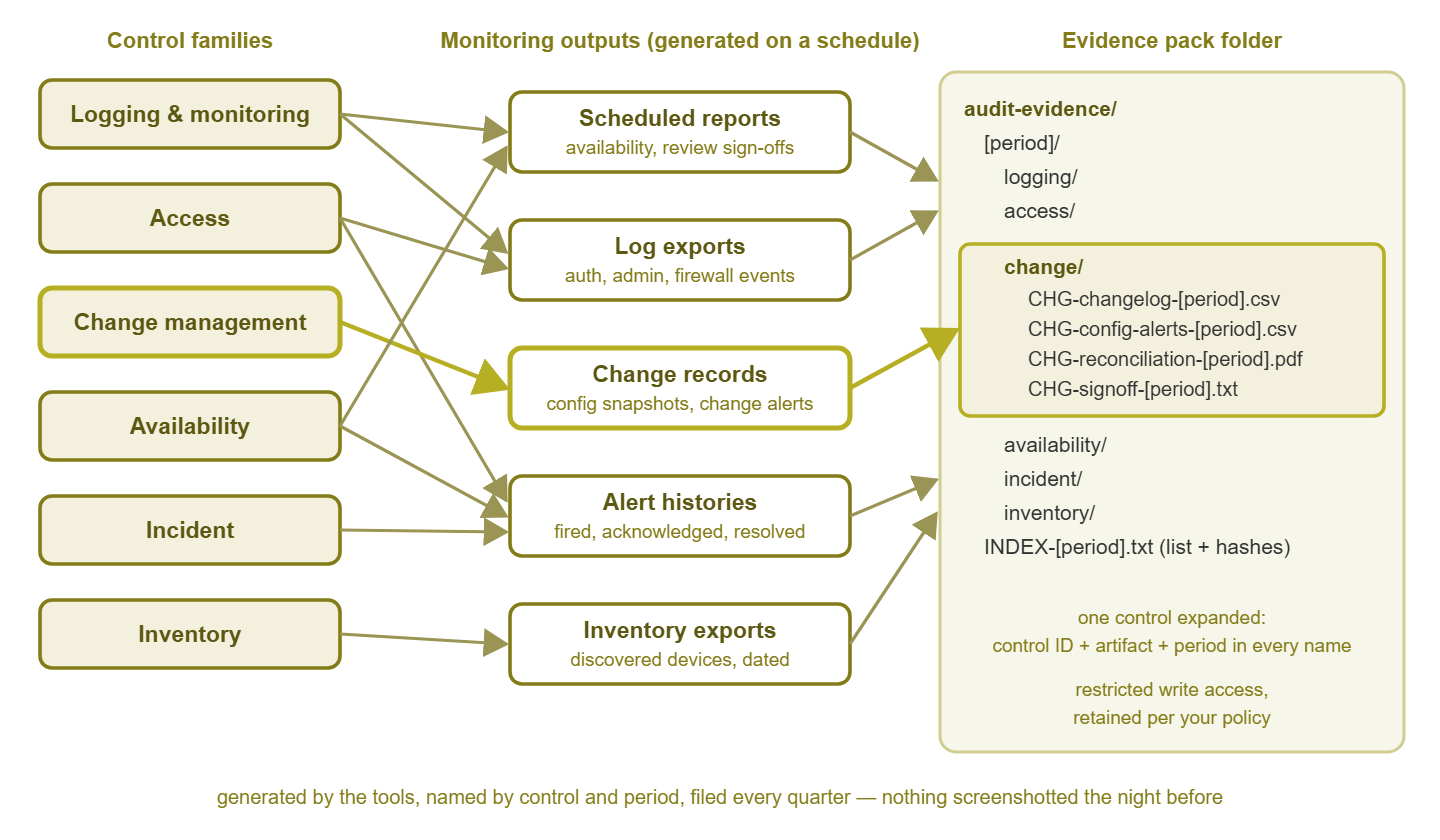
Figure 1: Control families produce monitoring outputs on a schedule; the outputs land in a per-control, per-period folder. One control's pack is expanded to show the artifacts inside.
Naming and dating that auditors can follow
An auditor handed a folder of files named report (3).pdf and export-final-FINAL.csv will ask you to explain every one of them. Naming is where a good pack quietly earns its keep. The convention needs to carry three things in every filename: which control the artifact supports, which period it covers, and when it was generated.
Pattern:
  <CONTROL-ID>-<artifact>-<period>-gen<generated-date>.<ext>

Examples (control IDs are yours; use your framework's numbering):
  AVL-01-availability-report-Q2-gen0701.pdf
  LOG-03-auth-events-export-Q2-gen0701.csv
  CHG-02-config-change-alerts-Q2-gen0701.csv
  CHG-02-reconciliation-Q2-gen0708.pdf
  CHG-02-signoff-Q2-gen0708.txt
  INV-01-discovered-devices-Q2-gen0701.csv

Folder layout:
  audit-evidence/
    <period>/
      logging/
      access/
      change/
      availability/
      incident/
      inventory/
      INDEX-<period>.txt      (every file listed with its hash)
A few rules make this work in practice. Use your framework's own control identifiers where it has them, so the auditor can go straight from their request list to your folder. Name the period covered separately from the generation date. A report about the second quarter generated in the first week of the third quarter should say both. That is because the gap between them is itself something an auditor may ask about. Use the same period labels everywhere — if your organization works in quarters, name in quarters; if it works in months, name in months. And write the generation date in a fixed, sortable form so folders list in order.
The INDEX file is the small touch that makes the biggest difference. It lists every file in the period's pack with a one-line description and a hash, and it is generated last, after everything else has landed. It tells the auditor what they are looking at, and it lets them verify nothing has changed since assembly. The retention guide shows the hashing mechanics.
The per-control evidence checklist
The checklist is the contract between you and the pack. For each control your framework requires, it records which artifact proves it, which tool produces it, and how often. It also records who signs off that they looked at it. The sign-off column matters more than it appears to: a report nobody reads is a collection, not a control. A dated initial next to it turns it into evidence that a human reviewed the output.
| Control family | Artifact | From where | How often | Who signs |
|---|---|---|---|---|
| Logging and monitoring | Log source list with last-received times; retention setting export; integrity report | Log collector; archive job | Monthly | Monitoring owner |
| Logging and monitoring | Alert review notes | Review meeting or ticket | Weekly | Reviewer |
| Access | Authentication event export; suspicious-login alert history | Log collector; monitoring | Monthly | IT lead |
| Access | Privileged account list with review outcome | Directory export | Quarterly | IT lead |
| Change management | Change log export; config-change alert history; config snapshots | Ticketing; monitoring; config backup | Monthly | Network admin |
| Change management | Reconciliation of detected vs. approved changes | Manual comparison | Quarterly | Network admin |
| Availability | Availability report per critical service; outage alert history | Monitoring | Monthly | Monitoring owner |
| Availability | Backup job results; restore test record | Backup console | Monthly; test quarterly | Backup owner |
| Incident | Incident register; per-incident timelines; post-incident notes | Ticketing; monitoring alert records | Quarterly | IT lead |
| Inventory | Discovered device export; new-device alert history; review note | Monitoring discovery | Monthly | Network admin |
Print this, adjust it to your framework's control list, and pin it somewhere. When a scheduled report fails to arrive, the checklist is what tells you a gap has opened. When a new person joins, it is what tells them what the pack is for.
Tip: the sign-off can be as light as a text file in the folder: "Reviewed Q2 availability reports, one outage on the file server matched incident record, no concerns. — initials, date." Auditors do not need ceremony. They need a name and a date attached to the act of looking.
Where the pack lives
A pack that anyone can edit is a pack an auditor will doubt. The storage requirements are simple, and most organizations already have somewhere that meets them.
- Restricted write access. Use a controlled folder on a file server or a dedicated space in a document system. Only the scheduled jobs and one or two named people can add files, and nobody can silently modify or delete them. Read access can be broader; write access should be narrow.
- Retention that matches your policy. The pack is itself compliance evidence, so it is kept for the compliance tier's duration, in the same write-once, integrity-checked way as the log archive. Say so in the retention policy.
- Automated arrival. Wherever possible, the tools write directly into the folder. The monitoring system saves its scheduled reports there, and the export script drops its files there. The backup console emails its summary to a mailbox that files into it. The fewer human hands between generation and storage, the stronger the evidence.
- An index per period. The
INDEXfile with descriptions and hashes, generated after assembly, signed by whoever assembled it. - A read-only copy for the auditor. When the audit comes, give the auditor a copy of the relevant periods, not access to the live folder. Note the export in the chain-of-custody log.
The location does not need to be sophisticated. A folder with the right permissions on a server that is backed up and whose backups you have tested is entirely adequate. What matters is that the answer to "who could have changed this?" is short, specific, and true. "Anyone" is short, and fails the other two. In a department of one, the same person runs the systems and assembles the pack. In that case, lean harder on the automated arrival and the index hashes. They let you show that the files came from the tools and have not changed since, even though only one person was involved.
Quarterly, not annually
The single most effective habit in this guide is assembling the pack every quarter rather than once a year. The reasons are practical rather than philosophical.
- Gaps get found while they are small. If a scheduled report silently stopped in month two, quarterly assembly catches it at month three, when you can fix it and document a short gap. Annual assembly catches it eleven months later, when the gap is the whole audit period.
- The work stays small. Assembling a quarter's pack from files that already landed takes an hour. Check the checklist, chase the one missing export, write the sign-offs, and generate the index. Doing a year at once means twelve of everything, with the details forgotten.
- Memory is fresh. The reconciliation of detected changes against approved ones is easy when the changes were last month. It is guesswork when they were last spring.
- The audit becomes a copy operation. Four assembled quarters plus an index is the audit submission. There is nothing left to create.
Here is a quarterly routine that works for small teams. In the first week after quarter end, walk the checklist top to bottom. Confirm each artifact is present for each month. Produce the quarterly items (access review, reconciliation, incident register, restore test record). Write the sign-off notes and generate the index. File a one-line summary of any gaps found and what was done about them. That summary is not an embarrassment. It is evidence that the process notices its own failures, which is one of the things auditors most want to see.
Harbourview Clinic assembled its pack once a year, in the fortnight before the audit. The availability report was scheduled to email itself monthly, and it did. Then the mail relay was replaced in the second month, and nobody told the monitoring server. Eleven months later the assembly found one availability report and ten months of nothing. The outage records were still in the monitoring database, so the evidence was rebuilt by hand over a weekend. And the finding noted that the control "operated but was not consistently evidenced". A quarterly check would have found the gap at month three, when it was a ticket rather than a weekend.
A worked example: one control's pack
Take change management, because it exercises every part of the method: it needs a human record, a machine record, and a reconciliation between them. Suppose your framework's control says, in paraphrase, that changes to production network devices must be authorized, recorded, and that unauthorized changes must be detected. Here is the change folder for one quarter, file by file, with what each one proves.
CHG-02-change-log-Q2-gen0701.csv. This is an export from the ticketing system (or the change spreadsheet) of every change record in the quarter. It includes identifier, device, description, requester, approver, planned date, and completed date. This is the population. It shows that a change process exists and was used. The auditor will pick a sample of rows from it.
CHG-02-config-change-alerts-Q2-gen0701.csv. An export from monitoring of every configuration-change alert in the quarter: device, timestamp, who acknowledged it. This is the detection evidence. It shows that monitoring noticed changes independently of the ticket system, which is the point of the control.
CHG-02-config-snapshots-Q2/ (a subfolder). Monthly saved configurations for each in-scope device. These let the auditor, or you, confirm that a given change actually landed and that nothing else changed alongside it. (Something else often has.)
CHG-02-reconciliation-Q2-gen0708.pdf. The quarterly comparison: for each detected change, the matching change record; for each change record, the matching detection. Any detected change with no record is listed with an explanation. That might be an emergency fix recorded after the fact, a false detection, or an unauthorized change that became an incident. This is the strongest single artifact in the pack, because it shows the two halves of the control being checked against each other.
CHG-02-signoff-Q2-gen0708.txt. Three lines: who performed the reconciliation, the date, and the outcome ("all detected changes matched to records except one, see reconciliation item four, incident record attached").
Now imagine the auditor's questions. "Give me all changes in the period" is the change log. "How would you know about a change that skipped the process?" is the config-change alert export. "Show me that you actually compare them" is the reconciliation. "Who did that and when?" is the sign-off. "Show me the same for the first quarter" is the folder next door. Nothing was screenshotted. Nothing was created at audit time. The person who used to run the marathon spent an hour per quarter, and most of that was reading.
Every other control family follows the same shape: a population export, a detection or review record, a periodic human check, and a sign-off. Once you have built one folder this way, the rest are copies with different filenames.
Where to go next
An evidence pack replaces a week of screenshots with an hour of assembly. That is because the tools generate the evidence during the period. A naming convention, a checklist, and a controlled folder keep it in shape. The marathon was never compulsory; it was just what happened when nobody kept the files. The next question is coverage: which of your framework's controls have evidence behind them and which are quietly empty. The mapping monitoring to controls guide builds the matrix that answers it. The continuous compliance guide adds the alerts that tell you when a scheduled artifact stops arriving. All of it lives in Monitoring for Compliance & Audit Evidence.
Put this into practice with SysPeep Monitor
Three of the five artifacts in this guide come straight out of monitoring: availability reports, alert histories, and inventory exports. SysPeep Monitor produces reports from a single web console. It keeps its alert history in the database backend you choose, and auto-discovers the devices and interfaces that become your inventory export. So the pack fills itself between audits. The free trial installs on a Windows machine in minutes.
Download Free TrialLearn About SysPeep - All Rights Reserved.