
Diffing Configs: Alerting on Changes Nobody Announced
Somebody changed something. You know this because the network is behaving differently and nobody has an explanation. The monitoring system shows a port that went down at 09:14 and came back at 09:16. It shows a route that now takes a different path and a VLAN that suddenly contains a printer. Every person you ask says they did not touch anything, and every one of them is telling the truth as they remember it. The thing that actually happened — a configuration line added, removed, or edited — is sitting in a device's running config with no name attached.
If you take a configuration backup every night, you already own the tool that finds it. Comparing today's backup with yesterday's is a diff: a line-by-line comparison that prints only what differs. Run it every morning across every device. Then any change made in the previous day shows up as a handful of lines, whether or not anyone announced it. The planned changes will match a change record. The rest is drift — configuration moving without a paper trail — and drift is exactly the thing that turns into the mystery ticket.
This guide is about detecting the changes nobody announced. It covers the daily diff and the noise that will make you distrust it until you strip it out. It provides a script sketch that sends the changed lines to the device's owner. It covers how to read a diff, and how to route and record the explanation. It covers how to use the device's own logs to find out who and when. It assumes backups are already flowing into a version-controlled repository; if not, the sibling guide on automating config backups is the prerequisite.
In this guide
- The daily diff
- Was there a change record?
- Noise: why the first week of diffs will lie to you
- A diff-and-alert script sketch
- Reading a diff: an annotated example
- Routing the alert to the person who can explain it
- Recording the explanation
- Who changed it: the device logs
- Where to go next
The daily diff
A diff tool takes two text files and reports the lines that are in one but not the other. Removed lines are marked with a minus sign, added lines with a plus sign, and a few unchanged lines around each change are shown for context. The tool is standard: diff on Linux, Compare-Object in PowerShell, or git diff if the files live in a repository. There are also any number of graphical editors that colour the changes for you. Applied to two backups of the same device it answers one question with perfect reliability: did this device's configuration change, and if so, exactly where?
That is a remarkable amount of value for a tool that costs nothing. Every other change detector depends on something being set up correctly on the device or on someone being honest and awake. That applies to parsing syslog for "configured by" messages, watching for a configuration-changed trap, and asking people. The diff depends only on the backup having run. It catches the change a contractor made from the console with no logging configured. It catches the change made through a management GUI that never writes a log line. It catches the change the device made to itself when a feature auto-provisioned something. If it is in the running configuration, the diff sees it.
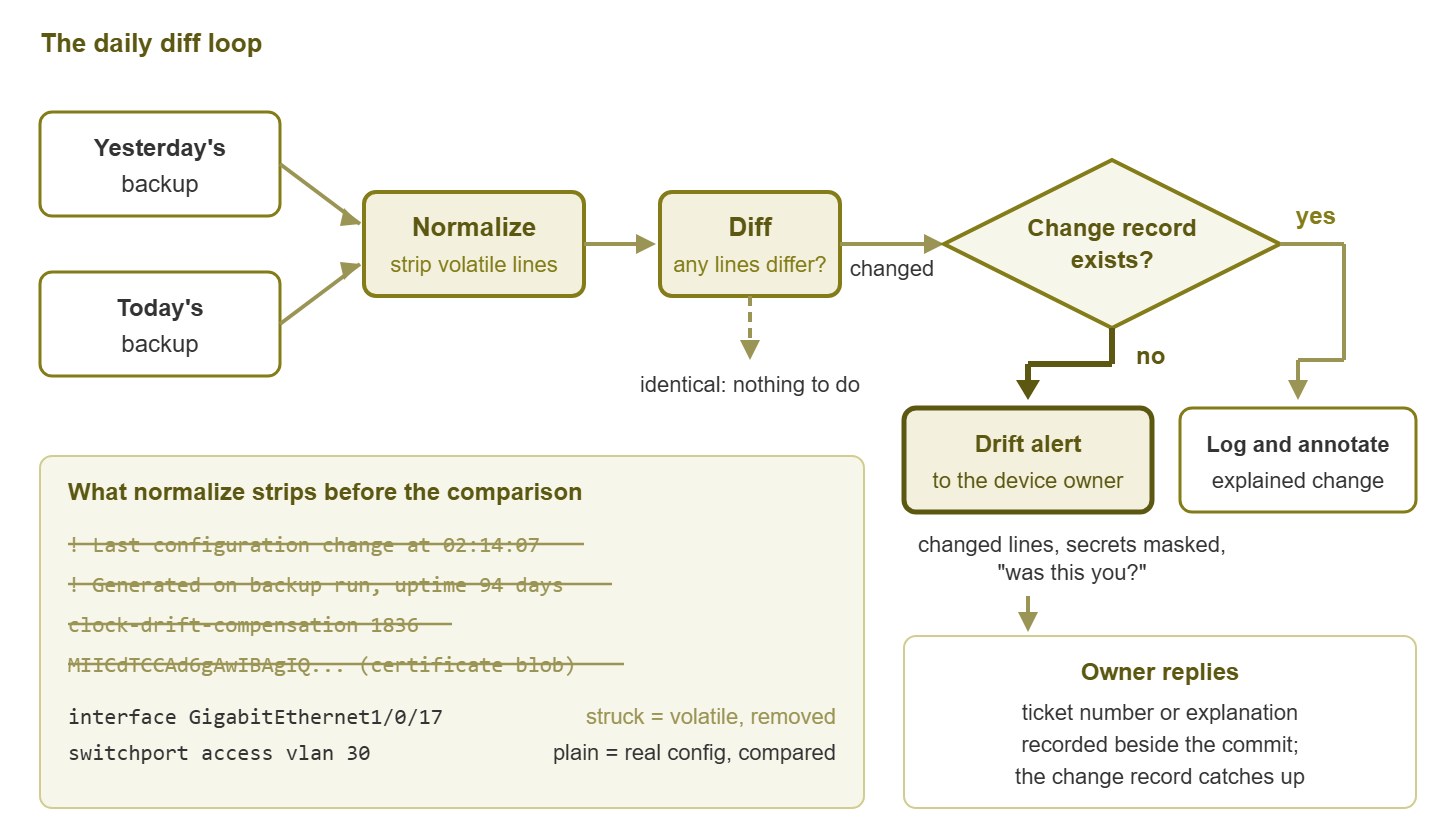
Figure 1: The daily diff loop. Two backups go through normalization and get compared. Any real difference is either matched to a change record or raised as a drift alert to the device's owner.
The loop runs once a day, right after the nightly backup. For each device: normalize both files (more on that shortly), diff them, and if the diff is empty move on. If not, ask the one question that matters — is there a change record for this? — and route the result accordingly. Everything in this guide elaborates that loop.
Was there a change record?
A change record is any written note, made before or shortly after a change, that says what was changed, why, when, and by whom. It might be a ticket, a row in a shared spreadsheet, or a message in a team channel with an agreed format. The format matters far less than the existence. The diff tells you that a change happened; the change record tells you it was meant to happen. When both exist for the same device on the same day, the change is explained. Log it and move on.
When the diff finds a change and no record exists, you have drift, and drift comes in a few flavours. The most common is the honest omission: a colleague fixed something quickly and forgot to write it down. Next is the invisible hand: a contractor, a support engineer with remote access, or an automated tool that applied a template. Rarer, and the reason security teams care about this topic, is the change nobody on your team made at all. All three look identical in a diff. What separates them is the explanation, which is why the alert has to reach a person who can supply one.
Two neighbouring practices use the same word and are worth telling apart. When an incident is under way and you are asking "what changed just before this broke?", you are running the correlation in the other direction — from a symptom backwards to candidate changes. The guide on change correlation covers that investigation. And for changes you do know about in advance, the monitoring system should be told so that alerts during the work are suppressed. That is the subject of change-aware alerting. This guide is the third leg: finding the changes that were never announced, so that both of the others have a complete list to work from.
Noise: why the first week of diffs will lie to you
Run a naive diff on two backups of an unchanged device and it will very often report a change anyway. A configuration listing contains lines that vary on their own. Examples are a header with the time the listing was generated and a "last changed by" stamp that updates when someone merely saves. Other examples are a counter the device rewrites itself and a certificate that re-encodes slightly differently on every export. Left alone, these produce a "change" on every device every night. Within a week you will have trained yourself to ignore the alert, which is worse than not having it.
The fix is to normalize both files before comparing them. Apply the same cleanup rules to each so that lines which change on their own are removed or replaced by something stable. Normalization is a small list of patterns, built up over the first few weeks. You look at each false alarm and ask "why does this line differ when nothing changed?" The table below lists the usual suspects.
| Noise source | What it looks like | Normalization |
|---|---|---|
| Timestamps in headers | A comment line at the top: "last configuration change at ..." or "generated on ..." | Drop lines matching the pattern |
| Self-updating values | A drift compensation figure or counter the device rewrites periodically | Drop the specific line by pattern |
| Certificate and key blobs | Long blocks of encoded text that re-wrap or re-encode on each export | Replace the block with a short hash of its content, so a real change still shows |
| Re-salted secrets | A password hash that changes every time the device saves, though the password did not | Mask the value and keep the line, so an added or removed account still shows |
| Ordering differences | API exports listing objects in a different order each time | Pretty-print with sorted keys; sort sections with no meaningful order |
| Whitespace and line endings | Trailing spaces, tabs versus spaces, Windows versus Unix line endings | Strip trailing whitespace; convert line endings to one form |
| Pagination artifacts | Fragments of a "more" prompt or terminal control codes in the captured text | Disable paging before the show command; strip control sequences |
| Dynamic banners | A login banner that embeds the date or uptime | Exclude the banner block, or replace its dynamic part |
Two cautions. Normalization should remove or stabilize volatile lines, never rewrite meaningful ones; if a rule is broad enough to hide a real change, it is too broad. And keep the raw file too — the normalized copy is for comparison. But the raw copy is what you would restore from, and it should stay exactly as the device produced it.
A diff-and-alert script sketch
The sketch below assumes the nightly pull writes each device's normalized configuration into a git repository but leaves the commit to this step. It asks git which files differ from the last committed copy and diffs each. It masks any line that looks like a secret, sends the result to the device's owner, and then commits. The real work is in the pattern lists, which you will grow over time.
#!/usr/bin/env python3
"""Run after the nightly pull, before committing. For every device file that
differs from its last committed copy: diff, mask secrets, alert the owner."""

import re, subprocess

REPO = "/srv/config-backups"

VOLATILE = [                    # applied by the pull step before writing the file
    r"^! Last configuration change",
    r"^! Time: ",
    r"^! Generated on ",
]
SECRET = [r"password", r"secret", r"community", r"pre-shared-key", r"key-string"]

def normalize(text):
    lines = (l.rstrip() for l in text.splitlines())
    return "\n".join(l for l in lines
                     if not any(re.match(p, l) for p in VOLATILE)) + "\n"

def mask(line):
    if any(re.search(p, line, re.I) for p in SECRET):
        return line[:1] + "    <secret line redacted>"
    return line

def git(*args):
    return subprocess.run(["git", "-C", REPO, *args],
                          capture_output=True, text=True, check=True).stdout

def main():
    changed = [f for f in git("diff", "--name-only").splitlines() if f.endswith(".cfg")]
    for path in changed:
        hostname = path.rsplit("/", 1)[-1].removesuffix(".cfg")
        diff = git("diff", "--unified=2", "--", path)
        body = "\n".join(mask(l) for l in diff.splitlines())
        owner = owner_for(hostname)               # an owner column in the inventory
        send_alert(to=owner,
                   subject=hostname + ": configuration changed since last backup",
                   body=body + "\n\nIs there a change record for this? "
                               "Reply with the ticket number or a one-line explanation.")
    if changed:
        git("add", "-A")
        git("commit", "-q", "-m", "nightly pull: " + ", ".join(changed))

if __name__ == "__main__":
    main()
The masking keeps the leading plus or minus so that the reader still sees that a secret-bearing line was added or removed, without seeing the secret. The alert asks a question rather than stating a fact, because the goal is to get an explanation back. And if your pull script commits immediately, compare the last two commits of each file instead. The command git log -2 --format=%H -- path gives their identifiers. In that case, the rest is the same.
Reading a diff: an annotated example
Here is what lands in the owner's inbox for an access switch one morning. The format is a unified diff: a two-line header naming the old and new files, then one or more hunks. Each hunk begins with a line in @@ markers giving the line numbers. The changed lines follow, with context around them.
--- a/access/sw-floor2-01.cfg
+++ b/access/sw-floor2-01.cfg
@@ -41,5 +41,5 @@
 interface GigabitEthernet1/0/17
  description Phone system gateway
- switchport access vlan 50
+ switchport access vlan 30
  spanning-tree portfast
@@ -112,3 +112,4 @@
 logging host 10.0.5.20
+logging host 10.0.9.77
 ntp server 10.0.5.21
The header. a/ is the old copy, b/ the new. Same file, two moments in time.
First hunk, starting at line 41. Lines beginning with a space are unchanged context: this is port 17, described as the phone system gateway. The line beginning with - was removed; the line beginning with + replaced it. Port 17 moved from VLAN 50 to VLAN 30. If VLAN 30 is the guest wireless network, the phone system's gateway port is now on the guest network. In that case, it is either a very deliberate decision or the reason the phones have been flaky since Tuesday. Either way the diff has handed you the exact line to ask about.
Second hunk, starting at line 112. Nothing was removed; one line was added. The switch now sends a copy of its logs to a second address. Do you recognize 10.0.9.77? If it is the new log collector a colleague set up, fine. If nobody recognizes it, a device on your network is forwarding its logs somewhere unexplained, and that is a security conversation. Diffs surface this kind of small, quiet line precisely because a human reading a whole configuration would skim straight past it.
That is the skill: read each hunk and ask "what does this line do, and who would have wanted it?" And take the question to the person most likely to know. A minute per device replaces an afternoon of guessing.
Routing the alert to the person who can explain it
A drift alert that lands in a shared mailbox nobody reads is a diff that runs for its own amusement. The alert must reach a person who can either say "yes, that was me, ticket so-and-so" or "no, and I want to know who". In practice that means an owner per device, recorded as a column in the same inventory the backup job reads. For a small team the owner is often the same person for every device. That is fine, as long as it is a person rather than a distribution list.
Send the changed lines in the alert, masked as shown above. An alert that says "sw-floor2-01 changed, see repository" gets deferred. One that shows three lines and asks "was this you?" gets answered from a phone in twenty seconds. Keep one alert per device per day rather than one per hunk. And put the hostname in the subject so that a morning with five alerts can be triaged at a glance.
Severity deserves a moment's thought. Most drift is benign and belongs in an inbox, not on a pager. But a few kinds of change are worth waking someone for, and you can classify them by pattern before sending. Examples are a change to an access list, to user accounts, to logging or SNMP destinations, or to anything on a core device. Tag those as high and copy whoever handles security questions.
Tip: suppose the same device drifts on the same line every few days. And suppose the explanation is always the same colleague doing the same undocumented fix. In that case, you have not found a drift problem. You have found a missing standard, which is what the sibling guide on golden configs is for.
Recording the explanation
The alert asked a question; the answer has to go somewhere, or next month's investigation starts from zero again. The lowest-friction place is the repository itself. Keep a small explanations file — one line per commit. Each line contains the commit identifier, the hostname, the ticket number or a one-sentence explanation, and who supplied it. When the owner replies to the alert, whoever handles it appends a line. A change with an explanation is closed; a change without one, after a few days, appears on a short weekly report of unexplained drift.
Two things happen as a result. The change record catches up: an undocumented change gets its paperwork after the fact, which is far better than never. And the repository history becomes readable. Long after, someone will look at the commit that moved port 17 and find beside it "ticket 4471, phone vendor requested guest VLAN for the gateway during migration, reverted the following week". That one line saves an hour of archaeology. The sibling guide on the change workflow makes the record-before-change habit formal. That way, the explanations file mostly contains ticket numbers and the drift report mostly stays empty.
Who changed it: the device logs
The diff tells you what changed and narrows when to a window between two backups. Finding who, and the exact minute, is a job for the device's own records, if it has been configured to keep them:
- Syslog messages sent to your central log server. A configuration change typically produces a message along the lines of "configured from console by admin on vty0 (10.0.1.15)", naming the account, the session type, and the source address. Search the log server for the device's hostname in the window the diff identified.
- Authentication and accounting records, if the device sends logins and commands to a central authentication server. Command accounting is the gold standard: each command a user entered, with a timestamp.
- The device's own change history. Many platforms keep a short log of configuration sessions or an archive of recent configurations on the device itself.
- Login records on the device and on any jump host or VPN the person came through. The source address in the syslog message points at a workstation; the VPN log points at a person.
If the answer is "the device does not send logs anywhere" or "command accounting is not enabled", you have found the most useful outcome of the whole exercise. It is a gap that makes every future investigation harder, and one that is easy to close. Logging destination, time synchronization, and accounting are precisely the lines a golden configuration requires on every device. Time synchronization makes log timestamps line up with backup times. Once those lines are in place the "who" question takes a minute rather than a meeting.
One more source that is easy to forget: the monitoring system. A change that shut and re-enabled a port, or rebooted a device to apply a setting, left a mark in the metrics. That might be an interface down event at 09:14, or an uptime counter that reset. Line up the diff with the monitoring timeline and the window narrows from "overnight" to a specific minute. That is exactly what you need to search the logs efficiently.
Where to go next
The daily diff is the cheapest change detector you will ever run: two backups, one comparison. And every change on the network surfaces whether or not anyone announced it. Making it trustworthy takes a normalization step so that "unchanged" means unchanged. Making it useful takes an alert that shows the changed lines to a named owner and asks for an explanation. It takes an explanations file that records the answer, and device logs that turn "someone" into a name and a minute. Once that loop runs, unexplained drift becomes a short weekly list instead of a recurring mystery.
From here, golden configs extends the diff from "did this device change?" to "does this device match what its role should look like?" And the change workflow closes the loop so that planned changes arrive with their records already written. The reasons behind all of it are in why configuration backups belong next to monitoring. And the whole topic lives under Config Backup and Drift Detection Alongside Monitoring.
Put this into practice with SysPeep Monitor
Diffing configurations is a companion practice to monitoring; SysPeep Monitor does not do it, and the script in this guide is the tool for that job. Where SysPeep helps is the other half of the investigation. Its SNMP and SSH collectors record the interface flaps, uptime resets, and traffic shifts that a configuration change leaves behind. Its alert rules and dashboards put those events on a timeline you can line up against the diff. The free trial installs on a Windows machine in minutes.
Download Free TrialLearn About SysPeep - All Rights Reserved.