
Trust Zones: Why Traffic Between Segments Deserves a Watchful Eye
Most small networks are built like a medieval town. There is one thick wall facing the outside world, with guards at the single gate. Inside the wall is a busy market where anyone can wander into anyone else's house. The wall is your internet firewall. The guards are its rules. And the market is every workstation, server, printer, camera, and door controller you own. They are all able to talk to each other because nobody ever said they could not.
That design was reasonable when threats arrived from outside. It makes far less sense now that the usual way in is a laptop that is already inside the wall. A user clicked something, and now a stranger is standing in your market with a shopping list. What happens next depends entirely on what that one machine can reach. This guide is about that space inside the wall. It covers the traffic between your own segments, and why it deserves at least as much attention as the gate.
No security background is assumed. By the end you will be able to carve a small network into a handful of trust zones. You will be able to say which traffic should and should not cross between them. You will capture all of it in one table — the zone-pair matrix. That becomes the foundation for every other guide in this topic. If you can name the VLANs on your switch, you have everything you need.
In this guide
- The perimeter fallacy: a hard shell and a soft middle
- North-south, east-west, and where the watching gap is
- Carving a small network into trust zones
- What should cross between zones
- What should not cross (and why that list matters more)
- The zone-pair matrix: the one artifact to keep
- Why lateral movement lives entirely in the east-west space
- Where to go next
The perimeter fallacy: a hard shell and a soft middle
The perimeter is the boundary between your network and the internet. For decades the standard advice was to make it as strong as possible. That meant a firewall that permits only what you choose, an intrusion sensor watching the gate, and careful rules for anything published to the outside. That advice is still correct. The problem is what it quietly implies: that everything inside the boundary can be trusted, because the hard part was getting in.
Engineers call this the hard shell, soft middle design, and the name is the whole critique. The shell is strong. The middle is not merely soft — it is usually unobserved. Inside most small networks a workstation can reach any server, any other workstation, the printer, and the camera system. It can reach the management page of the core switch too. And nothing logs the attempt, let alone blocks it. Reachability is exactly what an intruder needs.
Here is the uncomfortable truth the shell model hides: the first machine an attacker controls is almost never a server. It is a user's laptop, compromised through email or a browser, sitting inside the shell with full citizen rights. From there, the goal is to reach something valuable — the file server, the directory server, the backups. The path to those things is entirely internal. The perimeter firewall never sees a single packet of it.
So the defender's question changes. It is no longer only "how do I keep them out?" but "assume one machine inside is already theirs — what can it reach, and would I notice?" Every idea in this topic follows from taking that question seriously. The perimeter remains necessary; it simply stopped being sufficient.
North-south, east-west, and where the watching gap is
Two directions of traffic have names borrowed from the way network diagrams are drawn. The internet is at the top and your hosts at the bottom. North-south traffic crosses the perimeter: a user browsing a website, a mail server receiving mail, a remote user connecting to the VPN. It moves vertically through the firewall, and because it does, it is inspected, logged, and rate-limited by a device whose entire job is to watch it.
East-west traffic moves sideways, between hosts and segments inside the network. A workstation opening a file on the file server, an application server querying its database, a monitoring system polling a switch — all east-west. So is a compromised laptop reaching for the backup server. The visibility side of this story explains why east-west traffic is a classic monitoring blind spot. It also covers how that traffic slips past the tools that watch the gate. That story is covered in East-West Traffic as a Blind Spot. This topic builds the security discipline on top of that foundation rather than repeating it.
A bit of arithmetic shows why you cannot simply "watch everything" inside. If your network has N hosts, the number of possible directed conversations between them is N × (N − 1). A modest network of two hundred devices has 39,800 possible host-to-host pairs. You will never reason about those individually, and you do not need to. You reason about a handful of groups and the traffic between them. Those groups are your trust zones.
Carving a small network into trust zones
A trust zone is a set of hosts you have decided to treat the same way. They have similar purpose, similar exposure to risk, and similar rules about who may talk to them. A zone is a design idea, not a technology. In practice each zone maps onto one or more VLANs or subnets. That is how switches and firewalls can tell the groups apart. But the zone comes first and the VLAN follows. Naming the zones is the part people skip, and it is the part that makes everything else possible.
For a small or mid-sized network, six zones cover almost every case. You may merge or split, but start here:
| Zone | What lives there | Why it is its own zone |
|---|---|---|
| User workstations | Desktops, laptops, thin clients — anything a person sits at | The most likely place for a compromise to start (email, browsers, downloads). Workstations have no legitimate reason to accept connections from each other. |
| Servers | File, mail, directory, application, database, backup | Where the valuable data and credentials are. Servers accept connections, but only on the ports of the services they run. |
| Management | Admin workstations, a jump host, the monitoring system, and the management interfaces of switches, firewalls, and hypervisors | Holds the keys to everything. Should be the smallest zone and the most tightly controlled: the only zone allowed to originate administrative protocols. |
| IoT / building | Cameras, door controllers, HVAC, printers, meeting-room screens, badge readers | Often unpatchable, often running ancient software, and each with a narrow job. They should speak only to their own controllers. |
| Guest | Visitors' phones and laptops on the guest wireless network | Completely untrusted. Internet only, nothing internal, ever. |
| Remote / VPN users | Staff connecting from home through a VPN tunnel | Behave like workstations but arrive over an untrusted network from devices you may not control. Give them their own address range so you can tell them apart in logs. |
Two notes on the edges. Printers are servers in the sense that people connect to them and IoT in the sense that nobody patches them. Put them in the IoT/building zone, reachable from users on the printing ports only. And resist the temptation to create fifteen zones. Every zone multiplies the rules you must write, and rules you cannot keep straight are rules that drift. Five or six coarse zones you actually enforce beat a beautiful diagram nobody maintains.
What should cross between zones
With zones named, the interesting question becomes which traffic should flow between them. The guiding principle is short. A conversation across a zone boundary should be started by the more trusted side, or should go to a defined service on a known port. Everything else is suspect until you have written down why it exists. Applying that principle to the six zones gives a short and satisfying list.
- Users → Servers, on known ports. Web applications, file sharing, mail, directory and authentication, DNS, time, software updates. The user starts the connection; the server replies. The list of ports is finite and you can write it down.
- Management → everything. Remote desktop, remote shell, SNMP polling, web management pages, hypervisor consoles. The management zone is the one place from which administrative protocols may originate. That single sentence does more security work than most firewall rulebases.
- Servers → Servers, on known dependencies. The application server talks to its database. The mail server talks to the directory. Everything talks to DNS and the time source. These dependencies are specific and nameable, which means anything outside the list stands out.
- Servers → Users, only for named pushes. Normally a server only replies to what a user asked for. The exceptions — a software deployment service, an endpoint management agent's check-in, a print notification — are few and should be written down individually.
- Users → IoT, on narrow ports. Printing, viewing a camera feed through its web page, casting to a meeting-room screen.
- IoT → its own controller. Cameras to the recorder, door readers to the access-control server, thermostats to the building management system, plus DNS and time. Nothing else.
- Guest → the internet. That is the entire list.
- Remote → Servers, the same as users, and often narrower — perhaps only the services that make sense from home.
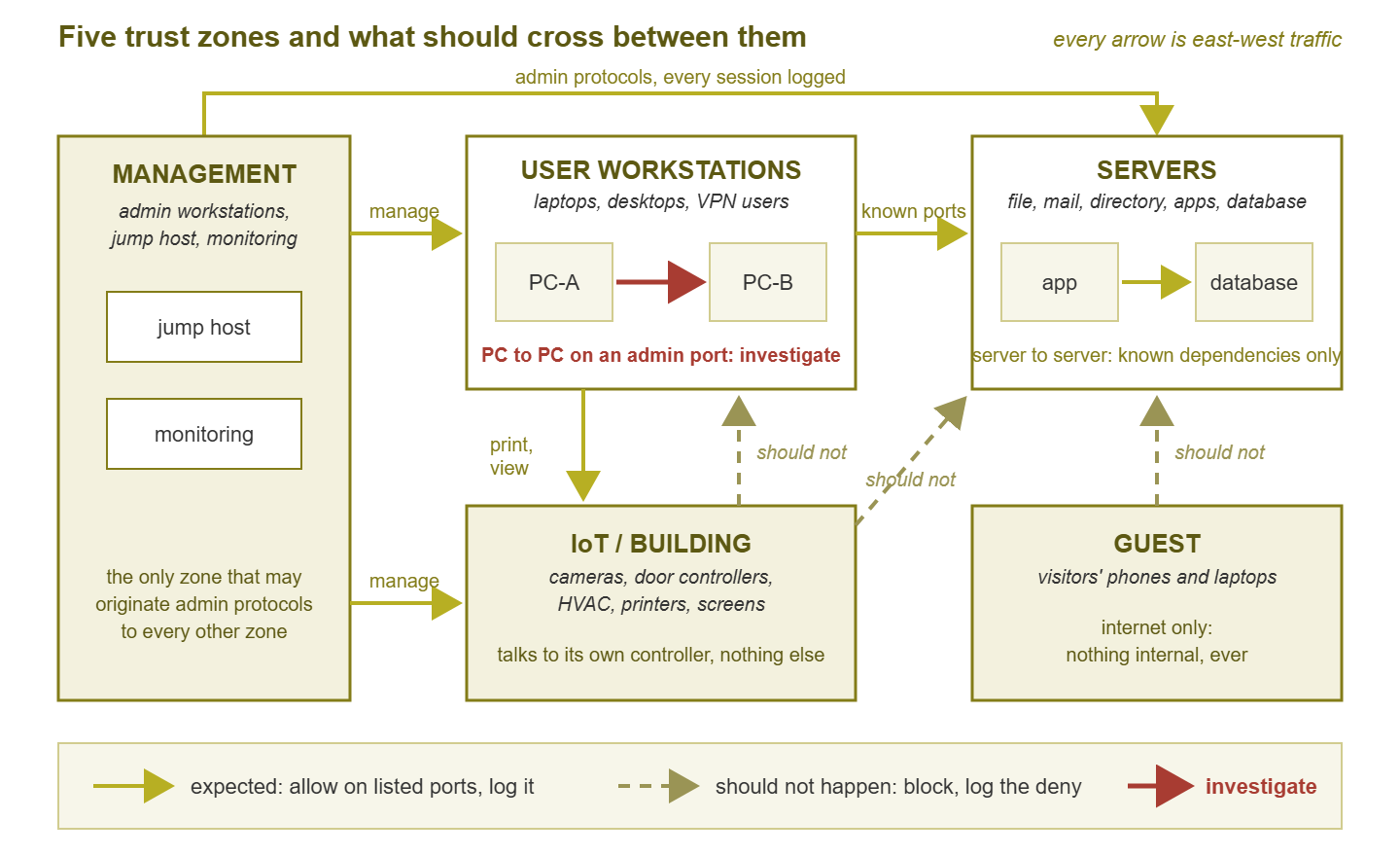
Figure 1: The zone map most small networks need. Solid arrows are expected crossings you allow and log. Dashed arrows should never occur. The one red arrow — a workstation reaching another workstation on an administrative port — is the crossing that most often means something is spreading.
What should not cross (and why that list matters more)
The list of expected crossings is useful, but the list of crossings that should never happen is where the security value lives. Each item on it is something you can block outright. And — more importantly — it is something you can alert on when it appears anyway. From the defender's chair, these are the ones to memorize.
Workstation → workstation on administrative protocols. In nearly every organization, one user's PC has no reason to open a remote desktop session to another user's PC. The same applies to a file-sharing connection or a remote management session. People share files through the file server, not directly. Help desk staff who remotely assist users do so from help desk machines, which belong in the management zone. So when a workstation starts an administrative conversation with a neighbor, there are only two explanations. Someone is doing something unusual by hand, or a compromise is spreading. Both deserve a look. This is the single highest-value alert in the whole topic.
IoT → servers. A camera has no business talking to the file server. A thermostat does not need the directory. Devices in this zone are the most likely to be running unpatched software with default credentials, which makes them attractive footholds. If they can reach servers, a compromised camera becomes a stepping stone. Confining them to their own controllers removes that stone entirely.
Guest → anything internal. Usually enforced already, because guest networks are typically built isolated. Verify it anyway: a guest network "temporarily" bridged to an internal VLAN for a vendor demo has a way of staying bridged.
Users → management interfaces. The login page of the core switch, the firewall's admin port, the hypervisor console: only the management zone should reach these. Users reaching them is either an admin working from the wrong machine (worth fixing) or something worse.
Servers → the internet on arbitrary ports. Servers need updates and a few outbound services, and the list is short. Outbound connections to unfamiliar destinations belong to a different topic — data leaving the building — covered in the Data Exfiltration Patterns guides. The zone model simply gives you a place to write the outbound list down.
Tip: "should not happen" does not mean "never happens." Every network has exceptions. There is the vendor's support laptop, or the one department that shares a scanner directly. There is the legacy app that talks to the database from a PC. The right response is not to loosen the rule but to move the exception into the matrix explicitly: source, destination, port, owner, and reason. An exception you have written down is a rule. An exception you have merely tolerated is a hole.
The zone-pair matrix: the one artifact to keep
Everything above compresses into a single table that you will use for the rest of this topic. The zone-pair matrix has one row per source zone and one column per destination zone. Each cell records your decision about traffic from the row's zone to the column's zone, using three states:
- Allow — permitted on a listed set of ports, and logged, so you can see how much of it there is and from whom.
- Log — permitted for now, but every session is logged and reviewed. This is the honest state for pairs you cannot block yet because you do not fully understand what depends on them. It is a temporary state with a review date, not a permanent one.
- Block — denied, with the denial logged. A logged deny is a free alarm: it fires exactly when something tries to do what nothing legitimate should do.
Here is a starter matrix for the six zones. Rows are where the connection starts; columns are where it is going. Adapt the port lists to your own services.
| From ↓ To → | Users | Servers | Management | IoT | Guest | Remote |
|---|---|---|---|---|---|---|
| Users | Block admin ports, alert | Allow: web, file, mail, directory, DNS, time | Block | Allow: print, camera viewing | Block | Block |
| Servers | Block, except named pushes | Allow: listed dependencies only | Allow: log and backup targets only | Block, except controller servers | Block | Block |
| Management | Allow admin protocols, log every session | Allow admin protocols, log every session | Allow, log | Allow admin protocols, log | Allow admin protocols, log | Allow admin protocols, log |
| IoT | Block | Block, except own controller | Block | Log | Block | Block |
| Guest | Block | Block | Block | Block | Log | Block |
| Remote | Block | Allow: same as Users, or narrower | Block (admins use a separate admin VPN profile) | Block | Block | Block |
Notice how much of the table is Block. That is the point. In the hard-shell model every cell was implicitly "allow, unlogged." Writing the matrix down converts most of those cells into explicit decisions. Each explicit Block becomes both a rule you can enforce and an alarm you can set.
Building your first matrix in an afternoon
You do not need a project plan for this. You need a list of your VLANs and a spreadsheet.
- 1. List every VLAN and subnet you have, and assign each one to a zone. If a VLAN holds a mix, note it. Servers and workstations sharing a subnet is common in older networks. A mixed VLAN is your first segmentation task, but it does not stop you from drawing the matrix.
- 2. Draw the empty grid, six by six. Label rows and columns.
- 3. Fill in the obvious allows from what you already know. Users reach the file server, mail server, and web applications. Management reaches everything. Write ports next to each.
- 4. Fill in the obvious blocks. Guest to anything internal. IoT to servers. Users to management interfaces.
- 5. Mark everything remaining as Log. This is honest: you do not yet know whether the pair is used. Logging it is how you find out, and the next guide in this topic shows how.
- 6. Date it and file it with your network documentation. This matrix is now your intended state. Every later guide compares reality against it.
Why lateral movement lives entirely in the east-west space
Lateral movement is the phase of a compromise in which control spreads from the first machine to others. It spreads from the phished laptop to a file server, from that server to the directory, from the directory to everything. You do not need to know how any of that is done to defend against it, and this topic will not describe it. What you need is one observation, which is obvious once said aloud. From the defender's chair, every lateral step is a new connection from one internal host to another internal host. It is east-west traffic by definition.
Three consequences follow, and they are the reason this topic exists.
The perimeter firewall never sees it. A connection from a workstation VLAN to the server VLAN does not go north. It goes through your core switch or an internal firewall, and if nothing there is looking, nobody is looking.
It very often crosses a zone boundary. The valuable targets are in the server and management zones; the starting point is almost always in the user zone. To get from one to the other, the traffic must cross the line you have just drawn. Watch the line and you watch the road it has to travel. It may also spread within a zone, workstation to workstation. That is exactly why that pair has its own row in the matrix and its own alert.
It looks like a change in who talks to whom. Legitimate east-west traffic is astonishingly repetitive: the same workstations reach the same servers on the same ports every working day. A compromise spreading introduces new pairs, new ports, and new directions. You cannot block all of it — users must reach servers — but every crossing you allow can still be logged, baselined, and compared against the matrix. New is the signal. The guides on monitoring traffic between zones and signals of lateral movement turn that idea into something you can run.
Zone thinking gives a defender three things the hard-shell model never could. They include fewer places to watch (boundaries instead of pairs) and a written definition of "abnormal" (anything not in the matrix). Zone thinking also gives you something concrete to enforce and verify. None of it requires new hardware — only a decision about which groups exist and which arrows between them you are willing to defend.
Where to go next
You now have the mental model that the rest of this topic depends on. The perimeter protects the gate. The space inside is where compromises spread. That space becomes manageable the moment you divide it into a few trust zones and write down, pair by pair, what may cross. The zone-pair matrix you drafted is your intended state. The next steps are about reality. They are observing what actually crosses between zones and verifying that your segmentation matches the matrix. They also include recognizing the signals that something is spreading, and responding without making it worse.
All of those guides live on the East-West Visibility & Lateral Movement pillar page. Start with the matrix, keep it honest, and you will already be ahead of most networks twice your size.
Put this into practice with SysPeep Monitor
Zone thinking starts with an accurate picture of what is actually on each segment. SysPeep Monitor auto-discovers the devices and interfaces on your network and draws the map. It keeps a live eye on the core switch and firewall interfaces that sit at every zone boundary. So when you draft your matrix, you are working from what is really there rather than from memory. The free trial installs on any Windows machine.
Download Free TrialLearn About SysPeep - All Rights Reserved.