
What Encryption Hides — and What It Still Shows
The first time a junior admin opens a packet capture from a modern network, the reaction is nearly always the same: almost everything is scrambled. Web traffic, mail, chat, software updates, the calls one server makes to another — all of it is encrypted, and the capture looks like a wall of random bytes. It is easy to conclude that monitoring encrypted traffic is pointless, that the network has gone dark, and that the only way back is to break the encryption open.
That conclusion is wrong, and this guide explains why. Encryption protects the contents of a conversation. It does not — and cannot — hide the fact that a conversation happened, who took part, how much was said, or when. Think of a sealed envelope in the post. The letter inside is private, but the outside carries the sender, the recipient, the postmark, and the weight. A postal worker who never opens a single envelope still knows an enormous amount about who writes to whom, how often, and how much they send.
By the end you will be able to list exactly which fields of an encrypted connection remain visible. You will know what each one is good for in day-to-day operations and in security work. Just as importantly, you will know which things are genuinely gone. That way, you stop spending effort looking for them where they cannot be found.
In this guide
- The envelope and the letter
- The visible fields, one by one
- Why the envelope is plenty for operations
- What the envelope tells security
- The honest list: what you truly lose
- Hidden versus visible: the reference table
- Reading one connection from the outside
- When the envelope gets thinner
- Where to go next
The envelope and the letter
Nearly all the encryption you meet on a network is TLS, Transport Layer Security. That is the protocol behind the padlock in your browser, and increasingly behind mail, chat, software updates, and server-to-server calls. A TLS connection begins with a short negotiation called the handshake. The client says hello and lists the options it supports. The server picks from that list and presents its certificate (an identity document signed by an authority the client trusts). The two sides agree on secret keys. From that point on, the application data — the web page, the file, the password — travels scrambled, and only the two ends can unscramble it.
Here is the part that gets forgotten. TLS runs on top of the ordinary network. Every scrambled packet is still a packet. It needs a source address, a destination address, and port numbers, or no router on earth could deliver it. Those fields cannot be encrypted, because the machines in the middle have to read them to do their job. The result is a connection with two layers. There is an envelope the network must be able to read. Inside it is a letter that only the endpoints can open.
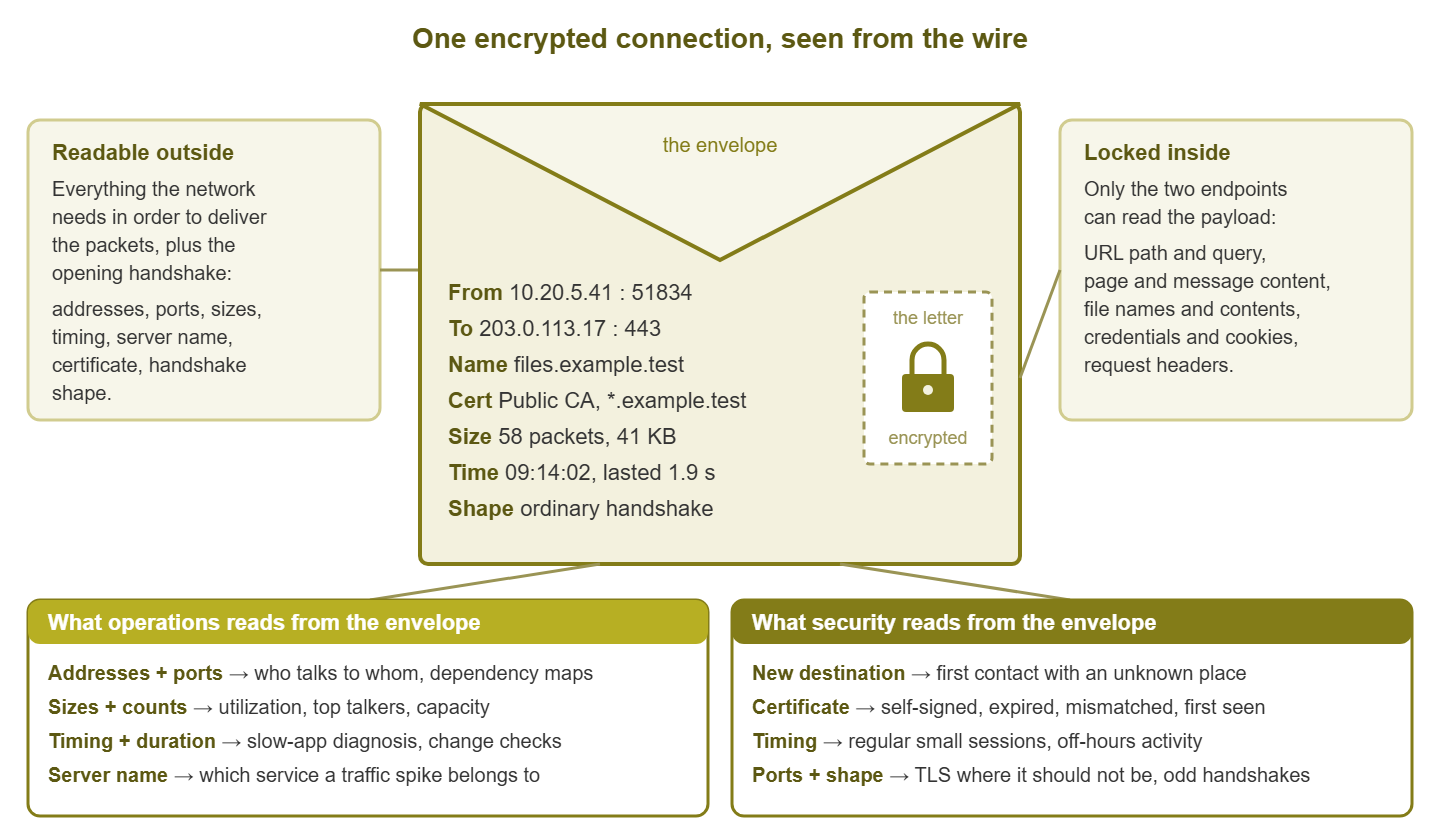
Figure 1: The envelope stays readable because the network needs it; the letter is locked because the application wants it that way. Operations lives mostly on the left-hand uses, security on the right, and both work without opening anything.
Encryption is usually introduced to new admins as a blind spot, and it is one — the encrypted traffic visibility guide covers that framing. This pillar is about the practice built on top of it: what the envelope says, how to read it, and what to do with what you find.
The visible fields, one by one
Seven things stay readable on every encrypted connection, or nearly every one. Each deserves a moment, because each answers a different question.
Source and destination addresses
The IP addresses of both ends. On your side this is a workstation, server, phone, or printer. On the far side it is a server somewhere on the internet or in another part of your own network. Addresses answer the most basic monitoring question there is: who is talking to whom? They are also the field you will use to join encrypted-traffic observations with everything else you know. That includes the DHCP lease that says which laptop held that address at the time. That information also includes the inventory record that says who uses that laptop, and the firewall log that recorded the same connection.
Ports
A port is a number that identifies which program on a machine a packet is meant for. The server side of an encrypted web connection nearly always uses port 443; mail submission, directory services, database engines, and remote management each have their own conventional numbers. The client side uses a high, essentially random port for each connection. The server port tells you what kind of service is being contacted. It lets you notice when the number and the traffic do not match. A TLS handshake on a port that should carry a plain-text management protocol is a classic clue that something is not what it claims to be.
Packet sizes and counts
Encryption changes the bytes; it does not change how many of them there are, apart from a small, predictable overhead. A connection that carries 40 KB in and 4 KB out looks like a page load. A connection that carries 2 GB out and 40 KB in looks like an upload. Sizes and counts are the raw material for utilization graphs, top-talker lists, and capacity planning, and they stay accurate whether the contents are encrypted or not.
Timing and duration
When the connection started, when it ended, how long it lasted, and how the packets were spaced within it. Timing is the field junior admins underrate most. It tells you whether an application feels slow because the network is slow or because the server is slow. A slow network means long gaps between a request packet and the first reply from the far end. A slow server means the same gap, but the network round trip was quick. Timing tells you that a workstation contacts the same address every five minutes, all night long, while its user is asleep. It tells you that a session which should last seconds has been open for hours.
The server name in the handshake
When a client starts a TLS handshake, it usually names the server it wants, in readable form. That lets a server hosting many sites pick the right certificate. This field is called Server Name Indication (SNI). It is the single most useful envelope field for security work, because it turns "a connection to some address" into "a connection to files.example.test". It is not always present — some clients and some services do not send it in readable form. That is why the next field, and your DNS logs, matter as backups.
The server's certificate
The server's identity document. In many handshakes the certificate is sent where a passive observer can read it. Where it is not, you can fetch it yourself by connecting to the server. A certificate carries the subject (the names it claims to represent) and the issuer (the authority that vouches for it). It also carries the validity period (the dates before and after which it is not valid). From those three things you can see whether a certificate is self-signed, expired, mismatched with the name being requested, or brand new to your network.
The shape of the handshake
Before encryption begins, client and server exchange a few packets in a recognizable pattern: an offer, a choice, a certificate, a key agreement. The sizes and order of those packets are visible, and different client software produces subtly different offers. You do not need to decode a single option to notice that one workstation's handshakes look unlike every other workstation's. The metadata analysis guide in this pillar goes deeper into that idea.
Why the envelope is plenty for operations
Step back and look at what an operations team actually needs day to day. Which links are busy and which are idle? Which servers does the accounting application depend on? Why is the file share slow this morning? Did last night's change alter how the branch office talks to headquarters? Every one of those questions is answered from the envelope: addresses, ports, sizes, timing. Not one of them needs the letter.
This is not a coincidence. Flow records are the summaries routers and firewalls export, one per connection, with addresses, ports, byte counts, and start and end times. They are envelope data by definition, and they were the backbone of traffic monitoring long before encryption became the default. Encryption took nothing away from flow-based monitoring. Top talkers, link utilization, application dependency maps, and slow-link diagnosis all work exactly as they always did, because they never looked inside the letter in the first place.
The one operational loss worth naming is application-level detail. In the plain-text days you could tell that a busy web connection was fetching one specific report or one specific image. Now you can tell it went to the reporting server on the web port and moved 40 MB in six seconds. For capacity questions and for most troubleshooting, that is enough. For "which report is so heavy?" you ask the application's own logs — a theme this pillar returns to in the visibility without breaking encryption guide.
What the envelope tells security
Security work asks a different question: not "how is the network doing?" but "is anything happening that should not be?" The envelope carries a surprising share of the answer, because most unwanted activity changes who, when, or how much long before it changes anything you would need decryption to see.
- New destinations. A workstation that has talked to the same few hundred addresses and names for months suddenly opens an encrypted session to somewhere it has never been. The contents are hidden; the novelty is not.
- Odd timing. Regular, small, encrypted sessions at fixed intervals, continuing overnight, from a machine whose user went home at five. That shape is visible in timing and sizes alone.
- Suspicious certificates. A self-signed certificate on a connection leaving the building. A certificate whose subject does not match the requested name. An issuer you have never seen before. A certificate on an internal service that changed when nobody changed it.
- Wrong port, wrong protocol. A TLS handshake where you expected a plain management protocol, or bytes that are not a TLS handshake at all on the port everyone assumes carries web traffic.
- Volume. A single encrypted destination receiving far more bytes from one host than any destination normally does, at an hour when that host is normally idle.
Notice that none of those needs the letter. Each is a property of the envelope, and each becomes an alert once you know what normal looks like on your network. The anomalies guide in this pillar turns them into concrete detection rules. This guide's job is only to convince you that the raw material is there.
The honest list: what you truly lose
Now the other half of the deal, without hedging. Encryption really does hide things, and pretending otherwise leads to bad designs and broken promises. From the wire, without decryption, you cannot see:
- URLs beyond the host name. You can see that a browser reached
files.example.test. You cannot see which folder, document, or search term it asked for. - Page and message content. Web pages, mail bodies, chat messages, API requests and responses, error text.
- File names and file contents. You can see that roughly 300 MB went out. You cannot see that it was a spreadsheet named after your customer list.
- Credentials. Usernames, passwords, session cookies, tokens. You cannot inspect them — and that is the entire point of encrypting the traffic.
- Headers and metadata inside the request. Browser identification strings, referrers, cookies, content types.
- Malicious content in transit. Whether a download was a harmless installer or something worse cannot be judged from the envelope.
Two consequences follow. First, any monitoring design that promises to catch content-level threats from encrypted network traffic alone is overpromising. Content-level visibility lives on the endpoint or on your own servers, never on the wire. Second, the loss is deliberate. The same property that stops you from reading an employee's banking session stops an attacker on the coffee-shop wireless from reading it too. Monitoring around encryption, rather than through it, keeps that protection intact for everyone.
Tip: when someone asks "can we see what was in that download?", the honest answer from the network side is no. The useful follow-up is "but we can see which host fetched it, from where, when, how big it was, and whether that destination was new". Then point them at the endpoint or the file server for the rest.
Hidden versus visible: the reference table
| Field | Hidden or visible? | Monitoring use |
|---|---|---|
| Source and destination addresses | Visible | Who talks to whom; joining with DHCP, inventory, and firewall logs; new-destination detection |
| Server port | Visible | Which type of service; protocol-on-wrong-port detection |
| Client port | Visible | Telling connections apart; little value on its own |
| Packet and byte counts, each direction | Visible | Utilization, top talkers, upload-versus-download shape, volume anomalies |
| Start time, end time, duration | Visible | Slowness diagnosis, long-session detection, off-hours activity |
| Packet spacing within a connection | Visible | Round-trip estimates; beaconing shape |
| Server name in the handshake | Usually visible | Which service; category policies; new-name detection |
| Server certificate (issuer, subject, validity) | Usually visible, or fetchable | Self-signed, expired, mismatched, and first-seen certificate alerts |
| Handshake shape | Visible | Unusual client software; automated versus browser traffic |
| URL path and query | Hidden | Ask the browser, proxy, or web server logs instead |
| Page, mail, and message content | Hidden | Ask the application; endpoint protection for threats in content |
| File names and contents | Hidden | Ask the file service or the endpoint |
| Credentials, cookies, tokens | Hidden, deliberately | Authentication logs on the server are the source |
| Request headers | Hidden | Server-side web logs |
Reading one connection from the outside
Theory is fine; let us read two real-looking connections using only the envelope. Both come from the same office workstation. Here is the first, in the kind of layout a flow record with handshake metadata would give you:
Start     Source        Destination     Port  Pkts  Bytes out  Bytes in  Duration
09:14:02  10.20.5.41    203.0.113.17    443   58    4,120      37,088    1.9 s
  server name : files.example.test
  certificate : subject *.example.test, public issuer, 61 days of validity left
  handshake   : ordinary browser pattern
Walk through it field by field. The source is a workstation on the office subnet. The destination port is the standard web port. The exchange is small, short, and download-heavy — roughly nine bytes in for every one out. That is what a page load or a small file fetch looks like. The server name matches the certificate's subject, the issuer is a public authority, and the certificate is nowhere near expiry. The handshake looks like every browser in the building. Operations sees nothing interesting. Security sees nothing interesting either, unless this name is new for this host, which a first-seen check would tell you. You know nothing about which file was viewed, and you do not need to know.
Now the second connection, from the same workstation, later that night:
Start     Source        Destination     Port  Pkts   Bytes out  Bytes in  Duration
02:41:17  10.20.5.41    198.51.100.8    443   1.6 M  2.1 GB     42 KB     1 h 47 m
  server name : (none sent)
  certificate : subject "localhost", self-signed, issued three days ago
  handshake   : not a browser pattern
Same workstation, middle of the night, and upload-heavy by a factor of fifty thousand. It ran for nearly two hours. No server name was sent. The certificate is self-signed, claims to be localhost, and was created this week. The handshake does not look like a browser. You still have no idea what was in the letter, and you do not need to: every visible field is wrong for a workstation. The most innocent explanation is a backup or sync agent someone installed that points at an unfamiliar server. That is exactly the kind of thing you want to know about anyway. The envelope alone got you from "nothing to see" to "someone should look at this before lunch".
When the envelope gets thinner
Be honest about the edges. Not every connection carries a readable server name. Some client software and some services send it in a protected form. In that case the name field is simply empty from the wire's point of view. Some devices resolve DNS over encrypted channels of their own, so the resolver a workstation asks is not always yours. In that case, you lose the lookup that normally precedes the connection. And large hosting providers put thousands of unrelated services behind a handful of shared addresses, so an address by itself tells you "a big cloud", not which tenant inside it.
None of this makes the envelope useless; it changes which fields you lean on. When the name is missing, the certificate often still identifies the service. Your own DNS resolver's logs record what name the client looked up a moment before connecting, provided your resolver is the one it uses. When the address is shared, the name and certificate carry the meaning. When everything is thin at once — no name, shared address, generic certificate — that combination is itself worth noticing, because most legitimate services do not look like that. Good encrypted-traffic monitoring degrades gracefully as fields disappear; it does not collapse the moment one goes missing.
A last practical point: the envelope is only as good as your ability to see it. Three plumbing pieces put envelope data in front of you. These are flow export from the firewall, a mirror port feeding a capture tool, and DNS logging on your resolver. Without at least one, this discussion is academic.
Where to go next
You now have the mental model the rest of this pillar builds on. Encryption locks the letter, not the envelope. The envelope — addresses, ports, sizes, timing, server name, certificate, handshake shape — answers most operational questions and a large share of security ones. The genuine losses are URLs, content, file names, and credentials, and those belong to the endpoint and the server, not to the wire.
The next guides go from model to practice. Metadata analysis shows how to read fingerprints, certificates, and flow shapes. TLS inspection tradeoffs covers what happens when you decide to open the letter after all, and what it costs. Visibility without breaking encryption is the design guide, and Anomalies in encrypted traffic turns the envelope into alerts you can actually run. All of them live under Monitoring Encrypted Traffic.
Put this into practice with SysPeep Monitor
The volume side of the envelope is how much, when, and on which link. That is exactly what SysPeep Monitor collects from your switches, routers, and firewalls over SNMP, without decrypting anything. Auto-discovery finds the devices, dashboards and maps show where the traffic goes, and alert rules flag the changes. The free trial runs on a single Windows machine.
Download Free TrialLearn About SysPeep - All Rights Reserved.