
Deny-Log Mining: Turning Blocked Traffic into Intelligence
Every time your firewall refuses a connection, it writes a line saying so. Most admins treat those lines as the firewall patting itself on the back: "blocked another one." That is a shame, because the deny log is the closest thing a small team has to a free security sensor. It records, without any extra hardware, everything that tried to cross a boundary and was refused. That means it records the internet's probing, your own misconfigurations, and, occasionally, the first quiet footsteps of something genuinely wrong.
This guide is about reading those lines on purpose. You will learn the handful of aggregations that turn a million denies into a one-page summary. You will learn how to tell harmless internet noise from traffic aimed at you and from your own broken configurations. And you will learn what to do with each kind of finding. It ends with a worked weekly review, the way one actually goes. If the fields in a deny line are still unfamiliar, read what a firewall log contains first. This guide assumes you can read src, dpt, and rule without stopping to think.
In this guide
- The deny log as a free sensor
- The aggregations that matter
- Noise, targeting, or misconfiguration?
- A worked weekly review
- What to do with each finding
- Keeping the notes that make next week easier
- Where to go next
The deny log as a free sensor
A sensor is anything that turns activity into a signal you can read. An intrusion detection system is a sensor; so is a motion light. Your firewall's deny log qualifies because it captures a specific, interesting kind of activity: attempts that policy refused. From the outside, that is the constant background hum of the internet — strangers checking every public address for open doors. Plus, very rarely, it is someone looking at your doors in particular. From the inside, it is every machine that reaches for something it is not allowed to have. Examples include a forgotten script pointed at a decommissioned server and a laptop carrying its home network's habits into the office. They include a new application nobody told you about and, rarely, malware trying to phone home.
Three properties make this sensor unusually good value. It is already installed. It is cheap to keep, because a deny is a single line with no session behind it. And it is policy-shaped: every entry is traffic your own rules said should not happen. So the log is pre-filtered for things worth a second look. The catch is that the signal arrives buried in noise. The only way to read it is to stop looking at lines and start looking at counts.
The aggregations that matter
Aggregation is the act of grouping many lines by a shared field and counting them. Instead of ten thousand denies, you get a short ranked list: this source, this many times; this port, this many times. Five aggregations do almost all of the work, and every log tool from a shell one-liner to a full log platform can produce them. The tooling guide covers the mechanics; here is what each one is for.
Top denied external sources
Group inbound denies on the outside interface by source address, count, and rank. Add two more columns: how many distinct destination ports each source touched, and on how many separate days it appeared. The ranking itself is rarely interesting — the top entries are usually scanning operations that hit everyone. The extra columns are the point. A source that appears once with hundreds of ports is a sweep that has already moved on. A source that appears every day, on one or two ports that are services you actually run, is looking at you specifically.
Top denied destination ports
Group the same inbound denies by destination port. This list tells you what the internet is looking for this month: remote-desktop, SSH, database ports, old file-sharing ports, whatever the current fashion is. It is mildly educational and mostly stable. What you care about is the change — a port that was not on last month's list and now is. You also care about the outliers. A port with many hits from very few sources is not fashion. It is attention, especially if you run something there.
Internal hosts hitting denies
Group denies whose source is an internal address by source, destination, and port. This is the most valuable aggregation in the whole guide, and it should be short. Every internal host has a job, and every deny it triggers is a mismatch between that job and your policy. The mismatch has one of three causes. The policy is wrong (a legitimate need you did not know about). Or the host is misconfigured (pointed at something that no longer exists, or carrying an old setting). Or the host is doing something it should not (a user experimenting, unapproved software, or malware). You cannot tell which from the count alone, but you can tell that each row needs an owner and an explanation. An internal host that is denied to many different internal destinations on the same few ports deserves particular attention. The internal scanning patterns guide covers what that looks like and why it matters.
Deny bursts in time
Count denies per hour (or per ten minutes) and look at the shape. Background noise is flat with gentle daily tides. A spike is either an external event or an internal one. An external event is one source hammering for a while, which the top-sources list will confirm. An internal event is a host suddenly generating thousands of denies, which usually means something just started running. Bursts are where a weekly review and a real-time alert overlap. The firewall logs and alerts guide covers the alerting side. Here you are asking what the burst meant and whether it left anything behind.
Denies on rules that should never fire
Some deny rules exist as tripwires. Examples are "the DMZ must never initiate connections into the office network" and "guest Wi-Fi must never touch servers." Another is "nothing but the backup host may reach the backup target." If you have named those rules clearly, a filter on the rule field gives you a list that ought to be empty. Any entry on it is a finding by construction — either the tripwire caught something, or a legitimate flow is missing an allow rule above it. Both are worth ten minutes.
Noise, targeting, or misconfiguration?
Once the aggregations exist, every row in them falls into one of three bins, and the response depends entirely on which bin. The diagram shows the whole process at a glance: raw lines in, aggregation in the middle, and three bins out, each with its own verdict.
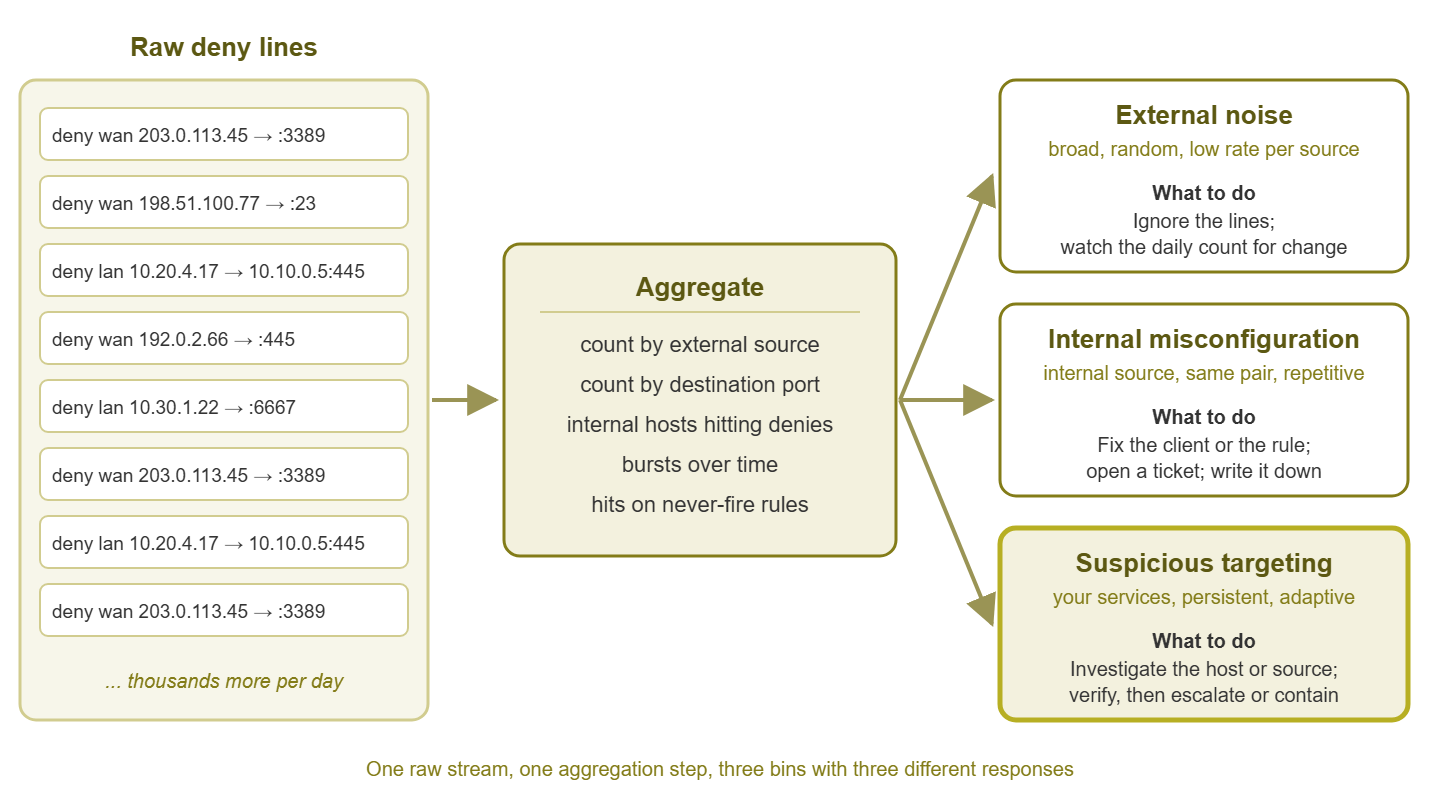
Figure 1: The deny-log mining loop. Raw lines are never read directly; they are aggregated, and each aggregated finding is sorted into one of three bins with a different response.
The three bins have recognizable fingerprints, and learning them is most of the skill.
External noise is broad, random, and low-rate per source. Broad: it is not about you; the same sources are hitting every address on the internet. Random: the ports and addresses vary and follow the internet's fashions rather than your services. Low-rate: each individual source touches you briefly and moves on, even if the total is large. A useful confirmation is that noise hits your unused public addresses as enthusiastically as your used ones. Noise is not a problem, and reading its lines is a waste of attention. Its count, however, is your baseline, and a change in the baseline is information.
Suspicious targeting is specific, persistent, and adaptive. Specific: it goes for services you actually run, on the addresses where you run them. It often goes for the management ports and VPN endpoints rather than the public website. Persistent: the same source, or a small cluster of sources, returns day after day. Adaptive: the pattern changes in response to what it finds — a port that answered yesterday gets more attention today. Targeting is uncommon, and most of what feels like targeting at first is noise that happened to line up. The distinguishing test is time: noise forgets you; targeting remembers.
Internal misconfiguration has an internal source, hits the same source-destination pair, and is repetitive. It often has machine-like regularity — every thirty seconds, every five minutes, on the hour. Examples are a workstation retrying a decommissioned file server and a monitoring probe polling a device it was never allowed to reach. Another is a print driver that insists on a discovery protocol you block. These produce hundreds or thousands of identical denies and zero danger. They are worth fixing anyway. They bloat the log and usually mean something is silently broken for a user. Every one you clear makes the remaining internal denies more meaningful.
The honest complication is the fourth case that looks like the third. An internal host talks, regularly, to an external address on an unusual port and is denied. Regular and repetitive fits misconfiguration — but "phoning home" is also regular and repetitive. The difference is the destination. An internal host retrying an internal server it used to know is a leftover. An internal host retrying an unfamiliar internet address every few minutes is something to look at today, not next week.
| Fingerprint | External noise | Suspicious targeting | Internal misconfiguration |
|---|---|---|---|
| Source | Many external, each brief | Few external, returning daily | One internal host |
| Destination | Any public address, used or not | Your real services and management ports | One specific host or service |
| Ports | The internet's current fashions | What you actually run | One port, always the same |
| Timing | Flat background with tides | Persists across days; shifts with what it learns | Clockwork regular |
| What it means | Nothing, until the count changes | Someone is paying attention to you | Something inside is silently broken |
| Response | Ignore lines; watch the count | Investigate; verify; escalate or contain | Fix client or rule; ticket; note |
A worked weekly review
Here is how a thirty-minute weekly session goes, using illustrative output from a small network with one edge firewall. The addresses and counts are invented; the shapes are not.
First, the external sources. Seven days of inbound denies on the outside interface, grouped by source, with distinct ports and days seen:
count   source           ports  days
14212   203.0.113.45         1     7
 9870   198.51.100.77     1840     1
 2210   203.0.113.9          3     6
 1804   192.0.2.66         211     2
  877   198.51.100.140       2     7
Read the columns, not the ranking. The second row is a textbook sweep: nearly two thousand ports in a single day, then gone. Noise, ignore. The first row is the opposite shape: one port, every single day, fourteen thousand attempts. Which port? A quick filter shows it is 3389, Remote Desktop, aimed at the one public address where you publish a remote-access gateway. That is persistent and specific. It may still be a bored automated tool that will never get anywhere. But it earns a note. It earns a check that the gateway's own logs show no successful logins from that address. And it earns a look at whether that address appears anywhere in the allow logs. The last row is the same pattern in miniature: two ports, seven days. Worth the same treatment.
Second, the destination ports. The same seven days grouped by port, with distinct sources:
dport   count   sources
   23   31020     4100
 3389   18455     2260
  445   12030     1850
   22    9018     1500
 8443    4410       12
The first four rows are the internet's greatest hits — thousands of sources each, the usual fashions. Compare with last month and the mix is about the same. The last row is the interesting one: a respectable number of hits from only a dozen sources. Port 8443 is where your customer portal lives. Twelve sources sharing a focused interest in one of your real services is the shape of targeting. It joins the notes, and you check which twelve they are. If they overlap with the persistent sources above, you have a cluster. A cluster earns a conversation with whoever owns security decisions in your organization.
Third, the internal hosts. This list should be short, and each row gets an owner:
count   src           dst              dport   rule
 1840   10.20.4.17    10.10.0.5          445   lan-to-servers-default-deny
  612   10.30.1.22    203.0.113.200     6667   lan-to-internet-restricted
  300   10.20.8.40    10.20.0.1          161   mgmt-only
   96   10.20.4.51    (many)           22,445  lan-to-servers-default-deny
Row one: a workstation trying the file-sharing port on 10.10.0.5 every few minutes. That address belonged to a file server decommissioned months ago. A mapped drive nobody removed — misconfiguration. Ticket to the desktop team, and the row disappears next week. Row three: the monitoring host polling the gateway over SNMP and being refused by the management-only rule. Either monitoring needs an allow, or it should not be polling that device; either way, a rule change or a config change, ticketed. Row four: a workstation touching many internal servers on SSH and file-sharing ports. That is not a leftover; that is a host looking around. It moves to the top of the list, and the internal scanning guide linked above is the next thing you read.
Row two is the one that matters most. An internal workstation reaches for an unfamiliar external address on port 6667 and is denied 612 times in a week. That works out to roughly once every fifteen minutes, around the clock, including nights and the weekend. Regular, machine-like, external, unusual port. That is the fingerprint of something on the host trying to reach a controller. The attempt is being stopped only because a restrictive outbound rule happened to be in the way. This is a same-day investigation. Isolate the workstation's network access. Involve whoever handles endpoint security. And check the allow logs for anything else that host has been talking to.
Fourth, bursts and tripwires. The hourly chart shows one spike on Tuesday afternoon, which the sources list explains: the big port sweep, over in forty minutes. Nothing left behind. The never-fire rules show two hits on dmz-to-lan-deny from the web server toward the database server on a port the database does not use. It is probably a misconfigured health check on the web server. But the DMZ initiating anything inward is exactly what that tripwire exists to catch. So those hits get verified against the web server's own logs before they are written off.
Thirty minutes, four aggregations, and here are the week's findings. There are two persistent external sources to watch and one focused cluster on the portal to escalate. There are two internal misconfigurations to ticket and one likely infection to investigate. There are also one internal host showing scanning behavior and one tripwire hit to verify. That is what mining looks like.
What to do with each finding
Every finding gets exactly one of three verdicts, and writing the verdict down is part of the job.
- Tune. The finding reveals that policy and reality disagree, and policy should move. A legitimate flow hitting a deny needs an allow rule, as narrow as possible. A tripwire that catches an approved health check needs an exception above it. Internal misconfigurations are usually tuned on the client side instead — remove the stale mapping or fix the probe target. They only get a rule if the flow turns out to be wanted. Every tune is a rule change. Rule changes go through the change process described in closing the loop from logs to rules.
- Investigate. The finding might be a security problem, and you do not yet know. Examples are persistent external sources against real services and internal hosts talking to unfamiliar external addresses on odd ports. Others are internal hosts touching many neighbors and tripwire hits with no innocent explanation. Investigation means gathering more evidence. That means the host's allow logs, the destination's reputation, the endpoint's own state, and the owner's explanation. And, critically, it means not tuning the rule until you understand what the traffic is. A deny that is stopping something bad is a deny you want to keep.
- Ignore and note. The finding is noise, or a known and accepted oddity, and you have decided not to spend more time on it. The note is not optional: "203.0.113.45 hits the RDP gateway daily; checked gateway logs, no successful logins; will revisit if the count changes or the port changes." Next week, the row is already explained, and the review gets faster. An ignore without a note is not a decision; it is forgetting.
Tip: The order of the three bins in your review should be the reverse of their volume. Internal hosts hitting denies are the smallest list and the richest; read them first, every week, without exception. External noise is the largest list and the poorest; read only its shape. Most of the value of deny-log mining comes from the ten rows you read carefully, not the ten thousand you skim.
Keeping the notes that make next week easier
The review notes are the institutional memory of the sensor. Keep them somewhere shared and searchable — a page in the team wiki, a document beside the retention policy, or a simple table. Use one row per finding. Include the date, the aggregation it came from, the address or host, the verdict, and one sentence of reasoning. Over a few months the notes become a map of your environment's quirks. They show which external sources are old acquaintances, which internal hosts have permanent explanations, and which rules produce recurring questions. New team members can read them and learn the network's normal in an afternoon. And when something changes — a familiar source starts touching a new port, a ticketed misconfiguration reappears — the notes are how you know.
Notes also feed the other reviews. "Tune" findings become input for the monthly rule cleanup. "Investigate" findings that turned out innocent become documented exceptions. And the count of new findings per week, tracked over time, is the simplest measure of whether the environment is getting cleaner.
Where to go next
You now have a way of reading the deny log that scales: five aggregations, three bins, three verdicts, one set of notes. External noise gets counted and ignored; internal misconfigurations get fixed and ticketed; targeting and suspicious internal behavior get investigated before anything is tuned. None of it requires reading raw lines, and all of it fits in thirty minutes a week once the summaries are automated.
Two guides continue from here. From logs to better rules takes the "tune" findings and turns them into a safe change process. That way, what the deny log teaches you actually reaches the rulebase. And the tooling guide shows how to produce the four summaries above automatically, from shell one-liners up to a lightweight log platform. Both live under Firewall Log Analysis Fundamentals. Alongside them is the guide on what to keep, review, and ignore that sets the cadence this review lives in.
Put this into practice with SysPeep Monitor
A deny-log finding often ends with the question "what is that host actually doing?" SysPeep Monitor can put a picture beside the log. It can show interface traffic, session counts, and firewall CPU over SNMP, and the host's own health over WMI. That way, a suspicious row in your weekly review comes with context instead of guesswork. The free trial installs on any Windows machine.
Download Free TrialLearn About SysPeep - All Rights Reserved.