
NetFlow vs. sFlow vs. IPFIX: The Differences That Matter
Your bandwidth graph says the internet uplink hit 90% at lunchtime. That graph is honest, and it is also completely unhelpful. It cannot answer the only question anyone actually asks next: who did it? Interface counters — the numbers behind every utilization graph — count bytes crossing a port, and that is all they do. The moment you want names — which machine, talking to what, over which service — you need flow data. And the moment you go looking for flow data, you run into three names that sound interchangeable: NetFlow, sFlow, and IPFIX.
They are not interchangeable. Hiding behind those three names are two genuinely different ways of watching a network, plus one standards story with a happy ending. This guide assumes you have never touched flow monitoring. By the end you will know exactly what a flow record contains and how each of the three families produces one. You will know which differences will actually affect your life — as opposed to the ones people argue about online. Small spoiler: the choice is usually made for you by the gear you already own, and that turns out to be fine.
In this guide
- What a flow is: the network's phone bill
- NetFlow: the device keeps a ledger
- sFlow: not actually flows at all
- The two models, side by side
- IPFIX: NetFlow's grown-up format
- The differences that actually matter
- So which one do you enable?
- Quick answers to common questions
- Where to go next
What a flow is: the network's phone bill
Before comparing the three families, nail down the thing they all produce. A flow is a summary of one conversation on the network. Conversations are identified by five values, which admins call the 5-tuple: the source address, the destination address, the source port, the destination port, and the protocol. (The port numbers identify which program or service on each machine is talking. Web traffic goes to port 443, mail goes to port 25, and so on. The protocol is the carrying method, usually TCP or UDP.) Every packet that shares those five values, close together in time, belongs to the same conversation. A flow record is that conversation's one-line summary.
Here is what one record looks like, tidied up for reading:
src 10.1.4.23:51844   dst 203.0.113.9:443   proto TCP
start 12:41:07        end 12:58:52
packets 214,509       bytes 302,118,440
Read it like a detective. Workstation 10.1.4.23 talked to an outside address on port 443 (that is HTTPS, the encrypted web). The conversation lasted a little under eighteen minutes and moved about 300 MB. One line, whole story. Notice what is absent: no page contents, no file names, no message bodies. A flow record knows a conversation happened and how big it was — never what was said.
The analogy that makes all of this click is the itemized phone bill. Your phone bill lists who you called, when, and for how long — it does not contain recordings of the calls. Flow data is your network's itemized phone bill. Its nosy cousin, packet capture, is the phone tap: complete contents, enormous storage cost, and frankly overkill for most questions. The bill is tiny by comparison. A busy hour on an office uplink might be tens of millions of packets but only a few thousand conversations. That is why a flow collector can keep weeks or months of history on a modest disk and search it in seconds. For the surprising range of questions that little bill can answer, see What Flow Data Reveals That Counters Can't. Here, we care about how the bill gets written.
One wrinkle worth absorbing now, because it explains oddities you will meet in every collector: flow records are usually written per direction. What you think of as one conversation typically lands as two records: your workstation requesting a page, the server sending it back. There is one for each direction of travel, each with its own byte and packet counts. Collectors are good at stitching the halves back together into a single displayed "conversation." But when a report shows separate inbound and outbound entries for the same pair of machines, that is not a bug. That is the bookkeeping showing through, and the lopsidedness itself is informative: a download is heavy one way and light the other, by nature.
NetFlow: the device keeps a ledger
NetFlow is the original — it began life as a router feature at Cisco and became so useful that the whole industry copied the idea. Its model is bookkeeping. A NetFlow-speaking device maintains a table in memory called the flow cache: one row per active conversation. Every single packet that passes through gets inspected just enough to identify its 5-tuple. It is matched to its row (or given a new row if it starts a new conversation). The packet is then counted — packets up by one, bytes up by the packet's size, last-seen timestamp refreshed.
Rows do not sit in the table forever. A conversation may visibly end (a TCP session closing) or go quiet for a while (the inactive timeout). Or it may have been running so long that the device wants to report progress (the active timeout). In any of those cases, the row is packaged into a flow record. The record is shipped over the network to a collector — the machine that stores and reports on flow data. Then the row is deleted from the cache. One consequence is worth knowing on day one. Records arrive when conversations end or age out, so the collector's picture of "right now" trails reality by a minute or two. That is normal, tunable, and covered in the setup guide.
The payoff of this model is precision. Because every packet was counted, the byte totals are exact. That is accounting you could bill from, and the kind of certainty you want when auditing what still talks to a server. The cost is that the device does real work: memory for the table and processing for every packet. On a firewall or edge router moving internet-speed traffic, that work is modest. A firewall already tracks every connection just to do its job, so flow accounting comes almost free. On a core switch moving traffic at line rate, tracking every packet is genuinely expensive, which is exactly the gap the next protocol fills.
One version note matters, because you will see the numbers everywhere. NetFlow v5 uses a fixed record format — the same fields, in the same order, in every record from every device. That made it universally understood and permanently frozen: v5 has no room for IPv6 addresses, VLAN details, or anything invented after it. NetFlow v9 solved this with templates. The exporter first sends a small message describing the layout of its records — "my records contain these fields, in this order". It then streams records matching that description. Templates let each device export whatever fields it actually has. If your device offers both, pick v9; v5 still works, but it is the flip phone of flow formats.
sFlow: not actually flows at all
Now for the naming mischief: despite the name, sFlow does not track flows. An sFlow device keeps no conversation table and maintains no per-conversation state. It does two much simpler things. First, it samples packets. Roughly one packet out of every N is sampled (a rate you configure — one in 1,000 is common). The device copies the first portion of that packet — the headers, which carry the addresses and ports. It ships that copy to the collector immediately, raw and unprocessed. Second, on a fixed schedule it ships snapshots of its interface counters, the same totals SNMP would give you, pushed rather than polled.
All the intelligence moves to the collector, which reconstructs the traffic picture statistically. If one packet in a thousand was examined, multiply what was seen by a thousand. That makes sFlow data estimates by nature. Big conversations are estimated very accurately. A flow making up a third of your traffic contributes thousands of samples, and the arithmetic lands close to truth. Small conversations get fuzzy: a fifty-packet exchange might be sampled once or not at all, so its reported size is somewhere between rough and fictional. What sampling does to each kind of question is a topic big enough for its own guide. See Sampling: What 1-in-1000 Does to the Truth. But the headline is: shares and rankings survive, tiny details do not.
Why accept fuzziness at all? Because sampling is nearly free for the device. Copying one packet in a thousand takes so little effort that switch makers build it into the forwarding silicon. That means sFlow runs happily on fast, busy switches — including the many-port data-center kind — where per-packet bookkeeping would be unaffordable. That is sFlow's home turf: breadth. Enable it across a whole switch fabric and you get a statistically faithful map of who talks to whom. That map works at a scale where the ledger model cannot follow.
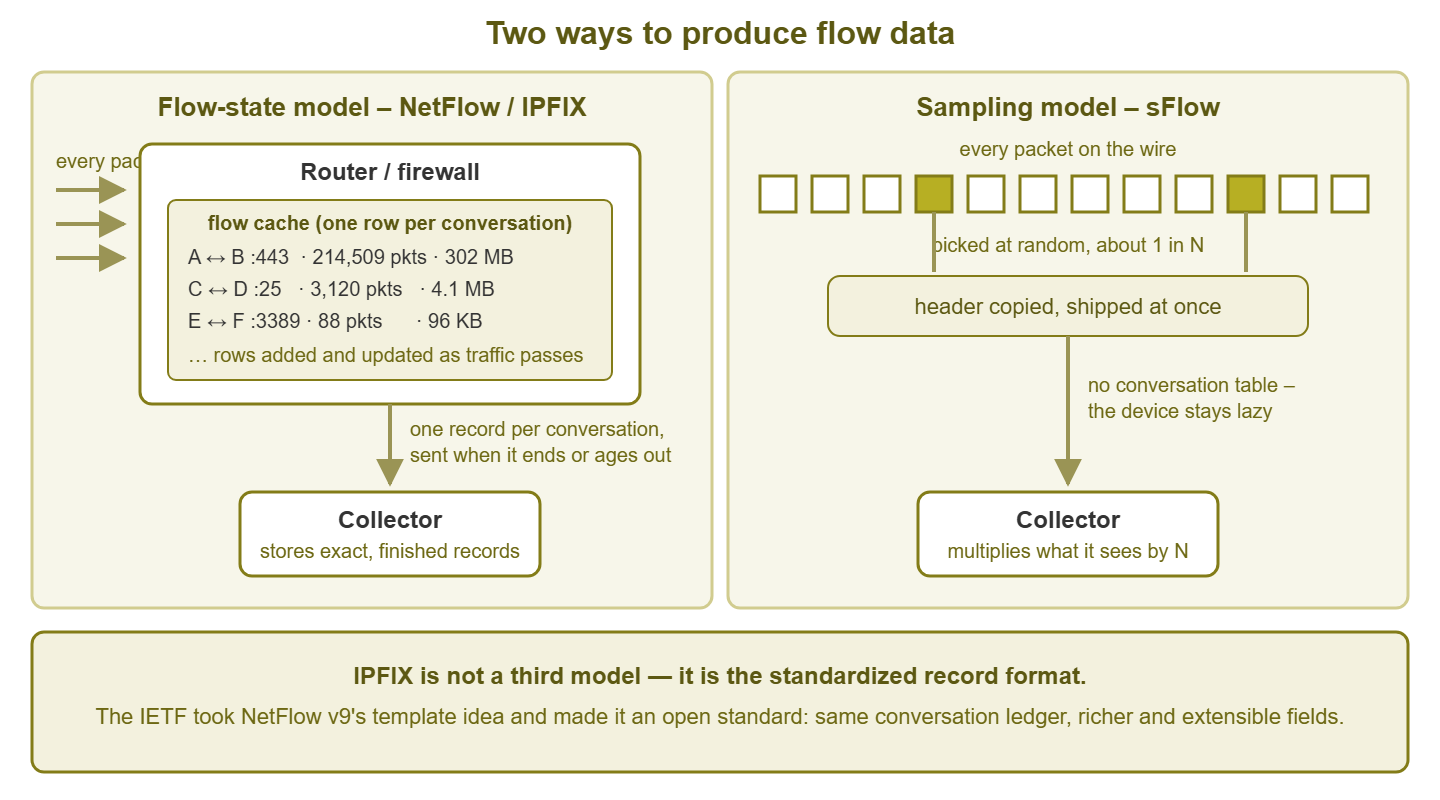
Figure 1: The two models. NetFlow and IPFIX devices keep a ledger of conversations and export finished records. sFlow devices ship a random sample of packet headers and let the collector do the math. IPFIX is not a third model — it is the standardized record format.
IPFIX: NetFlow's grown-up format
The third name is the standards story. NetFlow v9's template idea was clearly the right one. So the IETF — the body that writes internet standards — took it in and polished it. The IETF published it as an open standard called IPFIX (IP Flow Information Export). You will sometimes hear it called "NetFlow v10," which is informal but captures the lineage. It has the same ledger model underneath and the same template mechanism, now vendor-neutral and considerably more capable.
Here is what "more capable" means in practice. IPFIX defines a large registry of standardized field types — hundreds of them, far beyond addresses and byte counts. It defines a clean way for vendors to add their own fields without breaking anyone else's collector, and support for variable-length values. That last one matters more than it sounds. It is how some firewalls export the application name they identified inside a connection, or a hostname, alongside the classic counters. Think of NetFlow v5 as a rigid paper form and v9 as a form you can redesign. Then IPFIX is the same form as an international standard with room for attachments.
For you, the practical takeaway is short: treat an IPFIX device exactly like a NetFlow device with a richer vocabulary. The accounting model is the same conversation ledger; the difference is what each record can carry. Collectors treat the two nearly identically, and when a device offers both, IPFIX is the forward-looking pick.
The differences that actually matter
Comparison articles love to tabulate a dozen dimensions. In real deployments, three questions settle it.
1. What does your gear actually export?
This decides most cases before you get a vote. Support follows device class. Routers and firewalls lean NetFlow or IPFIX — the ledger model fits boxes that already track connections as part of their day job. Switches, especially fast or data-center switches, lean sFlow, because sampling is what their silicon can do cheaply. Plenty of devices speak more than one; plenty speak exactly one; a few budget devices speak none. Ten minutes with your device's documentation — search for "NetFlow," "IPFIX," "sFlow," or just "flow export" — beats any comparison chart ever written.
2. Accounting precision versus device load
This is the one genuine engineering tradeoff. Unsampled NetFlow or IPFIX counts every packet: exact totals, at the cost of device memory and processing. sFlow estimates from samples: near-zero device cost, statistical answers. If the question is billing, chargeback, or "prove nothing still talks to this server," exactness matters. If the question is capacity planning, top talkers, or protocol mix, estimates are entirely fine. And being able to afford visibility on a fast switch beats theoretical precision you cannot enable.
3. Will your collector eat it?
Mostly yes. Modern collectors ingest all three families and present them in the same reports. So this is rarely a reason to pick a protocol — but verify before you commit. If a firewall exports interesting vendor-specific IPFIX fields (application names, users), check that your collector actually understands those fields rather than silently dropping them.
| NetFlow (v5/v9) | sFlow | IPFIX | |
|---|---|---|---|
| Underlying model | Conversation ledger (flow cache) | Sampled packet headers + counter snapshots | Conversation ledger, standardized records |
| Work for the device | Moderate: touches and counts every packet | Very low: built into switch silicon | Moderate: same as NetFlow |
| Accounting precision | Exact when unsampled | Statistical estimate | Exact when unsampled; richest field set |
| Typical gear | Routers, firewalls | Switches, data-center fabrics | Newer routers and firewalls, some switches |
Watch the labels blur: busy routers can be configured to sample before flow tracking — "sampled NetFlow". This trades away NetFlow's exactness to buy back device capacity. And several vendors ship NetFlow-compatible export under their own house names. If the configuration talks about templates and collectors, it is the v9/IPFIX family regardless of branding. When exact accounting matters, confirm the export is unsampled rather than trusting the protocol name.
So which one do you enable?
Here is the honest answer this article has been building toward: do not agonize. The differences above matter at the margins — billing-grade accounting, tiny-flow forensics, exotic fields. For the everyday questions ("who is eating the uplink?", "what talks to this server?", "what does normal look like?") all three families answer well. The expensive mistake is not picking the wrong protocol; it is spending a month comparing protocols while your network stays anonymous. A short decision procedure:
- 1. Pick the device that sees the traffic you care about. For most networks that is the internet edge — the firewall or router your uplink passes through.
- 2. Find out what it exports. Check its admin interface or documentation for NetFlow, IPFIX, or sFlow support.
- 3. Offered a choice of versions? Prefer IPFIX or NetFlow v9 over v5 — templates and IPv6 support are worth having.
- 4. Only have a switch, and it only speaks sFlow? Take it gladly. Statistical answers about who-talks-to-whom beat precise ignorance every day of the week.
- 5. Point the export at a collector and start looking at real reports. Everything after that is refinement.
The full path includes choosing a collector, the configuration knobs, opening firewall ports, and validating that what arrives is trustworthy. It is walked step by step in Setting Up Flow Export End to End.
Quick answers to the questions everyone asks
Can I run more than one at once?
Yes, and most grown networks do exactly that without ceremony. The edge firewall exports NetFlow or IPFIX, and the switches export sFlow. All of it lands in one collector that merges the sources into a single view. The protocols do not conflict with each other, because each device only reports what it sees. In fact the combination is a design pattern in its own right. It uses the exact ledger where precision is affordable, and the cheap sample where speed makes precision expensive. You will find it recurring throughout these guides.
Will the export itself clog my network?
No, and it is worth seeing why. Flow records are summaries. A device summarizing a fully loaded gigabit link emits a comparative trickle of export traffic, because thousands of packets collapse into each one-line record. sFlow's sampled headers are a trickle by construction. The budget that flow export actually spends is the device's own memory and processing. That is why the load conversation in this guide was always about the exporter's CPU, never about the wire. After enabling export on a modest device, glance at its CPU for a day; that is the whole due diligence.
Which one is best for security visibility?
The unsampled ledger, where you can afford it. Security questions disproportionately involve small, brief, or rare conversations — a quick login from nowhere, a scan, a whispering beacon. Those are exactly what sampling blurs first, while big-pattern detection survives fine. The practical answer is placement again: exact records at the internet edge, samples for breadth inside, and realistic expectations about each. Flow Data as a Security Sensor goes properly into what flow data can and cannot catch.
Where to go next
You now know the vocabulary that gates this whole subject. A flow is a conversation summary — the phone bill, not the phone tap. NetFlow invented the ledger model and its v9 templates made records flexible. sFlow is really packet sampling wearing a flow costume, cheap enough to run everywhere. And IPFIX is the ledger model's record format all grown up and standardized. Choose by placement and device support, not by protocol religion, and let your collector homogenize the rest.
The natural next steps begin with seeing what this data can actually do for you. What Flow Data Reveals That Counters Can't makes that case with five short diagnostic stories. Then comes wiring up your first exporter. The rest of the Flow Monitoring (NetFlow, sFlow, IPFIX) guides cover reading the reports, sampling accuracy, security uses, and the storage math.
Put this into practice with SysPeep Monitor
Flow protocols tell you who is talking. They say nothing about whether the devices doing the talking are healthy. SysPeep Monitor covers that side of the street. It discovers your routers, switches, and firewalls. It watches health, port status, and traffic counters over SNMP and WMI, and alerts you when something breaks. So while you pick a flow protocol, the basics are already watched. The free trial installs on any Windows machine in minutes.
Download Free TrialLearn About SysPeep - All Rights Reserved.