
Setting Tripwires: Automated Watchdogs for Rare Events
The fault strikes at three in the morning. You are, quite reasonably, asleep. By the time you arrive at eight the network has healed itself. The perishable evidence — queue depths, session tables, the exact second things went quiet — has gone. All that remains is a user saying it happened again. You cannot out-stubborn a fault that works nights. You need staff who do.
A tripwire is that staff. It is a small automated watcher aimed at one specific event, armed around the clock. Its whole job is to notice the moment, write down the time, and grab the evidence. When it has earned it, the tripwire wakes somebody. The name comes from the taut wire across a trail that announces an intruder; the IT version announces a symptom. Build a few of them well and the three a.m. fault stops being invisible and starts being the best-documented event of your week.
This guide covers the four kinds of tripwire worth knowing: high-frequency synthetic checks, threshold traps, log-pattern triggers, and capture-on-event rigs. It shows how to wire them together into one evidence machine. It ends with the small daily ritual that keeps a long hunt alive, the morning tripwire page.
In this guide
- What a tripwire is (and is not)
- Aim at the symptom, not the theory
- Tripwire 1: high-frequency synthetic checks
- Tripwire 2: threshold traps on the suspect metric
- Tripwire 3: log-pattern triggers
- Tripwire 4: capture-on-event rigs
- Wiring the rig together
- The morning tripwire page
- A worked rig: the branch that blinked at three
- Where to go next
What a tripwire is (and is not)
You already run monitoring, so it is worth being precise about how a tripwire differs. Regular monitoring is broad, permanent, and deliberately calm. It watches everything at a modest rhythm. Its alert rules include confirmation logic — two or three bad polls before firing — precisely so that it does not raise false alarms. Those are the right choices for production alerting. They are the wrong choices for hunting a rare event. The confirmation logic that filters false alarms also filters out your ninety-second ghost.
A tripwire inverts every one of those settings. It is narrow: one watcher, one question, aimed at a single suspected symptom or precursor. It is temporary: armed for the weeks of the hunt, then stood down. And it is tuned hot: it fires on the first twitch. During a hunt a false alarm costs you a shrug while a missed event costs you another week of waiting. You are not building an alarm system to run forever; you are baiting a trap you intend to spring a handful of times.
The cousin term watchdog comes from hardware. It is a timer that must be reset regularly by a healthy system, so that silence itself triggers the alarm. That inversion is worth stealing for hunts where the event is an absence — a heartbeat that skips, a job that fails to report in. A tripwire fires when something happens; a watchdog fires when something that should happen does not. You will want both kinds in your kit, and everything below applies to either.
A tripwire's primary product is evidence, not urgency. Its outputs are timestamps, measurements, and snapshots that drop straight into your timeline. Waking a human is optional and often counterproductive. Most tripwire firings should land quietly on a page you read in the morning, which we will get to.
Aim at the symptom, not the theory
The first tripwire you set should measure what the user actually experiences, as directly as possible. If the complaint is "logging in hangs sometimes," trap the duration of a login — not CPU on the server you suspect. If it is "the branch loses the network," trap reachability from inside the branch — not a theory about the WAN router.
There are two reasons for this discipline. First, your theory may simply be wrong, and a symptom trap keeps you honest. If the suspect metric misbehaves but the symptom trap stays green, your theory just failed an audition, cheaply. Second, the symptom trap turns arguments into arithmetic. "Did it happen last night?" stops being a matter of user testimony and becomes a lookup. The check failed at 03:02:41 for seventy seconds, or it did not. That objective definition of "an occurrence" is the anchor every other piece of evidence hangs on.
Once the symptom is trapped, add precursor traps around the suspects your trend graphs and timeline have pointed at. The symptom trap tells you that it happened; the precursor traps tell you what was moving when it did.
Tripwire 1: high-frequency synthetic checks
A synthetic check is a robot user: a scripted version of a real operation. It might be a ping, a name lookup, a web page fetch, a file open, or a test login. The operation is performed on a schedule, with the result and its duration written down every time. Your monitoring system already runs checks like these; the tripwire version differs mainly in tempo. During a hunt, run the check every ten to thirty seconds instead of every few minutes. Then even a short event has nowhere to hide between samples.
Log every result, not just failures, and log durations, not just pass/fail. The record of successes is what proves the fault was absent at 02:00 and present at 03:02. Durations catch the early tremors. An operation that quietly stretches from fifty milliseconds to two seconds is a fault clearing its throat. A minimal Windows example, timing a web fetch every fifteen seconds:
while ($true) {
  $stamp = Get-Date -Format "yyyy-MM-dd HH:mm:ss"
  $sw = [System.Diagnostics.Stopwatch]::StartNew()
  try {
    $null = Invoke-WebRequest -Uri "http://app1.corp.local/status" -UseBasicParsing -TimeoutSec 5
    $val = $sw.ElapsedMilliseconds
  } catch { $val = "FAIL" }
  Add-Content -Path C:\watch\app1.csv -Value "$stamp,$val"
  Start-Sleep -Seconds 15
}
How fast is fast enough? Work backward from the shortest event you must not miss and check at least twice that often. Ideally, check several times within its span, so a single lost packet cannot masquerade as the fault. For a symptom reported as "about a minute," a fifteen-second check gives you three or four samples inside every occurrence. That is enough to see the shape, not just the fact. The same arithmetic that creates polling blind spots works for you once you flip it around.
Three cautions. Run the check from where the users sit. Use a small probe machine in the affected branch or VLAN (the virtual network segment those users share). Vantage point is part of the symptom. A check that takes a different path can stay green while users burn. Choose an operation that is side-effect-free. A test login must use a dedicated account that cannot lock out a human. A write test must write to a scratch location. And be polite to fragile targets. A fetch every fifteen seconds is nothing to a web server, but a heavy database query at that tempo is a self-inflicted wound. When in doubt, measure the cheapest operation that still exercises the failing path.
Tollgate Foods had a depot whose handheld scanners "lost the server for a second or two, now and then". Five-minute polling on the depot uplink had never once seen it. The ticket had been closed twice. A two-second ping loop on a spare desktop in the depot, logging every result, showed two FAIL rows at 02:00:04 and 02:00:06. Then there were no FAIL rows for fourteen days, then the same two rows again. The media converter feeding the depot's fibre was on the comms-room UPS. Its fortnightly self-test moved the load onto a battery that could no longer hold it for the few seconds the test took. The converter rebooted. The link was down for four seconds once a fortnight at two in the morning. The night shift noticed it and the monitoring never would have. The fix was a battery. The script that caught it was eleven lines long and ran on a machine with a sticky note on it reading "do not turn off".
Tripwire 2: threshold traps on the suspect metric
A threshold trap is an alert rule repurposed as a recording instrument. It watches one suspect metric and fires at the first sign of the anomaly you are hunting, with no confirmation delay. Good candidates come straight off your suspect list. They include response time above a hair-trigger line, retransmissions climbing, and CPU pinned for even one sample. They include temperature creeping and a queue deeper than usual.
The sharpest version is the delta trap on an error counter. Interface error counters on a healthy link should sit at zero forever, so instead of alerting at some percentage, alert on any increase at all. A counter that ticks up by twelve at 03:01 is a signed and timestamped witness statement. Because counters accumulate, even a slow poll catches the fact that errors happened, if not the exact second.
The real gain is what happens when the trap fires. Perishable state — the address tables, session counts, connection lists, and process lists of that exact moment — is gone by morning. Your monitoring or a small script may be able to react to the alert by collecting a snapshot of that state. If so, every firing produces a little forensic package instead of a bare timestamp. Even "run one command and append its output to a file" is a huge upgrade over nothing.
Keep hunt traps out of your production alerting stream. Route them to a separate notification target or dashboard so that a hot, twitchy, deliberately noisy trap never trains the on-call rotation to ignore alerts. (A rotation learns to ignore a noisy alert much faster than it learns to trust a quiet one.) The exception is the symptom trap itself — if the event is severe enough that a human should react at night, that one may deserve the pager.
Tripwire 3: log-pattern triggers
Devices narrate their own misbehavior. A switch logs a port going down and up. A firewall logs a failed rekey. Windows logs a service crash, an unexpected restart, a disk that took too long to answer. A log-pattern trigger is a watcher that reads these narrations as they arrive. It fires when a line matches a signature you care about — "interface down," "topology change," "duplicate address," "task terminated unexpectedly."
Log triggers have a property polling can never match: they are event-driven. The device itself timestamps the moment and volunteers the message; there is no gap between samples for the event to fall through. That makes them the natural tripwire for faults that are loud in the logs but too brief for polls. The prerequisite is that the logs actually arrive somewhere central while the evidence is fresh. A device that reboots takes its unshipped logs with it. Building that collection point is its own small project, covered in the syslog and log collection guides.
Once logs flow centrally, the trigger itself can be modest. Most log collectors can match a pattern and send a notification or run a script. Windows can attach a scheduled task directly to a specific event so the machine reacts the instant the entry is written. The action does not have to be fancy. "Email the line to the hunt mailbox with a timestamp" already turns a scattered log entry into a row on your timeline.
Tripwire 4: capture-on-event rigs
Sometimes the verdict needs packets — the actual conversation on the wire during the bad ninety seconds. The mechanics of running a continuous ring-buffer capture and freezing it when a trigger fires are their own craft. Sizing, placement, and tooling are covered in capturing intermittent problems. What belongs in this guide is the tripwire's role in that rig: something has to pull the trigger, and your other tripwires are the finger.
The capture runs in a loop, continuously overwriting its oldest data, remembering only the last few minutes. When the synthetic check fails, or the threshold trap fires, or the log pattern matches, the trigger action stops the capture. The buffer now permanently holds the traffic from just before and during the event. The better your tripwires, the better your captures. A crisp, symptom-anchored trigger means the frozen buffer contains the crime and not just three minutes of unrelated chatter. If the hunt might end in a packet-level question, set the capture rig up early; it costs little while it waits.
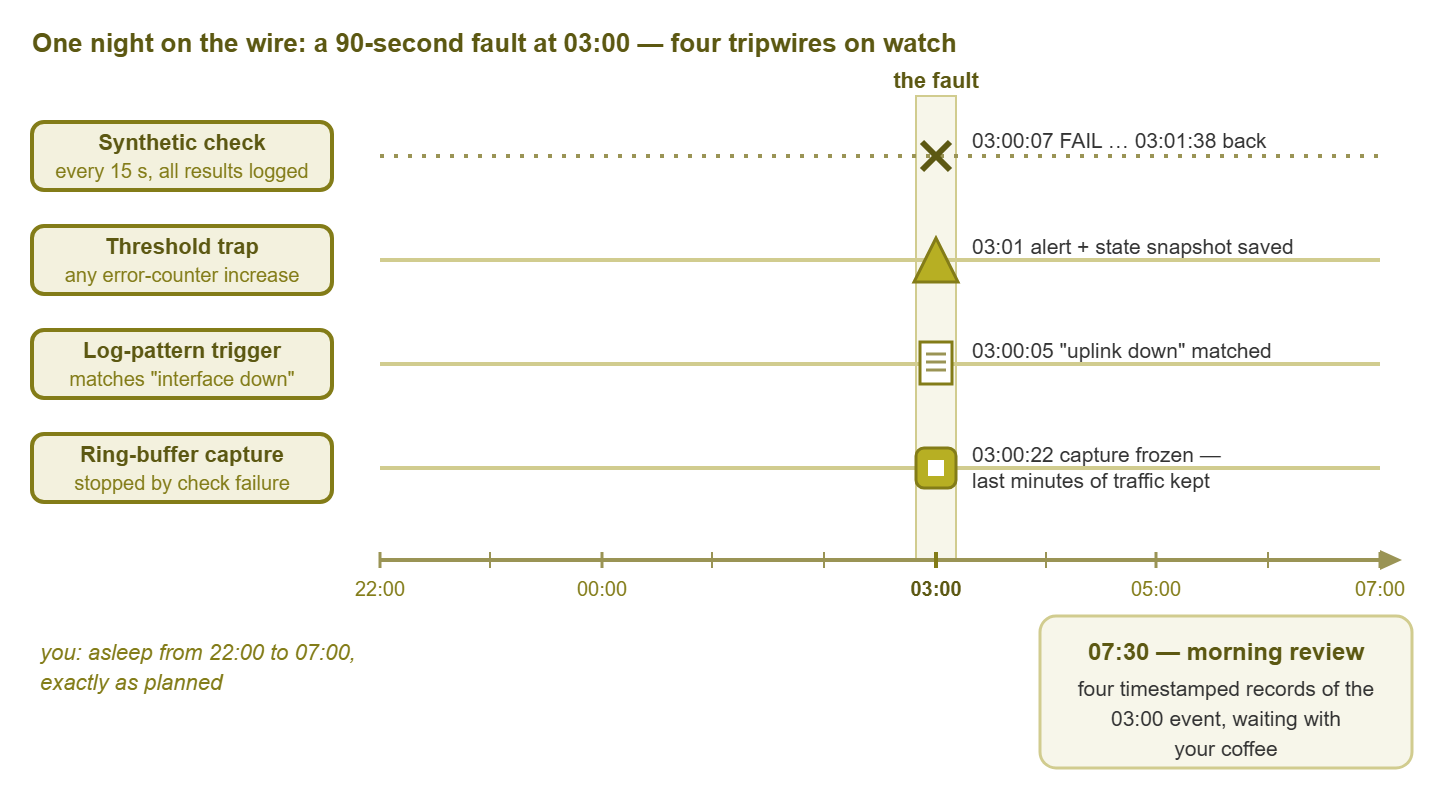
Figure 1: one night, one ninety-second fault, four tripwires — each records its own view of 03:00 while you sleep, and the morning page holds the evidence.
Wiring the rig together
Each tripwire type answers a different question. A mature rig runs several at once so that every occurrence produces a matched set of evidence. That includes the symptom's exact window, the metrics that moved, the device's own words, and (when needed) the packets:
| Tripwire | Question it answers | Evidence it produces | Main risk |
|---|---|---|---|
| Synthetic check | Did users feel it, exactly when, for how long? | Per-second timeline of the symptom | Load on the target; wrong vantage point |
| Threshold trap | Which metric moved first, and how far? | Timestamped alert plus state snapshot | Noise if routed to production alerting |
| Log-pattern trigger | What did the device itself say? | The device's own timestamped narration | Useless if logs are not collected centrally |
| Capture-on-event | What was actually on the wire? | Frozen ring buffer around the moment | Setup effort; needs a good trigger |
Wire them so firings reinforce each other. The log trigger's action can stop the capture; the threshold trap's action can grab the snapshot. Everything notifies the same hunt mailbox so each occurrence arrives as one bundle of matching timestamps, ready to be pasted into the timeline. When all four fire within the same minute, the ordering among them — who twitched first — is itself a clue about where the fault begins.
Finally, spring every trap once on purpose before you trust it. Unplug the test target for a minute, write a matching line into a log, and push the metric over its line in a controlled way. Confirm that the check logs the failure and the snapshot script actually runs. Confirm that the capture actually stops and the notification actually arrives. A tripwire that has never fired is a hypothesis. The night the real fault walks through is a terrible time to discover the snapshot script had a typo. Fire drills are cheap. Missed occurrences are not.
Tip: label every tripwire with its purpose, its owner, and an expiry date, right in its name if you can. Forgotten hunt-traps have a way of firing eight months later and terrifying whoever finds them. A name like HUNT-branch3-ping (expires end of quarter) is documentation that cannot get lost.
The morning tripwire page
A hunt for a rare event runs for weeks, and the thing that kills it is not technology but attention. After ten quiet days, everyone stops looking, and the fault's next appearance goes unread. The countermeasure is a ritual: one page, checked every morning with the first coffee, five minutes flat.
Build a dashboard — or at worst a folder and a checklist. For every armed tripwire, the page should show when it last fired and how many times it has fired since yesterday. It should also show the symptom check's recent history at a glance. The page turns the question "did anything happen last night?" from an investigation into a glance. Most mornings the answer is no, and that is fine; a clean night is also data, quietly shrinking the space of theories.
When the page does light up, read it like a detective, not a firefighter. Symptom trap fired but no precursor trap did? Your theory about the cause just took damage — widen the net. Precursors fired but the symptom stayed green? Interesting: the suspected condition occurred and was survived, which is evidence too. Both fired? Compare timestamps and enjoy the rare pleasure of watching a mystery become a sequence.
The page also makes the hunt transferable and reportable. A colleague can cover your vacation by reading the same page. "The trap has fired three times, always within two minutes of the same log pattern" is a status update a manager can actually act on. That is a world away from "still investigating."
A worked rig: the branch that blinked at three
The complaint: a small branch "loses everything for a minute or two, some nights, around three-ish," per the one early-shift worker who ever saw it. The rig has a probe machine in the branch running a fifteen-second ping-and-fetch symptom check. It has delta traps on the error counters of the branch uplink. It has a log trigger on any interface-down or reboot message from the branch switch. And it has a ring-buffer capture at the branch edge, stopped by the symptom check's first failure.
Four nights later, the morning page lights up: symptom check failed from 03:00:07 to 03:01:38. The log trigger caught the branch switch's uplink going down at 03:00:05. More telling, it caught the switch's boot banner two seconds later. The switch did not lose a link; it restarted. The frozen capture shows healthy traffic that simply stops, mid-conversation, with no error storm first. That is the signature of power vanishing, not of a protocol dying. Three timestamps, one story: at 03:00:0x on the dot, something cuts power to that switch.
A time that round points straight at something on a timer, and the something turns out to be entirely physical. The switch in that closet is plugged into an outlet controlled by the building's lighting timer. The timer cuts over at 03:00 on the nights a particular circuit relay cycles. Facilities re-wires the outlet. The tripwires stay armed for three more weeks and never fire again. That is exactly the proof-of-fix discipline the reproduction guide formalizes. Total human night-hours spent awake: zero.
Where to go next
Tripwires catch the fault in the act while you sleep, which is the whole point. The fault works nights, and now so does something on your side. Four small watchers, one mailbox, and five minutes every morning turn a month of "it happened again" into a timeline with seconds on it, and nothing in that sentence requires anyone to be awake at three. The final escalation is to stop waiting for the fault at all and summon it on your own schedule. That means load, soak, and methodical toggling, plus the etiquette of doing that safely on a production network. That is reproducing the unreproducible, the last guide in Catching Intermittent Problems.
Put this into practice with SysPeep Monitor
Every tripwire rig needs a patient watcher at its center. SysPeep Monitor polls your devices and services around the clock. It fires threshold and alert rules the moment a metric twitches and notifies you by email when a trap deserves attention. Its live dashboards make a natural morning tripwire page. The free trial sets up on a Windows machine in minutes.
Download Free TrialLearn About SysPeep - All Rights Reserved.