
Subnet Planning for Growing Networks
Subnet decisions outlive furniture. The desks get replaced, the servers get virtualized, and entire teams come and go. And the /24 someone typed in a hurry a decade ago is still there, still cramped. It is still shaping every firewall rule and every troubleshooting session. Addresses are the one part of a network that is genuinely painful to change later, because everything else ends up written in terms of them. That makes subnet planning one of the rare IT tasks where an hour of thinking now saves literal weeks of work later.
The rule this whole guide orbits: plan for the network you will have, not the network you have. The good news is that the planning itself is not hard. It is a bit of friendly arithmetic, a handful of conventions, and the discipline to leave empty space on purpose. This guide walks through sizing subnets with headroom and laying them out by function. It covers choosing conventions that make every address self-describing and growing cleanly. And — most importantly — it covers never having to renumber a live network. It ends with a complete worked plan for a fictional two-site company that you can adapt outright.
In this guide
- Subnet sizing without tears
- Lay out by function, not just floor plan
- Conventions that make addresses readable
- Leave gaps on purpose
- Adding a subnet cleanly
- When a subnet fills up
- Renumbering: the project to avoid
- Private space: use it like you own it
- A worked plan: two sites, one convention
Subnet sizing without tears
A quick refresher, made painless. A subnet's size is written in CIDR notation — the slash number after an address, as in 10.1.20.0/24. The number counts how many bits of the address name the network; whatever is left over names the hosts inside it. You do not need to do binary in your head. You need exactly one anchor and one rule. For the anchor, remember that a /24 holds 256 addresses, of which 254 are usable. The first address names the network itself and the last is the broadcast address, so the guests get 254 seats. The rule: each step down the slash doubles the space; each step up halves it. A /23 is two /24s glued together; a /25 is half of one. That is the entire ladder:
| Prefix | Total addresses | Usable hosts | Typical use |
|---|---|---|---|
| /30 | 4 | 2 | Point-to-point links between routers |
| /28 | 16 | 14 | Tiny special-purpose segments |
| /26 | 64 | 62 | Small function subnets (printers, management) |
| /25 | 128 | 126 | Modest user or voice subnets |
| /24 | 256 | 254 | The everyday workhorse |
| /23 | 512 | 510 | Larger user subnets, dense Wi-Fi |
| /22 | 1,024 | 1,022 | Big campus user pools |
| /16 | 65,536 | 65,534 | A whole site's allocation to carve from |
Now the principle that matters more than the math: size for two to three times the devices you have today. Count what is on the subnet now, multiply by three, and pick the rung that fits. This feels extravagant until you notice two things. First, device counts only ever climb. Every person now brings a laptop, a phone, a headset, and occasionally a smart mug. And every "temporary" gadget is permanent. Second, the price of headroom is wildly asymmetric. At planning time, extra space costs nothing — private address space is effectively free, as we will see. At renumbering time, the space you failed to reserve costs a migration project. Growth is cheap on paper and ruinous in production. Buy it on paper.
Lay out by function, not just floor plan
One subnet per what, exactly? The tempting answer is geography — a subnet per floor or per building, because that is how the cabling looks. The better answer at small and mid scale is function. Give users a subnet, and servers another. Give network management one (the admin interfaces of your switches, access points, and UPS units). Add one for voice if you run desk phones, and one for guest and IoT devices. Add one for printers if you have enough of them to matter. Geography still exists in the plan — each site gets its own block — but inside a site, function draws the lines.
The reason is that your security policy speaks subnet. Firewall rules, access lists, VPN scopes — they are all written in terms of address ranges. When a subnet means something ("these are all servers"), policy becomes one clean line. Guests reach the internet and nothing internal. The management subnet is reachable only from IT machines. The IoT subnet talks to its cloud and to nobody else. A subnet might mean "floor two" — a mixture of users, printers, a lab box, and that one server under a desk. In that case, every rule becomes a paragraph of exceptions. Every exception is a future security finding. Clean subnets make clean rules; clean rules are ones you can still understand at 2 AM. Function-aligned layout also quarantines the network's chaos agents. Guest devices and IoT gadgets misbehave freely without their traffic or their DHCP appetite touching the subnets you actually depend on.
Conventions that make addresses readable
Here is the trick that separates a merely correct plan from a genuinely pleasant one: make the octets mean something, and mean the same thing everywhere. Give each site a block like 10.X.0.0/16, where X is the site number. Inside every site, give each function the same third octet: users at .10.0/24, servers at .20.0/24, management at .30.0/24, and so on. The payoff is that every address becomes self-describing. When 10.3.20.15 shows up in a firewall log, you read it like a sentence: site 3, server subnet, host 15. You can do that before you have looked anything up. During an outage, that at-a-glance decoding is worth more than any diagram you will ever draw.
| Octet | Meaning | Convention | Example |
|---|---|---|---|
| First | Private space | Always 10 | 10.3.20.15 |
| Second | Site | 1 = HQ, 2 = warehouse, 3 = branch… | 10.3.20.15 — branch |
| Third | Function | 10 users, 20 servers, 30 mgmt, 40 voice, 50 guest/IoT | 10.3.20.15 — a server |
| Fourth | Host | Carved by role inside the subnet | 10.3.20.15 — host 15 |
Extend the same spirit to the last octet: the gateway is always .1, in every subnet, at every site. When something cannot reach the world, you know what to ping without thinking. Core infrastructure lives low (.2 through .19), servers in a known band, DHCP in its own stretch. These micro-conventions are about findability under stress: conventions are what you can still remember while the phones are ringing. Write all of them down on a one-page decoder ring — the conventions page in documenting address space is exactly this artifact.
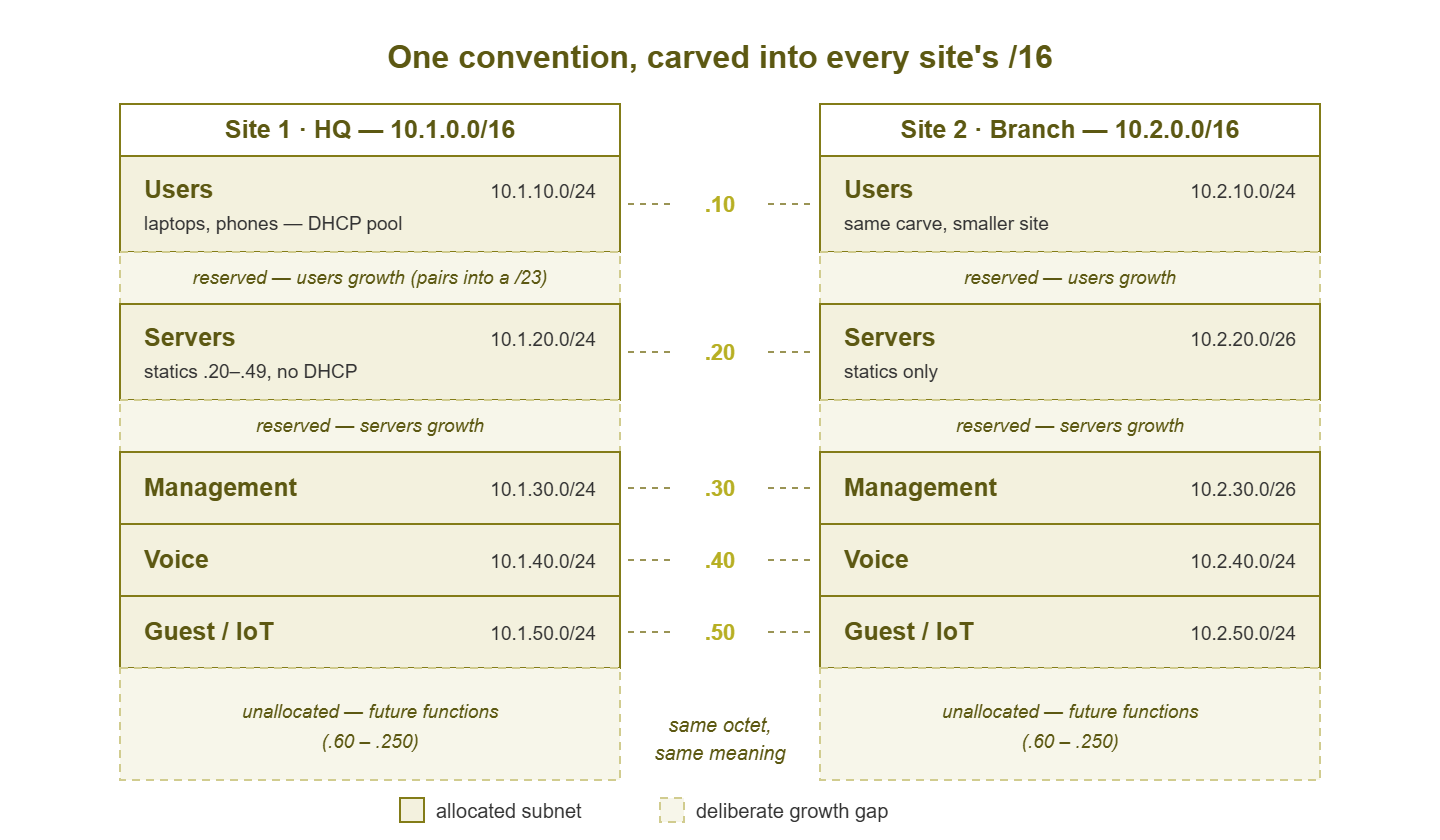
Figure 1: One convention, every site. Each function keeps the same third octet everywhere, and the unallocated gaps between functions are deliberate — that is where future growth goes.
Leave gaps on purpose
Notice the empty lanes in that map. An address plan with no unallocated space is a bookshelf packed to the wall. The first new book forces you to move every other book. So allocate sparsely on purpose. If users sit at .10 and servers at .20, the third octets 11 through 19 are a deliberate gap. That gap is reserved, documented as reserved, and empty. When the user subnet eventually overflows, the second user subnet is .11, right next door, exactly where anyone would look for it. The gaps are not waste; they are the plan's shock absorbers.
Gaps also enable the gentlest kind of growth: widening a subnet in place. Two adjacent /24s can merge into one /23 — but only if they are the right pair, because subnets can only merge with their alignment partner. A /23 must start on an even third octet: .10 and .11 can become .10.0/23, but .11 and .12 cannot merge at all. The practical rule: when you carve the plan, place each subnet on an even third octet and keep its odd-numbered neighbor free. Do that, and "we need more room for users" becomes a maintenance-window mask change instead of a migration. Keep a gap map — a short list of which ranges are reserved for whose growth — in the address plan itself. That way, nobody "borrows" your shock absorbers for a quick project.
Tip: the plan is only as safe as its paper trail. Record reserved gaps in the address plan with the same seriousness as live subnets. An undocumented gap is just space waiting to be squatted, and the squatter will always pick the exact range you were saving. The registers in IPAM basics are where all of this lives.
Adding a subnet cleanly
A new subnet is born several times a year on a growing network — a new function, a new site, an overflow sibling. The failure mode is the subnet that mostly works: devices get addresses but cannot print, or work fine but appear on no monitor. A checklist prevents the mostly. In order:
- 1. Plan entry first. Pick the range from the address plan, following the conventions, and write the row before configuring anything. The register moves first — same intake habit as for single addresses.
- 2. Create the VLAN. A VLAN (virtual LAN) is how switches keep one subnet's traffic separated from another's on shared hardware; in practice each subnet pairs with a VLAN. Reusing the subnet's third octet as the VLAN number (subnet .20 = VLAN 20) is a small convention with a long payoff.
- 3. Configure the gateway. The router or layer-3 switch interface for the subnet — at .1, because conventions.
- 4. Create the DHCP scope, sized to the plan, with statics kept outside the pool range, and the right options (gateway, DNS). The wrong-options failure modes are covered in DHCP scope monitoring.
- 5. Write the firewall rules. A new subnet inherits no policy; decide on purpose what it may reach and what may reach it, rather than discovering the defaults by incident.
- 6. Add DNS entries for anything static that people or systems will call by name.
- 7. Add it to monitoring. The gateway, the DHCP scope, and discovery coverage for the new range — a subnet that is not monitored is a blind spot with users in it. Folding new things into monitoring is its own small discipline; the Monitoring Scope & Coverage guides cover the intake habit.
- 8. Update the documentation — plan row confirmed, conventions still true, gap map adjusted if you consumed a reserve.
When a subnet fills up
Subnets fill quietly. The lead signals arrive months before the pain if anything is watching. DHCP scope utilization creeps upward a couple of percent each month. Reconciliation finds fewer free statics each quarter. That slow trend is your planning trigger. The moment utilization trends toward its threshold is the moment to schedule the fix, calmly. Do not wait for the Monday when new laptops start failing. (Watching that trend is precisely the growth-radar role of DHCP scope monitoring.)
The fix is a fork with two prongs. Expand in place when the design left room: the alignment partner is free, so you widen the mask — /24 becomes /23. In that case, update the DHCP scope, the gateway mask, and the documented range. Life continues with the same addresses. Expanding in place is the cheap option and it exists only because past-you left the gap. Note that every device's subnet mask has to follow, which for DHCP clients happens at renewal and for statics is a short manual chore. Add a sibling when there is no adjacent room, or when the subnet is full because it accumulated a second personality. Half the "user" subnet might actually be IoT gadgets. Then the second subnet next door (users-2 at .11, or a proper IoT subnet at .50) with its own VLAN and scope is cleaner than stretching the first. Rule of thumb: expand when the subnet is one healthy thing that grew; split when it is secretly two things sharing a roof.
Renumbering: the project to avoid
Everything above exists to spare you renumbering, so it is worth one clear-eyed look at why. Renumbering a live network is the project everyone underestimates, because addresses are load-bearing in ways nobody remembers until they snap. Changing a subnet means touching every static assignment on it. It means touching every firewall and VPN rule that names the old range, and every DNS record pointing into it. It also means touching every monitoring check, backup target, and license server configured by address. Then comes the long tail of vendor gear — the door controller, the HVAC panel, the production machine whose config only the vendor may edit. That happens on the vendor's schedule, at the vendor's rates. Printers alone deserve a support group: every scan-to-folder setup and every workstation's driver quietly memorized the old address, and each one fails individually, days apart. The dependency web is always larger than the diagram, and the last corner of it is discovered by outage.
You might be cornered anyway — a company merger with colliding ranges, an acquisition inheriting your least favorite /24. In that case, the survivable shape is a parallel run, in one paragraph. Stand the new subnet up alongside the old with routing between them. Move systems deliberately in small planned groups (updating each system's dependents as it moves). Let the old subnet drain over weeks. Watch its traffic until it is provably idle, and only then retire it. Never a big-bang weekend cutover; those end with a Monday nobody enjoys. But the deeper lesson is that every hour of headroom, gaps, and conventions earlier in this guide was you buying your way out of ever needing that paragraph.
Private space: use it like you own it
All of this generosity — a /16 per site, gaps everywhere — runs on one liberating fact: private address space is enormous and free. RFC 1918, the standard that defines private addressing, sets aside three ranges for anyone's internal use: 10.0.0.0/8 (about 16.7 million addresses), 172.16.0.0/12 (about a million), and 192.168.0.0/16 (65,536). Yet networks routinely suffer inside a single crowded /24. Picture the hundred-person company squeezed into 192.168.1.0/24, rationing addresses and running scopes at 95%, while the entire 10/8 continent sits empty next door. There is no prize for address frugality. Nobody audits your unused private space. Spread out.
One genuine constraint deserves respect while you choose ranges: overlap with home networks. Consumer routers overwhelmingly ship using 192.168.0.0/24 or 192.168.1.0/24, and often 10.0.0.0/24. If your office uses the same range, every remote worker's VPN develops a split personality. Their laptop cannot tell whether 192.168.1.10 means your file server or their soundbar. Traffic for the office quietly dies at home. That is the classic remote-worker overlap gotcha, and a miserable one to debug over the phone. The dodge is easy at plan time. Build on 10-space with a non-obvious second octet — 10.37.0.0/16 collides with nobody's living room. Steer clear of 192.168.0/24, 192.168.1/24, and 10.0.0/24 for anything a VPN will ever reach.
A worked plan: two sites, one convention
Here is the whole guide condensed into a master table for a fictional company — headquarters plus one branch. It is planned on 10-space with the site-in-the-second-octet, function-in-the-third convention, sized with 3× headroom, gaps included. Adapt freely; the shape matters more than the numbers:
| Network | Site | Function | VLAN | Gateway | DHCP pool | Growth notes |
|---|---|---|---|---|---|---|
| 10.1.10.0/24 | HQ | Users | 10 | 10.1.10.1 | .50–.199 | .11.0/24 reserved (pairs to /23) |
| 10.1.20.0/24 | HQ | Servers | 20 | 10.1.20.1 | none | .21.0/24 reserved |
| 10.1.30.0/26 | HQ | Management | 30 | 10.1.30.1 | none | Rest of .30.0/24 reserved |
| 10.1.40.0/24 | HQ | Voice | 40 | 10.1.40.1 | .50–.199 | |
| 10.1.50.0/24 | HQ | Guest / IoT | 50 | 10.1.50.1 | .20–.229 | Split guest from IoT at .51 later |
| 10.1.60.0–.250 | HQ | Unallocated | — | — | — | Future functions |
| 10.2.10.0/24 | Branch | Users | 10 | 10.2.10.1 | .50–.199 | Same carve as HQ |
| 10.2.20.0/26 | Branch | Servers | 20 | 10.2.20.1 | none | Rest of .20.0/24 reserved |
| 10.2.30.0/26 | Branch | Management | 30 | 10.2.30.1 | none | |
| 10.2.50.0/24 | Branch | Guest / IoT | 50 | 10.2.50.1 | .20–.229 | |
| 10.3.0.0/16 + | — | Future sites | — | — | — | One /16 per new site |
Read a few addresses out of it to feel the payoff: 10.2.30.4 is branch management — a switch, probably. 10.1.40.61 is an HQ desk phone on DHCP. 10.1.20.1 is the HQ server-subnet gateway. Nobody looked anything up. That is what a good plan feels like from the inside: the network explains itself.
Where to go next
Plan with headroom, carve by function, keep the conventions identical everywhere, leave labeled gaps, and grow through the checklist — that is subnet planning in one sentence, and it is how you avoid ever meeting the renumbering project in person. The plan then needs two companions: watching utilization so growth never surprises you, and writing the plan down so it survives you. DHCP scope monitoring and documenting address space pick up those threads. The rest of the IP Address Management & Subnet Monitoring guides fill in the surrounding craft.
Put this into practice with SysPeep Monitor
A subnet plan starts from an honest picture of what is on the network today. SysPeep Monitor's auto-discovery builds that picture for you — the devices and interfaces living on each subnet. Once the plan is live, its dashboards and alerts watch utilization so growth shows up as a trend, not a surprise. The free trial runs on any Windows machine.
Download Free TrialLearn About SysPeep - All Rights Reserved.