
Per-Device, Per-Sensor, Per-Flow: Licensing Models in Plain Language
The first monitoring quote I was ever asked to check was one page long and had four numbers on it. One line said "devices". The next said "sensors". A footnote said "elements", and a box at the bottom said "flows". I could not tell whether our network was a small number or a large one. It turned out to be both. A licensing model is a private dictionary that each vendor writes for itself. And the same network can be a modest count in one dictionary and an alarming one in another. That is not confusion on your part. It is the dictionary doing its job.
This guide translates the dictionaries. By the end of it you will know what each common model actually counts. You will know how a stack or a virtual machine or a remote probe lands in the count. You will know which network shapes each model is kind to. And you will have the short list of questions to ask before you commit to any of them. Nothing here is about money. It is entirely about counting. Once you can count your own network in each model, the money part is arithmetic. You can do it at your desk with the quote in one hand.
Every model below is legitimate. A vendor picks a counting unit because it matches how the product creates value and how its customers tend to grow. None of the units is a trick. Your job is not to find the "fair" model. It is to find the model whose growth curve looks like your network's growth curve. That is a question about your network before it is a question about anyone's price list.
In this guide
- Every license counts something
- Per-device, per-sensor, and per-flow, one at a time
- Per-user, per-core, and unlimited licensing
- Subscription, perpetual, and tiered bundles
- How each model scales with the shape of your network
- The questions to ask before choosing
Every license counts something
A software license is permission to use a product within limits. For monitoring software, the limit is nearly always a count. That might be a number of things you are allowed to monitor, or a number of people allowed to use the console. Or it might be a number of records the system may process. The thing being counted is the licensing unit.
This matters because the unit decides how your bill behaves when your network changes. If the unit is the device, adding a switch moves the count by one. If the unit is the sensor, adding the same switch can move it by dozens. If the unit is the flow record, adding the switch may not move it at all, but upgrading your internet link might. The unit is, in effect, the shape of your future budget conversations. Learn to count your network in each unit, and you will never again be surprised by a renewal.
A useful mental model: think of each licensing model as a different turnstile at the entrance to a building. One turnstile counts people. Another counts bags. Another counts how fast the crowd is moving. The same crowd produces three very different numbers, and none of the turnstiles is lying.
Per-device licensing
What it counts: individual monitored devices. A router is one. A switch is one. A server is one. A firewall is one. It is the easiest model to explain to a manager, because "we monitor forty things" is a sentence anyone understands.
Where it gets interesting is at the edges of the word "device," so read the license definition instead of assuming. Some cases to check:
- A switch stack. Several physical switches joined to act as one logical switch with one management address. Some definitions count the stack as one device because the tool sees one address. Others count each member because each has its own interfaces and health. Ask.
- A virtual machine. A VM is usually a device, because it has its own operating system and address. The hypervisor host underneath it is typically another device. Ten VMs on one host can therefore be eleven devices.
- A remote probe. A probe is the small collector you install at another site so the central server can monitor devices there. Some models count the probe itself as a device; some license probes separately; some include a number of them.
- A chassis with line cards, or a wireless controller with access points. Is the controller one device and its access points "free," or is each access point a device? Definitions differ, and the difference can be the largest number in your count.
- Cluster members and high-availability pairs. Two firewalls acting as one are two addresses to the tool, and usually two devices to the license.
Scales well for: networks with a modest number of devices that each have many interfaces or services. A per-device license does not care how big each box is. A chassis switch with hundreds of ports costs the same unit as a tiny branch router. Watch out for: networks with many small devices, such as a fleet of access points, thin clients, or IP phones. Also watch virtualization-heavy environments where the device count climbs every time someone clones a template. (Someone is always cloning a template.)
Per-sensor (per-element) licensing
What it counts: individual monitored items, which vendors call sensors, elements, monitors, checks, or metrics. Under this model, a device is not a unit; the things you measure on the device are. One interface's status is a sensor. That same interface's traffic may be a second sensor. A disk volume is a sensor. A running service is a sensor. The CPU is a sensor. Uptime by ping is a sensor.
This is the model where a 48-port switch stops being "one thing." If you monitor status and traffic on every port, the switch alone is about a hundred sensors. That is before you count its CPU, memory, temperature, and power supplies. A file server with several volumes, a dozen services, and a few performance counters is easily thirty.
That sensitivity is also the model's strength. Per-sensor licensing rewards discipline. If you monitor only the uplinks and server ports on that 48-port switch, it costs you a handful of units instead of a hundred. You pay for exactly the visibility you chose. The license gently discourages the "monitor everything and ignore it all" habit that drowns new admins in alerts. Many tools show the sensor count per device, so right-sizing becomes part of normal setup.
Scales well for: small and mid-size networks where you monitor a curated set of things, and for teams who like fine control over what counts. Watch out for: auto-discovery that adds every interface it finds and bulk templates that attach many sensors to each new device. Also watch the moment a large switch or a busy server joins the network. Under this model, growth in detail costs as much as growth in devices.
Meridian Parts bought a per-sensor license sized for the servers, the core switches and the firewall, with a comfortable margin on top. Then someone ran auto-discovery across the whole address range with the default template attached, and the tool found the printers. Every printer got a ping, a status check, a toner level per cartridge and a pair of interface sensors. And the count crossed the license ceiling before lunch. The tool did what its license said and stopped adding sensors. So the new file server that arrived the following week was monitored for exactly nothing. The post-mortem recorded that discovery had been "thorough". The template was trimmed to a ping. And the printers went back to being watched by the people who order toner, which is where that job had always lived.
Per-flow and per-flow-rate licensing
A flow is a summary record of one conversation across the network. It records which address talked to which, on which ports, for how long, and how many bytes. Routers and switches can export these records to a collector using protocols such as IPFIX (IP Flow Information Export) and sFlow. A monitoring tool turns them into "who is using the bandwidth" reports. Many products license flow monitoring as a separate add-on.
What it counts varies more here than in any other model, so pin it down in writing. One common variant is a count of exporters (each router or switch that sends flow records is a unit). Another is a flow rate (the number of records the collector may process per second, averaged or peak). Another is a stored volume (how much flow history the system may keep). Or the license may use some combination. The first variant grows when you add flow-capable devices. The other two grow when your traffic grows, even if you never add a single box.
Flow volume follows bandwidth and behavior, not hardware, and traffic has no idea it is licensed. An internet link upgrade, a new cloud application, a video-heavy quarter, or a scanning incident can raise the record rate substantially. Some tools handle overage by sampling (keeping one record in every N), which preserves the picture at lower detail. Others drop records, and a few simply stop accepting. Which of these your candidate does at the limit is a question worth asking before you buy.
Scales well for: networks with a few flow-exporting devices at the core and stable traffic. Watch out for: bandwidth growth, distributed sites where every branch router exports, and any rate-based cap when your traffic is bursty.
Per-user and per-admin licensing
What it counts: people, or more precisely accounts. A per-user license (often called a seat) allows a fixed number of named or concurrent logins to the console. Named seats belong to specific people; concurrent seats are a pool that any of a larger group can use, a few at a time. Some products license only administrators this way and allow unlimited read-only viewers. Others count every login, including the account that drives the wall display in the office.
This model usually rides alongside a device or sensor count. It scales well when the team is small and the network is large. It becomes awkward when you want the help desk, the on-call rota, and a few managers to have their own logins. Count the seats before you sign: the admins, the help desk, and whoever it is that always asks for "just read-only". Then check how service accounts are counted, meaning API keys, integrations, and scheduled reports. An API (application programming interface) is the doorway other programs use to talk to the tool without a person logging in. And a "second admin seat" that turns out to be needed for an integration is a classic surprise line.
Per-core and per-server licensing
What it counts: compute. There are two flavors, and they point in opposite directions. The first licenses the monitoring server itself by the CPU cores or sockets it runs on. You will meet this with database backends and some larger platforms. Under this flavor, monitoring more devices does not change the license, but moving the tool to a bigger machine does. The second flavor licenses monitored servers, sometimes by core or socket, so that a large physical host counts for more than a small VM. This flavor belongs more to application- and server-centric products than to network monitoring.
Virtualization is the wrinkle. A per-core license on the monitoring server needs a clear rule for virtual cores versus physical cores. It also needs a rule for what happens when a VM migrates to a host with more cores. Ask how the count is measured (assigned vCPUs, meaning virtual CPUs, or physical cores of the host, or something else) and who reports it.
Unlimited and site licensing
What it counts: nothing, within a boundary. An unlimited license lets you monitor as many devices and sensors as the software can handle. A site license is the same idea bounded by a place or a legal entity: one campus, one company, one country. Both trade counting for a flat entitlement, and both feel wonderful the first time you add a switch without opening a spreadsheet.
The word "unlimited" still has edges, and they live in the definition of the boundary. One typical boundary is one installation (a second server for a test lab is a second license). Another is one site (a new branch may need its own). Another is one organization (a subsidiary or a merger may not be covered). Other boundaries include a fixed number of probes or pollers and a technical ceiling described as "supported capacity." Read the boundary, not just the headline. Then read the footnote under the boundary. Yes, that one.
Scales well for: fast-growing networks, virtualization-heavy environments, and any team that wants monitoring decisions to be engineering decisions instead of licensing decisions. Watch out for: paying for headroom you never use if the network is small and stable. Also watch for boundary language that quietly makes "unlimited" mean "unlimited here."
Subscription, perpetual, and tiered bundles
Perpetual plus maintenance
A perpetual license is a right to use a specific version of the software indefinitely. It is a one-time purchase. Alongside it comes maintenance (sometimes called support and updates, or software assurance). This is a recurring agreement that entitles you to new versions and to help when things break. If maintenance lapses, the software keeps running. But you are then frozen at the last version you were entitled to, and you may lose the right to open support cases. Re-joining later sometimes involves paying for the lapsed period, a mechanic called reinstatement. Ask about it before letting maintenance lapse "just for one term."
Subscription
A subscription is a right to use the software only while the term is active. Updates and support are normally included in the term. Stop paying, and after the term ends the software stops (or degrades to a limited mode). There is no separate maintenance line, which makes quotes cleaner. The mechanics to understand start with the term (how long each period lasts). Then comes the notice period (how far before the end you must announce a change or cancellation). Also understand auto-renewal (whether silence renews the term). Finally, understand true-up (a periodic reconciliation where usage above the count is billed retroactively). Some subscriptions also allow a true-down at renewal, letting you reduce the count; some do not.
Tiered bundles and editions
Many products sell in editions (a starter, a standard, an enterprise) and in bands (up to a certain count, then the next band). Editions gate features: the starter may lack flow analysis, maps, clustering, or an API. Bands gate size. Both create step functions. Nothing changes until you cross a line. Then everything changes at once, usually in the same week as the new site. When a quote lists an edition and a band, ask which features are gated by the edition. Also ask what the next band's boundary is. Ask whether crossing it reprices only the extra units or the whole entitlement. Those questions separate a comfortable renewal from a painful one.
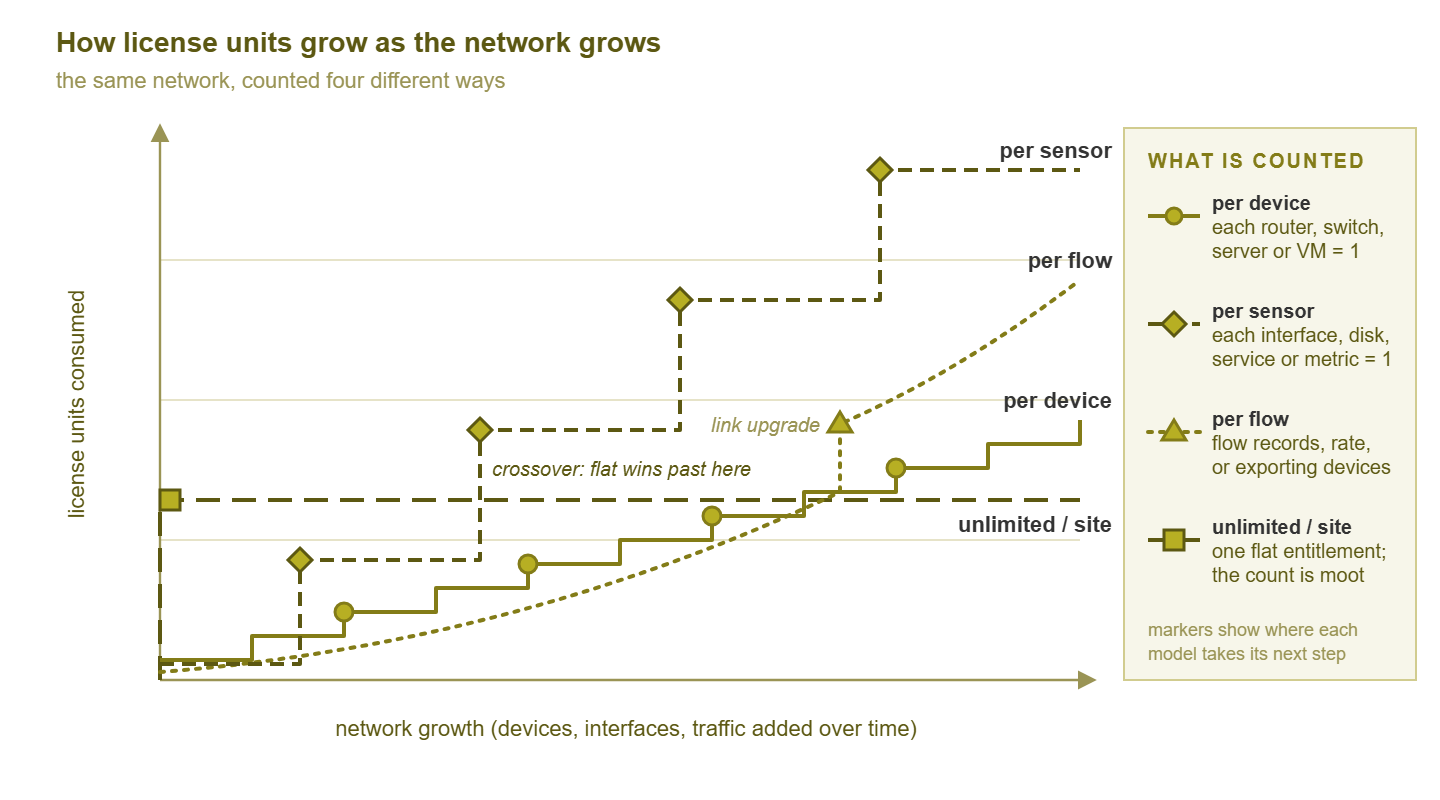
Figure 1: The same growing network counted four ways. Each model steps at a different event, and the flat line eventually crosses the counting lines.
How each model scales with the shape of your network
Networks have shapes, and each shape has a friendly model and an unfriendly one. Three shapes describe a great many small and mid-size environments.
A few big switches. One or two chassis or large stacks, a firewall, a handful of servers, everything in one building. Per-device is generous here: the device count is small no matter how many ports each box has. Per-sensor is the one to watch, because those big switches hold most of your interfaces. Flow licensing is usually cheap in exporters (one core, one edge) and depends entirely on traffic.
Many small sites. A dozen branches, each with a router, a small switch, an access point, and a printer. The device count is now the large number, and so is the count of probes if the tool needs one per site. Per-sensor is more forgiving, because each small device has few interfaces worth monitoring. Per-exporter flow licensing scales with the number of branch routers, so it becomes the surprise line in this shape.
Virtualization-heavy. Two hypervisor hosts and eighty VMs, plus a small physical network. Under per-device, every VM is a device and the count moves each time a template is cloned. Under per-sensor, VMs are usually modest (a ping, a CPU, a disk, a few services). So the total is driven by how much you monitor per VM. Unlimited licensing shines in this shape because growth is cheap to create and expensive to count. I once added thirty VMs to a per-device count in one afternoon while testing a deployment script, and the license noticed before I did.
| Model | What counts | Scales well for | Watch out for |
|---|---|---|---|
| Per-device | Each router, switch, server, VM, probe (definitions vary) | Few large devices; stable device counts | Access-point fleets, VM sprawl, stacks and clusters counted per member |
| Per-sensor / element | Each interface, disk, service, metric | Curated monitoring; small teams wanting fine control | Big switches, bulk templates, discovery adding every interface |
| Per-flow / rate | Exporters, records per second, or stored volume | Few exporters; stable traffic | Link upgrades, branch routers exporting, bursty traffic hitting a rate cap |
| Per-user / admin | Named or concurrent console accounts | Small teams, large networks | Help-desk logins, wall displays, integration service accounts |
| Per-core / server | Cores or sockets of the monitoring server, or of monitored hosts | Fixed-size deployments | Moving to bigger hardware; virtual vs physical core rules |
| Unlimited / site | Nothing within a boundary | Fast growth; virtualization; multiple admins | Boundary language: one install, one site, one entity, probe limits |
Tip: before you compare quotes, count your own network three times. Count once in devices, once in sensors (be honest about how many interfaces you would really monitor), and once in flow exporters. Write the three numbers on one page. Every quote you receive can then be checked against the same page. You will notice immediately when a vendor's definition of a unit differs from yours.
The questions to ask before choosing
These are the questions that turn a licensing model from a marketing phrase into a contract you can plan around. Ask them in writing, and keep the answers with the quote, because the brochure is not the contract. In three years the answers will matter more than the quote did.
- What exactly is counted? Ask for the definition of the unit as it appears in the license agreement, not the brochure. Then test it with your edge cases: a stack, a VM, a probe, a cluster pair, a wireless controller, a printer, an IP phone.
- What happens at the count? Does the tool stop adding devices, keep adding and warn, keep adding and bill later (true-up), or silently drop monitoring? A hard stop is inconvenient; a silent drop is dangerous.
- How is usage measured and reported? Can you see the current count in the console, in a report, or through an API? If you cannot see the number, you cannot manage it, and you cannot dispute it.
- What is included, and what is a module? Flow analysis, configuration backup, maps, reporting, clustering, remote probes, and integrations are each sometimes included and sometimes separate. Get the list.
- How do probes, high-availability nodes, and test instances count? Each can consume units, need its own license, or be included, depending on the product.
- Can units be reclaimed and reassigned? When you retire a device, does its unit return to the pool immediately, at renewal, or never?
- What are the term, notice, auto-renewal, and true-down mechanics? These decide how much freedom you have at renewal time.
- What is the next boundary? The next band, the next edition, the probe limit. Knowing where the step is lets you plan to reach it on purpose rather than by accident.
If a vendor cannot answer these plainly, that is information too. Clear counting rules are a sign of a mature product and of a sales team that expects long relationships rather than surprised customers.
Where to go next
You can now read a licensing model the way you would read a network diagram: as a description of what happens when something is added. The dictionaries are still private, but you have a translation. And the four numbers on the quote are now four numbers you can check against your own count. The next guide, Growth Traps: How Licensing Bites When the Network Grows, walks through the specific ways each model steps when the network expands. It also covers how to plan headroom. Then The Hidden-Costs Checklist covers everything on a quote beyond the unit count. Both live in Monitoring Licensing Models and Hidden Costs. If you are still deciding which tool to evaluate, the guides in How to Choose a Network Monitoring Tool and Open Source vs. Commercial Monitoring: Honest Tradeoffs cover the wider decision.
Put this into practice with SysPeep Monitor
Counting your own network in each model is easier when you can try a tool against it. SysPeep Monitor publishes its pricing on the site. It discovers devices and interfaces automatically, so your counts come from a real scan rather than a guess. It offers a free trial for exactly that kind of measuring.
Download Free TrialLearn About SysPeep - All Rights Reserved.