
Anatomy of a Network Loop: How One Cable Melts a LAN
Every experienced network admin has a version of this story. The morning is quiet. Then, over about ninety seconds, everything dies at once — file shares, printers, phones, the internet. The switches are powered on, every port light blinking furiously, but you cannot reach a single one. The cause, discovered an hour later: one Ethernet cable that somebody plugged in with the best of intentions.
That failure is called a network loop, and the traffic explosion it triggers is a broadcast storm. It is one of the very few problems in IT where a tiny, innocent action takes down an entire building almost instantly. It is also a satisfying problem to understand, because the mechanics are simple, logical, and a little bit horrifying.
This guide walks through the anatomy of a loop. It explains how switches decide where to send traffic and the one safety feature Ethernet never got. It shows how a single broadcast becomes a self-sustaining flood and why the meltdown spreads to every device in the VLAN. By the end, you will be able to explain a storm on a whiteboard. And you will know exactly what the defenses in the rest of this topic are defending against.
In this guide
- What a loop actually is
- How a switch decides where to send a frame
- The missing safety: Ethernet frames never expire
- From one broadcast to a self-sustaining flood
- The second meltdown: MAC-table chaos
- Why the whole VLAN suffers
- Three classic ways loops get created
- Why it never fixes itself
What a loop actually is
A network loop exists whenever there are two or more active paths between the same two points in a switched network. So traffic can travel in a circle. Two cables between the same pair of switches: loop. Switch A to B, B to C, C back to A: loop. A cable from one wall jack to another jack that leads back to the same closet: loop. The shape does not matter. What matters is that a frame leaving a switch can arrive back at that same switch by another route.
Here is the uncomfortable part: a switch cannot see the loop. A switch has no map of the network. It knows its own ports and nothing else. Port 7 is just port 7, whether the cable in it leads to a printer, another switch, or all the way around the building and back into port 12. Each switch follows simple local forwarding rules, like a mail sorter who forwards envelopes without ever seeing a map of the postal system. When the topology is loop-free, those local rules add up to perfect delivery. When there is a circle, the same rules add up to disaster — and no switch ever notices it is doing anything wrong.
To see why, you need to know the two forwarding rules every switch lives by. They take about two minutes to learn, and they explain the entire storm.
How a switch decides where to send a frame
Traffic on an Ethernet network travels in units called frames. Every frame carries two hardware addresses. The first is the MAC address (Media Access Control address — the unique factory-assigned identifier of a network card) of the device that sent it. The second is the MAC address of the device it is for. A switch's whole job is reading those addresses and choosing an exit port. It does this with two rules.
Rule one: learn. Whenever a frame arrives, the switch notes the source MAC address and the arrival port. It writes that pair into its MAC address table (also called the forwarding table or CAM table). This is a receptionist's visitor log: "the laptop ending 4F came in through port 3." From then on, any frame addressed to that MAC is sent out port 3 and nowhere else. This is what makes a switch smarter than the old shared hubs it replaced.
Rule two: when in doubt, flood. A frame may be addressed to a MAC the switch has not learned yet (an unknown unicast). In that case, the switch forwards a copy out every port except the one it arrived on. The theory is that the recipient must be out there somewhere. And some frames are addressed to everyone on purpose. A broadcast is a frame with a special destination address meaning "all devices," and it is always flooded out every other port. Broadcasts are not exotic — they are the network's normal background chatter. Every time a device asks "who has this IP address?" (a protocol called ARP, the Address Resolution Protocol), that question is a broadcast. DHCP requests, service discovery, name lookups on small networks — broadcasts, all of them. A healthy network murmurs with a constant low rate of them, and every switch dutifully copies each one out all of its ports. Multicast — frames meant for a group of devices — gets much the same treatment on a basic switch: copy it everywhere, just in case.
Read rule two again with a circle in mind. "Forward a copy out every port except the one it arrived on" includes the ports that lead around the loop. The rule has no exception for that, because the switch does not know the loop exists.
The missing safety: Ethernet frames never expire
At this point you might expect a safety net, because a very similar problem exists one layer up. And there, a safety net was built in from the start. IP packets (the layer routers deal with) carry a field called TTL, short for time to live. It is a simple counter, set by the sender. Every router that forwards the packet subtracts one, and whichever router sees it hit zero throws the packet away. So when routers are accidentally configured in a circle, a trapped packet survives a limited number of laps and then dies. A routing loop wastes capacity and breaks connections, but the looping traffic itself is self-extinguishing, like a candle burning down to nothing.
Ethernet frames have no TTL. There is no lap counter, no hop limit, no expiration of any kind in the frame. A switch receiving a frame for the ten-thousandth time forwards it exactly as enthusiastically as the first time. This was not an oversight so much as a design philosophy. Ethernet was built to be simple and fast, on the assumption that the physical topology would never contain a circle. Switches forward frames in dedicated hardware at full line speed precisely because they do so little thinking per frame. Adding loop protection to every frame was someone else's problem. That problem was later handed to a protocol called spanning tree, which we cover in Spanning Tree Without Tears.
Think of it as a memo with "please forward to everyone" written on it and no expiry date, in an office where everyone always follows instructions. Once that memo enters a circle of diligent forwarders, it circulates forever. The frame trapped in your loop today will still be looping at midnight, unless something physically breaks the circle. That single missing field is why a loop is not a degradation but a meltdown.
From one broadcast to a self-sustaining flood
Now put the pieces together and watch one storm being born. The setup: three switches — A, B, and C — cabled in a triangle, with no loop protection. A PC on switch A sends one ordinary ARP broadcast, the kind your machine sends dozens of times an hour. Here is the play-by-play:
- Lap zero: the broadcast arrives at switch A. Following rule two, A floods it out every other port — including its link to B and its link to C. There are now two copies traveling the ring, one clockwise and one counter-clockwise.
- Lap one: B receives its copy and floods it out every other port, including onward to C. C does the same toward B. Each copy is also delivered out every PC-facing port along the way.
- Lap two: each copy arrives back at a switch that has already seen it — and is forwarded again, because nothing in the frame says "you have seen me before." At every junction offering two onward paths, one copy becomes two.
- Every lap after: the circulating population doubles at each pass through a fork. One frame becomes two, two become four, then eight, sixteen — past a thousand copies within ten laps, past a million within twenty.
The math is only half the horror; the other half is the timescale. A lap around three switches takes microseconds, because switches forward in hardware as fast as the wire allows. Doubling every few microseconds means the flood does not grow so much as detonate. The only ceiling is the capacity of the links, and the storm hits it in well under a second. From then on, every link in the loop runs saturated with copies of traffic that no longer means anything.
And the original ARP request was not alone. Every device keeps emitting its normal background broadcasts, and each one enters the whirlpool and multiplies the same way. The storm is not one frame looping; it is every broadcast produced since the loop formed, all circulating at once, all forever. That is why admins call a storm self-sustaining. Switch off the PC that sent the first broadcast and nothing improves, because the copies in flight no longer need their creator.
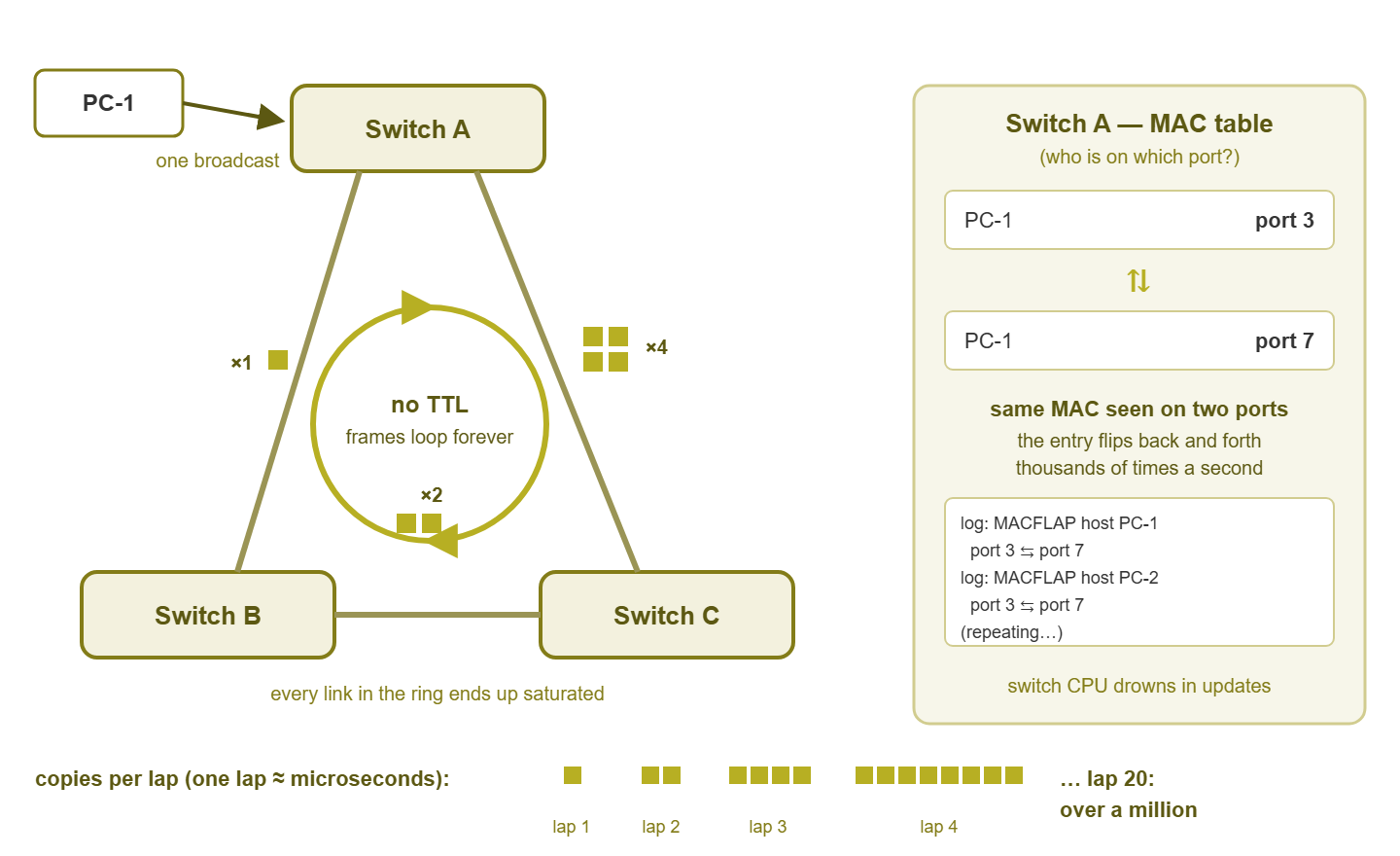
Figure 1: One broadcast enters the ring, doubles every lap, and saturates the links in under a second — while the MAC table (right) flails between ports.
Tip: do not memorize the arithmetic — memorize the timescale. A broadcast storm goes from "first looped frame" to "every link saturated" faster than you can stand up from your desk. Whatever warning you get comes before the loop closes, not after, which is why the early signals in Early-Warning Signs of Loops and Storms matter so much.
The second meltdown: MAC-table chaos
The flood of copies is the loud half of a storm. The quiet half is what a loop does to rule one — the learning rule — and it is just as destructive.
Remember that a switch updates its MAC table every time a frame arrives, based on the frame's source address. In a loop, copies of a frame from your PC arrive at switch A from two directions at once. One is the port the PC is actually on. The other is the loop path that delivered a boomeranged copy. So switch A learns "that MAC is on port 3." Microseconds later a looped copy arrives and it learns "no, port 7." Then "port 3" again. Thousands of times per second, for every active device on the network, the table entry flips back and forth. This is called MAC flapping, and switches that can log will scream about it:
%MACFLAP: host 00:1b:44:11:3a:b7 flapping between port 3 and port 7
%MACFLAP: host 00:1b:44:11:3a:b7 flapping between port 7 and port 3
%MACFLAP: host a4:5e:60:c2:9d:04 flapping between port 3 and port 7
(repeated hundreds of times per minute, for many different hosts)
Flapping does two ugly things. First, it burns switch CPU. Forwarding happens in hardware, but table updates, log messages, and flap notifications involve the switch's small management processor — now doing thousands of pointless updates per second. That is why storming switches stop answering pings and management sessions: their little brains are fully occupied, even while their forwarding hardware keeps shoveling copies at full speed. Second, flapping poisons ordinary traffic. A frame addressed to a MAC whose entry currently points the wrong way is delivered into the loop instead of to its owner. And entries that churn turn known destinations back into unknown unicasts — which are, by rule two, flooded. The storm converts the network's polite one-to-one conversations into yet more flood water. Even traffic with nothing to do with broadcasts drowns.
Why the whole VLAN suffers, not just one switch
A reasonable beginner question: the loop is between two or three switches in one closet, so why did the far end of the building die too? The answer is the broadcast domain — the set of all ports a broadcast must reach. A VLAN (virtual LAN) is exactly one broadcast domain, carried between switches over trunk links. These are the inter-switch connections that haul traffic for many VLANs at once. A flooded broadcast goes to every port in that VLAN on every switch that carries it, so the storm rides the trunks to all of them. If VLAN 20 exists on nine switches across three floors, the whirlpool exists on nine switches across three floors, even though the physical circle sits in one closet.
Then the damage fans out from the network to the devices on it:
- Every PC and server slows down. A network card cannot ignore broadcasts — each one is received and handed to the operating system to inspect. At normal rates that costs nothing. At storm rates, every host on the VLAN spends serious CPU time processing garbage, so even machines talking to nobody get sluggish.
- The way out is blocked. The router or firewall interface that serves the VLAN is itself a member of the broadcast domain, drinking the same flood. Traffic to other VLANs and the internet dies with everything else, which is why a loop in one closet reads as "the internet is down" building-wide.
- Switch brains lock up. Storming switches busy with MAC churn stop responding to management — on the very VLAN you would use to reach them. This is the storm's cruelest trick: it disables your tools for diagnosing it. We tackle that problem in Storm Response: Containing a Meltdown in Progress.
- Neighboring VLANs limp. Other VLANs do not receive the flooded frames, but they share switch CPUs and trunk capacity with the one that does — so even "unaffected" segments feel seasick.
A useful mental image: VLANs are the watertight compartments of a ship, and a loop is a hole in one of them. The compartment floods completely while the bulkheads mostly protect the rest. That is also the honest argument against putting the whole company in one flat VLAN: one compartment, one hole, everything underwater.
Three classic ways loops get created
Almost nobody builds a loop on purpose. Loops are built by accident, by helpful people, and the same three accidents account for most of the storms you will ever meet. Learn the stories now and you will recognize the scene later.
The helpful spare cable
A patch cable is left dangling from a wall jack in a meeting room. Someone tidy notices the loose end and plugs it into the other wall jack, because a cable with both ends connected looks finished. Both jacks are patched back to the same closet, and the circle is complete. Nothing about it felt like a change — no laptop configured, no software installed — which is exactly why this cause takes so long to find. The culprit genuinely believes they cleaned up.
The desk switch plugged into itself
A five-port mini switch lives under a desk because one wall jack was never enough. In a reshuffle, two of its ports end up connected to each other — or it gets connected to the wall with two cables "so there is a backup." A cheap unmanaged switch (one with no configuration and no management — the plastic kind from the supermarket) speaks no loop-prevention protocol. It just forwards, instantly and loyally, and the loop through it storms the upstream network. Bonus variant: two desk switches under neighboring desks, joined twice by cables snaked along the floor.
The bridged Wi-Fi client
A laptop or a small access point is set to bridge its Wi-Fi and its Ethernet port — forwarding traffic between them like a tiny switch. Plug its cable into the wall while its radio is on your wireless network, and there is now a circle that runs through the air. The path runs from the wired network to the access point, across the radio, and back into the wired network. There is no suspicious cable to see. And the radio hop is slow, so this loop often smolders instead of detonating — a partial storm that degrades everything without quite killing it. Those slow-burn loops are a big reason the signals in the next guide exist.
| Story | How the circle formed | Why nobody spotted it |
|---|---|---|
| Helpful spare cable | Jack-to-jack patch, both leading to the same closet | Tidying up does not feel like a network change |
| Desk switch to itself | Two cables between desk switch and wall, or port to port | Unmanaged switch under a desk, invisible to inventory |
| Bridged Wi-Fi client | Device forwards between its radio and its Ethernet jack | No physical cable forms the loop; storm may stay partial |
Tip: when a storm is finally traced, resist the urge to hunt the person who plugged in the cable. They were being helpful; the real lesson is that your network let one honest mistake become a building-wide outage. The fixes are in Designing Loops Out.
Why it never fixes itself
Most network problems have some self-limiting quality. Congestion eases when users give up; a crashed service stops receiving requests; even that routing loop quietly executes its trapped packets after a fixed number of laps. A switching loop has no such mercy, because nothing in it decays. The frames do not expire — no TTL. The switches do not tire or learn from experience — they are built to forward at full speed indefinitely, and they will. Ten minutes or ten hours: the storm at hour ten is exactly as violent as it was two seconds in.
Only two things end a storm. A human breaks the circle — unplugs the right cable, shuts the right port — which is the subject of the response playbook. Or a protocol breaks it first: spanning tree, which lets switches discover redundant paths and deliberately block them before frames can circulate. When spanning tree is present and unfooled, the loop you plug in today is neutralized in seconds and the storm never happens. Much of the rest of this topic is about keeping that protection healthy and catching what slips past it.
Where to go next
You now know the whole anatomy: switches flood by design, and frames never expire. So one circle turns background chatter into an exponential, self-sustaining flood. Meanwhile, MAC flapping burns switch CPUs and poisons ordinary forwarding, everywhere the VLAN reaches. The storm is not mysterious; it is simple rules meeting a shape they were never meant to meet. From here, the natural path through Loops, Broadcast Storms & Spanning Tree is clear. Learn the early-warning signals monitoring can catch. Meet the protocol that guards you in Spanning Tree Without Tears. And keep the response playbook within reach for the day a loop finds you anyway.
Put this into practice with SysPeep Monitor
The storm itself takes seconds, but the evidence shows up in monitoring data first. That means broadcast rates leaving their baseline, switch CPU climbing, and ports pegged flat. SysPeep Monitor discovers your switches automatically, tracks broadcast traffic, CPU, and port status over SNMP, and alerts you when those numbers leave normal territory. The free trial installs on any Windows machine in minutes.
Download Free TrialLearn About SysPeep - All Rights Reserved.