
Dependency-Aware Suppression: One Parent, Not Forty Children
Take a core switch down for planned work and watch what your monitoring does. The switch goes red; you expected that. Then the access switches behind it go red. Then the access points behind those. Then the printers, the cameras, the door controllers and the lab servers go red. That is forty alerts in ninety seconds, every one of them about a problem you already know. Every one of those devices is unreachable through the thing you are rebooting on purpose. The monitoring system is not wrong. It is just not helping.
Every alert in that storm is true, and every alert is useless. The obvious fix is to type all forty downstream devices into the window's scope by hand, and I have done that. It is tedious enough that people skip it, and fragile enough that when they do it they miss three. Mine were a camera, a door controller, and the one access point the facilities manager sits under. Dependency-aware suppression is the grown-up answer. Teach your monitoring which devices sit behind which. Then one suppression on the parent quietly covers all of its children for the length of the window. One rule, forty silences, zero typing of hostnames at 9 p.m.
This guide covers how the parent-child model works. It explains the three levels of tool capability (and the honest fallback when your tool has none of them). It covers where the dependency data comes from and how to keep it true, and the pitfalls that make naive dependency suppression dangerous. It also includes a worked example showing the same window with and without it.
In this guide
- The planned-work alert storm
- How dependency suppression works
- The capability ladder: what your tool can do
- Where the dependency data comes from
- The nuances that keep it honest
- The unplanned bonus
- Worked example: one window, two timelines
- Your starter plan and design checklist
The planned-work alert storm
First, name the problem precisely. When a device that carries other devices goes down, monitoring loses sight of everything behind it. The monitoring server cannot tell "the access point died" from "the path to the access point died" — both look like a failed check. So it reports what it sees: everything unreachable, all at once. During an unplanned outage, taming that storm is the job of alert correlation. That is grouping and root-cause logic that works out, after the fact, that forty symptoms share one cause. That reactive discipline has its own pillar: alert correlation.
A maintenance window is the same storm with one glorious difference: you know about the cause in advance. You do not have to infer the parent from the pattern of failures — you are holding the change ticket with its name on it. Dependency-aware suppression is the proactive twin of correlation. Instead of untangling forty alerts after they fire, you tell the system beforehand "this parent will be down; everything that depends on it is expected to vanish; hold the noise." Same topology knowledge, applied before the fact instead of after.
And it beats the manual alternative on both effort and safety. Hand-listing children means someone must know all forty, remember the camera VLAN, notice the new door controller added last month — and repeat that feat every window. Miss three and they page the on-call at 22:05. Sweep too broadly instead ("mute the whole site") and you silence things that do not depend on the switch, which is how unrelated failures get lost. That is the blast-radius sin covered in suppression mechanics. Dependencies give you a scope that is exactly right by construction: whatever is behind the parent, current as of today, nothing more.
How dependency suppression works
The model is a family tree for reachability. A parent is a device or check that others depend on; a child is anything that becomes unreachable or meaningless when its parent is down. The relationship usually comes from network topology. The access switch is a child of the core switch because packets to it flow through the core. But the relationship can also be a service dependency. The web application is a child of the database server, and the virtual machines are children of the hypervisor they run on. (Hypervisors are strict parents. When one leaves, everybody leaves.)
"Depends on" is worth defining tightly, because it decides what belongs in the tree. A child is something whose check result carries no independent information while the parent is down. The unreachable AP tells you nothing except that the core is rebooting; that makes it a child. A device that merely gets slower, or loses one of several functions, is not a child. Its checks still mean something, and silencing them would discard real signal. When in doubt, ask: "if the parent is down, does this alert tell me anything I do not already know?" No: child. Yes: leave it outside the tree.
With the tree in place, the window workflow collapses to one step: suppress the parent. The tool automatically extends the silence to every child for the window's duration. Ideally the children are not merely muted but marked — shown as "unreachable via suppressed parent" rather than "down" — so the dashboard tells the truth all night. And because good suppression mutes rather than pauses, the children's checks keep running and recording throughout, which matters enormously in a moment (see the nuances below).
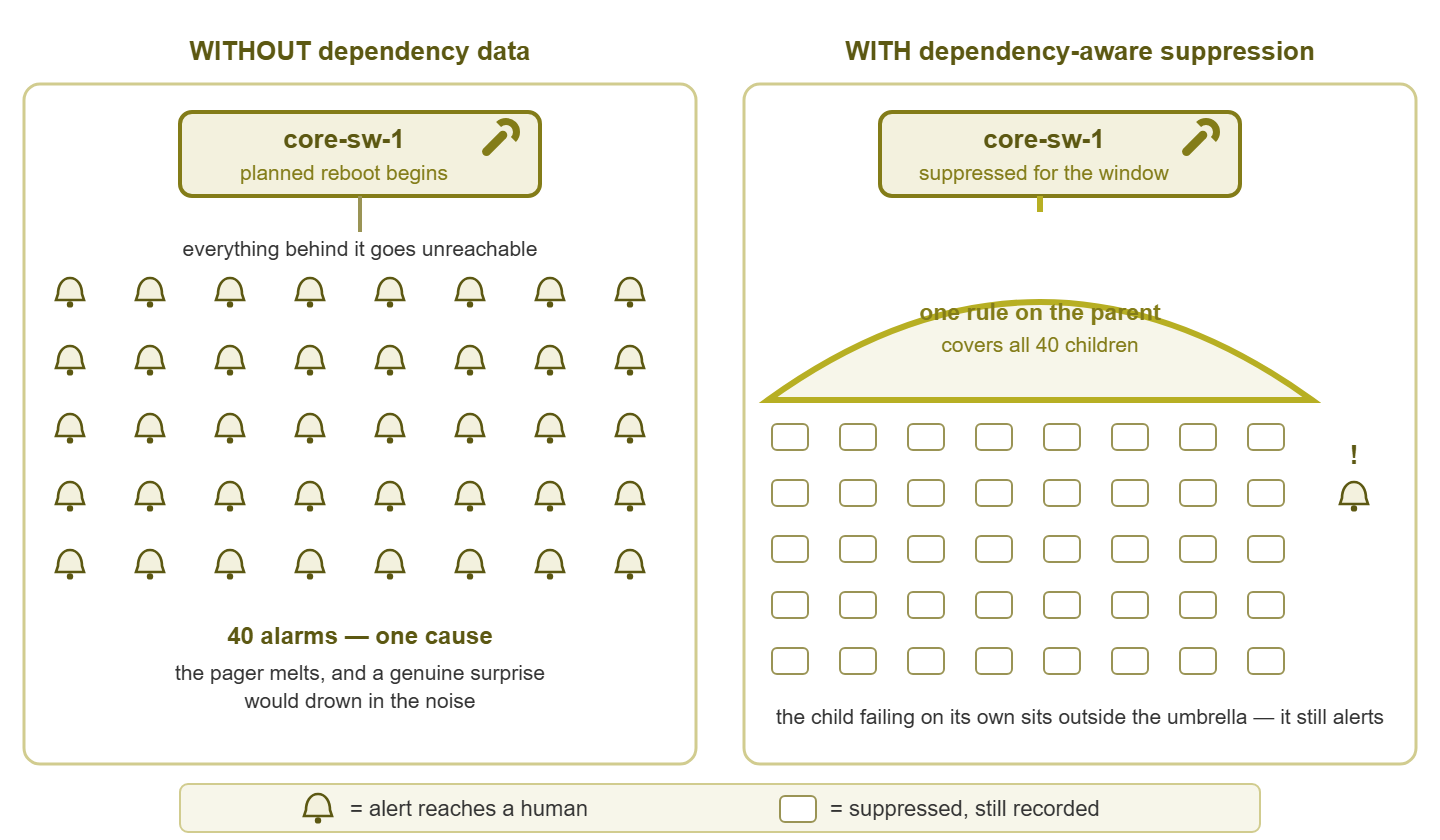
Figure 1: The same planned reboot, twice. One suppression on the parent covers the children; the device that fails for its own reasons sits outside the umbrella and still alerts.
The umbrella picture is the mental model worth keeping. The suppression covers exactly what stands under the parent — and only that. A device that fails for its own reasons, on a path that does not run through the parent, is outside the umbrella and alerts normally. That selectivity is the whole point: quiet where the work is, loud everywhere else.
The capability ladder: what your tool can do
Monitoring tools implement this idea at three levels of sophistication. Find your rung, and note that the lower rungs are still far better than nothing:
| Level | How it works | Strength | Watch out for |
|---|---|---|---|
| Explicit dependency tree | You (or discovery) declare parent-child links; suppression and alerting both follow them | Precise; handles service dependencies, not just network paths | Only as good as its maintenance — stale trees mislead |
| Topology-derived parents | The tool infers "behind-ness" from discovered network topology and routing | Cheap to keep current; updates when discovery re-runs | Sees the network path only; knows nothing about app-level dependencies |
| Group-based approximation | No real dependencies; you suppress a well-maintained device group ("everything on Floor 2") | Works in any tool; one action, many devices | Group membership is a hand-kept list — the manual-scope fragility returns, just centralized |
The third rung deserves a kind word, because it is where many small shops live. If your tool has no dependency model at all, well-maintained device groups stand in for a dependency tree. In that case, build one group per "thing that takes others with it" — behind-core-sw-1, on-hypervisor-2 — and suppressing the group becomes your one-step umbrella. The membership list still needs care (add the new AP to the group when you rack it), but you maintain it once, calmly, instead of re-deriving it during every window. The discipline transfers perfectly if you later move up a rung. I would rather inherit a well-kept group than a badly kept tree; the group at least admits it is a list.
Where the dependency data comes from
A dependency model is only as good as its data, and the data has two sources that complement each other.
Source one: topology discovery. Managed switches gossip about their neighbors using discovery protocols — LLDP and its vendor cousins. LLDP is Link Layer Discovery Protocol, the vendor-neutral standard by which each switch announces "this port connects to that device". A monitoring or mapping tool that reads this data can draw the physical tree for you: who uplinks to whom, what hangs off which port. That auto-drawn map is a superb starting point for network-path dependencies, and keeping such maps honest is its own craft. The network documentation pillar covers it. Trust discovery for breadth, then verify the links that matter.
Source two: manual curation of the core. Discovery cannot see everything (service dependencies, redundant paths, the odd unmanaged device), and it does not know which links are important. So hand-model the relationships that carry the most consequence, and take comfort from the count: there are usually only about twenty of them. The WAN edge everything traverses. The firewall behind it. The two or three core switches. The hypervisors that carry your virtual machines. The storage the hypervisors mount. And — easy to forget — the path between the monitoring server and everything else, because a switch on that path is the parent of your entire visibility. Twenty deliberate relationships cover the windows that generate real storms; the long tail of access-layer detail can come from discovery or wait.
Then keep it true. Dependencies rot exactly as fast as your topology changes, so bolt a change-hook onto the process you already have. Any change that re-cables, re-homes, or re-parents equipment gets one extra line in its plan — "update dependencies." A stale tree is not a neutral failure; it suppresses the wrong things and lets the wrong things page, both with total confidence.
Harbourview Clinic found out what a stale tree costs. The imaging server had been re-homed to a new distribution switch in the spring, and the dependency tree still listed it as a child of the old one. When the old switch had its firmware window, the imaging server was marked "unreachable via parent" along with everything else. That was not true: it was perfectly reachable, and it was losing a disk on its own. Nobody read a marked-as-expected entry, because that is what marked-as-expected means. Radiology reported the server at 07:30, which the review noted was "somewhat earlier than the monitoring did". Every change plan at Harbourview now carries a line that reads "update dependencies", and the line is not optional.
The nuances that keep it honest
Naive dependency suppression has sharp edges. Three of them account for nearly all the ways it goes wrong.
Nuance 1: the child that fails independently
During the parent's window, a child can develop a problem of its very own — and the classic case is the cold-boot failure. Power cycles and reachability blips are exactly when marginal hardware declares itself. Examples include the AP with the flaky power supply that does not survive the switch reboot, and the server whose disk finally refuses to spin up. The failed child's silence looks identical to every other child's silence during the window. The difference only appears at the end, when thirty-nine children recover and one does not. Two practices catch it. First, mute children rather than pausing them, so their during-window state is recorded and the non-recovery is visible in the data. Second, treat the post-window sweep — every child green before anyone goes home — as non-negotiable. That sweep has its own guide: the post-window checklist.
Nuance 2: the partial dependency
The tree assumes each child has one path to the world. Redundancy breaks that assumption. The dual-homed server — one uplink to the maintained switch, one to its healthy neighbor — does not go down when its "parent" reboots; it just loses a path. If your model calls it a child anyway, you over-suppress. In that case, a real failure of that server during the window would be silenced even though monitoring could still see it perfectly well. You have two honest options. Model the redundancy properly if your tool supports it (a child with two parents, suppressed only when both are down). Or accept conservative silence knowingly: leave it a child, and rely on the recorded results and the post-window review to catch anything it hid. Both are defensible; drifting into the second without deciding is not.
Nuance 3: how deep does the umbrella go?
Dependencies chain: the core switch parents the access switch, which parents the AP, which (in some models) parents the devices on its SSID. Suppression should inherit down the chain — grandchildren are just as unreachable as children — and good tools do exactly that. The sanity limits are practical. Know the full descendant count before the window: "suppressing this parent quiets 214 objects" is a number you want to read in advance, not discover in a report. Be suspicious of chains more than three or four levels deep. They are occasionally real, but more often a sign the tree encodes something wrong, or somebody's theory of the network. And remember the deeper the inheritance, the larger the surface hiding independent failures, which raises the stakes on the post-window sweep accordingly.
Tip: test the umbrella before you trust it. Pick a quiet evening, suppress a modest parent, and confirm three things. Confirm that the children actually went quiet and the marked reason says "dependency" rather than "down". Confirm that a device that should NOT be covered still alerts (unplug something safe and see). Ten minutes of rehearsal beats learning the tree's flaws during a real window.
The unplanned bonus
Every hour you invest in dependency data pays out twice. The same tree that quiets planned windows also tames unplanned outages. When the core switch dies for real at 3 a.m., a dependency-aware tool raises one actionable alarm — the parent. It marks the forty children as "affected via parent" instead of paging about each one. The on-call wakes to one alert that points at the cause, not forty that point at symptoms. That behavior is the suppression-flavored end of the broader toolkit — deduplication, grouping, root-cause flagging — that the alert correlation pillar covers. Build the tree for your maintenance windows; keep it for your worst nights.
Worked example: one window, two timelines
The job: reboot core-sw-1 for a planned upgrade, 22:00–22:45. Behind it: two access switches, eight APs, and roughly thirty assorted devices. First, the timeline nobody wants, as experienced by an on-call whose shop has no dependency data and who forgot to hand-list the children:
22:02  core-sw-1 DOWN            (suppressed - in window)
22:03  sw-access-21 DOWN         PAGE
22:03  sw-access-22 DOWN         PAGE
22:04  ap-201 DOWN               PAGE
22:04  ap-202 DOWN               PAGE
       ... 36 more pages over four minutes ...
22:09  on-call acknowledging alerts in bulk
22:31  srv-lab-3 DOWN            PAGE (ack'd in the bulk sweep,
                                  assumed "more window noise")
23:40  srv-lab-3 still down
Note the sting in the tail: srv-lab-3 is not behind the core switch. It died independently, mid-storm, and its genuinely important page was acknowledged, half asleep, in the same weary sweep as the noise. At 23:40 it is still down, and nobody yet knows that it matters. Storms do not just annoy; they camouflage. Now the same night with dependency-aware suppression — one window on the parent, children covered automatically:
22:02  core-sw-1 DOWN         suppressed (window, ticket 4207)
22:02  40 dependent objects   marked "unreachable via parent"
                              recorded, not notified
22:31  srv-lab-3 DOWN         PAGE  <- not a child; fires normally
22:38  on-call fixes srv-lab-3 (crashed service, restarted)
22:44  core-sw-1 UP           recovery
22:47  39 children green      1 straggler: ap-104 still down
22:55  ap-104 power-cycled    all green; window closed verified
Two pages all night: the one that mattered and nothing else. The unrelated failure surfaced instantly because it was never under the umbrella. The cold-boot casualty (ap-104) surfaced at window's end because the children were muted, not paused, and the closing sweep compared expected recoveries against actual. That is the entire promise of this technique in two log files.
Your starter plan and design checklist
You do not need to model your whole network this weekend. Start with the twenty relationships that matter:
- 1. List every device whose planned reboot would take others with it: WAN edge, firewall, core switches, distribution switches, hypervisors, primary storage.
- 2. For each, write down what stands behind it — from the topology map if discovery gives you one, from your head and a walk to the rack if not.
- 3. Add the monitoring path itself: whatever sits between the monitoring server and the rest of the network is a parent of your visibility.
- 4. Encode the relationships at your tool's best rung — explicit tree, topology-derived, or named device groups.
- 5. Rehearse once on a small parent, then use it in your next real window with the post-window sweep booked in.
- 6. Put the tree on a review rhythm. Give it a quarterly skim alongside your recurring-window review (see scheduled vs. ad-hoc). Also use the change-hook for anything that re-cables.
And before each dependency-suppressed window, the checklist: Is the tree current — did any recent change re-cable or re-home anything in scope? Do you know the descendant count the suppression will cover? Are children muted (recorded) rather than paused? Are redundant-path children handled deliberately, one way or the other? Does anything outside the umbrella still page — and did you leave it that way on purpose? Is the post-window verification owned by a named person? Five yeses and a name: then take the parent down with a clear conscience.
Where to go next
A dependency tree is a scope that writes itself. Twenty relationships, kept true by one line in every change plan, turn a forty-alert storm into one suppression on one parent. They do the same job on the outage you did not get to schedule. Keep the children muted rather than paused, so the one that does not come back is visible in the record. Sweep at the end. After that, the only hostname anyone types at 9 p.m. is the parent's, and nobody misses three.
Dependency suppression is one pillar of a complete windows practice. The mechanics of muting, scoping, and time-boxing live in suppression done right. The workflow split between planned windows and midnight mutes is scheduled vs. ad-hoc silencing. And proving the children all woke up is the post-window checklist. The full set lives in Maintenance Windows & Alert Suppression.
Put this into practice with SysPeep Monitor
Dependency-aware quiet needs a tool that understands your topology. SysPeep Monitor auto-discovers the devices and interfaces on your network. Its dependencies and alert rules are built to keep noise down. So a parent going dark doesn't mean forty pages about its children. The free trial installs on a Windows machine in minutes.
Download Free TrialLearn About SysPeep - All Rights Reserved.