
Why Monitoring Migrations Fail (and How to Plan One That Doesn't)
Every monitoring system gets replaced eventually. The license model changed, or the company merged with one that already had a tool. Or the person who built the current setup left, or the server it lives on is due for retirement. Whatever the reason, the announcement is cheerful: the new monitoring system goes live next quarter. I have read the plan that comes with that announcement more than once. It is one page long, and somewhere near the middle is a single line that says "migrate checks".
Monitoring migrations go wrong quietly. Nothing crashes on migration day; the new console is up, the tiles are green, and everyone goes home. The failure shows up weeks later, on the morning a device dies and nobody gets the alert. Or someone asks for last year's bandwidth graph one afternoon and there is no last year any more. By then the old server has usually been rebuilt as something else, and the evidence has gone with it.
It is the same six mistakes every time. I have watched them in organizations of every size, in migrations running in every direction. Those include commercial to open source, the other way round, or between two tools of the same kind. None of them is caused by the old tool or the new tool being bad. They are caused by treating the move as a weekend task instead of a project.
By the end you will be able to recognize the six classic failure modes before they happen to you. You will be able to sketch a six-phase plan with a timebox and an exit criterion for each phase. You will be able to name the roles a migration needs. And you will be able to explain to whoever holds the budget why "just switch it over on Friday" is a wish, not a plan.
In this guide
- A migration is a project, not a task
- The six classic failures
- Failures, causes, and preventions at a glance
- The plan skeleton: six phases, five gates
- Timeboxes and exit criteria
- Roles: an owner, a second pair of eyes, and the people who sign off
- Budgeting the migration honestly
- Where to go next
A migration is a project, not a task
A monitoring system is not one thing. It is a device list and hundreds or thousands of individual checks. Each check is a question the system asks a device on a schedule: is this port up, how full is this disk, is this service running? The system has thresholds that decide when an answer counts as bad. It has alert rules that decide who hears about it and how. It also has dashboards people have bookmarked, reports somebody's manager reads every month, and years of stored history. Replacing it means recreating every one of those in a tool that organizes them differently. Meanwhile, the original keeps running and the network keeps changing underneath you.
That is a project by any reasonable definition. It has a scope, phases that depend on each other, several people, and a duration long enough that the world changes while you are doing it. Teams that treat it as a task — one admin, some evenings, no written plan — are the ones that hit the failures below. Teams that treat it as a project still hit surprises, but in a phase designed to catch them, with the old system still watching. The surprises are identical in both cases. The only difference is whether you find them or a Saturday does.
The six classic failures
The forgotten UPS
Somewhere in the building is a device that was added to the old system years ago by someone who has since left. A UPS (uninterruptible power supply, the battery that keeps a rack alive through a power cut) in a wiring closet is the classic example. But it could be a temperature sensor or a router at a small branch. It is monitored. Nobody remembers that it is monitored. When the new system is built from memory — from what people think is watched — it is not recreated. Months after cutover — the day the new system becomes the one people act on — its battery fails. The closet loses power during a storm, and the first clue is a floor full of people without a network. The check existed. It just never made the trip.
The cause is building from recollection instead of from an export. The prevention is an inventory: everything the old system knows, extracted into one spreadsheet with one row per check, before anything is built. That is the first phase of the plan, and it has its own guide: Inventorying What You Monitor Before You Move It.
Nobody watching over the weekend
Cutover happens on a Friday afternoon. The old system's notifications are switched off so people stop getting duplicates; the new system's are switched on. Except that the new system's outgoing mail was never allowed through the relay. Or the on-call contact was imported with a phone number from two reorganizations ago. Or the rule that pages for a failed core switch was never enabled. A disk fills on Saturday. Nobody hears anything until Monday.
Meridian Parts cut over on a Friday afternoon and declared the migration complete in the same email. On Saturday the disk under the warehouse label printer filled up. The new system saw it and sent an alert to a distribution list the mail relay had never been told about. So the alert went nowhere. The old system, still polling with its notifications silenced, had the same disk in red on a console nobody opened until Monday. By then the warehouse had been hand-writing labels for a shift and a half. The review called it "a notification gap". The old system's notifications were switched back on that afternoon and stayed on for another six weeks.
The cause is switching alerting in a single step without proving the new path end to end. The prevention is alert parity testing. Every alert that matters is deliberately triggered and seen to reach the right person, by the right channel, before the old system stops sending. The method is in The Alert Parity Checklist.
A year of graphs, gone before the budget meeting
The old system held a year of interface utilization graphs. Those graphs were the evidence for the case that the internet link needs upgrading. Then the old server was rebuilt as something else, and the new system has three weeks of history. The budget meeting is next month. An argument that took a year to accumulate now rests on somebody's memory of what the graph looked like.
The cause is assuming history will move, or forgetting that it needs to. Raw history almost never migrates cleanly between platforms, but summaries, reports, and images do, if you export them before the old system goes. Data Export Realities covers what can be kept.
The help desk lost its favorite view
The people who look at monitoring most often are not the people who run the migration. The help desk had a dashboard showing the status of every branch office, and they glanced at it before answering every "is the network down?" call. The new system has a different dashboard, showing what the migration team thinks matters. The help desk was not asked. Now they phone the network team for every question they used to answer themselves, and they quietly conclude that the new system is worse. People who feel a tool was done to them rather than with them will resist it, sometimes for years.
The cause is treating other teams as an audience rather than as stakeholders. The prevention is finding out which views and reports people actually open, recreating those, and getting those people to confirm they work before cutover. (Ask what they open, not what they would like. The second list is always longer.)
The old system switched off too early
The new system looked fine for a week, so the old one was shut down to free up the server. Then the monthly report was due, and it had always come from the old system. Then a question came up about something that happened two months ago. Then somebody noticed that a whole category of check — certificate expiry, say — had never been recreated. The only list of which certificates were watched was in a database that no longer exists.
The cause is treating "it seems to work" as an exit criterion. An exit criterion is a written test that must pass before the next step is allowed to start. The prevention is a written list of things that must be true before the old system is touched. Then comes a sunset period in which it is kept read-only, not deleted.
Two systems, forever
The opposite failure is just as common. The new system was built, but nobody ever quite trusted it enough to switch the old one off. So both run. Both alert. Every device is polled twice. Every change to the network has to be made in two places and eventually is made in one. Two years on, the organization has two half-maintained monitoring systems and is evaluating a third because "neither of them is any good." This is one of the main ways tool sprawl starts; see the Monitoring Tool Sprawl pillar.
The cause is a parallel run — both systems watching the same devices while only one is trusted — with no end date. The prevention is a written exit criterion for the parallel phase, and a cutover date that is a decision, not a hope. Parallel runs do not end on their own. They settle in and acquire a budget line.
Failures, causes, and preventions at a glance
| Failure | Root cause | Prevention | Phase that catches it |
|---|---|---|---|
| The forgotten UPS | New system built from memory, not from an export | Complete inventory, one row per check, verified by a second person | Inventory |
| Alert gap at cutover | Alerting switched in one step; delivery path never proven | Deliberate test of every important alert, through to the real contact | Parity proof |
| History vanished | Assumed history would migrate, or forgot to export it | Export summaries, reports, and graphs; keep the old system read-only | Sunset (planned from the start) |
| User revolt | Stakeholders treated as an audience | Inventory the views people open; recreate them; stakeholders sign off | Inventory and parity proof |
| Old system off too early | "Seems fine" used as the exit criterion | Written cutover criteria; read-only sunset period | Cutover |
| Both systems forever | Parallel run with no end date | Timeboxed parallel phase; cutover is a scheduled decision | Parallel run |
The plan skeleton: six phases, five gates
Here is the shape that avoids all six. It has six phases, run in order, and between each pair of phases there is a gate. That is a written exit criterion that must be met before the next phase starts. Without gates, the phases blur into each other and you end up cutting over while still inventorying. With gates, every one of the six failures has a specific place where it gets caught.
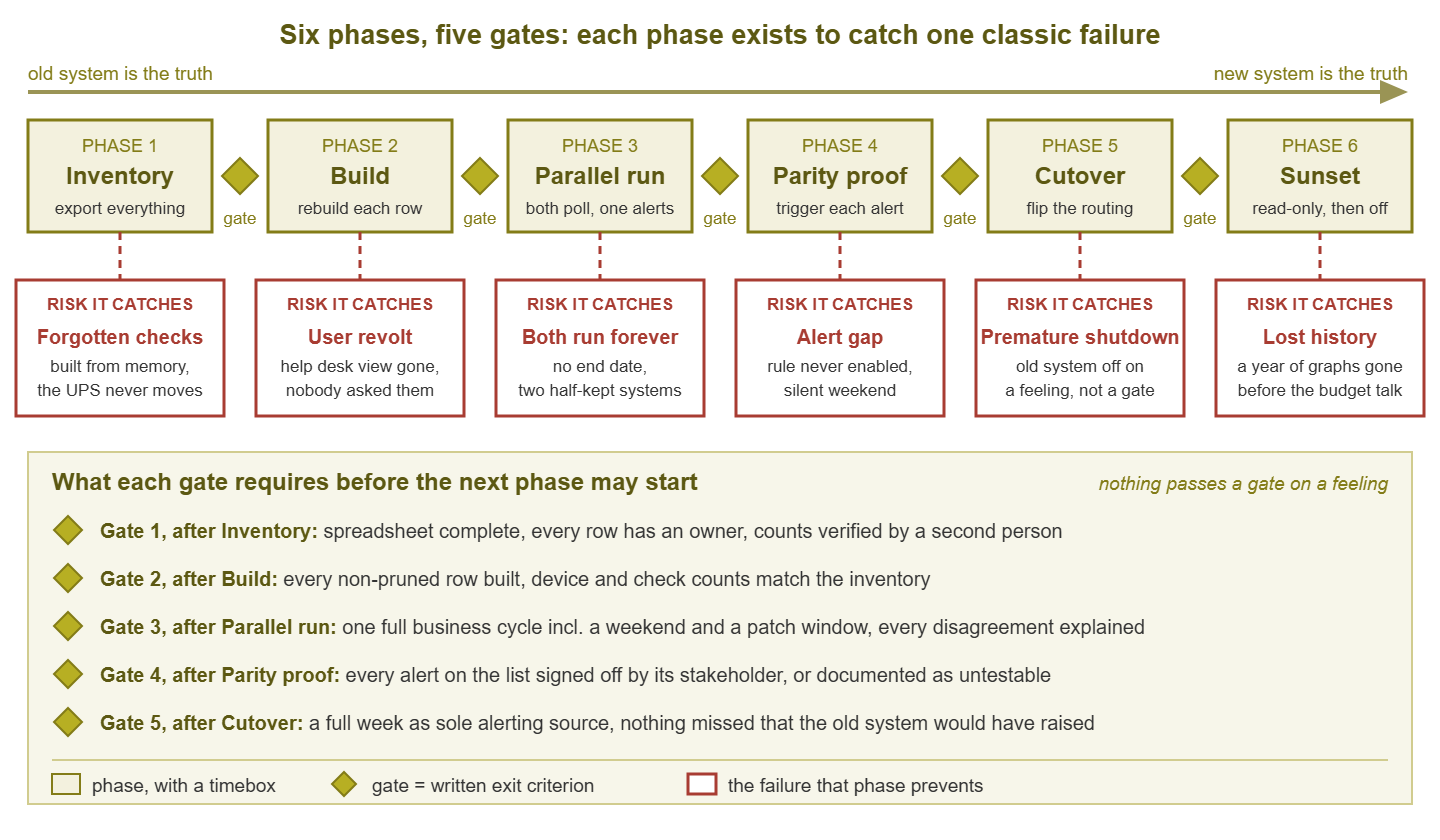
Figure 1: The six phases, the gate between each pair, and the classic failure each phase is there to catch. Nothing passes a gate on a feeling.
Phase 1: Inventory
Export everything the old system knows: devices, checks and their intervals, thresholds, alert rules, contacts, maintenance windows, dependencies, dashboards, reports, and integrations. Put it into a spreadsheet with one row per check. Prune what is dead, and record why. This is the document the rest of the migration is measured against. Exit criterion: the spreadsheet exists, every row has an owner, and a second person has checked its counts against the old system.
Phase 2: Build
Stand up the new system and recreate everything on the spreadsheet, marking each row as it is done. Recreate the dashboards people actually use, with those people looking over your shoulder. Connect the integrations. Exit criterion: every non-pruned row is marked built, and the device and check counts in the new system match the inventory, with any difference explained.
Phase 3: Parallel run
Both systems monitor the same devices at the same time. The old one remains the source of alerts that people act on. The new one alerts into a quiet channel that the migration team compares against the real alerts daily. This is where you discover what the build missed; see Parallel Running: Two Monitors, One Truth. Exit criterion: one full business cycle, including a weekend and a maintenance window, with every disagreement between the two systems explained.
Phase 4: Parity proof
Take the list of alerts that matter and trigger each one deliberately. Prove that the new system detects the condition and raises the right severity. Prove that it delivers the alert to the right person by the right channel within the expected time. Record each result and have the relevant stakeholder sign it. Exit criterion: every alert on the parity list is signed off, or documented as unsafe to test with a plan to verify it on first real occurrence.
Phase 5: Cutover
Flip the routing: the new system becomes the truth people act on, and the old system's notifications are silenced (not deleted) while its polling continues. Announce it. Tell every team where their view now lives. Keep the migration owner lightly loaded for the first week, because that is when the things nobody thought to test turn up. Exit criterion: a full week as sole alerting source, including a weekend, with no alert missed that the old system, still polling silently, would have raised.
Phase 6: Sunset
The old system is kept running, read-only, for as long as its history is useful and its terms of use permit. Monthly reports for the last year are exported as documents, capacity baselines into a spreadsheet, and the database and configuration are backed up somewhere restorable. Then, on an announced date, it is switched off. Exit criterion: the exports have been opened by a second person, the backup has been test-restored, and the shutdown date has been communicated.
Timeboxes and exit criteria
A timebox is a maximum duration you set before a phase starts. It exists to stop phases sprawling. If the inventory is not done inside its timebox, that is a signal to reduce scope or add hands, not to keep going indefinitely. I once ran an inventory with no timebox. It was still the inventory phase the following spring. The durations below are starting points for a network of a few hundred devices; scale them. But keep the shape, and keep the exit criteria as things that either happened or did not. "It feels ready" is not an exit criterion. "Every row is marked verified and the counts match" is.
| Phase | Typical timebox | Exit criterion (the gate) | Who signs the gate |
|---|---|---|---|
| Inventory | Two to four weeks | Spreadsheet complete; every row has an owner; counts verified by a second person | Owner and second pair of eyes |
| Build | Four to eight weeks | Every non-pruned row built; counts match the inventory, differences explained | Owner |
| Parallel run | One full business cycle, typically four to six weeks, including a weekend and a patch window | Every disagreement explained or accepted in writing; no unexplained missing devices | Owner and second pair of eyes |
| Parity proof | One to two weeks, overlapping the end of the parallel run | Every alert on the parity list signed off, or documented as untestable with a first-occurrence plan | The stakeholder for each alert |
| Cutover | One day, plus a one-week watch | One full week as sole alerting source with no missed alert | Owner and management |
| Sunset | The retention period, often up to a year | Exports checked by a second person; backup test-restored; shutdown date announced | Owner and management |
You need both: the timebox alone ends a phase whether or not it is finished, and the exit criterion alone never ends it. Together they force a decision at the deadline.
Roles: an owner, a second pair of eyes, and the people who sign off
Three roles. In a small team two people can share them, but no one person should hold all three, because the roles exist to check each other.
The owner
One named person runs the migration, keeps the spreadsheet, and chairs the daily comparison during parallel running. That person has the authority to say "not ready" at a gate. If nobody owns the migration it becomes something everyone does in their spare time, and it stalls the first week anyone is busy. The owner need not be senior; they need to be the person whose name is on it. That is because a gate only holds if someone is answerable for opening it.
The second pair of eyes
Someone who checks the owner's work at each gate. This is not a manager. Ideally, it is a peer who re-counts the inventory and spot-checks a random sample of rows against the old system. The peer also reads the parity sign-offs before cutover. This role exists because by the end of the build phase the owner has been staring at the spreadsheet for weeks. By then, the owner can no longer see the gap in it. The forgotten UPS is almost always found by the second pair of eyes, usually by walking past it.
The stakeholders who sign off
Everyone who consumes the monitoring: the help desk, the server team, the person who reads the monthly report, whoever carries the on-call phone. Each is asked, during the inventory, what they use; each is shown it working in the new system; each confirms that it works. Sign-off turns "I think they are fine with it" into a fact. It makes stakeholders feel the migration was done with them, which is the cheapest insurance against the user-revolt failure.
Tip: Sign-off does not need a form. The help desk lead can write: "I have looked at the branch-office dashboard in the new system and it shows what I need." Filed in the project folder, that email is enough. What matters is that the question was asked and the answer recorded before cutover.
Budgeting the migration honestly
Because it is a project, a migration has costs beyond whatever the new tool itself costs. The ones that get forgotten are the ones that hurt. Put each of these in the plan explicitly, even if the number next to it is "one admin, two days a week, for four months."
- People time. Inventory, build, daily comparison, parity testing, stakeholder walkthroughs. For a few hundred devices, count on a substantial fraction of one admin's time for the whole duration, plus hours from every stakeholder team.
- The overlap. Both systems must run through the parallel run, the cutover watch, and the sunset. If the old system is licensed, that license must cover the overlap; if it is open source, the hardware and maintenance still cost time.
- Capacity. The new system needs a server or virtual machine while the old one is still using its own, and possibly remote probes at other sites.
- Polling load. Two systems asking every device the same questions for weeks. Older or smaller devices can struggle.
- Documentation and training. Every runbook that says "check the monitoring console" needs a new screenshot and link. And every on-call engineer needs to see the new alerts before one wakes them.
- Contingency. Something in the inventory will be much harder to recreate than it looked: a custom script, an odd device, an integration whose author left.
If the budget covers only the new tool and "some admin time," the migration will run out of one of the above halfway through. That usually happens during the parallel phase. That is exactly when the two-systems-forever failure begins: the parallel run becomes the new normal, because finishing it would take resources nobody set aside.
Where to go next
The six failures all come from the same place: a migration treated as a task. Those failures are forgotten checks, alert gaps, vanished history, resentful users, premature shutdown, and the parallel run that never ends. Six phases with a gate between each, a timebox and an exit criterion for every phase turn it back into a project. It also takes an owner, a second pair of eyes, and stakeholders who sign off. That shape works in any direction for any pair of tools. The one-page plan that said "migrate checks" was not wrong, exactly. It just left out the other forty lines.
The rest of this pillar walks through the phases in order: inventorying what you monitor, parallel running, the alert parity checklist, and the realities of exporting history. If you have not yet chosen the destination, the Choosing a Monitoring Tool and Fair Proof of Concept pillars cover picking one fairly. If the migration is part of reducing the number of tools you run, the consolidation strategy guide shows how these phases fit a larger plan. Everything in this topic is collected at Migrating Between Monitoring Platforms Without Losing Your History.
Put this into practice with SysPeep Monitor
If you are heading into the build phase and still shortlisting a destination, the free trial of SysPeep Monitor can serve as the candidate you stand up in parallel. It installs as a central service on one Windows machine with optional remote probes for other sites. It auto-discovers devices and interfaces, and collects over SNMP, WMI, and SSH. That makes the count-against-the-inventory step quick to start. Whether it earns cutover is for your parallel run and parity proof to decide.
Download Free TrialLearn About SysPeep - All Rights Reserved.