
Where Spending Actually Helps (and Where It Doesn't)
Sooner or later someone with a budget stops at your desk and asks what you would do with a little money for monitoring. It is a good problem and a surprisingly hard question. I have watched two small teams answer it, one each way, and both got it wrong. The first said "buy the big tool with all the features", which is the obvious answer. The second said "nothing, it's all free", which is the reflexive one. Between those two sit a handful of purchases that reliably pay for themselves in a small team, and a handful that reliably do not.
This guide sorts them. It talks about spending in plain terms and quotes no prices, because prices change and your numbers are yours. It gives you five things worth paying for, in the order a small team should buy them. It covers four places where money quietly disappears. And it gives you a way to argue for the good spending without inventing a statistic. By the end you should be able to answer the budget question with a short list, a reason for each item, and a straight face.
In this guide
- The ladder and the pit
- Rung 1: time — paying for packaging
- Rung 2: support — someone to call
- Rung 3: a modest server or collector
- Rung 4: training
- Rung 5: a proper alerting and on-call layer
- The money pit: where spending is wasted
- Making the argument without inventing numbers
- The small-team spending ladder, in order
- Spend, benefit, and when: the table
The ladder and the pit
Two mental pictures carry this whole guide. The first is a ladder: five kinds of spending, climbed in order, where each rung makes the next one worth more. Buying training before you have a stack to be trained on is wasted; buying an on-call layer before anyone trusts the alerts is noise with a subscription fee. The second is a pit: the places where money goes in and nothing comes back, no matter how reasonable the purchase looked on the quote.
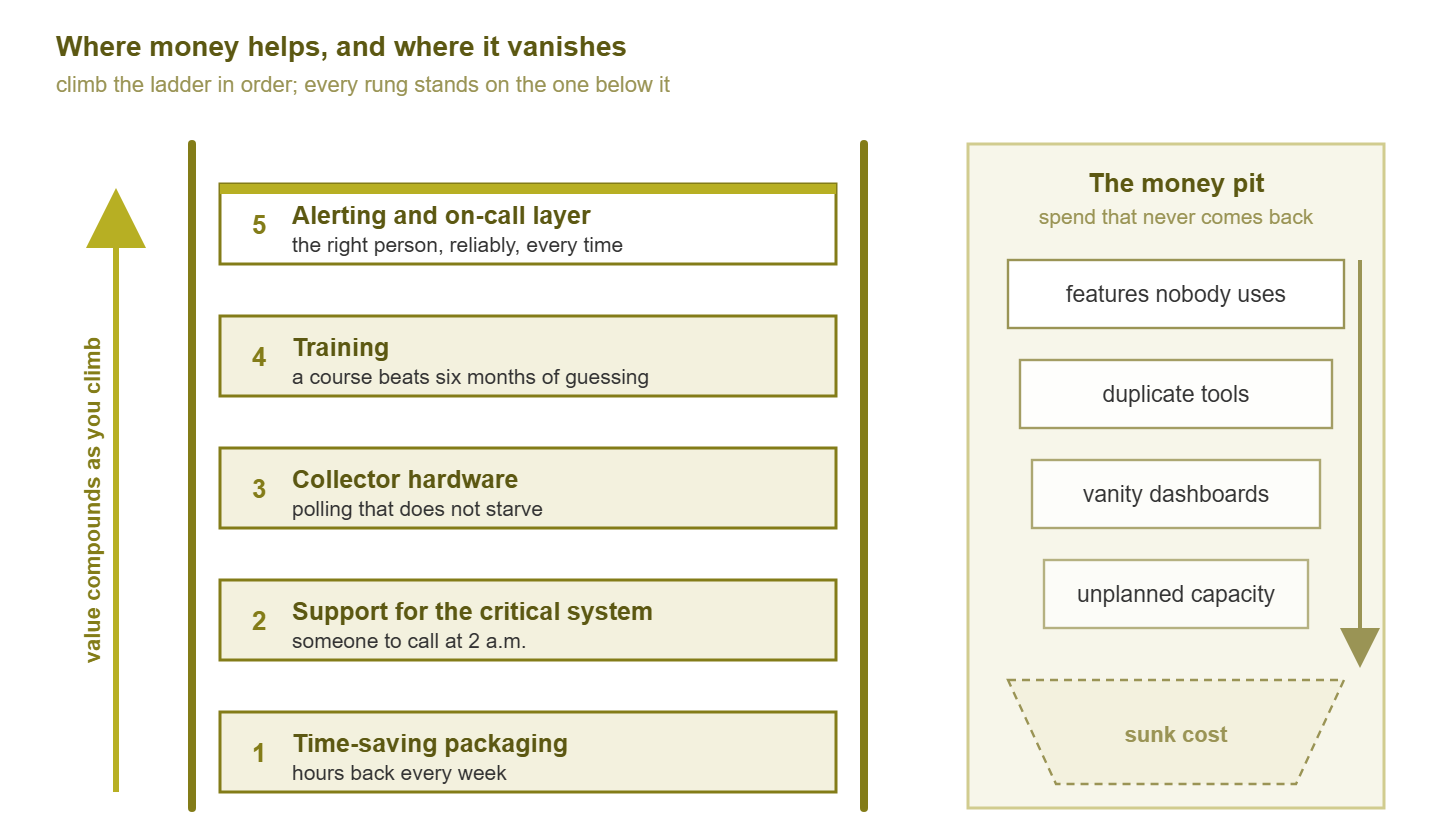
Figure 1: The spending ladder and the money pit. Climb the rungs in order — each one stands on the last. Everything in the pit looked sensible on the quote.
Notice what is not on the ladder: features. The ladder is about hours, risk, and people, because those are what a small team is actually short of. A feature only matters when it saves hours, removes a risk, or makes a person more capable. When it does, it belongs on one of the rungs already there.
Rung 1: time — paying for packaging
The first thing worth paying for is time. In monitoring the way you buy time is by paying for packaging. This is software that arrives assembled, discovers your devices, draws sensible graphs by default, and updates itself without a weekend. A free stack can do everything a packaged one does; the difference is who did the assembling and who does the upkeep. The guide on free stacks that punch above their weight is honest about that upkeep: days to build, then hours every month, forever.
Those hours are the cost, and the arithmetic is simple even without prices. If assembling and nursing a stack takes three hours a week, that is roughly a full working week every quarter. In that case, the person spending it is usually the most capable person you have. A purchase that gives most of those hours back is not "spending on monitoring". It is spending on the projects those hours were stolen from. The three hours appear on no budget line, which is how the stack stays free.
This rung is first because it is the one that changes what the rest of the ladder means. Once the time is back, support has something coherent to support, training has a stable thing to teach, and an alerting layer has a trustworthy source to route. The honest caveat is that if you genuinely have the hours and enjoy the craft, this rung is worth less to you. That is a legitimate reason to skip it — for now.
Rung 2: support — someone to call
The second rung is support for the critical system. That means a contract, a vendor, or a consultant who answers when the monitoring — or the thing it monitors — falls over and the person who understands it is unavailable. Small teams undervalue support because they rarely use it, which is exactly backwards. Insurance is valuable in proportion to how bad the day is when you need it, not how often.
The test for whether support is worth paying for on a given system is a single question: if this breaks at two in the morning and our expert is on a plane, what happens? If the answer is "we wait until they land," the system needs either a second expert or a phone number. Support is usually cheaper than the second expert, and faster to arrange. Apply this to the monitoring platform and to the two or three systems it watches that would stop the business.
What good support buys is not just fixes. It buys a sanity check before a risky upgrade, a known path when a database fills the disk, and the ability to take a holiday. For a team of one or two, that last item is not a perk; it is what keeps the team at one or two rather than zero. I once spent the second day of a holiday on a hotel phone, talking a colleague through a database restore from memory. A support contract would have been cheaper than the hotel phone, and the restore would have been faster.
Rung 3: a modest server or collector
The third rung is embarrassingly unglamorous: hardware, or the virtual equivalent. The aim is for the monitoring server to have enough CPU, memory, and disk to poll everything it should, as often as it should. It should also have enough resources to keep the history you will want.
Monitoring that runs on the leftover box under the desk shows a specific set of symptoms. Polling cycles stretch, so a five-minute graph quietly becomes an eight-minute graph and the alerts arrive late. The database grows into the disk and either the graphs stop or the alerts stop, and nobody notices which. A busy poller competing with a busy database on the same starved machine drops SNMP (Simple Network Management Protocol) responses. Those dropped responses appear in the graphs as gaps that look like network problems and are not. The result is a monitoring system that is technically running and practically untrustworthy.
The fix is modest. It is a dedicated VM (virtual machine) with resources reserved rather than shared, with disk sized for the retention you actually want. For a second site or a segment behind a firewall, it also means a small remote collector or probe. That way, the WAN (wide area network) link's health is measured from both ends. This is also the rung where a little spend removes an argument. Nobody can blame the network for a gap in a graph when the poller is known to be healthy.
Tip: before buying hardware, check the monitoring server's own graphs. If the poller's CPU is flat and the disk is half empty, this rung is already paid for. If polling duration is creeping up month over month, it is not.
Rung 4: training
The fourth rung is training: a course, a workshop, a few days with someone who already knows the tool or the protocol. It is the rung most often skipped, because it produces nothing you can point at on a rack. It is one of the highest-return purchases on the list.
The honest comparison is a course against six months of trial and error. Both get you there. One gets you there in days with fewer mistakes. And — this is the part people forget — the mistakes on the trial-and-error route are made on the production network. Learning SNMP by breaking the core switch's CPU with over-aggressive polling is educational and expensive. Learning it from someone who says "do not do that" costs an afternoon.
Training is also the cheapest way to raise the bus factor. That is the number of people who would have to be unavailable at once before nobody could run the thing. In a team of one or two, that number is usually one. Send the second person, not just the expert. A stack understood by two people is worth more than the same stack with a better feature list, and no amount of software spending buys that particular resilience. The guide on the hidden costs of cheap has more on why.
Rung 5: a proper alerting and on-call layer
The top rung is a dependable path from alert to human. This is something that takes the notifications your monitoring produces and makes sure the right person actually sees them. It escalates when nobody responds, respects who is on call this week, and does not depend on one mail server being up. Whether this is a feature of your monitoring platform, a small separate service, or a carefully built arrangement of your own, it is the rung that converts detection into response.
It sits at the top because it depends on everything below. An escalation layer fed by untrusted, noisy alerts just escalates noise faster and pages more people about nothing. Build it after the thresholds are sane and the dependencies are modeled. Then it becomes the difference between "monitoring emailed at two, someone read it at eight" and "the outage lasted twenty minutes." That difference is the closest thing monitoring has to a headline benefit. And it is worth real money precisely because everything under it has been done right.
The money pit: where spending is wasted
Now the other column. These four purchases show up in small-team budgets constantly, and they share a property: each one looked defensible on the day it was approved.
Features nobody uses
The most common waste is paying for a tier, module, or license count because "we might need it." A feature that nobody has a question for today will not be configured, and an unconfigured feature is a line item. Buy the tier that does what you need this year, and let a real, recurring question trigger the upgrade. Any quote will happily include the bigger tier; you are under no obligation to accept it.
Harbourview Clinic bought the top tier of a monitoring platform because the quote expired on Friday and the discount was described as exceptional. The tier included log analytics, application tracing, and a capacity-planning module, none of which anyone at the clinic had a question for. Two renewals later the three modules were still at their default settings. The one thing the clinic had actually needed — a remote collector for its second site — turned out to be sold separately. The admin who signed still had the original quote in a drawer. It had expired on a Friday, and so had the four that followed it.
Dashboards for the sake of it
Large screens, dashboard add-ons, and days of panel-building produce something that looks like monitoring and is closer to decoration. A dashboard earns its place when a specific person looks at it for a specific decision. If nobody can name the person and the decision, the spend belongs to the pit. One screen with twenty things that matter costs almost nothing and does more than a wall of graphs.
Tools that duplicate existing ones
The second tool that pings hosts. The third place logs go. The new dashboard layer that draws the same graphs the core already draws. Duplication does not add coverage; it adds seams, disagreements, and a question ("which one is right?") that costs time during every incident. Before any purchase, ask which existing component it replaces. If the answer is "none, it is in addition," be suspicious.
Capacity nobody planned
A big server, a large license count, or a retention period chosen by rounding up "just in case" is capacity without a plan. Capacity without a plan is paid for every month and used never. The right size is the one that fits the next year with room to grow. The right time to buy more is when the monitoring shows you need it — which, pleasingly, is a thing monitoring is good at.
Making the argument without inventing numbers
The person with the budget will want a return-on-investment argument, and the temptation is to invent one: a percentage from nowhere, an outage cost someone once heard. Do not. Invented numbers get found out, and once they are, every future request is discounted. What works instead is an argument structure whose numbers are all yours and all checkable.
The first structure is hours saved multiplied by what an hour of your time costs. You do not need to say the second number out loud; the person with the budget knows it better than you do. Your job is the first number, measured honestly. Keep a log for a month of the hours spent building, patching, and nursing the current setup. Then state what the purchase would return: "about three hours a week, based on the last month's log, which is a working week per quarter for our most senior admin." That is not a projection; it is a measurement plus a proposal.
The second structure is incidents caught earlier. List the last few outages and, for each, when the problem started, when you found out, and how you found out. If the honest answer to "how" is "a user called," you have a detection gap you can describe without a single invented statistic. For example: "in four of the last five incidents, users noticed before we did. The alerting layer on the ladder exists to close that gap." Then estimate, conservatively, what earlier detection would have changed for one of them — in minutes of downtime, not in currency.
The third structure is risk removed, which is where support and training live. Frame it as a question the budget owner can feel: "if the monitoring server dies while I am on leave, nobody here can rebuild it; this purchase means someone can." Budget owners understand single points of failure; they have a few themselves.
A worked outline, ready to fill in:
REQUEST:  [one rung of the ladder]
HOURS:    [measured hours per week on the problem it solves, from a log]
RETURN:   [hours back per quarter, in your words]
GAP:      [last N incidents: how many were found by users first]
RISK:     [what breaks if the one expert is unavailable]
NOT ASKED FOR: [the bigger tier / extra tool you deliberately left out, and why]
That last line is the quiet winner. Showing the budget owner what you chose not to buy is the most persuasive evidence that the rest of the list was chosen carefully.
The small-team spending ladder, in order
Putting the rungs together, here is the order in which a small team should spend as money becomes available. Each rung has the trigger that says it is time for the next rung:
- Spend nothing first. Build the utility belt and a minimum free stack. Log the hours it takes. You cannot climb the ladder honestly without that log.
- Rung 1, time. Trigger: the log shows hours every week going to assembly and upkeep, and those hours are being taken from projects that matter more.
- Rung 2, support. Trigger: the two-in-the-morning question has an answer you do not like, for the monitoring platform or a system it watches.
- Rung 3, hardware. Trigger: polling cycles are stretching, disks are filling, or graphs show gaps that are not network problems.
- Rung 4, training. Trigger: a stable stack exists, and only one person understands it — or nobody fully does.
- Rung 5, alerting layer. Trigger: alerts are trusted and quiet, and the remaining gap is between "the alert fired" and "someone acted."
The order is not rigid. A team whose expert is about to leave should buy training and support before packaging. A team whose monitoring server is visibly dying should buy hardware first. But the default order holds for most small teams, because it front-loads the purchases that make the later ones cheaper and safer.
Spend, benefit, and when: the table
| Spend | What it buys | When it is worth it | When it is not |
|---|---|---|---|
| Packaged monitoring software | Hours back every week; a coherent, supported whole | Upkeep hours are measurable and stolen from better work | You have the hours and enjoy the craft, and the stack is stable |
| Support contract or retained consultant | Someone to call; a path through the bad day | The critical system has one expert, or none | Two people can rebuild it from documentation today |
| Dedicated server or remote collector | Polling that does not starve; trustworthy graphs; WAN measured from both ends | Poll cycles stretch, disks fill, graphs show false gaps | The poller's own graphs are flat and the disk is half empty |
| Training | Days instead of months; mistakes made in a classroom, not production; a second expert | A stable stack exists and knowledge lives in one head | The tool is about to be replaced |
| Alerting and on-call layer | Alerts reach the right human, with escalation, reliably | Alerts are trusted and the gap is alert-to-action | Alerts are still noisy; it would escalate noise |
| Bigger feature tier | Options | A recurring question needs a feature you lack | "We might need it" |
| Wall dashboards and add-ons | Visibility for a named person and decision | Someone will look at it for a reason | Nobody can name the person or the decision |
| Additional overlapping tool | Rarely anything new | It replaces a component and removes a seam | It is "in addition" |
| Extra capacity or retention | Headroom | Monitoring shows the current size will not last the year | Rounded up "just in case" |
Where to go next
Start the hours log this week. It is the one input every argument in this guide depends on, and it costs nothing but honesty. Then answer the two-in-the-morning question for your monitoring platform and the three systems the business cannot lose. Those two exercises tell you which rung is next. And the answer comes out as a short list with a reason beside each item, which is the only kind of answer a budget owner remembers. The rest of the Monitoring on a Budget: Free and Low-Cost Stacks topic fills in around it. It covers the free stack to measure against and the hidden costs the log will surface. It also covers a staged roadmap that places each purchase at the point where it earns its keep. For the wider decision between building and buying, the Open Source vs. Commercial Monitoring topic weighs both sides. The straight face you will have to manage on your own.
Put this into practice with SysPeep Monitor
Rung one on the ladder is paying for packaging. That is the honest place to mention SysPeep Monitor. It is a commercial Windows product that discovers devices, polls them over SNMP and other collectors. It handles thresholds, dependencies, alerts, and dashboards from one console. It is not free, but the trial is. So you can measure the hours it gives back against your own log before anyone signs anything.
Download Free TrialLearn About SysPeep - All Rights Reserved.