
Heartbeats and Dead-Man Switches
The guide to monitor failure modes ends on an uncomfortable conclusion: when the monitoring system dies completely, it cannot tell you. That is because the thing that would do the telling is the thing that died. Its silence looks exactly like a healthy, quiet network. If your plan for noticing is "surely an alarm would arrive," you have no plan. Dead systems send nothing, which is the whole problem.
The fix is not a bigger alarm. It is a design inversion, and it is one of the oldest safety ideas in engineering. Stop asking "did an alarm arrive?" and start requiring proof of life. The monitor must continuously demonstrate that it is alive and working, and somebody independent must notice when the demonstration stops. Under this design, absence itself becomes the alarm. Silence stops being ambiguous — it becomes the loudest signal you have.
This guide shows you how to build that arrangement. It explains what the two halves (the heartbeat and the dead-man switch) actually are. It explains what separates an honest heartbeat from a hollow one. It covers how to choose the frequency and your realistic options for an independent witness at small scale. It also covers how to test the whole loop. None of it requires new hardware or a budget meeting. A working version fits in an afternoon.
In this guide
- The design inversion: from alarms to proof of life
- The two halves: heartbeat and dead-man switch
- What makes a heartbeat honest
- Choosing the frequency: the detection-delay math
- Independent witness options, honestly compared
- Building it: the pulse and the alarm path
- Testing: the monthly pull-the-plug drill
- What each layer catches
- The afternoon build checklist
The design inversion: from alarms to proof of life
The name "dead-man switch" comes from trains. A locomotive driver holds a handle or pedal that must stay pressed; if the driver collapses, the handle releases and the brakes apply automatically. Notice what the engineers did not build: a button the driver presses to report "I have collapsed." That design fails for the obvious reason — a collapsed driver presses nothing. Instead they required continuous proof of consciousness and made the absence of that proof trigger the safety response. No action was needed from the person who is in trouble.
Your monitoring system is the driver. Any scheme where the failing system must take an action to report its own failure — send an email, fire a trap, post a message — collapses along with it. The inversion sidesteps this completely. The healthy system does something small and regular. An independent party treats the stopping of that something as the emergency. You never have to enumerate the ways the monitor might die. You only have to notice that it stopped saying hello.
The two halves: heartbeat and dead-man switch
The arrangement has exactly two parts, and the names are wonderfully literal. The heartbeat is a small signal the monitoring system emits on a fixed schedule — every five minutes, say — meaning "I am alive and working." Physically it can be almost anything: a tiny HTTP request, an email, a ping, a status message. The dead-man switch is the other half: an independent party that expects the heartbeat on that schedule. It runs a countdown timer that each arriving pulse resets. It raises an alarm when the timer runs out. Pulse arrives, timer resets, silence continues to mean health. Pulse stops, timer expires, and the silence finally gets a voice.
The elegance is in what this catches. Go back to the failure catalog: the service crash, the dead host, the deleted VM, the full disk that froze the database, the site-wide power cut, the severed uplink. Those are six different failures with six different causes. And every one of them stops the heartbeat, so every one of them trips the same alarm. You did not have to predict any of them. One mechanism covers the entire family of total failures, including the ones you have not imagined yet. That is why this pattern, not a taller pile of self-checks, is the cornerstone answer to "who watches the watcher."
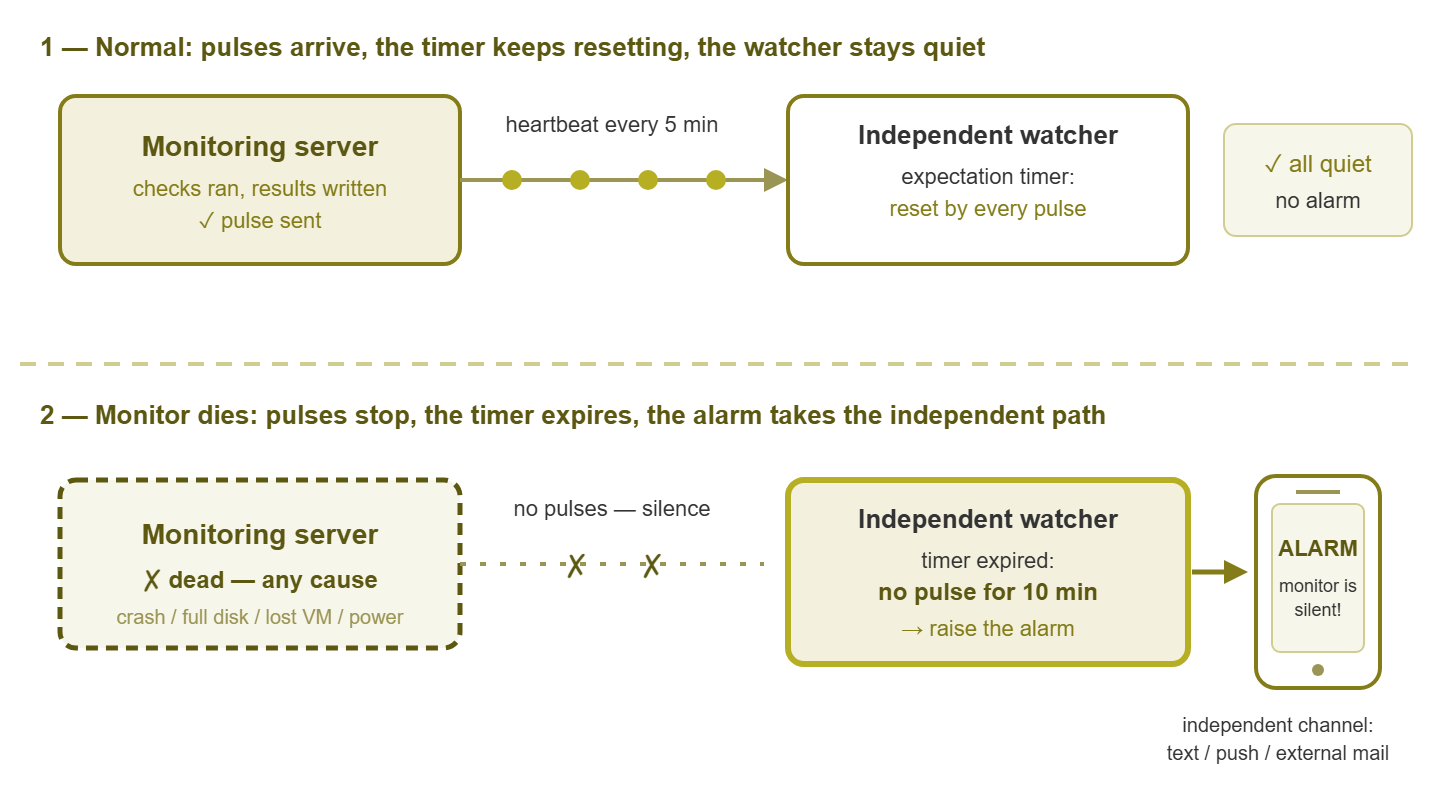
Figure 1: While pulses arrive, the watcher stays quiet. When they stop — for any reason at all — the watcher raises the alarm through a channel the dead infrastructure cannot take down.
What makes a heartbeat honest
Here is the trap almost everyone falls into on the first attempt: the hollow pulse. You create a scheduled task on the monitoring server that pings the watcher every five minutes. It works, you feel safe — and you have proven nothing except that the operating system's task scheduler is alive. The monitoring service can be crashed. The database can be corrupt, and every check can be stopped. And that little task will keep dutifully pinging away like a smiling receptionist in a burning building.
An honest heartbeat is proof of work, not proof of power. Tie the pulse to the thing you actually care about: it should fire only if checks genuinely ran and results were genuinely recorded. The gold standard goes one step further and sends the pulse through the notification pipeline. That means the same alert rules, mail relay, or messaging channel a real emergency would use. Now the pulse proves the whole chain end to end: scheduler alive, checks running, results flowing, alerts deliverable. If any link breaks — including the sneaky notification death, where checks run fine but alerts silently evaporate — the heartbeat stops. Which is exactly what you want, because a monitor that cannot deliver alerts is, for practical purposes, dead.
Keep the content minimal by design: a timestamp and a name is plenty. The temptation is to stuff the pulse with status details — check counts, disk numbers, little reports. Resist it. The watcher's job is to detect absence, and absence detection must stay dumb and bulletproof. A watcher that has to parse a status payload is a watcher with new ways to fail. The pulse's presence is the message. Everything else belongs in the monitor's own dashboards.
Choosing the frequency: the detection-delay math
How often should the heart beat? Work backward from one question: how long can you tolerate being blind without knowing it? The arithmetic is simple but worth doing consciously. If the pulse fires every N minutes and the watcher tolerates one missed pulse before alarming, then detection takes between one and two intervals. That tolerance is a sensible default that avoids false alarms from a single lost packet. A 5-minute heartbeat with that tolerance means the alarm fires somewhere between 5 and roughly 10 minutes after the monitor dies. That is up to ten minutes of undetected silence, worst case.
For most small networks, a 5-minute pulse with ten-minute worst-case detection is a fine landing spot. Even a 15-minute pulse transforms your situation. Remember, the alternative you are replacing is "days, or whenever someone happens to open the console." Tightening to one minute buys faster detection at the price of more false alarms. That is because every brief hiccup between monitor and watcher now looks like a death. The tolerance window exists precisely to absorb those hiccups. Pick numbers, state the worst case out loud ("we would know within ten minutes"), and confirm you can live with it. If you cannot, tighten. If a tight setting cries wolf weekly, loosen. It is the same detection-delay reasoning you use for polling intervals, applied to the one system that has no backstop.
Independent witness options, honestly compared
The dead-man switch has to live somewhere, and "independent" is the load-bearing word. Every dependency the watcher shares with the monitor — same host, same power, same internet uplink, same mail server — is a failure that kills the patient and the witness together. Total independence is hard to get for free at small scale, so here are the realistic options with their honest tradeoffs.
Another box on-site
A second machine in the building runs the expectation timer. The machine can be a tiny single-board computer, an existing utility server, or even a spare desktop. The timer is a small script that alarms if no pulse has arrived in ten minutes. Cheap, fully under your control, running within the hour. The weakness is shared fate: the machine sits on the same power, the same switches, the same uplink. It reliably catches the monitor's individual death (crash, full disk, eaten VM). But a site-wide outage takes out the witness along with the patient — and may take out its ability to reach you, too.
The reciprocal pair
If you run two sites, or two monitoring systems anywhere, cross them. In that setup, site A's monitor expects site B's heartbeat and alarms when it stops, and vice versa. Each watcher is a full monitoring system with real alerting, on separate power and a separate uplink. The whole thing costs nothing but configuration. This is the elegant answer for anyone already running multi-site monitoring of the kind the scaling guides describe. The residual gap: anything that takes both sites at once — a shared provider, an organization-wide power event — silences both witnesses simultaneously. Rare, but real, and worth saying out loud.
The external expectation service
There is a whole class of service — generically, a heartbeat-monitoring or dead-man service — that lives outside your infrastructure entirely. You send it a small periodic ping (typically an HTTP request to a unique URL). When your pings stop arriving, it alarms you. Independence is the entire point. Your power, your internet, your mail server, and your virtualization stack can all die together. Even then, the watcher, living elsewhere, still notices and can still speak. Evaluate two things. First, what it can know: only that your pings stopped, not why. Its alarm means "go look," which is honestly all you need it to say. Second, its delivery paths: the alarm must reach you by a route that does not depend on your dead infrastructure. For example, use a push notification or text message to your phone, or an external mailbox. Do not use an inbox hosted on the mail server that just went down with everything else.
The low-tech floor
The humblest version: a scheduled daily email from the monitor — the 7:00 morning report — whose absence a human notices. No new systems, no scripts; the dead-man switch is you, with coffee. Its flaws are human flaws. Detection delay is up to a day. People forget, take vacations, and stop noticing the absence of routine things with impressive speed. Make it survivable by attaching the habit to something you would open anyway. If the morning report is genuinely useful, its absence is genuinely conspicuous. This is the floor, not the goal. But it is enormously better than nothing, and if you build only this today, today was still a good day.
Building it: the pulse and the alarm path
Concretely, the heartbeat is a small piece of automation tied to real cycle completion. Many monitoring platforms can send a scheduled notification or run a script when polling completes. Failing that, a tiny script on the monitoring server tests the freshness of the data before it dares to pulse. The logic, in plain pseudo-code:
every 5 minutes, on the monitoring server:
    newest = age of most recent check result in the database
    if newest > 10 minutes:
        exit quietly           (something is wrong - send NO pulse)
    send pulse to the watcher  (HTTP request, email, or check-in)

on the watcher, continuously:
    if no pulse received for 10 minutes:
        raise the alarm via the independent channel
The other half of the build is the alarm path. It is governed by one rule: the dead-man's alarm must reach you outside the possibly-dead infrastructure. Trace it explicitly. When this alarm fires, what does its delivery depend on? If the scenarios that kill your monitor plausibly include your mail server, then the dead-man must not alert through that mail server. The shared risks include the same VM cluster, same site, or same power. If you use that mail server in that case, you have built an elaborate machine for sending email to a corpse. A message to your phone or an external mailbox breaks the dependency. Every dependency the alarm path shares with the monitored infrastructure is a hole in the design; find them now, on paper, rather than during the outage.
One caution about the watcher itself: keep it embarrassingly simple. A watcher script that silently stops running has its own hard death, and nobody is watching the watcher's watcher — that way lies infinite regress. The escape from the regress is simplicity plus testing: a dumb timer, a log line every cycle, and the monthly drill below.
Tip: when you take the monitor down on purpose — patching, upgrades — the dead-man will fire, which proves it works. Pause it deliberately, with a written end time, and un-pause it as the last step of the maintenance. A dead-man left paused is a dead-man deleted. The upgrade guide builds this into its checklist.
Testing: the monthly pull-the-plug drill
An untested dead-man switch is a decoration with a reassuring name. The only proof is the drill, and it is short enough to do monthly:
- Step 1. Warn anyone who shares the alert channel that a test is coming.
- Step 2. Kill the heartbeat on purpose: disable the scheduled task, or block the pulse's path. Do not simulate — actually stop it.
- Step 3. Start a timer and wait out your worst-case detection window.
- Step 4. Verify the alarm arrived where it should: on the phone, in the external mailbox — not merely in some log.
- Step 5. Restore the pulse and confirm the watcher settles back to quiet.
- Step 6. Note the measured time-to-alarm. If it beat your stated worst case, all is well; if not, you just learned something valuable for free.
The first drill almost always finds something. That might be an alarm going to an old address, a timer set looser than anyone remembered, or a watcher script that had quietly stopped weeks ago. That is the drill doing its job. Finding it during a test costs ten minutes; finding it during a real outage costs the whole point of the exercise.
What each layer catches
A heartbeat with a dead-man switch catches every total failure — but the partial ones sail right under it. If half the checks stop while polling cycles still complete, the pulse keeps firing and the watcher stays happy. That is not a flaw; it is a boundary. The silent partial and its cousins are caught by the self-monitoring checks from the failure-modes guide. The two layers are designed to overlap like roof shingles:
| Layer | Catches | Misses |
|---|---|---|
| Heartbeat + external dead-man | Every total death: crash, host loss, eaten VM, frozen database, site power cut (and notification death, if the pulse rides the notification pipeline) | Partial failures; slow degradations |
| Self-checks (own disk, CPU, RAM, database growth) | The slow suffocation, while there is still time to act | Anything that kills the box outright |
| Staleness and check-count alarms | Silent partials; config self-wounds | Total death — nobody left to evaluate them |
| Weekly end-to-end test alert | Notification death | Everything else |
| Monthly and quarterly drills | The slow decay of all of the above | Nothing, if you actually do them |
The afternoon build checklist
Everything above compresses into one honest afternoon of work:
- 1. Choose your witness: spare box on-site or an external expectation service to start; the reciprocal pair the day you have a second site.
- 2. Choose the alarm channel and trace its dependencies — it must survive everything that could kill the monitor.
- 3. Build the heartbeat tied to real work: a freshness test before the pulse, or a pulse routed through the notification pipeline.
- 4. Pick frequency and tolerance; write down the worst-case detection time in plain words.
- 5. Set the watcher's expectation timer to match.
- 6. Run the pull-the-plug drill once, today, before you trust any of it.
- 7. Document the whole loop — where the watcher lives, how to pause it, how to test it — somewhere that survives the monitor. The backup guide recommends this for all recovery knowledge.
- 8. Put the monthly drill on the calendar. The habit is the product.
Where to go next
With a dead-man switch running, total silence can no longer hide from you — the scariest failure mode on the board is now the best-covered one. The remaining work is layering. That includes the self-checks and staleness alarms that catch partial failures. It also includes a plan for the day the alarm fires and you need to reach a network that is not answering. That is out-of-band access, the next guide in Who Watches the Watcher.
Put this into practice with SysPeep Monitor
No monitoring product can be its own dead-man switch — the independence is the whole point. What the monitor's side of the loop needs is dependable checks and flexible alerting. That is SysPeep Monitor's home ground. Its alert rules and email notifications give you an honest heartbeat that proves the pipeline end to end. Remote probes make the reciprocal two-site setup natural. Try it free on any Windows machine.
Download Free TrialLearn About SysPeep - All Rights Reserved.