
The Management Plane: Your Network's Service Entrance
Picture a bad evening. The core switch has stopped switching. You know exactly what you would do to fix it — log in, look at the logs, roll back this morning's change. So you open a session to the switch, and it times out. You try the web interface of the firewall to check from that side. Timeout. The server room is twenty minutes away. And every single tool you would use to diagnose the problem depends on the network that just failed. You are not locked out of one device. You are locked out of your entire job.
Buildings solved this problem a long time ago. The front door is for customers; around the back there is a service entrance for staff, deliveries, and repairs. When the shop floor is flooded, the plumber does not wade in through the showroom. They come in through the service door, which was built to stay usable when the front of the house is a mess. Networks have the same two doors. The trouble is that most small networks only ever built the front one.
This guide gives you the mental model behind that second door. It explains what the management plane is and why it tends to fail at the worst possible moment. It explains which management interfaces you already own without realizing it. And it shows how to start treating "can I reach my equipment to fix it?" as a monitored service in its own right. By the end you will have a concrete inventory template you can fill in this week.
In this guide
- The front door and the service entrance
- The in-band trap: why access fails when you need it
- A tour of your management surfaces
- Your starter management inventory
- The crisis-path mindset: monitor the service entrance
- Where to go next
The front door and the service entrance
Every network device does two very different jobs at once, and it helps enormously to give them names. The first job is moving your users' traffic: files to the file server, email to the mail server, video calls out to the internet. Engineers call this the data plane — the plane (as in "level" or "layer of activity") where the actual payload flows. This is the store's front door. It is the reason the network exists, it is what users experience, and it is what almost all monitoring effort goes into.
The second job is being managed. Every device also answers to you. Think of the login screen where you change its configuration, the status pages you read, and the monitoring queries it answers. Think of the port you plug a laptop into when everything else has gone wrong. All of that together is the management plane — the service entrance. It carries no user traffic at all. Its only customers are administrators and monitoring systems, which is exactly why it gets ignored. Nobody complains when the service entrance rusts shut, because nobody uses it on a normal day.
For completeness: network people sometimes mention a third plane, the control plane, which is devices talking to each other about how to move traffic. That means routing protocols, spanning tree, and friends. It matters, but it is a topic for another day. This guide is about the plane that lets you in.
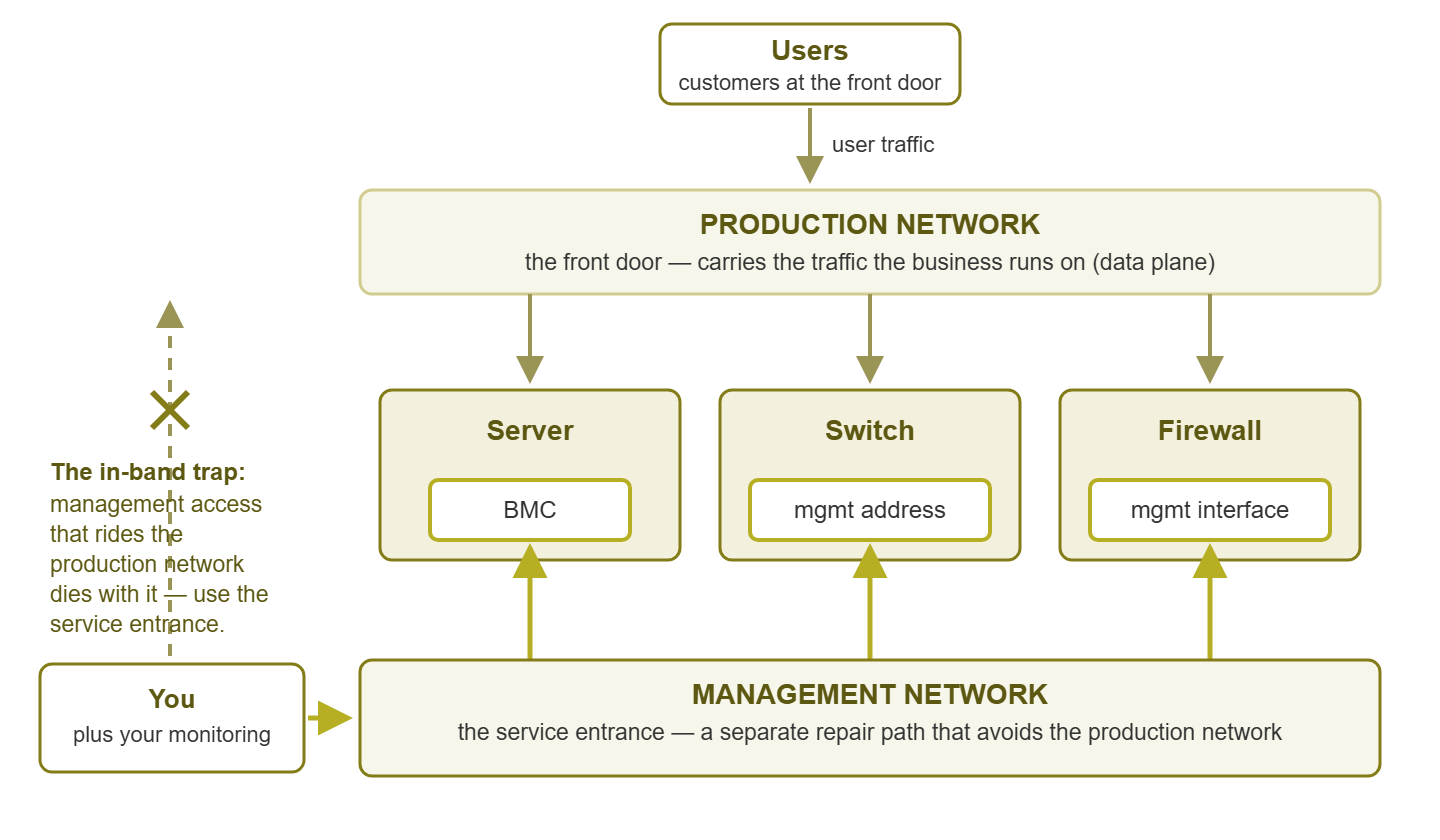
Figure 1: Two doors into the same devices. User traffic uses the front door; your management access should have its own path, because a service entrance that runs through the showroom floods with it.
The in-band trap: why access fails when you need it
Here is the vocabulary that makes the whole topic click. Management access is called in-band when it travels over the same network that carries production traffic. You reach the switch's login page across the very LAN that switch is switching. It is called out-of-band (OOB) when it travels a separate path that does not depend on the production network. That could be a dedicated management network, a serial cable, or a separate small link that exists only for repairs.
In-band management is the default everywhere, and on a calm Tuesday it is fine — convenient, free, and perfectly responsive. The trap is hiding in the logic of it: the management plane rides on top of the thing it manages. That means the probability of losing management access is not independent of the probability of a network failure. They are the same event. The bigger and uglier the outage, the more certain you are to be locked out of the tools you need to fix it. This is not bad luck; it is the geometry of the setup. The one day you desperately need the service entrance is precisely the day the front of the building is on fire. And you built the service entrance through the lobby.
Three short scenes, all of them classics. First: you are tightening an access rule on a switch. You apply it, and the rule cuts off the very session you applied it from — along with any chance of connecting again. The fix is a thirty-second rollback that you can no longer type. Second: the core switch fails. Every other device on the network is perfectly healthy, but every one of their management addresses sits on the far side of the corpse. Twenty working devices, zero reachable ones. Third: a remote site's router hangs. The tunnel you would use to reach that site terminates on — you guessed it — that router. Someone is now driving.
The trap also has a sneakier, partial form. The network does not have to be fully down to take your management access with it — it just has to be sick. During a broadcast storm or a saturated uplink, in-band management sessions crawl, drop characters, and time out halfway through the command you were typing. That is precisely because your keystrokes are queueing behind the flood of junk traffic you are trying to stop. A degraded network degrades your ability to repair it, which stretches the outage, which is the opposite of what you want from a repair path.
Notice what all three scenes have in common: nothing was wrong with your skills, your tools, or your plan. The failure was structural. And structural problems have structural fixes, which is what the rest of this pillar is about. To be clear, the lesson is not "in-band management is bad" — you will keep using it daily, and you should. The lesson is that in-band must not be the only way in. Whatever second way in you have must be watched, because an unwatched backup path quietly becomes a decorative one.
A tour of your management surfaces
Before you can monitor the management plane, you have to know what yours is made of. Most admins are surprised by how many management interfaces they already own. Here is the tour — walk it mentally now, and physically later.
Server BMCs
Nearly every business-grade server has a BMC (baseboard management controller): a small, independent computer soldered onto the motherboard. It has its own processor, its own firmware, and usually its own network port. Vendors brand it differently — iLO on some servers, iDRAC on others. Many BMCs speak a common standard called IPMI (Intelligent Platform Management Interface). But it is the same idea everywhere. The BMC runs whenever the power cord is connected, even when the server itself is off or crashed. Through it you can see the console screen, power the machine off and on, and read hardware sensors. It is the single most valuable crisis door you own, and it deserves its own guide: Monitoring BMCs covers it in depth.
Switch and router management addresses
Every managed switch and router has at least one IP address that exists purely so you can log into it. Sometimes it is just an address on the default network; better setups put it on a dedicated management VLAN. Some devices also offer a dedicated physical management port. This is an Ethernet jack wired to the device's brain rather than through its normal switching fabric. So it can stay reachable even when the data plane is misbehaving. If your switches have those ports and they are empty, you are leaving a free service entrance bricked up.
Console ports
The console port is the serial socket on the front or back of network gear — the keyboard of last resort. It needs no network configuration at all on the device. A cable and a terminal program get you a login prompt even on a box with a blank config or a melted routing table. Consoles, and the console servers that make many of them reachable from one place, get their own guide: Console Servers and OOB Paths.
Firewall management interfaces
Firewalls usually offer a dedicated management port or a management address reachable only from inside. Two things make firewall management special. First, the stakes: a firewall you cannot reach is a security device flying blind. Second, the temptation: when the management interface is hard to reach, someone eventually suggests exposing it to the internet "just for now." Resist. The service entrance must never open onto the public street. (For what to watch on the firewall itself, see the Firewall Monitoring pillar.)
PDU and UPS management
A PDU (power distribution unit) is the rack-mounted power strip your equipment plugs into. A UPS (uninterruptible power supply) is the battery that keeps your equipment alive through outages. The managed versions of both carry network cards that let you read load and battery state — and, on many PDUs, switch individual outlets remotely. That last ability is a crisis superpower. The frozen device that "just needs someone to pull the plug" can be power-cycled from your desk, but only if the PDU's management card is on a path you can still reach. The Power & Environment Monitoring pillar covers the power side of this story.
The management VLAN itself
Finally, the connective tissue. A VLAN (virtual LAN) is a way to slice one physical network into separate logical ones. And a management VLAN is the slice reserved for all of the interfaces above. Here is the part people miss: the management VLAN is itself a management surface. It can be misconfigured, pruned off an uplink by accident, or lost when the one switch carrying it dies. If everything in your inventory reaches you through a single fragile VLAN, that VLAN's health is the most important unmonitored thing you own. Designing it well is the subject of A Management Network You Can Trust.
The odd ones out
Once you start looking, more doors appear. There is the management address of your wireless controller and the admin interface of the storage array. There is the hypervisor host's management network and the smart rack sensors watching temperature. The test for whether something belongs in your inventory is simple. If losing this interface would leave you unable to see or fix a piece of infrastructure, it is a management surface, and it goes on the list.
Your starter management inventory
Now make it concrete. The goal of this exercise is one honest table listing every management surface in the building. It lists where each lives and how you would reach it when things are bad. Here is a sweep that works:
- Step 1 — list the devices. Pull your device list from your monitoring system, your documentation, or worst case a walk through the racks. Servers, switches, routers, firewalls, wireless controllers, UPSes, PDUs, storage boxes.
- Step 2 — find each device's management surfaces. For each one, note every way in: BMC address, management IP, console port, dedicated management jack. Physically check the back of servers — a BMC port with no cable in it is depressingly common.
- Step 3 — record the path honestly. For each surface, write down whether reaching it depends on the production network (in-band) or not (OOB). Do not write what the design document says; write what is actually cabled.
- Step 4 — record where the credentials live. A reachable login prompt you cannot log into is theater. Note which credential store holds each password — and think hard about whether that store is reachable during an outage.
- Step 5 — date your last proof. When did a human last successfully use this surface? "Never" and "unknown" are legal answers. They are also your to-do list.
A starter template, with example rows the way a real first draft tends to look:
| Device | Management surface | Address / location | Path | Credentials | Last verified |
|---|---|---|---|---|---|
| File server | BMC | 10.20.0.11 | In-band (shared port) | Password manager | Unknown |
| Core switch | Management IP | 10.20.0.2 | In-band | Password manager | Last month |
| Core switch | Console port | Rack 1, port 3 on console server | OOB | Sealed envelope | Never |
| Firewall | Management interface | 10.20.0.1 | In-band | Password manager | Last week |
| Server room UPS | Network card | 10.20.0.31 | In-band | Default (!) | Never |
| Rack PDU | Network card | Not cabled | — | — | — |
Yes, the example rows are a little embarrassing. That is the point. A first inventory almost always reveals the same three findings. Nearly everything is in-band. At least one management card still has default credentials. And at least one crisis door has never been opened by a living admin. Finding that out on a quiet afternoon costs nothing. Finding it out during an outage costs the outage plus the discovery.
Tip: keep a copy of this inventory somewhere that survives a network outage. A printed sheet in the server room and an offline copy on a laptop both work. An inventory stored only on the wiki, behind the network it describes, joins the long list of things you cannot reach during the incident. The Network Documentation pillar has more on outage-proof docs.
The crisis-path mindset: monitor the service entrance
Here is the mental shift this whole pillar asks you to make. Management reachability is not plumbing; it is a service. It has users (you, and every future 2 AM version of you). It has an availability requirement: it must work during disasters, which is a stricter requirement than most production services have. And like any service, it is either monitored or it is quietly rotting. Treat "can I reach the service entrance of every device?" exactly the way you treat "is the file server up?"
Practically, that starts embarrassingly simple. Schedule a reachability check — a ping, or better, a login-page probe — against every management surface in your new inventory. Add an alert when one goes dark. That single move defeats the most common management-plane failure there is: the quiet single-device death. BMCs hang and stop answering. A management cable gets borrowed during maintenance and never returned. A UPS card dies of old age. None of these break production, so nothing notices — until the day that particular door is the one you need. A reachability check finds each of these in peacetime, when the fix is a five-minute chore instead of a mid-incident catastrophe.
Then group these checks so they read as one thing. Put every BMC, management address, console server, and power card in a dashboard section named "management plane". That turns an abstract idea into a row of lights you glance at weekly. Gaps become visible; a new server without a monitored BMC stands out. How to structure that grouping — and how to keep one dead management switch from turning into forty separate alerts — is covered in A Management Network You Can Trust.
Reachability checks prove the doors answer; they do not prove you can walk through them. For that, nothing beats periodically logging in through the crisis path on purpose — a rehearsal we cover step by step in Crisis-Path Drills. And one special case deserves its own note. The monitoring server itself needs an emergency door too, or the system that watches everything becomes the thing you cannot reach. That specific problem is covered in Out-of-Band Access to Your Monitoring.
One honest caveat: if today every management surface you own is in-band, monitoring them will not save you from the big one. In that setup, when the core dies, your monitoring loses sight of the management plane along with everything else. Do it anyway. Most management-plane failures are the quiet, single-device kind, and catching those is pure profit. Then close the structural gap over time by adding genuinely out-of-band paths, starting where a lockout would hurt most.
Where to go next
You now have the model: a front door for users, a service entrance for you. And there is a trap waiting wherever the service entrance secretly runs through the front of the building. You also have the first deliverable — an honest inventory of every BMC, management address, console port, and power-management card you own, with reachability checks on each. The rest of this pillar builds on that foundation surface by surface. Read Monitoring BMCs for the computer inside each server. Read Console Servers and OOB Paths for the keyboard of last resort. Read A Management Network You Can Trust for the network that ties it together. And read Crisis-Path Drills for proving the whole thing works before reality tests it for you. Start from the pillar page: Out-of-Band & Management-Plane Monitoring.
Put this into practice with SysPeep Monitor
The fastest way to build that management-plane inventory is to let discovery do the legwork. SysPeep Monitor auto-discovers the devices on your network — management interfaces included. It then keeps scheduled reachability and SNMP health checks on every BMC, switch, and UPS card. These are grouped on one dashboard so a dead service entrance gets noticed in peacetime. The free trial installs on any Windows machine in minutes.
Download Free TrialLearn About SysPeep - All Rights Reserved.