
Support Realities: Community Forums vs. a Phone Number
Every monitoring tool works fine until the night it does not. The collector stops polling half the network, the dashboards go dark, and you are the one awake. What happens next depends less on how good the software is than on what kind of help is attached to it. "Support" is one of the most misunderstood words in the whole open-source-versus-commercial argument. People imagine community support means "nobody helps you" and commercial support means "an expert picks up the phone." I have leaned on both at two in the morning, and neither is true. The gap between the myth and the reality is where bad decisions get made.
This guide describes plainly what each kind of support delivers, what it quietly withholds, and where the middle road of paid support for open-source software fits. It also covers the two things that matter more than either. One is the quality of the documentation, which is support you never have to ask for. The other is the skill of asking for help well, which multiplies the value of every channel you have. By the end you will know exactly what you are getting on either path, and you will have a template for the help request that gets answered.
In this guide
- The two a.m. test
- What community support gives you
- What community support withholds
- What commercial support tiers generally mean
- The limits of a phone number
- Paid support for open source: the middle road
- Documentation, the invisible support
- How to ask for help well
- The support-source comparison table
- Where to go next
The two a.m. test
The most useful question to ask about any support arrangement is not "is it good?" but "what does it do for me at two in the morning?" Daytime support is easy to overrate: during business hours you have colleagues, time to search, and the patience to read. The night failure strips all of that away and shows what the support channel is made of. The diagram shows the two paths side by side, with what each delivers and where each has gaps. Notice that both paths start from the same place, and notice the line at the bottom, which is the part nobody puts in a brochure.
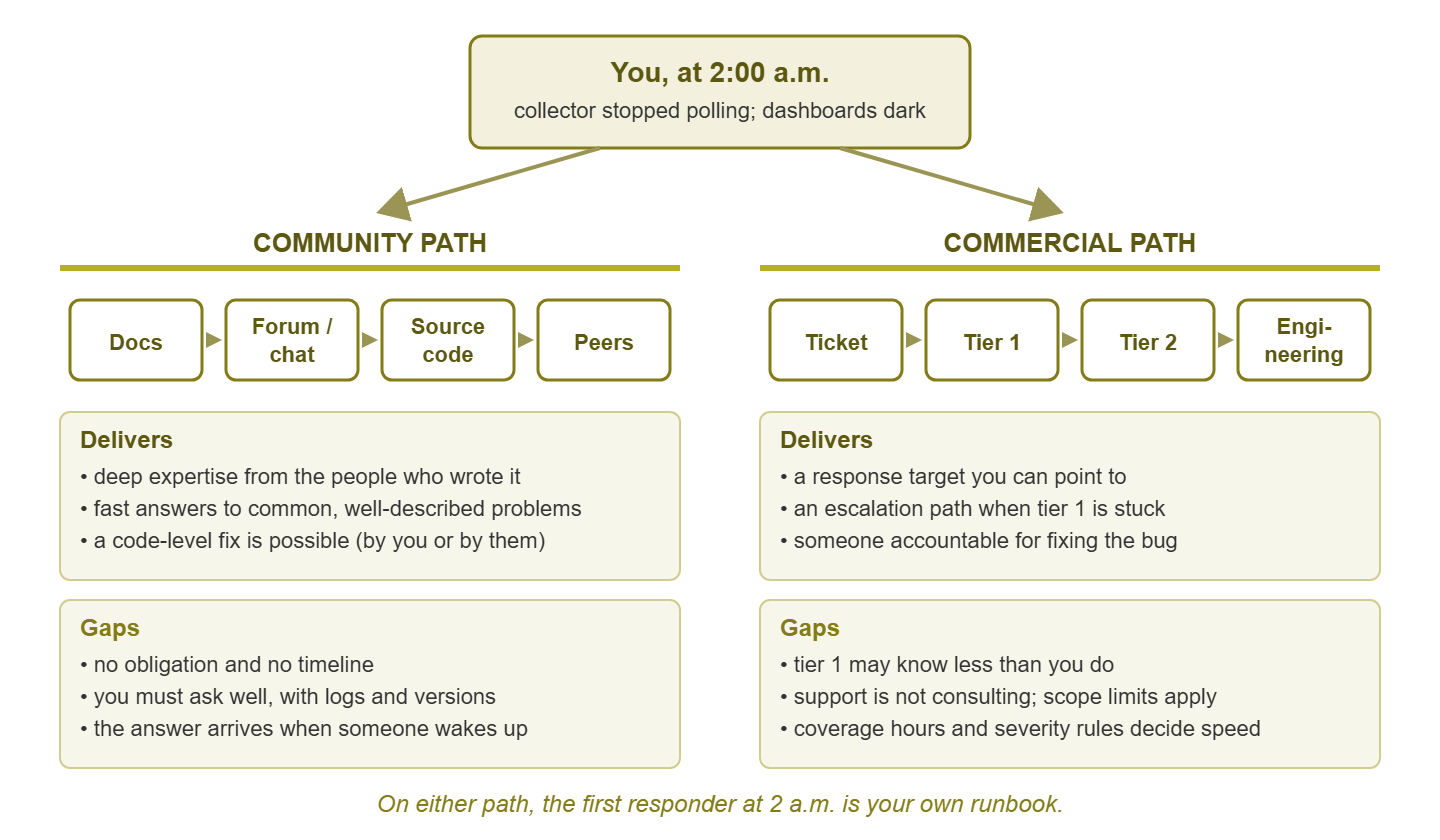
Figure 1: The community and commercial support paths from the same starting point. Each delivers something real and withholds something real; on both, the first responder is you.
On both paths, the first responder at two in the morning is your own runbook. A support contract does not remove you from the loop; it changes who you can reach once you are in it. A forum is generous at two in the afternoon and asleep at two in the morning. So, often, is a basic support contract. Keep that in mind and the comparison stops being a fantasy on either side.
What community support gives you
"Community support" is shorthand for the forums, chat channels, issue trackers, mailing lists, and wikis that grow up around an open-source project. It sounds thin. In practice it delivers three things that commercial support often cannot match.
Deep expertise, sometimes from the authors
The people answering questions on a healthy project's forum include the people who wrote the code. A commercial vendor's support desk is, by design, several layers away from its developers. Your question may touch something genuinely deep: why a particular collector behaves oddly with a particular device family, or why a query is slow. In that case, the community can produce an answer of a quality that no support tier below "engineering" can match. You are not guaranteed that answer, but it is possible in a way it rarely is on a ticket.
Fast answers to common problems
If your problem is one many people have had, the answer is probably already written down. Search the forum and the issue tracker before you ask anything. A well-trafficked project has years of solved problems sitting in its archive, and the archive never sleeps. Some threads end "fixed it, thanks" and never say how; you will find those first. For the ordinary failure (a misconfigured collector, a permission problem, a dependency that changed under you) the community path is often faster than a ticket. That is because you skip the queue entirely.
A code-level fix is possible
This is the ace that only open source holds. If the bug is real and you (or someone you can hire) can read the code, you are not waiting for anyone. You can patch it, submit the fix upstream, and move on. With a commercial product the same bug enters a queue whose priorities you do not control, and the fix arrives when the vendor's roadmap says it does. For teams with development skill, this single property can outweigh everything a support contract offers.
What community support withholds
Now what it withholds, described just as plainly.
- No obligation. Nobody on the forum owes you anything. Volunteers answer what interests them, when they have time. A polite, well-written question can go unanswered for days for no reason except that nobody who knew the answer happened to be reading.
- No timelines. There is no response target and no escalation. You cannot ask to speak to someone's manager, because there is no manager. When you need to tell your own manager "help is coming by such-and-such a time," the community cannot give you that sentence.
- You must ask well. Community answers scale with the quality of the question. A vague "it doesn't work" gets a vague reply or silence, and repeated vague questions can earn you a reputation that follows your username. The section on asking well below is not optional on this path; it is the whole path.
- The two a.m. problem is yours. At night, the forum is a place to post and wait. The answer arrives when someone in a helpful time zone wakes up. If the outage cannot wait, the only tools you have are your own runbook, your own logs, and the source code.
- "Try the latest version." A common and reasonable community answer is that your problem was fixed upstream. That is genuinely helpful and also means an unplanned upgrade, with everything that implies for a production monitoring system.
None of this makes community support bad. It makes it unobligated, which is a different thing. An organization that understands that going in can plan around it; one that assumed a support desk was hiding behind the forum cannot.
What commercial support tiers generally mean
Commercial vendors describe their support in tiers and contracts, and the vocabulary is confusing the first time you meet it. Every vendor's terms differ, so this is the general shape, not a promise about any particular product.
Response targets. A support contract usually specifies how quickly the vendor will respond to a ticket at a given severity. A total outage gets a faster target than a cosmetic bug. Read the word "respond" carefully: it typically means a human acknowledges the ticket and begins work, not that the problem is solved in that window. A resolution target, if one exists at all, is a separate and rarer promise. The response clock stops when someone says hello; the outage does not.
Severity levels. You usually classify your own ticket's severity, within rules the vendor sets. Classifying honestly matters: filing everything at the highest severity burns goodwill, but under-classifying a real outage puts you in the slow lane.
Escalation paths. This is the real product. A first-tier agent takes the ticket. If they cannot resolve it, it moves to a second tier with deeper product knowledge. If that fails, it reaches engineering. Each hop is a defined step with a defined trigger, and you can ask for it. The community path has no equivalent, which is why "escalation" is the single word that best summarizes what you are paying for.
Someone accountable. Behind every commercial ticket is a company whose revenue depends on your renewal. That does not make them fast or brilliant, but it does make them answerable. When a bug is confirmed, fixing it is somebody's job, and you have a name and a ticket number to point to.
Coverage hours. Support contracts come with hours. That means business hours in the vendor's time zone at the basic level, extended or around-the-clock coverage at higher levels, often for more money. The two a.m. test only passes if your contract actually covers two a.m. Many basic contracts do not.
Harbourview Clinic bought the basic support tier, business hours in the vendor's time zone. It filed its first real ticket at ten past two in the morning when the collector stopped polling the ward network. The response came at four minutes past nine, comfortably inside the target, because the clock had only started at nine. By then the on-site admin had fixed it from the runbook. The review recorded that the contract had been "met in full." The renewal added out-of-hours cover, and the runbook now opens with which number to ring and when it is answered.
The limits of a phone number
Paid support is real, and it is also routinely oversold in the buyer's own imagination. A few honest limits, stated the way a colleague would over coffee.
The first tier often knows less than you do. Tier-one support exists to filter: to catch the password resets and the "did you restart it" problems so that scarce engineers are not buried. If you are a competent admin with a genuine problem, your first exchange will often involve being asked things you have already tried. The skill is to get through that stage quickly and politely by front-loading everything you have done. That is what the template later in this guide is for.
Support is not consulting. A support desk will help you with the product behaving incorrectly. It will not design your alerting strategy or tell you which thresholds suit your network. Nor will it debug a problem that turns out to be in your firewall rather than their software. When a ticket drifts from "your product is broken" to "my environment is confusing," you will be politely redirected. That is fair: consulting is a different service at a different price.
Reproduction demands. Before engineering will look at a bug, support usually needs to reproduce it. That means logs, configuration exports, sometimes a screen-sharing session at a time convenient to them. Intermittent problems, the ones that matter most, are the hardest to push through this gate.
The fix arrives on their schedule. Once confirmed, a bug goes into the vendor's backlog. A workaround may come quickly; the real fix may come in the next release, and the release after that. You have no code to patch and no way to jump the queue except escalation, which has limits of its own.
Support quality is invisible until you need it. You cannot evaluate a support desk from a brochure. You can only evaluate it by filing a real ticket. That is why the trial period of any commercial tool should include at least one genuine support request. That applies even if you have to invent a mildly awkward question to ask.
Paid support for open source: the middle road
Many mature open-source projects have companies or independent consultants who sell support for them. Sometimes it is the project's own maintainers running a business; sometimes it is a third party who specializes in that stack. Either way, it is often the best fit for a small team that wants open-source flexibility without adopting the forum as its only lifeline.
What you typically get is a contract with response targets and an escalation path, attached to software that stays open. The data formats stay yours, the code stays readable, and if the support relationship sours you can walk away without leaving the tool. Before signing, check who is actually on the other end. Is it maintainers, or a reseller who forwards questions to the same forum you could have posted on? Also check whether the contract covers the whole stack you run or just one component of it. A support contract for the time-series database does not help when the dashboard layer is what broke.
Paid open-source support is not magically cheaper than commercial support, and it does not remove the operational work described in The Real Cost of "Free". It removes the "no obligation" gap and leaves everything else in place. For many teams that is exactly the right trade.
Documentation, the invisible support
The most-used support channel for any tool is the one nobody counts: the documentation. Every question you answer by reading the manual is a ticket you did not file and a forum post you did not write. Documentation quality is therefore a support feature, arguably the biggest one, and the one you can evaluate completely before you commit to anything. Read it before you buy. Yes, all of it. Yes, the troubleshooting section especially.
Good documentation, open source or commercial, has a few recognizable properties. It explains concepts, not only buttons: what the tool thinks a "host" or a "check" is, and how those ideas fit together. It has a troubleshooting section written from real failures, with actual error messages you can search for. It is versioned so you can tell whether a page describes what you are running. It contains configuration examples that are complete enough to copy. And it is honest about limitations. The absence of any of these is a support gap you will feel later, at night.
Tip: during any evaluation, pick three ordinary problems you expect to hit. These could be adding a new device type, changing an alert's recipients, or recovering from a full disk. Try to solve each one from the documentation alone, without searching the web. Time it. That number tells you more about a tool's support reality than any contract does.
How to ask for help well
Whichever path you are on, the biggest lever you control is the quality of your request. A well-formed question gets answered on a forum by people who owe you nothing, and it skips the tier-one shuffle on a commercial ticket. Poorly formed questions cost days on either path. Here is the sequence experienced admins follow, usually without thinking about it.
- Search first. Paste the exact error message into the project's issue tracker and forum, and into the vendor's knowledge base. Most problems are not new.
- State the versions. The tool, its components, the operating system, and anything you upgraded recently. "Recently upgraded" is the most common root cause in monitoring support requests, and leaving it out wastes everyone's first reply.
- Say what you expected and what happened instead. "Checks against the branch office subnet stopped returning data at around midnight; I expected them to continue" is a question. "Monitoring is broken" is a mood.
- Attach the evidence. The relevant log lines around the failure, with secrets removed. The configuration section involved. A screenshot only if the problem is visual.
- List what you already tried. Restarting the service, checking connectivity, rolling back a change. This is what gets you past tier one and earns respect on a forum.
- Give a minimal reproduction if you can. The smallest configuration that shows the problem. This is the step most people skip and the one that most reliably turns "we cannot reproduce" into a fix.
- Say how urgent it is, truthfully. On a ticket, choose the severity honestly. On a forum, say whether you are down or merely curious; volunteers prioritize too.
A template you can keep in your notes and fill in under pressure:
Subject: [component] short, specific description of the failure

Environment:
  - tool and component versions:
  - operating system:
  - changed in the last week:

Expected:   what should happen
Observed:   what happens instead, with timestamps
Started:    when it began, and whether it is constant or intermittent

Evidence:
  - log excerpt (secrets removed):
  - relevant config section:

Already tried:
  1.
  2.

Impact:     what is not being monitored while this is broken
Minimal reproduction (if available):
Filling this in takes ten minutes. On a forum, it is the difference between an answer and silence; on a commercial ticket, it is the difference between one round trip and four. It also has a pleasant side effect. Surprisingly often, writing the "already tried" section makes you realize what you have not tried, and you solve the problem before you press send. I have closed more tickets this way than I have ever filed.
The support-source comparison table
| Support source | Strengths | Limits | Best for |
|---|---|---|---|
| Project documentation | Always available, no waiting, evaluable before you commit | Only as good as the project's writing discipline; may lag the software | Everyone, always the first stop |
| Community forum and chat | Deep expertise, fast answers to common problems, large searchable archive | No obligation, no timelines, quality depends on how well you ask | Skilled teams with tolerance for waiting; non-urgent problems |
| Issue tracker and source code | Code-level fixes possible, bugs visible before they hit you | Requires development skill; fixing is your time | Teams with a developer or the appetite to become one |
| Peers and user groups | Context-aware advice from people running similar environments | Informal, availability varies, may not know your exact stack | Design questions and "is this normal?" checks |
| Paid support for open source | Response targets and escalation on software that stays open | Coverage may not span the whole stack; check who is answering | Small teams wanting flexibility with an obligation behind it |
| Commercial vendor support | Escalation path, accountability, defined coverage hours | First tier may know less than you; not consulting; fixes on their schedule | Teams that need a timeline they can promise to someone |
| Consultant or managed service | Design help and hands-on fixes across tools | Separate cost; only as good as the individual | Problems that are about your environment rather than any one product |
The last row is worth a sentence. Sometimes the problem is not the tool at all, and the right move is outside help of a different kind. When to Get Help covers how to recognize that moment.
Where to go next
Community support gives deep expertise, fast answers to common problems, and the possibility of fixing the code yourself. It withholds any obligation, any timeline, and any help at two in the morning that you did not prepare in advance. Commercial support gives response targets, escalation, and accountability, and withholds first-tier depth, consulting, and control over when a fix ships. Paid support for open source sits between them. Documentation quietly outweighs all of it, and asking well multiplies whatever you have, which matters most on the night you are the one awake. The remaining guides in Open Source vs. Commercial Monitoring: Honest Tradeoffs look at what a commercial license actually buys beyond support. They also look at how to weigh all of this for your own team.
Put this into practice with SysPeep Monitor
The only honest way to judge a vendor's support is to ask it a real question during the trial. SysPeep Monitor's free trial installs on a Windows machine and discovers your network in minutes. That leaves plenty of trial time to bring an actual problem to the support page and see how the answer feels.
Download Free TrialLearn About SysPeep - All Rights Reserved.