
Getting the Packets: SPAN, Mirror Ports, and Taps
You have decided a capture is genuinely warranted — the question passed the tests in when to reach for packet capture. Now comes the unglamorous decision that quietly determines whether the whole exercise succeeds: where will the packets come from? A capture records only the traffic that physically passes its observation point. Everything else — every packet on every other link — simply does not exist as far as your capture file is concerned. You cannot analyze what you never saw.
Switched networks make this a real decision. A switch delivers each packet only to the port that needs it. So plugging a laptop into a spare port shows you little beyond your own laptop's chatter. To see someone else's conversation, you must arrange a vantage point deliberately. There are four ways to do it, ranked here from least effort to most fidelity. They are capturing on an endpoint itself, mirroring with a switch, inserting a tap, and capturing on the firewall or router.
This guide walks through all four honestly. That includes how the most popular option, the mirror port, can silently lie. The guide ends with a chooser table mapping common questions to the right place to stand.
In this guide
- The rule of vantage: where you stand is what you see
- Option 1: capture on the host itself
- Option 2: SPAN and port mirroring
- Where mirror ports lie to you
- Option 3: taps — paying for the whole truth
- Option 4: capture at the firewall or router
- Choosing where to stand
- Mirrors are temporary; captures are tidy
- The capture-point chooser
- Where to go next
The rule of vantage: where you stand is what you see
Before the options, one idea that governs all of them. A capture is not "the truth about the network." It is the truth about one point in the network, at the moments traffic crossed it. The same conversation looks different from different vantage points. The client's view includes packets that were later lost on the way to the server. The server's view includes replies that never made it back. A mid-path view sees both directions but timestamps them with its own clock, not the endpoints'. None of these views is wrong. Each is complete only about its own location.
That is why choosing the capture point is part of forming the hypothesis, not an afterthought. If your theory is "the server's replies are being lost," the client side is where the loss is visible as an absence. If the theory is "the client never sends the request," stand at the server and wait for silence. And when two systems disagree, the strongest move in all of packet analysis is to stand in both places at once. More on that below.
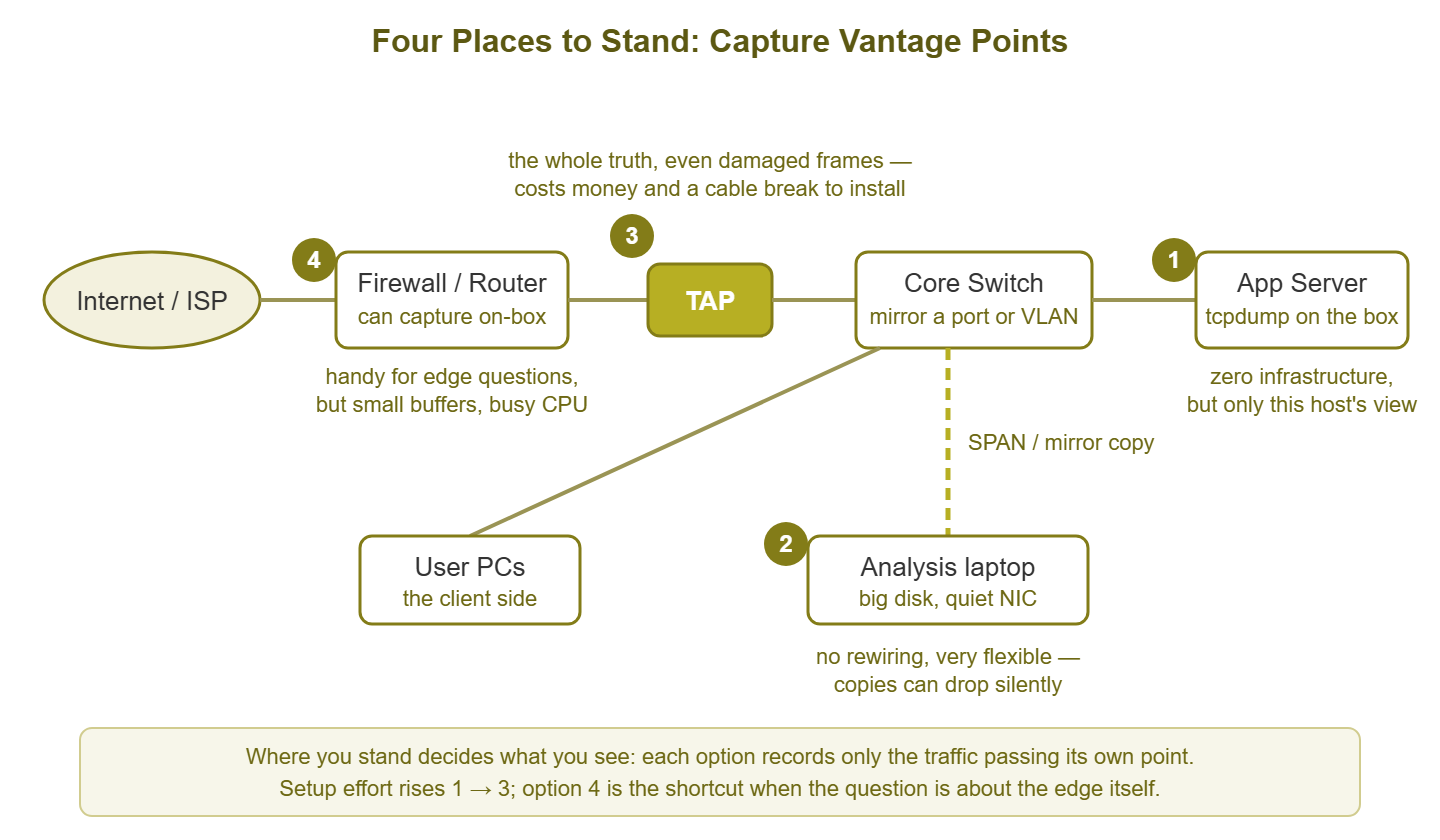
Figure 1: The four vantage options on one small network. Effort and fidelity rise from host capture (1) through SPAN (2) to a tap (3). Firewall capture (4) is the shortcut when the question is about the edge itself.
Option 1: capture on the host itself
The most underrated first move in packet capture is to skip the network infrastructure entirely. Run the capture tool on the machine you are curious about. On Linux and most Unix-like systems that is tcpdump. On Windows it is the built-in packet tracing tools or a locally installed analyzer. Either way, the recipe is the same: log in, start capturing with a filter for the conversation you care about, reproduce the problem, stop.
The advantages are enormous. Zero infrastructure: no switch configuration, no change ticket for the network, no laptop to position. You are already at one end of the conversation, which is exactly where most questions live. "What is this server actually sending?" and "what is actually reaching it?" are both answered from its own network interface. The filters in the tcpdump phrasebook keep the file small, and the file is sitting right there to copy off and analyze.
The honest caveats, because every vantage has them:
- The host's clock stamps the packets. Timestamps come from this machine's clock. That is fine within one capture, but the moment you compare captures from two hosts, both clocks must be sane. Make sure both machines sync time before a two-ended investigation.
- You are inside the host's network stack, not on the wire. The capture hook sits between the operating system and the network card. You may record outbound packets that a host firewall drops a step later. Modern network cards that merge packets for efficiency can make giant "packets" of tens of kilobytes appear in your capture. These are sizes that never existed on the physical wire. Neither is a bug; both are reminders that this is the host's view, not the cable's.
- Capture costs the host CPU and disk. On a busy production server, capturing everything at full packet size is a measurable load. Filter narrowly, capture short, and consider recording only packet headers when volume is high.
- It is one-sided by definition. You see what this host sent and what reached it. You cannot see where a missing packet died along the way — only that it never arrived here.
For most protocol-level questions and most who-paused timing questions about a specific machine's conversations, host capture is not the compromise option. It is the correct one, and it is available in the next sixty seconds.
Option 2: SPAN and port mirroring
You may need to see traffic for a machine you cannot install tools on: a printer, a phone, an appliance, a whole VLAN of clients. The workhorse answer is port mirroring. This is a feature of managed switches that copies traffic from one place to another. Cisco calls its version SPAN (Switched Port Analyzer), and the name has become generic shorthand. Other vendors say "port mirroring" or "monitor session." The concepts are identical everywhere, even though the configuration syntax differs.
Every mirror session has three ingredients. The source is what gets copied: one port, several ports, or an entire VLAN. The direction says which traffic to copy from the source: received (rx), transmitted (tx), or both. The destination is the port where the copies are sent — the port your analysis laptop plugs into. A generic example, in Cisco-flavored syntax purely for concreteness:
# Copy everything in and out of port Gi1/0/14
# to the analysis laptop on Gi1/0/24
monitor session 1 source interface Gi1/0/14 both
monitor session 1 destination interface Gi1/0/24

# Or copy a whole VLAN's received traffic (mind the volume)
monitor session 1 source vlan 30 rx
Two practical behaviors to expect. First, on most platforms the destination port stops acting like a normal switch port while the session exists. In that case, it does not forward regular traffic. Your laptop does not need — and ideally should not have — an IP address on that port. It just listens. Second, choose the direction deliberately: mirroring both directions of a port doubles the volume of copies, which matters enormously in a moment.
Where mirror ports lie to you
Mirroring is flexible, free, and remotely configurable, which is why it is everyone's default. It also has failure modes that are invisible from the analysis laptop. The capture looks complete while quietly missing the very packets you came for. Learn these before you trust a mirror with an important diagnosis.
The oversubscription math
A gigabit port can carry up to one gigabit per second in each direction at once. Mirror both directions of a busy gigabit port and you ask the switch to funnel up to two gigabits per second of copies. The destination port can carry only one. The arithmetic never works in your favor: suppose the source port is doing 700 megabits inbound and 600 outbound. That is 1.3 gigabits of copies per second aimed at a 1-gigabit pipe. So at peak, roughly a quarter of your evidence is discarded. Mirror a whole VLAN and the mismatch gets worse. The same trap exists at every speed: mirroring a 10-gigabit port into a 1-gigabit analysis laptop drops almost everything during any real burst.
The drops are silent, and they lie
Here is the truly dangerous part: those discarded copies do not announce themselves. Your capture file has no gaps marked in red; it simply does not contain the packets. Some platforms count mirror-session drops in an obscure counter, many surface nothing at all. The result is a capture that looks authoritative and isn't — and it produces two classic wrong conclusions. You see "packet loss" in the conversation that exists only in the mirror. And you go hunting for a network problem that is actually your measurement. Or the retransmission you were hunting genuinely happened, but its trigger packet was dropped by the mirror. In that case, the story in the file makes no sense. Worse, mirror copies are low-priority work for the switch. Under heavy load, they are the first thing sacrificed. That means the mirror is least faithful at the busiest moments, which are exactly the moments you are investigating.
What mirrors refuse to show
Many platforms will not mirror damaged frames at all. On these platforms, packets with checksum errors, undersized fragments, and other electrical-level casualties are dropped before the mirroring logic ever sees them. The mirror shows you a cleaner world than the wire. If your investigation is about corruption — a suspect cable, a failing transceiver, errors climbing on a link — a mirror is structurally the wrong instrument. In that case, the evidence is precisely what it cannot forward. Mirroring can also cost switch resources. Platforms limit how many sessions you may run. Variants that carry mirrored traffic across the network to a remote analyzer add their own load and their own opportunities to drop copies. Use them knowingly.
None of this makes SPAN bad. For who-said-what questions and millisecond-scale timing, a modestly loaded mirror is excellent — the most practical mid-path vantage there is. The rule is to distrust it for exact loss accounting and error-frame hunting. Keep the destination port's capacity comfortably above the source's real traffic. Mirror one direction instead of both when that helps.
Option 3: taps — paying for the whole truth
A tap (test access point) is a purpose-built device you insert physically in-line on a link. The cable that used to run from A to B now runs from A into the tap and from the tap on to B. The tap hands copies of everything to one or more monitor ports. It is the vantage point that does not negotiate with a switch for resources, because the switch is not involved at all.
What you get for the trouble is the closest thing to ground truth that exists in this discipline. A tap forwards every frame, in both directions, including the damaged ones a switch would neither deliver nor mirror. These include checksum failures, runts, and the electrical casualties that diagnose bad cables and dying optics. The tap adds zero load to the switch and cannot be oversubscribed in its pass-through path, saturated or not. On fiber, a passive tap is little more than a precision splitter that skims off a fraction of the light. There is no power, no electronics, nothing to fail in the data path. Copper gigabit is different: its signaling runs both directions on all wire pairs simultaneously. That cannot be split passively, so a copper gigabit tap is an active, powered device. Good ones are engineered to keep the link passing traffic if their power fails. But that is a question to ask before buying, not after an outage.
One practical wrinkle: a full-duplex link is really two one-way streams. A classic tap presents them on two separate monitor outputs. That means two capture interfaces on the analysis machine and a merge afterward. Aggregation taps merge the directions into one output for convenience. The cost is reintroducing a small oversubscription risk when both directions run near line rate at once.
The costs are real: money, and a maintenance window — installing a tap means breaking the link. So it is a planned change, not a Tuesday-afternoon whim. Taps therefore earn their price in specific places. One is a choke point you investigate chronically (the WAN edge, the uplink into the server farm). Another is a link where error-level truth is required. Or there is a spot where a standing capture point must never depend on — or disturb — the production switch. Install once during a window, and from then on your vantage point is a patch cable away, forever.
Option 4: capture at the firewall or router
Most firewalls and many routers can capture packets on themselves. They offer a diagnostics page in the management interface, or a tcpdump-like command in their shell. As a vantage point, the edge device is unbeatable for edge questions: did our packet actually leave the site? What exactly is arriving from the VPN peer? Is the provider sending us the traffic they claim? You are standing precisely on the boundary the question is about.
Address translation adds a genuinely useful trick here. A firewall rewrites addresses as traffic crosses it. An on-box capture usually lets you choose the inside or the outside interface. So capturing on both shows the same conversation before and after translation. That settles a whole category of "the addresses don't match" confusion no other vantage sees as directly.
The limits are just as characteristic. Capture buffers on edge devices are small — often enough for seconds, not minutes, of a busy link. Some platforms truncate each packet by default, keeping headers but discarding payload. The device also has a day job: on a loaded firewall, an enthusiastic capture competes with traffic processing for CPU. The etiquette is to capture narrowly (one host, one port), capture briefly, export the file off the box, and do the reading elsewhere. For edge questions those constraints rarely hurt; for anything long-running or high-volume, arrange a mirror or a tap instead.
Choosing where to stand
With four options available, the choice comes back to the question you are asking. Three positions cover almost everything:
- Client side — capture on the complaining user's machine or mirror its access port when the question is about experience. What did this user's machine actually send, what actually reached it, and who paused? This is the view from the seat where the complaint originates.
- Server side — capture on the server or mirror its port — when many clients are affected, because one vantage sees every client's conversation at once.
- The boundary — use firewall capture or a mirror of the uplink when the question contains the words "did it cross." That means traffic to or from the internet, a VPN, another site, or another security zone.
And then there is the power move: capture at both ends simultaneously. When two systems disagree about a conversation, run a capture at each end at the same time, reproduce the problem once, and compare. A packet present in the sender's file and absent from the receiver's was eaten somewhere between them — no more debate about whether it was sent. Delays localize the same way: if the server's file shows the request arriving promptly, the reply gap belongs to the server. Two files, one conversation, no more finger-pointing. Remember the earlier caveat: two captures means two clocks. So sync both hosts' time first. When the clocks cannot be trusted, line the files up by the packets' own sequence numbers rather than their timestamps.
Mirrors are temporary; captures are tidy
Two pieces of housekeeping separate people who capture packets from people who capture packets well.
Treat every mirror session as a temporary change. The forgotten SPAN is a genuine classic of the genre. An investigation ends, everyone moves on, and the mirror session quietly persists for months. It consumes switch resources, occupies a port, and copies a live feed of somebody's traffic to whatever gets plugged into the destination port next. An old mirror destination is a port where a future desktop receives copies of other people's conversations. So: create mirror sessions under a change record with a removal date. Use the session description field if the platform has one. Remove the session when the investigation closes, and let a periodic configuration audit hunt for stragglers.
Prepare the analysis machine once, properly. The ideal is a laptop with plenty of fast disk and a quiet capture interface. Give the capture NIC no IP address at all. It will capture perfectly well without one. And a NIC with no address cannot join the conversation it is supposed to be observing. Disable the protocols bound to that interface. That stops the laptop filling your evidence with its own searches for printers, updates, and file shares. Use a second interface for your own connectivity. It is a five-minute setup that permanently removes the most embarrassing question in packet analysis: "wait, which of these packets are mine?"
Authorization and privacy: a mirror or a tap shows you other people's traffic, not just a misbehaving device's. Capture with permission, capture the minimum, and handle the files like the sensitive data they contain. The guide to capture hygiene covers storage, sanitizing, and sharing.
The capture-point chooser
| Question | Stand where | Method |
|---|---|---|
| "Is the app or the network pausing for this one user?" | Client side | Host capture on the client, or SPAN its access port |
| "Many users report the same problem with one app" | Server side | Host capture on the server; SPAN its port if you can't install tools |
| "Did our traffic actually leave the site?" | The boundary | Firewall on-box capture, outside interface |
| "Why don't the addresses match what I expect?" | Both sides of the firewall | On-box capture, inside then outside interface |
| "These two systems disagree about one conversation" | Both ends at once | Two simultaneous host captures; compare files |
| "Is this link corrupting frames?" | In-line on the link | Tap — mirrors hide damaged frames |
| "We keep investigating this same choke point" | In-line, permanently | Install a tap in a window; capture at will afterward |
| "What does this appliance say on the wire?" | Its access port | SPAN that one port, both directions — volume is low |
| "Something odd is happening across a client VLAN" | The switch | SPAN the VLAN, one direction at a time, watch the volume |
Where to go next
Vantage point chosen, packets flowing — now collect and read them well. The twenty tcpdump filters keeps the capture small and relevant. Wireshark fundamentals turns the file into answers. And when the problem refuses to happen while you watch, ring buffers and long-running captures shows how to leave a vantage point armed and waiting. The full path through the discipline lives at the Packet Capture & Analysis pillar.
Put this into practice with SysPeep Monitor
A capture point is somewhere you visit; monitoring lives there full-time. SysPeep Monitor auto-discovers your switches, firewalls, and servers. It then watches port status, traffic, errors, and CPU over SNMP, WMI, and SSH. So its dashboards and alerts often name the port worth mirroring before you unpack the laptop. The free trial installs on a Windows machine in minutes.
Download Free TrialLearn About SysPeep - All Rights Reserved.