
Routing Protocols in Plain Language: What Monitoring Needs to Know
Routing protocols have a reputation problem. They are the part of networking that even confident admins lower their voices about. The acronyms sound like government agencies. The books are two inches thick. And every war story seems to end with someone accidentally taking down a network much bigger than yours. Suppose you are a junior admin who has just been told to "keep an eye on the routing." It is natural to feel like you have been asked to babysit a nuclear reactor.
Here is the secret the thick books bury on page four hundred: the core ideas are small and friendly. Routers keep maps. Routing protocols are how routers share those maps and keep them up to date when the world changes. That is genuinely the whole plot. Everything else — the states, the timers, the tie-breaking rules — is supporting detail you can pick up later, as needed, without shame.
This guide gives you the plain-language version of static versus dynamic routing and what a protocol actually does all day. It explains how the protocol that runs inside an organization differs from the one that runs between organizations. It also shows why a green ping check tells you surprisingly little about routing health. By the end you will know the three things worth monitoring. You will also know whether your network even runs a routing protocol at all. That is a more interesting question than it sounds.
In this guide
- The printed map and the GPS
- What a routing protocol actually does
- Interior and exterior: OSPF and BGP in one breath
- Why ping health and routing health are different questions
- What a small network actually runs
- Finding out what you have
- The monitoring surface: three things to watch
- Where to go next
The printed map and the GPS
Start with the router's job. A router is a device that joins networks together and decides, for every packet that arrives, where that packet should go next. To make the decision it consults its routing table: a list that says "to reach this destination network, send traffic to this next stop." The routing table is the router's map of the world, and every router has one. That includes your firewall, because a firewall is a router with opinions. The only real question is how the map gets drawn, and there are exactly two answers.
Static routing means a human draws the map by hand. Someone typed "to reach the branch office network, go via 10.0.0.2" into the router. That entry will sit there, unchanged, until a human edits it. A static route is a printed map in the glove box: perfectly accurate the day it was made. It is utterly unaware of anything that has happened since. If the bridge washes out, the printed map keeps cheerfully sending you to the bridge. That is not a flaw exactly — it is the deal you signed. Static routes are simple, predictable, and silent, and their failure mode is that they never, ever update themselves.
Dynamic routing means the routers draw the map themselves, continuously, by talking to each other in an agreed language called a routing protocol. This is the GPS with live traffic updates: when a road closes, nearby routers notice, tell the others, and everyone quietly recalculates a way around. The cost of this magic is complexity. The routers now have relationships, conversations, and opinions. And the map itself becomes a living thing that can be wrong in brand-new ways a printed map never could.
Resist the urge to rank these. Static is not embarrassing and dynamic is not showing off. Plenty of excellent small networks are static from end to end, and that is good engineering, not a confession. Dynamic routing earns its complexity when there are redundant paths or many sites — the situations where hand-maintaining printed maps becomes the bigger risk.
| Question | Static routing | Dynamic routing |
|---|---|---|
| Who updates the map? | A human, by hand | The routers, constantly |
| When a link fails? | Nothing — traffic keeps aiming at the failure | Routers recalculate and reroute on their own |
| Effort over time | Cheap at first, grows with every new path | Costly to learn, then mostly self-maintaining |
| Where it shines | Small networks, single paths | Redundant paths, many sites |
| What monitoring watches | That the few routes that matter still exist | Neighbors, route counts, and change events |
What a routing protocol actually does
Strip away the vendor detail and every dynamic routing protocol spends its life doing the same three jobs. Once you can name them, most routing conversations stop being intimidating, because everything anyone says is really about one of these three.
Job one: routers introduce themselves
A router running a protocol sends small hello messages out of its links every few seconds, looking for other routers speaking the same language. When two of them find each other and agree on the basics, they form a relationship. It is called a neighbor, an adjacency, or a peer depending on the protocol, but it is the same idea. Crucially, the hellos never stop. Each router keeps announcing "still here!" on a fixed rhythm. If one side goes quiet for too long — a window called the hold time — the other side declares it dead. That steady rhythm is a heartbeat. It is the single most monitorable thing in all of routing. That is why watching neighbor state gets its own guide.
Job two: they exchange maps
Once two routers are neighbors, they share what they know: "here are the networks I can reach; count me as a way to get there." Each router folds what it hears into its own routing table, and hears about further networks second-hand through its neighbors, until everyone holds a complete picture. Protocols differ in style. Some hand every router the entire street map so each can do its own math. Others pass along more compact directions like "for that destination, go through me." But the outcome is the same: a map assembled from conversations rather than typed by hand.
Job three: they recalculate when the world changes
When a link dies or a new one appears, the routers closest to the change announce it. The news spreads neighbor to neighbor, and every router redraws its map. For a brief window the routers disagree with each other — some have the news, some do not. Then they settle into a new shared picture. That settling process is called convergence. It takes real, measurable time. And the strange things that happen during it are the subject of the convergence guide.
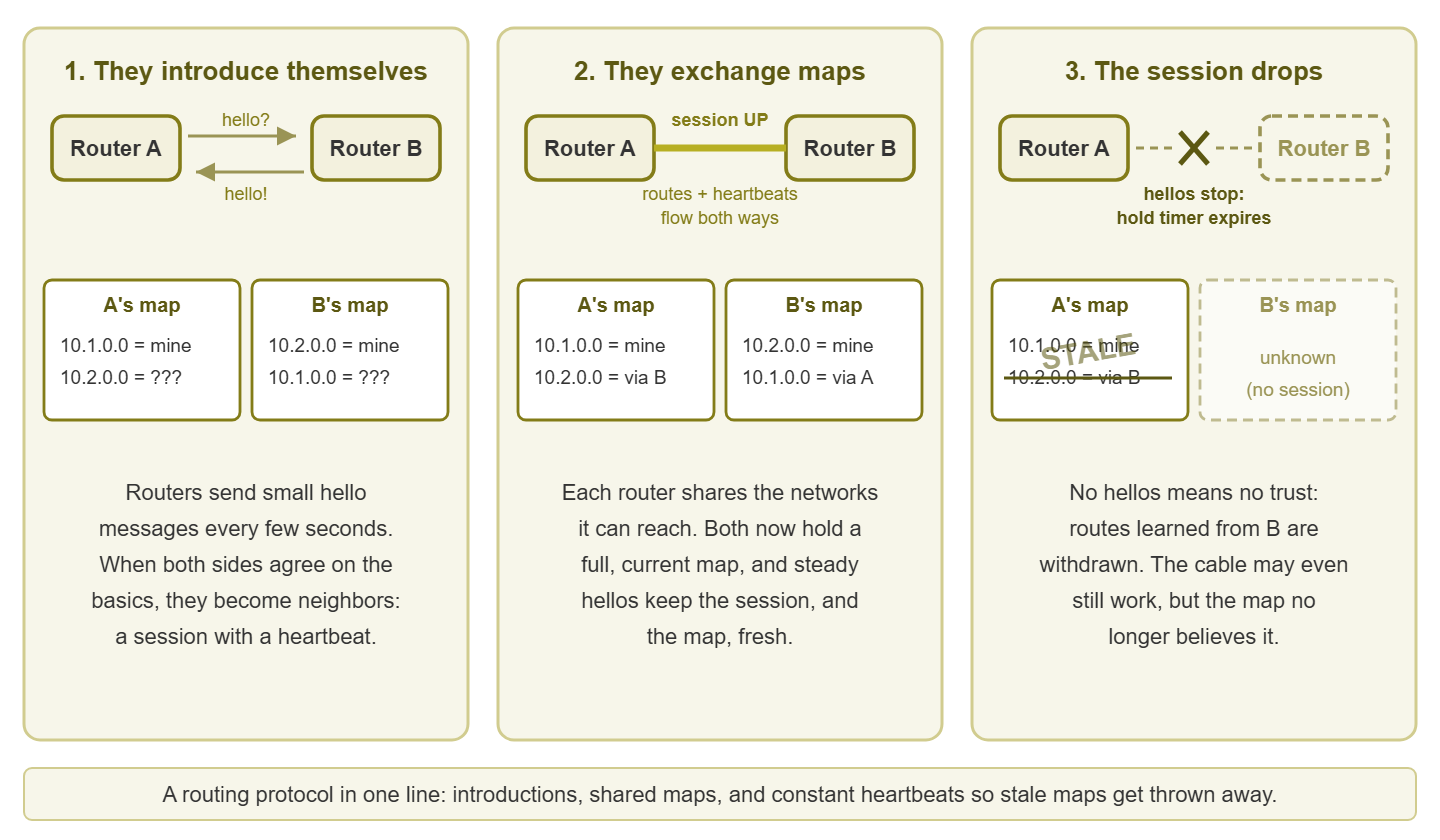
Figure 1: The whole plot of dynamic routing — introductions, shared maps, and a heartbeat that decides when a map can no longer be trusted.
Interior and exterior: OSPF and BGP in one breath
Routing protocols come in two families, and the split is about trust, not technology. Interior protocols run inside a single organization. All the routers belong to you, trust each other, and can afford to share the full, detailed map. The classic example is OSPF (Open Shortest Path First), the workhorse of company networks and campuses. Exterior protocols run between organizations that do not fully trust each other. That could mean you and your internet provider, or one provider and another. The classic example there is BGP (Border Gateway Protocol), the protocol that glues the entire internet together. Because it crosses business boundaries, BGP cares less about finding the mathematically shortest path and more about policy. That means whose traffic you are willing to carry, and which of your connections you prefer to use. Interior protocols are like giving a coworker directions across the office; BGP is international shipping, with customs.
Practically, this means you will only ever meet these protocols in specific places. If your campus or your site-to-site links use dynamic routing internally, it is probably OSPF or something shaped like it. BGP, if it exists in your world at all, lives at the internet edge — typically on a router facing your provider. Very often, it is configured or even fully managed by the provider themselves. You do not need to know either protocol's internals to monitor them, any more than you need to rebuild an engine to watch the oil light.
There is one more reason to care about the split, and it is operational rather than academic: the family tells you who to call. When an interior neighbor drops, both ends of the problem belong to you — the fix lives somewhere in your building or on your own circuits. When a BGP session to a provider drops, the far end of the conversation is somebody else's router in somebody else's facility. Your job shifts from fixing to gathering evidence and making the phone call. Monitoring cannot make that judgment for you. But a clearly labeled alert — interior neighbor versus provider-facing peer — means you start the right conversation several minutes sooner. You already have the timeline in hand.
Why ping health and routing health are different questions
Here is the part that justifies this entire topic. A ping is the basic "are you there?" test message. It answers one question: can I reach this destination right now, along whatever path the current map happens to choose? Routing health asks a different question: is the map itself correct, and will it stay correct when something fails? Those can disagree, because the road existing and the map being right are two separate facts. Some concrete ways they come apart:
- Redundancy silently lost. You have two paths between sites. The neighbor session on one of them died last Tuesday, so all traffic quietly moved to the survivor. Every ping is green, every user is happy, and you are now one failure away from a total outage without knowing it.
- The map flickers. An unstable neighbor session drops and re-forms every few minutes, forcing constant recalculations. Users feel brief stalls and weird "it hiccuped" moments, but a ping check that runs once a minute sails right through the gaps. That pattern has its own guide.
- Traffic on the wrong road. The fast primary path sits idle while everything crawls over the slow backup, because the map prefers the wrong entry. Pings succeed — slowly — while users grumble about everything.
- Holes for some destinations. A bad map entry sends traffic for one branch subnet into a void. Your ping target lives on a different subnet, so monitoring stays green while one office quietly falls off the network.
This is why routing gets monitored as its own discipline. Reachability checks tell you the network works at this moment. Routing checks tell you whether the map is right, whole, and stable enough to survive the next bad moment. The two are teammates, not rivals — keep every ping you have, and add map checks beside them.
What a small network actually runs
Now for some honesty you will rarely find in routing material: there is a good chance your network runs none of this. The most common small-business design is entirely static. Every device points at the firewall using a default route. That is the map entry that means "anything I have no better answer for, send here." The firewall has one static default route of its own, pointing at the provider. The provider runs BGP on their side of the fence so that the internet knows how to reach you. But no device in your building speaks a routing protocol, and everything works fine. If that is you, you are not behind; you are running the simplest design that meets the need, which is the whole art of this job.
| If your network looks like... | You probably run... |
|---|---|
| One site, one internet connection | Static routes only; the provider handles the rest |
| One site, with layer 3 switches routing between internal segments | Statics, or a small OSPF setup somebody built once and nobody has touched since |
| Several sites connected by VPN tunnels | Statics over the tunnels, or the firewall vendor's built-in routing |
| Several sites on a provider's private WAN service | Dynamic routing with the provider's equipment, often managed for you |
| Your own public address space and two internet providers | BGP at the edge — the real thing, possibly co-managed |
One definition from that table: a layer 3 switch is simply a switch that can also route between networks. It is a switch and a small router sharing a case. These switches are the most common place to find a forgotten OSPF configuration quietly doing its job for years. And if your network turns out to be statics-only, this pillar still pays rent. In that case, the neighbor material becomes useful background. And watching the routing table remains directly, immediately practical for the handful of routes you depend on.
Finding out what you have
You can answer "what routing do we run?" in about ten minutes with read-only access. The answer becomes the foundation for every check in this pillar. The commands below are generic — every router and firewall has its own exact spelling, but the shape is universal. Grab a coffee and a notepad, and treat this as reconnaissance, not surgery.
- Step 1: get read-only access to your router, firewall, and any layer 3 switch. Read-only is all you need and all you should want today.
- Step 2: display the routing table — on most gear something like
show ip route. The letter codes in front of each entry tell you where it came from, which is exactly the question you are asking. - Step 3: ask about neighbors with the protocol's summary command — the generic shapes are
show ip ospf neighborandshow bgp summary. An empty answer or an error means that protocol is not running, which is a perfectly good answer. - Step 4: repeat on the firewall. Firewalls love to hide their routing under a different menu, but it is there.
- Step 5: write down everything you find — which devices run a protocol, who their neighbors are, roughly how many routes they hold. You have just created your expected-state inventory, the raw material for real alerting.
Here is the kind of output step 2 produces, trimmed and annotated. The codes are the interesting part: this one table shows a network running statics, OSPF, and BGP at once.
core-rtr# show ip route
Codes: C - connected, S - static, O - OSPF, B - BGP

S*   0.0.0.0/0 via 203.0.113.1        <- default: "everything else, go here"
C    10.10.1.0/24, port Gi0/1         <- directly attached, always known
O    10.20.0.0/16 via 10.10.5.2       <- learned from an OSPF neighbor
B    198.51.100.0/24 via 203.0.113.1  <- learned from a BGP peer
Tip: "show" commands look; they do not touch. Running them is as safe as reading a dashboard, so do not let router fear stop you here. Use a read-only account where one exists. And if the person before you left no passwords behind at all, well, that is a different guide and a stronger beverage.
The monitoring surface: three things to watch
Everything in this pillar reduces to three questions, asked over and over by your monitoring system. Conveniently, all three can be answered with tools you already use elsewhere. One is SNMP polling (the standard question-and-answer protocol your monitoring system speaks to network gear). The other is the log messages routers send when something changes.
1. Is every expected neighbor up?
The heartbeat check. Routers publish their neighbor lists and session states. So your monitoring can compare "who is adjacent right now" against "who should be adjacent." It can raise a flag the moment a relationship drops — even when traffic still flows over a surviving path. This is the highest-value routing check by a wide margin, and the neighbor state guide builds it step by step.
2. Is the map the right size and shape?
Route counts and critical entries. A routing table that suddenly shrinks lost a source of information; one that suddenly grows learned something it should not have. And a few specific entries — the default route above all — simply must exist. Watching the routing table covers counts, presence checks, and snapshot comparisons.
3. How often is the map being redrawn?
Change events. A healthy network converges rarely — when something actually changes. A map being redrawn every few minutes means something is flapping, and users are feeling it even if ping is not. The route stability guide covers churn, and the convergence guide covers what happens during each redraw.
Where to go next
You now know the plot: routers keep maps, and protocols share and repair those maps. Monitoring watches the heartbeat between routers, the size and content of the map, and how often it gets redrawn. That is more practical routing knowledge than many admins ever pick up, and none of it required a two-inch book. The vocabulary matters too. The next time a vendor or a provider says "the adjacency dropped," you will hear "the heartbeat stopped and the maps went stale." And you will know exactly which of your checks should have caught it.
From here, read the neighbor state guide first. It is the check with the best effort-to-value ratio. Then read the rest of Routing Protocol Health in any order. Ten minutes with a "show" command today, and the mysterious routing layer becomes just another thing you monitor.
Put this into practice with SysPeep Monitor
Watching routing health starts with watching your routers, and that part does not have to be hand-built. SysPeep Monitor auto-discovers the routers, switches, and firewalls on your network. It polls their health over SNMP and alerts you when the numbers that matter change. The free trial installs on any Windows machine in minutes.
Download Free TrialLearn About SysPeep - All Rights Reserved.