
The Anatomy of a Runbook That Works Under Stress
A runbook has one reader, and that reader is tired. Nobody opens a runbook on a calm afternoon with coffee in hand. They open it during trouble, probably just woken, possibly watching an outage counter climb with one eye still shut while the phone keeps buzzing. Stress narrows attention, shortens working memory, and makes people skip ahead. I have read the same step four times at 3 a.m. without taking it in, and I was the one who wrote it. A runbook written like an expert's leisurely essay fails exactly when it is needed, which is the only time it is needed.
So a good runbook is not "documentation that happens to be about an incident." It is a machine for steering a 3 a.m. brain. It uses short numbered steps, explicit branches, and an expected result after every action. It has a clearly marked exit for when things go sideways. This guide gives you the five-section skeleton that does that job and the writing rules that keep each section stress-proof. You also get a complete worked example you can copy the bones of today: a runbook for a WAN link going down. (The WAN, or wide area network, is the circuit from your internet service provider, the ISP, to your office.)
In this guide
- Why runbooks fail at 3 a.m.
- The five-section skeleton
- The stress-writing rules
- The metadata header
- Where runbooks should live
- A complete worked example: WAN down
- The anatomy checklist
Why runbooks fail at 3 a.m.
Picture the actual reader. It is 3:12 a.m.; the alert says the internet link is down; they have been awake for ninety seconds. In that state, a wall of prose is unreadable. A step like "check the usual things" is a riddle. An undocumented assumption ("obviously you'd log into the firewall first") is a wall. Worse, a stressed reader who loses trust in the document abandons it entirely and starts improvising. That is precisely the failure mode the runbook existed to prevent. Every structural choice below exists to keep a degraded brain moving forward, one action at a time. The reader always knows whether the last action worked and what comes next. And they are never trapped without an exit.
At Harbourview Clinic the file-server runbook had a step three that read, in full, "check the usual things". The on-call admin, four months into the job, reached it at ten past four in the morning. She spent the next hour checking everything she could think of. That was a great deal, because nobody had told her what the usual things were. The usual thing turned out to be one stuck backup job holding a lock on the share. The author, when asked, said he had not wanted to insult anyone by spelling it out. Step three is now four lines long, and nobody has reported feeling insulted.
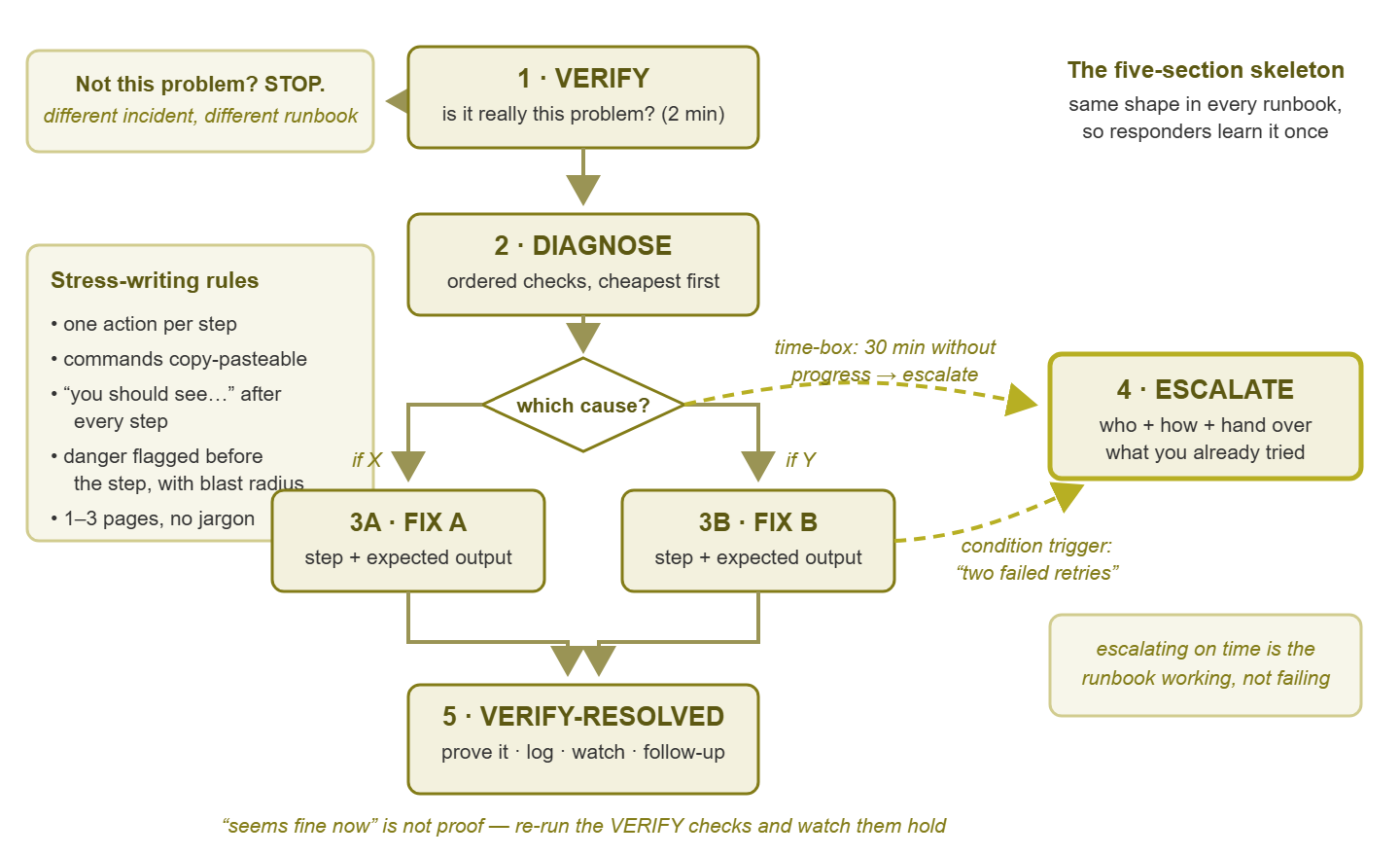
Figure 1: The five-section skeleton. The main path runs top to bottom; the escalate ramp is always one honest step to the side.
The five-section skeleton
Every runbook, whatever it covers, is the same five sections in the same order. The consistency is itself a feature: a responder who has used any of your runbooks knows the shape of all of them.
Section 1: VERIFY — is this actually that problem?
The first two minutes confirm that the situation in front of the responder is the one this runbook solves. Alerts are honest but narrow — "host unreachable" might be the host, the switch, or the monitoring server's own network card. The most expensive mistake available is confidently executing the wrong runbook. So VERIFY is one to three quick checks with expected results ("ping the firewall's inside address; you should get replies"). Crucially, it also has an early exit ramp. That is an explicit line that says "if X is not true, stop — this is not your incident; see runbook Y instead." Giving the reader permission to leave is not a failure of the document. It is the document working.
Section 2: DIAGNOSE — which kind is it?
Most problems worth a runbook have two to four common causes, and the fix differs by cause. DIAGNOSE is an ordered sequence of checks that narrows down which one you have. The order is "fastest and most likely first," because the responder's time is the scarce resource. The critical formatting rule: decision points are explicit if-then branches, never prose. "If the WAN port LED is dark, go to Fix A. If it is lit but the interface has no address, go to Fix B." Flat, numbered, almost insultingly literal steps beat clever paragraphs every time. A stressed reader cannot parse "depending on whether the interface obtained an address, you may wish to consider…" A small branch table — check, result, meaning, go-to — is often the clearest format of all. You will see one in the worked example below. And every check must say what its outcomes mean: a reading nobody can interpret is a step that stalls the whole document.
Section 3: FIX — the actions, with receipts
One FIX block per diagnosis branch. Each step is a single exact action — a copy-pasteable command or a literal click-path ("Admin > Interfaces > WAN"). A confirmation follows: "you should see…". Those expected-output lines are the runbook's seatbelts. They tell the responder after every step whether they are still on the path. And they catch the wrong turn immediately instead of three steps later. Dangerous steps get flagged inline with their blast radius — what else this action takes down — and a pause-point. "This reboots the firewall — the VPN and all internet traffic drop for ~3 minutes. Confirm users are notified before continuing." A responder should never discover a step was dangerous by watching what it did.
Section 4: ESCALATE — the exit, stated without shame
Every runbook needs give-up criteria, written as plainly as the fix steps. The alternative is a responder grinding alone for three hours out of pride or fear of "bothering someone." There are two kinds of triggers. One is a time-box ("30 minutes without clear progress = escalate, full stop"). There are also condition triggers ("both power cycles failed", "you see disk errors", "more than one site is down"). Then the logistics: exactly who to contact and exactly how (the phone number, not "call the vendor"). State what to hand over: which runbook you ran, which branch you took, and what you observed at each step. That handover context is what makes escalation a relay instead of a restart. The wider structure of who gets called when is its own topic — see the Escalation & On-Call guides. But each runbook carries its own local answer.
Section 5: VERIFY-RESOLVED — prove it, then land the plane
"It seems fine now" has restarted more incidents than any other sentence. The closing section states what proof of recovery looks like. That means the same checks from VERIFY, now passing; the alert cleared in monitoring; and a user-visible test working. It also states how long to watch before believing it — the difference between fixed and briefly quiet. Then comes the aftermath, because the incident is not over when the graph turns green. State what to log and where, and what to keep an eye on for the next day or two. Include any follow-up now owed ("replace the suspect cable," "open a ticket with the ISP"). This is the runbook-level version of the formal all-clear that incident response practice insists on: resolved, verified, recorded.
The stress-writing rules
The skeleton gives you the sections; these rules govern every line inside them.
- One action per step. "Restart the service and check the log" is two steps wearing one number. Split them — because if the combined step fails, the responder does not know which half failed.
- Commands are copy-pasteable. Exact syntax, correct quoting, tested. Where a value is device-specific, parameterize it loudly and consistently:
ping [FIREWALL-INSIDE-IP], with the real values listed once in the header, not sprinkled through the text. - No jargon without expansion. The runbook's reader may be the backup person, the new hire, or a future teammate you have not met. First use of any acronym gets its meaning: "check the ONT (the ISP's fiber box, usually on the wall by the demarc)."
- Write for a panicked stranger. The voice test: read each step aloud. Then ask, "could a competent IT person who has never touched our network, at 3 a.m., do this without asking anyone anything?" Every "well, they'd probably know…" is a defect.
- Length honesty: one to three pages. A runbook longer than three pages is almost always one of two things in disguise. It could be two runbooks stapled together (split them, and link between them). Or it could be a tangled decision structure that needs a diagram more than more words. Length is a smell; heed it.
The reading level feels wrong at first, because you are writing below your own expertise on purpose. Short sentences. Common words. Numbered everything. To the author on a calm afternoon it reads as almost condescending; to the responder at 3 a.m. it reads as mercy. The discipline is to write for the worst reading conditions the document will ever face, not the best. The expert loses nothing, and the exhausted reader gains everything.
The metadata header
Four short lines at the top of every runbook do most of the work of keeping it maintainable:
RUNBOOK: WAN link down
Owner: [name]            Last tested: [date]
Applies to: main-office firewall + [ISP name] circuit [circuit ID]
Linked alert: "Internet unreachable" (monitoring rule name)
Owner names the person who maintains it (not the only person allowed to use it). Last tested is the freshness stamp — a runbook nobody has tested in a year is a rumor. This date is what your review process keys on. Applies to scopes it, so nobody follows the head-office WAN runbook at the branch site. Linked alert closes the loop in both directions: the alert links the runbook, and the runbook names its alert. So neither can quietly orphan the other. This header is small, but it is the hook every maintenance practice hangs from — keeping runbooks alive covers that whole system.
Where runbooks should live
A runbook must be reachable during the outage it serves, and this rule disqualifies some popular homes. The classic trap: infrastructure runbooks stored in a cloud wiki behind single sign-on. When the internet or the identity provider is down, the instructions for fixing the internet are on the far side of the outage. They are smiling politely. (SSO — single sign-on — is the shared login your other logins depend on, which is exactly the problem.)
Three requirements, in order of importance. Reachable in the failure: for runbooks about network, power, and identity infrastructure, keep an offline or break-glass copy. That could be a synced folder on the on-call laptop, a printed binder in the server room, or a copy on a phone. Boring beats clever here. Linkable: every alert must be able to carry a URL or path straight to its runbook. So the home needs stable addresses, not "search the shared drive." Printable: plain formatting that survives paper, because paper is the only medium with 100% uptime. If your documentation home already follows the survival practices in documentation that survives, runbooks slot right in; just give the infrastructure subset the offline treatment.
Tip: test reachability the same way you test the runbook itself: once, from the on-call phone, with Wi-Fi off, at least pretend it is 3 a.m. If getting to the runbook takes more than a minute or a login you might not have mid-outage, fix the home before polishing the content.
A complete worked example: WAN down
Here is the whole skeleton in action — a realistic runbook for a small office losing its internet link. Commentary after each section points at the anatomy. Details like addresses are examples; the shape is the point.
RUNBOOK: WAN link down
Owner: [name]            Last tested: [date]
Applies to: main-office firewall (10.0.0.1) + [ISP] circuit [ID]
Linked alert: "Internet unreachable"

1. VERIFY (2 minutes)
   1.1  From any office PC:  ping 10.0.0.1
        You should see: replies. (Proves the LAN and firewall are alive.)
        If no replies -> STOP. This is a LAN/firewall incident,
        not a WAN incident. Use "Core switch / firewall down".
   1.2  From the same PC:  ping 1.1.1.1
        You should see: timeouts. (Confirms the internet truly
        is unreachable, not just one slow website.)
        If 1.1.1.1 replies but websites will not load -> STOP.
        Likely DNS. Use the "DNS failure" runbook.
Anatomy notes: two checks, each with an expected result, and two exit ramps before the reader has invested anything. The parenthetical "proves…" lines teach while they steer — the responder always knows why a step exists.
2. DIAGNOSE (5 minutes) — walk this table top to bottom, stop
   at the first row that matches.
| Check | If you see… | It means… | Go to |
|---|---|---|---|
| Look at the WAN port LED on the firewall (top right port) | Dark / unlit | No signal at all: cable, port, or the ISP box is dead | Fix A |
| Firewall web UI > Interfaces > WAN | "No IP address" or 0.0.0.0 | Link is up but the ISP is not issuing an address; usually the ISP modem/ONT is wedged | Fix B |
| Same page, WAN has its usual address; from firewall run a ping to the ISP gateway | Gateway does not reply | Our gear is fine; the problem is upstream at the provider | Fix C |
Anatomy notes: the branch table format — check, result, meaning, go-to. Three branches, ordered cheapest-first (a glance at an LED costs nothing). The "it means" column is the part most runbooks forget and tired readers need most.
3. FIX
   A. Dead physical link
      A1. Reseat the WAN cable at both ends (firewall + ISP box).
          You should see: LED lights within ~1 minute.
      A2. If still dark: swap in the spare cable
          (labelled WAN-SPARE, taped inside the rack door).
          You should see: LED lights; go to step 5.
      A3. Still dark -> go to ESCALATE (hardware or ISP box).

   B. No address from ISP
      B1. Power-cycle the ISP modem/ONT: unplug power, count 30
          seconds, plug back in. Wait up to 5 minutes.
          You should see: modem lights settle, then firewall
          WAN shows an address again.
      B2. If no address: repeat ONCE. Two failures -> ESCALATE.
      !! Do NOT reboot the firewall first. Blast radius: kills
         VPN and all inter-office traffic for ~3 min and rarely
         helps. Only reboot it if ESCALATE tells you to.

   C. Provider outage
      C1. Call [ISP support number, on the laminated card in the
          rack]. Give circuit ID [ID]. Get a ticket number.
      C2. Post the outage notice in [status channel] using the
          saved template. Users hear it from us first.
      C3. If the LTE failover is fitted: PAUSE POINT — failover
          data is metered; confirm with [manager] before enabling
          outside business hours.
Anatomy notes: each step has one action and expected output. There is a loudly flagged do-not with its blast radius. And there is a pause-point where an action has a cost someone else should approve. Notice how branch C is mostly communication — that is a real fix path too.
4. ESCALATE
   When: 30 minutes without clear progress, OR two failed
   power-cycles (B2), OR anything here does not match reality.
   Who:  [senior admin name], [phone]; no answer in 5 min ->
         [backup name], [phone]
   Say:  which branch you took, what each step showed,
         ISP ticket number if you have one.
   No shame clause: escalating at minute 30 is following this
   runbook correctly.

5. VERIFY-RESOLVED
   5.1  ping 1.1.1.1 from an office PC: replies, stable for
        15 minutes (leave it running).
   5.2  Monitoring: "Internet unreachable" alert has cleared.
   5.3  Open two normal websites from a user PC. Both load.
   Log: time down/up, branch taken, cause if known -> [ticket
   system], link the alert.
   Watch: if this was branch B, watch for a repeat within 48h;
   two wedges in a week = ask ISP to swap the modem.
   Owed: replace any cable you swapped out; close the loop on
   the ISP ticket.
Anatomy notes: the give-up criteria are exact and pre-authorized — the "no shame clause" is written down precisely because 3 a.m. pride is real. Escalating at minute thirty is following the runbook correctly; grinding until sunrise is not. Resolution is proven three ways, then the aftermath is owned: log, watch, owed. The incident ends recorded, not just quiet.
The anatomy checklist
Grade any runbook — including the ones you already have — against this card:
| # | Check | Pass looks like |
|---|---|---|
| 1 | Header present | Owner, last-tested, applies-to, linked alert — all four filled in |
| 2 | Verify with exit ramp | Two-minute confirmation plus an explicit "wrong runbook? stop, go to…" |
| 3 | Branches are explicit | If-then lines or a branch table; zero decisions buried in prose |
| 4 | Every fix step has a receipt | "You should see…" after each action |
| 5 | Danger is flagged before the step | Blast radius stated; pause-points where needed |
| 6 | Escalation is concrete | Time-box + condition triggers + who/how + what to hand over |
| 7 | Resolution is proven | Named checks, a watch period, and the log/watch/owed aftermath |
| 8 | Stranger-readable | No unexpanded jargon; passes the panicked-stranger voice test |
| 9 | Right length | 1–3 pages; longer ones split or get a diagram |
| 10 | Reachable in the failure | Offline/break-glass copy for infrastructure runbooks; linkable from the alert |
Where to go next
Five sections, four header lines, and a handful of writing rules. None of it is clever, and that is the point. Every piece exists for the reader with one eye still shut. A runbook that works for that reader works for everyone else by accident. If you are choosing which runbooks deserve this treatment first, start with your first five runbooks. If you are wondering how a document this careful stays correct as your network changes, that is keeping runbooks alive. The rest of the Runbooks pillar takes the same skeleton further — into training and, eventually, automation.
Put this into practice with SysPeep Monitor
Every runbook opens with the same move: confirm what is actually broken. SysPeep Monitor puts that confirmation on one screen — live dashboards and network maps fed by SNMP, WMI and SSH checks. Its alerts can point your responder at the right runbook the moment something fails. The free trial installs on a Windows machine in minutes.
Download Free TrialLearn About SysPeep - All Rights Reserved.