
NIC Teaming and Bonding: Redundancy That Needs Watching
Somebody, at some point, decided your important servers deserved two network cables instead of one. Good decision. Two cables, configured as a team, mean a dead cable or a dead switch port no longer takes the server off the network. The survivor carries on, and users never notice. You fix the failure on your own schedule instead of during an outage call. That is the promise of NIC teaming, and when it works, it is genuinely great.
Here is the catch nobody mentions at setup time: redundancy is invisible when it works, and the loss of redundancy is invisible too. A team that has quietly dropped to one working member looks exactly like a healthy team from every angle users and basic checks can see. The service is up. Ping answers. The application hums along. Meanwhile you are one cable failure away from the outage the second cable was bought to prevent. Teams have run degraded like that for months before anyone looked.
This guide explains teaming in plain language: what it is and the handful of modes you will actually meet. It explains why degraded teams go unnoticed, and exactly what to monitor so they never go unnoticed on your network. You will also learn how to prove your failover works by testing it on purpose. No vendor specifics required — the ideas are the same whether your OS calls it teaming, bonding, or link aggregation.
In this guide
- Two cables pretending to be one
- The three flavors of team
- The silently degraded team
- Monitor the members, not just the team
- Testing failover on purpose
- The switch has to agree
- Mismatched members: the lopsided team
- Where to go next
Two cables pretending to be one
Strip away the jargon and a NIC team is a simple trick. Take two (or more) physical network ports on a server, and present them to the operating system as one logical network interface. The applications, the IP address, the firewall rules — everything above sees a single interface and neither knows nor cares that two cables hide underneath. The teaming layer's job is to decide, packet by packet, which physical member actually carries the traffic, and to react when a member dies.
The same idea wears different names depending on where you meet it. Windows calls it teaming. Linux calls it bonding (and its newer implementations still say "team"). Switch people say link aggregation, LAG, or port-channel when the same trick is done between two switches, or on the switch side of a server team. It is all the same concept: several physical links, one logical link. Think of two bridges into a city that share a single name on the map. Drivers just take "the crossing." Only the traffic department knows there are two spans and decides which one each car uses.
Teams are built for two reasons, and it is worth knowing which one motivated yours. The first is redundancy: survive a failed cable, NIC port, transceiver, or switch port. If the members plug into two different switches, it also means surviving a whole switch failure. The second is capacity: spread traffic across members so the server is not limited to a single link's speed. Most teams in ordinary server rooms exist for redundancy, with capacity as a bonus. As you will see, the capacity bonus is smaller than the arithmetic suggests.
The three flavors of team
Every vendor's configuration screen offers a bewildering list of modes, but they collapse into three families.
Active-standby
One member carries all the traffic; the other sits idle, waiting. When the active member's link drops, the standby takes over within moments. This is the simplest mode, the easiest to reason about, and the one that demands the least from the switch. The switch just sees a normal server port that occasionally goes quiet while another wakes up. The price: you paid for two links' worth of hardware and get one link's worth of throughput, always.
Hash-based load sharing
Both members carry traffic at once. The teaming layer picks a member for each conversation by computing a hash — a deterministic scrambling — of addresses (MAC, IP, sometimes ports). All packets of one conversation therefore stay on one member and arrive in order. Some variants of this are switch-independent: the server spreads its outbound traffic without the switch knowing a team exists at all. The crucial fine print: because one conversation maps to one member, a single large transfer never goes faster than one member's speed. A team of two gigabit links is not a two-gigabit pipe for your big nightly copy. It is two one-gigabit lanes that different conversations get sorted into.
LACP: the negotiated team
LACP (Link Aggregation Control Protocol) is the standard way for both ends to formally agree on the team. The server and the switch exchange small protocol messages over each member, confirming "you and I are part of the same bundle". They keep exchanging them, like a quiet heartbeat on every member. That agreement buys you better failure detection. A member whose light is on but whose partner has stopped talking gets removed from the bundle. This catches certain half-dead situations that pure link-light logic misses. The price of the handshake is coordination. The switch must be configured for it, port by port, and misconfiguration has its own symptoms we will cover below.
| Mode family | Who carries traffic | Switch must be configured? | One flow's top speed | Failure detection |
|---|---|---|---|---|
| Active-standby | One member at a time | No | One member's speed | Link state |
| Hash-based (switch-independent) | All members, split by hash | No | One member's speed | Link state |
| LACP | All members, split by hash | Yes — matching bundle | One member's speed | Link state + protocol heartbeat |
Notice the third column reads the same all the way down. Whatever the mode, the single-conversation ceiling is one member's speed — teams add lanes, not a faster speed limit. Keep that in mind the next time a big file copy "only" runs at one link's rate over a team. That is the design working correctly, not a fault.
The silently degraded team
Now the failure story this whole article orbits. One Tuesday, a member of a two-member team dies — a cable gets crushed under a rack tile, a switch port fails, a transceiver gives up. The team does exactly what it was built to do: traffic shifts to the survivor within moments, no session drops, no user notices. And that is the problem. The service check is green. The team interface reports "up." The IP answers ping. Every signal a service-focused monitoring setup watches says healthy.
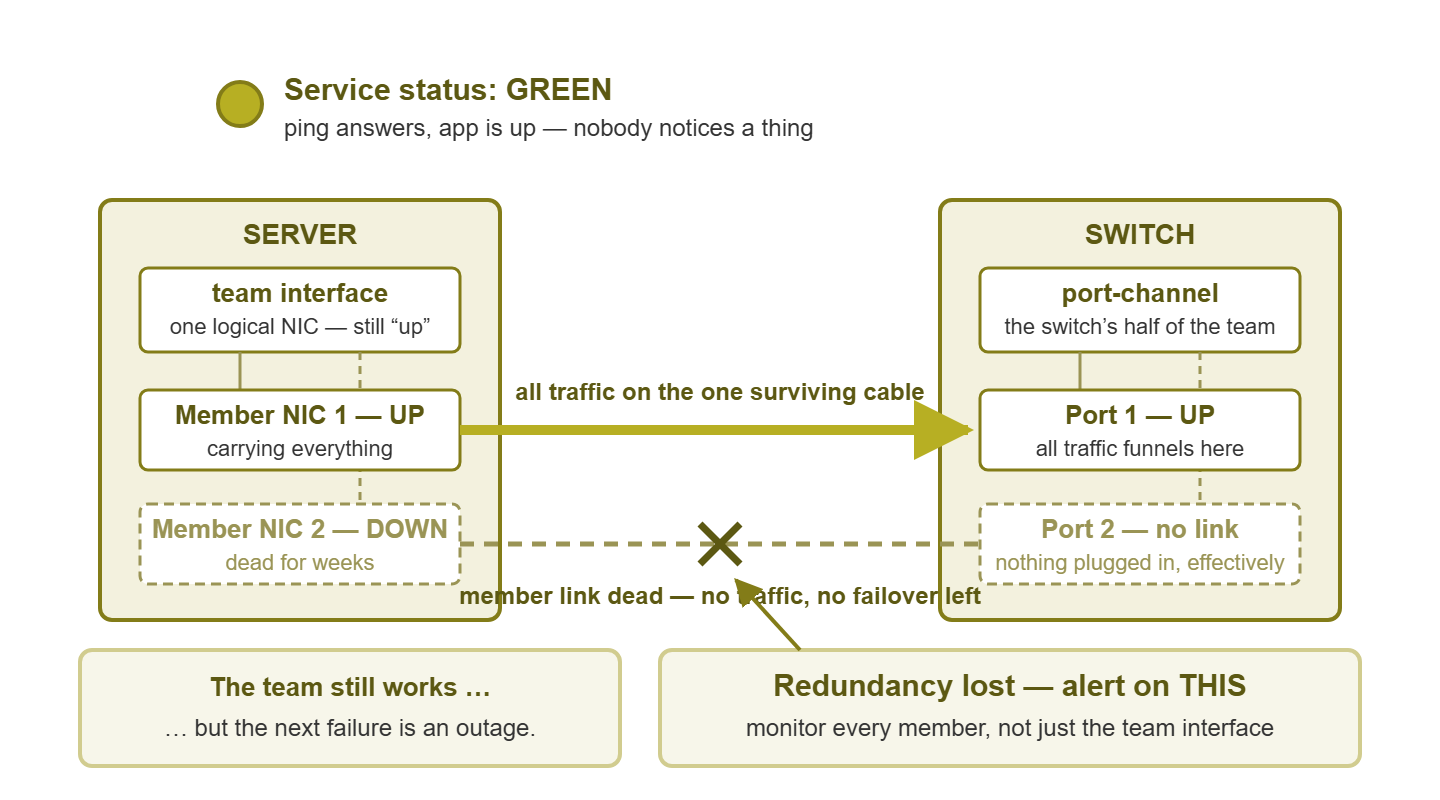
Figure 1: the silently degraded team. The service light stays green on one surviving member — which is exactly why the dead member, not the service, is the thing to alert on.
From that Tuesday on, the server is running without a safety net. Its redundancy — the thing someone specifically paid for — is gone, and nothing anyone routinely looks at says so. Weeks or months later the surviving member fails (cables that share a path tend to share hazards), and now there is a full outage. The postmortem digs into the logs and finds the first member's death, months old, unnoticed. Everyone agrees this was preventable. It was: the missing piece was never hardware, it was one alert.
There is a quieter version of the same trap in load-sharing teams: a member that still shows "up" but carries nothing. It could be a hash gone wrong, a half-configured switch port, or a member stuck outside an LACP bundle. The link light is on, yet one lane of your highway has been empty for a month. Watching traffic per member catches this; watching only the team total never will.
Monitor the members, not just the team
The fix is a monitoring rule so simple it feels anticlimactic: every member of every team is monitored as its own interface. And a dead member is a high-severity alert — even though no service is down. That last clause is the part that needs defending in front of colleagues, so here is the defense. The moment a member dies, the team stops being redundant and becomes a single point of failure. A single point of failure on a server important enough to team is precisely the condition the team was built to prevent. You are not alerting because something is broken for users; you are alerting because your insurance policy just lapsed.
Concretely, for each team, collect and watch:
- Per-member link state. The core check. Member down → high-severity alert, response expected in hours, not months.
- Per-member speed and duplex. Alert on change, not just on down. A member that renegotiated to a lower speed is a degraded team wearing an "up" costume. More on this below.
- Per-member traffic. In load-sharing modes, a member sitting at zero for days while its twin works is a silent failure of the sharing, worth a ticket.
- Per-member error and discard counters. Each member is a physical link with its own books, exactly as covered in the host counters guide. A member accumulating errors is on its way out.
- The team's own status. Most teaming layers report an overall condition (healthy/degraded) and which member is active. Collect it where offered, as a cross-check on the per-member picture.
The operating system will happily tell you all of this if something asks. On Linux, for example, the bonding layer publishes a status file that reads almost like a medical chart. Here is the degraded team from our story, as the kernel reports it:
$ cat /proc/net/bonding/bond0
Bonding Mode: fault-tolerance (active-backup)
Currently Active Slave: eth0
MII Status: up

Slave Interface: eth0
MII Status: up
Speed: 1000 Mbps
Link Failure Count: 0

Slave Interface: eth1
MII Status: down
Speed: Unknown
Link Failure Count: 3
The team (bond0) reports "up," and it is not lying. But three lines from the bottom, one member is down and has failed three times. Windows exposes the equivalent through its teaming status views and management interfaces. The information is always there; the whole game is making sure your monitoring reads it instead of a human remembering to.
How you collect all this is the usual host-monitoring menu: SNMP agent, WMI on Windows, an installed agent or SSH on Linux. The practical wrinkle is simply that member interfaces must not be filtered out as "unimportant" during discovery. Many monitoring setups auto-ignore interfaces without IP addresses, which describes every team member perfectly. Go check yours today; this misconfiguration is common, invisible, and cheap to fix.
Tip: name things so the alert explains itself. An alert reading "eth3 down" at 2 AM invites snoozing. Try "member 2 of team on the main file server down — redundancy lost." It tells the on-call person exactly what happened and why it matters, while the service is still comfortably up.
Testing failover on purpose
A team that has never failed over is a hypothesis, not a safety net. Configuration drifts, switch ports get reshuffled, and drivers change behavior. The only way to know your failover works today is to make it happen while you are watching. Admins call these pull-the-cable drills, and they are exactly what they sound like. Done in a maintenance window, they are low-risk. Skip them for years, and you may discover during a real failure that the standby member was misconfigured all along. Here is a drill sequence that keeps things safe:
- 1. Schedule and announce a window. Even though you expect zero impact, treat it as potentially impactful. That expectation gap is what you are testing.
- 2. Verify the team is fully healthy first. Both members up, both carrying what their mode says they should. Failing over a team that is already secretly degraded is how drills become outages.
- 3. Start continuous observation. A steady ping to the server, a long file copy, and your monitoring dashboard on screen.
- 4. Fail one member — pull its cable, or administratively shut its switch port. Watch three things. Did traffic move to the survivor? How many pings (if any) were lost during the switch? And did your monitoring raise the member-down alert? The alert is part of the system under test.
- 5. Restore, and wait for full recovery. Confirm the member rejoins the team and, in load-sharing modes, starts carrying traffic again — not just showing a link light.
- 6. Repeat for the other member. Asymmetric configurations hide on whichever member you did not test.
- 7. Write down the results. Failover time, packets lost, alerts fired. Next quarter's drill gets compared against this — drift shows up as a difference.
If proposing this drill makes someone nervous — "what if it breaks something?" — notice what that nervousness admits: nobody currently trusts the failover. That is the strongest argument for the drill, in a window you chose, rather than during a random Tuesday's real failure.
The switch has to agree
A team is an agreement between two parties. And the switch's half of the agreement can be wrong in ways that produce marvelously confusing symptoms. The switch-side construct — the port-channel or LAG — must include exactly the right ports, in the right mode, with matching settings. And each mismatch has a signature:
- LACP on one end, static or nothing on the other. Members flap, or the switch parks ports in a "suspended" or standalone state. The team limps along on whichever member happens to work. Look for interfaces that bounce in sync with LACP timers.
- Server team spread across switch ports that are not bundled. The switch sees the same MAC address hopping between two ordinary ports. Expect MAC-flapping log messages, intermittent loss, and occasional duplicate packets. This one convincingly imitates a haunted network.
- VLANs that differ between member ports. Traffic for some networks works only when the hash lands on the correctly configured member. So some conversations always work, while others fail "randomly." Users report it as the application being moody.
- Hash settings that concentrate traffic. Both ends up, no errors anywhere. But one member carries nearly everything — sometimes just an unlucky hash for your traffic mix, worth knowing before you blame hardware.
The pattern across all four: partial, intermittent, conversation-dependent trouble on a server whose team "looks up." When you meet that pattern, audit both halves of the agreement before touching anything physical.
One special case deserves a mention: teams whose members plug into two different switches, so that even a whole switch failure cannot isolate the server. It is a genuinely stronger design — and a more demanding one. Now the "one agreement" spans two switch chassis that must coordinate with each other to present a single bundle. Switch vendors each have their own multi-chassis mechanism for this; the concept is the same everywhere. The monitoring advice does not change, but the stakes do: with members on separate switches, a dead member might mean a dying switch. So the member-down alert is doing double duty. If your teams span switches and you did not know it, today is a good day to find out and write it down.
Mismatched members: the lopsided team
One more sneaky failure family: teams whose members are unequal. Members are supposed to be twins — same speed, same duplex, ideally the same kind of port. Reality drifts. A damaged cable makes one member autonegotiate down to a fraction of its proper speed. A port gets moved to an older switch; one member lands at half duplex after a negotiation hiccup. The team happily keeps running — and the hash keeps assigning a share of conversations to the crippled member.
The resulting symptom is a classic mystery: some users or sessions crawl while others fly, stable per victim, with nothing "down" anywhere. Whoever hashes onto the slow member suffers; everyone else is fine. Two defenses: first, alert when any member's negotiated speed or duplex changes (a value shift, not a down event). Second, treat any speed or duplex difference between members of one team as a fault to fix, never a quirk to tolerate. The mechanics of negotiation and its failure modes are covered in duplex and negotiation. Members can also differ in NIC model and driver. Keep in mind that mixed-hardware teams can behave differently per member in subtler ways too. The offload quirks in drivers and offloads apply per member, not per team.
Where to go next
Teaming is one of the rare parts of infrastructure that fails politely — so politely that nobody notices. Your job is to make its failures loud again. Monitor every member as a first-class interface. Alert on member-down as if it mattered (it does). Verify the switch's half of the bargain, and keep members symmetrical. Pull a cable on purpose once in a while to keep the whole story honest.
Each team member is an ordinary physical link underneath, so everything in the host counters guide applies to it individually. That is where your per-member error data comes from. And knowing what traffic should look like across a healthy team is part of knowing your servers generally: see what a healthy server's network looks like. The rest of this pillar lives at Where Server Meets Network: NICs, Teaming & Drivers.
Put this into practice with SysPeep Monitor
The degraded-team trap is really a discovery problem: member interfaces with no IP address are easy for monitoring to skip. SysPeep Monitor auto-discovers interfaces on servers and switches. It watches their state and error counters over SNMP and WMI. It lets you set a high-severity alert on a member going down — before the second failure turns it into an outage. Try it free on any Windows machine.
Download Free TrialLearn About SysPeep - All Rights Reserved.