
What a SIEM Does (and What a Small Team Actually Needs)
Somewhere in the last few months, someone — an auditor, a cyber-insurance questionnaire, a well-meaning consultant — has told you that your organization needs a SIEM. You looked it up and found that it stands for Security Information and Event Management. You read three vendor pages that used the word "platform" eleven times each. You closed the browser with the vague feeling that you are supposed to buy something large. If you are a one- or two-person IT team, that feeling is followed quickly by a second one: with what budget, and with whose time?
Here is the reassuring part. A SIEM is not magic, and it is not one thing. It is a bundle of five jobs — collect, normalize, correlate, alert, and retain. Every one of those jobs is something you can understand in a paragraph. You can do each one, at a small scale, with tools you already have. The heavy, expensive product exists because doing those five jobs across thousands of sources in real time is genuinely hard. Doing them across the six sources that actually matter on a small network is not.
This guide explains each job in plain language. It is honest about why the full product costs what it costs in money and attention. Then it draws a line around the "lite" version: the subset that delivers most of the protection for a fraction of the effort. By the end you will be able to explain each job a SIEM does in one sentence. You can then decide which parts you should be doing yourself this quarter.
In this guide
- The five jobs on one index card
- Job 1: Collect
- Job 2: Normalize
- Job 3: Correlate
- Job 4: Alert
- Job 5: Retain
- Why the full product is heavy
- The lite subset, defined
- Full versus lite, job by job
- The honest cost and effort
- Where to go next
The five jobs on one index card
Before the detail, here is the whole thing in a single breath. A SIEM collects logs from many places into one place. It normalizes them so that the same kind of fact looks the same no matter where it came from. It correlates events across sources to turn scattered facts into a story. It alerts when a story matches a pattern you decided was worth being interrupted for. And it retains everything long enough that you can investigate last month's problem. You can hand evidence to whoever is asking for it. That is the entire product. Everything else — dashboards, threat feeds, machine learning, the dark-mode console — is decoration on those five jobs.
A useful mental picture is a small-town detective's office. Collect is the mail slot where every report comes in. Normalize is the clerk who types each report onto the same standard form. Correlate is the corkboard with the string connecting pins. Alert is the phone call that goes out when the string connects two pins that should never touch. Retain is the filing cabinet in the back room. You can run that office with one clerk and a corkboard, or with a floor of analysts and a data center. The office does the same five jobs either way — the difference is volume, speed, and how many people are awake at 3 AM.
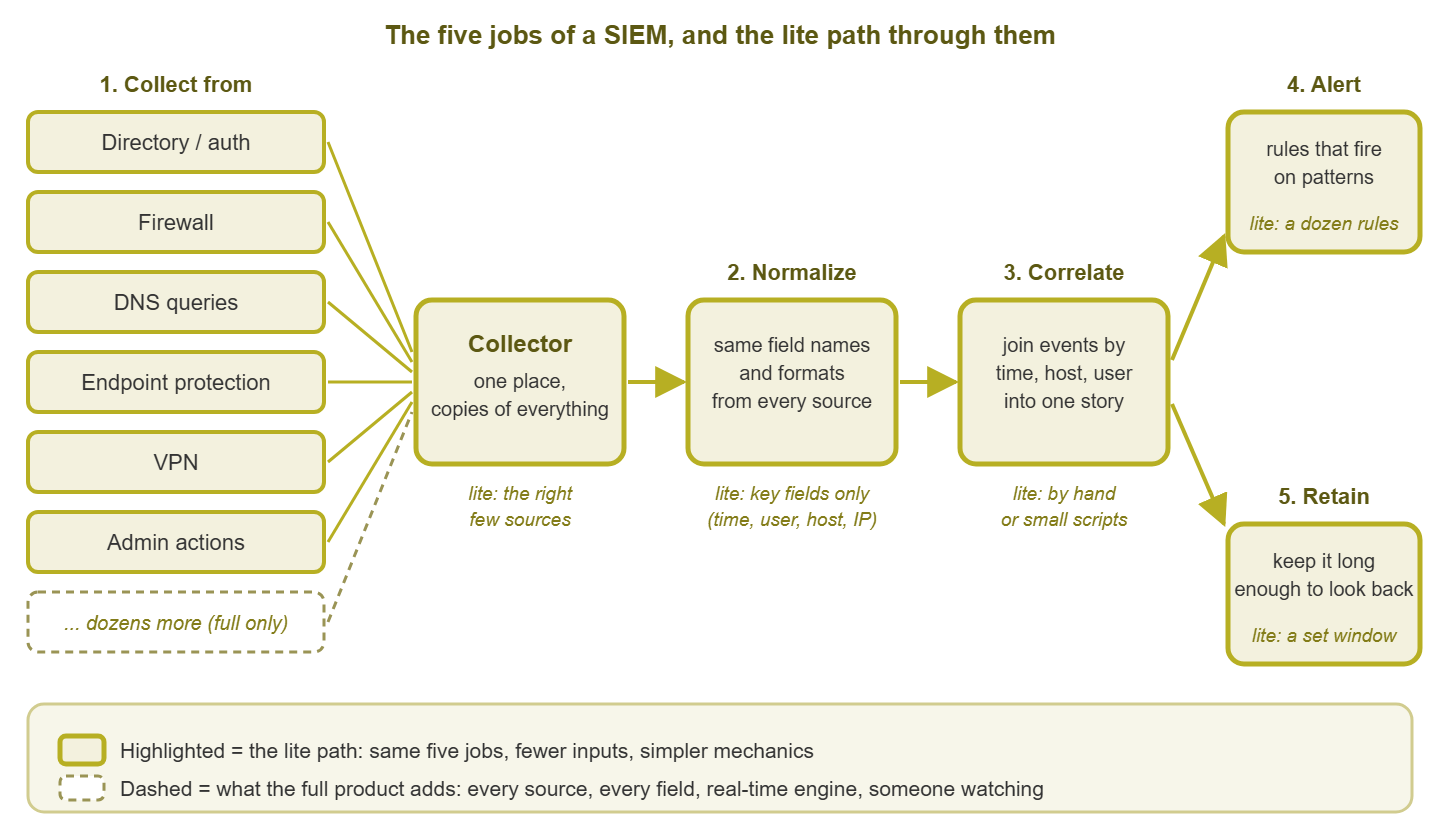
Figure 1: The same five jobs at any scale. The highlighted path is the lite version — fewer sources, fewer fields, simpler mechanics — and the dashed parts are what a full product adds.
Job 1: Collect — logs from everywhere into one place
Every device and service that matters already writes a log. The domain controller records who logged in, from where, and whether it worked. The firewall records what it allowed and what it denied. The DNS server can record which names were looked up. Endpoint protection records what it found, and — importantly — whether somebody switched it off. Left alone, each of those logs lives on its own box, in its own format. It quietly rotates away after a few days or a few megabytes.
Collecting means getting copies of those logs, continuously, onto one central machine that you control. The mechanisms are unglamorous. There is syslog, the decades-old standard for network gear to send log lines over the network to a listener. There is Windows event forwarding or a small agent for servers and workstations. And there is the occasional scheduled script that copies a file from a system that cannot do anything smarter. The reason a central copy matters is twofold. First, one of the most common things an intruder does on a compromised machine is clear its local log. A copy that already left the building survives that. Second, you cannot compare what you cannot see side by side. Correlation, two jobs from now, is impossible without collection.
The full product ships collectors for every operating system and parsers for hundreds of device types. It provides encrypted transport, load balancing, and buffering so nothing is lost when the central server is busy. The lite version is one collector machine, a syslog listener, event forwarding from the domain controllers, and a deliberately short list of sources. The general method for deciding which sources earn a place is covered in what to log. The security-specific ranking is the next guide in this pillar, the logs that matter most.
Job 2: Normalize — make fields comparable
Here is the problem normalization solves. The firewall writes user=jsmith. The directory server writes Account Name: JSMITH. The VPN writes jsmith@corp.local. Endpoint protection writes CORP\jsmith. That is one human being with four spellings, and a search for any one of them will miss the other three. Timestamps are worse. One source writes local time; another writes UTC. A third writes seconds-since-the-epoch, and a fourth writes the month in words. An IP address might be labeled src, source, client, or remote depending on who wrote the firmware.
Normalizing means mapping every source's fields onto one shared set of names and formats. You can then ask "show me everything involving jsmith between 09:00 and 09:30." You get honest answers from all four sources at once. Perhaps you have received five spreadsheets from five departments. You may have spent an afternoon renaming columns so they would line up before you pasted them into one sheet. If so, you have normalized data. It is the same chore, done for log lines instead of expense reports.
The full product carries parsers for hundreds of log formats and a common schema with hundreds of fields. It employs people whose job is to fix those parsers when a vendor changes its format in a firmware update. The lite version normalizes only the handful of fields you will actually join on. Start with the timestamp (converted to UTC) and the username (lowercased, with the domain part handled consistently). Add the source host or address, the destination host or address, and an event type with an outcome. Examples include login, success; login, failure; group change; and so on. Five or six fields, not five hundred, handled in the little script that reads each source. One prerequisite is non-negotiable: normalized timestamps are meaningless if the clocks producing them disagree. So make sure every source keeps NTP time and that you have done a timestamp sanity check before trusting any cross-source comparison.
Job 3: Correlate — join events across sources
Correlating means taking events from different sources and connecting them by something they share. That could be the same user, the same host, the same address, or the same window of time. On their own, individual log lines are boring. A burst of failed logins on the VPN is boring — people forget passwords. A successful VPN login is boring. An account opening a file share is boring. An outbound connection from the file server, logged by the firewall, is boring. But when those four boring facts share one username and fall within twenty minutes of each other, they are no longer four facts. They are a story with a beginning, a middle, and a part where you need to pick up the phone.
Correlation is the job that turns a pile of logs into detection, and it is the one that makes people say a SIEM is "smart." The full product does it in real time with a correlation engine. It uses sliding time windows and stateful rules that remember what they saw a minute ago. It has a rule language for expressing "A, then B within N minutes, from the same user." The lite version does it on demand and mostly by hand. Search the collector for a username or a host, sort the results by timestamp, and read. A small script that does the same search across every source and prints one merged, ordered list gets you most of the way. That is slower than an engine. But on a small network, with collection and normalization done, it is minutes of work rather than hours. The guide to correlation without a SIEM walks through exactly how to do it.
Job 4: Alert — rules that fire on patterns
An alert rule is a written-down pattern plus a decision that you want to be interrupted when it appears. "Ten failed logins followed by a success for the same account within five minutes" is a rule. "An account was added to an administrators group" is a rule. "Endpoint protection reported that it was disabled on a host" is a rule. The alerting job runs those rules against the incoming stream. In the lite version, it runs them against the last hour's batch on a schedule. It sends a notification when one matches.
This is where the full product's scale becomes a burden rather than a benefit. It arrives with hundreds of built-in rules. Nearly all of them fire constantly until you teach them what normal looks like on your network. After all, your backup job really does log in as a service account at 2 AM. Your scanner really does touch every file share on Saturday. The lite version runs a dozen rules, each chosen because you would act on it. You tune them one at a time until each is quiet on an ordinary day. The mechanics of turning a log pattern into a notification are covered in alerting on logs. The starter set for security specifically, with the tuning notes for each, is in detections a small team can actually run. Quality beats quantity here more than anywhere else in IT. An alert you routinely ignore trains you to ignore the next one. And the next one might be the real thing.
Job 5: Retain — keep it long enough
Retaining means keeping the collected logs for a period you chose on purpose, rather than whatever the default rotation happens to be. There are two reasons. The first is investigation: intrusions are very often discovered long after they began. The question you will need to answer is "when did this start, and what else did that account touch?" That question only has an answer if the logs from back then still exist. The second reason is requirements: auditors, cyber-insurance policies, contracts, and regulations frequently name a retention period. And "we keep whatever fits on the firewall" is not an answer that survives a meeting.
The full product offers tiered storage. Recent data goes on fast disks for searching; older data is compressed and parked on cheap ones. It also offers indexes, legal hold, and retention policies per source. The lite version is compressed text files on a disk with room to spare, a nightly copy to a second location, and a written-down window. Log text compresses extremely well, so the disk is rarely the hard part. A sensible starting shape is a searchable recent window of a few months and an archived window of a year or whatever your requirements say. But the number matters less than the fact that you decided it and can state it.
Why the full product is heavy
None of what follows is a complaint about vendors. It is simply what doing the five jobs at scale costs, and knowing it up front is what lets you make a fair decision.
Tuning
A SIEM arrives knowing nothing about your network. Every built-in rule will fire on your environment's quirks until you teach it otherwise, source by source. Those quirks include the service accounts, the scheduled jobs, and the vulnerability scanner. There is also the one application that authenticates fifty times a minute by design. Tuning is not a setup task that ends. It is a maintenance task that resumes every time something on the network changes. Teams that skip it end up with an expensive box that emails them four hundred times a day. They filter those emails to a folder, which is the same as not owning the box.
Storage
Log volume is the bill. One busy firewall logging every allowed connection can produce more lines per day than everything else on the network combined. Cloud-hosted platforms typically charge by the volume you send them, so every chatty source has a direct cost. Self-hosted platforms charge in disks, memory, and the time it takes to keep the indexes healthy. Either way, the sources you choose to collect become a recurring line item, which is a strong argument for choosing carefully.
Staffing
The product assumes there is someone to look at the queue. A SIEM that nobody watches is an elaborate log archive. Alerts may fire at 3 AM into an inbox nobody reads until 9 AM. That is six hours of head start handed to whoever caused them. Larger organizations solve this with a security operations team working in shifts. A small team cannot, and pretending otherwise is the most common way SIEM projects quietly fail.
Upkeep
Parsers break when a vendor changes a log format. Agents need updating. The platform itself needs patching, backups, and the occasional migration. This is ordinary system administration, but it competes for the same hours as everything else you run.
The lite subset, defined
"SIEM-lite" is not a product. It is a decision to do all five jobs at a scale one person can sustain, accepting known gaps in exchange for actually doing it. Concretely:
- Collect the right few sources: authentication, firewall, DNS, endpoint protection, VPN, and administrative actions. Six, not sixty.
- Normalize only the key fields: time in UTC, username, source, destination, event type and outcome. Do it in the script that reads each source, and keep the raw line alongside.
- Correlate by hand or by a small script, on demand, when a rule fires or a question arrives — not continuously.
- Alert on a dozen good rules, each tuned until it is quiet on a normal day, each with a first response written next to it.
- Retain for a window you chose and wrote down, on compressed storage, with a copy elsewhere.
What you give up is real: no real-time correlation across everything and no dashboards worth showing to management. Nobody is watching at night, and there is no coverage of the long tail of sources. What you keep is also real: most of the detections that matter on a small network, a durable evidence trail, and — underrated — the habit and the knowledge. When you do outgrow this, you will arrive at a real platform already knowing your sources, your rules, and your baseline. That is exactly what makes the difference between a SIEM that works and shelfware. The signs that it is time are the subject of when a real SIEM is worth it.
Full versus lite, job by job
| Job | Full product | Lite version | Where lite falls short |
|---|---|---|---|
| Collect | Agents and parsers for every source; encrypted, buffered, load-balanced transport | One collector; syslog plus event forwarding from a short source list | Long-tail sources; resilience when the collector is down |
| Normalize | Common schema with hundreds of fields; vendor-maintained parsers | Five or six key fields extracted per source by your own scripts | Anything outside the key fields needs a manual read of the raw line |
| Correlate | Real-time engine with sliding windows and stateful rules | Search by user or host, merge, sort by time — by hand or script | Speed; patterns that span days; patterns nobody thought to search for |
| Alert | Hundreds of built-in rules, case queue, escalation workflow | A dozen tuned rules run on a schedule, notifying by email or chat | Coverage breadth; nobody awake to receive the alert at night |
| Retain | Tiered, indexed storage with policies per source and legal hold | Compressed files, a chosen window, a nightly copy elsewhere | Search speed over old data; per-source policy granularity |
Tip: the single habit that makes the lite version work is a fixed weekly slot — an hour, same day, same time. Use it to read the week's alerts, confirm every source is still sending, and adjust one rule. Skip it for a month and you no longer have a SIEM-lite. You have a disk full of text files and a false sense of security.
The honest cost and effort
In time, expect the initial build to take a few working days spread across a few weeks. Allow a day to stand up the collector and point the first two sources at it. Allow a day to write the normalization scripts and check the clocks. Allow a day to write and tune the first rules. Then allow a couple of weeks of watching before you trust any of it. Ongoing, the weekly slot above is the real cost — call it an hour or two. Add the occasional afternoon when a source changes format or a new system needs adding.
In money, the lite version is a virtual machine or a modest physical box, a disk with headroom, and often nothing else. The skills required are a comfortable relationship with a shell or scripting language, patience for reading logs, and the willingness to write things down. All of it transfers directly to a full platform later.
In risk, be clear-eyed: the lite version will miss things a full product with a staffed team would catch. That especially means slow patterns that span days and anything that happens overnight. It will also catch things that nobody on your network was catching at all. The fair comparison for most small teams is not lite versus full. It is lite versus nothing, and nothing is where most of them are starting from. A dozen rules on six sources, reviewed weekly, is a very large improvement over a firewall log that nobody opens.
Where to go next
You now have the vocabulary: collect, normalize, correlate, alert, retain. The rest of Security Log Monitoring on a Budget (SIEM-lite) builds the lite version one job at a time. It covers which sources to collect first and why, and the dozen detections worth running. It shows how to join logs by hand and by script. It also covers the honest signs that you have outgrown do-it-yourself. Start with the source list; everything else depends on it.
Put this into practice with SysPeep Monitor
A SIEM-lite is only as good as the machines feeding it. The domain controllers, the firewall, the DNS server, and the collector itself all need to stay up and keep sending. SysPeep Monitor watches the health of those systems over SNMP and WMI. It alerts when one goes quiet. It gives you the uptime and performance history to go with your security logs. All this comes from a single web console on one Windows machine. The free trial installs in minutes.
Download Free TrialLearn About SysPeep - All Rights Reserved.