
PoE Power Budgets: The Watts Behind Your Phones and APs
At some point, without anyone making a formal announcement, your access switch took on a second job: electric utility. The desk phones run on it. The wireless access points run on it. The door controllers, the security cameras, and the little conference-room gadgets all draw their electricity through the same cables that carry their data. That power comes from a power supply inside the switch. This is Power over Ethernet (PoE), and it is a genuinely great idea that comes with a genuinely sneaky failure mode.
The sneaky part: the switch's power supply is finite, and almost nobody tracks how much of it is spoken for. Bandwidth problems announce themselves with slowness. Power problems announce themselves with a camera that reboots at dusk or a new phone that inexplicably will not turn on. Then comes the classic winter special: a lobby phone that dies every time the parking-lot camera's heater kicks in. Your switch has quietly become a small utility company experiencing a demand crisis, and no graph you currently watch says so.
This guide fixes that. You will learn how PoE and its power negotiation actually work. You will learn what a power budget is, how it runs out, and the symptoms of an exhausted budget. You will see exactly which numbers to monitor and threshold. You will learn how port priority decides who reboots when the watts run short. And you will learn how to plan headroom so growth does not turn into brownouts.
In this guide
- PoE in plain language
- The budget: one wallet, many hands
- What running out actually looks like
- A worked example: the dusk reboot mystery
- Monitoring the budget
- Priority: deciding who reboots
- Planning headroom for growth
- Where to go next
PoE in plain language
PoE puts electrical power and network data on the same Ethernet cable. The switch plays the role of power source; the phone, access point, or camera on the far end is the powered device. One cable to each device means no wall adapters, no electrician visits to put an outlet in the ceiling for an access point, and central backup power. Put the switch on a UPS and every phone on it survives a blackout with it.
The elegant part is the negotiation. When you plug a device in, the switch does not simply blast electricity down the wire and hope. It first probes gently to confirm something power-hungry is actually attached (a plain laptop port gets data only). Then the device identifies roughly how much power it needs by signaling a power class. Think of classes as t-shirt sizes for wattage: the smallest devices — simple sensors, basic phones — ask for just a few watts. Most desk phones and many access points ask for something in the low-to-mid teens. Beefier access points, pan-tilt cameras, and anything with a heater or a motor ask for tens of watts. The switch grants the request, reserves that much power for the port, and only then turns the juice on. Newer PoE generations raised the ceiling high enough that some monitors and laptops now drink from the network cable too. That makes the budgeting below more important, not less.
Two practical footnotes to the negotiation. First, not every powered device gets its electricity from a switch. A midspan injector is a small box that adds power to a cable partway along its run. It can feed a device from an ordinary non-PoE port. Injectors have their place (one ceiling camera on a closet full of non-PoE switches, say). But each one is a tiny, separate, unmonitored power company with its own wall plug and no ledger. Remember that when a device reboots and its switch swears innocence. Second, the negotiated class is a ceiling, not a meter reading. A camera that asked for 30 watts might idle at 12 and only approach its ceiling when the heater and infrared lamps run. That gap between promise and consumption is where most PoE confusion lives.
The key word in all of it is reserves. Power, unlike bandwidth, is promised in advance. Which brings us to the wallet.
The budget: one wallet, many hands
Every PoE switch has a power budget. That is the total number of watts its power supply can deliver to powered devices, after the switch's own electronics take their cut. The budget might be modest on a small office switch or generous on a big one. But it is always a hard number — and every powered port makes a withdrawal from it. The arithmetic is grade-school simple and administrators still get surprised by it constantly, because the withdrawals happen one innocent device at a time over months.
Say a switch has 370 watts to give. Thirty desk phones at about 7 watts each: 210 W. Six access points at about 20: another 120 W, total 330. Everything works beautifully, and the remaining 40 W of headroom feels theoretical. Then facilities asks for two heated outdoor cameras at 30 W apiece. The first one takes the budget to 360. The second one either refuses to power up or powers up by knocking something else off the ledger. Nothing failed. The wallet is simply empty.
One wrinkle matters for monitoring: switches differ in whether they budget by allocation or by actual draw. Allocation-based budgeting reserves each device's full class request — a camera that asks for 30 W books 30 W even while idling at 12. Draw-based budgeting counts what devices really consume. That fits more devices but can oversell the wallet. If several devices spike at once (heaters, radios, a firmware update), demand can exceed supply. If demand does exceed supply, the switch must shed load right now. Know which way your platform leans, because it changes whether your "consumed" graph shows promises or reality. The diagram below is worth holding in your head either way.
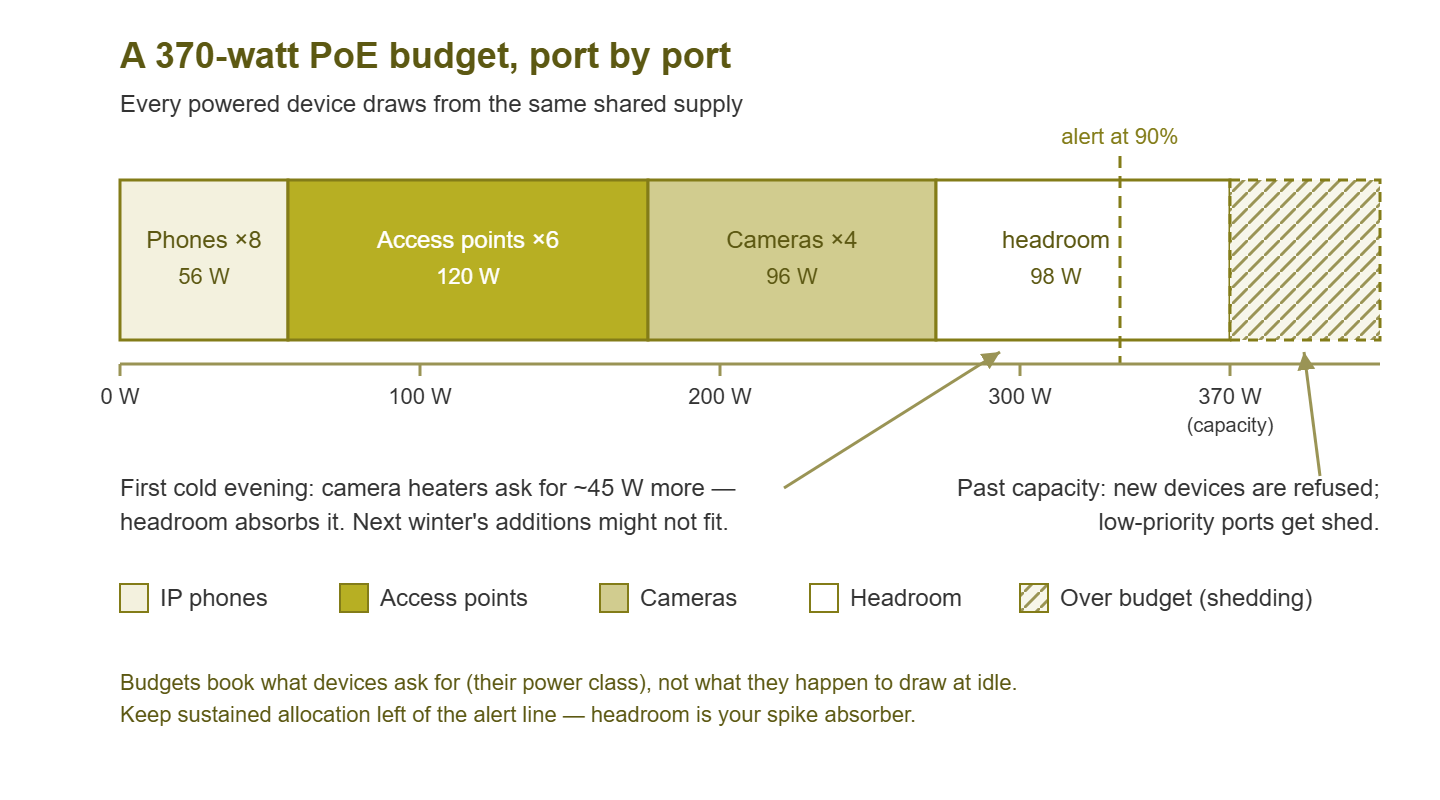
Figure 1: A PoE budget as a wallet. Each device class takes its slice. The headroom on the right is what absorbs seasonal spikes — and past capacity, the switch starts choosing who loses power.
What running out actually looks like
Budget exhaustion is a shape-shifter. It rarely says "power budget exceeded" anywhere a human is looking; instead it wears these four costumes.
The new device that will not wake up. You plug in a phone. The port shows link; the switch sees a device; the phone's screen stays black. Data is flowing — power was refused, because the budget could not cover the request. This one sends people chasing "bad cable" and "dead phone" theories for hours, swapping hardware that was never guilty. Every layer they know how to check reports healthy.
Random reboots of low-priority devices. On a draw-based switch running close to the edge, a demand spike forces instant load-shedding. The switch cuts power to its lowest-priority ports to protect the rest. The victims reboot; whatever spiked carries on fine. From the outside this looks like ghosts — "the third-floor phones reboot sometimes, no pattern." There is a pattern; it is just written in watts. Dusk (camera infrared lamps switching on), cold snaps (heaters), and big wireless firmware pushes are the classic triggers.
Flapping that impersonates cable trouble. A device that powers up, browns out, and powers up again takes its link down with every cycle. Suppose you have the flap detection from catching ports that bounce in place. A bouncing port whose error counters are clean and whose PoE draw sits near a limit is telling you the problem is electrical, not physical.
Log lines nobody reads. The switch has been narrating the whole drama — power denied on this port, power removed from that one — in its event log. Centralized logging turns this from a confession you find during the post-mortem into an alert you get at the first denial. If those messages are reaching a log server, exhaustion stops being mysterious at all.
A worked example: the dusk reboot mystery
Here is how the pieces fit together on a real-shaped incident. The ticket history reads like a haunting: for two weeks, the reception phone and one hallway access point reboot "sometimes, in the evening, not every day." Cables have been swapped. The phone has been replaced. The haunting continues.
Now add the monitoring from this guide and replay it. The per-switch consumed-watts graph shows a calm daily plateau around 300 W on a 370 W budget. Each evening, a few minutes after sunset, it steps up roughly 45 W as the parking-lot cameras switch on their infrared lamps. On mild evenings the step crests at 345 W and nothing happens. On cold evenings the camera heaters join in. Demand reaches for something the supply cannot give, and the switch sheds its lowest-priority ports. Because nobody ever set priorities, those turn out to be whatever the platform's default order says. The reception phone and that unlucky access point reboot. Demand eases, power returns, and the devices come back. The evidence evaporates until the next cold sunset.
With the graph, the whole investigation takes five minutes. The sunset step is visible. The cold-evening peaks line up with the reboot timestamps, and the power-denied events in the log name the shed ports outright. The fix is equally unglamorous. Set priorities deliberately, and move one camera to another switch. And put a budget alert at 90% so the next creep toward the ceiling is a calendar item instead of a séance. No packet capture, no cable swaps, no ghosts: just watts, counted.
Monitoring the budget
Most PoE switches expose their power ledger over SNMP. There is a standardized set of power tables many vendors implement, plus vendor-specific extensions with richer detail. The same numbers appear on the command line, which is a good way to meet your data before automating it. On many platforms the picture looks something like this:
switch# show power inline
Available: 370.0 W   Used: 331.5 W   Remaining: 38.5 W

Port      Admin   Oper     Power (W)  Device            Priority
--------  ------  -------  ---------  ----------------  --------
Gi1/0/1   auto    on       6.4        IP Phone          high
Gi1/0/2   auto    on       6.4        IP Phone          high
Gi1/0/7   auto    on       19.8       Access Point      high
Gi1/0/12  auto    on       28.6       PTZ Camera        low
Gi1/0/15  auto    faulty   0.0        --                low
Gi1/0/18  auto    off      0.0        --                low
Three lines of that output are your monitoring plan. The totals line gives you consumed versus available watts per switch — the single most important PoE metric. The per-port rows give you draw per device where the platform exposes it. And the faulty state on a port that should be powering something is an event worth catching in its own right. Turn them into checks like so:
| Check | Warn | Alert | Why |
|---|---|---|---|
| Budget used (per switch) | 80% | 90% | Headroom is your spike absorber |
| Budget used, sudden jump | +15% in a day | — | Something new arrived; verify it was planned |
| Power denied / removed events | — | Any occurrence | Exhaustion in progress, name of victim included |
| Per-port draw (key devices) | Near class ceiling | — | A device flirting with its own limit |
| PoE port state | — | "faulty" on a powered port | Negotiation or hardware trouble |
| Power supply status | — | Any PSU failure | On redundant supplies, losing one can shrink the budget |
That last row deserves a highlight, because it is the one that turns a resilient design into a surprise outage. Switches with two power supplies often pool them into one large PoE budget. Lose one supply and the switch keeps running. But the budget may drop by roughly half immediately. If it does, the switch sheds enough ports to fit the new, smaller wallet. If you monitor only "is the switch up," a dead PSU looks like a third of your phones rebooting for no reason. Monitor the supplies themselves, and the story tells itself in the right order.
One structural detail for stacked switches: PoE budgets are almost always per member, not per stack. Five stacked switches are one logical switch for management but five separate wallets for power. Member 2 can be shedding phones while member 5 lounges at 40% capacity. No amount of stack-level arithmetic will reveal it. Monitor the budget on each member individually. When a "random" phone reboots in a stacked closet, ask which member owns the port before anything else. (The general art of seeing individual members through the stack's single face is covered in monitoring switch stacks.)
Tip: graph the per-switch consumed wattage over time, not just its current value. The graph catches the slow creep of growth between audits and shows the daily rhythm (dusk bumps from camera lamps are visible from orbit). It gives you the before-and-after evidence when you add devices. A wallet you can see empties far more politely than one you cannot. For the general craft of watching power and environment, see Power & Environment Monitoring.
Priority: deciding who reboots
When demand exceeds supply, the switch must choose a victim, and it chooses by port priority. Most platforms offer three tiers — something like critical, high, and low — and shed power from the lowest tier first when the budget runs short. Ports within the same tier are typically shed in an order the platform defines (often by port number). That is a polite way of saying: if you never set priorities, the switch picks victims by a rule you have never read.
So set them deliberately, as policy. Here is a sensible default for a small office. Set phones and access points high (people notice instantly when voice and Wi-Fi die). Set door controllers and anything life-safety-adjacent critical, cameras and desk gadgets low. Adjust that to your own politics. Whether the lobby camera outranks the intern's phone is a business decision wearing a network costume. Then write the choices down. During the next power squeeze, the shed order is your incident. Knowing that the switch will sacrifice cameras before phones converts "random devices are rebooting" into "the budget is exhausted and behaving exactly as designed."
Priorities are triage, not treatment. If shedding ever actually happens, the budget was too tight — priorities just made the failure orderly. The cure is on the planning side.
Planning headroom for growth
PoE demand only moves one direction. Phones multiply, every access-point refresh wants more watts than the last generation, and someone is always about to discover that cameras exist. A budget that fits today is a budget that will not fit after two growth spurts. The planning habit that keeps you ahead is a simple watt audit before every deployment:
- List what the new devices will request — the class request, not the idle draw, since that is what allocation-based switches will book.
- Add it to the current consumed figure from your monitoring (the audit is one graph-read if you followed the section above).
- If the sum lands past about 80% of the budget, plan the fix with the deployment. For that fix, spread devices across switches, add or upgrade a power supply, or add a switch. Do it with the deployment, not after the first dusk reboot.
Keep seasonal demand in the math. Heated cameras, by design, draw most in exactly the weather during which you least want to visit the parking lot. Headroom that looks lazy in summer is what stands between you and a winter of mystery reboots. Think of those spare watts as the coat your switch owns and mostly does not wear.
It also pays to keep a one-line power ledger per wiring closet, right next to your port documentation. Record the budget, current consumption, and the answer to "where does the next hungry device go?" When the camera project or the phone refresh lands on your desk, that line converts a vague "should be fine" into an actual answer. It becomes yes, no, or "yes, on switch B." The ledger takes ten minutes a quarter to maintain when your monitoring is already graphing consumption. You are just writing down what the graphs say. The ledger makes you the rare admin whose power answers arrive before the electrician's invoice does.
Two adjacent budgets ride along with this one. Every PoE watt ultimately comes out of the wall circuit and the UPS. A switch pushing hundreds of watts of PoE is a meaningfully bigger UPS load than the same switch without it. Battery runtime estimates made before the camera project quietly expired when the cameras arrived. And watts become heat. A heavily loaded PoE switch warms its closet like a small space heater. Your closet's cooling (and temperature monitoring) should be sized to notice. Both belong to the wider practice covered in Power & Environment Monitoring.
Where to go next
PoE monitoring is the least glamorous kind there is — one percentage, a couple of event rules, a PSU check. It prevents some of the most confusing tickets a small network can generate. Wire up the budget graph, set the priorities on purpose, audit the watts before each rollout, and dusk stops being a scheduled mystery. From here, the electrical flavor of port bouncing is covered in link flapping. The rest of the per-port craft is covered in the interface metrics guide. The whole discipline is covered in Switch, Port & Interface Monitoring.
Put this into practice with SysPeep Monitor
Your switches already know their power ledgers — consumed watts, remaining budget, per-port draw, supply status. SysPeep Monitor collects those numbers over SNMP along with the rest of your device health. It graphs them so the slow creep is visible. It alerts at the thresholds you set before the shedding starts. The free trial installs on a Windows machine in minutes.
Download Free TrialLearn About SysPeep - All Rights Reserved.