
The Alert Lifecycle: Trigger, Acknowledge, Resolve, Learn
Ask where an alert goes after it fires and most shops answer, in effect, "to the inbox" — and that is the whole plan. Somebody will probably see it. Somebody probably did. Somebody, presumably, is on it. Every one of those probablys is a crack. Alerts fall through cracks in the most expensive way possible: silently. They are discovered only later, when a user calls about the outage the alert correctly announced two hours ago to nobody in particular.
The teams that stopped losing alerts all made the same quiet shift. They stopped treating an alert as a message and started treating it as a small process with states. A message is sent and then it is over. A process is born, gets handed to an owner, gets worked, gets closed with a verdict, and leaves a record. At every step, somebody or something is responsible for moving it along. This guide walks the six states of that process, the discipline each one demands, and the classic ways lifecycles break. Not every tool models all of this. So this guide also covers the minimum viable version you can run with an inbox and a spreadsheet. None of it requires fancy software. All of it requires deciding that "probably" is not a state.
In this guide
- An alert is a process, not a message
- Triggered and notified: the birth of an alert
- Acknowledged: a human owns this
- Worked, and resolved with a disposition
- Learned: the state after the incident
- Where lifecycles break
- The minimum viable lifecycle
- The lifecycle policy table
An alert is a process, not a message
Here is the full journey on one picture. There are six states in a line, and two escape hatches that make the line trustworthy. One is an escalation loop for the alert nobody acknowledged. The other is a learning loop that routes false positives back into better tuning. Everything below is commentary on this diagram.
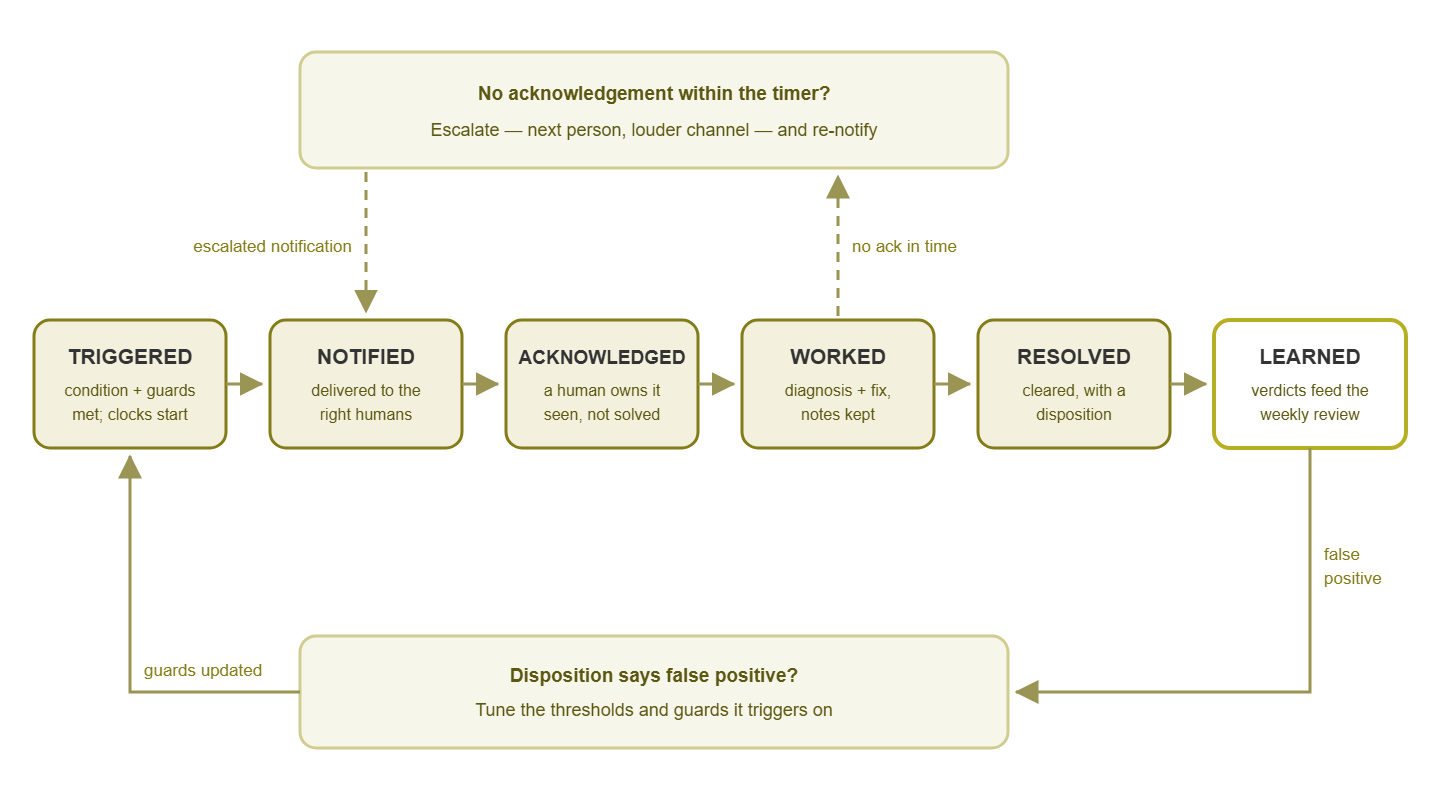
Figure 1: the six states of an alert, with the escalation loop (top) and the false-positive tuning loop (bottom) that keep alerts from being lost or repeated.
Two things to notice before we walk it. First, each state answers one question. Has it fired? Has it been delivered? Does a human own it? Is it being fixed? Is it over? Did we get smarter? An alert is always in exactly one state. Second, the transitions are where the discipline lives: each hand-off has an owner and, for the dangerous ones, a timer. States without timers are just labels. Timers are what make the process self-healing when a human drops the ball, which humans reliably do.
Triggered and notified: the birth of an alert
Triggered is the moment the monitoring system decides the condition is real: the threshold was crossed and the noise guards agreed. Those are the confirmation counts and sustained-for timers that keep one wobbly reading from becoming an event. (Those guards are designed up front, as part of the alert's anatomy.) The trigger timestamp matters more than it looks: it is the moment all clocks start. Time-to-acknowledge, time-to-resolve, the duration on the eventual all-clear — every number your team will later use to judge its own responsiveness counts from here. That is the territory of the detection and repair time guides. A lifecycle without honest timestamps is a story without dates.
One refinement at the trigger boundary: not every true condition should get a lifecycle of its own. Consider a declared maintenance window, or a device whose parent is down. For example, the switch died, so forty things behind it are "unreachable." In those cases, a well-configured system suppresses or folds the dependents rather than birthing forty processes for one problem. Dependency rules and maintenance-window suppression are their own topics. From the lifecycle's point of view, the principle is simply that a state machine per symptom is waste. The trigger stage is where the folding happens. One real problem, one lifecycle.
Notified is delivery: the alert, rendered as a human-readable message (see alert message writing), arrives with the right humans on the right channel. That routing decision is covered by the notification channels guides. The discipline of this state is delivery awareness: triggered and notified are different facts. The gap between them is a real failure mode. Mail servers filter, phones sit in do-not-disturb, and chat integrations break. Then there is the classic: the alert about the mail server being down is dispatched by email, through the mail server. Know how your channel fails, and prefer channels that fail loudly. Remember the darkest corollary: if the monitoring machine itself dies, nothing is even triggered. A monitoring system needs its own watcher — the monitoring the monitor guides cover that separate, important paranoia.
Acknowledged: a human owns this
Acknowledged — "acked," in the field — is the hinge of the whole lifecycle: the state where a specific human has said I have this. Not fixed it. Not even understood it. Just: seen it, claimed it, and taken responsibility for what happens next. That narrowness is the point. Ack means seen, never solved. Teams that blur the two start treating an acked alert as a handled one. That is how a claimed-but-forgotten problem ages quietly into an outage with a witness.
The state earns its keep through the ack timer. A critical alert unacknowledged after, say, fifteen minutes escalates — to the next person, the backup contact, the louder channel, the manager. This is the safety net for the night the on-call phone is on silent. It converts "somebody probably saw it" into a guarantee: either a human claims this alert, or the system keeps raising its voice until one does. The escalation loop in the diagram is exactly this. Set the timer per severity — minutes for critical, hours or never for warnings — consistent with the response promises in severity design.
What ack looks like varies by tooling: a button in the console, a reply to the notification, a reaction emoji in the team channel. The mechanics matter less than one enrichment: ack with an ETA when you can. "Ack — looking now" and "ack — in a meeting until 10, will take it then" are both legitimate claims. But they set very different expectations for the four colleagues deciding whether to stand down. A one-clause ack costs nothing and prevents the second-guessing that otherwise duplicates work.
In a team, ack carries etiquette, because acknowledging typically silences the alert for everyone — escalation stops, colleagues relax, the system considers the baton passed. So the rule is blunt: own it or don't ack it. Acking to make the noise stop, without intending to work the problem, is not tidying. It is telling your whole team "handled" while nobody handles it. The reverse etiquette also holds: before diving into an unacked alert, ack it. That way, two people do not silently fix the same thing from opposite ends. And if you must hand off mid-incident, say so out loud and have the receiver re-ack. Ownership transfers by statement, never by assumption.
Worked, and resolved with a disposition
Worked is the state everyone already knows — diagnosis and fix — and the lifecycle adds only two habits to it. First, this is where the runbook meets reality. The alert's action line pointed at a procedure (the subject of the runbooks guides). The responder is now executing or improvising it — noting, ideally, where the runbook lied, for later repair. Second, for anything that runs long: progress notes on the alert or its ticket. "Vendor engaged, case 88213, next update 15:00" takes twenty seconds and answers every "any news?" ping before it is sent. During a long incident the notes field is the difference between one responder working and three people re-diagnosing.
Resolved comes in two flavors that must be kept distinct. Auto-resolve is the monitoring system observing the condition clear — the metric back under the line, the device answering again. The system closes the loop itself. Useful, honest, and worth one caution: cleared is not the same as fixed. A value can dip under the threshold and climb right back; a device can answer one poll between chokes. Trust auto-resolve only when it is backed by the same anti-flap machinery that guards triggering. That means clear levels and confirmation, per the anti-noise toolkit. Stay suspicious of any resolution nobody can explain: a problem that vanished for no reason retains all its rights to reappear.
Human-resolve is a person marking the alert done. This is where the lifecycle collects its single most valuable byproduct: the disposition, a one-word verdict on what the alert turned out to be. Four values cover nearly everything:
- fixed — it was real, and a human repaired it.
- self-healed — it was real, and it went away on its own (suspicion warranted).
- false-positive — nothing was actually wrong; the alert cried wolf.
- known-issue — real, understood, accepted for now (waiting on parts, budget, or a maintenance window).
One word, chosen from a fixed list, at the moment of closing — five seconds of effort. Everything the next section describes is powered by that field.
Learned: the state after the incident
Learned is the state most shops skip, and the reason skipping it hurts is that alerts repeat. The same disk fills, the same link flaps, and the same service dies every third Sunday. Without a learning step, each recurrence is handled from scratch, with fresh surprise, forever. Learning is where the lifecycle stops being a treadmill.
The mechanism is beautifully cheap: the dispositions accumulate, and periodically somebody reads them. A pile of false-positive verdicts on one alert is a tuning work order. That alert's thresholds or guards are wrong, and the evidence says exactly which alert to fix. The fix loops back into the trigger conditions, which is the bottom branch of the diagram. A pile of fixed verdicts on the same recurring alert is a different order. Either the fix is manual and repeated (a runbook or an automation candidate) or the underlying cause deserves an actual repair instead of a weekly ritual. A pile of self-healed is a mystery deserving one honest investigation. And known-issue piles are a running measure of accepted risk. Those are worth re-accepting consciously now and then, because "waiting on budget" has a way of becoming a lifestyle.
The timestamps learn too. Because every state change was stamped, the lifecycle quietly produces a second dataset. It shows how long alerts sat before acknowledgement and how long from trigger to resolution. It also shows how both numbers differ by severity, by hour, by person on duty. You do not need a statistics degree. Even eyeballing "criticals waited 40 minutes for an ack twice this month" tells you whether your severity policy's response promises are promises or poetry. The measuring discipline itself belongs to the detection and repair time guides; the lifecycle is what makes the numbers exist at all.
Where does the reading of dispositions happen? There are two rituals, two cadences. The weekly alert review skims the week's dispositions and picks one thing to improve. The quarterly threshold review does the deep tuning pass with a quarter's evidence behind it. The lifecycle's job is merely to make sure that when those rituals sit down, the data exists.
Where lifecycles break
Three failure modes account for most lifecycle grief in practice. Each one is a state transition that silently did not happen — and each has a specific, boring, effective guard.
The un-acked alert everyone assumed someone else had. Five people saw it; each concluded, reasonably, that surely one of the other four was on it. This is a bystander problem, and exhortation does not fix bystander problems — structure does. The guard is the ack timer plus a named first responder. Every interrupting alert has exactly one person whose job is to ack it, and an escalation that fires if they do not. "Everyone" is not an owner.
The auto-resolved problem that was not fixed. The link flapped back up, the alert closed itself, the inbox looks clean — and the underlying cause is still there, rearming. The guard is a rule of respect for mystery: an auto-resolve on a critical, or any resolution with no explanation, still owes the team a look. The "resolved, but follow up" pattern in the recovery message — and the aging-alert sweep in the weekly review — exist for precisely this case.
The disposition field nobody fills. Closing takes five seconds; choosing a verdict takes five more. Under pressure, the second five gets skipped. Six months later nobody can say which alerts are noise because the data was never written. The guards are friction and habit. Make the disposition a required field or a closing convention ("no close without a verdict"). Keep the list to the four words so choosing is instant. And let the weekly review publicly mourn the blank ones for a few weeks. Filling it becomes muscle memory surprisingly fast.
The minimum viable lifecycle
Honesty about tooling: platforms vary enormously here. Some monitoring systems model every state above natively — acknowledgements, escalation chains, notes, resolution codes. Others give you alerts and recoveries and wish you luck. If yours is in the second camp, do not wait for a procurement cycle: the lifecycle is a process, and process beats features. A workable version runs on conventions and a spreadsheet:
- Ack by convention. Alerts land in a shared channel or mailbox. Claiming one means replying to the thread with "ack — name" (or claiming it with an emoji reaction your team agrees on). Public, visible, five seconds.
- A shared alert log. One sheet, one row per meaningful alert. The columns below are enough.
- Dispositions in the log. The same four words, typed into a column, validated by a dropdown if you are feeling fancy.
- A human timer. No automatic escalation? Then the convention is temporal: a critical with no ack reply in 15 minutes is anyone's duty to phone about. Written down, it works.
date   alert            ack@   by     resolved@  disposition  note
Mon    WAN-03 degraded  09:12  Priya  10:05      fixed        ISP reset port
Tue    FS-D-01 disk 91  09:40  Sam    Wed 11:00  fixed        archived logs
Wed    DB01 CPU high    —      —      (auto) 13:22 self-healed  watch Thu
Thu    UPS on battery   03:07  Sam    03:19      false-pos    poller glitch
That artifact is humble and mighty. It is an ack record, an escalation prompt, a disposition database, and next week's review agenda in one screen. Teams that keep it for a quarter find they cannot imagine operating without it. Usually, that is about the time they also find the budget conversation for better tooling has written itself.
Tip: whatever your tooling, resist the urge to invent more states. Six is already plenty. Every additional status ("pending-review-phase-two") is another place for an alert to sit unowned. The power is not in the taxonomy — it is in every state having an owner, a timer, and an exit.
The lifecycle policy table
The whole guide compresses into one table — the policy you can adopt, argue with, and pin up. Adjust the timers to your team's reality; keep every cell filled, because an empty cell is a crack.
| State | Meaning | Owner | Timer | Exit criteria |
|---|---|---|---|---|
| Triggered | Condition true, guards satisfied; clocks start | Monitoring system | Immediate | Notification dispatched |
| Notified | Delivered to the right humans on the right channel | Monitoring system | Ack timer: 15 min (critical) / next business day (warning) | A human acks — else escalate and re-notify |
| Acknowledged | One named human owns it (seen, not solved) | The acker | Progress note or status change within 60 min (critical) | Work begins, or explicit hand-off |
| Worked | Diagnosis and fix in progress; notes accumulate | The acker | Update cadence agreed per severity | Condition cleared or accepted |
| Resolved | Closed by auto-resolve (verified) or by a human, with a disposition | Closer | Disposition at close | One of: fixed / self-healed / false-positive / known-issue |
| Learned | Dispositions feed tuning, runbooks, and real fixes | Weekly review | Weekly | One improvement actioned |
Where to go next
The lifecycle is the middle of the story. How an alert earns the right to trigger at all is the anatomy of a good alert. The urgency and channel each state's timers key off come from severity design. The words the notified human reads are alert message writing. And the Learned state gets its own full guide in the weekly alert review. The set lives together in Alert Design.
Put this into practice with SysPeep Monitor
A lifecycle needs a platform that triggers honestly in the first place. SysPeep Monitor handles the front of the process: thresholds, dependencies and alert rules designed to keep noise down. So what fires deserves to enter your workflow. SysPeep Monitor delivers by email and other notification channels, with dashboards and reports to keep the open-alert picture in view. Free trial on any Windows machine.
Download Free TrialLearn About SysPeep - All Rights Reserved.