
Seeing Your Network the Way Attackers Do
Inside the building, your network is a rich, detailed thing. You know the VLANs, the server names, the switch in the closet nobody is allowed to touch. You have an inventory, a diagram, maybe a spreadsheet that is only slightly out of date. From the internet, none of that exists. An outsider sees a short list of public addresses, a handful of DNS names, and whatever services answer on those addresses. They also see the certificates those services present, your mail records, and anything with a public address in a cloud account. That is the whole picture. Nothing else is visible, and nothing else matters to someone probing from outside.
The uncomfortable part is that this outside-in picture is usually different from the one in your inventory. A test server that was supposed to be temporary. A vendor's remote-access box installed during a project and never removed. A cloud instance a developer launched with a public address. A subdomain left over from a campaign three managers ago. None of those appear in the internal list, and all of them are perfectly visible from outside.
This guide teaches you to see your own organization the way an outsider does. It also teaches you to turn that view into a written inventory you actually control. By the end you will know what "attack surface" means in concrete terms and why the internal inventory lies about it. You will know where each kind of external asset is recorded. And you will know how to assemble the outside-in list for what your organization owns. One rule runs through everything here: you examine what is yours, and nothing else.
In this guide
- What the internet can actually see
- Why your internal inventory lies about the outside
- Defining "attack surface" without the drama
- The authorization rule
- Building the outside-in inventory, one source at a time
- Asset types: where to find them and why they matter
- A worked example: one small organization's first list
- Where to go next
What the internet can actually see
Start by shrinking your mental model. From outside, an organization is made of exactly six kinds of things. Each is observable by anyone with an internet connection, because being observable is how they work.
- Public addresses. The IP addresses your internet provider or cloud provider has assigned to you. Traffic to your organization has to arrive at one of these. They are the front doors, and unlike the private addresses on your LAN, they are routable from anywhere.
- DNS names. Your domains and every subdomain under them. DNS (the Domain Name System) is the public phone book that turns a name like
mail.example.cominto an address. By design, anyone can look up an entry. - Exposed services. Whatever program answers when a connection arrives at a public address on a particular port. A port is a numbered doorway on an address: a web server typically listens on port 443, a mail server on port 25. An open port is one where something answers.
- Certificates. The digital identity documents that encrypted services present to prove who they are. Every certificate on a public service is, by definition, handed to anyone who connects, and most are also recorded in public logs.
- Mail records. The DNS entries that say which servers accept mail for your domain and which are allowed to send it on your behalf.
- Cloud assets. Anything in a cloud account that has a public address or public name: virtual machines, storage buckets, load balancers, managed databases with public endpoints.
That is the whole list. An attacker starting from zero cannot see your internal VLANs, your file server, or your domain controllers. They see these six things, and they start with the easiest to find: DNS names and certificates. Both are public records searchable without sending a single packet to your network.
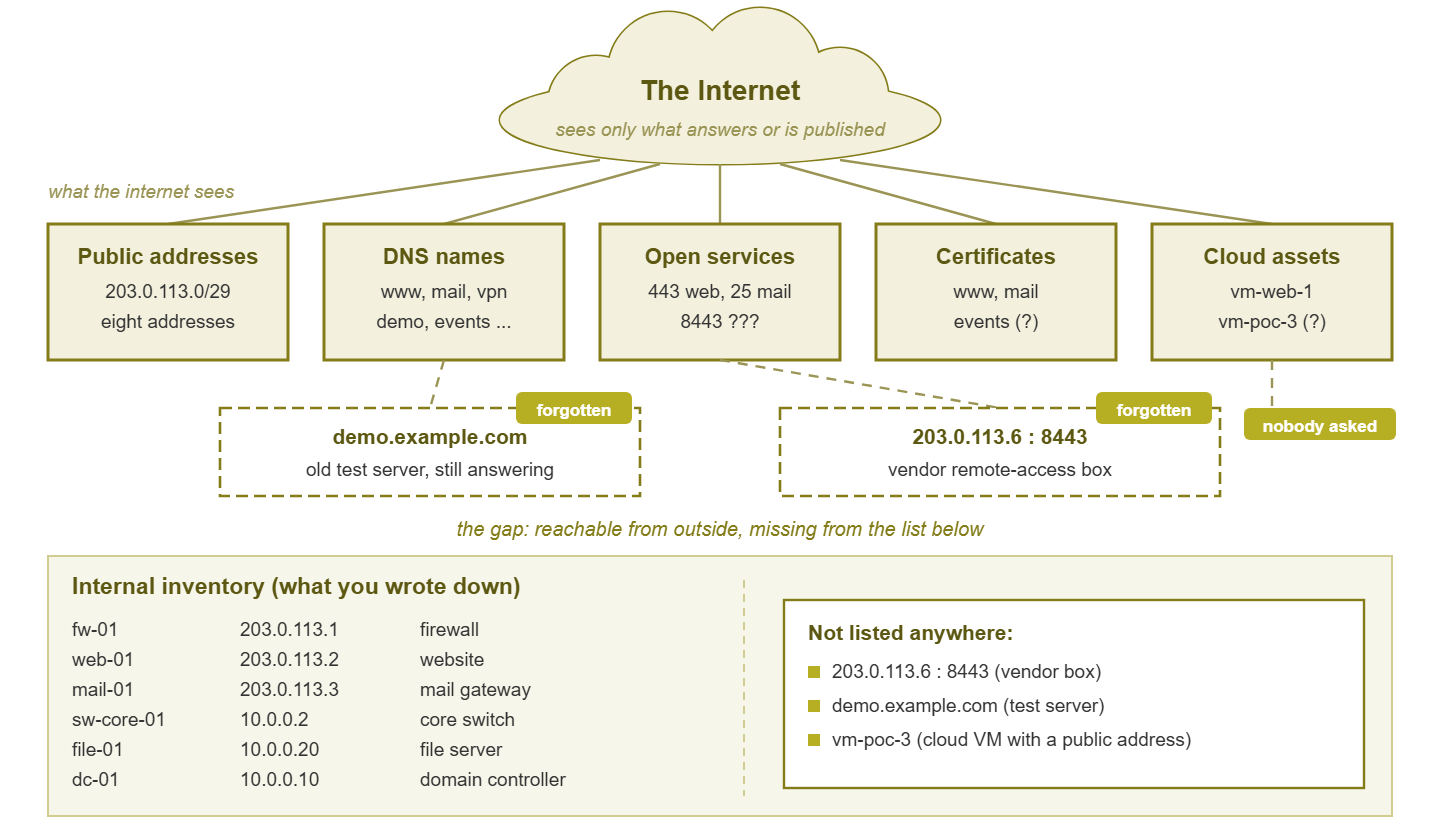
Figure 1: The outside-in view. The internet sees only what answers or is published, including the items nobody wrote down. The internal inventory below records intent, not fact.
Why your internal inventory lies about the outside
Your internal inventory was built from the inside. It lists what people asked for, what purchasing paid for, and what a discovery tool found on the LAN. It is a record of intent. The outside view is a record of fact: what actually answers when someone knocks. The two drift apart in predictable ways. Each of the following has been found on a real perimeter by an administrator who was sure it was not there.
The forgotten test server
Someone needed to demonstrate a web application to a customer. The quickest path was a firewall rule forwarding a public port to a lab machine. The demo went well, the project moved on, and the rule stayed. The machine is still patched irregularly, still running the demo build, and still answering to the whole internet. It was never inventoried because it was "just for the demo."
The vendor's remote-access box
A building-systems contractor, a phone-system supplier, or a printer fleet company installs a small appliance so their support staff can reach the equipment. It needs inbound access, so a rule is opened. The appliance belongs to the vendor, is patched on the vendor's schedule, and was set up by a technician who left no documentation. Your inventory lists the air handlers, not the box that lets a third party reach them.
The cloud instance nobody mentioned
A developer needed a place to run a proof of concept. Cloud consoles make it a two-minute job to launch a virtual machine with a public address and a permissive network rule. It never touched your LAN, so discovery never found it; it never went through purchasing, so nobody entered it anywhere. From outside it is as much a part of your organization as your main website.
The old subdomain
A marketing campaign, an event microsite, a partner integration. Each got a subdomain. The service was retired, but the DNS record still exists and still points somewhere. It might point to an address you no longer use, a hosting provider you no longer pay, or a cloud resource that no longer exists. The name is still yours, still public, and still promising visitors that something legitimate lives there.
Notice the common thread. None of these were malicious, or even careless in the moment. They were reasonable shortcuts whose cleanup step was never scheduled. The internal inventory cannot catch them because it only knows what someone told it. The outside view catches them because it does not care what anyone intended.
Defining "attack surface" without the drama
The phrase attack surface sounds dramatic, so here is the plain definition. Your external attack surface is everything reachable from the internet, whether you meant it to be or not. The second half of that sentence is the important half. A public web server you deliberately run is part of the attack surface. So is the demo box you forgot. So is the management interface on a device that was supposed to be internal-only but is reachable because of a rule with a typo. Intent has nothing to do with it.
Think of it like the exterior of a building. Every door, window, vent, and loading dock is part of the exterior whether the architect drew it or a tenant added it later. A sensible security review does not start from the blueprints; it walks around the outside and counts the openings. That walk is what this topic is about, and it is a walk around your own building only.
Two clarifications keep the definition useful. First, "reachable" means a connection can be established, not that anything is vulnerable. An open port running well-maintained software with strong authentication is still part of the surface. It can still be probed, and well-maintained software may have a flaw discovered tomorrow. Second, the surface includes things that are not servers at all. A DNS record, a certificate, and a mail authentication record each count, because each is something an outsider can read and, in some cases, misuse.
The authorization rule
Stated once, meant throughout: you may look up, connect to, and scan the addresses and names your organization owns or has explicit written permission to test. Nothing else. Reading a public DNS record is harmless. Sending probes to an address you do not control is at best rude and in many places illegal. Every technique in this topic is about building a picture of your exterior. If you are ever unsure whether something is yours, treat it as not yours until the paperwork says otherwise.
This rule is not a disclaimer bolted on for form's sake; it shapes how the inventory is built. Because you may only examine what you own, the first job is to establish, in writing, what you own. That list becomes the scope for every scan, review, and alert in the rest of this topic. Skip it and you end up scanning too little (the forgotten cloud account) or too much. The latter could be an address that was yours a contract ago and now belongs to someone else. Ownership first, examination second.
Building the outside-in inventory, one source at a time
Now the practical part. You will build four sub-inventories that together describe your exterior. And you will build them from records rather than memory, because memory is how the gaps got there in the first place.
1. Your public address ranges
Begin with what your internet providers assigned you. The sources usually pay off in this order. First come the contracts for each internet circuit. Next comes the WAN interface configuration on each firewall (the address it holds and the block it sits in). Then come the firewall's static NAT and port-forwarding rules, which name every public address you have ever mapped inward. Next comes the public registry record for your organization, listing any blocks registered directly to you. Last come the contracts for any colocation or hosted equipment. Write each range down, note who assigned it, and note what it is for. A small organization typically ends up with one or two small blocks plus a scattering of single addresses at other providers. And it is those scattered singles that get forgotten.
2. Your domains and subdomains
Log in to every domain registrar account your organization uses (finance can tell you who gets billed for renewals). List every registered domain, including the defensive ones bought to protect the brand and the ones acquired with a merged company. Then, for each domain, export the full zone from wherever its DNS is hosted. Every record in that export is an item on your surface. The DNS and certificate guide in this topic goes deep on what to do with those records. For now, the job is simply to have the complete list.
3. Your cloud accounts
List every cloud account, subscription, or project the organization pays for. Again, billing is the reliable source, because whoever pays the invoices knows the accounts exist even when IT does not. Inside each account, use the provider's console or command-line tools to list every resource with a public address or endpoint. Those include virtual machines, load balancers, storage buckets with public access, managed databases with public endpoints, and container services with exposed ports. How cloud security groups and gateways decide what is reachable is covered in the cloud networking basics guide. Here you only need the list of what is public.
4. Your certificates
Every certificate presented by a public service is part of the surface. That is because it advertises a name you claim and reveals which service is behind it. Your starting point is the certificate inventory you keep for renewals, described in the certificate inventory guide. The outside-in view adds one question that inventory cannot answer: are there certificates for your names that you did not issue or do not recognize? Public certificate logs make that searchable; the DNS and certificate guide in this topic explains how to use them as an inventory source.
Putting the four lists in one place
Combine the four sub-inventories into one document with a row per asset. A spreadsheet is fine; a text file under version control is better, because you will want to know what changed and when. Each row needs at least these columns:
asset            type      owner       purpose                   expected  last_verified
203.0.113.2      address   netadmin    main website (web-01)     yes       (date)
203.0.113.3      address   netadmin    mail gateway (mail-01)    yes       (date)
www.example.com  dns-name  webteam     A -> 203.0.113.2          yes       (date)
demo.example.com dns-name  ?           A -> 203.0.113.5 (?)      ?         never
vm-poc-3         cloud-vm  devteam     proof of concept (?)      ?         never
The question marks are the point. An inventory that admits what it does not know beats one that quietly assumes everything is fine. Every "?" becomes a task: find the owner, confirm the purpose, decide whether the asset should exist at all.
Asset types: where to find them and why they matter
The table below is the reference to return to when the inventory needs refreshing. It lists each kind of external asset, the records that reveal it, and why an outsider cares.
| Asset type | Where to find it | Why it matters from outside |
|---|---|---|
| Public address ranges | Provider contracts, firewall WAN configs, NAT and port-forward rules, public registry records, colocation agreements | Every inbound connection to you arrives at one of these; an address you forgot is a door you are not watching |
| Domains | Registrar accounts, renewal invoices, acquired-company records | A domain is the root of every name you publish; an expired or forgotten one can be registered by anyone |
| Subdomains and DNS records | Zone exports from your DNS host, public certificate logs | Each record is a public promise that something legitimate lives at the target; stale ones point at things you no longer control |
| Exposed services and ports | Firewall rules, then an authorized scan of your own addresses from outside | The services are what an outsider actually interacts with; an unexpected one is an unmanaged door |
| Certificates | Your certificate inventory, the services themselves, public certificate logs | Reveals which names you claim and which services exist; a certificate you did not issue is a red flag |
| Mail records | The DNS zone (MX, SPF, DKIM, DMARC entries) | Controls who can receive and send mail as your domain; weak records let others impersonate you |
| Cloud assets with public endpoints | Cloud consoles and command-line listings, billing statements | Never touches your LAN, so internal discovery cannot see it; often launched with permissive defaults |
| Vendor and partner equipment | Firewall rules allowing inbound access, support contracts, the vendor's own documentation | Patched on someone else's schedule, reachable from outside, and usually missing from your inventory |
Two rows deserve a second look. "Exposed services" is the only one where finding the asset means probing your own addresses rather than reading a record. The exposure scanning guide covers doing that safely and within your authorization. And "vendor equipment" is the row most often left blank because nobody on the IT team feels they own it. Somebody has to. If the box is reachable through your firewall, it is on your surface regardless of whose logo is on the front.
A worked example: one small organization's first list
Here is how the exercise plays out for a made-up but typical organization. It has one office, one small public address block, a single domain, and a modest cloud footprint. The administrator believed the exterior consisted of a firewall, a website, and a mail gateway. Building the inventory from records rather than memory turned up more.
Address ranges. The provider contract shows a block of eight addresses. The firewall's NAT rules reference three: the firewall itself, the web server, and the mail gateway. A closer read of the port-forwarding rules shows a fourth address forwarding port 8443 to a host on the building-management VLAN. Nobody on the current team remembers creating it. The rule's description field says "HVAC vendor access." That is the vendor's remote-access box, reachable from the internet since the climate controls were installed.
Domains and subdomains. The registrar shows two domains: the main one and a defensive registration of a common misspelling, which points nowhere and is fine. The zone export for the main domain has a few dozen records, most expected. A few point at addresses outside the organization's block. Two point at a marketing platform (documented), and one at a former hosting provider for a subdomain called events (nobody knows). One points at a cloud address in a region the organization does not use (nobody knows). Two mysteries, both now written down as questions rather than left as silent records.
Cloud accounts. Finance is paying two cloud invoices, not the one IT knew about. The second account belongs to the development team and contains four virtual machines. Two have public addresses and a network rule allowing inbound connections on every port from anywhere. One is the proof of concept from earlier. The other is a build server a contractor set up. Neither is patched by anyone.
Certificates. The certificate inventory lists three: the website, the mail gateway, and a wildcard used internally. A search of public certificate logs for the domain shows those three. It also shows one for events issued by a hosting provider, and one for a name nobody recognizes. The first is the old microsite. The second turns out to be a survey tool the marketing team set up on a subdomain without telling IT.
The finished inventory has roughly a dozen more entries than expected. And each unexpected entry is now a row with an owner to find and a decision to make. Nothing here required special tools. The work was reading contracts, exporting a zone, listing cloud resources, and searching a public log. All of it was for names and addresses the organization owns.
Tip: When you present the inventory to your manager, lead with the surprises, not the total. "We found a vendor appliance reachable from the internet that nobody owns" earns you time to fix things. A raw asset count earns you a shrug.
Where to go next
You now have the mental model the rest of this topic builds on. From outside, your organization is six kinds of observable things. Your internal inventory records what people intended, while the outside view records what actually answers. And the gap between them is made of reasonable shortcuts nobody cleaned up. Closing that gap starts with a written inventory built from records, limited strictly to what your organization owns.
The exposure scanning guide shows how to confirm which services actually answer on your own addresses, safely and with authorization. The open-port drift guide turns that into an alert when the answers change. The DNS and certificate guide covers the public-record side of the surface. And the program guide shows a small team how to keep it all running without it becoming a second job. All of them live under External Attack Surface Monitoring. If your internal inventory is in rough shape too, the device inventory guide shores up the inside view.
Put this into practice with SysPeep Monitor
The outside-in view only makes sense next to an honest inside view. And a discovery-based inventory is much harder to fool than a spreadsheet. SysPeep Monitor auto-discovers the devices and interfaces on your network. It tracks their health over SNMP, WMI, and SSH, and alerts when something changes. So the internal list you compare against the perimeter stays current on its own. The free trial installs on a Windows machine in minutes.
Download Free TrialLearn About SysPeep - All Rights Reserved.