
Guardrails: Rate Limits, Circuit Breakers, and Rollback
The fix is the easy part of an auto-remediation. Restarting a service is one line, and you can write it in the time the kettle takes. The other forty lines decide whether to run that line, how often, on which hosts, and what to do when it does not work. Those forty lines are the difference between an automation you can sleep next to and one that wakes you at three. That second automation wakes you with a worse problem than the one it was given.
Those forty lines are the guardrails. They are any check or limit that stops an automation from acting when it should not, from acting too often, or from acting on the wrong thing. They encode the hesitation a person brings for free. Someone who has just restarted a service does not restart it again thirty seconds later. They wait, look at the host, and ask whether something bigger is going on. A script with no limit will restart it again, all night, and the log it leaves behind is very long and very consistent.
This guide lays out the full set of guardrails and explains what each one protects you from. It also gives you an illustrative PowerShell skeleton that has them built in. By the end you will be able to look at any remediation script — yours or someone else's — and see at a glance which guardrails are missing.
In this guide
- The shape of a guarded remediation
- The guardrail set, one by one
- The human-in-the-loop handoff
- An illustrative PowerShell skeleton
- Testing the guardrails, not just the fix
- The guardrail reference table
- Where to go next
The shape of a guarded remediation
Every well-built remediation, whatever it fixes, has the same skeleton. An alert arrives. The script checks that the problem is real and that acting makes sense. It checks that it has not already tried recently. It records that it is about to act, then acts — or, in dry-run mode, only says what it would have done. It waits, verifies whether the fix worked, and either logs a success or hands everything it learned to a human. Watching the whole thing from the side is a circuit breaker that counts failures and pulls the plug if they pile up.
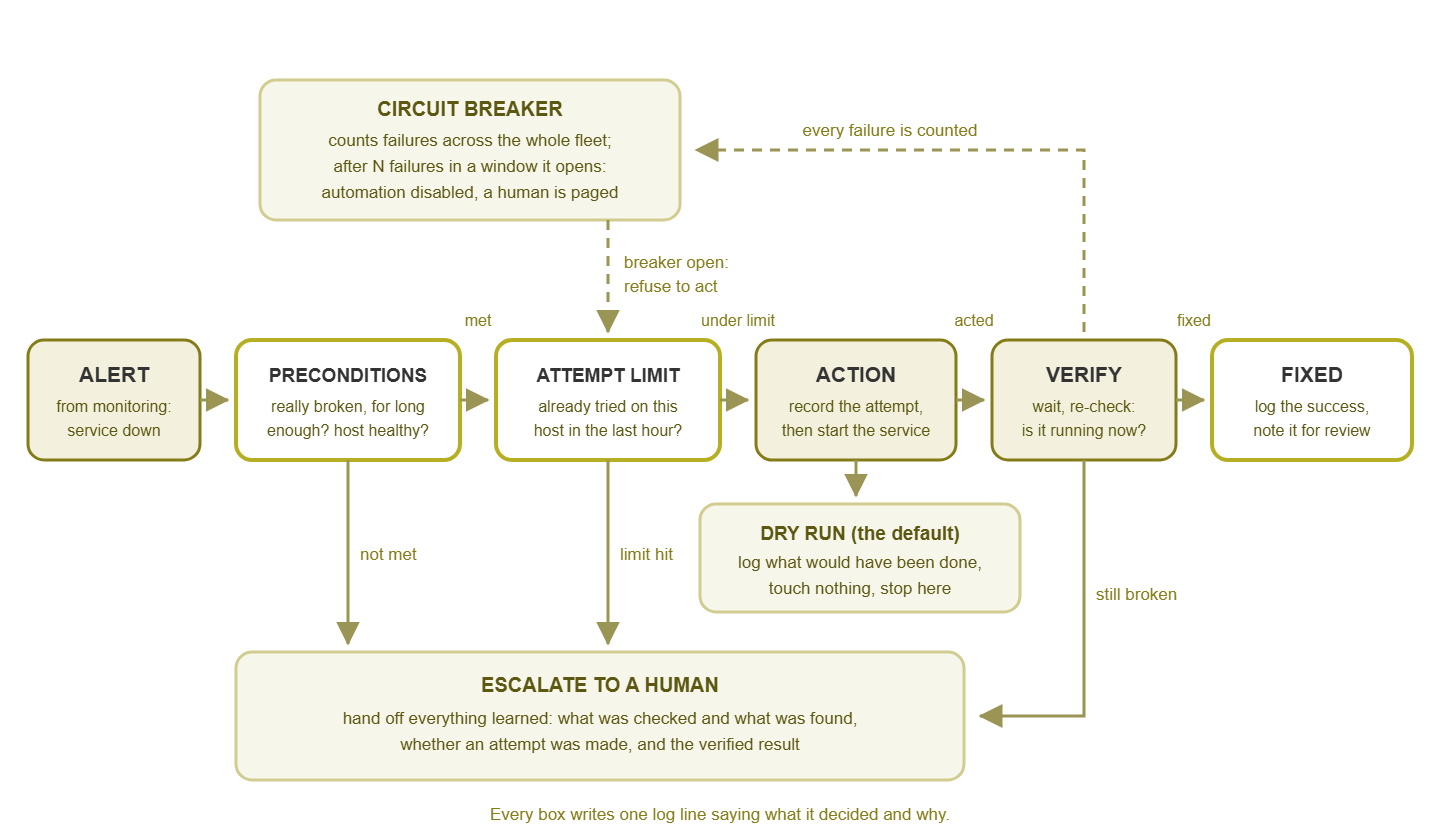
Figure 1: The guarded remediation flow. The two gates before the action, the dry-run branch, the verify step, and the circuit breaker are the guardrails. The action itself is the smallest box in the picture, which is how it should be.
Notice how many exits lead to a human rather than to the fix. That is deliberate. A remediation that declines to act and explains why has done something useful. A remediation that acts when it should not have has created a second incident. Bias every guardrail toward stopping. Stopping too often costs a log line. Acting too often costs a weekend.
The guardrail set, one by one
Preconditions
A precondition is a fact the script confirms for itself before acting, independently of the alert that summoned it. Two belong in every remediation. First, the problem has persisted for at least N minutes, so a momentary blip that would have cleared itself does not trigger a fix. Second, the host is otherwise healthy. That keeps you from restarting a service on a machine that is out of memory, out of disk, or halfway through a reboot. Add candidate-specific ones on top. Examples are that the service really is stopped according to the host itself, the temp folder really is large, or nobody has set a maintenance flag. When a precondition fails, the script logs which one and stops.
Attempt limits
An attempt limit caps how many times the script will act on the same target in a window. At most once per hour per host is a good default. The reason is simple. If the first restart fixed the problem, a second is unnecessary. If it did not, a second will not either, and the situation needs a person. Attempt limits require memory — a small state file or registry entry per target recording when the last attempt happened. The attempt should be recorded before the action, not after, so that a script that crashes mid-way still counts as having tried. A script without a limit does not retry the fix; it retries the failure, on a schedule.
Cooldowns
A cooldown is a quiet period after any action, successful or not. During that period the script will not act on that target again even if the alert re-fires. It overlaps with the attempt limit but protects against a different failure. An alert can flap because the service takes two minutes to fully start and looks "down" to monitoring in the meantime. A cooldown of a few minutes after a success, longer after a failure, absorbs that.
Circuit breakers
The circuit breaker is borrowed from electrical wiring, where it cuts the power when current spikes rather than letting the wiring catch fire. The automation version counts failures across the whole fleet, not just one host. If the script fails on three different hosts inside an hour, something is wrong with the world or with the script. In that case, it should disable itself entirely and page a human. This is the guardrail that prevents the automation storm. In that storm, a monitoring glitch makes every host look broken, and a script dutifully "fixes" all of them. A breaker needs a shared place to count (a central log or state file the script checks first). It also needs a way to reset it once a human has looked.
At Northgate Retail a core switch bounced one evening, and for three minutes every server behind it looked down to monitoring. The restart script asked nothing of the host and had no breaker. So when the switch came back, forty queued alerts became forty restarts of services that had never stopped. The restarts landed while the database behind them was still reconnecting, so half the services failed to come back. That raised twenty real alerts, which the script was still allowed to act on. The network had been healthy for twenty minutes by the time anyone worked out what was happening. The only thing still broken was the thing meant to fix it. The incident review listed the root cause as "switch", and then, after some discussion, added a second line.
Dry-run mode as the default
In dry-run mode the script does everything except the action. It checks preconditions, consults the attempt limit, and then logs "would have restarted the service now" instead of restarting it. A new automation should run this way for a week or more against real alerts. That lets you read the log and confirm it would have acted only when you would have. The important design choice is that dry-run is the default: the script does nothing real unless you explicitly pass a switch. That way a script run by accident, from the wrong scheduler, or by a colleague testing it, is harmless.
Allowlists of targets
An allowlist is the explicit list of things the script is permitted to touch: these service names, these hosts, these folders. Anything not on the list is refused, even if the alert names it. Allowlists turn "restart whatever service the alert mentioned" — which one day will be a database — into "restart one of these three services I have thought about." They also make expansion a deliberate act: adding a host to the allowlist is a change you can review.
Maintenance-window awareness
During planned maintenance, services stop on purpose. A script that restarts them mid-patch is at best annoying and at worst corrupts the install. The remediation needs to know when a window is open and to stand down inside it. It can learn that from a flag file the maintenance runbook sets, or a schedule the script reads. It can also check the same suppression the monitoring system uses. The two kinds of window and how to keep them honest are covered in Scheduled vs. Ad-Hoc Suppression.
Rollback plans
Before the script is allowed to do anything, you write down what undoes it. For a service start, the rollback is a stop. For a log rotation, it is renaming the file back. For a port re-enable, it is shutting the port. If you cannot write the sentence, the action does not belong in an automation. The rollback does not have to be automated — usually it should not be — but it has to be documented next to the script. That way, the person who gets the escalation at two in the morning knows how to put things back.
Logging every decision
Every branch the script takes writes a line. Those lines cover refusals because the target was not on the allowlist, skips because of a recent attempt, and stops because a precondition failed. They also cover would-have-acted in dry-run, acted, verified, escalated. Include the timestamp, the host, the target, and the reason. This log is the audit trail, the dry-run test report, and the raw material for measuring the automation later. When the script stops behaving, the log is the only witness. A remediation that acts silently is worse than no remediation. A mystery restart in the middle of the night is a problem nobody can diagnose. A week of a well-kept log, with the date column trimmed for width, reads like this:
02:14:07 [APP01/ReportScheduler] NO ACTION: status is 'Running', not Stopped.
03:12:41 [APP01/ReportScheduler] ACTION: starting service.
03:13:12 [APP01/ReportScheduler] SUCCESS: service is Running.
03:20:55 [APP01/ReportScheduler] SKIPPED: last attempt was 8 min ago. Escalating.
11:02:30 [APP02/SyncAgent] REFUSED: 'SyncAgent' is not on the allowlist.
23:45:03 [APP01/ReportScheduler] DRY RUN: would run Start-Service 'ReportScheduler' now.
Read that excerpt and you can already see a story. There is a real fix at 03:12, and a flapping alert eight minutes later that the attempt limit correctly absorbed. There is also a host where someone ran the script before adding its service to the list. None of that is visible without the log.
Tip: the guardrails above are cheap to write and expensive to leave out. If you only have time for three, take the attempt limit, the dry-run default, and the logging. Those three alone turn a risky script into one that can, at worst, fail to help.
The human-in-the-loop handoff
The single most important design principle in this whole topic: the automation tries once, and then hands off. It does not retry in a loop. It does not try something more drastic. (The more drastic thing is always a reboot.) It escalates — and the escalation carries everything the script learned along the way, so the human starts from the script's findings rather than from zero.
A good handoff message says which alert triggered the run, what preconditions were checked and what each one found. It also says whether an attempt was made and when, what the verification showed afterward, and where the full log is. Compare two messages a person might receive at three in the morning. The first: "Service down on APP01." The second: "Service ReportScheduler stopped on APP01 for 7 minutes; host has 4 GB free memory and 60 GB free disk; automation started the service at 03:12 and it was Stopped again at 03:13; no attempt in the previous hour; this is the second escalation for this host this week." The second message has already done the first fifteen minutes of the investigation. That handoff also has to fit into the way alerts flow through your team — who acknowledges, who works it, and how it is closed. That flow is the subject of The Alert Lifecycle.
Where does the handoff go? It goes wherever your escalations already go. That could be an email to the on-call address, a ticket in whatever queue your team works from, a message in the channel your team watches. The mechanism matters less than the content. What matters is that the script never quietly gives up.
An illustrative PowerShell skeleton
The script below restarts one named Windows service — and only if that service is currently stopped. It never kills processes, never touches anything not on its allowlist, and does nothing real unless you run it with -Execute. Read it as a template: the guardrails are the point. And the action in the middle could be swapped for any of the candidates in this topic. It is written to run on the host itself (from a scheduled task, for example). For remote hosts, wrap it in a remoting call rather than adding remote parameters to every line.
param(
    [Parameter(Mandatory)] [string]$ServiceName,
    [int]$MinAlertAgeMinutes = 5,
    [int]$AttemptWindowMinutes = 60,
    [switch]$Execute      # absent = dry run, which is the default
)

$AllowedServices = @('ReportScheduler', 'SyncAgent', 'Spooler')
$StateDir = 'C:\Remediation\state'
$LogFile  = 'C:\Remediation\logs\restart-service.log'
$Breaker  = 'C:\Remediation\state\BREAKER_OPEN'
$Computer = $env:COMPUTERNAME

function Write-Log {
    param([string]$Message)
    $line = "$(Get-Date -Format 'yyyy-MM-dd HH:mm:ss') [$Computer/$ServiceName] $Message"
    Add-Content -Path $LogFile -Value $line
    Write-Output $line
}

# --- Guardrail: circuit breaker ---------------------------------------
if (Test-Path $Breaker) {
    Write-Log "REFUSED: circuit breaker is open. A human must reset it."
    exit 2
}

# --- Guardrail: allowlist ---------------------------------------------
if ($AllowedServices -notcontains $ServiceName) {
    Write-Log "REFUSED: '$ServiceName' is not on the allowlist."
    exit 2
}

# --- Guardrail: attempt limit (state file remembers the last try) ----
$StateFile = Join-Path $StateDir "$ServiceName.last"
if (Test-Path $StateFile) {
    $last = [datetime](Get-Content $StateFile -Raw)
    $ago  = ((Get-Date) - $last).TotalMinutes
    if ($ago -lt $AttemptWindowMinutes) {
        Write-Log "SKIPPED: last attempt was $([int]$ago) min ago. Escalating."
        exit 2
    }
}

# --- Precondition: the service really is stopped ---------------------
$svc = Get-Service -Name $ServiceName -ErrorAction Stop
if ($svc.Status -ne 'Stopped') {
    Write-Log "NO ACTION: status is '$($svc.Status)', not Stopped."
    exit 0
}

# --- Precondition: the host is otherwise healthy ---------------------
$os = Get-CimInstance Win32_OperatingSystem
$freeMB = [int]($os.FreePhysicalMemory / 1024)
if ($freeMB -lt 512) {
    Write-Log "ESCALATE: only $freeMB MB free memory; a restart will not help."
    exit 2
}

# --- Record the attempt BEFORE acting ---------------------------------
(Get-Date).ToString('o') | Set-Content $StateFile

# --- Action, or dry run -----------------------------------------------
if (-not $Execute) {
    Write-Log "DRY RUN: would run Start-Service '$ServiceName' now."
    exit 0
}
Write-Log "ACTION: starting service."
Start-Service -Name $ServiceName
Start-Sleep -Seconds 30

# --- Verify ------------------------------------------------------------
$svc = Get-Service -Name $ServiceName
if ($svc.Status -eq 'Running') {
    Write-Log "SUCCESS: service is Running."
    exit 0
}
Write-Log "FAILED: status is '$($svc.Status)' after start. Escalating."
exit 2
A few things to notice. The exit codes mean something: 0 is "nothing more to do," and 2 is "a human needs to look." Whatever runs the script can turn a 2 into an escalation. The attempt is recorded before Start-Service, so a crash between the two still counts. The breaker is a plain file. A separate scheduled script can count FAILED lines across all hosts' logs in the last hour. It can create that file when the count crosses your threshold, and a human deletes it after investigating. And the only verb that changes anything is Start-Service, on a service that is already stopped. That is the closest thing to a harmless action a Windows server offers.
What is deliberately missing: no Stop-Process, no force flags, no loops that retry, no attempt to fix the host's memory problem, and no credentials. The script runs as an account that has exactly the right to start those three services and write to those two folders, and nothing else.
Testing the guardrails, not just the fix
Most people test a remediation by breaking the thing and watching the script fix it. That tests the one line that was never in doubt. Test the guardrails instead, by making each one fire on purpose:
- Allowlist: run it against a service name that is not on the list. Expect a refusal and a log line.
- Attempt limit: write a timestamp from five minutes ago into the state file, then run it. Expect a skip.
- Precondition: run it while the service is running. Expect "no action." Then, if you can safely, run it on a test box with memory deliberately consumed. Expect an escalation.
- Dry run: stop the service on a test host and run without
-Execute. Expect the service to stay stopped and the log to say "would." - Circuit breaker: create the breaker file. Expect a refusal before anything else is checked.
- Verify: point it at a test service configured to fail on start. Expect a failure line and exit code 2, not a retry.
Each of those is a two-minute test, and together they prove the thing that actually matters: that the script knows when not to act. Keep the tests written down next to the script and re-run them after every change. Guardrails have a way of getting "simplified" away by a well-meaning edit six months later.
The guardrail reference table
| Guardrail | Purpose | Example |
|---|---|---|
| Preconditions | Act only on a real, persistent problem on a host that can be helped | Alert older than 5 minutes; service Stopped per the host; free memory above 512 MB; no maintenance flag |
| Attempt limit | Never repeat an action that did not work | At most one attempt per service per host per hour, tracked in a state file |
| Cooldown | Absorb flapping while the fix settles | Ignore re-fires for 10 minutes after a success, 60 after a failure |
| Circuit breaker | Stop a fleet-wide storm | Three failures on distinct hosts in an hour opens the breaker; script refuses until a human resets it |
| Dry-run default | Make accidental runs harmless; prove behaviour before enabling | No -Execute switch means log-only |
| Allowlist | Limit what can be touched to what was thought about | Three named services; hosts added one at a time |
| Maintenance awareness | Stand down during planned work | Check a window flag or the monitoring suppression before acting |
| Rollback plan | Know how to undo it before doing it | "Stop the service"; "rename the log back"; written beside the script |
| Decision logging | Leave a witness for every branch | Timestamp, host, target, decision, reason — on every exit |
| Handoff | Give the human a head start | Escalation carries every check, the attempt time, and the verify result |
Where to go next
The action in a remediation is one line, the guardrails are the other forty, and the forty are what earn the trust. Preconditions and attempt limits keep the script from acting when it should not. Dry-run and allowlists keep it from acting on the wrong thing. The circuit breaker keeps a bad night from becoming a bad week. Rollback plans and logging make sure a human can always put things back and understand what happened. Test the guardrails on purpose, and hand off the moment the one attempt has not worked. Then you will have a script you can sleep next to. The one line was never the automation. It is just where the automation keeps the fix.
If you have not yet chosen what to guard, Safe Candidates for Auto-Remediation covers the selection criteria. Building Your First Auto-Remediation End to End puts the skeleton above to work on a real candidate, from trigger to rollout. And What Never to Automate describes the automation storm the circuit breaker exists to prevent. The full set of guides is on the Auto-Remediation: Letting Monitoring Fix Things (Carefully) pillar page.
Put this into practice with SysPeep Monitor
A remediation is only as good as the alert that wakes it. SysPeep Monitor's thresholds, dependency rules, and alert rules are designed so a service that is really down is what triggers the email your script reads. That means a service that is really down — not a momentary blip. SysPeep Monitor's dashboards show you whether the fix held. It does not run your scripts for you; it gives them a trustworthy signal to act on. The free trial installs on any Windows machine.
Download Free TrialLearn About SysPeep - All Rights Reserved.