
Containers for Network Admins: What Changed and Why You Care
The email usually arrives on a quiet afternoon. The development team is "moving to containers," and would you mind opening a few firewall ports for the new hosts? You say sure. Two weeks later your network has a few hundred IP addresses you never assigned, on a subnet you never created. Half of them stop answering ping before you finish writing them down. Nothing is technically broken. The applications run fine. But your map of the network suddenly has a region labeled "here be containers." That means the one in your documentation and the one in your head. Several instincts you have trusted for years are being quietly violated.
Here is the reassuring part, right up front: nothing about the physics changed. Containers rearrange the furniture of networking; they do not rewrite it. It is still Ethernet and TCP/IP, still DNS, still routing tables, NAT, and firewall rules — concepts you already own. What changed is the tempo. Network endpoints that used to be created once a year are now created a dozen times an hour. A few assumptions baked into how generalist admins inventory, secure, and monitor networks quietly stop holding. Nobody sends a memo about which ones.
This guide is that memo. By the end, you will know what a container actually is (one honest paragraph, no evangelism). You will know how a container gets on the network — namespaces, bridges, NAT, and published ports, all in plain words. You will know why container IPs churn and exactly what that breaks, and what stays reassuringly the same. You will know where a generalist should point monitoring so the churn stays the platform's problem instead of yours.
In this guide
- Containers vs. virtual machines, honestly
- How a container sees the network
- Bridges and NAT: how traffic gets out
- Published ports: the doors you can knock on
- The ephemerality shock
- What stays exactly the same
- The generalist's stance: hosts and front doors
- Questions to ask the dev team this week
Containers vs. virtual machines, honestly
A virtual machine is a house. It has its own foundation and its own plumbing: virtualized hardware and a complete operating system with its own kernel. That is why a VM takes minutes to build, consumes memory just by existing, and feels like a real server. For networking purposes, it practically is one. A container is an apartment. It shares the building's foundation and plumbing — the host's kernel. But it gets its own locked door, its own address, and its own utility meters. That means an isolated view of processes, files, and the network. Because nobody pours a new foundation for an apartment, a container starts in about a second and is demolished just as casually. That is the entire trick. Everything that will surprise you later — the density, the churn, the disposability — follows directly from how cheap containers are to create and destroy.
Two practical consequences matter to you as the network person. First, density: a host that comfortably ran ten VMs might run fifty or a hundred containers. So the number of network endpoints per physical box jumps by an order of magnitude. Second, lifespan: VMs live long enough to earn hostnames, backup schedules, and a row in your documentation. Containers are treated as disposable by design. When one misbehaves, nobody nurses it back to health. It is deleted and replaced with a fresh copy stamped from the same image. The dev team calls this "cattle, not pets." You are allowed to find the phrase grating and the idea genuinely useful at the same time.
How a container sees the network
The isolation trick behind container networking is a Linux kernel feature called a network namespace. A network namespace gives a group of processes its own private copy of the entire network stack. That includes its own interfaces, its own IP addresses, its own routing table, its own firewall rules, even its own loopback. A process inside the namespace cannot see the host's real interfaces at all. So every container genuinely believes it has its own NIC — usually named eth0, usually carrying a single private address. As far as the software inside is concerned, it is alone on a tiny, quiet network. The container is not lying to you; it is being lied to, politely and thoroughly, by the kernel.
That private eth0 has to connect to something. The usual answer is a veth pair — a virtual patch cable with two ends. One end appears inside the container as eth0; the other end appears on the host with an ugly auto-generated name. Whatever goes in one end comes out the other, exactly like a physical cable. If you log into a busy container host, run ip link, and find dozens of veth interfaces you never created, that is not malware. That is the patch panel.
# Inside a container: a private network, population one
$ ip addr show eth0
2: eth0: <BROADCAST,MULTICAST,UP> mtu 1500
    inet 172.17.0.5/16 scope global eth0

# On the host: one end of a virtual patch cable per container
$ ip link show | grep veth
14: veth3a9f21c@if2: <BROADCAST,MULTICAST,UP> master br0
15: veth8c04d77@if2: <BROADCAST,MULTICAST,UP> master br0
Read that top block again, because it explains half the weirdness ahead: the container's address lives inside a namespace on the host. It is not on any of your VLANs. Your switches have never heard of it and never will. It is real and routable within the host, and entirely invisible outside it. It is real the way a spreadsheet cell is real: useful, addressable, and living wholly inside somebody else's machine.
Bridges and NAT: how traffic gets out
The host-side ends of those virtual patch cables plug into a software bridge — a virtual switch that exists only inside the host. The bridge owns a subnet in private address space (172.17.0.0/16 is a common default), and each new container leases an address from it. Containers on the same bridge can talk to each other directly, exactly as if they shared a physical switch. And when a container talks to the outside world, the host applies source NAT. The packet leaves the physical NIC wearing the host's own IP address, precisely the way your home router masquerades your laptop. You have administered this design for years. It has simply been shrunk until it fits inside one server.
The consequence deserves to be said plainly: from the rest of the network's point of view, all outbound container traffic is host traffic. Your firewall logs show the host's address. Your flow records show the host's address. Twenty containers making twenty different kinds of connection collapse into one busy-looking server. That is not a defect; it is NAT doing what NAT has always done. But it means your network gear cannot attribute traffic to a specific container. Only the host itself, or the platform managing the containers, can make that attribution. When someone asks "which container is hammering the database?", the answer will come from the host, not from the switch.
Published ports: the doors you can knock on
Inbound traffic is the mirror image. Nothing on your network can reach 172.17.0.5 directly. It is a private address behind NAT, unreachable by design rather than because the firewall hates you personally. To make a container reachable, the host publishes a port. That is a forwarding rule that says traffic arriving on, say, host port 8080 should be delivered to port 80 inside a particular container. It is the same mechanism as the port-forward rule on a home router, and the same mental model applies. A published port is a deliberate, human-chosen, documented front door. From the outside, the host now looks like an ordinary server offering a service on 8080. Nobody needs to know a container answers the knock.
This is your first stable landmark in container country. Container IPs churn; published ports are configuration — chosen by a person, written into a deployment file, changed rarely and on purpose. Ask the dev team "what goes in the firewall rules, and what should I be monitoring?" The correct answer is a list of hosts and published ports, never a list of container addresses. Any conversation about container networking that is making your head hurt can usually be rescued by steering it back to front doors.
The ephemerality shock
Now the part that genuinely breaks habits. Containers are created and destroyed constantly: on every deployment, every scale-up and scale-down, every crash and automatic restart. Each new container leases whatever bridge address happens to be free, and freed addresses are reused within minutes by completely unrelated workloads. The address that was the billing application this morning can be a log shipper after lunch and nothing at all by evening. Multiply that by dozens of containers per host and several deployments a day. You get a network where a meaningful share of the endpoints did not exist an hour ago. None of this is malfunction. It is the platform working exactly as intended, at a tempo your tooling never anticipated.
Consider what that does to IP-based inventory. Your IPAM tool or trusty spreadsheet rests on two assumptions: an address maps to a machine, and the mapping is stable enough to be worth recording. Container addresses break both. The mapping changes hourly, and recording it produces fiction with timestamps. The honest move is to draw a boundary. Inventory the hosts meticulously and record the bridge subnets as "container space — managed by the platform." Decline to track individual container addresses at all. This feels like giving up. It is actually the same judgment you already make about DHCP client addresses on the office Wi-Fi — you track the pool, not the phones.
Firewall rules suffer the same fate. A rule that references a container IP is wrong within hours, silently, in whichever direction is most embarrassing. Rules must anchor on things that hold still: host addresses, published ports, and network-level segments. And traditional monitoring assumptions take the hardest hit of all. If your monitoring treats "device stopped answering ping" as an emergency, a container platform will hand you dozens of counterfeit emergencies a day. Every one of those emergencies is a container being deliberately replaced. Down does not mean broken anymore. Sometimes down just means Tuesday.
| Old assumption | What containers do to it | What to anchor on instead |
|---|---|---|
| An IP address identifies a machine | 172.17.0.5 was the billing app this morning and a test database after lunch | Host addresses and service names |
| The IP inventory is current | Container addresses churn faster than any spreadsheet can follow | Inventory hosts; let the platform account for its containers |
| Firewall rules can name each workload's IP | A rule referencing a container address is stale within hours | Rules built on host IPs, published ports, and segments |
| Ping the box to monitor the app | The container you pinged yesterday is gone; the app is fine | Check the published port or service URL, like a user |
| Down means broken | Containers stopping and restarting is normal operation | Alert on front-door reachability, not container lifecycle |
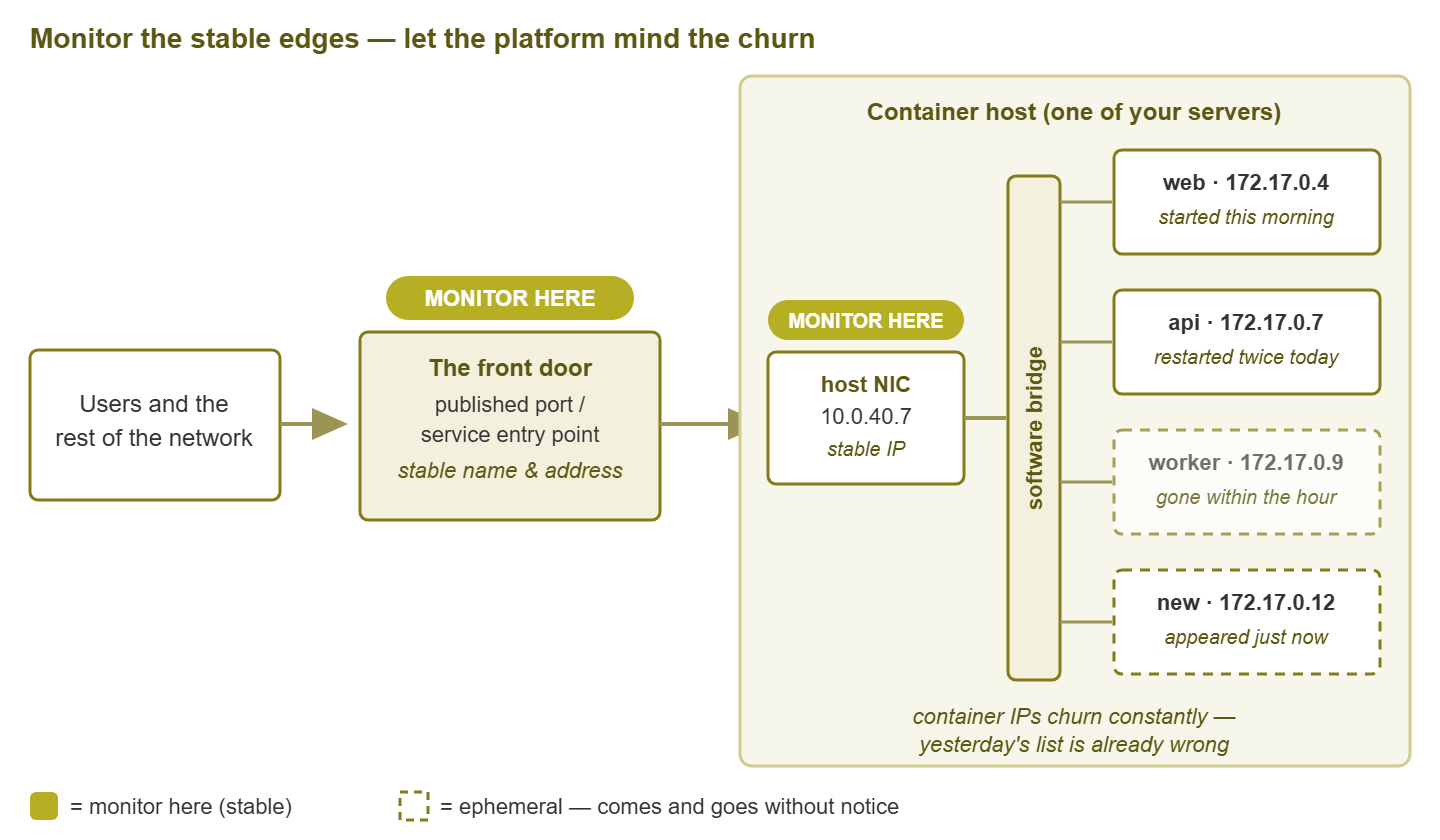
Figure 1: The generalist's mental model. The front door and the host hold still — monitor there. The container addresses inside churn by design — leave them to the platform.
What stays exactly the same
Take a breath, because the list of unchanged things is longer than the list of changed ones. It is still TCP/IP: the same handshakes, the same ports, the same MTU arithmetic, the same reasons a connection refuses versus times out. A refused connection still means "something answered and said no". A timeout still means "nothing answered at all". Those two facts still cut your search space in half. Packet captures still tell the truth. Run tcpdump on the host and you can watch bridge, NAT, and published ports doing exactly what this guide described, in plain view.
It is still DNS — more DNS than ever, in fact. When addresses are disposable, names become the only stable way for software to find anything. So container platforms lean on DNS for nearly all internal discovery. The old joke that it is always DNS is not retired by containers. It gets a promotion, for reasons the guide on why it's always DNS explains in loving detail. And it is still your troubleshooting logic: does the name resolve, does the port connect, does the service answer correctly? That ladder works unmodified. The only new skill is choosing where to stand while you climb it. That is because "from my desk" and "from inside the host" now see genuinely different networks.
If you have ever administered a hypervisor, one more comfort: this should feel like a familiar tune played at double speed. Those ideas include virtual switches inside hosts, guest traffic your physical network never sees, and the visibility tradeoffs that come with both. They are close cousins of the ones covered in Hypervisor & Virtual Networking. Containers did not invent hiding traffic inside a server. They just got dramatically better at it.
The generalist's stance: hosts and front doors
So what do you actually do? You adopt a deliberately boring stance: monitor the layer that is yours and holds still, and let the platform watch its own churning insides. The hosts are servers — your comfort zone, monitored the way you monitor everything else. The published ports and service URLs are front doors: stable, meaningful, and user-facing. Everything between those two layers is weather inside the building, and the platform is already paid to watch it. Container engines and orchestrators health-check their containers, restart the failed ones, and log every lifecycle event. Rebuilding that from the outside is how an admin burns a month constructing alerts that nobody, including the admin, actually wants.
- 1. Put every container host into your normal server monitoring: reachability, CPU, memory, disk, and NIC health.
- 2. Watch host NIC throughput and error counters — fifty chatty containers can saturate an uplink that ten VMs never strained.
- 3. Check every published front door from the network side, the way a user would. Use a TCP connect or HTTP check against the host port or service URL.
- 4. Check the DNS names those front doors are reached by, since a perfect service behind a broken name is still an outage.
- 5. Leave individual container lifecycles to the platform and the dev team — deliberately, and in writing.
Tip: do not alert on containers restarting. Restarts are the platform doing its job, and most are invisible to users. Alert when a front door stops answering, because that is the moment a human should care. This one decision prevents the majority of the alert noise container environments are famous for.
The "in writing" part is not decoration. The first time a container flaps at 2 AM and nobody gets paged, someone will ask why. "Because we agreed that is the platform's job, and here is the front-door check proving users were fine the whole time" is an answer. It is a strong answer when the agreement predates the incident — and a career conversation when it does not.
Questions to ask the dev team this week
You do not need to learn the platform to be effective next to it. You need a handful of facts only the dev team has. These five questions, asked over coffee rather than during an outage, will populate your documentation and your monitoring with everything this guide identified as stable:
- Which hosts run containers, and which subnets do their bridges use? (So you can label that space in your records and never chase it again.)
- What is the full list of published ports and service URLs, and which of them are user-facing? (Your front-door checklist, straight from the source.)
- Which DNS names do users and other systems use to reach these services? (Names outlive addresses; monitor the names.)
- What does the platform already monitor and restart on its own? (So you can point your checks at the gaps instead of the overlaps.)
- Who should be called when a container-level problem occurs, and who when a host or network problem occurs? (The split, agreed in daylight.)
Where to go next
You now have the core mental model: apartments rather than houses and a private bridge inside each host. It includes NAT on the way out, published ports on the way in, and churn as a feature. Monitoring is pointed at hosts and front doors. The next thing that usually happens — often about a month after the first containers appear — is an orchestrator arriving to manage them in flocks. Kubernetes Networking in Plain Language extends today's model with pods, services, and ingress. And Monitoring a Kubernetes Cluster Without Becoming a K8s Expert turns it into a concrete watchlist. The rest of Container & Kubernetes Networking for Generalists will be waiting when the cluster lands.
Put this into practice with SysPeep Monitor
SysPeep Monitor watches exactly the layer this guide told you to own: the container hosts and their front doors. It auto-discovers hosts and interfaces on your network. It tracks CPU, memory, disk, and NIC health over SNMP, WMI, and SSH. It alerts you when a host or a published service stops answering, while the platform's internal churn stays out of your inbox. The free trial installs on any Windows machine in minutes.
Download Free TrialLearn About SysPeep - All Rights Reserved.