
Why It's Always DNS: How Name Resolution Breaks Everything
There is a haiku that every system administrator eventually earns the right to laugh at: It's not DNS. There's no way it's DNS. It was DNS. The joke survives because the experience keeps repeating. The ticket queue fills with complaints that sound completely unrelated. The intranet is slow. Email is stuck. Someone can't log in. "The internet is down." After an hour of chasing each symptom separately, the cause turns out to be one quiet name-resolution problem touching all of them.
DNS — the Domain Name System — is the service that translates the names humans use (mail.example.com) into the IP addresses networks actually route (203.0.113.25). When a switch dies, the symptom points at the switch. DNS is different. When it breaks, it breaks sideways: the symptoms appear in every application except the one place the fault actually lives. That is why it is so easy to chase in the wrong direction — and why the meme exists.
This guide gives you the mental model that makes DNS failures make sense. You will follow one lookup through the resolution chain, and meet the four places it can break. You will see why each break produces its own weird set of symptoms. You will also learn how caching and TTLs give DNS problems their strange timing. DNS is broken for some, fine for others, healing and relapsing on a schedule nobody announced. None of it requires prior DNS knowledge. All of it will save you hours.
In this guide
- The job: turning names into numbers
- The resolution chain: four stops between a click and an answer
- One lookup, step by step
- Why one DNS failure looks like a dozen different problems
- Partial failure: broken for some, fine for others
- TTLs: why DNS problems arrive and leave on a delay
- Negative caching: remembering that something does not exist
- Symptoms that should make you think DNS first
- Where to go next
The job: turning names into numbers
Computers route traffic by IP address, and only by IP address. Humans — and, more importantly, configuration files — use names. DNS is the phone book that connects the two: you hand it a name, it hands you back a number, and only then can a connection even begin. No lookup, no connection. Name resolution sits in front of essentially everything else your network does.
And "everything" is not an exaggeration. Opening one ordinary web page can trigger dozens of lookups — the page, its image host, its scripts, its analytics. Your monitoring system looks up every device it checks by name. Even the office printer — a device that needs no help finding new ways to disappoint you — asks DNS where the print server lives. DNS is the dial tone of the network: nobody thinks about it until the moment it isn't there.
One more property completes the picture: no answer is remembered forever. Answers carry an expiry time, so clients must keep coming back to ask again. An outage therefore doesn't just stop new things from working — it slowly breaks things that were fine a minute ago, as remembered answers expire.
The resolution chain: four stops between a click and an answer
The single most useful thing to memorize about DNS: your computer does not look names up by itself. It asks a chain of helpers, each of which may answer from memory or pass the question along. It is like asking a librarian, who asks a bigger librarian, who finally phones the publisher. Four stops matter:
- The stub resolver. A tiny piece of your operating system that applications call when they need a name resolved. The word stub is honest: it does no detective work. It checks the local cache and the
hostsfile, then forwards the question to the DNS servers configured on the network adapter. This is you at the front desk of your local library. - The client cache. The operating system's short-term memory of recent answers, so it doesn't ask the network the same question every few seconds. On Windows this is the DNS Client service; inspect it with
ipconfig /displaydns, clear it withipconfig /flushdns. The pad of sticky notes on the front desk. - The local resolver, often acting as a forwarder. The DNS server your machines are configured to use — in most Windows shops, the Active Directory domain controller running the DNS role. A resolver (or recursive server) is willing to do the full detective work of answering any question. Many local resolvers are configured as forwarders instead. They answer what they know — your internal zones, their own cache — and pass everything else upstream to a bigger resolver. The town librarian, who owns the local archives but phones the city library for the rest.
- Upstream and authoritative servers. At the end of the chain, some resolver performs recursion. Starting from the root servers, it asks its way down — who runs
com? who runsexample.com? It continues until it reaches the authoritative servers, which own the zone's records and have the final word. The publisher who printed the book.
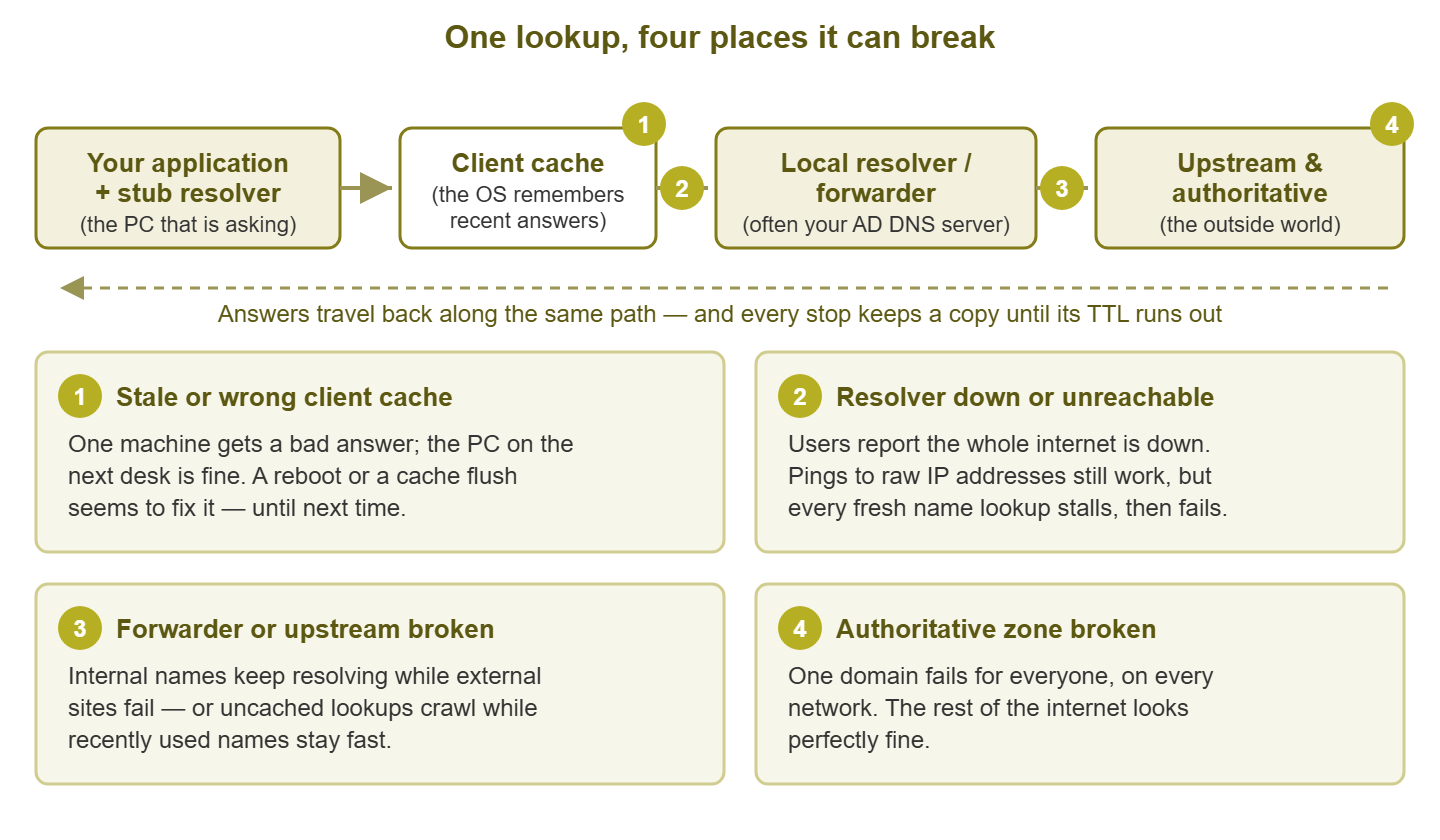
Figure 1: The resolution chain, with the four classic failure points. Each break produces a completely different symptom pattern — and that pattern is your best diagnostic clue.
Two details make this chain more than trivia. First, answers are cached at every stop on the way back — the upstream resolver remembers, your local resolver remembers, your operating system remembers. Caching makes DNS fast — and failures confusing, because each stop remembers different things for different lengths of time. Second, each stop trusts the next. Your PC believes whatever the local resolver says; the local resolver believes its forwarder. A wrong answer injected anywhere flows downstream looking exactly as trustworthy as a right one. What a healthy, debuggable version of this layout looks like is the subject of Resolvers, Forwarders, and Caches.
One lookup, step by step
Let's run one lookup through the chain in slow motion. A user opens app.corp.example, the internal timesheet app. Everything below happens before the browser sends it a single byte:
- Step 1. The browser asks the stub resolver: what is the address of
app.corp.example? - Step 2. The stub checks the
hostsfile (a manual override list, almost always empty), then the client cache. A fresh answer here ends resolution instantly, without touching the network. - Step 3. No cached answer, so the stub sends the question to the first DNS server configured on the adapter — say the domain controller at
10.10.8.21. If it doesn't respond within a couple of seconds, the stub retries, then tries the second configured server. Remember those pauses — they are the raw material of "everything is slow" tickets. - Step 4. The domain controller is authoritative for
corp.example— it owns the zone — so it answers directly from its zone data. (For an external name it would answer from cache or ask its forwarder.) - Step 5. The answer flows back and is cached at each stop for the record's TTL. Only now does the browser open a connection to the address it received.
On the client you can watch a simplified version of this with one command:
C:\> nslookup app.corp.example
Server:  dc1.corp.example
Address:  10.10.8.21

Non-authoritative answer:
Name:    app.corp.example
Address: 10.20.4.40
The Server: line names the resolver that answered — the helper your machine actually leaned on. And Non-authoritative answer means the reply came from a resolver's memory rather than straight from the zone's own server — a relayed answer, not the publisher's. Neither is a problem; both are clues you will use constantly in the troubleshooting playbook.
Why one DNS failure looks like a dozen different problems
When resolution breaks, applications do not say "DNS is broken." Each surfaces its own failure, in its own vocabulary, after its own timeout. A browser says the site can't be reached. A logon says the domain isn't available. The help desk receives a dozen different stories, all technically true, and none mentions DNS. The connection failed before it ever started, at a stage no error dialog bothers to describe.
Timing scatters the picture further. When the first resolver stops answering, clients don't fail instantly — they wait out a timeout, retry, then try the second resolver. If the second one works, nothing actually fails; everything just develops a mysterious multi-second stall on every new connection. Users call it "the network is slow today," and off you go to stare at innocent bandwidth graphs. But a uniform pause in front of everything is not congestion — congestion is never that consistent. It is the signature of a dead first resolver, and recognizing it on sight will make you look psychic.
| What gets reported | What actually happened | The tell |
|---|---|---|
| "The internet is down" | The resolver is down or unreachable, so every new lookup fails | Pings to a raw IP address still work; anything by name fails |
| "Everything is slow today" | First resolver in the list is dead; every fresh connection waits out its timeout before the second answers | A consistent pause of a few seconds, then things work normally |
| "I can't log in" | Clients can't find a domain controller — that discovery is itself a set of DNS lookups (SRV records) | Freshly booted machines fail while long-running sessions carry on |
| "Email stopped" | The mail server can't resolve destination domains, so messages sit in the queue | The queue grows while the mail server itself looks perfectly healthy |
| "Just this one site is broken" | That domain's records are wrong or expired, or its authoritative servers are down | It fails the same way from every network you try |
| "Works on my phone, so it's your network" | The phone is on mobile data — a different resolver chain with a different cache | Different resolver, different answer; the comparison is actually a useful clue |
The pattern across that table: DNS failures announce themselves less by any single symptom than by the spread. Many unrelated services degrade at once while the boxes they run on look healthy. Whenever a blast radius makes no sense, check the shared dependency in front of everything. That habit is worth building in general — dependency thinking covers it — but DNS is its most frequent payoff.
Partial failure: broken for some, fine for others
Total outages are almost the easy case — painful, but obvious. The failures that eat whole afternoons are partial, where the answer to "is DNS broken?" is genuinely "yes and no." Partial failure comes in three flavors, and they stack.
One record, not the whole zone
DNS data is thousands of individual records, and exactly one of them can be wrong — deleted in a cleanup, pointing at a decommissioned server, or born with a typo. Result: one application is down hard while every DNS test you run comes back clean, because you are testing other names. The zone is fine. The server is fine. That one record is lying.
One resolver of two
Well-built networks give clients two resolvers. When one of the pair breaks, you get the classic intermittent ticket. Or it might break subtly, answering some queries and dropping others, with the same result. The same action works, then fails, then works, depending on which server each client leaned on and what it had cached. Intermittent symptoms plus two resolvers should always prompt the same move: test each resolver directly, one at a time. The DNS health monitoring guide shows how to have machines do this around the clock, so the broken half of a pair can't hide.
Cached versus fresh
The strangest flavor. Because every stop caches answers, a DNS failure does not hit everyone at once — it rolls through the building in waves. Machines that recently looked up a name keep working on their cached answer; machines that ask fresh, fail. Twenty minutes later some of the lucky caches expire, and a new batch of users drops. The failure appears to spread like a disease — cue a malware hunt — when really it is cache entries timing out one by one. Recovery runs the same movie in reverse: fix the root cause and users come back gradually as caches refresh. "The fix worked for some people" usually means the fix worked, period; the stragglers are waiting out their caches.
Tip: during a suspected DNS incident, ask affected and unaffected users one question: "when did you last use the thing?" People who touched it recently and still work are riding a cache. People who came at it cold and failed are seeing the true current state. That one question separates illusion from what is actually broken right now.
TTLs: why DNS problems arrive and leave on a delay
Time to name the mechanism behind all that wave behavior. Every DNS record carries a TTL — time to live. It is a number of seconds telling every cache how long it may keep serving the answer without asking again. You can watch a TTL counting down by asking the same resolver twice. dig, the standard query tool on Linux and macOS (and installable on Windows), shows it as the second column:
$ dig www.example.com A +noall +answer
www.example.com.   300   IN   A   203.0.113.80

$ dig www.example.com A +noall +answer     (a minute later)
www.example.com.   240   IN   A   203.0.113.80
Same answer, smaller number: this resolver cached the record and will serve it for another 240 seconds before asking upstream again. When the countdown hits zero, the next query pays full price for a fresh lookup. That one mechanism produces most of DNS's famous time-weirdness:
- Changes take effect gradually. When you repoint a record, nobody pushes the update to the world. Caches simply expire at different moments, so some users see the new address while others still get the old one. This is what people vaguely call "DNS propagation." Nothing is propagating; caches are expiring on their own schedules.
- Mistakes linger after you fix them. Publish a wrong record with a long TTL, and correcting the zone does not un-remember the caches that already picked it up. The bad answer keeps being served, from memory, until the TTL runs out.
- Outages are cushioned, then hit a cliff. If your upstream resolver dies, popular names keep resolving from your local resolver's cache — for a while. The network seems fine, then degrades name by name as entries expire. By the time users complain, the root cause is many minutes old — which is why fresh-query monitoring beats waiting for humans.
TTL length is an honest tradeoff. Long TTLs mean less query traffic, faster answers, and more cushion when upstream hiccups — but slow-motion changes and long-lived mistakes. Short TTLs make changes fast and mistakes brief, at the cost of more queries and less cushion when upstream wobbles. The practical habit: lower a record's TTL ahead of a planned change, make the change, then raise it back once the dust settles.
Negative caching: remembering that something does not exist
Here is the caching wrinkle almost nobody expects: resolvers also cache failure. When an authoritative server replies "that name does not exist," the response code is NXDOMAIN, for non-existent domain. The resolver remembers that too, for a duration controlled by the zone's SOA (Start of Authority) record. This is negative caching, and it exists for good reason: without it, every typo'd hostname would hammer the authoritative servers with the same doomed question forever.
But it sets a classic trap. You create a brand-new record. The very user who asked for it before you finished keeps getting "does not exist" — from cache. That happens even though the record is sitting right there in your console. You check the zone; it's perfect. You test from your own machine, which never asked the doomed question; it resolves. The user swears it's still broken; they're right too. Everyone is telling the truth, and the negative cache is the missing suspect. The cure is patience or a cache flush — and the prevention is creating records before anyone has a reason to ask for them.
Tip: when a just-created record "doesn't work," resolve it directly against the authoritative server (the playbook shows the exact commands). If the authoritative answer is correct, stop editing the zone — you are just waiting out negative caches. Re-editing a correct record is how one mystery becomes two.
Symptoms that should make you think DNS first
Let's compress everything above into reflexes. Suspect name resolution early when you see any of these:
- Several unrelated applications degrade at once, while the servers behind them all look healthy.
- Things work by IP address but not by name. That name-versus-IP split is the fastest DNS test there is.
- Every failure is preceded by the same consistent pause of a few seconds — the smell of a timed-out first resolver.
- The problem is intermittent per user but constant per office — the signature of one broken resolver in a pair, or of caches expiring in waves.
- Exactly one domain is broken, identically, from everywhere — think authoritative servers or a bad record, not your network.
- The trouble started shortly after work on a domain controller, a firewall rule, or DHCP — the services that decide who resolves what.
Reflexes cut both ways. Sometimes the fastest move is proving DNS innocent so you can hunt elsewhere with a clear conscience. There is a whole guide to fast exoneration tests for exactly that. Either way, a few deliberate lookups beat an hour of symptom-chasing.
Where to go next
You now have the model: a chain of helpers — stub, client cache, local resolver or forwarder, upstream and authoritative. Each answers from memory when it can and fails in its own recognizable style. One broken link scatters symptoms across every application in the building. Caches and TTLs smear those symptoms across time. Negative caching even lets "it doesn't exist" outlive its own truth. None of that is mysterious anymore. It is just the chain doing what the chain does.
From here, two natural next steps. To stop discovering DNS problems via ticket flood, set up the per-resolver checks in Monitoring DNS Health. For the day something does break, keep the step-by-step playbook within reach — it turns this mental model into a command-by-command diagnosis. The rest of the pillar — architecture that fails loudly, and proving innocence fast — lives at It's Always DNS: Name Resolution Health.
Put this into practice with SysPeep Monitor
When a resolver dies, everything that depends on it screams at once — unless your monitoring understands who depends on whom. SysPeep Monitor auto-discovers your network and watches the Windows servers your DNS role runs on over WMI and SNMP. It lets you set dependencies so one failed resolver sends one clear alert instead of fifty. The free trial installs on a single Windows machine in minutes.
Download Free TrialLearn About SysPeep - All Rights Reserved.