
The Anatomy of a Custom Check
Sooner or later your monitoring system will not have a built-in check for something that matters. A line-of-business application that only reports its health through a status page. A backup job that leaves a text file behind. A door controller that speaks nothing but its own tiny web interface. When that happens, somebody writes a script. That script quietly becomes part of the system you rely on at three in the morning.
The difference between a script that helps and a script that lies is not the language or the cleverness. It is whether the script follows a small set of rules that every good check obeys. This guide is those rules. By the end you will know what a check must accept, what it must return, and what it must never do. You will know how to tell "the thing is fine" from "I could not tell." That is the most important distinction in the whole discipline.
Nothing here is tied to a language or a monitoring product. The sibling guides show the same contract in PowerShell and Python; this one is about the shape underneath.
In this guide
- A check answers one question about one thing
- The contract, part one: inputs
- The contract, part two: output
- The check lifecycle
- Why UNKNOWN is a real state
- The rules every check must obey
- Thresholds are parameters, not constants
- A minimal check, walked through
- Where to go next
A check answers one question about one thing
A check is a small program that answers exactly one question about exactly one target. It reports the answer in a form a monitoring system can understand. Products call the same idea a sensor, a monitor, a service check, or a probe. The vocabulary varies; the shape does not.
"Is the payroll web service answering on its HTTPS port?" is a check. "Is the payroll server healthy?" is not — it is a dozen questions wearing a trench coat. One question per check sounds fussy until you have lived through the alternative. If one script tests five things and reports one state, then when it turns red you do not know which of the five broke. With that script, you cannot set separate thresholds or put one of them into maintenance while the others keep watching. When the application team asks "what exactly is failing?", the honest answer is "something."
A good analogy is a smoke detector. It answers one question (is there smoke right here?). It has a clear output (silence, or a very loud noise). It does not try to put out the fire. And when its battery runs low, it chirps. That is a distinct sound meaning "I might not be able to do my job." That is not the same message as "there is no fire." Hold on to that chirp.
"One thing" matters as much as "one question." The same code should serve any target. Free space on drive C of one server is the same program as free space on drive D of another, with different inputs. The moment a hostname or threshold is typed into the script itself, you have a check that can only watch one thing. You will be copying and editing it for years.
The contract, part one: inputs
Think of a check as a function with a contract: known inputs in, a known shape of output out. Four kinds of input cover nearly every check you will ever write.
The target
What to ask, and where. Usually it is a hostname or IP address, plus whatever narrows it to one thing. That could be a port number, a URL path, a service name, a volume letter. The target is the only input with no default. A check with a default target silently watches the wrong machine when someone forgets a parameter.
The thresholds
The numbers that turn a measured value into a state. Typically a warning level and a critical level, with a direction (is bigger worse, as with CPU load, or better, as with free disk?). More on why these must be parameters below.
Credentials, by reference
Many checks need a password, an SNMP community string, an API token, or an SSH key. The check should receive a reference, never the secret itself. That means the name of an entry in a protected store, or of an environment variable the scheduler populates. Secrets on the command line show up in process listings and scheduler logs. Secrets inside the script end up in version control and in the email someone forwards to a contractor.
The timeout
The longest the check is allowed to spend. Every network call inside it needs a deadline. The check as a whole needs a budget comfortably shorter than the interval it runs at. A check scheduled every sixty seconds that can take ninety seconds to fail will eventually pile up on top of itself.
Every input except the target should have a sensible default. That way, the check can be run by hand with nothing but a hostname at midnight. Defaults are also documentation: they show what the author considered normal.
The contract, part two: output
A finished check produces three things, every single time it runs, no matter what happened.
- A state. One of four words. OK: the answer came back and the value is inside the acceptable range. WARNING: outside the range, but not yet worth waking someone for. CRITICAL: bad enough to act on, or the target flatly refused to answer. (A closed port on a service that should be listening is a real, bad answer.) UNKNOWN: the check could not measure at all.
- A value. The number that was measured, with its unit — free gigabytes, milliseconds, days until a certificate expires. The state is for alerting; the value is for graphing and trending. A check that returns only a state throws away the most useful part of its work.
- A message. This is one line a human can read at a glance, containing the value and the threshold it was compared to. That way, an alert makes sense without opening the script.
How those three things get from your script into the monitor is a matter of convention, and monitors differ. Two conventions are so common that most products accept at least one:
# Convention A: an exit code plus one line on standard output
#   exit 0 = OK   1 = WARNING   2 = CRITICAL   3 = UNKNOWN
OK - 42.3 GB free on C: (warn below 10, crit below 5) | free_gb=42.3

# Convention B: a small JSON object on standard output
{"state": "OK", "value": 42.3, "unit": "GB", "message": "42.3 GB free on C:"}
In convention A the part after the vertical bar is a lightly structured "performance data" section many tools parse for graphing. The part before it is the human message. Convention B is easier when a check has several values to report. Whichever your monitor expects, two rules hold. Print exactly one result on standard output and nothing else there. Diagnostics go to standard error or a log file, because the parser on the other end is not smart. And check the product documentation for the precise format it accepts. The contract stays the same regardless of the wrapping.
The check lifecycle
A check never runs alone. It lives inside a loop the monitoring system drives, and that loop is where each rule comes from.
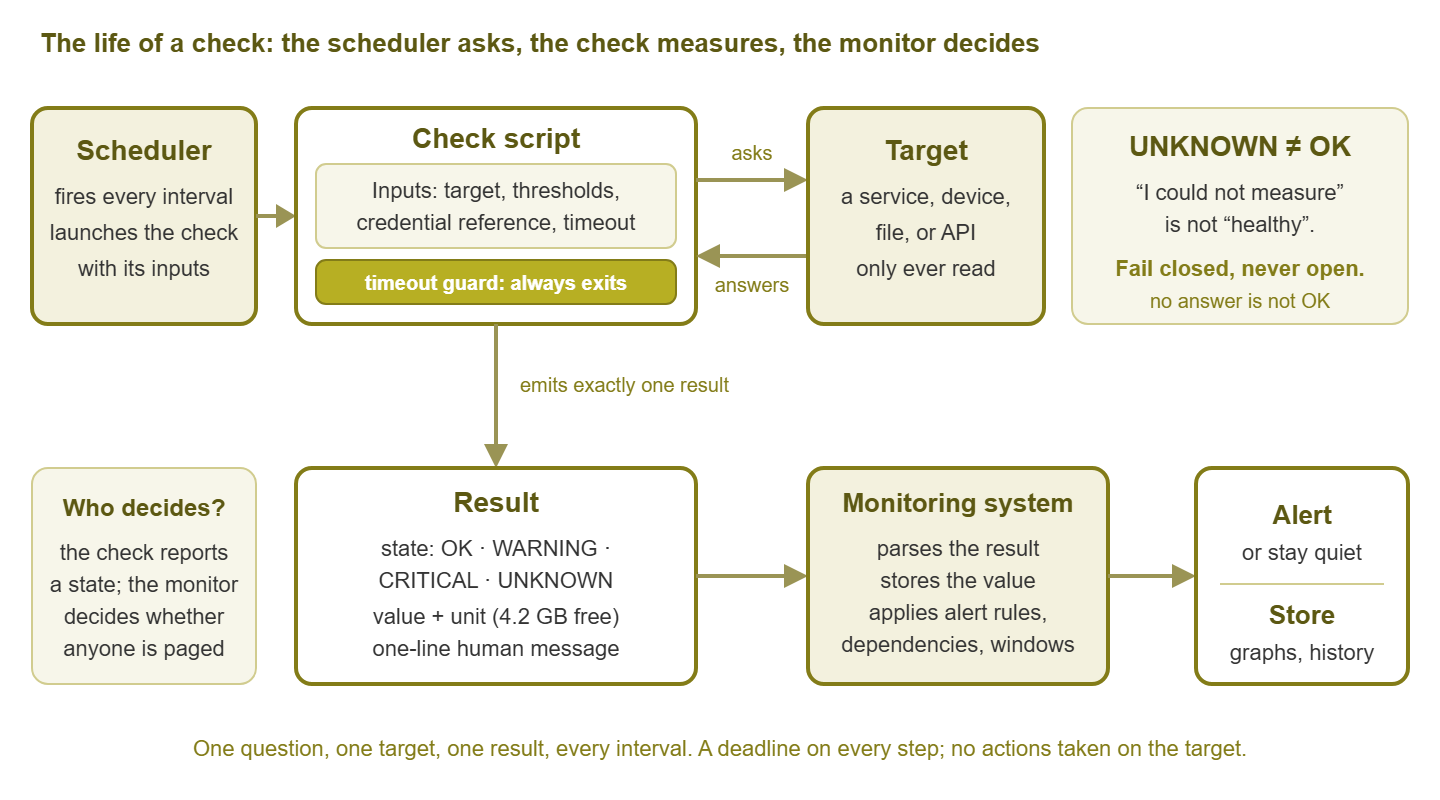
Figure 1: The life of a check. The scheduler asks, the check measures, the monitor decides. Every arrow has a deadline, and the target is only ever read, never changed.
- The scheduler fires. The monitor decides it is time and launches the check with the inputs from its configuration. On a busy monitor, hundreds of checks launch in the same second.
- The check runs. It reads and validates its inputs, starts its timeout clock, and opens a connection to the target with a deadline attached.
- The target responds — or does not. Promptly, slowly, with nonsense, with a refusal, or with silence. All five outcomes must be handled.
- The result is parsed. The check turns the response into a value, compares the value to the thresholds, and picks a state.
- The check emits its result and exits. One line or one JSON object, plus an exit code, then it frees its resources and gets out of the way.
- The monitor stores and decides. It records the value for graphs, updates the state, and runs its own alert logic: confirmation counts, dependencies, maintenance windows, routing.
Notice who does what. The check does not decide whether anyone gets paged. It reports what it found. The monitor decides, because it knows things the check cannot. Examples are that the upstream switch is also down, that the server is in a maintenance window, and that the rule says wait for three failures. A check that tries to be clever about alerting — retrying for two minutes before reporting CRITICAL, say — blocks the scheduler. It also duplicates logic the monitor already has.
Why UNKNOWN is a real state
Here is the chirp again. Newcomers tend to treat UNKNOWN as a rounding error and write checks that only return OK or CRITICAL. That produces two failure modes, both worse than they look.
The first is the check that fails open. It tries to connect and gets an exception it did not expect. Because the line that sets CRITICAL was never reached, it falls through and reports OK. The service has been down for a week and the dashboard is green. This is the most common bug in home-grown checks, and it usually starts with a variable that defaults to "healthy."
The second is the check that cries wolf. Its credential expired, or a library went missing after an update. It cannot measure anything, so it reports CRITICAL. The on-call engineer is woken to investigate an application that is perfectly fine. Do that three times and people stop trusting the check.
UNKNOWN exists to separate "the answer is bad" from "I could not get an answer." Timeouts, authentication failures, unexpected response formats, missing dependencies, and invalid parameters are all UNKNOWN. The rule of thumb: if the question was asked and the answer was bad, CRITICAL; if the question could not be asked, UNKNOWN. A connection refused on the port you are testing is the target answering "no" — CRITICAL. A name that will not resolve because the collector's own resolver is broken is a question that never got asked — UNKNOWN.
Monitors treat UNKNOWN differently for exactly this reason. UNKNOWN typically gets its own colour and its own alert rule (often "tell the monitoring administrator, not the application owner"). That only works if your check is honest. The technique is to fail closed. The state variable starts as UNKNOWN, and the code only earns OK by measuring a value and finding it inside the good range. Every error path, including the ones you did not think of, leaves the state where it started.
Tip: Silence is the worst possible output. A check that hangs, crashes without printing, or is killed by the scheduler produces no state at all. Many monitors will keep showing the last known state — stale green. If a check can silently stop reporting, pair it with a watchdog that notices the silence, as described in Heartbeats and Dead-Man Switches.
The rules every check must obey
Everything above condenses into a short contract. Hold every script to it.
| Element | Rule | Why |
|---|---|---|
| Question | One question about one target per check | Unambiguous results; per-thing thresholds; alerts that name what broke |
| Inputs | Everything comes from parameters; the target is required, the rest have defaults | One script serves every target; changing a threshold never means editing code |
| Credentials | Referenced by name from a protected store, never embedded or passed in clear text | Command lines and scripts leak; a store can be rotated and audited |
| Timeouts | Every network call has a deadline; the whole check has a budget shorter than its interval | A hung check blocks the scheduler and hides the outage it exists to catch |
| Always finish | Exit with a state and a message no matter what happened | Silence is indistinguishable from "still fine" on many dashboards |
| Fail closed | Start at UNKNOWN; only successful measurement earns OK | An unhandled error must never look like health |
| Idempotent | Running it twice, or twice at once, changes nothing | Schedulers retry, overlap, and run in parallel |
| Read-only | Takes no actions: no restarts, no writes, no cleanups on the target | A check that "fixes" things hides the problem and can cause outages; remediation is a separate, gated job (Auto-Remediation) |
| Output | Exactly one result on standard output; diagnostics elsewhere | Result parsers are simple; stray lines corrupt the state |
| Logging | Record target, inputs (not secrets), elapsed time, outcome | When a check misbehaves you need evidence, not a rerun |
| Speed | Finish in seconds, not minutes | Scheduler capacity is finite; slow checks starve the others |
| Cleanup | Close every connection and session, even on error | Small leaks times thousands of runs exhaust the collector or the target |
Idempotent means the check leaves the world exactly as it found it, which is automatically true of a check that only reads. Read-only is the rule that gets negotiated away ("it just restarts the service if it's stopped, what's the harm?"). The harm is that the check now has two jobs. The second job hides the failure the first was meant to expose. If a service stops every night, you want to know. A self-healing check makes sure you never do.
Thresholds are parameters, not constants
It is tempting to write if free_gb < 5 in the middle of a script. That is because five gigabytes seems reasonable for the server in front of you. Then the check is pointed at a database server with a huge volume, where five gigabytes is a rounding error. It is also pointed at a small appliance where five gigabytes free is normal. Now you either fork the script or spend your life editing numbers in code.
Parameters move the numbers into the monitor's configuration, where the people who know the systems can see and change them. A few design points:
- Name the direction. In the parameter name (
warn_below,crit_above) or a separate flag, so nobody has to remember whether bigger is good. - Name the unit. A threshold of "10" is meaningless; "10 GB" or "10 percent" is a decision.
- Validate the pair. If someone sets warning at 5 and critical at 10 for a "lower is worse" metric, exit UNKNOWN. In that case, say the thresholds are inconsistent rather than quietly producing nonsense.
- Allow "no threshold." With thresholds unset the check should still return the value with OK. That makes it a pure collector, which is often what you want for a metric you only mean to graph.
- Leave hysteresis to the monitor. Flap suppression and "must be bad for three runs" rules belong in the monitor's alert configuration. The check reports what it sees right now.
A minimal check, walked through
Here is the whole contract in language-neutral pseudo-code, for a free-disk-space check. Nothing about it is clever; every line exists because of a rule above.
check "free disk space":

  inputs:
    target      (required)              # host to ask
    volume      (default "C:")          # which disk
    warn_below  (default 10, in GB)
    crit_below  (default 5, in GB)
    cred_ref    (default "monitor-ro")  # name of an entry in the secret store
    timeout_s   (default 10)

  state   = UNKNOWN                     # fail closed: start here
  message = "check did not complete"
  started = now()

  try:
    if crit_below >= warn_below:
      message = "thresholds inconsistent: crit must be below warn"
      finish

    secret = secret_store.lookup(cred_ref)         # never on the command line
    conn   = connect(target, credential=secret, deadline=timeout_s)
    free   = conn.query_free_space(volume, deadline=remaining(started, timeout_s))

    if   free < crit_below: state = CRITICAL
    elif free < warn_below: state = WARNING
    else:                   state = OK
    message = free + " GB free on " + volume +
              " (warn below " + warn_below + ", crit below " + crit_below + ")"

  catch TimeoutError:
    message = "timed out after " + timeout_s + "s asking " + target
  catch AuthenticationError:
    message = "authentication failed using credential reference " + cred_ref
  catch anything else as e:
    message = "unexpected error: " + type_of(e)      # message only, never the secret
  finally:
    close(conn) if conn
    log(target, volume, state, elapsed(started))     # to a log file, not stdout

  print state + " - " + message + " | free_gb=" + free   # exactly one line on stdout
  exit with code for state                            # 0 / 1 / 2 / 3
Walk it from the top. The inputs block is the whole interface. It includes a required target, thresholds with defaults and units in their names, a credential by reference, and a timeout. The two lines after it are the fail-closed setup. The check is UNKNOWN before it has done anything, and the message says so in case nothing ever overwrites it.
Inside try, validation comes first and refuses inconsistent thresholds rather than pretending. The credential is fetched by name at run time. The connection and the query each carry a deadline. The second deadline is whatever is left of the budget. So together the connection and query can never exceed it. Only after a real number comes back does the check compare it to the thresholds, and OK is the last state it can reach.
The catch blocks each turn a specific failure into a specific message, but none changes the state. It stays UNKNOWN, because none of these failures is the disk being full. The catch-all prints the error's type rather than its text, because error text sometimes echoes back the credential that caused it. Finally runs whichever path was taken: it closes the connection and writes one log line.
Testing it before you trust it
A check is finished when you have watched it produce every state on purpose, not when it returns OK once:
- A healthy target: OK, with the right value in the message.
- The same target with thresholds temporarily raised: WARNING, then CRITICAL.
- A hostname that does not exist: UNKNOWN within the timeout, with a stopwatch.
- A host that silently drops packets (a firewall that blackholes rather than refuses), the classic hang: UNKNOWN inside the budget.
- A wrong credential reference and inconsistent thresholds: two different UNKNOWN messages.
- Two copies at once: both finish, neither interferes with the other.
If any of those produces OK, silence, or a stack trace on standard output, the check is not done. The fix is usually a missing deadline or a missing catch, both cheap to add now.
Where to go next
A check is a small program with a strict contract. It answers one question about one target. It takes inputs for target, thresholds, credential reference, and timeout. It produces an output of state, value, and message in whatever wrapping your monitor expects. It always finishes, fails closed to UNKNOWN, changes nothing, and leaves a log line behind. The monitor, not the check, decides who to wake.
The practical guides in this topic put the contract to work. Writing Checks in PowerShell is for the Windows side. Writing Checks in Python is for cross-platform collectors. SSH, SNMP, and API Collection Patterns is for choosing how to ask the question. And Small Collectors for Devices Without SNMP is for things that speak no monitoring protocol at all. The whole set lives under Writing Custom Checks and Sensors.
Put this into practice with SysPeep Monitor
Most of what you will ever want to check is already covered by built-in collectors. SysPeep Monitor gathers health and performance data over SNMP, WMI, and SSH. It applies your thresholds and keeps alert noise down with dependencies and alert rules. For the genuinely custom cases, the contract in this guide is what any monitor expects of a result. Check the product documentation for how it accepts custom results. The free trial installs on a single Windows machine.
Download Free TrialLearn About SysPeep - All Rights Reserved.