
DDoS in Plain Language: Volumetric, Protocol, and Application Attacks
At some point in your career, someone will lean into your office and ask, "Are we being attacked?" The website is crawling, the phones are choppy, and three graphs look wrong at once. Nobody can say whether this is a hardware failure, a bad day, or something deliberate. It is a stressful question when you lack the vocabulary to answer it. The vocabulary around denial-of-service attacks is unusually thick with jargon for a topic whose core idea is simple.
The core idea is this: overwhelm something with more than it can handle. That is the entire concept. Everything else is just a description of which thing gets overwhelmed, and therefore where you will feel it first. That includes the acronyms, the attack names, and the three families this guide walks through. Once you can name the thing that ran out, you know what you are dealing with and, more importantly, who can actually fix it.
This guide is written from the defender's chair. You will not learn how attacks are built. You will learn what they look like from your side of the circuit. You will learn why organizations that have never annoyed anyone still get hit, and why this is the one outage you cannot simply work harder to end. By the end, you will be able to answer that doorway question with something better than a shrug.
In this guide
- The whole idea in one sentence
- A restaurant, ruined three ways
- Family one: volumetric — the circuit fills
- Family two: protocol — the tables fill
- Family three: application — the kitchen drowns
- Why anyone gets targeted
- The asymmetry you cannot argue with
- A family, symptom, and where-it-hurts table
- Where to go next
The whole idea in one sentence
A denial-of-service attack (DoS) is any deliberate attempt to make a service unavailable to the people who are supposed to use it. It does this not by breaking in, not by stealing anything, but by keeping it too busy to do its job. Nothing is compromised. The attacker does not need your password. They just need to make the thing you rely on run out of something.
The extra letter in DDoS stands for distributed: the traffic comes from many sources at once rather than one. That single word is what makes the modern version so hard to handle. If one machine is bothering you, you block one address and go to lunch. Suppose ten thousand machines are each sending a little — compromised home routers, cameras, rented servers, phones with a bad app. There is no single address to block. The total adds up to more than your connection can carry.
Notice what the definition does not say. It does not say "sends a lot of data." Volume is one way to overwhelm something, but not the only way. The attacks that catch small teams off guard are usually the ones where the bandwidth graph looks perfectly calm. The question is never "how much traffic is there?" It is "which resource is full?"
A restaurant, ruined three ways
Picture a small restaurant. It has a front door, a dining room with a fixed number of tables, and a kitchen with a few cooks. On a normal night, people come through the door, sit at a table, order, eat, pay, and leave. Each part of the restaurant has a capacity, and on a normal night none of them is the bottleneck.
Now imagine someone who wants the restaurant to have a terrible evening. There are three ways to do it, and they map exactly onto the three families of denial-of-service attack.
A crowd at the door
Fill the sidewalk with a mob so dense that real customers cannot physically reach the entrance. The dining room is empty and the cooks are idle, but nobody can get in. Inside, everything is fine; outside, everything is jammed. This is the volumetric attack: the pipe between you and the world is full.
A crowd occupying tables without ordering
Send in people who walk through the door politely, sit down at every table, and never order. The door is clear, the kitchen is quiet, but every seat is taken by someone who will never eat. Real customers walk in, see no free table, and leave. This is the protocol or state-exhaustion attack: the connection tables in your firewall or server are full of half-finished conversations.
A crowd ordering the most complicated dish
Send in a modest number of people who sit down, order the twelve-course tasting menu, and keep ordering it. The door is clear and there are free tables, but the kitchen is buried. And every real customer's simple order waits behind an avalanche of expensive work. This is the application-layer attack: the web server or application is busy answering requests that cost a lot to serve.
Here is the lesson hiding in the analogy. In all three cases the restaurant is "too busy," and a customer outside cannot tell the difference. But the manager can, because in each case a different thing has run out: the sidewalk, the seats, or the cooks. Spotting which resource is exhausted is the whole diagnostic skill, and it determines what you do next.
Family one: volumetric — the circuit fills
A volumetric attack aims to fill your circuit — the physical link from your building to your internet provider — with more inbound traffic than it can carry. Every circuit has a ceiling measured in bits per second. When the flood exceeds that ceiling, the excess is simply discarded somewhere upstream of you. The discarding does not care whether a packet belongs to the attack or to a customer trying to place an order.
From your chair, the experience is unmistakable. The inbound utilization graph on your WAN interface goes flat against its maximum and stays there. Latency to everything outside climbs. Packet loss appears on every external check, not just the one service being targeted. Cloud apps, email, phone calls, and the VPN all degrade together, even if the attacker only cares about your public website. Everything behind the circuit starves, because the circuit is the one thing they all share.
A related cousin worth knowing: some floods are made of enormous numbers of tiny packets rather than large amounts of data. The bit-rate graph may not look pegged, but the packet-per-second rate is far above normal. And your router or firewall runs out of the ability to process packets before the wire runs out of room. Same starvation; the graph that gives it away is packet rate rather than bit rate. For a refresher on reading a circuit's normal ceiling, see WAN circuit health.
The most important fact about this family is where it happens: before your firewall. By the time any traffic reaches equipment you control, the damage has already been done on the wire coming in. Nothing you configure on your side can make the flood smaller, because your side is downstream of the problem. Dropping the attack packets the instant they arrive does not help, because the circuit was full before they arrived.
Family two: protocol — the tables fill
Most of the devices between you and the internet are stateful. They keep a note about every conversation passing through them so they can match replies to requests and enforce rules. A firewall keeps a session table. A web server keeps a list of connections it is in the middle of setting up. A load balancer keeps track of who is talking to which backend. Each of these tables has a fixed number of slots, and every slot is a table in the restaurant.
A protocol attack fills those slots with conversations that will never finish. The classic example is the half-open connection. A client begins the handshake that starts a connection. The server sets aside a slot and replies, and the client never completes the final step. The slot sits reserved, waiting for a guest who is never coming, until a timeout eventually clears it. Do that from enough sources, faster than the timeouts clear them, and the table is full of ghosts.
From your chair, this family is sneaky. The bandwidth graph looks unremarkable, because half-open handshakes are tiny. But the firewall's session count climbs to its ceiling and sticks there. Existing users, whose sessions are already established, often carry on fine. But new connections fail, which produces the confusing complaint that "it works for some people and not others." Firewall CPU may rise. The exact mechanics of a session table hitting its limit, and how to watch the count against the ceiling, are covered in session-table monitoring. So this guide will not repeat them.
Unlike a volumetric flood, a protocol attack lands on equipment you control. That means you have some levers of your own. These include shorter timeouts for unfinished handshakes, connection limits per source, and firewall features designed to hold half-open connections cheaply. You cannot make the attack stop, but you can sometimes make your tables harder to fill.
Family three: application — the kitchen drowns
The application layer is the part of the stack that actually does the work users asked for. That includes the web server building a page, the application querying the database, and the search box searching. Not all requests are equal here. Serving a cached image costs almost nothing. Running a search across every product, generating a report, validating a login, or rebuilding a shopping cart can cost thousands of times more. An application-layer attack sends a steady stream of the expensive kind.
From your chair, this is the family most likely to be mistaken for something else, because it looks like traffic. The request rate is up, the web server's CPU is up, response times stretch out, and the database is busy. At some point the application starts returning errors or timing out. But the circuit is fine and the session table is fine, because a few hundred well-formed requests per second are not much to a firewall. Every layer below the application reports a calm day. Only the application itself is drowning.
These attacks can also be quiet. Because each request is expensive, the attacker does not need many of them. A "low and slow" attack may never show up as a spike on any graph you already watch. It shows up as a mysteriously sluggish site, and a database that is unusually busy for the number of customers logged in. It also shows up as a support queue full of "is it just me?" That mismatch — server effort up while real user activity is flat — is the signature. The next guide in this pillar teaches you to read it.
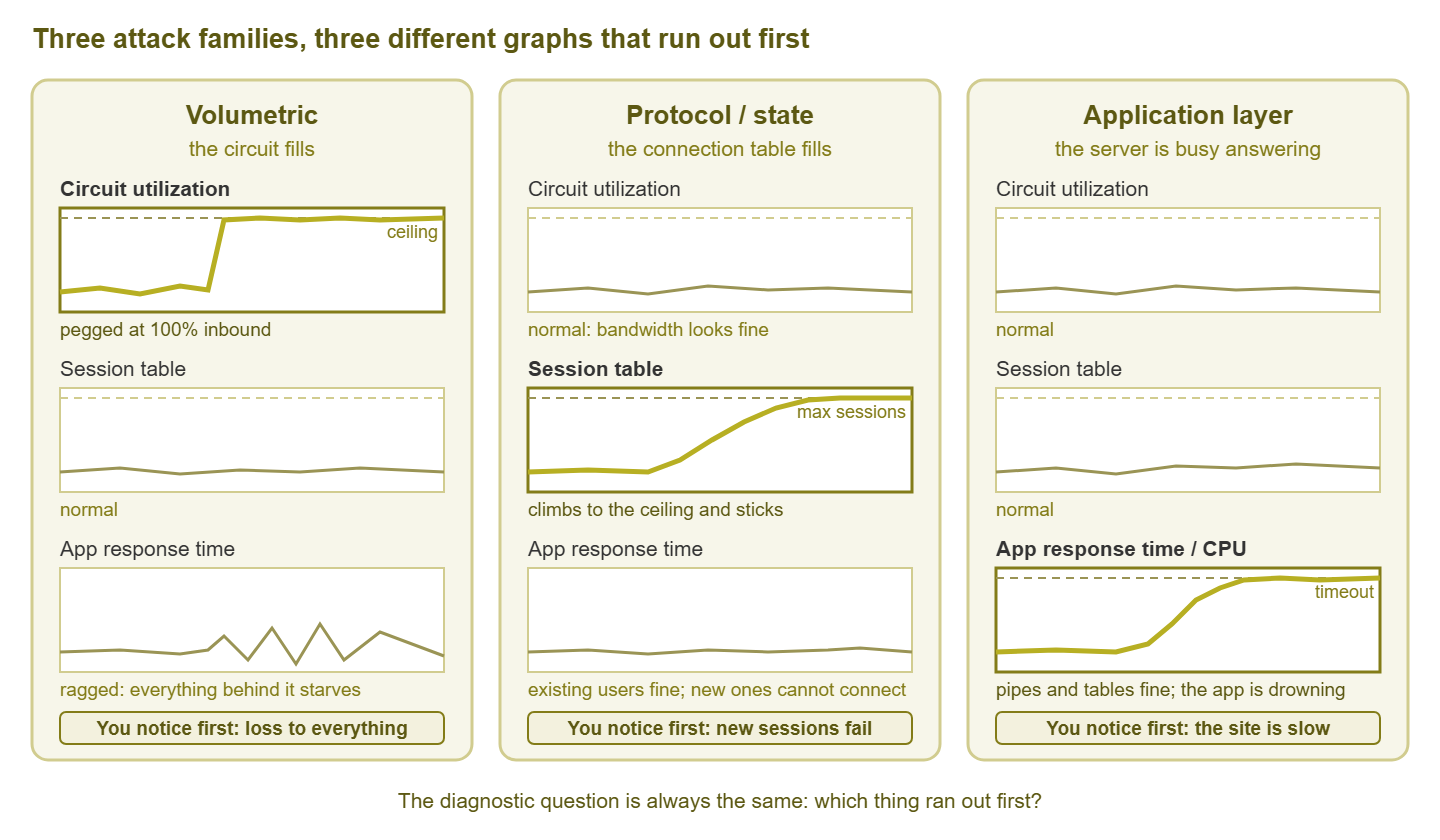
Figure 1: The same three graphs under each family. The one that hits its ceiling first tells you which family you are facing and who can help.
Why anyone gets targeted
New admins often assume attacks happen to banks and governments, not to a regional distributor with two hundred employees. In practice, the reasons are mundane, and few of them require you to be interesting.
- Extortion. A message arrives demanding payment to stop an attack, sometimes preceded by a short demonstration flood. The attacker does not care who you are; they care that you have a public website and a payroll.
- Activism or grievance. Someone objects to what your organization does, sells, said, or is associated with, and wants to make a point. This includes disgruntled former insiders and customers.
- Competitors and sabotage. Rare, but real: taking a rival's ordering system offline during a busy period is a crude and illegal form of competition that nonetheless occurs.
- Collateral damage. You share something — a hosting server, an address range, a provider's upstream link — with the actual target. The flood aimed at your neighbor fills the pipe you both use. From your graphs it is indistinguishable from an attack on you.
- Misdirected attacks. Your public address used to belong to someone else. An employee's personal quarrel in an online game follows them to the office network. A researcher's test hits the wrong range. None of these are about you, and all of them fill your circuit just the same.
The practical takeaway is not paranoia. It is that "we have no enemies" is not a defense plan, because most of these reasons do not involve enemies. Any organization with a public address can be on the receiving end, so it should know what the receiving end looks like.
The asymmetry you cannot argue with
Here is the part of this topic that is genuinely different from every other outage you will handle. That difference is the reason a whole pillar of guides exists for this topic. In almost every incident, working harder helps. You find the failed disk, restore the backup, restart the service, reroute the cable. The problem is on your side, and so is the fix.
A volumetric flood breaks that rule. Your circuit has one ceiling. The attacker's traffic is the sum of thousands of connections, each of which may be modest. And that sum is not limited by anything you own. If the total arriving at your provider's edge exceeds what your circuit carries, the excess is dropped before it reaches you. In that case, no configuration on your firewall, no amount of skill, and no number of extra hours change that arithmetic. You cannot out-bandwidth a flood from your side. Buying a larger circuit raises the ceiling; it does not remove it, and the attacker's capacity is usually cheaper to add than yours.
That leaves exactly three kinds of lever, and every response strategy in this pillar is one of them:
- Shed. Deliberately give up something so the rest survives: rate-limit at your edge, drop traffic to a sacrificial address, take a non-essential service offline. This helps with protocol and application attacks, where the pressure lands on equipment you control. It does nothing for a full circuit.
- Filter upstream. Ask someone whose pipe is bigger than yours — your provider — to discard the flood before it reaches your circuit. This is the only lever that works on a volumetric attack, and it is the subject of the ISP guide in this pillar.
- Absorb elsewhere. Put the public-facing service behind infrastructure built to soak up floods — a protected front or scrubbing arrangement. That way the attack lands on a much larger pipe than yours and only clean traffic is passed on. This is a preparation decision, not something you can arrange at three in the morning.
This is also why the emotional shape of a DDoS incident is unusual. The instinct to keep trying things on your own equipment is strong and mostly wrong. The most valuable work during a volumetric attack is gathering clear evidence and picking up the phone. The most valuable work for the next one happens weeks earlier, in preparation. Effort still matters — it is aimed at communication rather than at the firewall.
Tip: when the "are we being attacked?" question arrives, resist answering with a family name straight away. Answer with a resource instead: "The circuit is full," or "The firewall's session table is at its limit," or "The web server is maxed while the network is fine." Those sentences are true, verifiable from a graph, and immediately tell everyone in the room whether the fix is in your hands or your provider's.
A family, symptom, and where-it-hurts table
Keep this table where you can find it under pressure; the "where it hurts" column points at who can help.
| Family | Restaurant version | What runs out | What you see first | Where it hurts | Who can fix it |
|---|---|---|---|---|---|
| Volumetric | Crowd at the door | Circuit bandwidth (or router packet rate) | Inbound pegged at the ceiling; loss and latency to everything | Upstream of your firewall, on the wire | Your provider or a scrubbing arrangement; not you |
| Protocol / state | Guests holding tables, never ordering | Session or connection table slots | Session count at its maximum; new connections fail; bandwidth normal | Firewall, load balancer, or server connection tables | Partly you (timeouts, limits); provider for the rest |
| Application | Everyone ordering the tasting menu | Server CPU, database, worker threads | Response time and CPU up; request rate up; real users flat; network calm | The web server or application itself | Mostly you (rate limits, caching, blocking patterns); a protective front helps |
Real incidents are not always tidy. An attacker may run two families at once, or switch when the first stops working. A large enough application flood will eventually stress the session table too. But the table still works, because you read it top-down. If the circuit is full, nothing else matters until that is addressed. If not, look at the tables. If those are fine, look at the application. The order of the rows is the order of your investigation.
Three misconceptions to retire early
"The firewall will protect us"
A firewall decides which packets to admit. It cannot decide which packets arrive. Against a volumetric attack, it is a very good bouncer standing inside a building whose sidewalk is already impassable. Against protocol attacks, it is both defender and victim, since its own session table is the thing under pressure. Firewalls help with the shedding lever and their logs are excellent evidence, but they are not a DDoS strategy.
"We'll just block the addresses"
Against a distributed attack, the source list is long, changes constantly, and often includes ordinary home connections whose owners have no idea their devices are involved. Some attack traffic even carries forged source addresses, so blocking what you see punishes bystanders and misses the flood. Blocking has its place for patterns that stand out, but it is a lever, not a plan.
"We're too small to bother with"
Refer back to the list of reasons. Most of them do not require the attacker to have chosen you at all. Small organizations are, if anything, more attractive to extortion attempts because they are less likely to have arrangements in place.
Where to go next
You now have the mental model: one idea (overwhelm something), and three families (circuit, tables, application). You have a list of ordinary reasons it happens to ordinary organizations. And you understand the asymmetry that makes upstream help and preparation the real defenses. The rest of this pillar builds on exactly that model. Recognizing an attack in your graphs teaches the signatures of each family in your own monitoring and how to tell them from a merely busy day. The response playbook gives a small team a first hour that does not involve rebooting the firewall in a panic. When to call the ISP covers the upstream lever in detail. The guide preparing before the flood covers everything you can do while it is still quiet. All of them live under DDoS Detection & Response.
Put this into practice with SysPeep Monitor
Every family in this guide announces itself on a graph you can already collect. The graphs show WAN utilization and packet rate over SNMP, firewall session counts, and server CPU and response time. SysPeep Monitor gathers those from one Windows machine, keeps the history that shows what normal looked like, and alerts when a ceiling is being approached. So the "are we being attacked?" question can be answered from data rather than instinct. The free trial installs in minutes.
Download Free TrialLearn About SysPeep - All Rights Reserved.