
How Network Auto-Discovery Actually Works
To a newcomer, network auto-discovery looks like a magic trick. You type an address range into a monitoring tool, click Scan, refill your coffee, and a device list appears. It includes switches with names, servers with roles, a printer in a closet you did not know the building had. Where did all of that come from?
There is no magic in it. Discovery is a small set of old, understandable techniques layered on top of each other — tricks you could run by hand from any laptop. In this guide you will. We will tour each technique — how it works, what it finds, what slips past it, what it costs the network. Then we will look at how real engines stack them into a funnel. We will also look at how to read the results with the right amount of suspicion. By the end, a discovery report stops being a mysterious printout. You will know where every fact came from, and why the list is never quite complete.
In this guide
- Discovery is a stack of simple questions
- Ping sweeps: the existence pass
- ARP and neighbor caches: the layer-2 witness
- Port probing: which doors answer
- SNMP: the identity pass
- LLDP and CDP: topology for free
- DHCP leases: the tenant registry
- MAC vendors and fingerprints: naming the mysteries
- How real engines layer the passes
- Scoping: what discovery can and cannot see
- Reading the results skeptically
- The technique reference table
Discovery is a stack of simple questions
Every discovery technique is really one plain question asked of the network. Who answers a knock? Who has been talking lately? Which doors are open on this address? Who are you, exactly? No single question finds everything — each one has a blind spot big enough to hide important equipment in. The engineering insight behind every good discovery engine is that the blind spots do not overlap much. So asking all the questions and merging the answers gets you close to the truth.
The questions also come in a natural order, from shallow to deep. First existence: which addresses have something alive behind them. Then identity: what each living thing will say about itself. Finally classification: what kind of device it is, judged from all the evidence together. Keep that three-step funnel in mind — each technique below belongs to a step, and we will assemble the whole funnel afterward.
Ping sweeps: the existence pass
How it works: a ping is a tiny "are you there?" message defined by ICMP, the Internet Control Message Protocol. That is the network's built-in channel for exactly this kind of housekeeping. A ping sweep simply sends one to every address in a range and records who answers. Sweeping a whole subnet takes seconds with the right tool:
# Sweep a subnet, list who responds (no port scanning)
nmap -sn 10.0.3.0/24

Nmap scan report for 10.0.3.1    Host is up (0.0009s latency).
Nmap scan report for 10.0.3.12   Host is up (0.0021s latency).
Nmap scan report for 10.0.3.47   Host is up (0.0135s latency).
Nmap done: 256 IP addresses (23 hosts up) scanned in 3.18 seconds
This is the fastest wide net you can cast — existence plus rough response times — which is why nearly every discovery run starts with it.
What it misses: anything configured not to answer. Host firewalls often drop ICMP by default — Windows machines are famous for it. So a ping sweep routinely misses servers that are very much alive and very much your problem. Sleeping, powered-off, and unreachable devices stay invisible too. The rule to tattoo somewhere: a ping timeout means "no answer," never "nothing there." The firewalled server that exists but hides is the classic discovery gap, and the reason the next technique matters so much.
Network cost: nearly nothing. Pings are tiny; a few hundred is background noise on any LAN. Be gentler across slow WAN links, and know that a rapid sequential sweep is exactly the pattern intrusion detection systems watch for — more on politeness shortly.
ARP and neighbor caches: the layer-2 witness
How it works: before any two IPv4 devices on the same network segment can exchange a single packet, they must find each other's hardware address. They use ARP, the Address Resolution Protocol, and every device keeps a cache of the answers. Your laptop has one right now. So do your routers and switches, and theirs are much better fed, because everything on the segment eventually talks through them. Reading a router's ARP cache (which discovery tools do over SNMP) is like asking the one person at the party who has greeted every guest:
C:\> arp -a

Interface: 10.0.3.101 --- 0xb
  Internet Address    Physical Address      Type
  10.0.3.1            aa-bb-cc-01-02-03     dynamic
  10.0.3.31           3c-2a-f4-8b-11-07     dynamic
  10.0.3.47           00-80-77-5e-c2-19     dynamic
This is layer-2 truth: IP-to-MAC pairings for everything that actually communicated on the local segment recently — ping-blockers included. A server can drop your pings all day, but it cannot refuse to ARP and still use the network. That makes neighbor caches the perfect cross-check for the ping sweep's blind spot.
What it misses: distance and history. ARP works only within one broadcast segment, so a cache covers the local neighborhood and nothing beyond the router. Entries age out within minutes, so it lists recent talkers, not all residents. (IPv6 does the same job under a different name; its neighbor cache plays the identical role.)
Network cost: essentially zero. You are reading a table the network already maintains for its own purposes, not generating new traffic.
Try it now: run arp -a on your own machine. Every line is a device your computer has talked to on your segment recently. Congratulations — you have just performed passive network discovery with zero packets sent.
Port probing: which doors answer
How it works: once an address is known to exist, the next question is what it does, and open ports are the first clue. A port probe attempts a connection to a handful of well-known service ports and notes which ones accept. Each open door suggests a role. Port 3389 answering means Windows Remote Desktop. Port 22 means SSH (so a Linux box or network device). Port 80 or 443 means a web interface, and 445 means Windows file sharing. Port 9100 raw printing means you have almost certainly found a printer. Some probes also read the greeting banner a service sends on connection, which can name the software outright.
What it misses: services on non-standard ports, services allowed only from specific source addresses, and everything behind a host firewall that drops unsolicited connections. An open port suggests a role; it does not prove one, and a closed port proves nothing at all.
Network cost: this is the technique that deserves respect. Probing thousands of ports on hundreds of hosts is real traffic. It is precisely the signature intrusion detection and prevention systems are tuned to flag, and it can genuinely upset fragile equipment. Ancient printers, lab instruments, and industrial controllers have been knocked over by aggressive scans often enough that the caution is folklore for a reason.
Be polite and be announced: keep discovery probing to a short list of common ports, and spread it over time. Tell whoever watches the security tooling before your first big scan. A surprising number of "we're under attack!" afternoons turn out to be a colleague's discovery run.
SNMP: the identity pass
How it works: everything so far produces shapes — an address, a hardware address, some open doors. SNMP, the Simple Network Management Protocol, is where shapes become identities. Nearly every business-grade switch, firewall, printer, UPS, and access point will answer questions about itself when shown a valid read credential. Those answers include sysDescr (model and software description), sysName (its configured name), sysLocation, uptime, and the full interface table with every port's name and status. One credentialed SNMP conversation turns "10.0.3.12, probably network gear" into "sw-edge-02, a 24-port switch in the east closet, up 213 days, 9 of 24 ports in use." If you have never watched that transformation, spend twenty minutes with our snmpwalk tutorial. It is the single best way to understand what discovery engines do all day.
What it misses: everything without SNMP enabled (most workstations, plenty of servers, all the cheap unmanaged gear) and everything for which your scanner lacks the right credential. A device with SNMP running but a different community string looks exactly like a device with no SNMP at all — a silent, identity-less blob. Credential strategy matters enough that it has its own guide in this topic. (Windows plays the same identity game over WMI, and Linux over SSH — different protocols, same pass of the funnel.)
Network cost: light. A discovery-grade SNMP interrogation is a few dozen small questions per device — far gentler than a port scan.
LLDP and CDP: topology for free
How it works: network devices helpfully introduce themselves to each other. LLDP (Link Layer Discovery Protocol, the vendor-neutral standard) and CDP (its Cisco-specific ancestor) have devices periodically announce their name, model, and port identity out every link. Each neighbor records what it hears. Read a switch's LLDP neighbor table — over SNMP, naturally. It tells you not just that other devices exist but exactly which port connects to which port on which neighbor. Walk the neighbor tables from switch to switch and the wiring diagram of your switch fabric assembles itself. That is topology for free, and the skeleton every good network map hangs on.
What it misses: anything not speaking the protocol. LLDP is usually on for infrastructure and often for IP phones and access points, but ordinary PCs and servers rarely announce themselves. Security-conscious admins disable these protocols on ports facing untrusted areas — correctly so, since the announcements are readable by anyone plugged in. You get the skeleton of the network, not the flesh.
Network cost: zero extra. The announcements are already happening; discovery just reads the accumulated results.
DHCP leases: the tenant registry
How it works: most devices do not own their IP address. They rent one from your DHCP server (Dynamic Host Configuration Protocol — the service that hands out addresses to anything that joins the network). The server's lease table is therefore a tenant registry: every current renter's IP address, hardware address, self-reported hostname, and when the lease expires. It is a wonderful source precisely because it is passive and current. Laptops, phones, and gadgets that would never answer SNMP still show up here by name, because they had to ask for an address to function at all.
What it misses: the landlords. Devices with static addresses never appear in a lease table. These are your servers, switches, firewalls, the equipment important enough to configure by hand. And only the scopes this server manages are covered at all. The lease table is nearly the mirror image of SNMP's coverage: great on the casual population, blind to the critical infrastructure.
Network cost: none worth mentioning — a query to a server you own.
MAC vendors and fingerprints: naming the mysteries
How it works: after all the passes above, some devices remain stubbornly anonymous. They answer a ping or sit in an ARP table, but offer no SNMP, no useful ports, no hostname. Two classification tricks squeeze identity out of almost nothing. First, the OUI lookup: the first half of every MAC address is an Organizationally Unique Identifier assigned to the manufacturer. So a hardware address alone can reveal "made by a printer company" or "this vendor makes security cameras". That is often enough to guess what the mystery box is and where to look next. Second, behavioral fingerprinting: default packet lifetimes, the particular combination of open ports, web-interface titles, and multicast name announcements each narrow the possibilities. Engines combine such clues into a best guess with a confidence attached.
What it misses: certainty. An OUI names the maker of the network chip, not necessarily the product around it. Modern phones and laptops deliberately randomize their Wi-Fi MAC addresses, which turns the OUI trick to mush for that population. Virtual machines all wear their hypervisor vendor's prefix, telling you "a VM" and nothing about what runs inside. Treat fingerprint results as educated guesses awaiting confirmation — useful for sorting the pile, not for closing the case.
Network cost: effectively zero; this pass re-analyzes evidence already collected.
How real engines layer the passes
Now assemble the funnel. A real engine runs the cheap, wide techniques first to establish existence. These are ping sweeps across your ranges, ARP and neighbor caches read from routers, and the DHCP lease table. Everything that surfaces moves to the identity pass: SNMP interrogation, WMI or SSH where credentialed, a polite port probe for the rest. Finally the classification pass weighs all the evidence — a sysDescr here, an OUI there, an open port 9100. It sorts devices into types, queueing the leftovers as unidentified. Each pass deepens the detail: a blank spot becomes an address, an address becomes a name, a name becomes a typed, described device.
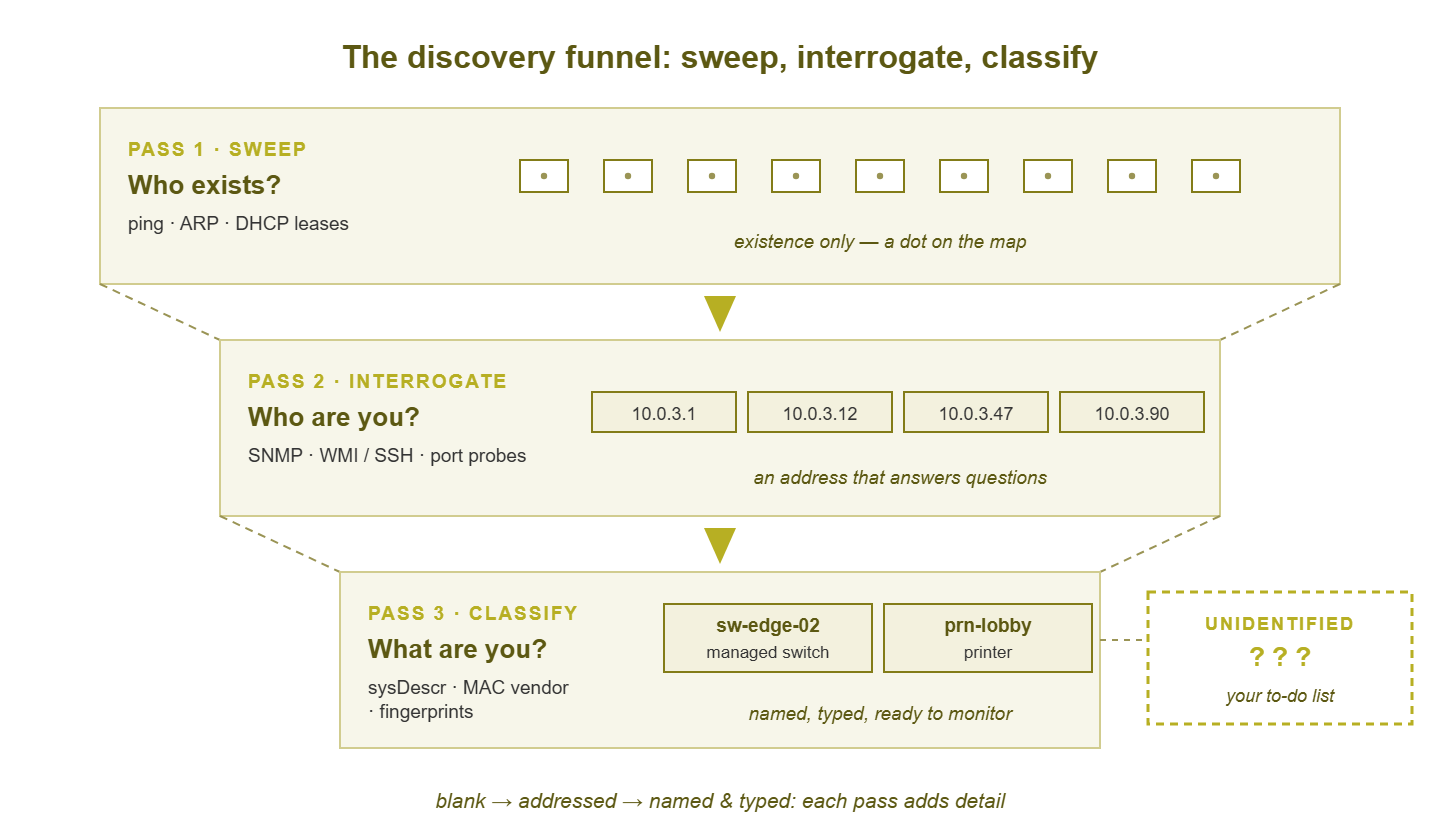
Figure 1: The discovery funnel. Each pass adds detail: sweep proves existence, interrogation extracts identity, classification assigns a type — and whatever resists all three lands in the unidentified queue.
This layering is why multi-method discovery beats any single method: the blind spots cover each other. The firewalled server that ignores pings is betrayed by the ARP cache. The cache's one-segment limit is crossed by sweeping every routed range. The static gear missing from DHCP is exactly what SNMP identifies best. The anonymous gadget with no SNMP still wears a vendor prefix. Knock out any one technique and predictable classes of device fall through the floor.
The second thing real engines layer is time. The standard pattern is deep-first, light-recurring. One thorough initial scan builds the baseline (wide port lists, full interrogation, run off-hours out of politeness). Then frequent lightweight passes — pings, ARP reads, lease diffs — cost almost nothing and answer one question: what changed? New answers become new-device findings; missing answers flag possible retirements. That recurring diff, and what to do with it, is the whole subject of keeping your inventory current.
Scoping: what discovery can and cannot see
A discovery engine only scans where you point it, and only finds what it can reach. Both halves of that sentence hide gaps. The subnet nobody wrote down is not merely unscanned — it is invisible in a way that looks exactly like "nothing there." And even within listed ranges, a firewall or access control list between scanner and segment silently blanks that segment. The scan completes, reports success, and shows emptiness. Discovery reach mirrors monitoring reach. The segment your scanner cannot see is the segment your monitoring cannot poll. So every dark spot on the discovery map is a preview of a future dashboard blind spot. Remote sites usually need a scanning vantage of their own on the far side of the WAN, a topic the monitoring architecture guides cover properly.
So treat your list of scan ranges as a claim to be audited, not a fact. Routing tables, firewall rules, and switch VLAN lists reveal the ranges you forgot. And since some devices evade even a perfectly scoped scan, pair automation with the manual hunt described in finding the devices nobody is managing.
Reading the results skeptically
The first discovery report of your career deserves a warning label, because two misreadings are near-universal. The first is treating the unidentified-device queue as noise to scroll past. It is the opposite: it is your to-do list. Every entry is a real thing on your real network that answered at least one question and refused the rest. So it is either a device you should be managing and are not, a device missing credentials, or a guest you did not invite. Working that queue down — walk the closet, check the port, look up the OUI, ask around — is some of the highest-value grunt work in IT.
The second misreading is trusting the device count. Engines must decide when two findings are the same device, and the evidence is genuinely ambiguous. A server with two network interfaces answers on two addresses with two MAC addresses — one machine, two entries, count inflated. This is the false merge problem in both directions. Fail to merge and one device appears twice; merge too eagerly and two devices collapse into one record. Engines deduplicate on overlapping evidence — a shared sysName, a serial number, an SNMP interface list that claims both MACs — and they are usually right. But "usually" is doing work in that sentence, so when a count matters, spot-check the multi-homed suspects: servers, firewalls, anything with a dedicated management port. The scrubbed, deduplicated result is what deserves promotion into your permanent records — and building that inventory is the next guide's whole subject.
The technique reference table
| Technique | What it finds | What it misses | Network cost |
|---|---|---|---|
| Ping sweep | Every address that answers ICMP; response times | Ping-blockers (host firewalls), sleeping devices, unreachable segments | Trivial; gentle on WANs; IDS may notice |
| ARP / neighbor cache | IP–MAC pairs of recent talkers on a segment, ping-blockers included | Anything beyond the local segment; silent devices (entries age out) | None — reads existing tables |
| Port probing | Open services; role clues; banners | Odd ports, source-restricted and firewalled services | Highest of the set; can trip IDS and fragile gear |
| SNMP (with WMI/SSH kin) | Name, model, location, uptime, full interface list — identity | Devices without the protocol enabled or without valid credentials | Light |
| LLDP / CDP harvest | Who connects to whom, port by port — the switch-fabric skeleton | Devices not announcing; links where the protocol is disabled | None — reads existing tables |
| DHCP lease table | Hostname, MAC, and IP of every address renter | Static-IP devices — typically your most important gear | None |
| OUI / fingerprinting | Vendor and best-guess type for otherwise silent devices | Certainty; randomized MACs; what is inside a VM | None — analysis of collected evidence |
Where to go next
You now know the whole trick. Existence comes from sweeps, caches, and leases; identity comes from SNMP and its credentialed kin. Classification comes from the accumulated evidence. A recurring light scan catches change. You also know the failure modes — the ping-blocker, the unscanned range, the double-counted server. That puts you ahead of plenty of people who have run discovery for years. Next steps: give the scanner the credentials that unlock identity, pour the findings into an inventory worth trusting, and let the results enroll themselves into monitoring. The rest of the Network Discovery & Asset Inventory guides take it from here.
Put this into practice with SysPeep Monitor
Everything in this guide is what SysPeep Monitor does when you point it at your address ranges. It sweeps for what exists, interrogates over SNMP and WMI for identity, and turns the results into a device-and-interface list ready for monitoring. The free trial installs on a Windows machine in minutes. Aim it at one subnet and compare what it finds against what you thought was there.
Download Free TrialLearn About SysPeep - All Rights Reserved.