
Writing a POC Test Plan Before Installing Anything
Most monitoring trials go like this. You download the installer on a Tuesday afternoon, point it at the nearest switch, and spend two weeks clicking on whatever looks interesting. The dashboards are handsome. The map animates. At the end you have a strong feeling about the tool and no evidence for it. You never wrote down what you were testing. You tested whatever the tool made easy, which is, not by coincidence, whatever the tool is good at. I ran my first evaluation exactly this way and recommended the product with the best map. I found out what it could not do in the second month of the licence.
A proof of concept (POC) is not a trial. A trial is a period of access: a licence key and a fortnight. A POC is an experiment. It has a fixed list of things you will try, on your own network. The meaning of "pass" is written down before you start. The difference between the two is a document, and this guide is about writing that document. It is shorter than you fear. It is also the one thing that turns "I liked it" into "it passed eleven of twelve tests, and here is the one it failed."
By the end you will be able to derive test cases from your requirements. You will be able to write scenarios drawn from your own history instead of a vendor's script. You will be able to set a timebox that actually ends and assign the three roles a POC needs. And you will be able to fill in a test-plan table you can hand to every candidate on the same day. Nothing in this guide requires you to have installed anything yet. That is rather the point.
In this guide
- Why the plan comes before the download
- Turning requirements into pass/fail and scored tests
- Scenarios drawn from real life
- The timebox, the environment, and the roles
- Agreeing the scoring method in advance
- The same plan for every candidate
- The test-plan template
- Where to go next
Why the plan comes before the download
Every monitoring tool has a happy path. The vendor's onboarding wizard, the getting-started guide, and the friendly engineer on the kickoff call all steer you down it. And rightly so: it is the fastest way to see the product working. But the happy path was designed by people who know which features look best. If you let it decide what you test, the POC becomes a guided tour, and every tour ends in the gift shop.
Writing the plan first flips the direction of steering. Instead of the tool showing you what it can do, you tell the tool what it must do and watch whether it can. The awkward device on the third floor, the alert storm from last month, the report your manager actually reads — these belong in the plan. That is precisely because no onboarding wizard would ever suggest them. A plan is also a defence against your own enthusiasm. Two weeks into a trial you will have opinions, formed by whatever was pleasant to click. The plan is the version of you that had not yet been charmed.
There is a second reason the plan has to exist before installation: fairness. If you are comparing two or three candidates, the only way to compare them honestly is to put each one through an identical set of tests. You cannot improvise identical tests. The moment you think of a new test while using candidate A, candidate B has either already finished or has not yet started. The comparison quietly bends. Writing every test down before the first installer runs is how you keep the lanes straight.
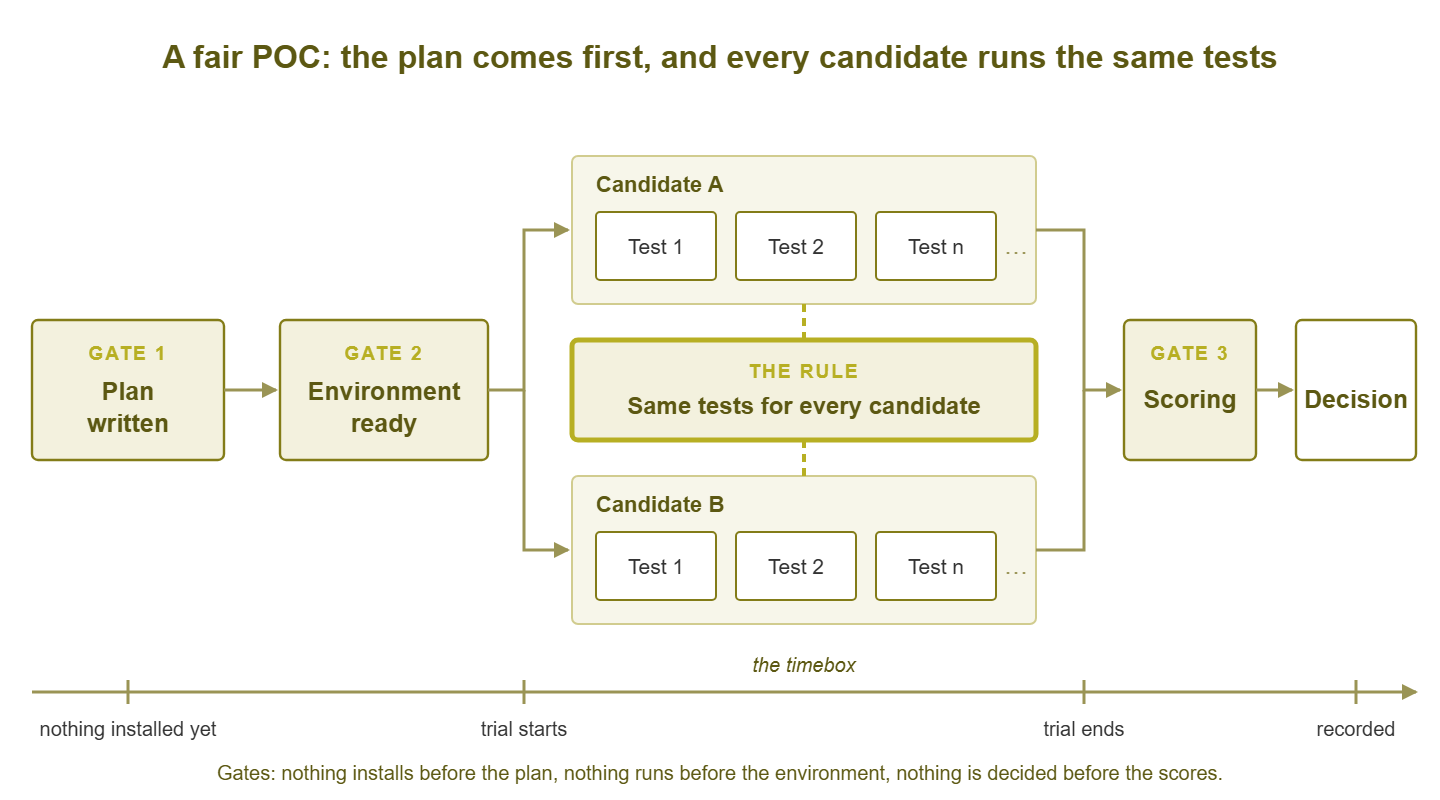
Figure 1: The gates of a fair POC. The plan exists before anything is installed, and the same test list feeds every candidate's lane.
Turning requirements into pass/fail and scored tests
A test plan is not written from scratch. It is derived from your requirements. These list what the tool must do, should do, and would be nice if it did. If you have not written that list yet, gathering requirements before any demos is the step that comes before this one. Assume for the rest of this guide that you have that list. Each item is tagged as a must-have, a should-have, or a nice-to-have. The conversion into tests follows one simple rule per tag.
Every must-have becomes a pass/fail test
A must-have is a requirement whose absence rules a tool out entirely. There is no partial credit for "must", so its test has exactly two outcomes. The trick is writing the pass condition tightly enough that two people watching the same screen would agree on the result. "Supports our firewall" is not a test. "Discovers the firewall, reads interface traffic on both WAN ports over SNMP, and shows a graph after fifteen minutes of polling" is a test. (SNMP, the Simple Network Management Protocol, is the standard way a monitoring tool asks a network device for its counters.) If you cannot write a pass condition that specific, the requirement itself is fuzzy. It is far cheaper to discover that now than during the POC.
Every should-have becomes a scored test
A should-have matters, but a tool that does it badly is not automatically out. These tests get a score on an agreed scale — commonly one to five — instead of a pass or fail. Again, precision is everything: write down what a one, a three, and a five look like for that test before anyone runs it. For a report test, a five might be "the report exists, runs on a schedule, and lands in a mailbox without anyone touching it". A three might be "the report exists but has to be run by hand". A one might be "the data is there but no report can be built from it." When the definitions exist in advance, scores stop being moods.
Nice-to-haves get noted, not tested
A nice-to-have earns a line in the plan so you remember to look. It does not earn a scenario, a timebox slot, or a weight that could tip the result. If two candidates finish level on everything that matters, nice-to-haves make a fine tiebreaker. Any larger role and they become demo glitter swaying a decision they should never have touched.
Scenarios drawn from real life
A requirement says what the tool must do. A scenario is the thing you actually do during the POC to find out. The best scenarios are not invented; they are remembered. Your network has a history of things going wrong, and every one of those is a ready-made test with a known correct answer. Here are five that belong in almost every plan.
Add your weirdest device
Every network has one. It might be the old uninterruptible power supply (UPS) that speaks a dialect of SNMP nobody else does. Or it might be the building controller with the undocumented management port, or the printer that answers every fifth poll. Adding it early shows how the tool behaves at the edge of its device knowledge. Does it fall back to basic checks gracefully, or show a blank page? Can you add a custom check for something it does not recognise, and how long does that take someone who has never used the product? Put the device's name in the plan, so every candidate meets the same monster.
Reproduce last month's outage
Pick a real incident from your recent past and stage it safely. Unplug the uplink to the test switch, stop a service on a lab server, or fill a volume with junk files. Then watch the tool. Did it notice within the time you would want to be told? Did it produce one alert, or one alert per affected thing below it? Did the alert say what was wrong in words a tired on-call person would understand? You know how the incident felt the first time. Now you get to see whether this tool would have made it feel shorter.
At Meridian Parts the plan listed "core switch down" as a scenario. Nobody ran it, because running it meant unplugging a switch in a lab the warehouse team also used. The candidate passed on the strength of alerts for things that had merely slowed down. Four months after the purchase order a real core switch failed. The tool sent two hundred and eleven alerts in ninety seconds. There was one for every device behind the switch and none for the switch. The review recorded that the scenario "had been planned". It had. It has since been run, on a Saturday, with the warehouse team's blessing and a labelled cable.
Tune the alert that spammed you
Somewhere in your inbox is an alert that fired forty times last quarter and mattered twice. Recreate it — a flapping interface, a CPU threshold set too tight. Then fix it inside the candidate. Raise the threshold, add a delay, require several consecutive failures, or make it depend on a parent device. The scenario tests two things at once: whether the tool has the mechanisms, and whether a junior admin can find them without a support ticket.
Back up and restore
Break the trial install on purpose. Take whatever the product calls a backup, delete the installation or roll the virtual machine back, and restore from what you saved. This proves the configuration you spent two weeks building is not trapped inside one box. Note how long it took and what was missing afterwards — historical data, user accounts, dashboards, alert rules. Missing pieces here are the ones you will miss again on the worst day of your working life.
Onboard a new site
If you have branch offices or will one day, pretend one just opened. Stand up a remote probe or collector on a segment the central server cannot reach directly. Discover the devices there and get their alerts flowing back. Even for a single-site organisation, this is a good proxy for "how hard is it to grow?" Every POC should answer that question before the purchase order does.
Tip: when you write a scenario, give it a name a colleague would recognise ("the Friday DNS thing") rather than a number. Names make the plan readable, make the results memorable, and remind everyone that these tests are your history, not a vendor's checklist.
The timebox, the environment, and the roles
The timebox
A POC without an end date is a hobby. Write the start and finish into the plan. Tell every vendor both dates. And treat the finish as a real deadline with a scoring meeting already in the calendar. For a small team evaluating a handful of tools, two to four weeks per candidate is a workable range. It is long enough to see polling settle, several days of alerts, and at least one weekend. It is short enough that people stay engaged and the day job survives. Longer trials do not produce better decisions. They produce forgotten trials, expired licences, and a vague sense of guilt.
Inside the box, rough out phases. Allow a couple of days to install and discover. Spend the bulk of the time running scenarios and living with the alerts. Reserve a final day or two for the backup test, the cleanup, and filling in results. Protect that final slice; otherwise the restore test is always the one that gets skipped.
The environment
The plan names where the POC runs: which server, which devices, which credentials, which alert mailbox. It should be the same environment for every candidate and it should look like your production network in miniature, awkward corners included. Building it well is its own subject. It is covered in building a fair POC environment. For the plan, it is enough to name the environment and to make "environment ready" a gate that no installer passes before. A lab that is still being built while candidate A polls it is a lab candidate B will never meet in the same state. Every result from that lab is a result for a slightly different network.
The roles
Three roles, which in a very small team may be three hats on one head, but should still be named separately in the plan.
- The owner keeps the plan, talks to the vendors, and protects the timebox. The owner makes sure results get written down the day they happen rather than reconstructed from memory at the end.
- The testers run scenarios and score them. Ideally they are the people who will use the tool in each role. Whoever holds the on-call phone scores alerting. Whoever staffs the help desk scores the everyday views. Involving the team in the verdict goes into who should evaluate what.
- The skeptic is one person whose job is to be unimpressed. They ask "did that actually pass, or did we want it to?" and "would this still work at twice the size?" A skeptic is not a cynic; they like the tool as much as anyone. They just refuse to round up.
Agreeing the scoring method in advance
The plan states, before the POC begins, exactly how the results will be turned into a decision. The method is simple and has two stages. First, the pass/fail tests act as gates: a candidate that fails any must-have test is out, whatever else it did well. Second, the surviving candidates are compared on their scored tests, each multiplied by a weight that reflects how much that requirement matters to you. The weights, the scale, and who scores what all go in the plan now, while nobody has a favourite. (Somebody has a favourite. Write the method down anyway.) If you want a fuller treatment of criteria families and weighting, the weighted scoring sheet is where that lives. The plan just needs to reference the sheet you have agreed to use.
Two details prevent the most common arguments. One: write down who scores each test. That way, a four on alerting is the on-call person's four, not a compromise among everyone who watched over their shoulder. Two: state that scores are recorded privately before any group discussion. That rule does more for fairness than any weighting formula. The first person to say "I gave it a four" out loud has just set everyone else's four. The guide to moving from POC to decision shows how the final tally works.
The same plan for every candidate
Fairness in a POC is not a feeling. It is a mechanical property: identical tests, run in the same environment, by the same people, within the same timebox, scored on the same scale. Any candidate that gets a different test list has been treated differently, whether the difference helps it or hurts it. The comparison is no longer between the tools. It is between the tests.
This is harder to keep to than it sounds, because the POC will teach you things. Halfway through candidate A you will realise the interface-error scenario should also check a specific counter, and you will want to add it. Do add it — for every candidate, going back to run it on any that have already finished. If that is impossible, the new test goes in an appendix marked "not applied equally" and is excluded from scoring. The plan is allowed to grow. It is not allowed to grow for one lane only.
A few more rules that keep the lanes straight, worth writing into the plan itself:
- A candidate might be unable to run a test because the feature does not exist or the vendor asks you to skip it. Record that test as a fail or a one. Do not leave it blank. A blank cell is a score in disguise.
- Vendor help is welcome, on the same terms for every candidate. If a vendor's engineer sets up discovery for you, note it; you have not yet learned whether you could have done it yourself.
- Run scenarios in the same order where order could matter: discovery first, then alerting, then backup and restore at the end.
- Freeze the environment between candidates. Do not add devices to the lab that an earlier candidate never met.
Candidates can run at the same time or one after another; both are fair as long as the tests match. Parallel saves calendar time and lets you compare alerts for the same real events. Sequential keeps polling load down and lets a small team concentrate. Neither should be confused with the longer exercise of parallel running during a migration. In that exercise, a chosen tool runs beside the old one until it proves parity. A POC is short, ends in a verdict, and does not need to match your old system alert for alert.
The test-plan template
Everything above lands in one table. Six columns are enough. They are the test, the requirement it proves, how to run it, the pass criteria or score definitions, the weight, and a result column. The result column stays empty until the POC runs. A dozen to twenty rows is realistic for a small team; if you have fifty, some are nice-to-haves in disguise. Here is a filled-in slice showing the level of detail that works.
| Test | Requirement | How to run | Pass criteria / score | Weight | Result |
|---|---|---|---|---|---|
| Discover the lab | Must: SNMP discovery of our device types | Point discovery at the lab subnet with the trial community; wait one hour | Pass: every device on the lab inventory found and classified | Gate | |
| The weird UPS | Must: custom checks for unrecognised devices | Add the UPS; if unrecognised, build a battery-runtime check by hand | Pass: runtime graph within one day, built without vendor help | Gate | |
| The Friday DNS thing | Must: one alert per root cause | Stop DNS on the lab server for ten minutes | Pass: one alert names DNS; downstream checks suppressed or grouped | Gate | |
| Quiet the flapper | Should: tune noisy alerts easily | Recreate the flapping port; suppress it with delay or dependency | 5: fixed in minutes by a junior; 3: fixed with the docs; 1: needs support | 4 | |
| Backup and restore | Should: config survives a rebuild | Back up, wipe the VM, restore | 5: everything back; 3: config back, history lost; 1: manual rebuild | 5 | |
| New site | Should: remote probe behind a firewall | Install a probe in the isolated segment; discover; alert back | 5: working same day; 3: needed vendor help; 1: not achievable | 3 | |
| Monthly uptime report | Should: scheduled reports by email | Build the report the manager reads; schedule it | 5: scheduled and delivered; 3: manual run; 1: cannot build | 2 | |
| Mobile view | Nice: usable on a phone | Open the console on a phone during an alert | Noted only; tiebreaker | 0 |
Above the table, the plan needs a short header. Keep it to a page, and keep it plain text so it can be pasted into an email to each vendor unchanged.
POC TEST PLAN — network monitoring tool selection

Candidates:   A, B, C  (identical plan for each)
Timebox:      three weeks per candidate, start and end dates fixed
Environment:  lab subnet 10.20.0.0/24, monitoring VM "mon-poc",
              trial SNMP community and read-only accounts only,
              alerts to mailbox poc-alerts@ and the #poc chat room
Owner:        (name)      keeps plan, timebox, results
Testers:      (names)     on-call / help desk / network / manager
Skeptic:      (name)      challenges every pass
Scoring:      gates first (any must-have fail = out), then weighted
              scores on the agreed sheet; scores recorded privately
              before discussion
Rules:        same tests, same order, same environment, same help
              for every candidate; new tests apply to all or none;
              untestable = fail, never blank
Decision:     scoring meeting on the day after the last timebox ends
That header, the table, and the scenario descriptions are the whole plan. Share it with the team and the vendors, and only then go looking for the download button.
Where to go next
A written plan gives the POC a shape. It has gates that nothing skips, scenarios drawn from your own history, a timebox with an end, and roles with names. It has a scoring method agreed while everyone is still neutral. It also gives you something to hold on to in week two, when the map is animating. The plan is the only thing in the room that still remembers what you came to find out. The next job is building the environment those tests run in. Then comes asking each vendor the honest questions the tests cannot answer. Finally, turn the scores into a recorded decision. The other guides in Running a Fair Proof-of-Concept walk through each of those in order.
Put this into practice with SysPeep Monitor
One of your candidates may be a Windows-hosted tool with automatic discovery and SNMP and WMI collection. In that case, the SysPeep Monitor free trial can take a lane in your POC alongside the others. Hold it to the same plan — same scenarios, same environment, same timebox — and let the results speak.
Download Free TrialLearn About SysPeep - All Rights Reserved.