
IDS vs. IPS in Plain Language
Somebody — an auditor, an insurer, a manager who read something on a plane — has asked whether your network has "intrusion detection." You have a firewall. You have antivirus on the endpoints. You have a vague sense that an IDS is a different thing, and that an IPS is a different thing again. You sense that people in security operations centers talk about both with a fluency you do not have yet. You would like to give an honest answer, and to know whether you actually need one.
The good news is that the core idea is simple, and the two acronyms differ by exactly one decision. Is the box allowed to stop traffic or only allowed to tell you about it? This guide explains what an intrusion detection system and an intrusion prevention system each do. It explains how they decide something is suspicious, where they physically sit, and what they realistically catch and miss. And because you are a small team, not a security operations center, it explains which one to start with. By the end you will be able to answer that question from the plane, and you will know what you are signing up for if the answer becomes "yes."
In this guide
- The smoke detector and the sprinkler
- How the box decides: signatures and anomalies
- Where the box sits: passive beside the path, or inline in it
- What a sensor catches
- What a sensor misses
- Detection vs. prevention: the comparison table
- A worked example: one event, seen both ways
- The honest starting recommendation for a small team
- Where to go next
The smoke detector and the sprinkler
Think about fire safety in an office. A smoke detector watches the air, and when it notices something wrong it makes a lot of noise. It never puts out a fire. It cannot; it has no water. What it does is tell a human, early, so the human can decide what to do. A sprinkler system is different: it is plumbed into the ceiling, and when its trigger fires it acts on its own, immediately, without asking anyone. It puts out fires. It also, occasionally, floods a server room because someone burned toast.
An intrusion detection system (IDS) is the smoke detector. It watches a copy of your network traffic, compares what it sees against what it knows to be suspicious, and raises an alert when something matches. It touches nothing. Traffic flows exactly as it would if the IDS did not exist. An intrusion prevention system (IPS) is the sprinkler. It sits in the traffic path, and every packet passes through it. When something matches it can drop that packet, reset the connection, or block the source. Same eyes, same brain, one extra ability: it can act.
That extra ability sounds like an obvious upgrade. But the toast problem is real. A smoke detector that goes off by mistake costs you a minute of annoyance. A sprinkler that goes off by mistake costs you a server room. Hold that thought; it drives most of the practical advice in this guide.
How the box decides: signatures and anomalies
Both need some way of deciding that a packet or connection is worth flagging. There are two broad approaches, and most real products mix them.
Signature-based detection
A signature (also called a rule) is a precise description of a known bad pattern. It specifies this protocol, this port, this specific sequence of bytes in the payload, and this suspicious combination of flags. The engine holds thousands of them and checks traffic against all of them, constantly. If you have ever used antivirus software, you already understand this model — signature-based detection is antivirus for packets. It is fast, it is precise about what it found, and every alert comes with a name that tells you roughly why it fired. Its weakness is baked into its definition: it can only find things that somebody has already seen, studied, and written a rule for. A brand-new attack, or a variant nobody has written a rule for yet, walks straight past.
Anomaly-based detection
The other approach does not look for known-bad patterns at all. It learns what "normal" looks like on your network — which hosts talk to which, how much, when, over what protocols. It raises a flag when something deviates from that picture. A file server that suddenly starts sending large volumes to an address it has never contacted is not matching any signature; it is simply behaving unusually. Anomaly detection can catch things no rule describes. The cost is being far less specific about what it found and far noisier while it is still learning your network. This guide stays focused on the signature side; the Traffic Anomaly Detection pillar covers the behavioral approach in depth.
One more piece of vocabulary. Modern engines do not just pattern-match raw bytes; they parse protocols. They understand that a stream is HTTP, or DNS, or a TLS handshake, and let rules refer to protocol fields by name. That is what makes a rule like "alert if a DNS query name is longer than this" possible, and it is also what makes engines hungry for CPU.
Where the box sits: passive beside the path, or inline in it
This is the decision that actually separates an IDS from an IPS, and the diagram shows it. In passive placement, the sensor is connected to a port that receives a copy of the traffic. That is a mirror port on a switch, or a dedicated network tap. The sensor simply listens. The mechanics of mirror ports and taps are covered in SPAN, Mirror Ports and Taps. The short version is that the switch is told to copy every packet crossing a port or VLAN onto the port where the sensor is plugged in. The sensor's capture interface usually has no IP address at all. It is a pair of ears with no mouth.
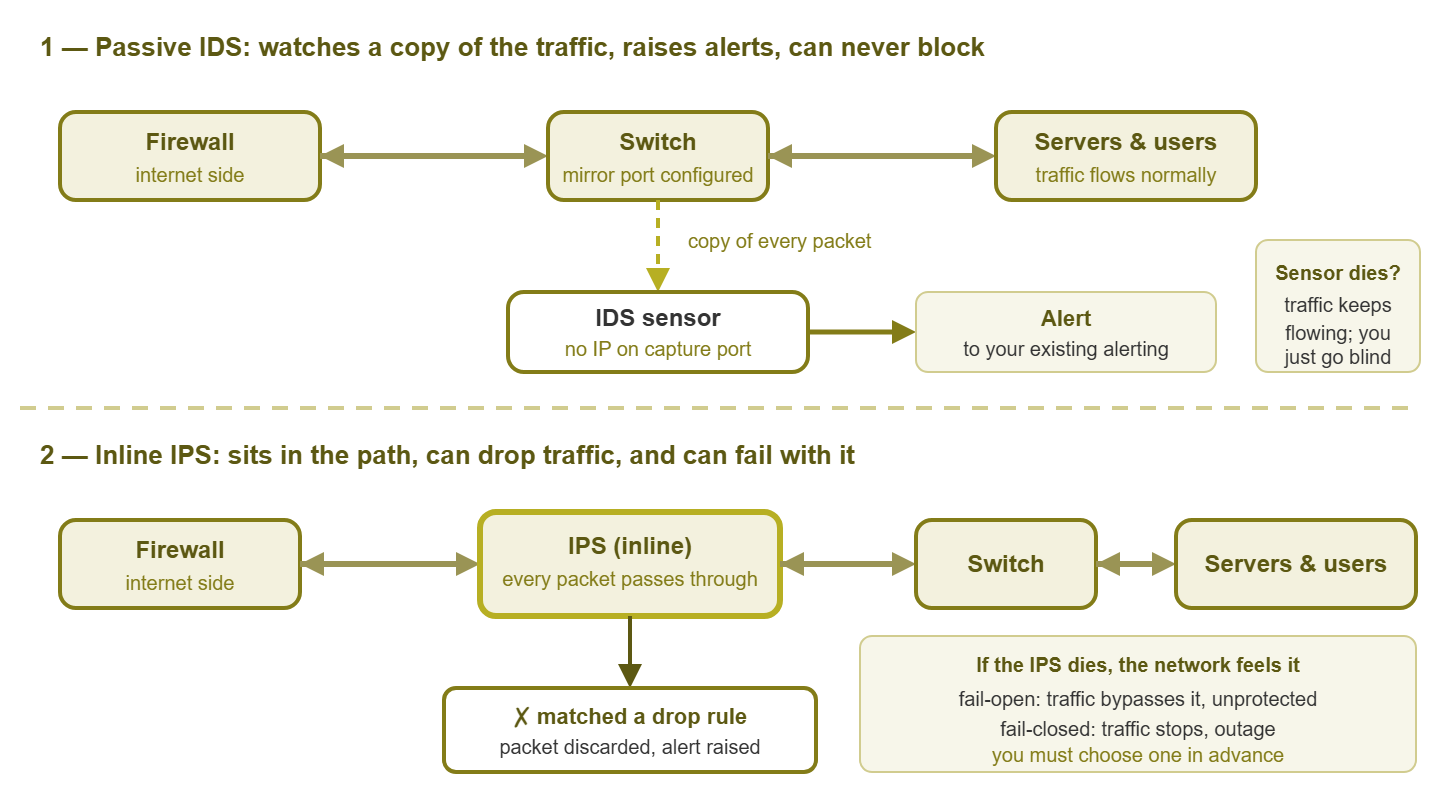
Figure 1: Passive detection watches a copy and can only alert. Inline prevention sits in the path, can drop traffic, and inherits the path's availability problem.
In inline placement, the sensor has two network interfaces bridged together. It sits physically between two parts of your network — typically between the firewall and the core switch. Every packet enters one interface, is inspected, and (if allowed) leaves the other. There is no copy; there is the traffic itself. That is what gives an IPS the power to drop things. And it is also what gives it the power to take your network down.
Consider what happens when an inline box dies. Its power supply fails, its kernel panics, its disk fills, someone reboots it for patching. Traffic cannot get from one interface to the other, because the software that forwarded it is gone. There are exactly two things the hardware can do, and you must choose in advance. Fail-open means a bypass relay physically connects the two ports when the box loses power or the software stops responding. Traffic then keeps flowing — uninspected and unprotected, but flowing. Fail-closed means the link simply goes dark until the box comes back. Neither is wrong. A small business whose entire operation runs through that link almost always prefers fail-open. That business needs to know that during any IPS outage it is relying on the firewall alone. What you cannot do is fail to decide, because then the hardware decides for you, and it usually decides "closed."
A passive IDS has no such problem. If it dies, traffic never notices. You lose visibility, which matters and should be monitored for, but nobody's email stops. That asymmetry is the biggest reason this guide's recommendation will be what it is.
What a sensor catches
A signature-based sensor on a well-placed mirror port earns its keep in four areas.
- Known malware traffic. Infected machines have to talk to something — a command server, a download site, a place to send what they stole. Rule writers study those conversations and publish signatures for them. When a workstation on your network starts making the characteristic check-in of a well-documented malware family, the sensor names it. This is often the first anyone hears about an infection that the endpoint antivirus missed or was disabled for.
- Policy violations. Cleartext protocols that should not be in use, file-sharing traffic on a network where it is forbidden, remote-access tools nobody approved, DNS going somewhere other than your resolvers. These are not attacks, but they are exactly the things you told the auditor do not happen, and the sensor will tell you when they do.
- Scanning. Something probing many ports on one host, or one port across many hosts, has a recognizable rhythm. A sensor sees it whether the scanner is an outside address that got past the edge, a contractor's laptop, or a compromised internal machine looking for its next victim. The internal scanning patterns guide walks through what that looks like and how to respond.
- Exploit patterns against your services. If you expose a web application, a VPN, or a mail server, attempts to exploit known weaknesses in them have known shapes. That might be a particular malformed header, or a login sequence matching a published technique. A sensor recognizes the attempt in flight, even when it fails, which tells you who is knocking and what they are trying.
Notice the theme: the sensor is strongest when the bad thing is well known and the traffic is readable. Both conditions matter, and both fail more often than the brochures admit.
What a sensor misses
Honesty about the gaps is what separates a useful sensor from a false sense of security, so here are the big ones.
Encrypted payloads. Most traffic today is encrypted end to end. A signature that needs to see inside an HTTP request cannot see inside an HTTPS request; the bytes it would match are scrambled. What the sensor can still see is the metadata around the encryption. That includes which addresses talked, on which ports, when, and for how long. It includes the unencrypted parts of the TLS handshake such as the server name requested. A surprising amount of detection lives in that metadata. But anything that depends on payload content is blind to encrypted sessions unless you deploy decryption. Decryption is a large project with its own privacy and complexity costs.
Novel attacks. By definition, a signature engine finds only what someone has already written a signature for. The first victims of any new technique get no alert. Rule sets catch up, often quickly, but there is always a window.
Anything not in the rules you actually loaded. Quieter and more common. Community rule sets are large, and most teams disable big chunks to reduce noise. Every disabled rule is a thing you have chosen not to see — a reasonable trade, but one to make consciously.
Traffic that never crosses the sensor. A mirror port on the core switch sees traffic that crosses the core. Two workstations on the same access switch talking directly never cross it. Virtual machines on the same host may never touch a physical switch at all. A sensor sees what it is placed to see, and no more.
The context to know whether it matters. Consider an alert that says "attempted exploit of a particular database server weakness, from an outside address, targeting host X". It is only interesting if host X runs that database. The sensor does not know what host X runs. You do, or your inventory does, and turning alerts into decisions is a human job — the subject of Triaging IDS Alerts Without a SOC.
Detection vs. prevention: the comparison table
| Question | IDS (detection, passive) | IPS (prevention, inline) |
|---|---|---|
| What it sees | A copy of traffic from a mirror port or tap | The traffic itself, passing through two bridged interfaces |
| What it can do on a match | Alert, log, record the packets | Alert, log, and also drop the packet, reset the session, or block the source |
| What happens if it dies | You lose visibility; traffic is unaffected | Traffic either bypasses it unprotected (fail-open) or stops (fail-closed) |
| Cost of a false positive | A wasted minute of your attention | A legitimate connection blocked — possibly a customer, a backup job, or the boss |
| Latency added to traffic | None | Some; every packet waits to be inspected |
| Hardware requirements | Must keep up with the mirrored traffic or drop packets silently | Must keep up with the traffic or slow the whole network |
| Change management | Rule updates can be tried freely; the worst case is noise | Rule updates can block production traffic; needs testing and a rollback plan |
| Skill needed to operate safely | Reading and triaging alerts | All of that, plus deep confidence in every rule set to drop mode |
| Where it belongs first | Any small team wanting network visibility | Teams that already run an IDS well and have specific, well-tested rules worth enforcing |
One row deserves a second look: the cost of a false positive. Every detection engine produces them; it is a property of the approach, not a defect of a product. On an IDS, a false positive is an alert you dismiss. On an IPS, it is a working thing that stops working, with no client-side error beyond "it just hangs." The troubleshooting session will not start at the IPS because nobody thinks of it. Many teams that deploy an IPS end up running most rules in alert-only mode anyway, which quietly turns it back into an IDS with a more fragile placement.
A worked example: one event, seen both ways
Let us make this concrete. Your office has a guest wireless network and a server VLAN. A visitor's laptop, infected with something ordinary, begins probing the server VLAN: a handful of common ports on every address in the range. Here is roughly what a passive IDS on the core switch's mirror port would emit, in the compact format most engines offer:
[1:9000101:2] SCAN Inbound probe to MySQL port 3306 [Priority: 2]
  {TCP} 10.50.0.117:49212 -> 10.10.0.21:3306

[1:9000102:2] SCAN Inbound probe to MSSQL port 1433 [Priority: 2]
  {TCP} 10.50.0.117:49213 -> 10.10.0.21:1433

[1:9000103:2] SCAN Inbound probe to PostgreSQL port 5432 [Priority: 2]
  {TCP} 10.50.0.117:49214 -> 10.10.0.21:5432
Read one line left to right. The bracketed numbers identify the rule that fired. The text is the rule's human name: a category (SCAN) and a description. The priority is the rule author's guess at severity. Then the protocol, the source address and port, and the destination address and port. Three alerts from the same source to the same target on three database ports, seconds apart, is the fingerprint of a scan. A dozen more lines would follow as the laptop moved to the next address.
With the IDS, here is your sequence:
- Notice. The alerts land in whatever you feed them into — ideally your existing alerting, not a separate console. You see a burst from one guest address.
- Confirm. Source is in the guest range, so it is a visitor device or a rogue. Target is the server VLAN. That should be blocked at the firewall between the two, so the first question is why it was not.
- Contain. Kick the device off the guest network, or block its address at the guest firewall.
- Fix the real problem. The guest-to-server rule on the firewall was wrong. Fix it. The scan was the symptom; the misconfiguration was the finding.
With an inline IPS in the guest-to-core path, the same rules in drop mode would have silently discarded those probes. That sounds better, and in this case it is. That is true only until you realize you would never have learned about the firewall misconfiguration, because the IPS covered for it. You would also have to be sure that an "inbound probe to a database port" rule never matches your own developers' laptops. Such a match is plausible enough to make you nervous.
Tip: the most valuable output of a first sensor is usually not the attack it catches. It is the list of things it reveals about your own network. That list includes the forgotten firewall rule, the printer talking to the internet, and the server still speaking a cleartext protocol you thought you had retired. Treat early alerts as an audit of yourself before you treat them as an alarm about others.
The honest starting recommendation for a small team
Start with a passive IDS. The reason is not that prevention is bad. A small team has three things in short supply: time, tolerance for outages, and confidence in a brand-new rule set. An inline IPS spends all three at once. A passive sensor spends only the first, on something that pays back: learning what actually crosses your network. The path that works, in order:
- One sensor, one mirror port, passive. Put it where it sees the most consequential traffic, which for most small networks is just inside the internet edge. Where Network Detection Fits in a Small Shop ranks the placement options.
- Open-source engine, community rules. The open-source detection engines tour explains the two families and what each gives you. You do not need to buy anything to find out whether this is useful to you.
- Alerts into the alerting you already read. A separate console that nobody opens is the number one way sensors die. Feed the output into the same place your monitoring alerts go.
- Triage and tune for a few months. Learn which rules matter here, disable the ones that cannot apply, and get the daily volume down to something a human reads.
- Only then consider prevention, and only for a small set of rules you have watched fire correctly for months. Consider it only on a box with a bypass relay, on a segment where a wrong block is survivable. Many teams never need this step. The firewall already prevents; the sensor's job is to see.
If you are tempted to skip straight to inline because it feels more protective, remember the sprinkler. It only feels more protective until the day it goes off during the quarterly close.
Where to go next
You now have the whole mental model. An IDS watches a copy of traffic and raises alerts. An IPS sits in the path and can also block, at the cost of inheriting the path's availability. Both decide using signatures (known patterns) and sometimes anomalies (deviations from normal). Both are strong against known, readable threats and weak against encrypted, novel, or off-path ones. For a small team, the right first move is passive detection, integrated into the alerts you already read, tuned patiently. The rest of the IDS/IPS for Generalists pillar takes you through placement, engine choice, and alert triage. It covers the maintenance habits that keep a sensor from being quietly abandoned a year after you set it up.
Put this into practice with SysPeep Monitor
A sensor tells you something suspicious crossed the wire. Your monitoring tells you what that host is, whether it is a server or a printer, and what it was doing before and after. SysPeep Monitor keeps that context ready on one Windows machine with a free trial. That includes discovered devices and interfaces, performance history, and alert rules designed to keep noise down.
Download Free TrialLearn About SysPeep - All Rights Reserved.