
Choosing What to Promise: Realistic Targets for Real Teams
The most expensive sentence in IT is said in a meeting, out loud. It comes from someone who wanted to sound confident: "we can do four nines on that." It takes two seconds to say and about a year to walk back. The number sounded good. Nobody worked out what it meant in minutes. And the team that had to deliver it was not in the room.
A target is the number inside an internal service level agreement. It says how available a service will be or how fast you will respond. It is not chosen. It is derived. It comes from how many people you have, when they work, what the equipment can survive, and what your suppliers have promised you. Start from those and the number picks itself. Start from what sounds good and the number picks you.
By the end of this guide you will be able to work out what a team of your size can honestly cover. You will be able to tell a promise from an estimate and set different targets for different services without apologising. You will be able to use your own monitoring history to find the number. And you will be able to say no to the four promises that sink every agreement that contains them. There is a worksheet at the end to fill in.
In this guide
- Start from the constraints, not the wish
- Business hours versus around the clock
- Response is a promise; resolution is an estimate
- Different tiers, different promises
- Let last year pick the number
- The dependency problem
- The promises you should refuse
- The target-setting worksheet
- A short story from Northgate Retail
- Checklist before you commit
- Where to go next
Start from the constraints, not the wish
Four things limit any promise, and they stack. At the bottom is what your vendors promise you: the ISP, the cloud email provider, the electricity company. Above that is what the architecture can deliver. A single server with no failover cannot be patched without an outage, whatever anyone signs. Above that is what the team can cover: the hours people are actually at a desk or on a phone. The promise sits on top of all three, and it cannot be wider than any layer beneath it.
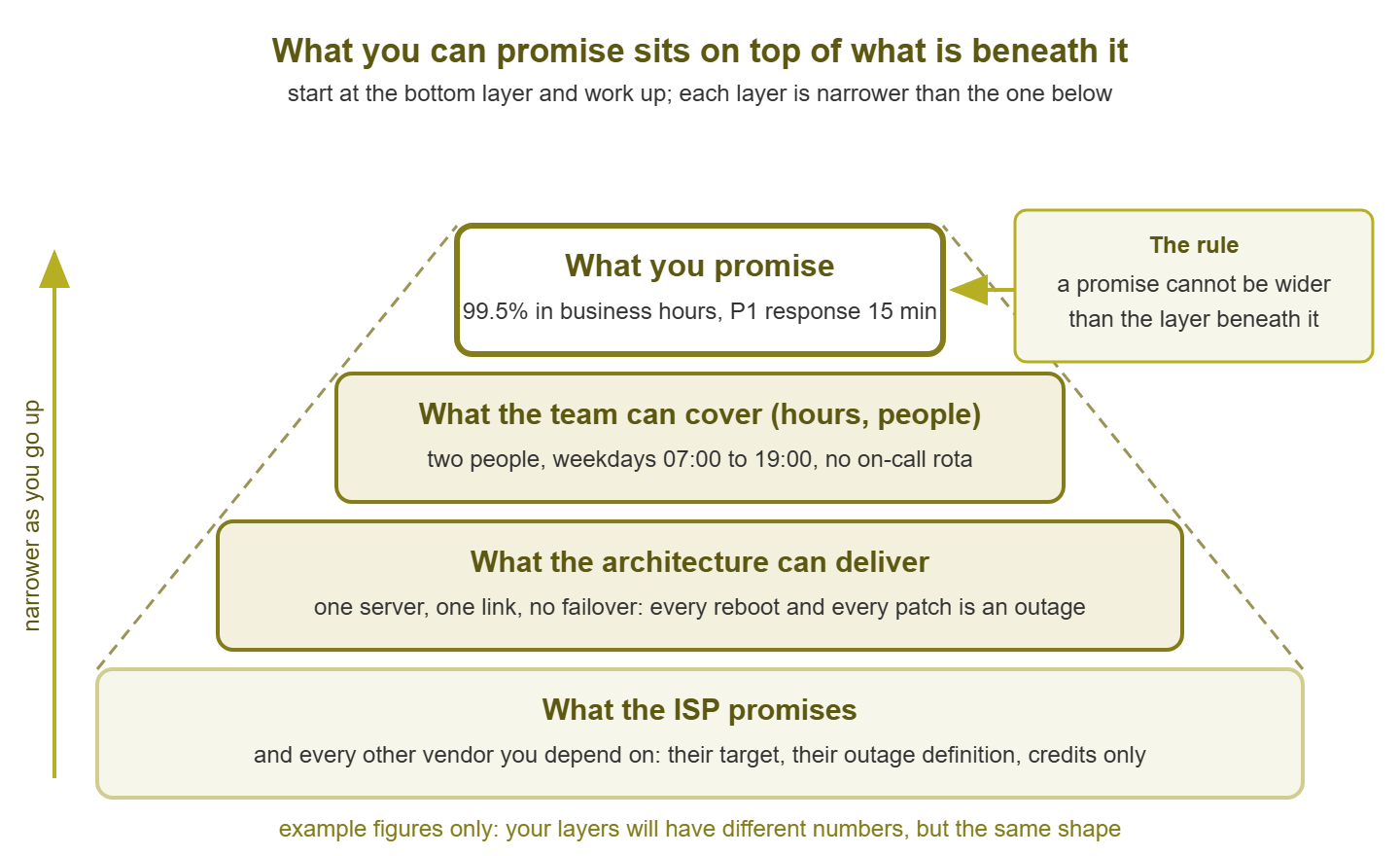
Figure 1: A promise is built from the bottom up. Every layer narrows the one above it. The target at the top can only be as wide as the narrowest layer beneath.
The order of work follows the picture: bottom first. Write down what each vendor has actually promised, in their words and with their exclusions. Then write down what the architecture can do. Record how long a reboot takes, whether there is a spare, and whether the backup link is real. Then write down the hours a human can honestly answer. Only then write a target, and make it fit inside all three.
Why not start from what the business needs? Because need sets the direction and constraints set the number. If the warehouse needs the scanners around the clock and the team goes home at six, that gap is real and important. But the gap is a budget request, not a target. Writing the need into the agreement as though it were already true does not close the gap. It hides it until the first night-time outage.
Business hours versus around the clock
Business hours means the promise applies only during the stated working day, say 07:00 to 19:00 on weekdays. Around the clock means every hour of every day counts, including the ones when the building is dark. The words look similar in a document and describe completely different jobs, so do the arithmetic before choosing either.
Here is what a two-person team can honestly cover. A week has 168 hours. Two people at 40 hours each give 80 hours of presence, but they overlap, because people like to work the same days. Stagger them and you can stretch a desk to roughly 55 or 60 hours a week: one early shift, one late, across five days. That is a business-hours promise, comfortably. It is nowhere near 168.
Covering the other 108 hours means someone is on call every one of them. With two people that is 54 hours a week each, on top of the day job, forever. Written down like that it stops sounding like a service level and starts sounding like a staffing complaint, which is what it is. The rules for doing on-call without wrecking the people doing it are in humane on-call. The summary is that around-the-clock coverage is a budget line, not a favour.
The honest wording for a small team has two parts. Inside business hours, a response promise with a number. Outside them, one of two things: "best effort, reviewed next business morning," or, if the team has agreed to it and is paid for it, "priority-one only, by phone, response within one hour." Write whichever one is true. A promise of around-the-clock coverage from a team that goes home is not ambitious. It is fiction with a signature.
Response is a promise; resolution is an estimate
Response time is how long until a named person has acknowledged the problem and started on it. Resolution time is how long until the service works again. Both are measured from the moment the problem was reported or detected. The timestamps that mark each one — detection, acknowledgement, repair — are laid out in the incident clock. What matters here is who controls each number.
You control response. Whether someone picks up a ticket in fifteen minutes is a question of staffing and attention, and both are yours to manage. You can promise it, measure it, and be held to it without any unfairness.
You do not control resolution. A failed disk in a mirrored pair is fixed in thirty minutes. A failed motherboard with the replacement two days away is fixed in two days. Both are the same priority, both got the same fifteen-minute response, and only one of them was in your hands. A resolution promise turns every unlucky hardware failure into a broken agreement.
So write resolution as an estimate with history behind it. "We aim to resolve priority-two tickets within one business day, and did so for most of them last year" is a sentence you can defend. "All priority-two tickets will be resolved within one business day" is a sentence that one broken part disproves. The table below shows how the two columns should look side by side.
| Priority | Definition | Response (promise) | Resolution (estimate) | Typical example |
|---|---|---|---|---|
| P1 | A tier-one service is down for many users, no workaround | 15 minutes, business hours | 4 hours | ERP unreachable from every desk |
| P2 | A service is degraded, or down for a few users | 1 hour, business hours | 1 business day | Shared printer queue stuck for one floor |
| P3 | Single user affected, workaround exists | 1 business day | 3 business days | One laptop cannot map a drive |
| P4 | Request, not a fault | 2 business days | 5 business days | New starter account |
Different tiers, different promises
Not every service deserves the same promise, and pretending otherwise breaks the agreement in one of two ways. One way is to promise the top tier's number to everything and miss on the services you never built to hit it. The other is to promise the bottom tier's number to everything. Then the services that matter get no real commitment. Sorting services into tiers of importance is covered in criticality tiers. The SLA is where each tier gets its own sentence.
A workable pattern has three levels. Tier one gets an availability target and a response promise, both measured monthly. Tier two gets an availability figure that is reported but held to a looser number, plus a response promise. Tier three gets a response promise only. Its availability is not measured, because the effort of measuring it would exceed the value of knowing it. (Somebody will ask why the intranet is tier three. The answer is that nobody noticed the last time it was down for a day, and that is data.)
Tiering also lets hours differ. The order-picking system can carry a longer service day than the payroll application, because the warehouse starts before the office does. One agreement, three tiers, each with its own hours and its own number, is still a one-page document. It is just a more honest one.
Let last year pick the number
The best predictor of what a service will achieve next year is what it achieved last year. Your monitoring system already holds that: every service check writes a status history, and a status history summed by month is an availability figure. Before you write any target, pull that figure for every service you intend to promise. If it exists, it is the strongest evidence in the room.
The query below is illustrative. Table and column names differ from product to product. Some products expose this as a built-in availability report rather than a table you query directly. Check the product documentation for yours. The shape is what matters: for each service, over the last twelve months, what share of checks succeeded?
-- Illustrative only: names vary by product; check the documentation.
-- Assumes a status_history table with one row per check result.
SELECT service_name,
       COUNT(*)                                            AS checks,
       SUM(CASE WHEN status = 'UP' THEN 1 ELSE 0 END)       AS up_checks,
       ROUND(100.0 * SUM(CASE WHEN status = 'UP' THEN 1 ELSE 0 END)
             / COUNT(*), 2)                                AS achieved_pct
FROM   status_history
WHERE  checked_at >= DATE_SUB(CURRENT_DATE, INTERVAL 12 MONTH)
GROUP  BY service_name
ORDER  BY achieved_pct;
Then promise slightly less than you achieved. Last year is one sample, and it contained no fire, no flood, and no week when both of you had the same cold. If the file server achieved 99.7%, promise 99.5%. If it achieved 98.9%, do not promise 99.5% because the meeting would like it. In that case, promise 98.5% and put the gap on the list of things to fix. A target you have already beaten once is a target you will probably beat again. That is the whole trick.
If there is no history, do not promise yet. Measure for three months, look at the numbers, then write the target. Three months of real data is worth more than any number anyone could guess. The business will wait for a promise that is going to be kept. A target with no history behind it is a guess with a signature.
The dependency problem
Your promise cannot exceed your suppliers'. If the ISP promises 99.9% on the internet link and defines an outage as starting only when you have opened a ticket, your own internet availability promise has to sit under that. In that case, it must sit under it by more than it looks, because their exclusions are broader than yours. How to read what a vendor has actually committed to is in understanding vendor SLAs. Bring the answer to the worksheet.
The arithmetic makes the point better than the argument. When a service depends on several parts in a chain, its availability is roughly the product of theirs. That is because any one part failing takes the service down. A cloud application at 99.9% reached over a link at 99.5% through a firewall at 99.9% gives:
0.999 × 0.995 × 0.999 = 0.993  (about 99.3%)

Around the clock, 30-day month: 43,200 × (1 − 0.993) = about 302 minutes
Business hours, 22 × 10 h:     13,200 × (1 − 0.993) = about 92 minutes
So the honest promise for that application is under 99.3%, however good the application itself is. You have two ways to handle a dependency you do not control. Exclude it, so the target covers only your part and the report names theirs separately. That is honest but makes the number mean less to users. Or fold it in, so the target is lower but describes what people actually experience. Either is fine. Ignoring it is not.
The promises you should refuse
Refuse "no unplanned outages." Zero is not a target; it is a wish with the word "no" in front of it. It will be missed in the first month. After that the document is dead, because a promise that has already been broken cannot be reported against with a straight face. Offer a number instead, and offer to make the number smaller each year.
Refuse "all tickets resolved within four hours." Resolution is not in your control, and "all" means a single delayed spare part breaks the agreement. Offer a response promise with a resolution estimate, and offer to report the share of tickets that met the estimate.
Refuse "around the clock" from a team that goes home. Offer business hours with a real response time, plus a written statement of what happens outside them. If the business genuinely needs the night covered, the answer is a rota. A rota is a cost, and costs are for the person with the budget to decide.
Refuse 99.99% for anything that runs on one machine. Four nines around the clock is about four minutes a month, which a single patch reboot spends in full. Offer 99.5% and a list of what 99.99% would cost. That means a second machine, a way to fail over between them, and a monitoring dependency that knows about both.
The way to refuse any of these is the same. Do not say no. Say "here is the number we can hit today, and here is what the number you asked for would cost." One of those two answers will be chosen. Both of them are honest, which is the only property the agreement needs to survive its first year.
Tip: when someone proposes a target in a meeting, ask for five minutes and convert it into minutes per month on the whiteboard. Most unrealistic promises die at the whiteboard. The rest die in the first report, which is a worse place for them to die.
The target-setting worksheet
Fill in one row per service before writing the agreement. The last column is the important one. It names the layer from the diagram that limits the target. So when someone asks for a higher number, the thing that would have to change is already written down.
| Service | Tier | Hours | Availability target | Response target by priority | Resolution estimate | Constraint that limits it |
|---|---|---|---|---|---|---|
| ERP (erp.example.com) | 1 | Mon–Fri 06:00–20:00 | 99.5% | P1 15 min / P2 1 h | P1 4 h / P2 1 day | Single application server; patch reboot each month |
| Email (cloud provider) | 1 | Mon–Fri 07:00–19:00 | 99.0% (provider excluded) | P1 15 min / P2 1 h | P1 4 h / P2 1 day | Provider target and ISP link |
| Internet access | 1 | Mon–Fri 07:00–19:00 | 99.0% | P1 15 min | Depends on ISP | ISP promises 99.9% with credit only; no second link |
| File server (files.example.com) | 2 | Mon–Fri 07:00–19:00 | 99.0% | P2 1 h / P3 1 day | P2 1 day | Two-person team; no cover after 19:00 |
| Intranet | 3 | Business hours | Not measured | P3 1 day | 3 days | Low impact; not worth the measurement |
| <service> | <1/2/3> | <days, start–end> | <xx.x% or not measured> | <per priority> | <per priority> | <vendor / architecture / team> |
A short story from Northgate Retail
Northgate Retail's operations director asked, in a planning meeting, what availability IT could offer on the point-of-sale system. The IT manager said "four nines" because the finance director had just said it about the bank. Nobody converted it into minutes. Nobody mentioned that the point-of-sale server was one machine in a cupboard with a monthly patch reboot. The first monthly report showed 99.86%, a miss. And the second showed 99.91%, also a miss. By the third month the report was being described in the meeting as "IT's problem." It took a printed sheet showing four minutes a month against a twelve-minute reboot to get the target changed to 99.5%. The same server then met that target for the rest of the year without anyone touching it. The IT manager now brings a calculator to planning meetings. He describes it as "a precaution."
Checklist before you commit
Go through the list with the worksheet filled in. Every "no" is a target that needs to change before it goes in the agreement.
- You have written down, in their own words, what each vendor you depend on has promised, including their outage definition.
- You know how long a reboot takes for every tier-one service and whether there is a spare.
- The hours in each row are hours a human on your team can actually answer.
- Every response target is a promise you control; every resolution figure is worded as an estimate.
- Every availability target has been converted into minutes per month for its own hours.
- For every service with monitoring history, the target is at or below what was achieved last year.
- For every service without history, the target is "measure for three months first."
- No service depending on a vendor is promised a higher number than the vendor promises you.
- No row says "no outages," "all tickets," "around the clock" without a rota, or 99.99% on a single machine.
- Every row names the constraint that limits it.
- The business sponsor has seen the worksheet, not just the agreement.
Where to go next
You now have a way to turn a wish into a number and to say why the number is what it is. That is most of the argument you will ever need to have about targets. If you are setting the uptime figure alone, internal uptime targets covers picking a percentage you can hit. This guide adds the hours, the response promises, and the tiers around it. The parts of the document that surround the number are in what an internal SLA is. The proof that you hit it comes from measuring SLA compliance from monitoring data. The conversation when you do not is in when you miss the SLA. The rest of Defining and Tracking Internal SLAs takes it from there.
Put this into practice with SysPeep Monitor
Picking a target starts with knowing what you actually achieved. The monitoring software behind this site keeps status history and availability reports for every service check in one web console. And its dependency rules mean an ISP outage shows up as one cause rather than fifty separate failures. The free trial runs on a single Windows machine.
Download Free TrialLearn About SysPeep - All Rights Reserved.