
Devices You Can't Manage: Monitoring the Unmanageable
There is a device on your network that you cannot log into. It might be the thermostat on the second floor, the badge reader at the loading dock, or the sign in the lobby. It might be a vending machine that phones home, or a sensor a contractor fitted and never mentioned again. It has no password you know, no agent you can install, and firmware you are not allowed to touch. It does a job somebody cares about, so when it breaks, the ticket comes to you.
Every standard monitoring technique assumes the device will cooperate. SNMP (Simple Network Management Protocol, the question-and-answer language most network gear speaks) needs the device to answer questions. WMI (Windows Management Instrumentation, the equivalent for Windows machines) and agents need an operating system you can reach. These devices refuse all of it. I once spent an afternoon hunting for a hidden login on a lobby sign before I accepted that the vendor had sealed the box. The seal was not coming off.
A sealed box still casts shadows. It draws power, holds a switch port, renews an IP address, and sends traffic. Every one of those things is observable from equipment you do control. This guide walks through the five outside-in signals that tell you whether an unmanageable device is alive, present, and behaving. It also covers the inventory discipline that makes any of it possible. By the end you will be able to monitor a device you have never logged into — honestly, and with clear eyes about the limits.
In this guide
- What "unmanageable" actually means
- Signal 1: reachability probes
- Signal 2: what your switch knows
- Signal 3: power draw as a heartbeat
- Signal 4: the DHCP roll call
- Signal 5: traffic patterns
- Inventory first, segmentation early
- The assembled toolkit
- What outside-in cannot tell you
What "unmanageable" actually means
An unmanageable device is opaque for several reasons at once, and the reasons shape what you can do about it. Usually it has most of these traits: the vendor never published credentials, or the "admin" account belongs to the vendor's cloud and not to you. There is no SNMP service, or there is one but it is undocumented and answers nothing useful. There is no way to install software on it, and attempting to would void a warranty or a support contract. Its firmware updates arrive on the vendor's schedule, not yours. Sometimes the device is technically manageable but contractually off-limits — the elevator controller works fine, but the maintenance agreement says only the vendor touches it.
The instinct to fight this — to find the hidden login, to demand credentials — is occasionally worth a polite email to the vendor. But mostly it is wasted effort, and there is a better mental model. Think of the device as a patient who cannot speak. A doctor with a silent patient does not give up; they read pulse, temperature, and breathing — external signs that reflect internal state. Your silent device has exactly five vital signs you can read from the outside. You can see whether it answers on the network and what its switch port reports. You can see how much power it draws, whether it keeps renewing its address, and what its traffic looks like. None of them tells you what is happening inside the box. Together, they tell you nearly everything you need for the questions that actually reach your ticket queue: is it there, is it alive, and is it acting normal?
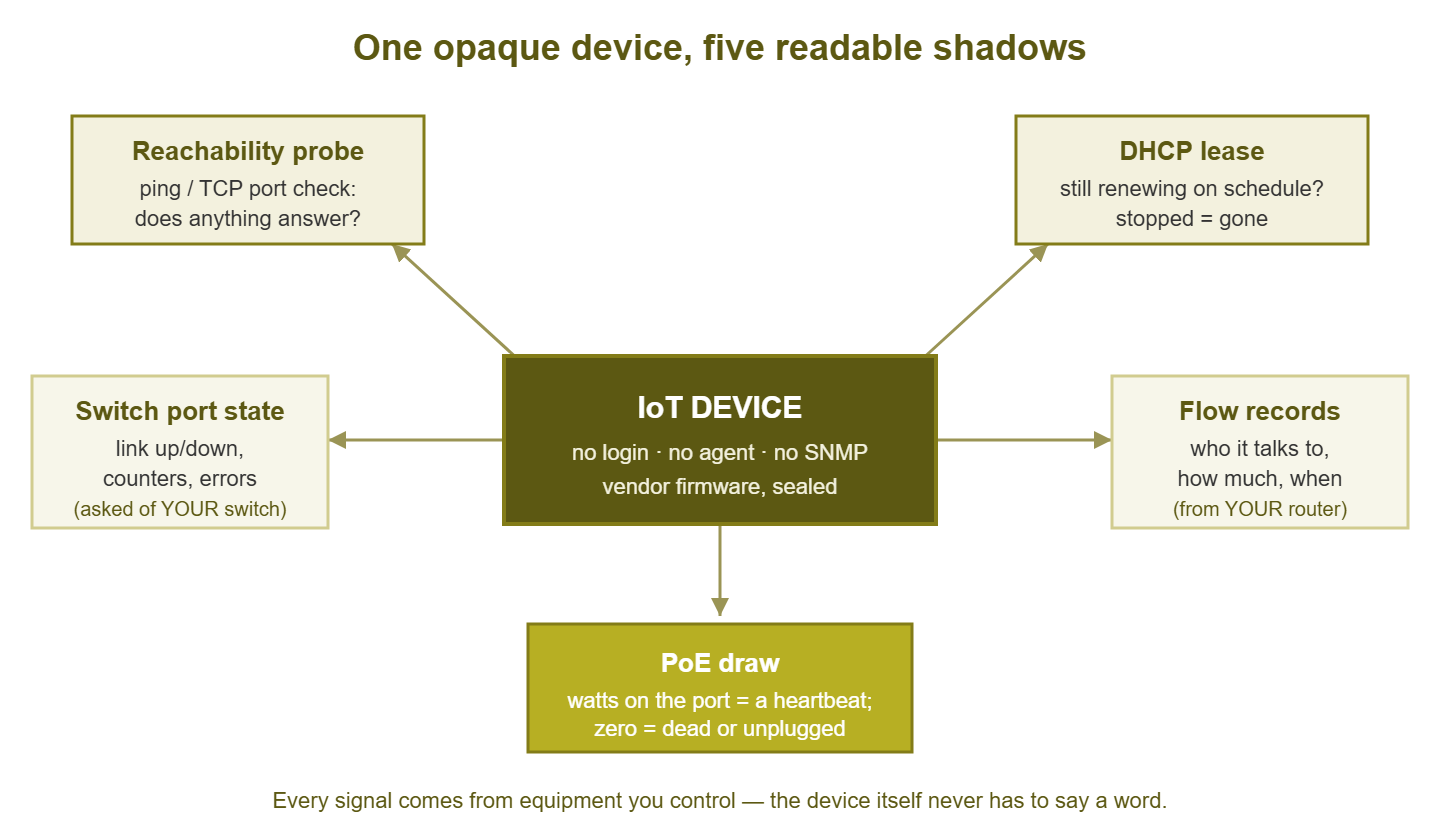
Figure 1: You never see inside the box. You read the five shadows it casts on equipment you do control.
Signal 1: reachability probes
The simplest question comes first: does the device answer when spoken to? A ping is a tiny "are you there?" message that most networked devices answer automatically. A ping check every minute or two is the cheapest liveness signal that exists. If the thermostat answered pings for months and stopped an hour ago, something changed, and you knew before anyone walked past it.
Two caveats make this signal weaker for IoT gear than for servers. First, some devices simply do not answer pings. The vendor disabled it, or the device sleeps aggressively to save power and wakes only when it has something to say. Test before you trust: ping the device by hand a few times across a day before you build an alert on it. A sign that sleeps at six every evening will otherwise be reported dead at six every evening, and mourned by nobody. Second, a ping answer proves the network stack is alive, not that the device is doing its job. A camera can answer pings with a failed image sensor; a door controller can answer pings while refusing every badge.
You can often do slightly better than ping with a TCP port check. Many sealed devices expose something — a web page used for initial setup, a video stream port, a control port for the vendor's own app. A port check tries to open a connection to a specific numbered door (a port) and reports whether anything answered. You do not need credentials for this; you are only knocking, not entering. "Port answers" is a meaningfully stronger claim than "ping answers," because it means the actual service process is at least accepting connections. Where a device offers a port, check the port; keep the ping as a fallback for devices that offer nothing at all.
Signal 2: what your switch knows
The device will not speak SNMP — but the switch it plugs into almost certainly will. And the switch sees everything the device does at the network's front door. This is the single most underused trick in IoT monitoring: monitor your own equipment about their equipment. For each port feeding an unmanageable device, your switch can report whether the link is up or down and how fast it negotiated. It can also report how many bytes are flowing in each direction and how many errors the port is counting.
Each of those answers a real question. Link state tells you about physical presence. If the port went down, the device lost power, lost its cable, or died. Those are all things worth knowing within minutes, not weeks. Traffic counters give you a crude activity pulse. A camera that normally pushes a steady stream and suddenly sends nothing is telling you something, even though the camera itself said nothing. Error counters catch the in-between failures. A damaged cable or corroded jack shows up as a slowly rising error count while the link stays "up." Users experience that as a device that mysteriously works on some days.
A port-status view for a row of IoT ports looks something like this, and every column comes from the switch, not the devices:
port  device (from inventory)   link   PoE draw   in rate     out rate    errors
14    lobby-sign-01             up     8.1 W      0.1 Mbps    2.4 Mbps    0
15    thermostat-2f-east        up     3.9 W      2 kbps      1 kbps      0
16    badge-reader-dock         up     4.2 W      3 kbps      2 kbps      412 (rising)
17    camera-parking-ne         down   0.0 W      -           -           -
Port 17 is a dead camera announcing itself through the switch. Port 16 is a badge reader with a cable problem announcing itself the same way. Neither device said a word. One habit makes this signal dramatically more useful: give every switch port a description that names the device plugged into it. Every port. Yes, the one feeding the fridge. An alert that says "port 17 down" starts an investigation; an alert that says "camera-parking-ne down" starts a fix.
Signal 3: power draw as a heartbeat
Many IoT and building devices are powered over the network cable itself using PoE (Power over Ethernet) — cameras, phones, access points, badge readers, sensors. When they are, your switch is not just their network connection; it is their power company. And like any power company, it meters usage: PoE-capable switches report the wattage each port is delivering, usually over the same SNMP you already use to read port status.
That wattage is a heartbeat. A camera drawing its usual handful of watts is running. The same port at zero watts means the device is gone or dead, even if nobody has noticed the missing footage yet. A device drawing noticeably more than usual can be an early warning too — some devices ramp power when a heater kicks in or a component starts failing. You do not need precision here; you need "roughly its normal draw" versus "zero" versus "weird." As liveness signals go, power draw is beautifully hard to fake: a hung device might still answer pings, but a dead one does not keep pulling watts.
Power over Ethernet also introduces a shared dependency worth respecting. Every powered device on a switch draws from one finite power budget. When that budget runs out, the switch starts refusing or shedding ports. That looks exactly like random devices dying. (It is not random. It only feels that way.) Monitoring the budget itself is its own topic, covered properly in PoE power budgets. For this guide, the takeaway is simpler: per-port PoE draw is a free liveness metric for every powered device that will never speak to you.
Signal 4: the DHCP roll call
Nearly every unmanageable device gets its IP address from DHCP — the service that hands out addresses to devices that join the network. A DHCP address is not a gift; it is a lease, borrowed for a set period and renewed on a schedule. That renewal schedule is a roll call. A device that keeps renewing its lease is present and at least alive enough to speak. A device that stops renewing has left the network — powered off, disconnected, or dead — and the DHCP server noticed even though nobody else did.
This makes your DHCP server a presence detector for exactly the population you cannot monitor any other way. Reviewing lease activity answers questions the devices never will: Is the sensor fleet all still checking in? Did something new join the IoT segment last night? Did the sign in the lobby quietly vanish over the weekend? Reading lease patterns properly — what normal churn looks like and which changes mean trouble — is its own skill, and lease churn analysis covers it in depth.
One practical refinement: for devices you monitor by address, use DHCP reservations. A reservation is an instruction to the DHCP server that a specific device, identified by its hardware address, always receives the same IP. Without a reservation, a device can reboot into a different address. In that case, your carefully configured ping check spends the next month monitoring an empty spot, or worse, whatever device inherited the old address. Reservations cost nothing and make every other signal in this guide point at the right target.
At Tollgate Foods the cold-store door controller was monitored by a ping check on its address, with no reservation behind it. A power cut rebooted the controller into a new address, and the old one was handed to a contractor's laptop the next morning. The laptop went home at six. So for three weeks the door controller was reported down every evening and up again every morning. The ticket log described this as "intermittent". When the real controller failed on a Tuesday, nobody was told, because the check was still pinging the laptop, and the laptop was fine. The reservation took four minutes to add.
Signal 5: traffic patterns
The four signals so far answer "is it there and alive?" The fifth answers a subtler question: "is it acting normal?" Your routers and many switches can export flow data — summaries of every conversation crossing them, recording who talked to whom, on which ports, and how much. Think of it as an itemized phone bill for the network. It shows not the content of the calls, but every number dialed and every minute used.
For a device you cannot inspect, its phone bill is the closest thing you will get to its diary. Most IoT devices are creatures of extreme habit. A thermostat exchanges a trickle with one vendor cloud service. A camera streams steadily to one recorder. A badge controller talks to one server on one port. That habit is a baseline, and deviations from it are the interesting part. A deviation might be a new destination that was never on the bill before, or a volume jump with no explanation. It might be a quiet device suddenly knocking on doors all over your network. Those deviations are how compromised or malfunctioning IoT announces itself. And they deserve their own guide: finding IoT that talks too much builds the per-device-class baselines and the response workflow on top of this signal.
Even without full flow export, you get a coarse version of this signal free from Signal 2: per-port traffic counters on the switch. Counters cannot tell you who the device talked to, only how much it talked. But "how much" alone catches a surprising share of misbehavior, because volume changes are the loudest symptom most failures and infections have.
Inventory first, segmentation early
All five signals share an embarrassing prerequisite: you have to know the device exists. Unmanageable devices are precisely the ones that arrive without telling you. They are installed by a contractor, plugged in by facilities, or handed over in a box by someone. That person was told it "just needs to be on the network". You cannot ping a camera you do not know about, and you certainly cannot label its switch port. The discovery habit is the foundation underneath everything in this guide. It means regularly sweeping the network for devices and reconciling what you find against what you expected. The guide to building a device inventory walks through doing it properly.
For each unmanageable device, the inventory entry earns its keep with a few extra fields the usual asset list forgets. Record physical location (you will eventually have to go look at it) and switch and port (so Signal 2 has a target). Include whether it is PoE-powered (Signal 3) and its hardware address and reservation (Signal 4). Record who owns it and which vendor to call. Ten minutes of recording at install time saves an hour of detective work per incident, forever.
Segmentation belongs in the same breath. Unmanaged devices should live on their own network segment, both to contain them and to make their traffic visible as a group. The strategy for that, and for monitoring guest and IoT networks generally, is covered in monitoring guest and IoT networks. Everything in this guide works better once the unmanageable population has its own well-lit room.
The assembled toolkit
Here is the whole outside-in toolkit in one view — what each signal costs, what it proves, and where it lies to you:
| Signal | Where it comes from | What it proves | What it cannot prove |
|---|---|---|---|
| Reachability (ping) | Your monitoring system | Network stack is alive | The device is doing its job |
| Port check (TCP) | Your monitoring system | A service is accepting connections | The service works correctly |
| Switch port state | Your switch, via SNMP | Physical link and activity; cable health | Anything above the cable |
| PoE draw | Your switch, via SNMP | The device is powered and drawing normally | What the electronics are doing with the power |
| DHCP lease renewal | Your DHCP server | Presence; the device keeps checking in | Health between renewals |
| Flow / traffic patterns | Router or switch export | Who it talks to and how much; behavior changes | What the traffic means internally |
And here is the rollout, per device, as a checklist you can actually follow:
- 1. Inventory it. Name, location, owner, vendor, switch and port, hardware address. No entry, no monitoring.
- 2. Reserve its address. A DHCP reservation so every check below points at the right device tomorrow.
- 3. Probe it. Test whether it answers ping and whether it exposes any TCP port; configure a check on the strongest thing it answers.
- 4. Label and watch its port. Set the switch-port description to the device name; monitor link state, traffic counters, and errors on that port.
- 5. Watch its power. If it is PoE-powered, record its normal draw and alert on zero.
- 6. Note its habits. Record what it normally talks to and roughly how much, from flow data or port counters, so "weird" is detectable later.
Tip: resist the urge to alert on all six signals per device — that way lies six alarms for one unplugged cable. Pick the strongest liveness signal the device offers as the alerting check (port check beats ping; PoE draw beats both for powered devices). Keep the rest as corroborating evidence you consult when that one fires. One alert, five witnesses.
What outside-in cannot tell you
Be honest with yourself and your colleagues about what you have built here, because the gap between "monitored" and "understood" is where trust gets lost. Outside-in monitoring observes symptoms, not internals. You will know the camera is powered, linked, present, and streaming its usual volume. None of that proves the lens is in focus or the recorder is keeping the footage. You will know the sensor renews its lease on schedule — and not whether its readings are drifting. Internal storage filling up, firmware slowly corrupting, a stuck process the watchdog keeps half-alive: all invisible from outside until they change something you can see.
Say it plainly in your documentation and to whoever owns each device: "we monitor that it is up and behaving normally on the network; we cannot see inside it." That sentence does three jobs. It sets expectations before an incident instead of during one. It gives the device's owner a reason to keep their own vendor-side checks. Many vendor clouds will happily email the owner when their box reports trouble. Use that; it is the only inside view anyone has. And that documented sentence turns every "why didn't monitoring catch this?" conversation from an ambush into a two-line answer you wrote months earlier. Outside-in is not an apology — five reliable external signals beat zero internal ones every single day. But it is a boundary, and boundaries stated early are boundaries respected.
Where to go next
You now have the pattern for every sealed box you will ever inherit. Inventory it, reserve it, probe it. Watch its port and its power. Learn its habits. Say honestly what that does and does not cover. None of it needs a password. The seal stays on, and it turns out you never needed it off. The rest of IoT, Cameras & Building Systems applies this pattern to the specific fleets that cause the most tickets: cameras and their recorders, HVAC and access control, and vendor appliances you did not choose.
Put this into practice with SysPeep Monitor
Most of the outside-in toolkit is things your existing gear already knows — somebody just has to ask. SysPeep Monitor auto-discovers the devices on your network. It pings the ones that will never talk. And it reads your switches over SNMP for port state, traffic, and errors. It then alerts you when a signal disappears. The free trial installs on any Windows machine in minutes.
Download Free TrialLearn About SysPeep - All Rights Reserved.