
Why (and When) Alerts Should Become Tickets
The file server's disk hit 92% on Tuesday. The monitoring system sent an email, the email went to the team, and now it is Friday. Somebody asks the only question that matters. That somebody might be a manager, an auditor, or your own tired brain at the end of a long week: "Is anyone actually working on that?" Did anyone look? Who? What did they do? The monitoring system knows the disk is still at 92%. It has no idea whether a human being is dealing with it.
That gap is what a ticket fills. An alert is a machine noticing a problem. A ticket is a person owning it. They are related. They are not the same thing. Most of the pain I have seen when a team "connects monitoring to the help desk" comes from treating them as if they were. Feed every alert into the queue and you get a pile nobody reads. Feed none in and you get heroic admins fixing things from their inbox with no record that anything happened. I have run both kinds of queue. The quiet one was not the better one.
This guide draws the line between the two. You will learn what a ticket is that an alert is not. You will learn which alerts deserve to become tickets and which ones must never make the trip. You will also learn how to write a filtering rule your team can apply even if your "ticketing system" is currently a shared mailbox. By the end you should be able to fill in a one-page decision table for your own network.
In this guide
- An alert and a ticket are different things
- What deserves a ticket
- What does not
- The queue as the record of work
- The two anti-patterns
- The decision table
- The small-team version
- A worked example: one night in the queue
- Where to go next
An alert and a ticket are different things
An alert is a signal. A monitoring system polls a device and compares what it sees against a threshold or an expected state. When the comparison fails it emits a message: this interface is down, this disk is full, this service stopped answering. An alert describes the world right now. It is produced by a machine, costs nothing, and can disappear by itself the moment the condition goes away. It has no owner. It does not know whether anyone has read it, and it does not care. A smoke detector is an alert: it shrieks while there is smoke and goes quiet when there is not. It will never tell you who went to check the toaster.
A ticket is a unit of work. It exists so that a piece of work can be tracked from "somebody should deal with this" to "somebody did." Three properties make it different from an alert. It has an owner: a named person or a group who is responsible for it right now. It has a history: every note, every hand-off, every change of state, each with a timestamp and a name attached. And it has a closure: at some point a human declares it finished and says why. Think of the work order clipped to a car in a repair shop. The car's warning light is the alert; the clipboard is the ticket.
Service-management vocabulary gives these units a few useful names, and you will meet them in any help-desk tool. An incident is an unplanned interruption or degradation of a service: the file server is down, the branch link is slow. A problem is the underlying cause behind one or more incidents: the file server keeps going down because its RAID controller is dying. A change is a planned modification: replacing that controller on Saturday. You do not need a framework to use these words. They describe three kinds of work. The distinction matters when you decide what monitoring should be allowed to create.
Alerts are cheap and disposable. Tickets are expensive, because every single one demands that a human open it, read it, decide something, and eventually close it. A bridge between monitoring and ticketing is therefore not a pipe. It is a filter, and its whole job is to be selective. A pipe is easier to build, which is why so many people build one.
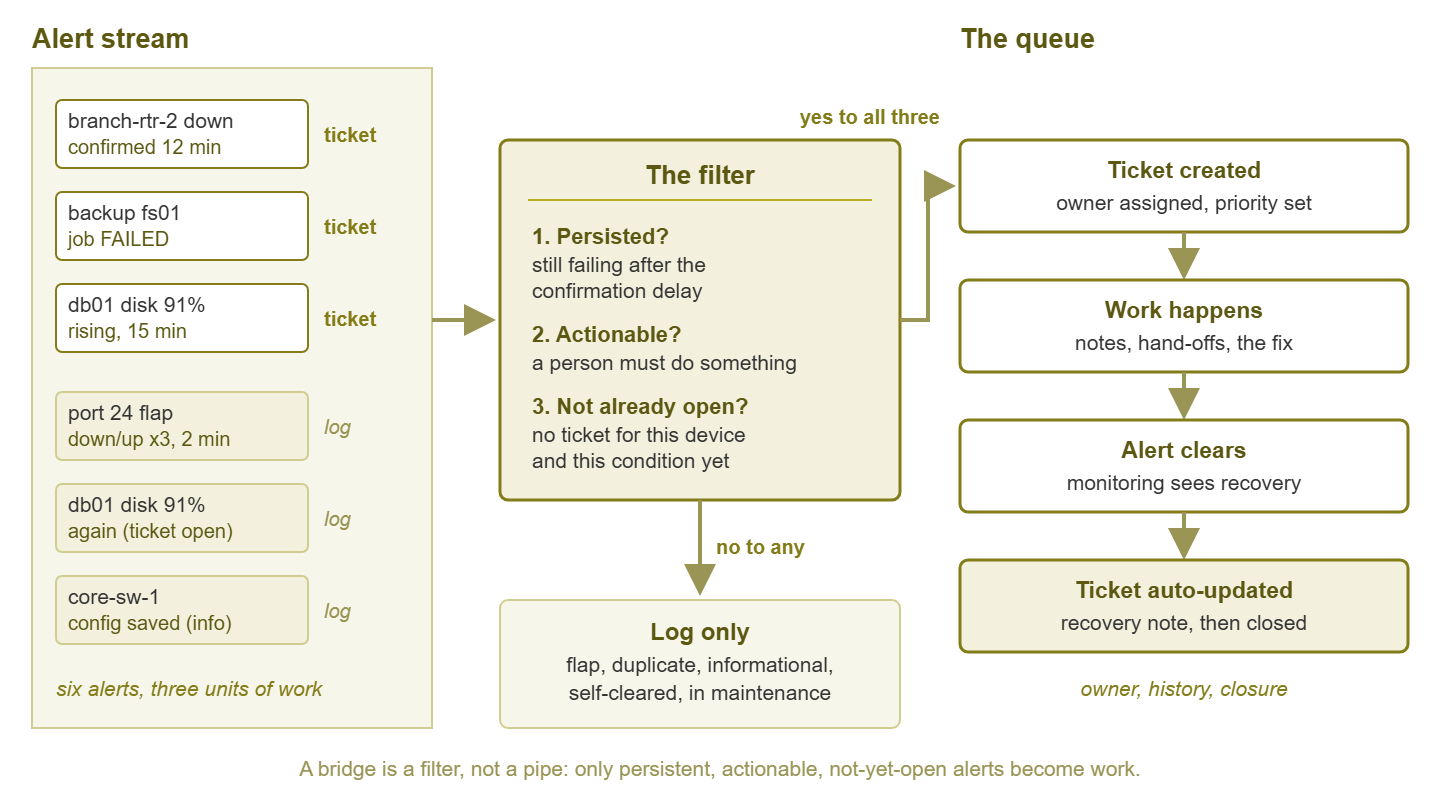
Figure 1: The bridge is a filter, not a pipe. Only alerts that persist, need hands, and are not already being worked become tickets; the rest are logged.
What deserves a ticket
Four kinds of alert earn their place in the queue. If an alert fits none of them, it should probably stay an alert.
A persistent failure that needs hands
Something is broken. It is not going to fix itself. A person must go and do something: replace a failed disk, call the ISP, restart a service and then find out why it stopped. This is the classic incident ticket. The key word is persistent. A failure that has been confirmed for several minutes and is still failing has proven it is real. A failure that appeared and vanished within one polling cycle has proven nothing yet.
Anything that needs a record
Some failures matter less for the work they create than for the paper trail. A service level agreement (SLA) is a formal promise about availability or response time, whether to a customer or to your own management. If you have one, you will one day need to prove that a specific outage was noticed within a specific number of minutes. In that case, you will also need to prove that it was resolved within a specific number of hours. Auditors ask similar questions about backup failures and security-relevant events. Those timestamps must live somewhere a human touched, not just in a monitoring log that will be rotated away. A ticket is that somewhere.
A recurring problem that needs root-cause work
This is where the problem ticket earns its keep. When the same access switch reboots every Sunday night, each reboot is an incident and each incident can be closed as "it came back." But the pattern is a separate piece of work: somebody needs to spend an afternoon finding out why. That investigation is the problem ticket. It stays open across many incidents. It collects the evidence from each of them. It is closed only when the cause is found and fixed. Without a problem ticket, recurring failures get fixed forty times and solved never.
Anything that crosses a team boundary
When the fix belongs to someone else, the ticket is the hand-off document. That someone might be facilities for the overheating closet, the carrier for the dead circuit, or a vendor for the firmware bug. The ticket records what you asked for, when, and what they said. Hand-offs done by phone call evaporate; hand-offs done by ticket survive the weekend.
What does not
The list of alerts that must not become tickets is at least as important, because every item on it is a way to bury the queue.
- Flaps. An interface bouncing down and up every few seconds, a host that misses one ping and answers the next. By the time a human opens the ticket the condition has cleared. If the bridge creates one ticket per bounce you will have forty auto-created, auto-closed tickets before breakfast. Flapping is a real fault worth investigating, but it is one problem, not forty incidents.
- Informational events. "Backup completed." "Device rebooted as scheduled." "Configuration saved." These are good to know and terrible to ticket. They belong in a log or a daily digest, where you can look at them when you want to.
- Alerts that clear themselves in minutes. A CPU spike during the nightly backup, a burst of packet loss while a laptop roams between access points. A short confirmation delay — wait a few minutes before deciding the alert is real — keeps these out of the queue entirely. The sibling guide on auto-creating tickets explains how to set it.
- Duplicates of an open ticket. The second, third, and fiftieth alert about the same device and the same condition. The open ticket should receive a note, not a sibling; updating tickets when alerts change covers how.
- Alerts nobody would act on. A warning about a thing nobody will ever change is not an alert; it is a habit. If it should not exist as an alert, it certainly should not exist as a ticket. The test for whether an alert is actionable at all is laid out in the anatomy of a good alert.
None of these are "unimportant." Flapping matters. Informational events matter. They simply are not units of work, and the queue is for work. It will accept anything else you give it, gratefully, forever.
The queue as the record of work
Once the alerts that matter reliably become tickets, the queue becomes the answer to questions the monitoring system cannot answer. What broke this month? Who fixed it? How long did each fix take? What is still open, and who is sitting on it? The monitoring history tells you when things were down. The queue tells you what humans did about it. You need both, and they are not interchangeable.
This is also where your operational metrics come from. These include time to acknowledge, time to resolve, and how often a "fixed" ticket gets reopened. They also include which device generates the most work. Every one of those is computed from ticket timestamps and fields, not from alert logs. Turning those numbers into something a manager can read is covered in reporting incident metrics. The point here is that the numbers do not exist unless the tickets do.
There is a quieter benefit too. Monitoring dashboards are what you look at. The queue is what your manager looks at. Infrastructure work is invisible when it goes well. Nobody notices the outage that did not happen. The ticket record is often the only evidence that the quiet weeks were quiet because of effort rather than luck. A closed ticket is evidence. A quiet week is an absence, and you cannot staple an absence to a report.
The two anti-patterns
Nearly every failed monitoring-to-ticketing project falls into one of two ditches on opposite sides of the road.
Every alert becomes a ticket
This is the landfill. Someone flips the switch. Every alert the monitoring system emits starts flowing into the queue. Within a week there are hundreds of auto-created tickets: flaps, informational events, the same disk warning repeated every polling cycle. Nobody can find the real work. Technicians learn to bulk-select and bulk-close anything created by "monitoring," and one afternoon a genuine outage gets bulk-closed along with the noise. The integration is switched off, and the story becomes "we tried that and it was a disaster." It was not the idea that failed. It was the absence of a filter.
No alert ever becomes a ticket
This is the invisible ditch, and it is more common. Alerts go to one admin's inbox. That admin fixes things, quickly and well, and nobody writes anything down. Then the admin goes on holiday and nobody is handling the alerts at all. Then the same server fails for the fifth time in three months and nobody notices it is the fifth time. That is because there is no queue to search. Then someone asks for SLA evidence and there is none. Nothing dramatic ever breaks. The organisation just never learns anything from its own failures.
At Tollgate Foods the alerts went to one administrator's inbox for four years. He restarted the warehouse scanner server every few weeks, from his phone, and he was very good at it. When he left, his replacement asked for the incident history and was given a mailbox with eleven thousand messages in it. The server failed again in her second week. The ticket she opened was the first written record of a fault that had been happening since before she was hired. The handover notes described the server as "generally fine".
The road between the ditches is a written rule, short enough to fit on one page. It says which alerts cross over and which do not.
The decision table
The alert types in this starting table are deliberately ordinary, and the decisions are the ones most teams converge on. Adjust the rows to your network, but keep the third column: the why is what lets you defend the rule later.
| Alert type | Ticket? | Why |
|---|---|---|
| Device down, confirmed for several minutes, nothing upstream is down | Yes — incident | Needs hands; needs a record |
| Device down because its upstream switch or router is down | No — note on the parent's ticket | One incident, many symptoms |
| Disk over threshold and still climbing | Yes — incident, low priority | Will not self-clear; fix it before it is a crisis |
| Disk over threshold, back under within minutes | No — log only | Transient; a temp file came and went |
| Interface flapping for a few minutes | No — log only | Noise until it persists |
| Interface flapping for an hour | Yes — problem | A sustained flap is a fault worth root-causing |
| Backup job failed | Yes — incident | Needs hands; audit record |
| Backup job succeeded | No — log or digest | Informational |
| UPS switched to battery | Yes — incident, high priority | Needs hands now; facilities needs the record |
| Certificate expires in 30 days | Yes — a task or change, not an incident | Planned work with a deadline |
| Third alert on a device that already has an open ticket | No — append a note | Duplicate of open work |
| Same failure for the fifth time this quarter | Yes — problem | Root-cause work, separate from the fixes |
| Event during a maintenance window | No | Expected; suppression should hide it anyway |
The "upstream is down" row depends on your monitoring system understanding that a branch router's failure explains the silence of every device behind it. That dependency thinking is what turns forty symptom alerts into one incident. And the "maintenance window" row is a reminder that the bridge should sit downstream of your suppression rules. That way, planned work never generates tickets at all.
Tip: when you cannot decide whether an alert type deserves a ticket, ask what a technician would do on opening it. If the honest answer is "read it, shrug, and close it," the answer is no. If the answer is "go and do something, then write down what I did," the answer is yes.
The small-team version
If you are the only IT person in the building, you may be thinking that none of this applies because you do not have a ticketing system. You do not need one. You need a queue, and a queue is a discipline, not a product. (A product can come later. It will arrive with a steering committee.)
A shared mailbox with folders and a few rules is a perfectly respectable queue. Set up a rule that moves any alert email whose subject contains your critical marker into a "Needs work" folder. Set up another that moves recovery emails into a "Recovered" folder. When you deal with something, reply to the thread with one line saying what you did and drag it to "Done." The person who replied is the owner, the thread is the history, and the "Done" folder is the closure. That is a ticket. A spreadsheet with columns for date, device, what happened, who, and what fixed it works just as well. Some very competent teams have run on nothing else for years.
The minimum viable queue has five parts. If yours has all five, you have tickets, whatever the tool is called:
- One place. Work that needs doing lives in one location, not scattered across inboxes and sticky notes.
- An owner. Every item names who is dealing with it, even if the name is always yours.
- A state. At minimum: new, being worked, done.
- A closing note. One sentence on what the cause was and what fixed it. This is the sentence future-you will search for.
- A weekly look. Ten minutes to scan what is still open and what got closed. Without this the queue quietly becomes a landfill again.
Start this way and, when you eventually adopt a proper ticketing tool, you will already know your rule for what goes in. That is because you will have been applying it by hand.
A worked example: one night in the queue
This is the filter applied to a plausible night on a small network with two remote sites. Six alerts arrive; three tickets result.
01:12  core-sw-1 port 24: down / up / down / up (three bounces in two minutes)
       -> LOG ONLY. Flap. The confirmation delay never elapsed. Recorded for the
          weekly review; if it keeps happening, it becomes a problem ticket.

02:30  Backup job "fs01-nightly" reported FAILED
       -> TICKET #4471, incident, medium priority, assigned to the backup group.
          Needs hands; also the audit record that someone was told.

03:05  branch-rtr-2 unreachable; 4 devices behind it also unreachable
       -> TICKET #4472, incident, high priority, for the router only.
          Dependency rules hold the four child alerts; they appear as a note
          on #4472 rather than as four more tickets.

03:31  branch-rtr-2 reachable again (carrier outage, 26 minutes)
       -> #4472 gets a recovery note with the timestamp. It stays open for
          human confirmation because a 26-minute site outage deserves a look.

04:00  core-sw-1: "configuration saved"
       -> LOG ONLY. Informational.

06:30  db01 volume D: 91% used, above threshold for 15 minutes and rising
       -> TICKET #4473, incident, low priority. Persistent; will not fix itself.
Read the outcome the way your manager will read it in the morning. The queue shows a backup failure that needs attention and a site outage that already recovered and needs a one-line cause. It also shows a disk that needs cleaning up this week. It does not show three bounces of a switch port or a configuration save. The person on the morning shift can open the queue and start working, rather than start sorting. That is the entire goal.
Where to go next
An alert says something is wrong now. A ticket says someone owns making it right. Connecting the two well means building a filter: persistent, actionable, not already open. Write the rule down, even if it lives on a single page and your queue is a mailbox. The next time someone asks whether anyone is working on that disk, the answer should be a ticket number and not a shrug. The rest of Connecting Monitoring to Ticketing and ITSM turns the rule into machinery. It covers how to create tickets automatically without flooding the queue and how to update and close them when alerts clear. It also covers how to make tickets arrive with the context a technician needs and how to keep the whole thing honest. If your team also coordinates through a chat channel, the guides under ChatOps for monitoring cover that side of the conversation.
Put this into practice with SysPeep Monitor
A ticket is only as good as the alert that created it. SysPeep Monitor's thresholds, dependency rules, and alert rules are designed to keep alert noise down. That way, what reaches your queue is a confirmed problem rather than a flap. SysPeep Monitor's email and other notifications are the kind of feed an email-to-ticket rule can consume. SysPeep Monitor does not run a help desk. It gives one a trustworthy signal. Check the product documentation for its notification options, and try the free trial on any Windows machine.
Download Free TrialLearn About SysPeep - All Rights Reserved.