
When the Notification Itself Fails: Delivery Reliability
There is a category of monitoring failure that hurts more than all the others. The check ran. The threshold tripped. The alert fired. The monitoring system did every single thing it was built to do. And no human found out, because the notification died somewhere on its way to a pocket. The dashboard glowed red in an empty room. Every experienced admin has one of these stories, and they all end with the same sentence: "the logs show the alert was sent." I have said it myself, to a room, and watched it not help.
"Sent" is doing a lot of dishonest work in that sentence. Between your monitoring system and a human's attention lies a chain of relays, providers, credentials, and radio waves. That chain is the last mile of monitoring, and most shops have never once looked at it as a thing that can fail. It can. Worse, it fails silently: a broken notification path produces no alert, because producing alerts is exactly the part that is broken.
This guide treats the notification path as what it is: infrastructure that deserves the same engineering as anything else you monitor. You will trace every link in each delivery path. You will find the places where an alert secretly depends on the very thing it reports on. You will build an independent second path without enterprise spending. And you will set up the one ritual that catches silent failures: testing delivery end to end, on a schedule, forever.
In this guide
- The irony catalog: alerts that could not deliver themselves
- Tracing every delivery path, link by link
- Shared fate: the danger matrix
- Independent paths on a small budget
- Testing delivery on a schedule
- Provider and account hygiene
- The reliability audit worksheet
The irony catalog: alerts that could not deliver themselves
Start with the classics — four patterns of self-referential failure that account for most real-world silent-alert incidents. Each has a name worth remembering, because naming them is how you learn to spot the shape before it happens to you.
The mail server that cannot email about its own death
The founding irony: monitoring watches the mail server, and alerts by email. The day the mail server dies is the one day its alert is guaranteed not to arrive. The same trap wears subtler costumes. For example, the alert email relays through the monitored server. Or it authenticates against a directory server that is also on the watch list. Prevention: anything the mail path depends on gets a non-email alert channel, full stop.
The internet-down alert that needed the internet
Your internet link fails. The monitoring system notices instantly and dispatches the notification. It goes to a chat platform in the cloud, a push service in the cloud, and a hosted mailbox in the cloud. All are reachable only through the link that just died. Everything after the local network segment is unreachable, and the alert queues politely until the outage it describes is over. Prevention: at least one channel that leaves your building by a different road — in practice, the cellular network.
The webhook revoked in a platform cleanup
A webhook is the URL a chat platform gives your monitoring system so it can post messages into a channel. Someone tidies the chat workspace — deactivates a former employee, prunes old integrations, renames a channel — and the webhook dies. The monitoring system keeps posting into the void; depending on the platform, it may not even get an error worth logging. The channel has been silent since March, and everyone assumed silence meant health. Prevention: a scheduled test message through every webhook, plus a heartbeat post whose absence is noticeable.
The SMS account that expired
SMS sending usually rides a paid gateway or provider account — prepaid credits, an annual renewal, an API key (the password-like token your monitoring tool presents to the provider). Credits run out. The card behind the account expires. The key is rotated during a security review and the monitoring config never hears about it. Texts stop. Nothing in your infrastructure changed, so nothing looks wrong. Prevention: balance and expiry live in a register that gets a quarterly sweep, and the gateway is part of the delivery test like everything else.
Different costumes, one plot: a delivery path failed quietly, and no alert announced it, because the thing that announces problems was the thing that broke. This is the notification-death failure mode — one of the family of ways a monitoring setup goes blind, cataloged in monitoring system failure modes. The rest of this guide is the systematic defense.
Harbourview Clinic monitored its mail server carefully and alerted on everything by email, through that mail server. On a Sunday evening the mail server's disk filled, and the service stopped. The monitoring system fired a critical within the minute, addressed to four people, via the mail server that had just stopped. The alert sat in the outbound queue for fourteen hours, next to the patient reminders. Monday's first clue was a receptionist asking why nobody had confirmed the day's appointments. The alert was delivered at 08:40, once the disk was cleared, and it was accurate in every detail.
Tracing every delivery path, link by link
The audit method is almost embarrassingly simple. For each notification channel you use, write down every link the message crosses between the monitoring host and the human. Ask of each link, "what happens if this is down — and would I know?" A typical small-shop trace looks like this:
EMAIL:  monitor host -> LAN -> mail server or relay
        -> internet link -> recipient mailbox
        -> mail app on phone (notifications on?)

CHAT:   monitor host -> LAN -> internet link
        -> chat platform cloud -> webhook valid?
        -> member's app -> channel not muted?

SMS:    monitor host -> gateway device or provider API
        (provider path: LAN -> internet -> provider)
        -> cellular network -> phone with signal

PUSH:   monitor host -> LAN -> internet link
        -> vendor cloud -> platform push service
        -> app installed, signed in, allowed to notify
Two things jump out of any honest trace. First, the chains are longer than anyone expects — five to seven links each, most of them owned by somebody else. Second, the same early links appear in almost every chain: your LAN, your internet connection, and often your mail server. Those shared links are where the real danger concentrates.
As you walk each link, grade its failure visibility, because not all broken links are equally dangerous. Some fail loud. The send attempt returns an error your monitoring system logs and can even alert on. Any such alert travels through a different channel, since the broken one cannot carry it. Some fail quiet — the send is accepted and the message evaporates downstream, like a text swallowed by a gateway or mail filed into spam. And some fail invisibly at the human end — delivered perfectly to a phone that is muted, out of battery, or sitting in a drawer. Loud failures take care of themselves if you alert on them. Quiet ones are what the scheduled end-to-end test exists for. The invisible ones are why the test ends at a human looking at a device, and why escalation exists at all.
Shared fate: the danger matrix
Shared fate means an alert and the thing it reports on depend on the same piece of infrastructure. So the failure that fires the alert also kills its delivery. It is the pattern behind every story in the irony catalog. And you find your own instances by crossing your alert classes against your channel dependencies:
| Alert about… | Email via own server | Chat | Push | SMS (cellular) |
|---|---|---|---|---|
| Mail server down | DANGER — shared fate | OK | OK | OK |
| Internet link down | DANGER (if mail is hosted or relays out) | DANGER — cloud unreachable | DANGER — cloud unreachable | OK |
| Core switch / LAN down | DANGER | DANGER | DANGER | OK if gateway is not behind that switch |
| Chat platform trouble | OK | DANGER — reporting on itself | OK | OK |
| One application server down | OK | OK | OK | OK |
Walk one row to feel how the matrix bites. Take "internet link down" — for many small shops, the most consequential alert they have. Email dies if it relays out through that link or lives in a hosted mailbox. Chat dies: the platform is on the far side of the failure. Push dies on the sending half for the same reason, even though the phone itself would happily receive over cellular data. The only surviving cell in the row is SMS through a local cellular gateway. Now check your actual configuration. If all four of your channels ride the internet link, your most important alert has zero delivery paths on its worst day. In that case, the matrix just told you so on paper, which is a much nicer place to learn it.
Your own matrix will differ in detail. Maybe your mail is hosted externally, or maybe your SMS gateway hangs off the core switch. But the exercise always ends at the same rule. The independence rule: every critical alert class needs at least one delivery path that shares no fate with the thing it reports on. Not every alert, and not every path — just one honest escape route per class of critical. For most small networks, the escape route is anything that reaches the cellular network before touching the broken thing.
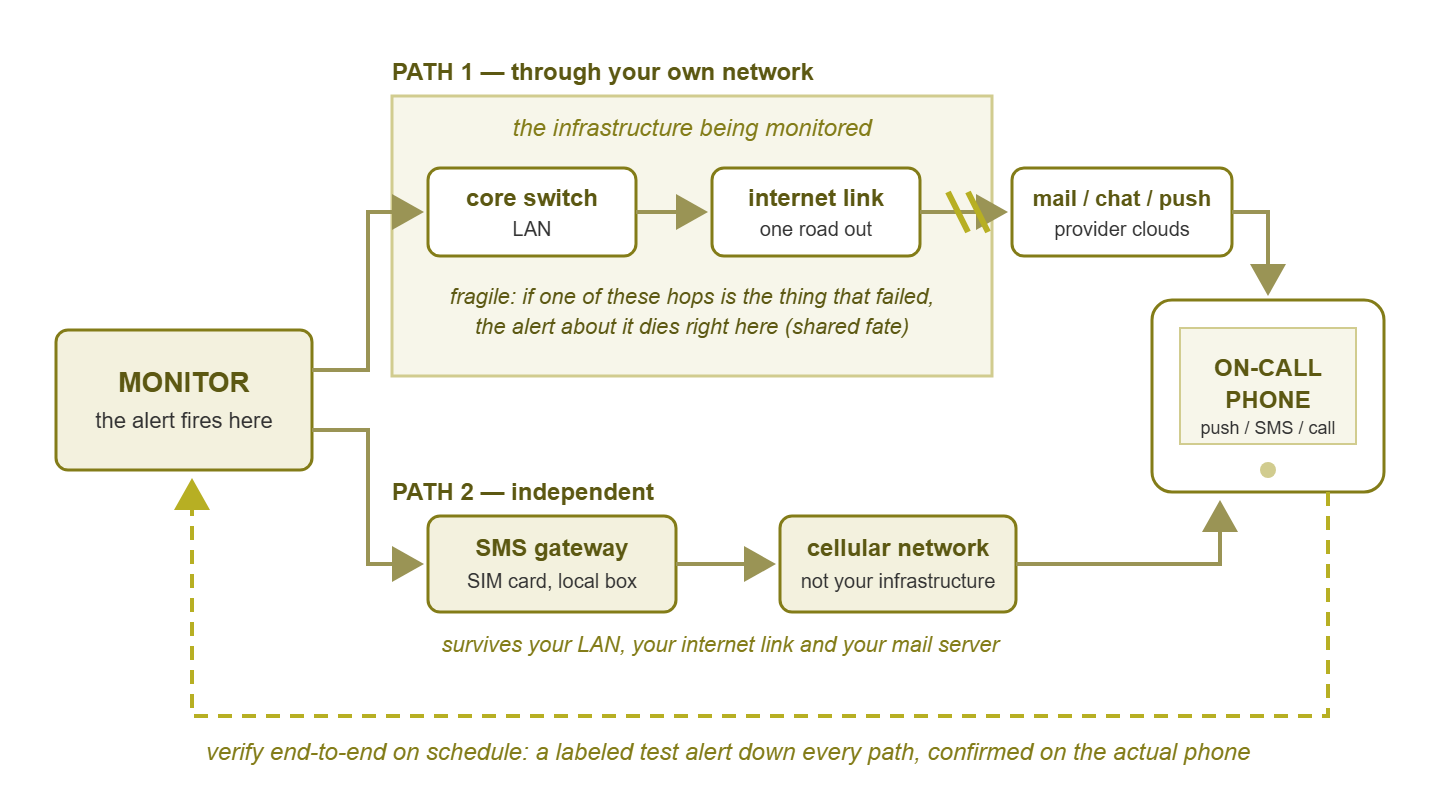
Figure 1: Two paths out. The internal path crosses the very infrastructure being monitored — if that link is the thing that failed, the alert dies with it. The independent path reaches the phone without touching it. The loop is the ritual that proves both paths still work.
Independent paths on a small budget
"Independent path" sounds like an enterprise line item. It is not. The practical independents available to a small shop, roughly in order of bang per buck:
- Cellular SMS. A text leaves through the mobile network, not your LAN or internet link. A hardware GSM gateway (a small box with a SIM card attached to the monitoring host) is the purest form. It works while your entire internet connection is dark. A cloud SMS provider is almost as good for every failure except your own internet link, since the request to the provider still has to get out.
- Push over the phone's own data. The on-call phone receives push notifications over cellular data even when the office network is completely down. The fragile half is the sending side, which needs your monitor to reach the vendor's cloud. Good against most failures; pairs beautifully with SMS, which is fragile in the opposite half.
- A second mail route. Alert email through an external relay service — not your own mail server — keeps email alerts alive when the mail server is the patient. Cheap, and often just a config change.
- The voice call. It is usually delivered by a calling service or the SMS gateway's voice feature. It rides the phone network, shares almost nothing with your infrastructure, and doubles as the top of the escalation ladder.
The standard small-shop build is simply two-path critical routing. Push is the fast, rich primary. SMS from a path as independent as you can afford is the second. A voice call sits behind both. That setup is what keeps reaching a phone while the office network is a smoking crater. Notice this is also just good escalation design. A chain that climbs through different channels is simultaneously an attention ladder and a reliability hedge, because each rung retries the human through a fresh set of dependencies. That doubling of purpose is spelled out in escalation paths. The severity-and-time logic of which alerts deserve the two-path treatment is the routing matrix.
One more independence trick inverts the whole problem: the heartbeat watched from outside. Your monitor pushing "something is wrong" outward fails when the paths fail. Instead, it regularly signals "I am fine" to a watcher that lives outside your infrastructure. And that watcher raises the alarm when the heartbeat stops. Silence becomes the alert, and silence needs no working delivery path from your side. It is the strongest defense against the scenario where your site is entirely dark, monitor included. And it belongs to the broader craft of watching the watcher rather than to channel design, so here it gets one paragraph and a strong recommendation.
Testing delivery on a schedule
Everything above is design. This section is the part that actually catches failures, and it is a ritual, not a technology. Send a synthetic test alert through every channel, end to end, on a schedule, and confirm it arrived on the actual devices. A synthetic alert is one you fire on purpose rather than one a real fault produced. End to end means the whole chain — not "the monitoring system logged a send," but "the text showed up on the on-call phone, the message posted in the channel, the call rang." Monthly is the floor. Weekly is better for the channels criticals ride. The day before your on-call handoff is a natural slot, so each incoming on-call person starts their week knowing their pocket actually buzzes.
Every shop that adopts this ritual collects the same trophies within a season. There is the webhook that had been dead five weeks and the push notification muted by a phone update. There is the test text that took four hours to arrive and exposed a misconfigured gateway. There is the voice call that went to a former employee's extension. Each one of those was a silent failure, sitting in ambush for a real outage — found instead by a drill that cost five minutes.
Automate what can be automated. Most monitoring tools can schedule a recurring test alert. Where a platform reports send status, alert on failed sends. A delivery-failure alarm is wonderfully self-referential and genuinely useful. But keep the honesty that has to come with it: an automated send-status check verifies the first links of the chain, not the last. The provider accepting your message does not prove the phone buzzed on a nightstand. It is turtles most of the way down — the last mile is verified by a human looking at a device, periodically, full stop. The checklist:
- 1. Calendar entry, recurring, owned by a named person (rotate it with on-call).
- 2. Fire a clearly labeled test alert per channel: email, chat, push, SMS, voice.
- 3. Confirm receipt on the receiving device — the on-call phone, not a desktop client.
- 4. Confirm the escalation climb once a quarter: let a test alert go unacknowledged and watch it walk the ladder.
- 5. Log the result; a one-line "all channels OK" with a date is enough.
- 6. Fix failures now, not later.
Fix whatever the drill finds the same day. A dead channel discovered by a drill is a gift with a countdown timer.
Tip: label test alerts unmistakably — a TEST prefix in the message itself — and send them at an agreed, expected time. A test alert that looks real teaches people to ignore alerts. A real alert mistaken for a test is how a drill causes an outage response failure. Predictable and labeled, always.
Provider and account hygiene
Most delivery failures are not technical faults; they are administrative decay. The defense is a notification accounts register — one page listing every account, credential, and device your alerting depends on, swept quarterly:
- SMS gateway or provider: credit balance, renewal date, the payment card behind it, SIM status for a hardware gateway.
- API keys and webhooks: what exists, where each is used, age, and who can revoke them — an inventory, so a platform cleanup checks the list before deleting.
- The alert sender mailbox and its authentication records.
- The monitoring app on each on-call phone: installed, signed in, notification permissions intact.
- The calling service or voice path, and the phone numbers it dials — are they still the right humans?
Then wire the register to change events, because the account that breaks is usually the one somebody changed. Examples include a chat platform migration, a mail system move, a security review that rotates keys, or an employee departure that deactivates integrations they created. Any of those triggers an immediate out-of-cycle delivery test. The rule of thumb: if anything in the notification chain changed, the chain is unproven until the next end-to-end test passes.
The reliability audit worksheet
The whole guide compresses into one table. Fill it in once — honestly — and revisit it at the quarterly sweep. A worked first row shows the shape:
| Channel | Path links | Shares fate with | Independent backup | Last tested end-to-end |
|---|---|---|---|---|
| Monitor → mail relay → internet → mailbox → phone app | Mail server, internet link | SMS via gateway | 1st of the month, received on phone | |
| Chat | Monitor → internet → platform → webhook → apps | Internet link, chat vendor | Push + SMS | |
| Push | Monitor → internet → vendor cloud → push service → app | Internet link (sending side) | SMS via gateway | |
| SMS | Monitor → GSM gateway → cellular → phone | Almost nothing (gateway power) | Voice call | |
| Voice | Monitor → calling service → phone network → phone | Internet link (if service is cloud) | — (top of ladder) |
Reading your finished worksheet is usually a small shock and always a cheap one. Every empty "last tested" cell and every critical alert class without a fate-free row is a silent failure you have now seen before it saw you.
Where to go next
Delivery reliability is the load-bearing wall under everything else in this pillar. The routing matrix assumes the channels work. Meanwhile, ChatOps assumes the webhook is alive. And after-hours routing assumes the 3 AM path has been proven before 3 AM. Test on a schedule and those assumptions become facts. The rest of the story lives at Notification Routing & Channels. The wider discipline of keeping the watcher watched is monitoring system failure modes. Do the drill, and "the logs show the alert was sent" becomes a sentence you never have to say to a room again.
Put this into practice with SysPeep Monitor
A delivery test is only meaningful if the alerting behind it is dependable. SysPeep Monitor runs as a central Windows service with optional remote probes for other sites and segments. It applies thresholds and dependency rules so alerts fire when they should. It sends notifications by email and other channels you can drill on a schedule. The free trial takes minutes to install.
Download Free TrialLearn About SysPeep - All Rights Reserved.