
UPS Monitoring: Status, Battery Health, and Honest Runtime
There is a heavy box in the corner of your server room, and everything that matters is plugged into it. It is the UPS — uninterruptible power supply. It makes one promise: when the utility power fails, it will carry your servers on battery long enough for them to shut down cleanly. Nobody has checked whether that promise is still true. The box has been in the same corner, humming the same hum, since before most of the team was hired. And its front panel has a green light on it. The green light is the problem.
A UPS looks and sounds exactly the same while its battery dies. The fans spin, the light stays green, and the display quotes a runtime figure that stopped being true a long time ago. I know this because I once inherited a unit whose panel said fourteen minutes. When the building finally tested it for me, its battery delivered under two. The only way to know what your UPS will do during an outage is to monitor it. Learn which of its numbers you can trust and which ones drift. And learn which one is a guess that has been formatted to look like a measurement.
By the end of this guide you will know what a network-connected UPS can report and how to read a status snapshot line by line. You will know why the famous "estimated runtime" figure lies as batteries age, and which four alerts belong in your monitoring system. And you will know how to plan battery replacement before the battery makes the decision for you at the worst possible moment.
In this guide
- What a UPS can tell you over the network
- Reading a healthy UPS: an annotated walkthrough
- Why the runtime estimate lies
- Load creep: the slow theft of your minutes
- Battery self-tests and when to schedule them
- The four alerts that matter
- Replacement planning: age, tests, and honesty
- Where to go next
What a UPS can tell you over the network
A basic UPS is a battery, a charger, and some clever electronics. Those electronics switch your equipment onto the battery faster than a power supply can notice the gap. A network-connected UPS adds one more ingredient: a management card. This is a small computer that slots into the UPS, gets an IP address, and answers questions about what the UPS is doing. On smaller units the same job is sometimes done over a USB cable to a nearby server running the vendor's agent software. That software then shares the data onward. Either way, the result is the same: the UPS becomes a device your monitoring system can ask questions of. Usually this happens over SNMP (Simple Network Management Protocol), the standard question-and-answer language that most network equipment speaks. The management card is part of your management network, and it deserves the same care as any other management interface. The guide on management plane basics covers that side of the story.
Once you can ask, the UPS turns out to be surprisingly talkative. There is even a standard set of UPS questions that most vendors support alongside their own extras. So the core readings look similar no matter whose logo is on the box. Here is the vocabulary worth learning:
| Reading | What it means | Why you care |
|---|---|---|
| Input status | Whether utility power is arriving, and whether it is within normal range | Your first sign of trouble upstream of the UPS |
| Output source | What is feeding your equipment right now: utility, battery, or bypass | The word "battery" here means a countdown has started |
| Load percentage | How much of the UPS capacity your equipment is drawing | Runtime and headroom both hang on this number |
| Battery charge | How full the battery is, as a percentage | A battery below full while on utility power points at a charging problem |
| Estimated runtime | Minutes of battery the UPS believes you would get if power failed right now | The number your whole shutdown plan rests on |
| Battery temperature | Heat at or near the battery | Heat is the main thing that ages batteries early |
| Self-test result | Whether the last battery test passed or failed, and when it ran | The closest thing you have to ground truth |
| Alarm flags | Conditions the UPS itself considers wrong: overload, battery fault, and similar faults | The UPS's own judgement that something is wrong |
The last row is the UPS raising its own hand. Overload, battery fault, charger trouble, and their friends are all conditions the unit has already decided are wrong. So an alarm flag is the one reading you never have to interpret. The runtime row is the opposite case, and it gets a section of its own below.
Two ways exist to receive all this. Polling means your monitoring system asks the UPS for its readings on a schedule — every minute is a fine rhythm for power equipment. Traps are messages the UPS sends on its own the instant something changes, such as switching to battery. Traps are faster; polling is more reliable, because a lost trap is simply gone while a poll gets retried. Use both if you can, but never rely on traps alone: the one outage where the trap gets lost is the one you needed it.
Reading a healthy UPS: an annotated walkthrough
Here is the kind of snapshot a monitoring system collects from a typical UPS management card, with the vendor-specific naming smoothed away. Read it like a doctor reads a chart — each line answers a specific worry:
Input status:            normal (utility power present)
Output source:           normal (load fed from utility)
Output load:             62 %
Battery status:          normal
Battery charge:          100 %
Estimated runtime:       11 minutes
Battery temperature:     31 °C
Last self-test result:   passed
Last self-test ran:      46 days ago
Alarms present:          none
Line by line: input and output say the world is normal — utility power is arriving and feeding the load directly, with the battery standing by. Output load at 62% deserves a raised eyebrow. The UPS is not overloaded, but load has a double cost: it shortens runtime now, and it removes headroom for growth. Many admins aim to keep steady load somewhere near half of capacity, precisely so the runtime math stays comfortable. Battery charge at 100% is what you expect whenever utility power has been present for a while. A battery that sits at 92% on a quiet Tuesday is telling you the charger or the battery has a problem.
Estimated runtime: 11 minutes is the headline number, and we will spend a whole section distrusting it properly. For now, note the question it must answer: is 11 minutes enough to notice the outage, alert a human, and complete a clean shutdown of everything attached? If your shutdown sequence takes 9 minutes, an 11-minute estimate leaves no margin at all — and margins are the whole reason the UPS exists. Battery temperature at 31 °C is warm. Batteries are chemistry, and chemistry runs faster when hot. A battery kept warm year-round ages noticeably faster than one kept cool. That is one more reason to watch the closet climate itself — a subject with its own guide. Finally, a passed self-test 46 days ago is reassuring but aging; we will get to how often that test should run.
Why the runtime estimate lies
The estimated runtime is the number your whole shutdown plan rests on, and it is the one that lies. It is not a measurement. The UPS cannot measure the future; it computes it. The arithmetic is roughly this: take how much energy a battery of this model should hold. Multiply by how full the charge level says it is. Divide by how fast the current load is draining it. Every part of that calculation is honest except one hidden assumption. The estimate assumes the battery can still hold what a healthy battery of its model holds.
That assumption dies of old age. Rechargeable batteries — and the sealed lead-acid type inside most UPS units especially — lose usable capacity as they age. This happens through slow chemical changes whether or not the battery is ever used. The decline is invisible from the outside. A tired battery still charges to "100%", because charge percentage means "full of whatever this battery can still hold," not "full of what it held when new." It still passes a casual glance. It simply holds less. Unless a recent real test has taught it otherwise, the UPS keeps calculating runtime as if the battery were young. In that case, it reports a number that grows more fictional every month.
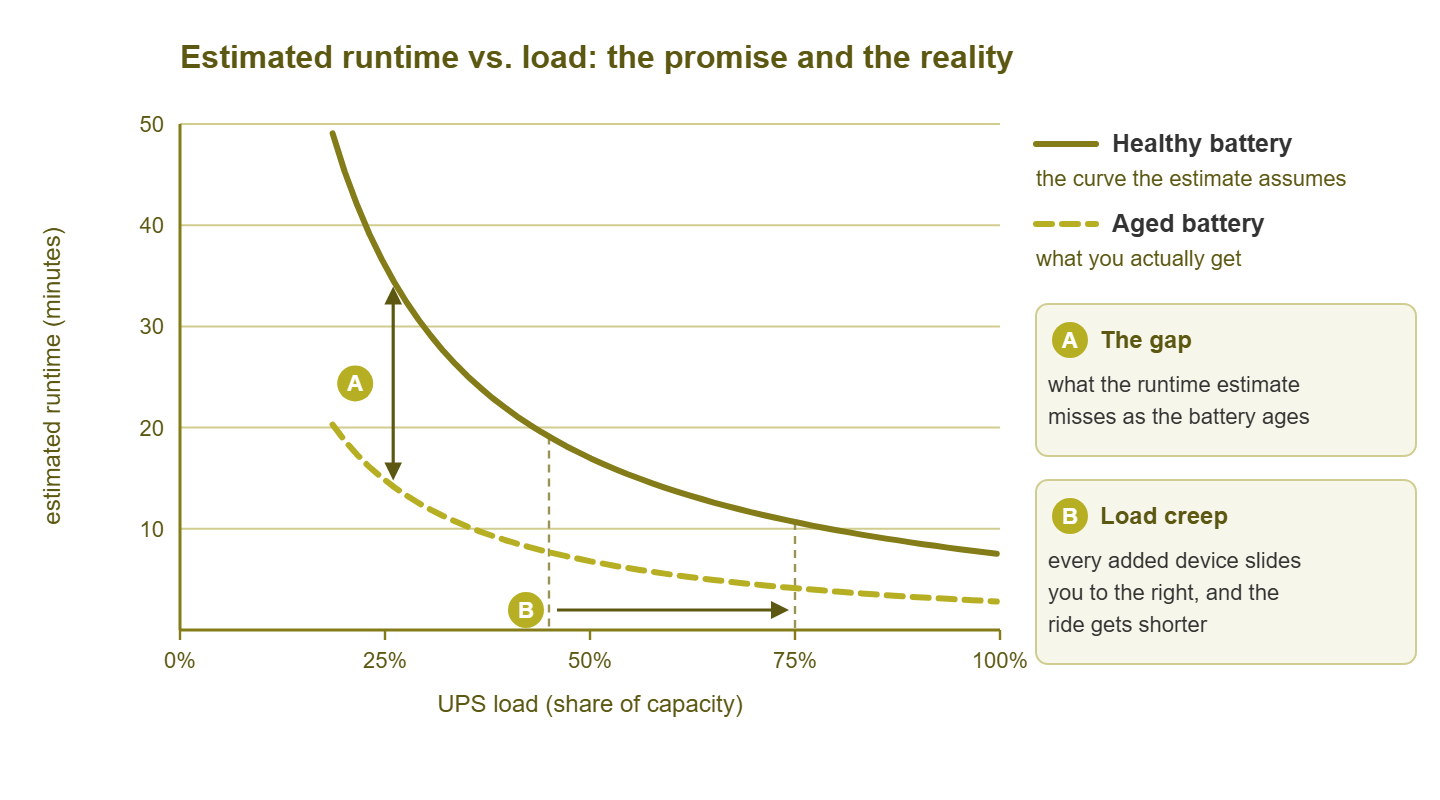
Figure 1: Runtime falls as load rises — and an aged battery rides a lower curve than the healthy one the estimate assumes. The gap between the curves is the fiction; load creep slides you rightward along whichever curve you are really on.
The chart shows the trap from both directions. The solid curve is the runtime a healthy battery delivers across different loads — the curve the estimate is built on. The dashed curve is what an aged battery of the same model actually delivers. At any given load, the vertical gap between them is the part of the estimate that no longer exists. Nothing on the front panel shows you that gap. The display quotes the upper curve while your building lives on the lower one. The two only meet during an actual outage — which is a terrible time to learn the difference.
Meridian Parts learned the difference on a Thursday afternoon. Their warehouse UPS had reported 100% charge and nine minutes of runtime every day for six years. Nobody had any reason to doubt a number that never changed. When a contractor cut the feed to the building, the servers ran on battery for ninety seconds. The shutdown script got as far as opening its log file. The incident report described the runtime estimate as "not reflective of conditions". The battery had been installed by someone who no longer worked there, on a date nobody could find written down.
This is why experienced admins treat runtime the way they treat a fuel gauge in a rental car: useful for trends, never trusted to the last liter. Three habits restore honesty. First, watch the runtime trend at a steady load. A healthy battery reports a stable number. A fading one reports a number that shrinks month over month even though nothing was added. Second, make the UPS re-learn reality through real battery tests, covered below. Third, build your shutdown automation to start early with margin to spare. That is a design problem the guide on graceful shutdowns takes on properly.
Load creep: the slow theft of your minutes
Battery aging is only half the erosion. The other half is on your side of the plug. The runtime a UPS can deliver falls as load rises — and not in a friendly straight line. Doubling the load more than halves the runtime, because batteries deliver less total energy when drained hard and fast. That is why the curves in the chart bend the way they do: the ride gets shorter faster as you slide to the right.
And you are always sliding to the right. Nobody ever installs a UPS and leaves it alone. A new server appears, and its power cable finds the UPS. Then a second switch. Then someone's desktop — "just temporarily." Each device is individually reasonable, none of them triggers any alarm, and every one of them quietly shortens the ride for everything else on the battery. Admins call this load creep, and it has a nasty interaction with battery aging. The load slides you rightward along the curve at the same time the aging drops you onto a lower curve. The UPS that once carried the room for twenty minutes now carries a heavier room on a weaker battery for four. The front panel never once complained.
The defense is boring and effective: monitor load percentage as a first-class number. Alert when it crosses a line you chose deliberately. Many admins pick something near 70–75% as the "we need to talk" threshold, comfortably below the level where the UPS itself would declare an overload. Just as useful, review the load graph occasionally and ask one question: what changed? A step up in the load graph on the day a new box was racked is load creep announcing itself. It is far cheaper to rebalance circuits in a planned window than to discover during an outage that the "ten-minute" UPS now delivers three.
Battery self-tests and when to schedule them
If the estimate assumes a healthy battery, the obvious fix is to check the battery's health for real. That is what a self-test is. The UPS briefly moves the actual load onto the actual battery, on purpose, while utility power is still available as a safety net. It watches how the battery voltage behaves under real load for a short stretch. A strong battery barely sags. A dying battery sags fast, the test fails, and the UPS raises a battery-fault condition — which is exactly the early warning you wanted. Many units also use what they learn to correct their runtime arithmetic, which is how the estimate gets dragged back toward the truth.
Self-tests need a little scheduling thought, because a test is a tiny, deliberate risk. For a few seconds your equipment really is running on the battery being questioned. Outages also travel in groups more often than feels fair, which is why the timing rules below are stricter than they look. Sensible rules:
- Run them regularly, on a schedule. Most management cards can self-test automatically every couple of weeks. If yours cannot, have your monitoring calendar remind you to trigger one. A test result from last quarter describes a different battery than the one you own today.
- Pick a low-stakes window. Inside business hours is actually reasonable — staff are around if something goes wrong — but avoid your busiest processing windows. What matters is that the time is chosen, known, and written down.
- Never test right after an outage. A battery needs hours to recharge after real use. Testing a half-charged battery proves nothing and steals reserve you might need if the power fails again soon after.
- Treat a failed test as a result, not an annoyance. A failed self-test is the system working. It found the weak battery on a calm Tuesday instead of letting the next outage find it for you.
- Feed results into monitoring. Poll the last-test result and its age. A stale test date is its own quiet alert: it usually means someone disabled the schedule and forgot.
The last rule is the one I would keep if I could only keep one. I once took over a unit whose automatic test had been "due" for three years. The schedule had been switched off during an office move and never switched back on. The card had been reporting the last pass, from before the move, with perfect confidence ever since. Nothing on the front panel distinguished that from a unit tested last week. The test date did, and only because something was polling it.
The four alerts that matter
A UPS can generate a comic variety of notifications, and if you enable them all you will learn to ignore them all. Four deserve a place in your alerting, each with a different urgency and a different correct response.
1. On battery — immediate, always
The output source changed from utility to battery: the countdown has started. This alert should reach a human immediately, at any hour, even though most of the time it will end thirty seconds later with a "back on utility" all-clear. The ones that do not end quickly are the ones you bought the UPS for. And brief events at odd hours are worth seeing too. A pattern of tiny blips is how failing building power introduces itself politely before failing hard. It is also, occasionally, how you discover that the UPS shares a circuit with the kettle.
2. Low battery — the last-chance bell
During an on-battery event, the UPS declares "low battery" when remaining charge or runtime crosses its final threshold. This is the point of no return: whatever shutdown has not happened yet is about to become an unplanned power loss. If this alert ever fires while your automation is still mid-sequence, the sequence started too late. That is a design lesson, and the shutdown guide covers how to set the trigger earlier.
3. Battery fault — the quiet one that matters most
A failed self-test, a battery flagged as needing replacement, or a charging fault. Nothing is down, nothing is dramatic, and this alert still deserves a same-week response. That is because it means the promise on the box is currently void. An outage today would go badly. Treat battery-fault as a scheduled-maintenance trigger with a short fuse.
4. Overload — the load-creep endgame
The equipment is drawing more than the UPS is rated to carry. Depending on the model, the UPS may cope briefly, switch to bypass (feeding raw utility power straight through, with no battery protection at all), or drop the output entirely. Overload is what load creep looks like when it finishes the job, and it is best never met. Your own warning threshold at 70–75% load exists precisely so this alert stays theoretical.
Tip: route these four alerts as different severities, not one generic "UPS problem." On-battery is an immediate page; low-battery is an emergency; battery-fault is an urgent ticket; your own load warning is a planning task. Blending them into one bucket guarantees the urgent ones inherit the reputation of the routine ones.
Replacement planning: age, tests, and honesty
UPS batteries are consumables. They wear out on a schedule that does not care about your budget cycle. So the professional move is to replace them on your schedule instead of theirs. Three signals, combined, tell you when.
Age. Every battery model has an expected service life. The vendor documentation for yours says what it is, commonly a small number of years for the sealed lead-acid type. Heat shortens it. A battery living in a warm closet can plausibly deliver only a fraction of its rated life. That is one more argument for cooling the room. The honest planning move is to record the installation date of every battery the day it goes in (the battery itself will not remember for you). Open a replacement task as the battery approaches the vendor's life figure — before failure, not after.
Test results and trends. A failed self-test is an immediate replacement order. But the softer signals arrive earlier. Examples include runtime estimates that shrink month over month at steady load. Another is a self-test that passes but shows the battery sagging closer to the limit each time. Or a charge level may recover more slowly after each event. Monitoring turns all of these into visible trends, which is the entire point — the battery gets a performance review instead of a surprise firing.
Fleet thinking. If you run several UPS units — server room plus wiring closets — track them as a fleet. Record model, battery type, install date, last test, and last result in one boring list. Batteries installed together age together, so plan replacements in waves, and keep a compatible spare battery set on the shelf if your gear allows it. The units hiding in remote closets deserve special suspicion, because nobody walks past them to hear the beeping. See the closet guide for exactly those.
Where to go next
Monitor the readings that matter — output source, load, charge, runtime, temperature, and test results. Wire up the four alerts and schedule real self-tests. Treat the runtime estimate as a trend to watch rather than a promise to believe. Do that and the heavy box in the corner stops being an article of faith and becomes what it was bought to be: measured, tested, honest insurance. The green light will still be on. The difference is that you will know what it means. The natural next step is deciding what should happen automatically once the power actually fails. The rest of Power & Environment Monitoring continues there, starting with the last five minutes before the battery runs out.
Put this into practice with SysPeep Monitor
If your UPS has a management card, it is already willing to answer questions over SNMP — someone just has to ask on a schedule. SysPeep Monitor discovers the devices on your network. It collects readings like output source, load, charge, and runtime. It alerts you the moment the building goes on battery. The free trial installs on a Windows machine in minutes.
Download Free TrialLearn About SysPeep - All Rights Reserved.