
QoS in Plain Language: Classification, Marking, Queuing
The story usually goes like this. A phone call breaks up, or a video meeting turns into a slideshow, right around the time a big file transfer or a backup kicks off. Someone senior says the magic words: "just turn on QoS." You open the router's settings page and find a wall of jargon — DSCP, classes, priority queues, shaping, policing. There are also a dozen checkboxes that sound important and explain nothing.
Quality of Service, or QoS, is one of those subjects that is genuinely simple underneath and buried under a thick layer of vocabulary on top. This guide strips it back to the four jobs QoS actually does, using one everyday analogy you will not forget. By the end you will know what classification, marking, queuing, and shaping each mean. You will know where on your network they matter. And — most important of all — you will know the one situation in which QoS does absolutely nothing, no matter how carefully you configure it.
In this guide
- The airport security lane
- Job one: classify — recognizing traffic
- Job two: mark — putting a label on it
- Job three: queue and schedule — who goes first
- Job four: police and shape — limits and smoothing
- The crucial truth: no congestion, no effect
- Where congestion actually happens
- What QoS can and cannot fix
- One packet's journey through a congested uplink
- Where to go next
The airport security lane
Picture the security checkpoint at an airport: a priority lane for crews and premium passengers, and general lanes for everyone else. The thing to notice is that the priority lane does not have its own separate airport. It feeds into the same scanners, the same officers, the same limited number of people who can be processed per minute. What the priority lane changes is the order: when a line forms, priority passengers get scanned first and everyone else waits a little longer. Everybody still gets through.
Now notice the two situations where the priority lane makes no difference at all. Early on a quiet morning, with no line, priority and ordinary passengers both walk straight up to the scanner. Nobody is waiting, so the priority lane is no faster. At the other extreme, if the airline hands priority passes to every single passenger, the priority lane becomes just another long line. A label everyone has is a label that means nothing.
QoS is exactly this. Your network link — a WAN circuit, a switch uplink, a Wi-Fi channel — is the scanner. It can push a fixed number of bits per second and not one more. QoS is the lane system. When more packets arrive than the link can send right away, it decides which ones go first. It also decides which ones wait or get turned away. Hold that picture and every piece of QoS vocabulary falls into place.
Job one: classify — recognizing traffic
Before a device can treat traffic differently, it has to recognize what it is looking at. Classification is that recognition step: examining each packet and deciding which class — which lane — it belongs to. A class is just a named group of traffic you want handled the same way. Devices can classify on anything they can see:
- Addresses. Anything to or from the phone server or the remote desktop gateway.
- Protocol and port numbers. The UDP port range a voice system uses for audio, or the port the ERP application listens on.
- Where it came from. Everything arriving on the phone VLAN, or on a particular switch port.
- An existing label. A marking already written into the packet by an earlier device or by the application itself — that is job two.
- Deeper inspection. Some devices recognize an application by its behavior rather than its port. Flexible, but costly, and the first thing to break when the application changes.
Most small networks end up with a handful of classes. Real-time traffic (voice, interactive video) that is ruined by delay. Business-critical traffic (the ERP system, remote desktop sessions) that must stay responsive. Best effort, which is everything else. And a scavenger class for traffic you actively want to lose first when things get tight: backups, software updates, cloud sync. Classification happens on every device that applies a policy, which is tedious and fragile — and why the next job exists.
Job two: mark — putting a label on it
Classifying by ports and addresses at every hop means every switch and router needs the same rules. Every rule needs updating when the phone server moves. Marking solves that. Once a device has classified a packet, it writes a label into the packet's header. Every downstream device reads the label instead of repeating the detective work.
The label that matters on IP networks is DSCP, the Differentiated Services Code Point. It is a six-bit field in the IP header, holding values from 0 to 63. A few values have standard names that appear on every settings page:
| Name | DSCP value | Usual meaning |
|---|---|---|
| EF (Expedited Forwarding) | 46 | Real-time audio — the priority lane |
| AF41 | 34 | Interactive video (Assured Forwarding class 4) |
| AF31 | 26 | Business-critical data (Assured Forwarding class 3) |
| CS6 | 48 | Network control — routing protocols talking to each other |
| CS1 | 8 | Scavenger — "lose this first" |
| Default (CS0) | 0 | Best effort — the general lane, and what most packets carry |
In the AF names the first digit is the class and the second is the drop level (higher drops first). A small network rarely uses anything but the x1 members. The CS (Class Selector) values are multiples of eight because they line up with an older three-bit precedence scheme.
Think of DSCP as the sticker on a parcel: "fragile," "express," "ground." The sticker does not move the parcel; it tells each depot along the way how to handle it. And, like a sticker, it can be ignored, peeled off, or replaced by anyone who handles the parcel. This happens far more often than newcomers expect. Where marks get set, stripped, and ignored in real networks is covered in DSCP Markings in the Wild. For now, the rule is: mark as close to the source as you can trust. Desk phones and conferencing applications often mark their own packets. A switch can mark everything from the phone VLAN at the access port. The WAN router can mark as a last resort using port and address rules. Two other labels exist. One is a three-bit CoS (Class of Service) field inside VLAN tags. The other is the four wireless traffic categories on Wi-Fi. But both are normally derived from DSCP by a mapping table. So DSCP is the one to learn first.
Job three: queue and schedule — who goes first
This is where QoS actually does its work. When packets arrive faster than the outgoing link can send them, they wait in an output queue. This is a chunk of memory that holds packets until the link is free. Without QoS there is one queue and it is strictly first in, first out — the general security lane. A voice packet that arrives just behind two hundred packets of a backup waits behind all two hundred. On a slow link that wait is long enough to hear.
QoS replaces the single queue with several, one per class, and adds a scheduler. This is the officer at the front deciding which lane's next passenger gets scanned. Two scheduler behaviors cover nearly everything you will configure:
- Strict priority. As long as the priority queue holds a packet, it is served before any other queue is even looked at. Real-time audio lives here. The danger is obvious: fed too much, this queue starves everything else. So it is almost always capped at a fixed bandwidth (see job four).
- Weighted sharing. The remaining queues each get a guaranteed minimum share of whatever the priority queue leaves over. For example, business-critical gets 30 percent, best effort most of the rest, and scavenger a sliver. Guarantees are minimums under congestion, not caps: a queue that is not using its share lends it out.
Every queue has a length. When a queue is full, the next packet to arrive is simply dropped — tail drop. That is normal and even useful. A dropped packet tells a TCP sender to slow down, which is exactly how a backup gets pushed out of the way. Some devices drop a few packets early, at random, to nudge senders before the queue overflows ("random early detection"); a refinement, not a requirement.
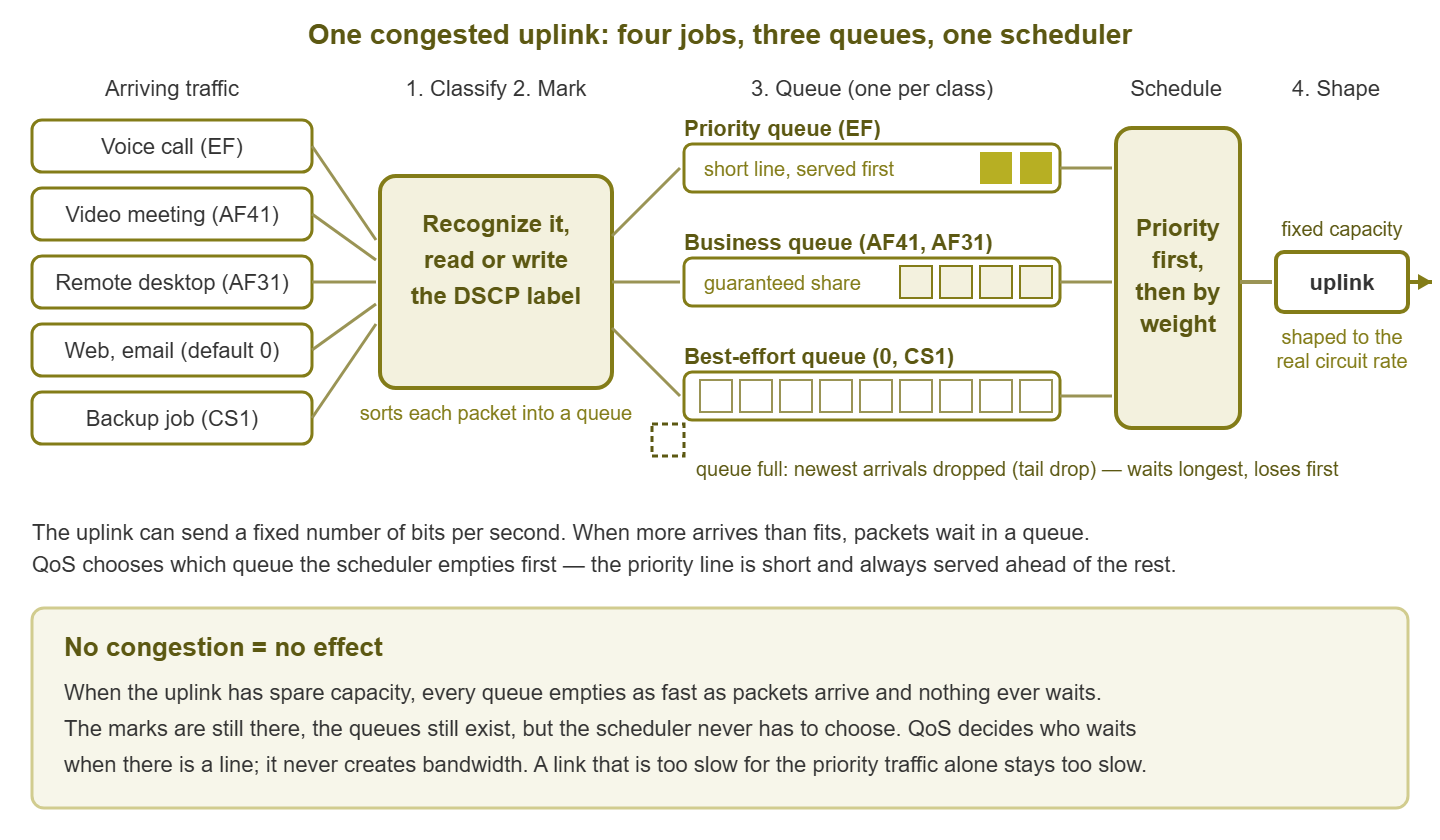
Figure 1: The four jobs at one congested uplink. Classification and marking sort packets into per-class queues; the scheduler serves the priority queue first, then shares the rest by weight. If the uplink has spare capacity, nothing ever waits and QoS changes nothing.
Job four: police and shape — limits and smoothing
Queuing decides the order. The last job decides how much. Two tools do it, and they are constantly confused because both are configured as a rate limit.
A policer is a bouncer with a clicker. It measures a class's rate continuously. Traffic above the limit is dropped on the spot (or re-marked to a lowlier class and let through). No buffer, no delay added. Policers cap the priority queue so it cannot starve the rest. They rein in sources you do not control, and are how providers enforce the rate you paid for. Hitting a policer feels like packet loss, because it is.
A shaper is the waiting area with the steady release. Traffic above the limit is held in a buffer and released at the configured rate, smoothing bursts into an even stream. Shaping trades a little delay for a lot less loss, and one of its jobs deserves its own callout.
The gigabit-port trap: your WAN router's outside port is probably a gigabit port. But the circuit behind it may carry a small fraction of that. From the router's point of view that port is never congested. The line actually forms one hop later, inside the provider's equipment, where your queues and classes do not exist. The fix is to shape the router's outbound traffic to just under the real circuit rate. Now the line forms on the router, and your policy finally has a line to manage. Without this one setting, most small-network QoS deployments are decoration.
The crucial truth: no congestion, no effect
Read this paragraph twice. QoS never creates bandwidth. It decides who waits when there is a line. If there is no line, every packet leaves the moment it arrives regardless of its marking, and the entire policy is invisible. The consequences:
- QoS cannot fix a link that is too slow for the priority traffic alone. If forty simultaneous calls need more than the circuit has, the priority lane is itself a traffic jam. You need a bigger scanner, not a better lane system.
- If nothing is congested, turning QoS on changes nothing, and "we enabled QoS and nothing changed" is often the correct result, not a failure. It will matter the day the link fills.
- If calls sound bad and no link along the path is congested, the cause is somewhere else. It could be Wi-Fi retries, a faulty cable, or a bad route at the provider. In that situation, no policy will help.
Congestion is measured in microseconds, not on a five-minute utilization graph. A link that averages a comfortable 40 percent on your dashboard can still have a line forming many times a second, because traffic arrives in bursts. A server sends at full gigabit speed for a few milliseconds, then goes quiet. During those milliseconds the slower link downstream has a queue. QoS engages during those bursts even when the graph looks calm. Queues form more often than averages suggest.
Where congestion actually happens
Since QoS only matters where lines form, the first design question is not "which DSCP values should I use" but "where on my network do packets actually wait?" The answer is nearly always the places where a fast link meets a slower one.
| Location | Why a line forms there | Does QoS matter here? |
|---|---|---|
| WAN edge (internet or private circuit) | The LAN runs at gigabit speeds; the circuit is a fraction of that. | Yes — the highest-value spot by far. Shape to the circuit rate. Only your outbound direction is under your control. |
| Switch uplinks | Dozens of access ports funnel into one or two uplink ports. Oversubscription is by design. | Yes when the uplink runs hot. Monitoring uplinks tells you which ones do. |
| Wi-Fi | Every client on a channel shares one half-duplex radio medium and waits for airtime. | Yes, through a different mechanism: wireless traffic categories decide who gets airtime. No queue fixes interference. |
| Speed mismatches inside the LAN | A ten-gigabit server talking to a gigabit client; a gigabit switch feeding an old hundred-megabit device. | Yes at the transition port. Often the hidden cause of "the LAN is slow." |
| VPN tunnels | Encryption overhead and the tunnel endpoint's own throughput limit sit below the physical link speed. | Yes at the tunnel endpoint, with the twist of inner versus outer markings. |
| Inside the provider's network | Their links, their queues, their rules. | No. Your marks are advisory at best out there, and often reset to zero. |
Direction matters. At the WAN edge you control the outbound queue completely, because the line forms on your device before packets cross the circuit. Inbound is different: by the time a download reaches your router, its packets have already been queued or dropped on the provider's side. Some devices can shape inbound traffic anyway, and it helps a little (dropping packets after arrival makes remote TCP senders slow down). But it is a lever pulled from the wrong end. That is also why the far end of every WAN link needs its own outbound policy. What protects your download is the other site's upload policy.
What QoS can and cannot fix
Plenty of network problems get a QoS project thrown at them that were never congestion problems in the first place. Check the complaint against this table before you build anything; it will save you from doing everything right and changing nothing.
| The complaint | Can QoS help? | Why |
|---|---|---|
| Calls break up whenever backups or big transfers run over the WAN | Yes | The textbook case: real congestion at a link you control. |
| Everything is slow, all day, and the circuit is flat-out | No | QoS only chooses who suffers. Not enough for the important traffic alone means you need bandwidth. |
| Calls are bad on Wi-Fi in a crowded room | Partly | Wireless priority categories help with airtime; interference, distance, and too many clients per radio need RF fixes. |
| Downloads from the internet swamp the office | Limited | The line forms on the provider's side. Inbound shaping softens it; it does not control it. |
| Random packet loss on a link that is nowhere near full | No | That is errors — a bad cable, a duplex mismatch, a dying optic — not congestion. Check the interface error counters. |
| One user's cloud upload hurts everyone else | Yes | Fair sharing between classes, or marking sync traffic as scavenger, handles this well. |
One packet's journey through a congested uplink
Let us put all four jobs together by following one voice packet from a desk phone to a colleague at another office. Meanwhile, a large backup is running over the same WAN link.
- 1. The phone marks it. The phone digitizes a few milliseconds of audio into a small UDP packet. Because phones generally know what they are, the phone writes DSCP 46 (EF) into the IP header itself. Job two, done at the source.
- 2. The access switch reads the label. The port the phone plugs into is configured to trust markings from the phone VLAN, so it leaves EF alone. (Had the port been untrusted, it might have rewritten the value to 0 right here. In that case, the rest of this story would be about a best-effort packet. This is the most common way QoS silently fails.) The switch's uplink is a lightly loaded gigabit link: no line, straight through, QoS invisible.
- 3. The core passes it along. Same story: fast links, no queue, nothing to decide.
- 4. The WAN router meets the line. The circuit is far slower than the LAN, and the router is shaped to just under its real rate. The backup is trying to push ten times that through it, so there is a line. The classifier reads DSCP 46 and places the voice packet in the priority queue. The backup's packets, marked CS1 by a rule on the backup server, land in the scavenger queue. It is already hundreds of packets deep and dropping new arrivals.
- 5. The scheduler serves priority first. The voice packet waits only behind the handful of other voice packets ahead of it: microseconds. The backup packets wait milliseconds and some are dropped, so the backup server slows down. The backup finishes later; nobody hears a thing.
- 6. The provider carries it. Across the circuit the EF mark is a suggestion the provider may honor, ignore, or reset. Private WAN services often honor it; the public internet, expect nothing.
- 7. The far end does the same in reverse. The colleague's audio coming back is protected by the other site's outbound policy, not yours. If only one site has QoS, only one direction of the call is protected. That is precisely the "I can hear them but they can't hear me" ticket.
Notice how little actually happened. There was marking once at the phone and trust once at the access port. A queue engaged only at the WAN edge, because that is the only place a line formed. That is the shape of a good small-network policy. Mark early, trust deliberately, queue where the line is, and shape so the line forms somewhere you control.
Where to go next
You now have the mental model that most QoS configuration guides assume and never state. Classification recognizes traffic. Marking labels it with DSCP. Queuing and scheduling decide who goes first when there is a line. Policing and shaping decide how much each lane may take. And the rule that governs everything: no line, no effect.
The rest of this topic builds on that model. DSCP Markings in the Wild follows the sticker through the devices that strip and ignore it. Designing a Simple QoS Policy turns the four jobs into a policy you can deploy. Monitoring Queue Drops shows the counters that reveal whether queues are engaging. And Proving QoS Works End to End shows how to demonstrate it under load instead of hoping. The specific delay, jitter, and loss targets that voice needs are laid out in QoS for real-time traffic. All of it is collected on the QoS: Designing, Verifying & Monitoring It pillar page.
Put this into practice with SysPeep Monitor
QoS only matters where links congest, so the first job is finding those links. SysPeep Monitor discovers your switches and routers. It polls interface utilization and discard counters over SNMP, and graphs them from one web console. So you can see which uplinks and WAN ports actually fill up. You can do that before you spend an afternoon writing policy for a link that never queues.
Download Free TrialLearn About SysPeep - All Rights Reserved.