
A Starter QoS Design for Real-Time Traffic
Somewhere in your building, a large file copy and an important phone call are sharing the same internet link. The file copy is winning. It always wins. Bulk traffic grabs every spare bit of capacity, and voice packets queue up behind it. The call turns choppy at exactly the moment someone is closing a deal. QoS — quality of service — is the fix. It is a set of rules that lets a router sort traffic and send the time-critical packets first when a link is momentarily full.
An honest warning before the optimism: QoS is a subject that can absorb entire careers. There are certification exams, thousand-page design documents, and vendor flame wars about queuing algorithms. You do not need any of that. What a small or mid-size network needs is the starter design. That is one afternoon of work that protects voice and video at the one or two places where they actually get hurt. That is what this guide builds. It covers the three jobs every QoS design performs and a concrete generic recipe with worked numbers. It also covers a way to prove it worked and the classic mistakes to skip.
If you are still fuzzy on why real-time traffic suffers in the first place, the guide on what jitter actually is explains the disease. This article is the vaccine.
In this guide
- What QoS can and cannot do
- The three jobs: classify, mark, queue
- Where QoS actually matters (and where it doesn't)
- The recipe: an afternoon deployment with real numbers
- Proving it works: the loaded-link test
- The classic mistakes
- Where to go next
What QoS can and cannot do
Think of the priority lane at airport security. It does not make the scanner any faster, and it does not build a second scanner. It only reorders the waiting: certain travelers go next, everyone else waits slightly longer. QoS is exactly that, applied to packets. When a link has more traffic than it can send at this instant, the packets wait in a queue, and QoS decides who goes first. When there is no line — the link has spare capacity — QoS does precisely nothing, because there is no waiting to reorder.
Three corollaries fall out of that picture, and they explain most QoS successes and failures. First, QoS only acts at congestion points — configuring it on a link that never fills is harmless but pointless. Second, QoS never adds bandwidth; if you have too little capacity for your traffic all day long, no queuing policy will manufacture more. Third, QoS is a trade: voice waits less because bulk traffic waits more. The trade is nearly free in practice. The traffic that gets delayed — backups, downloads, sync clients — genuinely does not care about an extra 30 milliseconds. A voice packet cares about little else.
Why voice specifically? A phone call needs only about 100 kbps, a rounding error on a modern link. But it needs its packets delivered on time, every 20 ms, and it cannot pause and retry the way a download can. When voice shares a full queue with bulk traffic, each voice packet waits behind a randomly varying pile of big packets. That variation is jitter. QoS gives the metronome its own lane so the rhythm survives the rush hour.
The three jobs: classify, mark, queue
Every QoS design, from your afternoon project to a carrier backbone, performs the same three jobs. First, classify: recognize which packets are time-critical. Then mark: label them so every device downstream agrees. Finally, queue: actually treat them differently at the bottleneck. Keep the three verbs separate in your head and every vendor's configuration screen becomes readable.
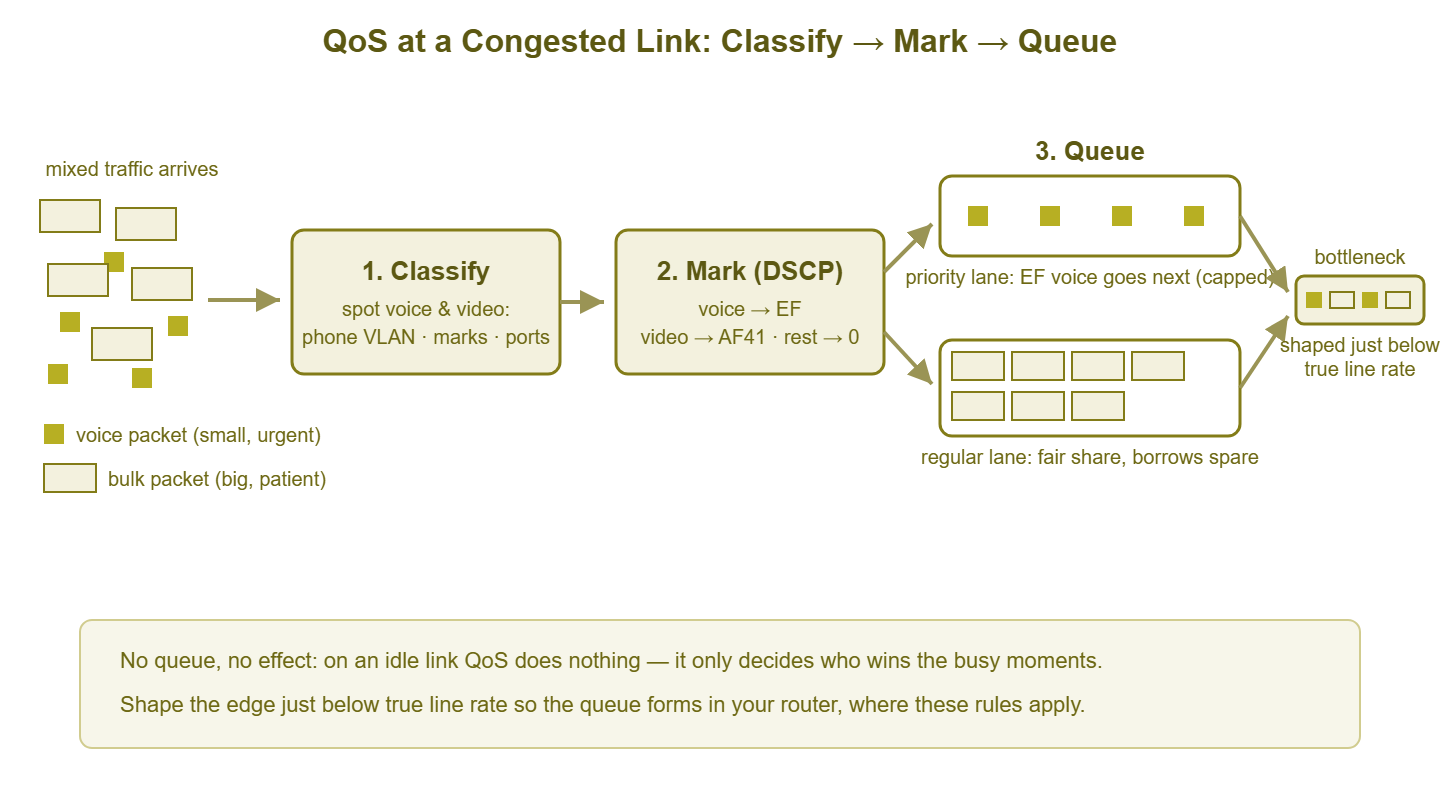
Figure 1: The three jobs at one congested link. Voice is recognized, labeled EF, and served from a priority queue at the bottleneck; bulk traffic shares what remains fairly. The link is shaped slightly below line rate so the queue forms here, where these rules apply.
Job 1: Classify — recognize the real-time traffic
Classification answers one question: is this packet voice, video, or everything else? On a small network you have three practical handles, and you will usually combine two of them. The first is source. If desk phones live on their own VLAN or subnet, then anything coming from that subnet is voice by definition. That is the simplest and most reliable rule available. The second is existing marks. Many phones and conferencing apps already label their own packets (with the DSCP stickers described next). So classification can be as easy as reading the label — once you have decided whose labels to believe. The third is port ranges. Voice media travels as RTP (Real-time Transport Protocol) over UDP. Your phone system's documentation states which UDP port range it uses. So a rule can match on that. Fancier gear can classify by inspecting application signatures; for a starter design, subnet plus marks covers nearly everything.
Job 2: Mark — the DSCP sticker
DSCP (Differentiated Services Code Point) is a small field in the header of every IP packet — six bits reserved for exactly this purpose. Think of it as a standardized priority sticker: any device along the path can read it without unwrapping the packet. You classify once, near the source, and write the sticker. Every downstream hop can act on it with a one-line rule instead of repeating the whole classification.
The sticker values have names, and two of them are worth knowing on a first-name basis. EF, "Expedited Forwarding," is the universal convention for voice — when a device sees EF, it understands "small, urgent, steady rhythm, do not make it wait." Interactive video conventionally wears a sticker from the "Assured Forwarding" family, typically AF41 — "important, but bigger and slightly more tolerant than voice." Everything unmarked is best effort, the default class where ordinary traffic lives. There are many more values, arranged in a taxonomy you can happily ignore for years; the starter design needs exactly these three tiers.
One honest caveat: a DSCP mark is a request, not a command. Every device makes its own decision about whether to honor, ignore, or overwrite the sticker. That is both a limitation (your ISP will ignore it, more on that below) and a safety feature. You can refuse to believe a PC that has marked its game traffic EF.
Job 3: Queue — different treatment at the bottleneck
Queuing is where the marks finally buy something. At the congested link you create a small set of queues. Voice (EF) goes into a priority queue — sometimes called a low-latency queue — which the device always serves first. If a voice packet is waiting, it goes next, ahead of everything. Because "always first" is a dangerous superpower, the priority queue gets a bandwidth cap. If something floods the priority queue, the excess is dropped rather than allowed to starve the entire network. Video gets a guaranteed share — a promised minimum slice when the link is contested. Everything else shares the remainder through fair queuing, which stops any single greedy flow from monopolizing what is left. Bulk transfers barely notice any of this; a backup finishing four seconds later is a tragedy for no one.
Where QoS actually matters (and where it doesn't)
Remember the first corollary: QoS acts only where queues form. On a typical small network, queues form in exactly two places. The first is the internet edge — the step down from a gigabit LAN to an internet connection a tenth or a fiftieth of that size. This is almost always the crime scene, and its upload direction is the worst neighborhood of all. The second is any WAN or site-to-site link, which shares the same "big pipe funnels into small pipe" geometry.
Conversely, LAN QoS rarely matters at small scale. Gigabit switch ports connecting a few dozen users are almost never congested, and a queue that never forms cannot be reordered. Configure your switches to trust the phone VLAN's marks so the stickers survive the trip to the edge, and move on. (The honorable exceptions: heavily loaded uplinks between switches and the wireless side of an access point — but those are refinements, not afternoon-one work.)
Now the uncomfortable truth about the internet: past your handoff, the ISP ignores your marks. Most providers strip or disregard DSCP at the boundary, and you cannot buy your packets a priority lane across the public internet. What you control completely is your own side of the bottleneck. That turns out to be most of what matters, because of one subtle trap. If your router hands packets to the ISP's modem at full line rate, the queue forms inside the modem. That device has no QoS brain and, frequently, an absurdly oversized buffer — the infamous bufferbloat problem. Your beautiful priority rules sit idle while voice drowns in a queue you cannot see.
The fix is called shaping. Configure your edge device to send at slightly below the link's true rate — a few percent under what the connection actually delivers. Sending a little slower than the ceiling means the queue forms inside your router, where your rules reign. This one setting is the highest-value line in the whole design: shape below line rate so the queue is yours.
Tip: reservations are floors, not ceilings. A guarantee of 30% for video means video gets at least that much when the link is contested. But when video is idle, everyone else borrows the space automatically. A well-built QoS policy wastes nothing; it only decides who wins the moments of conflict.
The recipe: an afternoon deployment with real numbers
Here is the generic starter design, written for a worked example you can scale to your own numbers. It is a 40-person office with desk phones from a cloud phone system. Its internet connection measures 100 Mbps down and 20 Mbps up. The office has one firewall/router at the edge, and managed switches. Every vendor spells the configuration differently, but each step below exists in some form on any business-grade gear.
Step 1: Put the phones on their own VLAN. If they are not already, this is the foundation. It makes classification trivial ("everything from VLAN 40 is voice"). It pays dividends far beyond QoS in addressing, security, and troubleshooting. Softphones on PCs complicate life; classify those by the phone system's documented port ranges or by its published server addresses instead.
Step 2: Establish the trust boundary at the switch. Tell your switches to trust DSCP marks arriving from phone VLAN ports, and to re-mark everything from ordinary PC ports down to best effort. If the phones mark their own traffic EF (most do — check one packet and see), you are done classifying. If not, have the switch or firewall apply EF to traffic sourced from the phone VLAN. The principle: trust devices you control, re-mark everyone else.
Step 3: Measure the true uplink speed and shape below it. Run a few speed tests at a quiet hour. If the 20 Mbps upload honestly delivers 21, shape outbound to roughly 19–20 Mbps — about 95% — so the queue forms in your router, not the modem. If the link's real rate varies through the day (common on shared media), shape toward the lower end of what you observe.
Step 4: Build three classes at the edge. Using the worked numbers on the 20 Mbps upload:
| Class | Matches | Queue treatment | On our 20 Mbps upload |
|---|---|---|---|
| Voice | DSCP EF (from the phone VLAN) | Priority queue, capped | Cap at 20% = 4 Mbps — comfortably 30+ concurrent calls at ~0.1 Mbps each |
| Interactive video | DSCP AF41, or the conferencing app's documented ports | Guaranteed minimum share | Guarantee 30% = 6 Mbps when contested; borrowable when idle |
| Everything else | All remaining traffic | Fair queuing, default class | Remaining 50% guaranteed, borrows to 100% when others are idle |
In pseudo-configuration — a concept sketch, since every vendor's syntax differs:
# at the internet edge, outbound direction
shape interface wan1 out 19 Mbit          # just under true upload rate
class voice    match dscp EF      priority  cap 4 Mbit
class video    match dscp AF41    guarantee 6 Mbit
class default  match everything   fair-queue
Step 5: Repeat at every other bottleneck. If you have a site-to-site VPN or WAN link, apply the same three-class policy at its choke point, scaled to that link's speed. Then stop. Resist the urge to add classes for every application someone mentions in a meeting. The three-tier design is the starter kit precisely because it covers the traffic that genuinely cannot wait.
Proving it works: the loaded-link test
A QoS policy that has never been tested under load is a rumor, not a design. The proof is a deliberately congested link with a call riding on top, and it takes twenty minutes:
- Baseline first. With the link quiet, measure jitter, latency, and loss to a steady target. The methods in measuring jitter properly apply directly. Write the numbers down.
- Load the link. Start a genuinely large upload. A multi-gigabyte file to any cloud drive saturates the upload direction nicely, which is exactly where voice suffers.
- Measure during load, policy off. Repeat the measurement while the upload runs (temporarily disable the policy, or record this before deploying). Expect the ugly version: jitter in the tens of milliseconds, latency inflated, possibly loss. This is the "before" photo.
- Measure during load, policy on. Same load, QoS enabled, measuring from the protected class. Jitter and latency should fall back near baseline while the upload continues at nearly full speed — the trade, working. A live test call should sound normal.
- Read the queue counters. Most gear counts packets and drops per class. During a call, the voice class counter should climb — proof classification is catching the right packets. During the load, drops should appear in the default class and stay at zero in voice. A voice counter frozen at zero during a call is the classic silent failure: marks stripped somewhere, or a match rule that matches nothing.
Judge the "after" numbers against the per-workload jitter targets. The goal is not zero jitter, just numbers that stay inside what a jitter buffer can gracefully absorb, even at the worst moment you can manufacture.
The classic mistakes
Prioritizing everything. The most common failure. Someone important asks for their application to be "high priority," then another. Soon half the traffic wears a priority sticker. At that point nothing is prioritized, because priority is meaningful only as an exception. Hold the line: voice, interactive video, and honestly not much else. A VIP lane with everyone in it is just the regular lane with extra paperwork.
Trusting every mark. DSCP is written by the sender, and any PC, console, or misbehaving app can stamp its packets EF. If your edge honors all marks blindly, one machine's opinion of its own importance hijacks the voice lane. This is why Step 2 re-marks traffic from untrusted ports to best effort — and why the voice queue wears a cap even so.
Using QoS as a substitute for capacity. QoS arbitrates moments of contention. If your link runs pinned at its ceiling for hours every day, QoS is a triage tent at a disaster site: genuinely useful, honestly a band-aid. The utilization patterns that distinguish "buy QoS time" from "buy bandwidth" are exactly what how full is too full teaches. Protect voice today, and let the utilization graphs make the upgrade case on their own schedule.
Forgetting to shape. Priority queues in your router are decorative if the actual queue forms in the ISP's modem. If your loaded-link test shows QoS making no difference, this is the first thing to check: the shaper missing, or set above the link's true rate.
Testing on an idle link and concluding QoS is broken. On a quiet link the before and after numbers are identical — and correctly so, since there was no queue to reorder. QoS proves itself only under load; that is not a flaw, it is the definition.
Set-and-forget. A new phone system, a new conferencing app, or a changed port range can quietly orphan your match rules. When that happens, everything drifts to best effort, and calls degrade months after "QoS was done." A periodic glance at the class counters — is the voice class still seeing packets? — is the cheap insurance.
Where to go next
The starter design in one breath: put phones where you can recognize them, mark voice EF and video AF41 at a boundary you trust, shape your edge just below true line rate so the queue is yours, give EF a capped priority queue and everything else fair treatment, then prove it with a loaded-link test and the class counters. That is an afternoon, and it removes the single most common cause of terrible calls on small networks. The deeper ends of the subject live in the rest of the Jitter & Real-Time Traffic guides. Those cover measurement technique, targets to hold yourself to, and what the buffers are doing with the milliseconds you save.
Put this into practice with SysPeep Monitor
QoS decides who waits; monitoring tells you whether anyone had to. SysPeep Monitor graphs interface utilization, discards, and errors over SNMP around the clock. So you can see the congestion moments QoS exists for — and whether a link has crossed from occasional bursts into genuinely needing more capacity. The free trial installs on a Windows machine in minutes.
Download Free TrialLearn About SysPeep - All Rights Reserved.