
How Jitter Buffers Work — and What Happens When They Give Up
Every voice call and video meeting on your network survives thanks to a small piece of machinery almost nobody has heard of. It sits inside every phone, every softphone, every conferencing app, quietly absorbing the network's imperfections dozens of times per second. When it wins, nobody knows it exists. When it loses, you get the robotic audio, the lag, and the talk-over that fill your ticket queue. It is called the jitter buffer, and understanding it is the difference between guessing at call problems and diagnosing them.
The previous guide in this topic, jitter explained, showed the problem. Real-time audio is sent as a metronome-steady stream of small packets, and the network delivers them bunched and gapped. This guide covers the coping mechanism. It explains how the buffer turns that mess back into rhythm. It covers the unavoidable price the buffer pays to do so, and the exact ways it fails when the network asks too much of it.
That last part matters most for you as an administrator, because jitter buffer failures have distinctive fingerprints. Robotic audio means one thing. Conversational lag means another. Bad first seconds that clear up mean a third. By the end of this guide you will be able to read those fingerprints. You will know which knobs exist and which do not. And you will know why the network fix always comes before the buffer fix.
In this guide
- The problem: a deadline every 20 ms
- The shock absorber: how a jitter buffer works
- Fixed vs adaptive buffers
- The trade-off triangle
- A numbers walkthrough
- Where buffers live — and what you can tune
- Symptoms decoded
- What monitoring sees vs what apps hide
- Fix the network first
The problem: a deadline every 20 ms
Quick recap of the situation the buffer is born into. A voice stream arrives as small packets, each carrying 20 ms of audio, sent exactly 20 ms apart. The player at the receiving end must produce continuous sound, which means it faces a hard deadline every 20 ms. The next slice must be in hand at the moment the current slice finishes playing. The network, meanwhile, delivers those slices with variable delay — some early, some late, some bunched together after a queue somewhere burps.
Without protection, every packet that arrives even a millisecond past its deadline is useless, and the audio glitches. On a path with 30 ms of jitter, that would make most packets useless. That would mean a call that is 0% lost on the wire and unlistenable in the ear. Clearly the player cannot play packets the instant they arrive. It needs slack. The question is how to buy slack without ruining the conversation, and the answer is one of the neatest engineering compromises in networking.
The shock absorber: how a jitter buffer works
The jitter buffer is a deliberate delay. Instead of playing each packet as it arrives, the receiver holds arriving packets in a small waiting room. It starts playback a fixed distance behind the arrivals — say 40 ms behind. From that moment on, the player pulls one packet out of the waiting room every 20 ms, in sequence-number order, at its own serene pace. Arrivals can be early, late, bunched, or shuffled. As long as each packet shows up before its own playback moment comes around, the ear hears a perfect metronome.
Think of it as the pause before a live broadcast, or the few seconds of tape a radio station runs behind. The buffer converts "did this packet arrive on time?" into "did this packet arrive within 40 ms of on time?" The network keeps failing the first question. It can usually pass the second. Bunched packets simply wait their turn; the pair that arrived 2 ms apart leaves 20 ms apart. Out-of-order packets get re-sorted for free, since everything is pulled by sequence number. The rhythm is rebuilt at the cost of a constant, predictable delay.
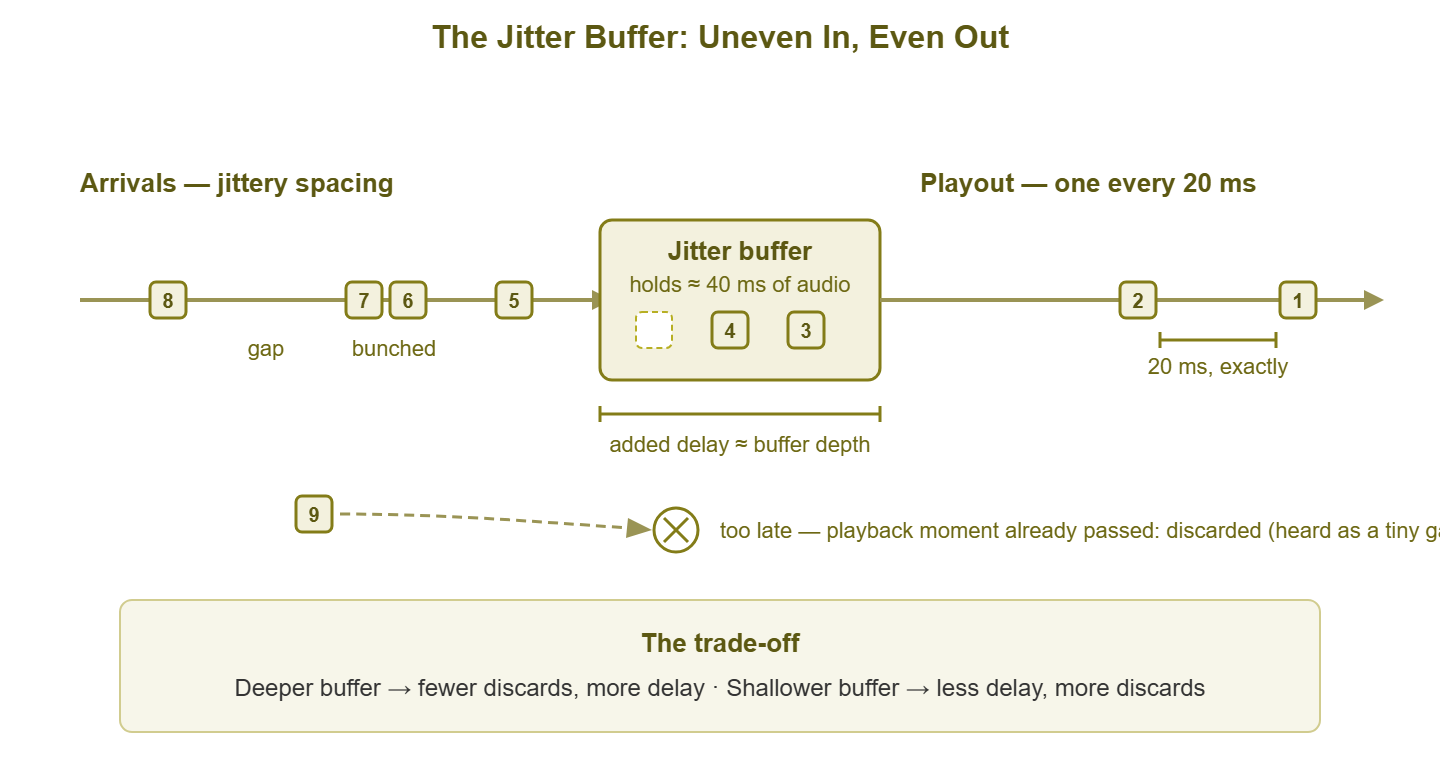
Figure 1: The jitter buffer holds uneven arrivals and releases them on a steady clock. The price is added delay — and any packet later than the buffer's depth is discarded.
Two hard rules govern the machine, and both come straight from the diagram. First, the buffer's depth is added delay. A 40 ms buffer makes every single word arrive 40 ms later than it otherwise would. That is on top of all network delay, for the whole call. Second, the buffer's depth is a cliff: a packet that arrives more than 40 ms behind schedule finds its playback moment already gone. The buffer discards it. The player performs concealment — stretching neighboring audio or inserting a guess — and the listener hears a tiny artifact. One discard is inaudible. A burst of them is the robot voice. On the wire, nothing was lost; the discard counter inside the phone is the only witness.
Fixed vs adaptive buffers
Every jitter buffer must answer one question: how deep should I be? The two schools of answer define the two kinds of buffer you will meet.
Fixed buffers: simple and stubborn
A fixed jitter buffer holds a configured depth — 60 ms, say — from the first packet to the last, no matter what the network does. The appeal is total predictability: delay is constant, behavior is constant, and there is nothing clever to go wrong. The weakness is that the number is a guess made before the call. Guess high and every call carries more delay than it needed, including the millions of packets that arrive beautifully on time. Guess low and every jitter spike blows past the cliff and turns into discards. A fixed buffer is only ever exactly right on a network whose jitter never changes — a network nobody has. You will find fixed mode mostly on older hardware phones and voice gateways. It is also occasionally chosen deliberately for fax or modem-over-IP traffic, which hates delay changes even more than it hates delay.
Adaptive buffers: clever, with side effects
An adaptive buffer watches the jitter it is actually experiencing and resizes itself during the call. It runs shallow when the network is calm, deeper when spikes appear, usually within a configured floor and ceiling. This is what every modern softphone and conferencing app runs, and on average it beats any fixed guess. You pay for depth only while you need it.
The cleverness has a cost: resizing a buffer mid-audio is audible if done crudely. Growing the buffer means playback must fall further behind. The player has to stretch time, either by lengthening silences between words (graceful) or by slipping in a small pause (noticeable). Shrinking means catching up — trimming silences or gently speeding playback, which is the freeze-then-fast-forward effect users describe after a bad patch. Modern implementations hide most of this inside natural pauses in speech. The artifacts you notice are usually the buffer being forced to resize abruptly by a jitter spike it did not see coming. An adaptive buffer on a jittery network is never done settling — which, as you will see in the symptoms section, explains several classic complaints.
The trade-off triangle
Here is the core tension, and it cannot be engineered away. The jitter buffer sits between three quantities that pull against each other — depth, delay, and discards.
- More depth → more delay. Every millisecond of buffer is a millisecond added to every word of the conversation, in each direction.
- Less depth → more discards. Every millisecond removed moves the cliff closer, and some tail of late packets falls off it. A too-shallow buffer converts jitter into effective packet loss.
- Too much delay → broken conversation. Humans are brutally sensitive to conversational delay. As total one-way delay climbs toward roughly 150 ms and beyond, the natural timing of turn-taking fails. Then both parties hear silence. Both start talking. Both stop. Both apologize. That is talk-over, and it makes a technically clean call feel broken.
So the buffer cannot simply be huge ("never discard anything") because deep buffers wreck the conversation with lag. And it cannot be tiny ("never add delay") because shallow buffers wreck the audio with discards. It must be just deep enough for the current jitter. That is why adaptive designs exist. It is also why no buffer of any design can save a call once jitter grows past what the delay budget can afford to absorb. Past that point the buffer must choose a poison on your behalf: lag or robot voice. Users get one or the other, and sometimes an alternating taste of both.
A numbers walkthrough
Let us make the trade concrete with arithmetic you can do on a whiteboard. Suppose measurement (see measuring jitter) shows packets on a path typically arriving within about 15 ms of their ideal times, with occasional excursions to 35 ms. A buffer 40 ms deep covers essentially every arrival: rhythm restored, at a price of 40 ms added one-way delay. Is that price affordable? Check it against the delay budget. If the network one-way delay is 50 ms and codec processing adds around 30 ms, the total lands near 120 ms. That is inside the comfortable range, with headroom. The same 40 ms buffer on a 130 ms intercontinental path lands at 200 ms and the call feels like a walkie-talkie. Same buffer, same jitter, different verdict — the budget decides.
One subtlety: buffers must be sized against the jitter peaks, not the polite smoothed average that most tools report. A common rule of thumb is a depth around double the reported jitter figure. That is because a buffer equal to the average swing still discards the above-average swings. Those are exactly the moments users notice. The table shows how the arithmetic plays out across typical situations, assuming a modest 50 ms network delay and ~30 ms of codec processing:
| Measured jitter (smoothed) | Sensible buffer depth | Added delay | Total one-way (≈) | Verdict |
|---|---|---|---|---|
| 2 ms | 10–20 ms | 10–20 ms | ~95 ms | effortless; buffer barely working |
| 10 ms | 20–30 ms | 20–30 ms | ~105 ms | comfortable |
| 20 ms | 40–50 ms | 40–50 ms | ~125 ms | works, headroom shrinking |
| 30 ms | 60–80 ms | 60–80 ms | ~150 ms | at the edge: lag becomes noticeable |
| 50+ ms | 100+ ms needed | 100+ ms | ~180+ ms | no good setting exists — fix the network |
Read the last row carefully, because it is the punchline of the whole guide. Once jitter demands more depth than the delay budget can afford, there is no correct buffer setting. Shallow discards, deep lags, adaptive oscillates between the two. The buffer has not malfunctioned — it has been handed an unsolvable problem. Every hour spent tuning it at that point is an hour not spent on the actual cause.
Where buffers live — and what you can tune
Jitter buffers sit wherever a packet stream is turned back into live audio or video. That means a typical call may pass through more than one:
- Hardware IP phones — usually the most tunable: many let you choose fixed or adaptive mode and set minimum, nominal, and maximum depth. These settings are typically pushed from the phone system's provisioning templates rather than per handset.
- Softphones and conferencing apps — almost always adaptive and almost never user-tunable. The vendor picked the behavior; your influence is limited to feeding the app a better network.
- Voice gateways and analog adapters — the boxes bridging VoIP to analog lines or the PSTN carry their own configurable buffers. These boxes are a classic place for a bad fixed setting to hide for years.
- Conference room systems — somewhere in between; occasionally tunable, usually best left on automatic.
The honest summary of your tuning power: on managed telephony hardware you can genuinely adjust depths and modes. On the consumer and SaaS apps where most meetings now happen, you cannot touch the buffer at all. That asymmetry is not the bad news it sounds like. It simply relocates your leverage to the place it belonged anyway: the network the buffer is trying to survive.
Tip: when you do tune a phone or gateway buffer, resist the urge to set the maximum depth to its highest value "just in case." A generous ceiling gives an adaptive buffer room to climb during a jitter storm. And some implementations are slow to come back down, leaving calls laggier than they need to be long after the storm has passed. Set the ceiling to what your delay budget can actually afford, not to the biggest number the menu offers.
Symptoms decoded
Because the buffer converts network trouble into specific, distinct user experiences, complaint language is diagnostic data. Here is the translation table:
| What users say | What is happening | What it tells you |
|---|---|---|
| "Robotic," "underwater," syllables clipped | Late packets are being discarded; concealment is filling holes | Jitter currently exceeds buffer depth — the shallow-side failure |
| "We keep talking over each other," "answers come slowly" | Total delay too high; a deep buffer is often a contributor | The deep-side failure — check network delay plus buffer depth against the budget |
| "Every call starts rough, then clears up" | An adaptive buffer converging from its starting guess to the path's real jitter | Mild and brief is normal; slow or severe settling points at high jitter greeting every call |
| "It freezes, then talks fast to catch up" | An adaptive buffer that grew during a spike is shrinking back | Jitter spikes mid-call — look for periodic load, Wi-Fi events, backup windows |
| "Long calls slowly get worse until we redial" | Buffer creep: repeated spikes ratchet an adaptive buffer up faster than it recovers | Sustained jitter, or an implementation that recovers timidly — and redialing resets it, which is why redialing "works" |
Notice how much you can narrow down before touching a single tool. Robot voice and talk-over are opposite failures. One says the buffer is effectively too shallow for the jitter. The other says the total delay is too high. "It got better when we redialed" is practically a signed confession from an adaptive buffer. And all five rows share one root instruction: go find out what the jitter actually is.
What monitoring sees vs what apps hide
A monitoring system watches the network from outside. From there it can see a lot: the jitter, latency, and loss on paths between sites, link utilization climbing toward saturation, error counters, device CPU. What it cannot see is anything that happens after delivery — inside the endpoint. The buffer's current depth, its resize decisions, and above all its discard counter are private to the app. This is why the network dashboard and the users can both be telling the truth while flatly contradicting each other. There can be zero loss on the wire, yet audibly missing audio. That is because the losses happened at the buffer cliff inside the phone.
The endpoint's side of the story is usually available if you know where to look. Hardware phones typically expose per-call statistics — jitter observed, packets discarded, concealment seconds — on their web interface or status screens. Call platforms record per-call quality telemetry in their admin dashboards, built from the quality reports the endpoints exchange with each other during the call. The complete picture always takes both halves: your network-side measurements tell you what the path did. The endpoint's counters tell you what the buffer had to do about it. When the two disagree — clean path, ugly discards — suspect the segment you did not measure. On real networks, that is usually the last hop: the user's Wi-Fi.
Fix the network first
Buffer knowledge invites a temptation: quality is bad, the buffer has settings, so let us fix quality by adjusting settings. Occasionally that is right — an ancient gateway pinned to a 20 ms fixed buffer on a jittery WAN is genuinely misconfigured, and deepening it helps. But as a strategy, buffer-first is backwards, for a simple reason the trade-off triangle already proved: the buffer cannot remove jitter; it can only choose which poison to convert it into. Tuning rearranges the pain. Only the network can reduce it. Hence the order of operations:
- 1. Measure. Get real jitter numbers for the affected path, at the times calls actually suffer. Compare them against the targets in jitter targets by workload.
- 2. If jitter is high, chase the source. Saturated uplinks, Wi-Fi contention, an overloaded firewall — the diagnosing jitter guide is the isolation sequence. And QoS for real-time traffic is how you protect calls from traffic you cannot remove.
- 3. Only then consider buffers. On a path that is as good as you can make it, check that configurable endpoints (phones, gateways) hold sensible settings. Those settings are adaptive mode where supported, a floor near 20 ms, a ceiling your delay budget can afford.
A network delivering single-digit jitter makes every buffer look brilliant, including the ones you cannot configure. A network delivering 60 ms of jitter makes every buffer look broken, including the expensive ones. The buffer is the messenger; this guide has been about reading its messages, not shooting it.
Where to go next
Here is the jitter buffer in one paragraph. It deliberately delays playback to give late packets time to arrive, rebuilding the sender's rhythm at the cost of added delay. Its depth is a dial between two failure modes. Too shallow converts jitter into discarded audio. Too deep converts it into conversational lag. And no setting exists that beats jitter bigger than the delay budget. Fixed buffers guess once; adaptive buffers chase conditions and leave fingerprints when they resize. The symptoms users report map cleanly onto all of this, which makes complaints themselves a diagnostic instrument.
Your next stops include measuring jitter properly to get the numbers this guide kept asking for. Another is MOS scores to see how buffer behavior feeds the quality score users would give. And the rest of the Jitter & Real-Time Traffic topic covers diagnosis and QoS. If the deep-buffer lag symptom sounded familiar, the Network Latency topic covers the delay side of the story in full.
Put this into practice with SysPeep Monitor
Jitter buffers live inside phones and apps. But what they have to absorb is decided by your network, and that part you can watch. SysPeep Monitor auto-discovers your devices, graphs link utilization, errors, and device CPU over SNMP and WMI. It alerts you when an uplink saturates or a gateway pins its processor. Those are the exact moments buffers start losing. The free trial installs on a Windows machine in minutes.
Download Free TrialLearn About SysPeep - All Rights Reserved.