
Jitter Explained: Why Variation Hurts More Than Delay
The ticket says the call "sounded like a robot." Or the words came out chopped, or the other person kept freezing for half a second and then talking double-speed. So you check the obvious things: the internet is up and the speed test shows plenty of bandwidth. A quick ping to the phone provider comes back at a reasonable 35 ms. Everything you know how to measure says the network is fine — and yet the calls really are terrible. Welcome to jitter, the network problem that hides from every test you were taught to run first.
Jitter is variation in delay. Not how long packets take to arrive — how inconsistent they are about it. Most of what runs on a network barely notices jitter, which is why you can go years without meeting it. But real-time audio and video are built on a rhythm, and jitter is precisely the destruction of rhythm. It is the single most common reason a call sounds bad on a network that passes every other check.
This guide gives you the mental model. You will see exactly what a voice call looks like as packets and watch a healthy stream fall apart in slow motion. You will learn why a steady-but-slow connection beats a fast-but-twitchy one. And you will find out where the variation actually comes from. By the end, "the call sounded robotic" will translate directly into three numbers you know how to ask for.
In this guide
- A phone call is a metronome
- What jitter actually is
- Watching a voice stream fall apart
- Why steady 80 beats swinging 20–120
- Where the variation comes from
- Jitter, latency, and loss: the three-way relationship
- How much jitter is normal?
- The three numbers to pull for any call complaint
A phone call is a metronome
To understand jitter you first need to see what real-time traffic actually looks like on the wire, because it is nothing like a download. When you fetch a file, the sender shoves data at you as fast as the network allows, in big greedy bursts. Nobody cares whether byte number five million arrives at 10:00:03 or 10:00:04. A voice call is the opposite in every way.
A voice call is a stream of very small packets sent at a strict, fixed rhythm. The most common arrangement works like this: the phone samples your voice and chops the audio into 20-millisecond slices. It compresses each slice with a codec (the audio encoder). It sends each slice as one small packet — typically a couple of hundred bytes. One packet every 20 ms means fifty packets per second, each carrying exactly one-fiftieth of a second of sound, for the entire duration of the call. Video conferencing does the same thing with bigger, slightly less regular packets; the principle is identical.
Notice what this stream needs from the network. It needs almost no bandwidth — a voice call fits in less capacity than a single email attachment in flight. What it needs is punctuality. The receiving side must play slice 1, then slice 2, then slice 3, each for exactly 20 ms, with no pauses in between. That is because your ear is listening to the output in real time. The sender is a metronome. The receiver needs the metronome to still be a metronome after crossing the network. That is the entire game.
What jitter actually is
Here is the definition, now that it can land properly: jitter is the variation in spacing between packet arrivals. The packets left the sender exactly 20 ms apart. If they also arrive exactly 20 ms apart, jitter is zero. In that case, it would not matter one bit whether the trip took 5 ms or 200 ms, because the rhythm survived. If instead one gap between arrivals is 4 ms and the next is 55 ms, the rhythm is broken, and the amount by which it is broken is the jitter. It is measured in milliseconds, like latency, which causes endless confusion — but it is a different quantity. Latency is how long the trip takes. Jitter is how much the trip time wobbles from packet to packet. (In standards documents you will see it called packet delay variation, which is honestly the better name.)
An analogy that holds up well: a commuter train that takes 40 minutes every single day is a long commute. But you can build your life around it — you know exactly when to leave and when you will arrive. A train that takes anywhere from 15 to 50 minutes, at random, is unusable for anything with a start time, even though its average is faster. Real-time audio is a meeting with a start time, fifty times per second. Jitter is the randomness in the timetable.
Why does variation break things when delay alone does not? Because the receiver can compensate for a constant and cannot compensate for a surprise. Constant delay just shifts the whole conversation later by a fixed amount — not free, but survivable. Variation means the receiver never knows when the next slice of audio will show up. A slice that shows up after its playback moment has passed is, for practical purposes, useless.
Watching a voice stream fall apart
Let us slow the clock down and watch eight packets of one voice stream cross a mildly congested network. Each packet is sent exactly 20 ms after the previous one. The trip time, however, varies a little from packet to packet — some hit a queue inside a busy router, some sail through. Watch the last column: it shows the gap between each arrival and the one before it, which is the number your ear ultimately experiences.
| Packet | Sent at | Trip time | Arrived at | Gap since previous arrival | Verdict |
|---|---|---|---|---|---|
| 1 | 0 ms | 30 ms | 30 ms | — | baseline |
| 2 | 20 ms | 30 ms | 50 ms | 20 ms | perfect rhythm |
| 3 | 40 ms | 34 ms | 74 ms | 24 ms | slightly stretched |
| 4 | 60 ms | 52 ms | 112 ms | 38 ms | late — hit a queue |
| 5 | 80 ms | 34 ms | 114 ms | 2 ms | bunched right behind 4 |
| 6 | 100 ms | 30 ms | 130 ms | 16 ms | recovering |
| 7 | 120 ms | 62 ms | 182 ms | 52 ms | long gap — trouble |
| 8 | 140 ms | 52 ms | 192 ms | 10 ms | bunched after the gap |
Read the story in that last column. The sender transmitted a flawless drumbeat: 20, 20, 20, 20. What arrived was 20, 24, 38, 2, 16, 52, 10 — a drunk drummer. Packets 4 and 5 arrived practically on top of each other because packet 4 sat in a queue while packet 5, sent later, caught up to it. Packet 7 got stuck long enough to open a 52 ms hole in a stream that only carries 20 ms of audio per packet. Notice that not a single packet was lost. Every slice of audio made it. The network, by its own accounting, did a perfect job.
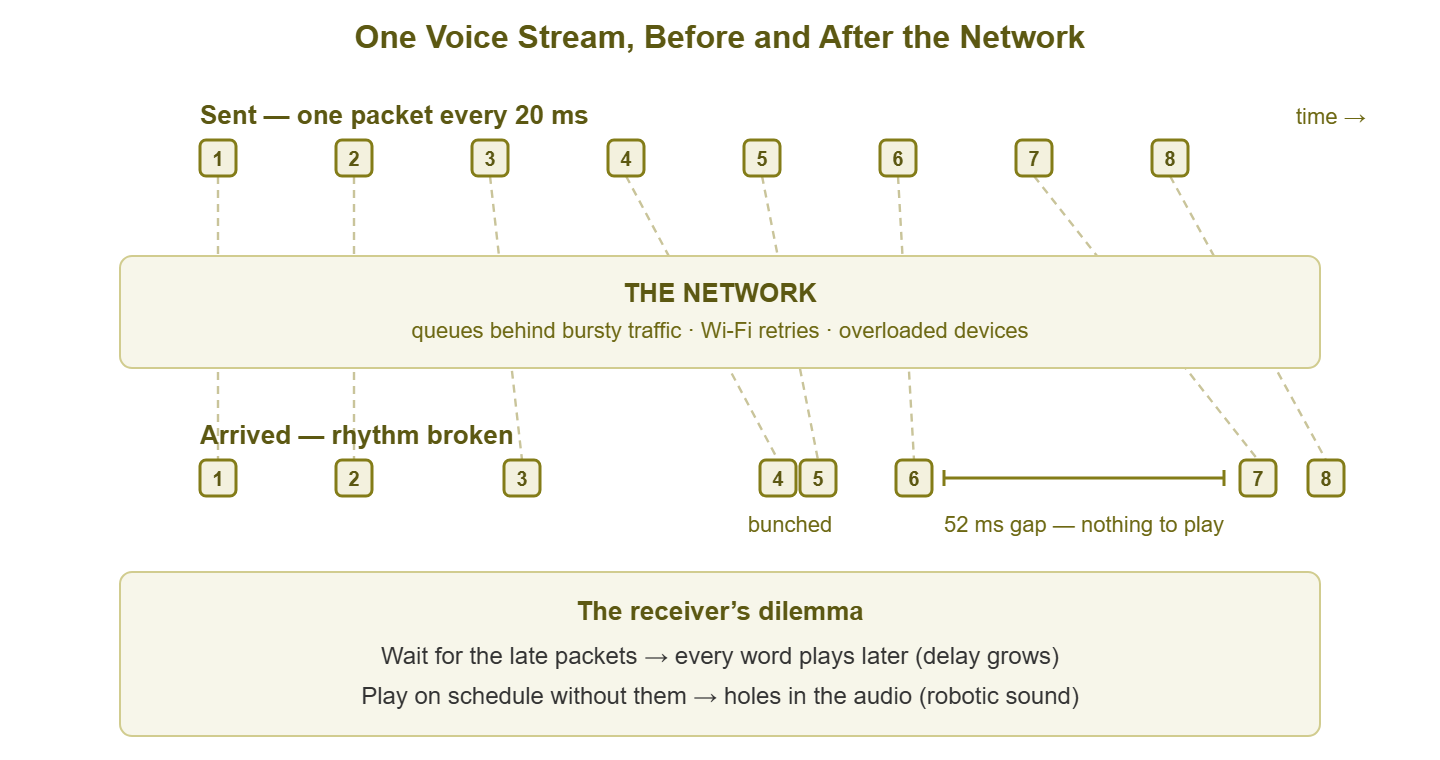
Figure 1: The same eight packets, sent as a metronome and arriving as a mess. The receiver must now choose between waiting (delay) and giving up (gaps).
Now put yourself in the receiver's position at the moment packet 6 finishes playing. The next 20 ms slice — packet 7 — has not arrived. And there is no way to know whether it will show up in 5 ms or 500. There are exactly two options, and both hurt:
- Wait for it. The audio pauses until packet 7 shows up, then playback resumes. Every wait like this pushes the whole conversation further behind real time. And the accumulated delay is what makes two people start talking over each other.
- Give up and play on. The player's deadline passes, so it fills the hole as best it can — silence, a stretched copy of the previous slice, or a synthetic guess. This is called concealment, and in small doses it is inaudible. In larger doses it is exactly the robotic, underwater, syllable-chopping sound your users are complaining about. A packet that arrives after its moment has passed is discarded — it might as well have been lost.
Real receivers split the difference using a small holding area called a jitter buffer, which deliberately delays playback a little so that late packets have time to arrive. It is such an important mechanism that it gets a full guide of its own: how jitter buffers work. For now the key point is that the buffer does not eliminate the two bad options — it just lets the device choose a blend of them. Extreme jitter can even deliver packets out of order (packet 8 nearly overtook packet 7 above), which the receiver must quietly re-sort on top of everything else.
Why steady 80 beats swinging 20–120
Here is the claim from this article's title, made concrete. Take two calls. Call A has a one-way network delay of 80 ms, every packet, like clockwork — a long path, maybe across an ocean. Call B averages only 70 ms, but individual packets take anywhere from 20 to 120 ms. On paper, call B is faster. In the ear, call A wins, and it is not close.
Call A's receiver has a trivial job. The rhythm arrives intact; the jitter buffer can be nearly empty; audio plays smoothly with a modest total delay. Eighty milliseconds one-way is well inside the range where conversation feels natural. The traditional rule of thumb is that people start noticing awkwardness when one-way delay creeps past roughly 150 ms. Long before that, it is merely a slightly formal cadence, like a good satellite-free international call.
Call B's receiver has an impossible job. To play audio without holes, it must delay playback long enough to cover the slowest packets. That means buffering roughly 100 ms on top of the base delay, pushing the effective delay well past call A's. Or it can buffer less and discard every packet that arrives beyond its window, turning jitter into audible loss. In practice adaptive buffers chase the swings, growing and shrinking mid-call. The user gets a bit of everything: lag, robotic stretches, and that characteristic freeze-then-fast-forward effect. The average delay figure — the one number your basic ping test reports — is the least relevant number in the whole story.
This is the general law of real-time traffic: predictability beats speed. A receiver can engineer around any reasonable constant. It can only gamble against variance.
Where the variation comes from
If every packet in a stream follows the same path through the same equipment, why would trip times vary at all? Because the network is shared, and your polite little voice packets are sharing it with traffic that behaves very differently.
Queuing behind bursty traffic — the chief villain
Most jitter is queuing delay, applied unevenly. Inside every router, switch, and firewall there is a queue — a waiting line where packets sit when the outgoing link is momentarily busy. Data traffic is bursty by nature: a file transfer or a cloud sync sends a wall of big packets, then pauses, then sends another wall. A voice packet that arrives at the router between walls sails through in microseconds. One that arrives behind a wall waits its turn behind dozens of 1,500-byte packets. Same path, same equipment, wildly different trip time — purely depending on the instant of arrival. Queuing is one of the four fundamental delay components, and the only one that changes packet-to-packet. That is exactly why it is the engine of jitter. The four types of delay guide builds that foundation properly. The extreme version, where oversized queues on a saturated link add hundreds of milliseconds of wildly varying delay, has its own name and its own guide: bufferbloat.
Wi-Fi retries
Wireless adds its own flavor of variance. Wi-Fi is a shared radio channel where devices take turns, wait for quiet air, and — crucially — retransmit any frame that gets corrupted by interference or collisions. A voice packet crossing Wi-Fi might go through on the first try in a millisecond. Or it might need three retries and a back-off pause, arriving 40 ms later than its neighbor. The retry machinery that makes Wi-Fi reliable is precisely what makes it jittery; the Wi-Fi packet loss guide explains that trade in depth. It is a big part of why the same call that is flawless on a wired desk phone struggles on a laptop two rooms from the access point.
Route changes and load balancing
Sometimes mid-call the path itself changes. A carrier reroutes traffic, a failover fires, or a load balancer starts spreading packets across two links of different lengths. That last case generates constant reordering. Mid-call path changes are rarer than queuing but have a distinctive signature: jitter that appears as sudden steps rather than a continuous wobble.
Overloaded devices
A router or firewall whose CPU is pinned stops forwarding packets at a steady pace. Deep packet inspection, a routing recalculation, a management task waking up — anything that steals processor time makes forwarding hesitate for a few milliseconds at a time. The same applies at the endpoints: a laptop running a conference call on a maxed-out CPU generates jitter all by itself, before the network is even involved. When jitter correlates with a device's CPU graph rather than a link's traffic graph, you have found this one.
Jitter, latency, and loss: the three-way relationship
Latency, jitter, and packet loss get measured separately, but for real-time traffic they are not three independent problems. They are connected by the jitter buffer, and the connection runs one way: excess jitter must become either extra delay or extra loss. There is no third door.
Follow the logic. A late packet is only useful if the receiver is still willing to wait for it. If the buffer waits, the jitter has been converted into delay — the call survives but lags. If the buffer refuses to wait, the late packet is discarded, and the jitter has been converted into loss — the call stays snappy but crackles and robotizes. Every real-time system is continuously choosing its poison, packet by packet. That is why an end-to-end path can show 0% packet loss while the phone at the end reports several percent of packets discarded. The network delivered them, but too late to matter. Loss has its own independent causes and its own thresholds too, of course. The Packet Loss topic covers what genuine loss does to calls and how much is acceptable. But on many networks, a good share of what users experience as "loss" during calls is actually jitter wearing a disguise.
This three-way relationship is also why the three numbers must be judged together. A path with 40 ms latency, 2 ms jitter, and 0.1% loss is excellent for voice. A path with 40 ms latency, 35 ms jitter, and 0.1% loss will produce complaints, despite the identical average latency and loss. Quality scoring systems formalize exactly this judgment — the MOS scores guide shows how the three numbers combine into the single quality score a user would report.
How much jitter is normal?
You now know what jitter is; the next question is always "so what number is bad?" Precise, defensible thresholds per workload live in the jitter targets guide. But you should carry around a rough sense of scale — friendly orders of magnitude for what different environments typically produce:
| Environment | Typical jitter | Character |
|---|---|---|
| Healthy wired LAN | well under 1 ms | a metronome; effectively perfect |
| Good internet path, lightly loaded | 1–5 ms | fine for anything real-time |
| Busy office internet, no traffic prioritization | 10–40 ms | calls lean hard on their buffers; occasional artifacts |
| Wi-Fi, clean and uncrowded | a few ms to ~20 ms | usually fine, never as steady as a cable |
| Wi-Fi, congested or noisy | 20–100+ ms | calls audibly struggle |
| Saturated uplink with big queues (bufferbloat) | 50–500 ms, swinging | real-time traffic collapses |
Treat these as field-guide silhouettes, not lab constants — your own baseline matters more than any generic table. The shape is what to memorize: wired networks are naturally steady, radios are naturally wobbly, and saturation anywhere turns any network into a jitter machine.
Tip: jitter is bursty by nature, so a single quick measurement usually catches the network between bursts and reports an innocent-looking number. When a user says calls are bad "sometimes," believe them: measure for minutes, during the times things go wrong, and look at the worst moments rather than the average. The measuring jitter guide covers how to do this without expensive tools.
The three numbers to pull for any call complaint
Time to make this operational. The next time a call-quality complaint lands on your desk, resist the speed test — bandwidth is almost never the culprit, because calls barely use any. Instead, collect the three numbers that fully describe a path's fitness for real-time traffic, measured during the problem window, toward the same destination the calls use:
- Latency — the round-trip time, for the base delay of the path. High latency alone makes conversation stilted but leaves audio clean.
- Jitter — the variation, including its worst spikes, not just an average. This is the robotic-audio number.
- Packet loss — the fraction of packets that never arrive at all. Genuine loss produces gaps and artifacts that no buffer can fully hide.
Three numbers, one diagnosis. Clean latency and loss with ugly jitter points at queuing, Wi-Fi, or an overloaded box on the path. High everything points at saturation. Clean everything — measured properly, at the right time — points away from the network and toward the endpoints or the service itself. Each pattern has a next move, and the diagnosing jitter guide turns those patterns into a full isolation sequence.
Where to go next
The mental model in one paragraph: real-time audio is a metronome of small packets. Jitter is the network smearing that rhythm. The receiver must convert the smear into either added delay or discarded audio. And the villain is usually a queue somewhere, with Wi-Fi as accomplice. Delay you can live with. Variation is the killer.
From here, one natural next step is how jitter buffers work to see the receiver's coping machinery up close. Another is measuring jitter properly to put real numbers on your own paths. You can also use jitter targets by workload to judge what you find. The rest of the Jitter & Real-Time Traffic topic continues from there, through diagnosis and on to QoS.
Put this into practice with SysPeep Monitor
Jitter itself is measured with the techniques in this topic — but the conditions that create it are exactly what a monitoring system watches all day. SysPeep Monitor auto-discovers your network, then tracks response times, interface utilization, and device CPU over SNMP and WMI. It alerts you when a link saturates or a firewall pins its processor — the moments that turn steady calls robotic. The free trial installs on any Windows machine in minutes.
Download Free TrialLearn About SysPeep - All Rights Reserved.