
The Ransomware Lifecycle from the Network's Point of View
Most people picture ransomware as a single terrible moment: someone opens a file, and an hour later every screen in the building shows a ransom note. That picture is wrong in a way that matters enormously to you. By the time the note appears, the attack has usually been running for days — sometimes weeks. During all that time it has been leaving footprints on the one system that sees everything: your network. The note is not the beginning. It is the final scene of a play that has been in progress the whole time, on a stage you already own.
This guide walks through that play from the defender's seat. You will not learn how ransomware is built or how it gets in. That is not your job and it is not useful to you. You will learn what each stage looks like from switches, firewalls, DNS servers, flow records, and file servers — the instruments a small IT team already has. You will learn which stage is the last one where stopping the attack is cheap. By the end you should be able to look at your own monitoring and say, honestly, "we would see it here, but not there."
One framing before we start: throughout, the word attacker means whoever or whatever is driving the intrusion. Sometimes that is a person at a keyboard; sometimes it is automated. From the network's point of view it does not matter, because the network only sees connections, and connections have shape.
In this guide
- Why thinking in stages changes everything
- The six stages and what the network sees at each
- The warning window: the defender's gift
- The stage / signal / where-you-would-see-it table
- When the script is not followed
- Where to go next
Why thinking in stages changes everything
A ransomware incident is a process, and processes have a sequence. The attacker has to get onto one machine before they can get onto ten. They have to find your file server before they can encrypt it. They have to learn which account has rights before they can use it. None of those steps can be skipped, and every one of them involves network traffic, because there is no other way for one machine to reach another. That is the whole basis of early warning. You are not trying to recognize malicious code. You are trying to recognize the shape of a process unfolding across your network.
This is also why the network is such a good vantage point for a small team. You may not have an expensive endpoint security stack. You almost certainly do have firewall logs, DNS logs, switch counters, and some way to see which host is talking to which. Those tools were built for troubleshooting, but they happen to be exactly the instruments that reveal each stage below. The trick is knowing what to look for at each step, and that is the rest of this guide.
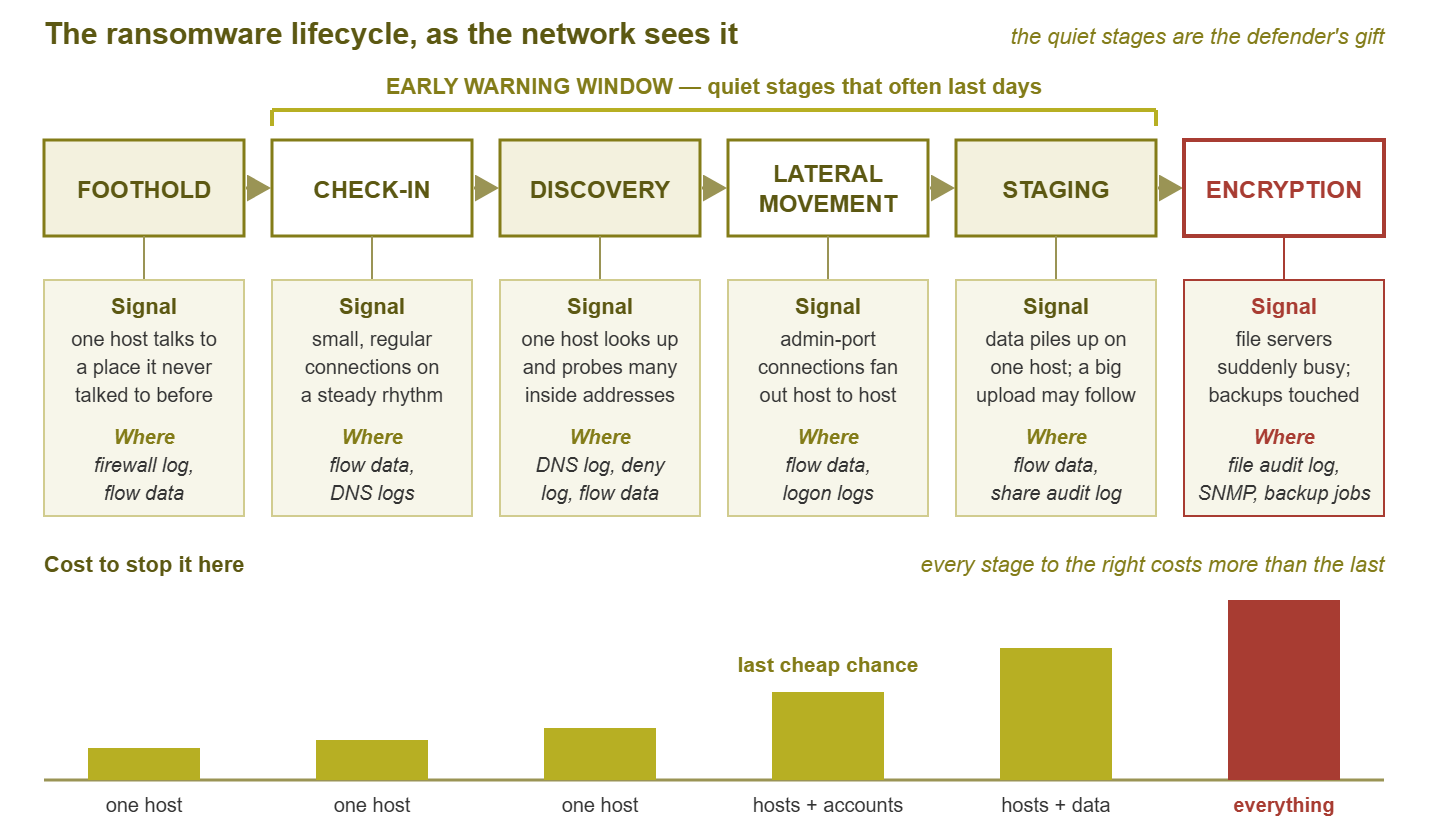
Figure 1: The lifecycle as a timeline. The quiet middle stages are where the network gives you days of warning. The cost of stopping the attack climbs at every step to the right.
Stage 1: The foothold
What happens: one machine on your network — usually a workstation, occasionally an exposed server — comes under the attacker's control. How that happened is an investigation question for later. Right now the only thing that matters is that one host is now doing something on someone else's behalf.
What the network sees: that host starts talking to somewhere new. New means an outside address or name it has never contacted before. The port or pattern does not match the way this machine normally behaves. Workstations are creatures of habit; they talk to your domain controllers, your file server, your mail provider, a few dozen web services, and not much else. A brand-new outbound destination is not proof of anything on its own. People install software, browse to new sites, and click on things all day. But that destination is the first thread. It is recorded in your firewall's connection log and in flow data if you collect it.
How loud it is: very quiet. A single new connection from a single workstation is about the most ordinary event a network produces. You will almost never catch an attack at this stage by itself, and that is fine. What matters is that the record exists, so that when a later stage fires you can walk backward and find when it all started.
Stage 2: The quiet check-in
What happens: the foothold machine checks in with the attacker on a schedule to ask for instructions. This is called beaconing, and the reason it exists is simple. Whoever is running the intrusion is not sitting on your workstation. So the workstation has to phone home and wait to be told what to do next.
What the network sees: small, regular connections from one internal host to the same outside destination. They follow a steady rhythm — every few minutes, every hour, whatever the schedule is — carrying almost no data. This check-in traffic runs at night. It runs at lunch. It runs when the user is on holiday. That regularity is the tell, because humans are not regular and most legitimate software either talks constantly or not at all. Recognizing this rhythm in flow records and DNS logs is its own skill, and Beaconing: The Heartbeat of Something That Shouldn't Be There covers it in depth.
How loud it is: quiet, but detectable if you are looking. This stage can last a long time. From the attacker's side there is no hurry: the machine is theirs, the schedule is set, and rushing only increases the chance of being noticed. From your side, every hour of check-in traffic is an hour of evidence and an hour in which nothing irreversible has happened yet.
Stage 3: Discovery
What happens: the foothold looks around. Before the attacker can move anywhere, they need a map. It must show what other machines exist, which ones are servers, and where the file shares are. It must show which accounts have administrative rights and where the backups live. They build that map the same way you would if you were dropped onto an unfamiliar network — by asking.
What the network sees: name lookups and connection attempts across the network from one host, at a rate and breadth that host has never shown before. Your DNS server logs a workstation resolving dozens or hundreds of internal names it has never asked about. Your firewall's deny log, if you have any segmentation at all, shows that same host knocking on addresses that do not answer. Flow records show a fan of short, failed, or tiny connections from one source to many destinations. A workstation that normally talks to eight internal addresses suddenly touches eighty. The general shape of this — one host, many targets, short conversations — is the same shape as any internal scan. The guide Internal Scanning: When One Host Starts Knocking on Every Door describes it in detail.
How loud it is: this is the first stage that is genuinely noisy if your instruments are pointed at it. Discovery is also the first stage where the attacker has to touch your infrastructure — your DNS, your address space — rather than just talking out to the internet. That makes it the first stage you have real home advantage over.
Stage 4: Lateral movement
What happens: the attacker uses the map and whatever credentials they have collected to move from the foothold to other machines. The goal is reach: file servers, domain controllers, backup servers, and enough workstations that encryption, when it comes, hurts everywhere at once.
What the network sees: administrative-style connections spreading host to host. Remote desktop sessions, file-sharing connections, and remote-management traffic originate from a workstation — or from a single server. They reach out to many other hosts in a short window. Alongside them, your domain controllers log a burst of authentication events. One account succeeds on machine after machine, or there is a cascade of failures followed by a success. A workstation acting as the source of admin traffic to other workstations is unusual in almost every network. That direction is the signal. Because this stage has the loudest and most specific footprint of the whole quiet phase, it gets its own guide, Lateral-Movement Traffic: The Loudest Quiet Signal.
How loud it is: loud, and unmistakable in hindsight. Every incident retrospective contains the sentence "the lateral movement was right there in the logs." The point of this pillar is to make you the team that reads that sentence in the present tense.
Stage 5: Staging
What happens: the attacker prepares. Data may be gathered onto one host and, increasingly often, copied out of your network before anything is encrypted. That is because a copy of your data is a second lever in the ransom demand. Tools are placed where they will be needed. Backups are located and, where the attacker can reach them, damaged or deleted so that recovery is harder.
What the network sees: two things, and both are volume-shaped. First, an unusual amount of data flowing inward to one host from file shares it has never read from in bulk. Second, though not always, there is a large outbound transfer from that host, or from a server, to an outside destination. It is often at night, often to somewhere the network has never sent data before. Flow records show these as fat, long-lived sessions where you normally see thin ones. File-server audit logs show one account reading breadth-first across shares. Backup systems may log jobs being cancelled, retention being shortened, or snapshots vanishing.
How loud it is: moderately loud, and the last stage in which the "nothing irreversible" statement is still mostly true. If data has already left, that changes the incident's legal and communication shape, but your systems are still intact and recoverable.
Stage 6: Encryption
What happens: files are encrypted across every host and share the attacker has reached, usually as fast as possible. This usually happens at a time chosen so that nobody is watching. The ransom note appears. This is the moment most people think of as "the attack". From the network's point of view it is the end of the story, not the start.
What the network sees: file servers suddenly become very, very busy. Disk and CPU on the file server saturate. File-sharing traffic between the encrypting hosts and the shares spikes in both directions, because each file has to be read and then written back. File-server audit logs show a storm of renames and modifications from one account. Backups fail, or backup targets go quiet. Monitoring agents on affected machines stop reporting. The specific signatures are the subject of Mass Encryption Signatures; the response is the subject of The First Hour.
How loud it is: deafening. And nearly useless as a warning, because by now the only thing left to do is limit the damage and recover.
The warning window: the defender's gift
Look at the diagram again and notice what is bracketed. Stages two through five — check-in, discovery, lateral movement, staging — are the quiet middle. They are quiet by design, because the attacker gains nothing by hurrying and loses everything by being noticed. From their side, patience is the safest strategy. From your side, that patience is a gift. It means the interval between the foothold and the encryption is measured in days more often than in hours. Every one of those days is a day the network is quietly recording the attacker's movements.
This is the single most important idea in this pillar, so it is worth saying plainly. You do not need to catch ransomware at the moment it arrives. You need to catch it at any point during a window that usually lasts days. That is a far easier problem. It changes the question from "can we spot a malicious file?" to "would we notice a workstation that started scanning the network and logging into servers at two in the morning?" The honest answer to the second question, for most small teams, is "yes, if we had set up the alert."
The bars at the bottom of the diagram show the other half of the argument: the cost of stopping the attack. During check-in and discovery, stopping it means isolating one host and reimaging it — an afternoon's work. During lateral movement, it means isolating a handful of hosts and resetting the accounts they used — a bad day, but a day. During staging, you add the question of whether data left, which brings in legal and communication work. At encryption, you are no longer stopping anything. You are recovering, and recovery is measured in days of downtime and weeks of cleanup. Lateral movement is the last cheap chance. It is loud enough to catch reliably, and early enough that catching it still means an ordinary bad day instead of the worst week of the year.
Tip: when you assess your own monitoring, ask one question per stage: "if this were happening right now, which alert would fire?" Any stage where the answer is "none" is a gap, and the gap at lateral movement is the one to close first. The last guide in this pillar, Readiness, turns that exercise into a checklist.
The stage / signal / where-you-would-see-it table
Here is the whole lifecycle compressed into one reference. The final column is deliberately about the tools a small team is likely to have, not the ones a large security operation might buy.
| Stage | What the network sees | Where you would see it | Loudness |
|---|---|---|---|
| 1. Foothold | One host contacts a new outside destination it has never used | Firewall connection log, flow data | Very quiet |
| 2. Check-in | Small, regular connections to one outside destination, around the clock | Flow data, DNS query logs, firewall log | Quiet, detectable |
| 3. Discovery | One host resolves and probes many internal addresses in a short time | DNS query log, firewall deny log, flow data | Moderate |
| 4. Lateral movement | Admin-style connections fan out from one host to many; authentication bursts | Flow data, domain controller logon logs, switch port counters | Loud — last cheap chance |
| 5. Staging | Bulk reads onto one host; large outbound transfer; backups tampered with | Flow data, file-share audit logs, backup job logs | Moderate to loud |
| 6. Encryption | File-server saturation; rename storms; backups fail; agents go silent | File audit logs, SNMP disk and CPU, backup jobs, monitoring heartbeats | Deafening — too late |
Two patterns are worth noticing in the table. First, flow data appears in almost every row. If you collect one new kind of telemetry after reading this pillar, make it flow records from your core switch or firewall. They answer the "who talked to whom, how much, and when" question at every stage. Second, the sources are all things you can read without any special security tooling. A DNS log is a text file, a deny log is a text file, and a logon log is a Windows event log. Detection at this level is mostly a matter of paying attention to data you already generate.
When the script is not followed
Everything above is a model, and models are simplifications. Real incidents wander off the script in ways you should expect, so that when yours does, you do not conclude that "it can't be ransomware because we didn't see discovery."
- Stages are skipped. An attacker may already hold a working administrator account — from a reused password, a leaked credential, or a previous compromise. In that case, they may go straight from foothold to lateral movement with almost no discovery, because they already know where things are.
- Stages overlap. Check-in traffic continues through every later stage. Discovery and lateral movement interleave: move to a server, look around from there, move again. The clean left-to-right timeline is really a tangle in which several stages run at once.
- The window is short. Some intrusions go from foothold to encryption in hours. When that happens, the quiet stages compress rather than vanish. The signals are still there, just crammed into one evening. Around-the-clock alert routing is the difference between catching them and reading about them in the morning.
- The window is very long. Other intrusions sit at the check-in stage for weeks. That is good news for detection and bad news for evidence retention. If your logs only cover a few days, the beginning of the story may already be gone by the time you notice the end.
- The foothold is a server, not a workstation. An internet-facing server that is compromised starts the lifecycle already sitting on a segment with better reach. And its "new destination" traffic can be harder to distinguish from normal server behavior.
- There is no staging. Not every incident involves copying data out. Its absence does not mean encryption is not coming.
The practical lesson is to treat the stages as a checklist of places to look, not as a sequence that must be confirmed in order. If you see convincing lateral movement, you act on it. You do not wait for the discovery signal you may have missed. The model's job is to tell you what each kind of evidence means and where to find the next piece. It is not a gate that has to be passed in order before you are allowed to respond.
Where to go next
You now have the mental model that the rest of this pillar builds on: ransomware is a process. Every stage of the process leaves a footprint on the network. The quiet middle stages usually last days. Lateral movement is the last point at which stopping the process is cheap. The next guide, Lateral-Movement Traffic: The Loudest Quiet Signal, zooms into that stage and gives you concrete thresholds. Mass Encryption Signatures covers the loud end. The First Hour is the response checklist. Readiness turns the whole set into a monitoring program. All of them live under Early Warning Signs of Ransomware on the Wire.
Put this into practice with SysPeep Monitor
Several of the signals in this lifecycle are plain infrastructure metrics. They include a file server whose disk and CPU suddenly saturate, a backup job that fails, and a monitoring agent that goes quiet. SysPeep Monitor collects exactly those numbers over SNMP and WMI, with thresholds and alert rules designed to keep noise down. That way, the alert that fires at two in the morning is one worth waking up for. The free trial installs on any Windows machine.
Download Free TrialLearn About SysPeep - All Rights Reserved.