
Scripted User Journeys: Testing Login-to-Result, Not Just Ping
Every admin has lived this morning. The dashboard is a wall of green. Ping says the application server is up. The port check says the web service is listening. The CPU graph is flat and bored. And the help desk phone will not stop ringing, because nobody in accounting can search for a customer. The login page loads beautifully. The search behind it has been broken since the overnight database maintenance. Not one of your checks noticed, because not one of them ever tried to search.
A scripted user journey closes that gap. Instead of asking "is the server there?", it does what a real person does. It opens the app, logs in, searches, opens a record, submits a form, logs out. It does this automatically, on a schedule. It reports how long each step took and whether it produced the right result. It is the difference between checking that the shop's front door is unlocked and walking in to see whether anyone can sell you something.
This guide assumes you have never built one. By the end you will know what a journey is and which of three scripting approaches fits which application. You will know how to set up test accounts and data without endangering anything real. You will also know why measuring each step separately is the whole point. Where to run journeys from is covered in the guide on transaction test vantage points.
In this guide
- What a journey is (and what a ping is not)
- Why a single check cannot see a broken step
- Three ways to script a journey
- Designing the journey: steps, proofs, and budgets
- Test accounts and data hygiene
- Measure every step, not just the total
- A worked example: the morning the search broke
- Where to go next
What a journey is (and what a ping is not)
Start with the vocabulary. A synthetic transaction is any test where a machine pretends to be a user and performs a real action against a real system. It runs on a schedule. That lets you learn about the system's health without waiting for a human to complain. "Synthetic" simply means the traffic came from your test rather than a real customer. A journey is a synthetic transaction made of several steps in sequence, each depending on the one before it. You cannot search until you have logged in. You cannot open a record until the search returned one.
Contrast that with the checks you probably already have. A ping proves that a machine's network stack answers. A port check proves that something is listening. A single HTTP check proves that one page returns a status code. Each is useful and cheap, and each tests exactly one layer of a stack that has a dozen. Single-check design is covered in the guide on designing synthetic probes. This guide is about chaining checks into something that resembles a person.
A journey for an internal customer-records application:
- 1. Open the app. Load the front page; expect the login form.
- 2. Log in. Submit the test account's credentials; expect the home page with the account's display name on it.
- 3. Search. Search for a known test customer; expect exactly one result with that name.
- 4. Open the record. Follow the result; expect the record page with the customer's reference number.
- 5. Submit a form. Add a note to the record; expect a confirmation and the note in the record's history.
- 6. Log out. End the session; expect the login form again, and expect the home page to now refuse to load.
Every step has two halves: an action and an expected result (testers call this an assertion). The action alone proves nothing. "I submitted the login form and got a page back" is true even when the page says "invalid credentials." The expected result is what turns a script into a test.
Why a single check cannot see a broken step
Applications are layered. A web front end answers HTTP, but the search box behind it calls a search service. That service queries a database, which lives on storage reached over a network. Authentication may hop out to a directory or an identity provider. A ping exercises the very bottom of that pile. A page check exercises the front end and nothing behind it. The failures that generate tickets live in the middle. For example, a database accepts connections but has a locked table. A search index is rebuilding. An identity provider answers just slowly enough that logins time out.
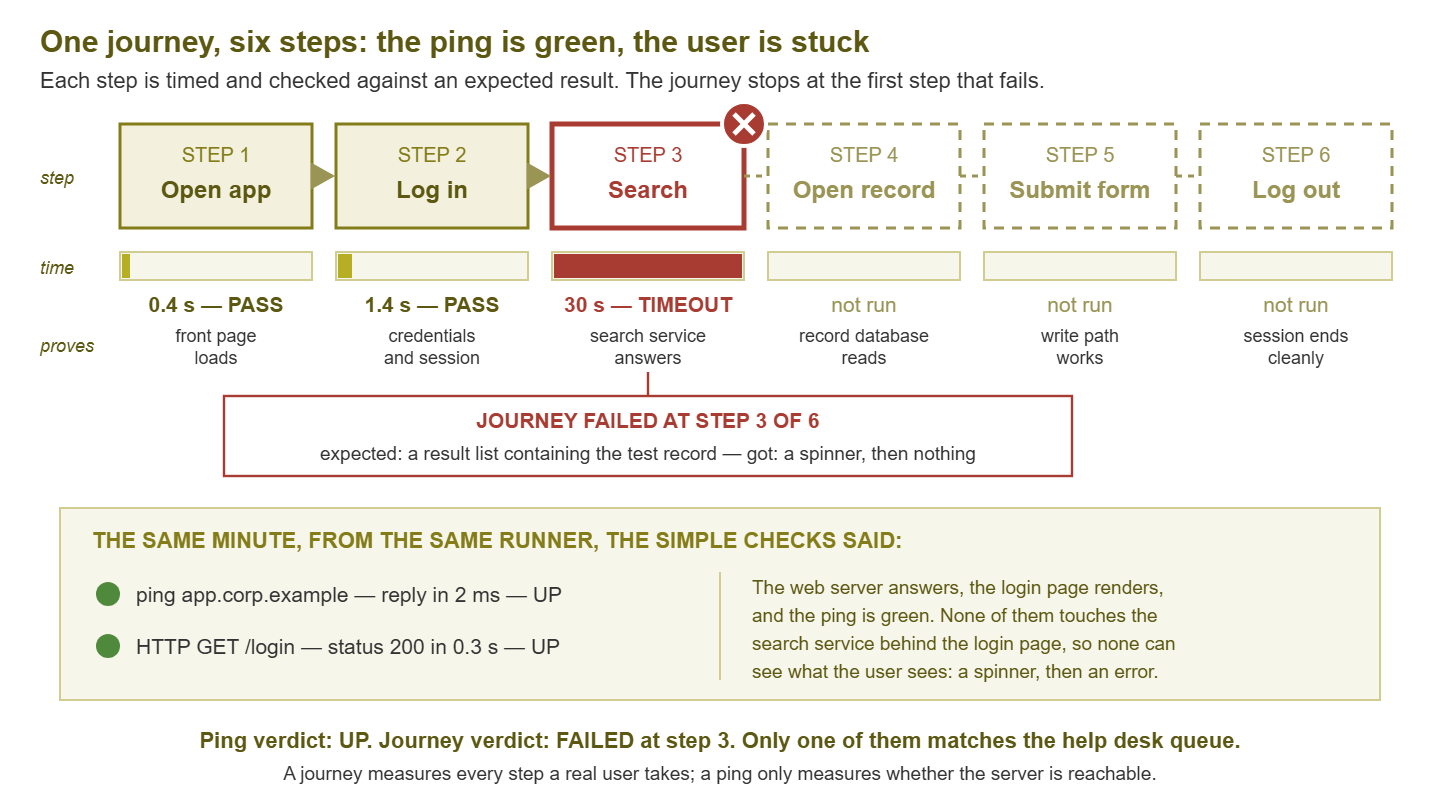
Figure 1: A journey stops at the first failing step and reports which one. At the same minute, a ping and a login-page check from the same machine both said the application was fine, because neither touches the search service.
The journey catches these because it walks through the layers in the same order a user does, and stops at the first one that fails. That stopping point is the diagnostic gold. "Journey failed at step 3, search, after 30 seconds, with an empty result page" narrows the problem to the search path before anyone has opened a terminal. "Ping OK" narrows it to nothing. And a journey that passes says something no wall of green infrastructure checks can. At this minute, from this place, a user could actually get work done. That is the sentence your manager wants during an incident, and a ping cannot say it.
Three ways to script a journey
You do not need to buy anything to build a journey, though a little scripting comfort helps. There are three broad approaches, and most shops end up using two of them.
1. Browser automation: drive a real browser
A browser-automation framework launches a real browser (usually headless, meaning without a visible window). Your script tells it to navigate, type into fields, click buttons, and wait for elements to appear. This is the most faithful approach. It runs the application's own JavaScript, renders the pages, and sees exactly what a user's browser would see, including a login button broken by a front-end bug. The price is weight and fragility. A real browser needs a runner with memory to spare. Each run takes seconds rather than milliseconds. Scripts identify page elements by names or structure that front-end developers change without warning. Use it where rendering matters and the application is too complex to script at the request level.
2. HTTP or API sequence scripts: faster, no rendering
Underneath every web journey is a sequence of HTTP requests: a GET for the login page, a POST with the credentials, a GET for the search results, and so on. An HTTP sequence script sends those requests directly, keeps the session cookie or token between them, and checks each response for the expected content. With no rendering and no JavaScript engine it runs in a fraction of a second and can run every minute from a tiny machine. The trade is that you have to work out what the requests are. Watch your browser's developer tools while you perform the journey by hand. Applications with heavy client-side logic can be awkward to drive this way. It is the right default for APIs, simpler web apps, and any journey you want to run often from many places. A first cut can be a shell script:
# Step 1: open the app (expect the login form)
curl -s -o /dev/null -w "open %{http_code} %{time_total}s\n" https://records.corp.example/

# Step 2: log in, keeping the session cookie in a jar (expect a redirect to /home)
curl -s -c jar.txt -o /dev/null -w "login %{http_code} %{time_total}s\n" \
  -d "user=svc-synth-records" -d "pass=$SYNTH_PASS" https://records.corp.example/login

# Step 3: search with that cookie (expect the test customer in the body)
curl -s -b jar.txt -w "search %{http_code} %{time_total}s\n" \
  "https://records.corp.example/search?q=SYNTH-TEST-CUSTOMER-01" | grep -c "SYNTH-TEST-CUSTOMER-01"
That is crude, but it already tests three layers that no ping touches. Note that the password comes from an environment variable rather than living in the script; more on that below.
3. Protocol-level sequences for non-web applications
Not everything users touch is a web page. Mail is a journey. Authenticate to the mail server and send a message to a test mailbox. Then open that mailbox and confirm the message arrived, timing the round trip. A file share is a journey: map the share, write a small file, read it back, delete it. A directory service is a journey: bind with the test account, search for a known object, compare the result. The tools differ, but the pattern never changes: a chain of dependent steps, each with an action, an expected result, and a stopwatch.
| Approach | What it exercises | Cost per run | Breaks when | Best for |
|---|---|---|---|---|
| Browser automation | Everything a user's browser does, including JavaScript and rendering | Seconds; hundreds of MB of memory | Page structure or element names change | Complex, front-end-heavy web apps |
| HTTP / API sequence | The requests behind the pages, sessions, back-end services | Milliseconds; negligible | URLs, parameters, or token handling change | APIs, simpler web apps, frequent runs from many places |
| Protocol-level sequence | Non-web services end to end (mail, files, directory, database) | Milliseconds to seconds | Credentials, server names, or protocol settings change | Services users depend on without seeing |
Designing the journey: steps, proofs, and budgets
The most common design mistake is scripting what is easy rather than what matters. Before writing a line, sit with someone who uses the application all day. Ask what they do most, and what hurts most when it breaks. The journey should follow that path, not the developer's demo path. Keep it short: five to eight steps is plenty. A thirty-step journey fails for thirty reasons, and nobody can tell from the alert which one.
For each step, decide three things and write them down before you script anything.
- The action. Exactly what the step does, in terms a colleague could reproduce by hand.
- The proof of success. What must be true in the response for the step to pass. Choose something specific to the outcome: the customer's reference number on the record page, not "the page loaded." A status code of 200 is the weakest proof there is; many applications return 200 with a polite error in the body.
- The time budget. How long the step may take before it counts as slow, and how long before it counts as failed (the timeout). Start generous, run for a week or two, then tighten to what normal looks like.
| # | Step | Action | Proof of success | Slow after | Fail after |
|---|---|---|---|---|---|
| 1 | Open app | GET the front page | Login form present in body | 2 s | 15 s |
| 2 | Log in | POST test credentials | Redirect to home; display name "Synthetic Records" shown | 3 s | 20 s |
| 3 | Search | Query for SYNTH-TEST-CUSTOMER-01 | Exactly one result, with that name | 3 s | 30 s |
| 4 | Open record | GET the record from the result | Reference number SYN-000001 in page | 3 s | 30 s |
| 5 | Submit note | POST a note containing the run timestamp | Confirmation; note text visible in history | 4 s | 30 s |
| 6 | Log out | GET the logout link, then GET home | Login form returned both times | 2 s | 15 s |
Keep a design table like this next to the script. It is what you will hand to the application team when they ask "what exactly does your test do?" The step that writes something (step 5 here) is the only one that proves the write path works. It is also the only one that leaves a trace, which is the subject of the next section.
Tip: Include one step that would fail if the application were serving a stale copy. Writing a note containing the run's timestamp and reading it back is the classic way. If the read-back shows the previous run's timestamp, something between the user and the database is lying.
Test accounts and data hygiene
A journey that logs in needs an identity, and a journey that submits a form creates data. Both are places where a careless test becomes a security incident or a very confused colleague. The rules are simple.
Dedicated accounts with minimal rights
Create an account that exists only for the journey, named so its purpose is obvious in any log (svc-synth-records beats test1). Give it the least privilege that still lets the journey complete. That means read access to the one test record, write access to notes on that record, nothing else. Never reuse an administrator's credentials or a real employee's account. When the journey misbehaves at three in the morning, you want the audit log to say "the synthetic account did this." Not "Dave did this." If the application requires multi-factor authentication, ask its owners for an exception scoped to that one account and the runner's source address, not anything broader. Store the password in a secrets store or an environment variable the runner reads at start — never in the script file or its version-control history.
Tagged test records, cleaned up on schedule
The journey should search for, open, and write to records that exist only for testing, named with an unmistakable tag such as SYNTH-TEST-CUSTOMER-01. Tell the application owners those records exist so nobody "tidies" them away; that is a classic way for a journey to start failing overnight. Anything the journey creates should be cleaned up. The journey itself can do this as a final step. Or use a scheduled job that removes tagged records older than a day. Ask, too, what else happens when a user submits that form — an email to a manager, a ticket, a workflow. Route those effects to a test sink. A journey that files a real help-desk ticket every five minutes will make you briefly famous.
Never real customer data
A journey must never search for, open, or modify a real customer, employee, or patient record. It is tempting, because real records are already there and behave realistically. But the journey's output — logs, screenshots, saved responses — ends up in monitoring systems, chat channels, and email alerts. Those have far looser access controls than the application itself. Synthetic data only, always. If the application cannot be tested without real data, that is a conversation with its owners, not a reason to bend the rule.
Measure every step, not just the total
A journey that reports only "passed in 9.2 seconds" has thrown away most of its value. Nine seconds could be a slow login and a fast search, or the reverse, and those point at different teams. Record, for every run, the duration and the pass/fail result of every step, plus a short reason on failure:
journey: records-core   runner: hq-lan-01   run: 02:15:00
 1 open-app        0.41 s  PASS   200, login form present
 2 login           1.08 s  PASS   redirect /home, display name found
 3 search          9.87 s  FAIL   expected 1 result, got "search temporarily unavailable"
 4 open-record        --   SKIP
 5 submit-note        --   SKIP
 6 logout             --   SKIP
 total            11.36 s  FAIL at step 3 (search)
Per-step measurement gives you three things the total cannot.
Localization. The step that failed or slowed names the layer to look at. A slow login points at authentication and the directory. A slow search points at the search service and the database. A slow submit points at the write path. This is the multi-step cousin of response-time decomposition, which splits one request into its parts.
Baselines per step. After a couple of weeks you know that login normally takes about a second and search about half a second from the office. A three-second search is then obviously abnormal even though the journey as a whole still "passes." Per-step baselines are the raw material for the alert rules in the guide on alerting on experience.
Trend before failure. Steps rarely go from fine to broken in one jump. A search that has crept from half a second to two seconds over a month is telling you about an index that needs rebuilding. The total hides that creep behind the noise of the other steps. So keep history: a journey that only keeps its last result is a smoke detector. One that keeps every step of every run is a monitoring system.
A worked example: the morning the search broke
Back to the morning in the introduction, replayed with a journey in place. The records journey runs every five minutes from a small virtual machine on the office network. At 02:10 the overnight maintenance job on the database server finishes. At 02:15 the journey passes steps 1 and 2. At step 3 it receives a polite "search temporarily unavailable" page instead of a result list. The step fails on its proof, the journey stops, and the result record above is written.
A second run at 02:20 fails the same way, which satisfies the confirmation rule. An alert goes out: "records-core FAILED at step 3 (search) from hq-lan-01, two consecutive runs; steps 1–2 passing; ping and login page OK." Whoever reads that — at 02:20, or more realistically at 07:00 — already knows four things. The web tier is fine. Authentication is fine. The search path is not. The problem began right after the maintenance window. That is a ten-minute fix by the database administrator instead of a three-hour argument about whether "the network" is slow.
With only the old checks, nothing fires. The first signal is a ticket at 08:40. By then someone has restarted the web server "just in case," which fixed nothing and destroyed the evidence. Same outage, two different mornings; the difference is a script that tried to search.
Where to go next
A journey is a chain of dependent steps, each with an action, a proof of success, and a time budget. It runs as a dedicated account against tagged test data. And it records every step's duration and outcome so that a failure names its own layer. Start with one journey for the application that generates the most tickets, and let it run for two weeks before you trust its thresholds.
The rest of this topic picks up the next questions. Where to run transaction tests from explains why the same journey from different places localizes problems. How often to run it is discussed in the guide on synthetic test frequency. Alerting on experience turns step results into alerts people trust. The guide on keeping synthetic tests honest deals with the day the login page changes and your script does not. All of them start from the Synthetic Transactions & End-to-End Testing pillar.
Put this into practice with SysPeep Monitor
A journey tells you which step a user is stuck on; the infrastructure graphs tell you why. SysPeep Monitor watches the servers and network behind your journeys. It tracks CPU, memory, disk, and interface utilization over SNMP and WMI, plus latency and loss to each server. So when the search step turns red, you can open the database server's chart for that minute instead of guessing. The free trial installs on any Windows machine.
Download Free TrialLearn About SysPeep - All Rights Reserved.