
Finding Your Predecessor's Landmines Before They Find You
The network you inherited works today. That is the trap. Most inherited-network disasters are not lurking bugs waiting for bad luck — they are appointments. A certificate will expire on a specific date. A domain will lapse on a specific date. A support contract, a license, a UPS battery, a disk array: each carries a timer that started counting long before you arrived. None of them care that the person who knew about them has left the building.
This is why taking over an undocumented network feels haunted. Nothing is wrong — and then, one Tuesday, the VPN portal shows a scary browser warning. Or email stops worldwide because the company domain quietly expired over the weekend. The failure was scheduled years ago. Your predecessor knew the date, or their calendar did, or their personal credit card was silently absorbing it. Now nobody does.
The fix is a sweep: hunt the timers systematically, write down every date, and plant a defusal in front of each one before it goes off. This guide gives you the full taxonomy of landmines: five families. For each, learn how to find it, how to defuse it, and how much fuse you typically get. You also get a one-afternoon-per-category sweep plan and the calendar discipline that keeps you from ever being surprised again.
In this guide
- Every landmine is a date
- Family 1: certificates, domains, and the credentials of things
- Family 2: licensing timers
- Family 3: lifecycle timers
- Family 4: dependency timers
- Family 5: knowledge timers
- The sweep: one afternoon per family
- You are also somebody's predecessor
- The master landmine table
Every landmine is a date
Get the mental model right and the whole problem becomes manageable. A landmine, in this guide, is anything on the network that will fail on a schedule rather than by chance. Nobody currently employed is watching it. That definition does two useful things. First, it tells you these problems are completely preventable: unlike a dying switch, a scheduled failure announces its date to anyone who checks. Second, it tells you what the hunt actually is: not fixing, just enumerating and dating. Find the timer, read the timer, write the date down. Defusal — renewing, transferring, replacing, automating — can then happen calmly, in fuse-length order, on your schedule instead of the landmine's.
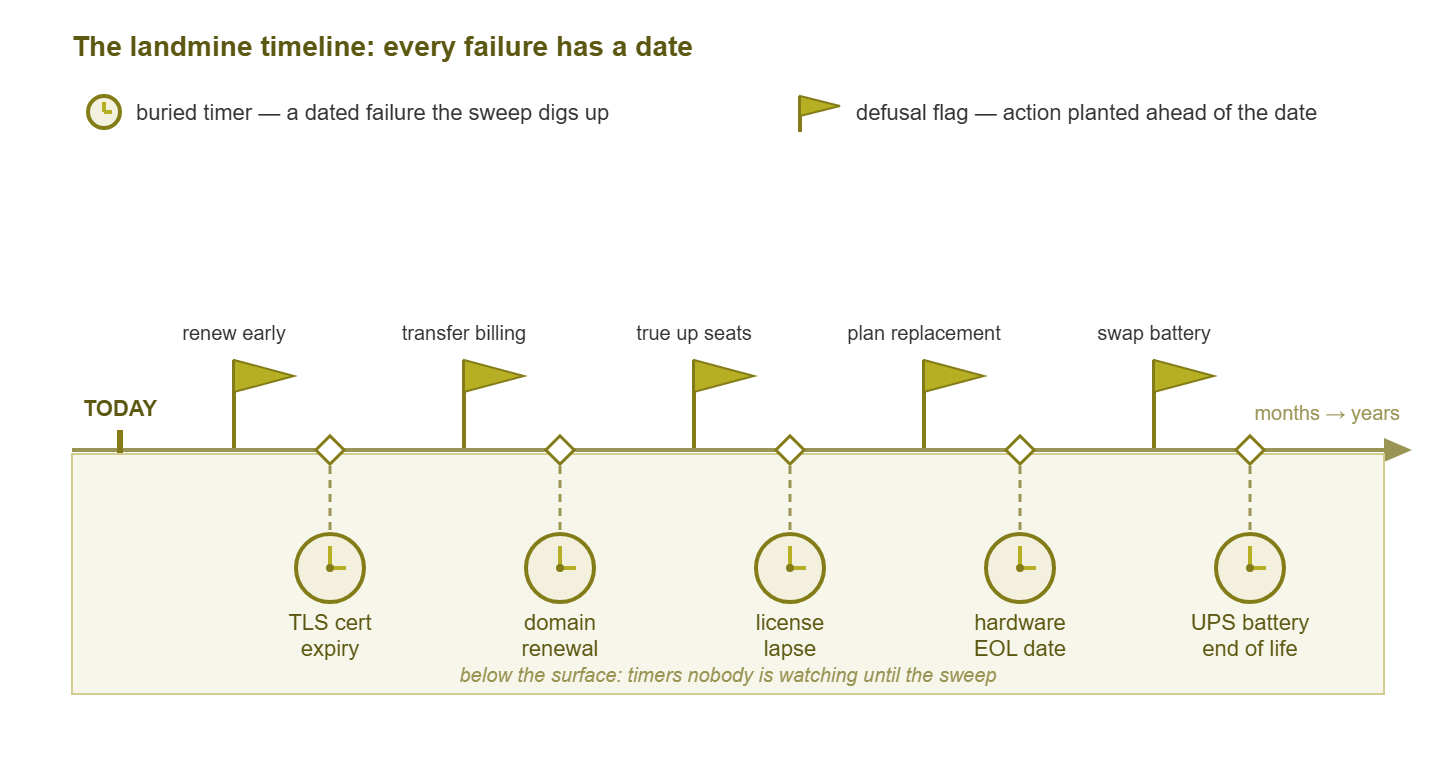
Figure 1: the landmine timeline. Every buried timer has a date; the sweep finds each one early enough to plant a defusal flag in front of it.
Fuse lengths vary enormously, which is why the sweep sorts by date. Some timers give you a year of warning; some are already smoking when you arrive. The five families below are ordered roughly by how often they actually detonate on new admins. And the first family is first for a reason.
Family 1: certificates, domains, and the credentials of things
A TLS certificate is the credential behind the padlock. It lets browsers and apps trust that your mail server, VPN portal, or web interface is really yours. Certificates are issued with a built-in expiry date. When one lapses, the service does not degrade politely. Browsers throw full-screen warnings, mail clients refuse to connect, and VPN users are locked out at 8 AM sharp. Expiry is the most common inherited landmine because renewal was probably a manual chore living in one person's head.
Detection is a sweep with two layers. First, walk everything you already know about — every web UI, the mail server, the VPN portal, anything with a padlock — and record each certificate's expiry date. One generic command does it from any admin box:
$ openssl s_client -connect vpn.example.com:443 \
    -servername vpn.example.com 2>/dev/null \
    | openssl x509 -noout -enddate
notAfter=(the date you came for)
Second, hunt the certificates you do not know exist. Your discovery registers list every host that answers on the common secure ports. Check each one, because internal admin pages and appliances carry certificates too. And for anything public-facing, remember that publicly trusted certificates are recorded in open, searchable logs when they are issued. Searching those logs for your company's domain names is a legitimate admin trick. It regularly surfaces forgotten services your predecessor stood up and never mentioned.
Then the bigger sibling: the domain itself. Every company domain is a rented name with a renewal date, a registrar account that controls it, and a payment method behind the renewal. All three are landmines. The classic horror story goes like this. The domain was registered years ago by the previous admin, on their personal registrar account, set to auto-renew against their personal credit card. It kept quietly working after they left — until the card expired. The renewal failed, and the warning emails went to their dead mailbox. One Monday the company's website, email, and every service hanging off the domain simply stopped. Recovering an expired domain ranges from an embarrassing fee to genuinely losing the name.
Defusal, for the whole family: find out who literally owns each domain (which registrar account, in whose name). Get ownership and billing moved to company-controlled accounts paid by company money. Confirm the renewal and expiry notices reach a mailbox that living, current employees read. Do the same for the DNS hosting account — the service that answers queries for the domain. This is frequently a separate account with its own lapsing payment method. Typical fuse: certificates give weeks to a year; domains renew on multi-year cycles, which means the fuse can be long but the detonation is catastrophic.
Warning: "it auto-renews" is not defusal — auto-renew is only as alive as the payment card and the mailbox behind it. A landmine on auto-renew with a dead card is just a landmine with extra steps. Verify the card, the account owner, and the notification address, or you have verified nothing.
Family 2: licensing timers
Software and support age on paper even when the bits keep running. Three sub-species. Support contracts: the firewall or server may hum along fine. But the day its support lapses is the day a dead power supply becomes a procurement crisis instead of a courier envelope. Software licenses and subscriptions: some products stop working at expiry, some drop into limited modes, some keep working but put you out of compliance. You want to know which category each one is in before the date. Seat drift: licenses bought for forty users, silently serving sixty. Nobody decided to be out of compliance; the company just grew and the person who tracked counts left.
Detection: build a license register. Sources: the software itself (About pages and license screens usually show expiry and counts), invoices and renewal emails in accounting's files, and the vendor portals. Which raises this family's nastiest twist: the vendor-account recovery problem. Support entitlements, license portals, and renewal controls are very often tied to the departed admin's named account and email address. You cannot even read your own entitlements until that is fixed. So the register-building doubles as a transfer-of-ownership sweep. Contact every vendor and prove the company's identity (expect to need an invoice number or a manager's signature). Get accounts re-homed to role-based company addresses — it-admin@ rather than any human's name. It is tedious, unglamorous, and worth more than almost anything else in this guide. The same logic applies to every admin credential the predecessor held, which is the broader project of credential archaeology.
Defusal: register with dates, renewals assigned to a calendar and an owner, accounts transferred, seat counts trued up. Typical fuse: months to a year — usually generous, if you look.
Family 3: lifecycle timers
Hardware and firmware carry two kinds of dates. The published kind: EOL and EOS — end of life and end of support. These are the vendor's announced dates after which a product gets no fixes, no security patches, and eventually no spare parts. An inherited network nearly always contains something past one of these dates, still faithfully passing packets. It works — and it is uninsurable: the next vulnerability in it will never be patched. Look up every model in your device register against the vendor's lifecycle pages and record the dates. Managing the consequences — upgrade trains, replacement planning — is the territory of the Firmware Lifecycle guides.
Then the physical kind, the wear-out timers. UPS batteries chemically age toward a runtime of roughly zero regardless of how healthy the UPS looks from the front. The status page or SNMP data reports battery age and estimated runtime. Anything old or short goes on the replacement list. Disks and arrays past their design life: drives of the same age and batch have a charming habit of failing close together. So a five-year-old array is not "fine so far." It is a countdown with the label worn off. Read the SMART data (Self-Monitoring, Analysis and Reporting Technology — the drive's own health self-assessment), note reallocated-sector counts and power-on hours. And record the age of every spinning thing. Defusal: replacement plans with budgets attached, spares on the shelf for what cannot be replaced yet, and monitoring on everything that can report its own decay. Typical fuse: months to years, but the wear-out timers are silent — they only have a date if you go read it.
Family 4: dependency timers
The sneakiest family, because these timers live outside the building. Every network quietly depends on external services, and inherited ones depend on services chosen by someone who is not around to confess. The recurring shapes:
- The load-bearing free tier. A DNS service, a tunnel broker, a notification relay — signed up on a free plan years ago, now carrying production traffic. Free tiers change terms, add limits, or retire, and no invoice means no warning reaches accounting.
- The personal-account cloud resource. A DNS zone, a storage bucket, a VM — created under the predecessor's personal account "just to test," then never migrated. It survives on their card and goodwill; it dies when either does.
- The job that emails the dead. Scheduled tasks, backup reports, and device alerts faithfully mailing a mailbox that was disabled the day your predecessor left. The automation still runs; its cries for help land nowhere.
Detection is the dead-letter audit: for every scheduled job, alert source, and automated report you can find, answer one question — whose inbox receives this? Anything pointing at a departed human, a disabled account, or an empty distribution list is a live finding. Repointing them was one of the thirty-day quick wins; the audit here is the systematic completion of it. For the external services, follow the money and the DNS. Accounting's card statements reveal paid dependencies, and your public DNS records reveal many of the rest. Every record pointing at an external provider is a dependency somebody signed up for. Defusal: migrate personal-account resources to company accounts, put real billing behind anything load-bearing, and give every automation a monitored recipient. Typical fuse: unknowable from the inside — which is exactly why this family gets enumerated instead of trusted.
Family 5: knowledge timers
The last family is the strangest: procedures that only existed in your predecessor's head, still ticking on muscle-memory schedules nobody else knows. The monthly service restart that kept the old application happy. The quarterly certificate ritual on the door-badge system. The tape swap, the manual true-up, the "you have to reboot it twice" trick. These are landmines because the absence of a routine detonates just as reliably as an expiry date — only later, and more confusingly.
Detection means flushing invisible routines into the open. Three seams to mine. The weird-but-working list from your config audit: strange scheduled tasks, odd scripts, and unexplained cron entries are frequently the automated half of a ritual whose manual half left with its owner. Vendor support histories: ask each vendor for the ticket history on your account — recurring tickets ("please reset the appliance again") are rituals wearing a support-case costume. And the humans: long-tenured staff remember symptoms, not causes. "Every few months the label printers stop and Dale did something in the closet" is a treasure map with one sentence of legend. Defusal: each recovered ritual gets written down as a runbook, then automated or scheduled with an owner. Typical fuse: weeks to a year — you find out the period the first time it elapses without the ritual.
The sweep: one afternoon per family
Do not try to hunt all five families at once; the sweep works as five focused afternoons, one family each, spread across two or three weeks. Each afternoon has the same shape: work the family's checklist, and for every landmine found, write one row into the risk register — with a date. The date is the whole point. Undated risks pile up into background anxiety; dated risks sort themselves into a work queue. When the five afternoons are done, sort the register by date. You have something rare and wonderful on an inherited network: a to-do list in the true order of urgency, made of deadlines instead of opinions.
| Afternoon | Family | Checklist highlights |
|---|---|---|
| 1 | Certificates & domains | Expiry date per certificate; registrar account owner per domain; billing card alive; notices reach a read mailbox; DNS hosting account owner |
| 2 | Licensing | License register with dates; seat counts vs reality; support contract dates; every vendor portal account transferred to a role address |
| 3 | Lifecycle | EOL/EOS date per model; UPS battery age and runtime; disk ages and SMART health; spares on hand for the unreplaceable |
| 4 | Dependencies | Dead-letter audit of every job and alert; external services from card statements and DNS records; personal-account resources migrated |
| 5 | Knowledge | Weird-but-working list explained; vendor ticket history read; long-tenured staff interviewed; each ritual written as a runbook |
Then build the defusal calendar — the permanent machinery that keeps the register from rotting back into mystery. Three tiers, in order of preference. Automate what can be automated: renewals on company billing with auto-renew verified alive. Monitor what can be watched: expiry and health checks make superb permanent sentries. A check that counts days-remaining turns a silent date into a loud warning at 30 days out. It does this on every future certificate too, including ones you have not met yet. Schedule the rest: calendar entries with reminders at 90, 30, and 7 days. Each names an owner and an action — not "cert!!" but "renew VPN portal certificate; procedure in runbook."
Tip: every reminder should reach at least two people, and never a personal mailbox alone. A defusal calendar visible only to you is your predecessor's mistake with a new name on it.
You are also somebody's predecessor
Here is the meta-lesson hiding in the sweep: every landmine you found was once a perfectly reasonable decision that simply outlived its decision-maker. Your predecessor was not a saboteur. They were a busy admin who registered a domain the fast way, took the free tier, and kept the ritual in their head. Those are exactly the shortcuts you will be tempted toward on your busiest days. The difference between them and the admin you want to be is not virtue; it is a register.
So keep a never-again register. The standing rule: anything with a date, an owner, or a renewal gets written down at creation time. Put it in the shared system, with its defusal already scheduled. Do that, and notice what your sweep documents have quietly become: a complete inventory of every date, dependency, account, and ritual the network runs on. That is a handover document — the one you wish you had been given. Today's defusal list is tomorrow's smooth transition, because one day someone will inherit this network from you. What they find in the shared drive will be your real resume. The craft of keeping such documents alive belongs to the Network Documentation guides.
The master landmine table
The whole hunt on one page — pin it somewhere and tick off families as the afternoons complete:
| Landmine | How to find it | Typical fuse | Defusal |
|---|---|---|---|
| TLS certificate expiry | Expiry sweep of every service with a padlock; public issuance logs for forgotten hosts | Weeks–1 year | Renewal owned and scheduled; expiry monitoring as a sentry |
| Domain / DNS account lapse | Registrar and DNS host account check: owner, billing card, notice mailbox | 1–several years | Company-owned accounts, company billing, watched mailbox |
| Support contract lapse | Vendor portals + invoices into a license register | Months–1 year | Renewal calendar with owner; decide renew-or-retire early |
| License expiry / seat drift | License screens; seats vs headcount | Months | True-up; register; renewal reminders |
| Orphaned vendor accounts | Every portal tied to the departed admin's email | Already expired | Transfer-of-ownership sweep to role addresses |
| EOL / EOS hardware | Device register vs vendor lifecycle pages | Months–years | Replacement plan and budget; lifecycle process |
| UPS battery death | Battery age and runtime via SNMP or panel | Silent | Replacement list; battery monitoring |
| Aged disks / arrays | SMART data, power-on hours, array age | Silent | Health monitoring; staged replacement; tested backups |
| Load-bearing free tier | DNS records; traffic; no invoice anywhere | Unknowable | Paid plan on company billing, or planned migration |
| Personal-account resources | Card statements; DNS; asking vendors | Unknowable | Migrate to company accounts |
| Jobs emailing the dead | Dead-letter audit: whose inbox receives each automation? | Already live | Repoint to monitored aliases |
| Head-only rituals | Weird-but-working list; vendor ticket history; staff memories | Weeks–1 year | Runbook, then automate or schedule with an owner |
Five afternoons of hunting, one register full of dates, and a calendar standing guard: the inherited network stops being haunted. A documented timer is not a landmine anymore — it is just maintenance. For the rest of the takeover, in order, head back to Taking Over an Undocumented Network.
Put this into practice with SysPeep Monitor
No software renews a domain or re-homes a vendor account for you — that part of the sweep is yours. But the watching afterward is automatable. SysPeep Monitor auto-discovers the devices on your network and reads health data like UPS battery status over SNMP and WMI. And its threshold and alert rules turn quiet decay into a timely email instead of a surprise. The free trial installs on one Windows machine.
Download Free TrialLearn About SysPeep - All Rights Reserved.