
How Email Actually Flows (and Where It Gets Stuck)
Email is the one system everybody assumes is instant and everybody is wrong about. A user clicks Send, the message vanishes from the Outbox, and as far as they are concerned it has arrived. In reality it has just begun a relay race through several machines, most of which you have never logged into. Each can quietly set it down and forget to pick it up again. That is why email problems are the sneakiest tickets you will ever get: nothing crashes and nothing turns red. And the first sign of trouble is a customer asking why they never received Tuesday's invoice.
The good news is that the path is not mysterious. Every hop does the same simple thing: accept a message, store it, try to pass it on. Every hop fails in the same handful of ways. This guide walks the chain hop by hop. By the end you will know what a mail queue is and what "deferred" means, and the classic places mail gets stuck. You will know what to monitor at every hop so you hear about the pile-up before the customer does. You will also know how to read a message's own headers to reconstruct its journey. No prior mail-server experience assumed.
In this guide
- The post office analogy: SMTP is store-and-forward
- The hop chain, one hop at a time
- Queues at every hop, and what "deferred" really means
- Where mail gets stuck: the usual suspects
- What to monitor at each hop
- The hosted-mail twist: fewer hops, same responsibilities
- Reading a message's own travel log
- Where to go next
The post office analogy: SMTP is store-and-forward
The protocol that moves mail between servers is SMTP, the Simple Mail Transfer Protocol. It was designed for a world of unreliable links, and its central idea is store-and-forward. A server that receives a message takes full responsibility for it and writes it to disk. Only then does it try to hand it to the next server along. If the next server is busy or unreachable, the message waits, safely stored, and the hand-off is retried later.
The best mental model is the physical post office. You drop a letter in a box. A carrier takes it to the local sorting office. The sorting office puts it in a bag bound for the destination city. That city's office sorts it again and a carrier walks it to the door. At every stage the letter sits in a bag. Nobody at your local post office cares whether the far-end carrier is on strike — they accepted your letter and will keep trying to move it along. Email works the same way, and the bag at each stage has a name: the queue.
Two consequences of this design drive everything else in this guide. First, "accepted" is not "delivered": when a hop says yes to a message, it is promising to try, not promising success. Second, because every hop has a bag, mail can pile up at any hop. The pile is invisible to everyone except the administrator of that machine. Each hand-off in SMTP ends with a three-digit response code whose first digit tells the story. A 2 means "accepted, my responsibility now." A 4 means "not right now, try again later" (a temporary failure). And a 5 means "no, and do not retry" (a permanent failure). Those digits decide whether a message waits, moves, or dies.
The hop chain, one hop at a time
Here is the whole journey in one picture. The exact number of hops varies, but the roles are remarkably consistent, and every real mail path is some version of this chain.
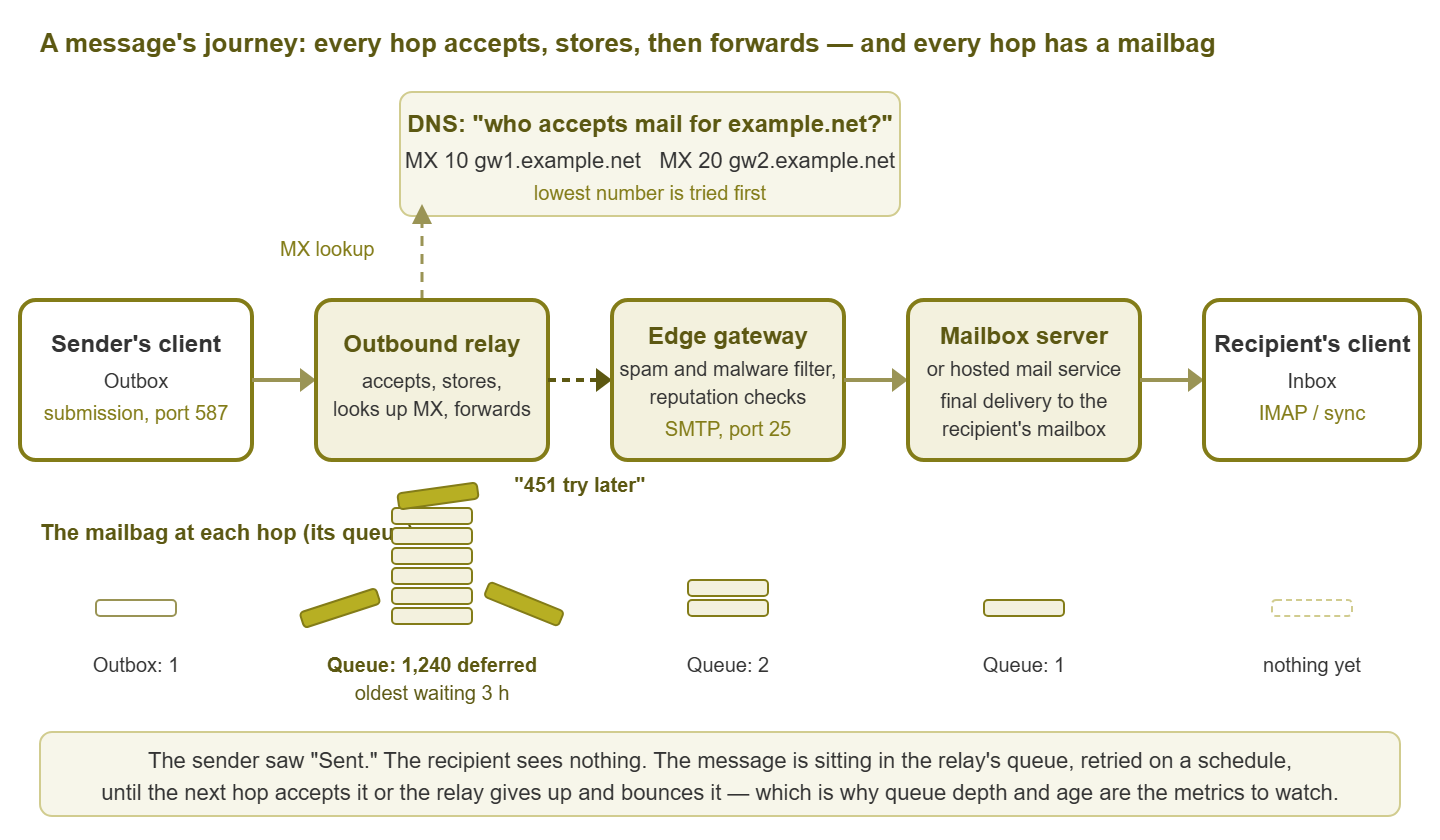
Figure 1: The hop chain. Every hop accepts, stores, then forwards, so every hop has a queue. Here the relay cannot hand off to the gateway, so its queue grows while the sender believes the message was sent.
Hop 1: the sender's client hands the message off
A mail client (a desktop program, a phone app, or a web interface) does not deliver mail to the recipient. It submits the message to a server it has been configured to trust, usually with a username and password. It uses the submission port (port 587, or port 465 for the always-encrypted variant). Once the server says "accepted," the client moves the message from Outbox to Sent Items and forgets about it. That moment is the source of every "but I sent it!" conversation. The user is right that they sent it, and it may still be sitting two hops away.
Hop 2: the outbound relay, the first mailbag you own
The server that accepted the submission is the outbound relay, sometimes called a smart host or simply the mail server. In a small organization it may be the same machine that holds the mailboxes. In a larger one it is a dedicated box whose only job is moving mail out. With a hosted service, it is the service's own outbound layer. Whatever it is, this is the first queue in the chain that belongs to you, and the one you will look at most often when mail is "slow."
Hop 3: the DNS MX lookup
Before the relay can forward a message to someone@example.net, it must find out which machine accepts mail for that domain. It asks DNS for the domain's MX records (mail exchanger records). Each MX record names a host and carries a priority number; the lowest number is tried first and the others are backups. If a domain has no MX records at all, the relay falls back to the domain's plain address record, which is how a lot of small setups accidentally work. This tiny step is where a startling share of mail problems begin. That is because DNS failures masquerade as everything else. A relay that cannot resolve MX records cannot deliver anywhere, and the symptom is simply "mail is stuck."
Hop 4: the recipient's edge gateway or filter
The MX record almost never points at the machine that holds mailboxes. It points at an edge gateway: a hardened server or appliance, or a filtering service in the cloud. The gateway's job is to be the public face of the domain on port 25. It checks the sending server's reputation, scans for spam and malware, enforces size limits and policies, and may deliberately slow unknown senders down. Only mail that survives is forwarded inward. To the outside world, this gateway is the domain's mail system.
Hop 5: the mailbox server or hosted service
Behind the gateway sits the mailbox server: the system that owns the actual mailboxes. It applies the recipient's rules and forwarding, and writes the message into the right folder. With hosted mail, this layer — and often the gateway too — lives at the provider. Delivery into the mailbox store is called final delivery, the true end of the SMTP journey.
Hop 6: the recipient's client picks it up
SMTP's work is done, but the user has not seen anything yet. Their client fetches or syncs the mailbox using a mailbox-access protocol (IMAP, the older POP, or a proprietary sync method) on its own schedule. A message can be sitting safely in a mailbox while a phone with a stale connection insists nothing has arrived. This hop is not part of mail flow, strictly speaking, but it is where the user forms their opinion of it.
Queues at every hop, and what "deferred" really means
Every server-side hop above keeps a queue: a directory or database of messages it has accepted but not yet handed off. In healthy operation a message spends milliseconds there. The queue only becomes visible when the next hop stops cooperating.
When a hop tries to forward a message and gets a temporary failure, it marks the message deferred. That failure could be a 4xx response, a timeout, a refused connection, or a failed DNS lookup. Deferred does not mean lost. It means "I tried, it did not work, I will try again." The retry schedule starts short and stretches out: a few minutes, then longer gaps. Retries continue until either the next hop accepts the message or it reaches the server's maximum queue lifetime. That lifetime is typically measured in days. At that limit, the message is given up on. At that point the server generates a bounce, formally a non-delivery report or NDR, and sends it back to the original sender explaining the failure.
Look closely at what the sender experiences during that window: nothing. For hours, possibly days, the message sits deferred and no human is told. Some relays send a "delivery delayed" notice partway through, many do not, and users routinely ignore the ones that arrive. This is the whole reason mail fails quietly, and why the depth and age of your queues are the metrics that matter. The guide on mail queue monitoring goes deep on exactly that.
There are three states, then. The first is delivered: the next hop said 2xx, and the message moved on. The second is deferred: a temporary problem, so the message is waiting and will be retried. The third is bounced: a permanent problem or an expired retry, so the message is dead and an NDR went back. A fourth, informal state — stuck — describes a message that is neither moving nor being retried, usually because the queue-processing service itself has stalled. Stuck is the worst, because the retry logic that normally saves you is what broke.
Where mail gets stuck: the usual suspects
Any hop can hold a message, but in practice the same causes show up over and over.
- DNS and MX problems. The relay cannot resolve the recipient's MX records, or resolves them to the wrong place because the recipient changed providers and left a stale record behind. Everything to that domain defers at once.
- Greylisting and rate limits. Many gateways answer the first attempt from an unfamiliar sender with a deliberate 4xx on the theory that spam software will not bother to retry. Legitimate relays do retry, so the message arrives late rather than never. Rate limits work similarly: send too much too fast and the far side tells you to slow down.
- The next hop is down. The recipient's gateway is offline, or your own gateway is offline and your mailbox server cannot forward to it. Whatever sits upstream of the outage fills up.
- Disk full. Queues live on disk. A mail server whose queue or log volume fills up stops accepting new mail or, worse, accepts mail it can no longer write reliably.
- Misrouted connectors. Mail servers use routing rules — often called connectors or transports — to decide which next hop handles which destinations. A rule pointing at a decommissioned smart host, or a typo in a domain list, will strand or loop mail. So will an internal domain routed both inward and outward. Sometimes this affects one destination only.
- TLS failures and blocklists. Two servers agree to encrypt the session and then fail to complete it, so the message defers. Or the far side refuses your relay's IP address outright because it appears on a blocklist. Those refusals are usually permanent (5xx), so the symptom is a bounce spike rather than a queue. The reputation guide covers this world.
- A runaway sender. A compromised account or an application in a retry loop floods the queue with junk that crowds out real mail. So does a forwarding rule that bounces a message between two systems.
Tip: when a user reports a missing message, ask for the recipient domain before anything else. One destination stuck while everything else flows almost always means DNS, greylisting, or a blocklist at that domain. Everything stuck means a hop of yours is down or full. That one question cuts the investigation in half.
What to monitor at each hop
Now the payoff. Because each hop has the same shape, each wants the same small set of checks, adjusted for what you can reach. Use this table as the starting inventory for your mail monitoring.
| Hop | What goes wrong here | What to monitor |
|---|---|---|
| Sender's client | Wrong submission settings, expired password, client stuck offline | Mostly a help-desk matter; a synthetic test that submits a message the way a client does proves the submission path |
| Outbound relay | Queue growing, disk filling, service stalled, resolver unreachable, runaway sender | Queue depth and oldest-message age, free space on the queue volume, mail service state, resolver reachability, outbound message rate |
| DNS / MX lookup | Records missing, stale, or pointing at the wrong host; resolver outages | MX records for your domains resolve and match what you expect; the resolvers your relays use answer promptly |
| Edge gateway / filter | Appliance overloaded, subscription lapsed, queue backing up inward, port 25 unreachable from outside | Port 25 answers with a proper banner from outside; inbound queue depth; CPU, memory, disk; whatever health the appliance exposes over SNMP or its API |
| Mailbox server / hosted service | Store offline, disk full, internal routing broken, hosted-service incident | Service and store health, free space, internal queue depth, a synthetic message that lands in a real mailbox |
| Recipient's client | Sync stalled, client cannot reach the mailbox service | Mailbox-access ports (IMAP and friends) answer; the synthetic test polls the mailbox the way a client would |
Notice the pattern: at every server-side hop, the first two items are queue depth and queue age. If you monitor nothing else about mail, monitor those on every relay and gateway you own. The third, always, is the disk the queue lives on. And the item that ties the chain together is the synthetic end-to-end test: a message you send yourself and watch arrive. The delivery latency guide shows you how to build it. Port checks alone are not enough. A relay can answer on port 25 all day while its queue silently grows. That is the mail version of the difference between ping-up and service-up.
The hosted-mail twist: fewer hops, same responsibilities
If your mailboxes live with a hosted mail service, you may be tempted to conclude that none of this is your problem anymore. It is genuinely a smaller problem: the provider runs the gateway, the mailbox servers, and usually the outbound relay. And their staff watch those queues so you do not have to. But look at what did not move to the provider.
- DNS is still yours. Your MX records point at the provider, and if they are wrong, stale, or missing, no amount of provider excellence helps. The sender-authentication records covered in the reputation guide (SPF, DKIM, DMARC) are also yours to keep correct.
- Connectors are still yours. Every scanner, application server, alarm panel, and backup job that sends mail needs a path to the hosted service. That is usually through a local relay you run or with credentials you manage. These connectors have their own queues and their own authentication that expires, and when they fail nobody at the provider will know.
- The client path is still yours. Your network, firewall, DNS resolvers, and internet link stand between users and the hosted service. When they degrade, mail "is slow" even though the provider is fine.
- The provider can have a bad day. Your only early warning is your own synthetic test showing delivery delay while the provider's status page still says all is well.
In practice, hosted mail changes the monitoring list rather than deleting it. The gateway and mailbox rows in the table above become "synthetic test into and out of the service." The relay row shrinks to whatever local relay you kept for devices. The DNS row gets more important, because it is the one piece the provider cannot fix for you. The relay and MX health guide walks through those checks, connectors included.
Reading a message's own travel log
Here is a trick that turns the abstract chain into something you can inspect on any real message. Every hop that handles a message stamps a Received: line at the top of the message headers. Because each hop adds its line above the previous ones, the headers read like a travel log in reverse. The bottom Received line is the first hop and the top one is the last. Each line names the server that handed the message over, the server that received it, and the time. Most mail clients have a "view headers" option, and forwarding a message as an attachment preserves them.
Suppose a message from example.com to example.net arrived three hours late. Reading from the bottom up (dates trimmed to the time of day for readability):
Received: from gw1.example.net (gw1.example.net [203.0.113.10])
        by mbx2.example.net with ESMTPS; 12:52:20 +0000
Received: from relay.example.com (relay.example.com [198.51.100.25])
        by gw1.example.net with ESMTPS; 12:52:18 +0000
Received: from laptop-jsmith (workstation [192.0.2.44])
        by relay.example.com with ESMTPSA; 09:47:12 +0000
Walk it through. At 09:47 the user's laptop submitted the message to relay.example.com. The A at the end of ESMTPSA means an authenticated submission — hop 1 handing off to hop 2. The next line up shows the recipient's gateway accepting it from the relay at 12:52, more than three hours later. The top line shows the gateway forwarding it to the mailbox server two seconds after that. So the whole delay happened between the relay and the gateway: the message sat in the relay's queue for three hours. Now you know which machine to look at (your relay). You know which log to read (its delivery attempts to gw1.example.net in that window). And you know the likely causes: greylisting, a gateway outage, or the relay's own DNS trouble.
Two cautions. Server clocks are rarely perfectly in sync, so treat small differences between hops with suspicion and large ones as real. And lines added by machines outside your control can be forged, while the lines your own servers add are trustworthy.
Where to go next
You now hold the whole map. Email is a chain of post offices, each of which accepts a message, stores it in a queue, and tries to pass it forward. Every hop can defer, and deferrals are silent. Trouble concentrates in a short list of places. Each hop wants the same small set of checks, led always by queue depth, queue age, and free disk. Hosted mail shortens the chain you own but leaves you DNS, connectors, and the client path. And a message's own Received headers will tell you exactly where it waited.
The rest of the Email Flow Monitoring guides build on this map. Start with queue monitoring, because it predicts the incident. Add the synthetic round-trip test, because it catches what queue numbers miss. Then work through relay, MX, and gateway health, and finish with the reputation and blocklist problems that make mail vanish without a queue ever growing.
Put this into practice with SysPeep Monitor
Most of the hops in this guide are ordinary servers and appliances, and SysPeep Monitor watches them the ordinary way. It discovers your relays, gateways, and mailbox servers. It collects their health over SNMP, WMI, and SSH: service state, free disk on the queue volume, CPU and memory. And it alerts by email and other channels when something drifts. Put the whole chain on one dashboard and the quiet failures stop being quiet. The free trial installs on any Windows machine.
Download Free TrialLearn About SysPeep - All Rights Reserved.