
Surviving Vendor Churn: Keeping Your Monitoring Knowledge Portable
Your monitoring tool will change hands before you do. Somewhere between the day you install it and the day you leave, the company that makes it will be bought or will buy someone else. Or it will move to a new licence, or simply stop answering the phone. None of this is a scandal; it is how the software business works. The question is not whether it will happen but what you will have left when it does.
For most teams the answer is "a login that no longer works and a very strong memory of where the button was". That is because they built their monitoring knowledge inside the tool. It was in dashboards drawn by hand, in check names the vendor invented, in thresholds nobody wrote down, and in muscle memory for one console. All of that is rented. When the tool leaves, it takes the lot.
This guide is about the part you can own. By the end you will be able to say which pieces of your monitoring practice are portable and which are not. You will be able to design the practice so that the portable part is the important part. You will be able to run a portability audit against what you have today. And you will be able to recognise what a team that got this right looks like on the morning the tool changes under them.
In this guide
- Vendor churn, defined
- What is portable
- What is not
- Designing for portability before you need it
- The portability audit
- The honest opinion
- The fortnight rebuild
- The checklist
- Where to go next
Vendor churn, defined
Vendor churn is the steady turnover of the tools you depend on, driven by events you do not control. Four of them do most of the damage. A tool gets acquired and folded into a product line you did not choose. A tool gets repriced, and the renewal arrives with a licensing model that charges for whatever you happen to have a lot of. A tool gets discontinued, politely, with a migration path to something else. Or you outgrow it, which is the only one of the four that is your own doing.
An administrator changes monitoring tools several times in a career. I will not put a number on it, because I do not have one and neither does anyone who claims to. What I can say from experience is that every change felt like the first. That was because nothing from the previous tool came with me except what I had written down. The second time, I wrote more down. Sometimes churn is not one tool leaving but four arriving; monitoring tool sprawl is that problem, and the cure turns out to be the same document.
Churn is not an argument for picking a different kind of vendor. Every tool churns eventually, the open-source ones included; a project can lose its maintainers as surely as a company can lose its founders. Open source versus commercial weighs that trade honestly. The argument here is for building a practice that does not much mind which tool it is running on this year.
What is portable
Something is portable if it means the same thing in the next tool as it did in this one. Seven kinds of thing pass that test, and between them they are most of what makes your monitoring worth anything.
The protocols, and what they mean
SNMP (Simple Network Management Protocol, the standard way of asking a device for its counters) is a standard. WMI (Windows Management Instrumentation, the same idea for Windows machines) is a standard. SSH (Secure Shell, a command line over the network) is a standard. syslog (the standard format for devices sending log messages) is a standard. And flow records (summaries of who talked to whom, exported by routers and switches) are standards. Every serious tool speaks them. What you learn about them is yours for the rest of your career. You learn that an interface counter wraps, that a syslog severity of zero means emergency, that a flow record carries no payload. SNMP, syslog, and flow monitoring each have a pillar, and none of it is about a product.
The list of what you monitor, and why
The list of services and devices, with the reason each one is watched, is the most portable asset you own and the one most often never written. It is not the tool's device list; that is a list of addresses. It includes "the file server, because payroll runs from it on the last working day of the month". It also includes "the guest wireless, because nobody will notice for a week and then the front desk will". A list with reasons can be handed to any tool, and to any person.
Thresholds and their reasons
A threshold is a number; a threshold with a reason is knowledge. "Disk warning at 85 per cent because the archive job needs ten per cent free to run" moves to any tool in one line. The number alone does not, because the next tool will ask why, and so will the next administrator. And "it was 85 in the old one" is not an answer either of them can use.
Alert definitions written as specifications
An alert specification says what is measured, from where, how it is judged, for how long, who is told, and what they do about it. Written that way, it is a short paragraph that any tool can implement. Written as a screenshot of the old tool's rule editor, it is a puzzle with a piece missing.
Runbooks
A runbook — the written procedure for handling one kind of alert — belongs to the service, not to the tool. "When the VPN concentrator alerts, check the certificate expiry first" is true whichever product raised the alert. Runbooks covers writing them so that they stay true.
The data you exported
History is portable only once it has left the tool. Graphs saved as images, samples saved as plain text, incident timelines saved as documents: these survive. History that lives only in the tool's database, in the tool's format, survives exactly as long as the tool's export feature is willing to help. That is usually less long than you would like.
The principles
The ten principles travel in your head, and they are the reason the other six items on this list exist at all.
What is not
Four things feel like knowledge and are actually rent.
- Dashboards built by hand. A dashboard is a layout of panels in one product's editor. The question it answers is portable. The panels are not, and neither is the afternoon you spent lining them up.
- GUI-only configuration. Anything that exists only because someone clicked through a wizard has no text form. A thing with no text form cannot be copied, compared, reviewed, or moved. It can only be re-clicked.
- Vendor-specific check names. "Sensor type 4411" and "Smart Health Probe" mean nothing outside the product that invented them. Name the check by what it measures in your own document, and let the tool call it whatever it likes.
- The muscle memory of one console. Knowing that the acknowledge button is bottom-left and that the device search accepts wildcards is genuinely useful. It is worth nothing on the first morning with the new tool. It also fades faster than you would think. I can no longer find anything in a console I used every day for three years.
The uncomfortable part is that the non-portable list is where most of the effort went. Dashboards took weeks. Wizards took days. The document that would have made the tool replaceable took an afternoon and was never written, because there was always a dashboard to finish.
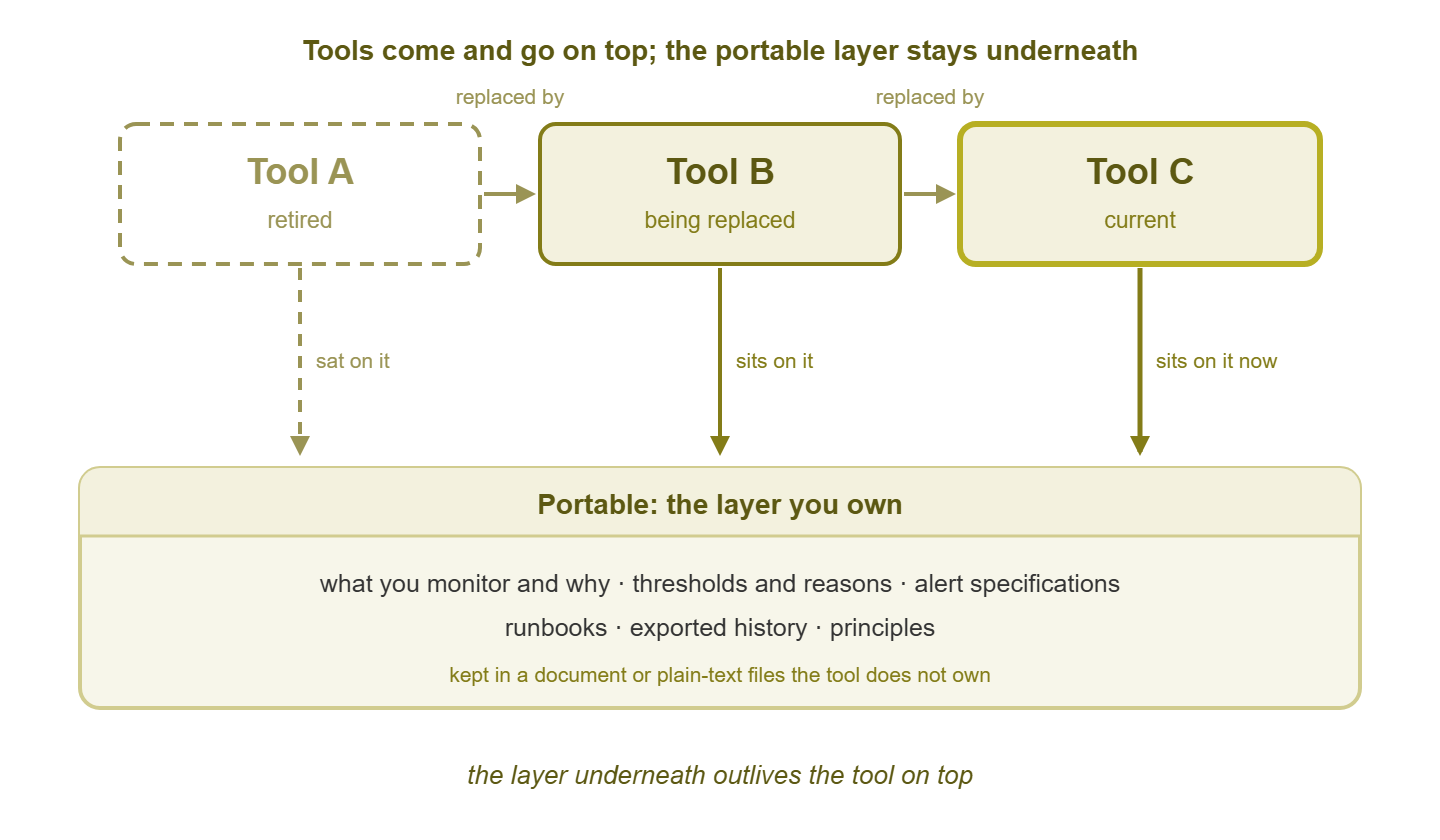
Figure 1: three tools in succession, each sitting on the same portable layer. The layer underneath outlives the tool on top.
Designing for portability before you need it
Portability is a design decision made while the current tool is working and nobody is under pressure. Four habits do most of the work, and none of them needs a new tool to start.
Keep the "what and why" outside the tool
The service list, the thresholds with reasons, the alert specifications, and the runbooks live in a document or a folder of plain-text files. The tool does not own it. The tool is configured from the document, never the other way round. This is the same idea as the handover-ready configuration in the bus factor pillar. And it is the starting point of monitoring as code, where the document eventually becomes the configuration itself. You do not have to go that far. You need the document to exist, and you need the tool to be a copy of it rather than the original. Once it exists, version-controlling the checks gives you a history of every change and who made it.
Export on a schedule
Exporting is a chore that never gets done under pressure, so arrange for it to happen when there is none. Say a scheduled task runs the tool's export once a week into a dated folder. That means on the day the vendor disappears you already hold last week's data in a shape you can read. Data export realities is honest about what an export actually contains and what it quietly leaves out. The habit here is simply to have one before you need it. On Windows, the scheduling half is one command:
schtasks /Create /SC WEEKLY /D SUN /ST 02:00 ^
  /TN "Monitoring weekly export" ^
  /TR "C:\monitoring\export\run-export.cmd"
What the script does depends on the product. Some have an export command. Some have a report that can be saved as plain text. And for some the honest answer is a copy of the database file. Check the product documentation. Whatever it does, the output goes into a folder named with the date. And once a quarter somebody opens one of the files to confirm it is not empty. An export nobody has opened is a hope, not a backup.
Name things by service, not by tool
Check names, alert names, and group names that describe the service — payroll-fileserver-disk — mean the same thing in any tool. Names that describe the tool's feature — Sensor 12 - Custom Probe — mean nothing after the migration and not much before it. Name for a reader who has never seen the console. If the tool insists on its own names internally, keep yours in the document and record the mapping.
Treat every alert as a specification
Before an alert exists in the tool, it exists as a short specification in the document, and the specification is the truth. The tool implements it. Written this way, the same page does two more jobs later. On the day of a migration it is the list you check the new tool against. That is exactly what the alert parity checklist does. The service list beside it is what inventorying checks and alerts has to reconstruct when nobody wrote it. Write the specifications now, and both of those documents write themselves later. A specification looks like this:
ALERT:     payroll-fileserver-disk-full
Measures:  used space, volume D:, fs-01.example.com
From:      central poller, over WMI
Judged:    above 85 per cent for 15 minutes
Because:   the archive job needs 10 per cent free to run
Tell:      storage owner by email; on-call phone after 18:00
Action:    extend the volume or clear the archive share; runbook RB-014
Depends:   core-sw-1 (suppress if the core is down)
Reviewed:  quarterly, at the threshold review
Nine lines, no product named, and any tool with thresholds and notifications can implement it in a few minutes. The "Because" line is the one people skip, and it is the one the next administrator will need most.
The portability audit
The portability audit is a table with one row per asset. Each row records what it is, where it lives today, whether it would survive the tool leaving, and the action that makes it survive. Fill it in during one afternoon with the console open. It is the most useful document you will write this quarter, and the first pass will have more "no" in it than you expect.
| Asset | Where it lives today | Portable? | Action |
|---|---|---|---|
| Service list with reasons | In three people's heads | No | Write it; one line per service, with who feels it |
| Thresholds | In the tool, no comments | No | Add a "because" to each; copy to the document |
| Alert definitions | The tool's rule editor | No | Write one specification per alert |
| Runbooks | The wiki | Yes | Link each one from its alert specification |
| Dashboards | The tool | No | Record the question each answers; accept the panels are rent |
| Device inventory | The tool's discovery | Partly | Export weekly to plain text |
| Metric history | The tool's database | No | Scheduled export of the graphs that matter |
| Dependencies | The tool's map | Partly | Record parent and child in the document |
| Polling credentials | The tool's credential store | Partly | Inventory them in the password manager, not only the tool |
| Principles | Your head | Yes | Print the card; put it in the document too |
"Partly" is the honest answer for most rows on a first pass, and it is a fine answer as long as the action column says what would make it "yes". The audit is not a test you pass; it is a list of afternoons, in order. Do the service list first, because every other row refers to it.
Tip: keep the document in the same place as the rest of the network documentation, not in the monitoring tool's own notes feature. A note stored inside the tool is another thing the tool takes with it, and it will be the note that explained everything.
The honest opinion
The tool matters less than you think and more than the vendor says. Less than you think, because the practice — the list, the reasons, the specifications, the runbooks — is what actually keeps the network up. A modest tool running a good practice beats a lavish tool running none. More than the vendor says, because no tool makes the practice for you. The slide deck that promises "instant visibility" is describing discovery, and discovery gives you a list of addresses, not a list of reasons.
So choose a tool on whether it can implement your specifications honestly, poll over the standard protocols, and export what it collects. Change it when it stops being able to do those things. Do not change it because a newer one has a nicer map. Choosing a monitoring tool and licensing models and hidden costs are the pillars for the choosing part, and both are shorter reads when you already know what you need the tool to do.
The migration itself will still be hard, and a portable practice does not change that. Why migrations fail lists the ways, and most of them are ways in which the old tool turned out to be the only record of something. Portability does not make a migration easy. It makes it a project rather than an archaeology dig.
The fortnight rebuild
Northgate Retail was told that its monitoring product was being discontinued. There was a migration path to a successor that licensed by a unit the team had a great many of. They had eleven weeks and a folder of plain-text files. They had one specification per alert, the service list with a reason on every line, and a runbook linked from each specification. They installed a new tool on a Monday, ran discovery, and spent the first week matching each specification to a check. They spent the second week confirming in the lab that every alert fired when it should. The old tool was switched off after a fortnight. The only thing anyone asked for from it afterwards was one dashboard. It was rebuilt in twenty minutes from the note that said which question it answered. The post-migration review recorded a single lesson, in full: "the folder was the product".
Nothing about Northgate's fortnight was clever. The specifications were short. The folder was plain text. And the new tool was chosen because it could implement the specifications and export its data, not because of anything on its home page. What made the difference was the order of events. The document existed before the discontinuation notice, so the notice was a scheduling problem rather than a crisis. That order is the whole of this guide.
The checklist
Run through this once now and again after every quarterly review. Every line is a yes or a no, and every "no" has a row in the portability audit waiting for it.
- The service list, with a reason for every entry, exists outside the monitoring tool.
- Every threshold has a written "because" beside it.
- Every alert has a specification that names the measure, the judgment, the person, and the action.
- Every specification links to a runbook, and the runbook does not name the tool.
- Checks, alerts, and groups are named by service, not by the tool's feature names.
- A scheduled export runs weekly into a dated folder, and someone opened last quarter's.
- The graphs that would matter in an argument are exported as images on a schedule.
- Dependencies are recorded in the document as well as in the tool's map.
- Polling credentials are inventoried in the password manager.
- Every dashboard has one written line saying which question it answers.
- The portability audit has been run, and every "no" has an owner and an afternoon.
- You could describe your monitoring to a new tool's setup wizard without opening the old one.
Where to go next
Vendor churn is weather. You cannot stop it, you cannot predict it usefully, and you can be dressed for it. The dressing is a document that holds the what and the why. It is also specifications the tool merely implements and an export that runs whether or not anyone remembers. And it is names that describe your services rather than someone else's features. Build those while the current tool is working and the next tool becomes a fortnight's work instead of a year's regret.
The ten principles are the layer beneath even the document. When everything changes is the checklist to open on the morning the migration notice arrives. And Teaching judgment, not buttons is about the other kind of portability, the kind that lives in the next administrator. All of them are part of The Fundamentals That Outlive Every Tool.
Put this into practice with SysPeep Monitor
A portable practice still needs a tool to run on. And the test of a tool is whether it can implement your specifications without asking you to learn a new vocabulary. SysPeep Monitor polls over SNMP, WMI, and SSH from a central Windows service. It auto-discovers devices and interfaces and applies your thresholds, dependencies, and alert rules. It keeps dashboards, maps, and reports in one web console, with the data in SQLite, MySQL/MariaDB, or SQL Server. The free trial is a reasonable way to find out how long your own specifications take to implement on a second tool.
Download Free TrialLearn About SysPeep - All Rights Reserved.