
Reading a TCP Conversation Like a Story
Open a packet capture for the first time and it looks like the least readable thing in IT. There are thousands of lines of timestamps, addresses, and numbers that scroll past faster than you can blink. Here is the secret nobody mentions: a TCP conversation is not a wall of numbers. TCP is Transmission Control Protocol — the reliable-delivery layer that carries web pages, file shares, databases, and most of everything else. The conversation is a story. It has an introduction, a plot that advances page by page, a listener who sometimes says "slow down," and a dramatic mishap in the middle. It has one of two possible endings — a polite goodbye or a slammed door.
This guide teaches TCP by reading it, not by drawing state diagrams first. We will walk through one realistic conversation packet by packet — the same summary lines tcpdump or Wireshark would show you. We will narrate what each line means. By the end, you will be able to glance at a capture and recognize the handful of patterns that solve most mysteries. Those are the healthy exchange, the unanswered hello, the stall, the refusal, and the server that simply took its time.
In this guide
- The cast, the setting, and how to read each line
- Chapter one: the introductions (SYN, SYN-ACK, ACK)
- Chapter two: pages and receipts (sequence and acknowledgment numbers)
- Chapter three: "how much can you absorb?" (the receive window)
- Chapter four: trouble (retransmissions and duplicate ACKs)
- Chapter five: two ways to say goodbye (FIN and RST)
- One healthy pattern, four kinds of trouble
- The symptom table
- Where to go next
The cast, the setting, and how to read each line
Our story has two characters. laptop is a user's machine. It will play the client, the side that starts the conversation. web is a server listening on port 80, the classic web port. The user has just asked for a report, and laptop is about to fetch it.
Each line you are about to read is one packet, in the style tcpdump prints. Each line has a timestamp, who is talking to whom (name and port), the TCP flags in square brackets, and then the bookkeeping fields. Flags are single-bit announcements about what a packet is doing. S stands for SYN (synchronize — "let's talk"). . stands for a plain ACK (acknowledgment — "received"). P stands for PSH (push — "deliver this now"). F stands for FIN (finish), and R stands for RST (reset). I have trimmed a few fields the tools normally print so the lines fit on screen, but nothing here is invented. This is the shape of real output.
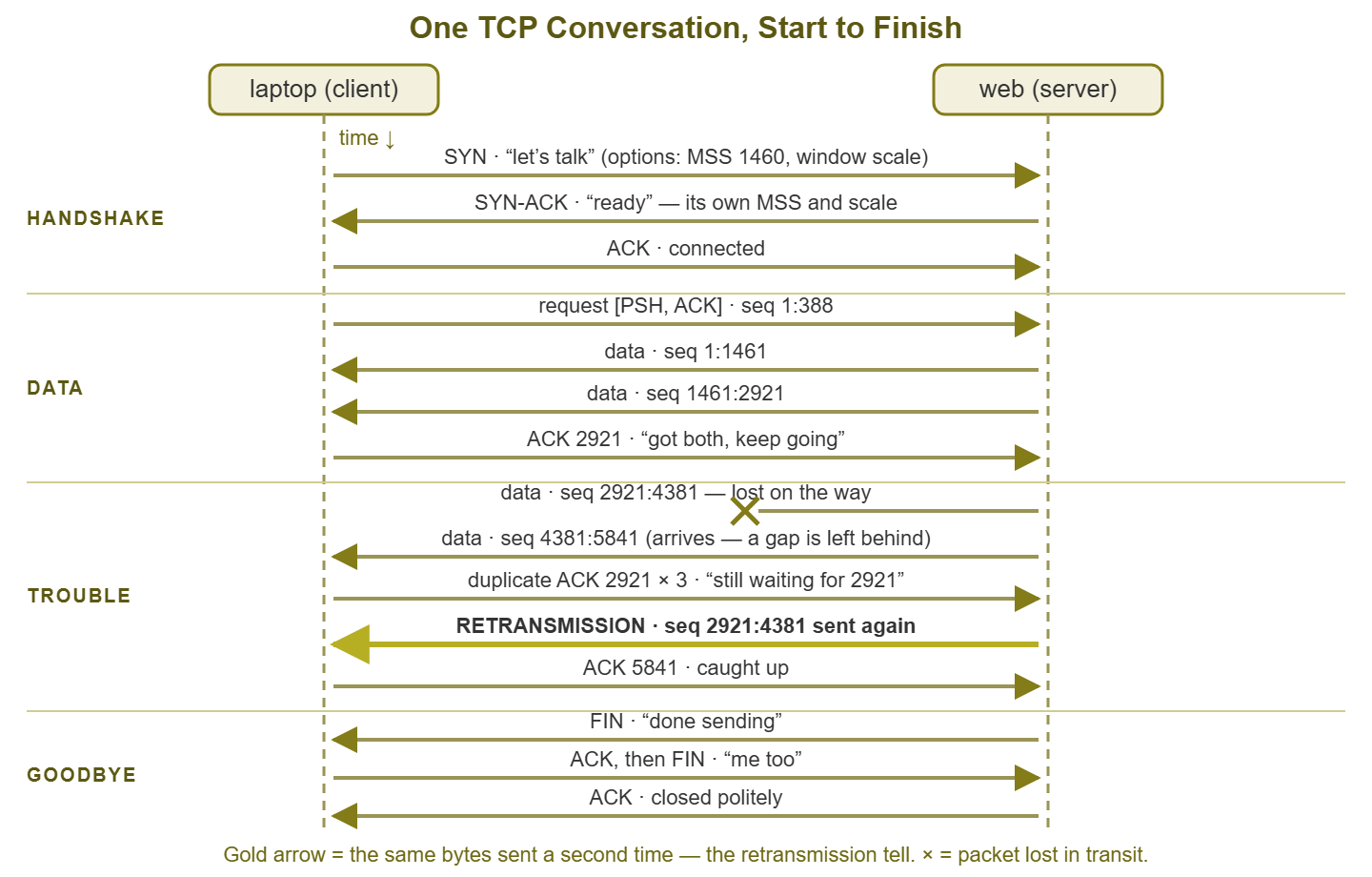
Figure 1: The whole story on one page — handshake at the top, data flowing down with ACKs coming back, one lost segment recovered by a retransmission (highlighted), and the polite FIN ending. Keep this map in mind as we read each chapter.
Chapter one: the introductions (SYN, SYN-ACK, ACK)
No TCP data ever flows between strangers. First comes the three-way handshake — two characters introducing themselves and agreeing on the rules of the conversation:
09:15:02.118 IP laptop.51612 > web.80: Flags [S], seq 3820104147, win 64240,
    options [mss 1460,sackOK,wscale 7], length 0
09:15:02.139 IP web.80 > laptop.51612: Flags [S.], seq 990412807, ack 3820104148,
    win 65160, options [mss 1460,sackOK,wscale 9], length 0
09:15:02.139 IP laptop.51612 > web.80: Flags [.], ack 1, win 502, length 0
Line one is laptop's opening: a SYN. The seq 3820104147 is a starting page number chosen at random — more on page numbers in a moment. The options are the interesting part, and you can absorb them in one breath. mss 1460 is the maximum segment size: "the biggest chunk of data I can accept in one packet is 1460 bytes." wscale 7 is the window scale: "when I later tell you my window, multiply it by 2 to the 7th — 128." (The window field in the TCP header is too small for modern speeds, so both sides agree on a multiplier up front. It is only announced here, in the handshake — which is why a capture that misses the handshake leaves tools guessing about window sizes.) sackOK permits selective acknowledgment, a smarter way to report exactly which pieces arrived after a loss.
Line two is the server's reply, flags [S.] — SYN plus ACK in one packet. It picks its own random starting number and states its own options (note its multiplier is 512). And — crucially — it says ack 3820104148: laptop's number plus one. An ack value always means "this is the next byte I expect from you," so this one says "I got your hello; I'm ready for whatever comes after it."
Line three: laptop acknowledges the server's hello, and the connection exists. Notice the numbers suddenly became small — ack 1. That is the tool being kind. After the handshake, tcpdump and Wireshark show sequence numbers relative to each side's random start, so byte one of the conversation is simply 1. Everyone is grateful for this.
Chapter two: pages and receipts (sequence and acknowledgment numbers)
Here is the mental model that makes the whole middle of the story readable. Each direction of a TCP conversation is a book being dictated one batch of pages at a time. The sequence number on a data packet is the page number of its first page. The acknowledgment number coming back is a receipt: "I now hold every page up to here — this is the next page number I need." That accounting — pages out, receipts back — is the entire trick that lets both sides know exactly what arrived, in order, with nothing missing. Watch it work:
09:15:02.141 IP laptop.51612 > web.80: Flags [P.], seq 1:388, ack 1, win 502, length 387
09:15:02.163 IP web.80 > laptop.51612: Flags [.], ack 388, win 128, length 0
09:15:02.171 IP web.80 > laptop.51612: Flags [.], seq 1:1461, ack 388, win 128, length 1460
09:15:02.172 IP web.80 > laptop.51612: Flags [P.], seq 1461:2921, ack 388, win 128, length 1460
09:15:02.190 IP laptop.51612 > web.80: Flags [.], ack 2921, win 501, length 0
First line: laptop sends its request — 387 bytes covering pages 1 through 387 (seq 1:388 reads as "from byte 1 up to but not including 388"). The P flag, PSH, means "don't buffer this, hand it to the application now". You will see it at the end of every request and every response. That gives application traffic its characteristic PSH/ACK heartbeat: a small pushed packet one way, a receipt, a burst back, another receipt.
Second line: the server's receipt, ack 388 — "I have your request through page 387; page 388 would be next." Then the server starts dictating its own book: the report, in 1460-byte segments (that size is no accident — it is the MSS agreed in the handshake). Laptop's receipt ack 2921 covers both segments at once; receipts are cumulative, so one ACK can thank the sender for several packets. A healthy transfer looks exactly like this: seq numbers climbing on one side, ack numbers climbing right behind them on the other, timestamps close together. When you can hum this rhythm, anything that breaks it will jump out at you.
Chapter three: "how much can you absorb?" (the receive window)
There is a third number on every line we have been politely ignoring: win. The receive window is each side continuously answering a question the other side never stops asking: how much more can you absorb right now? It is the size of the listener's remaining buffer — the pages it can hold that its application has not yet read. Remember the handshake multipliers: laptop's win 502 means 502 × 128, about 64 KB of headroom.
The window is where a capture shows you strain. When the receiving application stops reading fast enough — busy CPU, slow disk, a database chewing on something — the buffer fills and the advertised window shrinks in plain sight. From here on I will trim the lines to the fields that matter:
09:15:04.410 laptop > web: Flags [.], ack 208061, win 180
09:15:04.482 laptop > web: Flags [.], ack 214321, win 64
09:15:04.560 laptop > web: Flags [.], ack 219481, win 0        <-- "stop talking, I'm full"
09:15:05.061 web > laptop: Flags [.], ack 388, win 128, length 0    (window probe)
09:15:05.061 laptop > web: Flags [.], ack 219481, win 0             (still full)
09:15:06.230 laptop > web: Flags [.], ack 219481, win 501           (window update: go on)
Watch the window collapse: 180, 64, then the famous zero window — a completely legal TCP message that means "stop. I cannot take one more byte." The sender must go silent, apart from tiny periodic window probes asking "room yet?" To the user this is a freeze: the transfer simply hangs, no errors, until a window update reopens the tap. When someone reports "it stalls for a few seconds and then continues," zero windows are one of the first things to look for. And note carefully who advertised the zero, because that is the side that could not cope. The network between them was innocent; it delivered every packet just fine.
Chapter four: trouble (retransmissions and duplicate ACKs)
Now the mishap. Somewhere between web and laptop — a congested queue, a flaky link, an overloaded firewall — one segment of the report is dropped. Nobody is told. Loss on a network is silent; it can only be inferred. Here is what the inference looks like on the wire:
09:15:06.310 web > laptop: Flags [.], seq 258701:260161, length 1460
             (web sends 260161:261621 here -- it is lost on the way)
09:15:06.312 web > laptop: Flags [.], seq 261621:263081, length 1460
09:15:06.313 laptop > web: Flags [.], ack 260161, win 501
09:15:06.315 web > laptop: Flags [.], seq 263081:264541, length 1460
09:15:06.315 laptop > web: Flags [.], ack 260161, win 501       [dup 1]
09:15:06.317 web > laptop: Flags [.], seq 264541:266001, length 1460
09:15:06.317 laptop > web: Flags [.], ack 260161, win 501       [dup 2]
09:15:06.319 web > laptop: Flags [.], seq 266001:267461, length 1460
09:15:06.319 laptop > web: Flags [.], ack 260161, win 501       [dup 3]
09:15:06.321 web > laptop: Flags [.], seq 260161:261621, length 1460   [retransmission]
09:15:06.323 laptop > web: Flags [.], ack 267461, win 498
Read laptop's receipts. Data keeps arriving — pages 261621 and beyond — but laptop's ack is stuck at 260161, repeated four times. A repeated receipt is a duplicate ACK. And it means exactly what a librarian tapping the counter means: "I am still waiting for page 260161. I have later pages, but I cannot file them until the gap is filled." (Thanks to SACK from the handshake, the receipts also carry a note listing which later pages arrived, so the sender knows precisely what to resend. I trimmed those notes for readability.)
The sender has two ways to notice trouble. The slow way is a retransmission timeout. No receipt arrives at all within its estimate of the round trip, so after a conspicuous silence it resends. You see the same sequence number return after a long gap. The fast way is what happened here. Three duplicate ACKs in a row are treated as proof the segment died, and the sender resends immediately without waiting for the timer. That is fast retransmit — in plain words, "three reminders equals a lost letter." The tell in any capture is the same either way: a sequence number you have already seen comes back again. One retransmission is a shrug. Steady retransmissions are a path problem, and the timestamps around them tell you how much time each recovery cost the user.
Chapter five: two ways to say goodbye (FIN and RST)
Every TCP story ends one of two ways. The polite ending is the FIN handshake — each side finishing its book and acknowledging the other's ending:
09:15:11.204 web > laptop: Flags [F.], seq 294001, ack 388, win 128
09:15:11.205 laptop > web: Flags [.], ack 294002, win 501
09:15:11.232 laptop > web: Flags [F.], seq 388, ack 294002, win 501
09:15:11.253 web > laptop: Flags [.], ack 389, win 128
"I have nothing more to say" — "noted" — "me neither" — "noted." Four packets, everyone leaves friends. A FIN is application-driven: the program decided it was done. Seeing FINs means the software on both ends believed the conversation ended properly.
The other ending is the RST — reset — and it is a door slam: no receipt, no closure, the conversation is simply declared dead. Here is the most common place you will meet one, a connection attempt to a port where nothing is listening:
10:22:41.007 laptop.53001 > web.8443: Flags [S], seq 118900441, win 64240,
    options [mss 1460,sackOK,wscale 7], length 0
10:22:41.028 web.8443 > laptop.53001: Flags [R.], seq 0, ack 118900442, win 0, length 0
When you find an RST mid-mystery, ask who slammed the door, because the answer assigns blame. An RST from the server in answer to a SYN means the machine is alive but the service is not there: wrong port, crashed daemon, service not started. An RST from the server in the middle of an established conversation usually means the application aborted or was restarted. And sometimes the RST comes from neither party. In that case, a firewall, load balancer, or other middle-box between them objected. An idle timeout expired, a rule matched, or a session table filled. That middle-box forged a reset to both sides to tear the conversation down. Here is a hint that a middle-box did it. The RST arrives implausibly fast, or details like the TTL (the hop-count field in the IP header) do not match the server's other packets. Both sides' applications then report that the other side hung up, and both are wrong.
One healthy pattern, four kinds of trouble
You have now read every element TCP is made of. The payoff is that a handful of shapes, built from those elements, cover most diagnoses you will ever make from a capture. Learn these on sight:
1. Clean handshake, flowing data, tidy ending
SYN, SYN-ACK, ACK; sequence numbers climbing with receipts close behind; healthy windows; FINs at the end. This is the healthy pattern — and finding it is a result, not a failure. It means the network and TCP did their jobs, and whatever the user experienced lives inside the application data or somewhere else entirely.
2. SYN with no reply
The client says hello, waits, says hello again (SYN retransmissions come at stretching intervals — roughly one, two, four, eight seconds), and nothing ever answers. Either the destination is dead or unreachable, or something on the path is silently discarding the SYN — which is precisely what firewalls do when a rule says drop. Next, look at the route to the host, the host itself, and every filtering device between. If you can, capture at the far end too. That is because "SYN never arrived" and "SYN arrived, reply never came back" are different suspects. The vantage-point guide, SPAN, mirror ports, and taps, covers how to get that second view.
3. Good handshake, then a stall riddled with retransmissions
The connection establishes cleanly, some data flows, then progress crawls: repeated sequence numbers, bursts of duplicate ACKs, long recovery pauses. The connection logic is fine; the path is losing packets under way — congestion, errors, duplex trouble, a bad cable. This pattern says "stop debugging the application, start examining links and queues." The packet-loss pillar's guide to intermittent packet loss is the natural next step for hunting a fault that comes and goes.
4. Instant RST
SYN out, RST back in a round-trip time. The network is fine — something answered, promptly! It answered no. This is an application-side conversation to have: is the service running, is it listening on the port you think, did a middle-box policy refuse it? No amount of network tuning changes a deliberate refusal.
5. Request, then a long silence, then a fine response
The request goes out and is ACKed within milliseconds — delivered, receipted. Then... nothing. No retransmissions, no duplicate ACKs, no shrinking window. Seconds later the response arrives and transfers quickly. The network delivered everything promptly and sat waiting; the server spent those seconds thinking — a slow query, a busy backend, an overloaded application pool. That quiet gap between receipt and reply is server think time, and captures make it measurable to the millisecond. To place that gap among all the other places time hides, see the anatomy of a round trip.
Tip: the ACK is what separates patterns 3 and 5, and it is the most common misread in all of packet analysis. An ACK means "your request arrived" — so a delay after the ACK is the server thinking, not the network struggling. Before blaming anyone, find the receipt.
The symptom table
| On the wire | Plain meaning | First suspect |
|---|---|---|
| SYN, SYN-ACK, ACK, data, FINs | Healthy conversation, proper ending | Not the network — look at application content or elsewhere |
| SYN repeated, never answered | Nobody home, or a silent drop en route | Host down, routing, firewall rules |
| Repeated sequence numbers, duplicate ACKs | Packets lost after connect; TCP repairing | Path: congested or faulty link, errors, duplex |
win shrinking to win 0 | "Stop talking, I'm full" — receiver overwhelmed | The zero-window side: its app, disk, or CPU |
| Instant RST answering a SYN | Alive but refusing | Service down or wrong port; app-side |
| RST mid-conversation | Someone slammed the door | App crash/restart, or a middle-box timeout or policy |
| Request ACKed fast, long quiet gap, then response | Network prompt; server thinking | Server and application, not the path |
Where to go next
Read enough conversations and the skill becomes automatic. Your eye finds the handshake, follows the receipts, notices the window, and stops on the first repeated sequence number. From here, Wireshark fundamentals shows you the tool features that make this reading faster (following a stream, time deltas, expert warnings). The guide to the tcpdump filters worth memorizing helps you trim captures down to one conversation in the first place. The guide to when to reach for packet capture covers choosing this tool at the right moment. The rest of the Packet Capture & Analysis pillar takes it from there.
Put this into practice with SysPeep Monitor
Reading one conversation tells you what happened; knowing which conversation to read is the other half. SysPeep Monitor watches your devices and interfaces around the clock. It watches port status, traffic, errors, and health over SNMP and WMI. It alerts you when something turns strange. So your next capture starts in the right place at the right time. The free trial installs on a Windows machine in minutes.
Download Free TrialLearn About SysPeep - All Rights Reserved.